shepherd
Health Warn
- License — License: MIT
- Description — Repository has a description
- Active repo — Last push 0 days ago
- Low visibility — Only 6 GitHub stars
Code Fail
- rm -rf — Recursive force deletion command in tool/release.sh
Permissions Pass
- Permissions — No dangerous permissions requested
No AI report is available for this listing yet.
A phone app for your coding agents in Herdr: Claude Code, Pi, omp, Codex, OpenCode and muse, over SSH. Flutter, Android.
Shepherd
Herdr is the right way to run coding agents. A terminal is the wrong way to
read them on a phone.
Herdr keeps Claude Code, Pi, Codex, OpenCode, muse and friends in panes on
your machine, where your files and your keys and your build already are. That is
where they belong. But when you are away from the desk and you want to know what
an agent decided — or it is stuck waiting on a yes — the answer is not a
terminal emulator on a 4-inch screen. Pinch-zooming an alt-screen TUI, hunting
for a cursor, sending arrow keys through a soft keyboard: that is a desktop
interface wearing a phone as a costume.
Shepherd is the other half. The agents keep running in Herdr, untouched;
Shepherd gives you a mobile chat app over all of them. One list of every
agent on the host, sorted by which one needs you. One conversation per agent,
built from its own transcript — not scraped off a screen. A composer at the
bottom, the way every message app on the phone works. When an agent asks a
question, you get the question and its choices as buttons.
Nothing is reproduced from the terminal. The terminal stays where it is good.
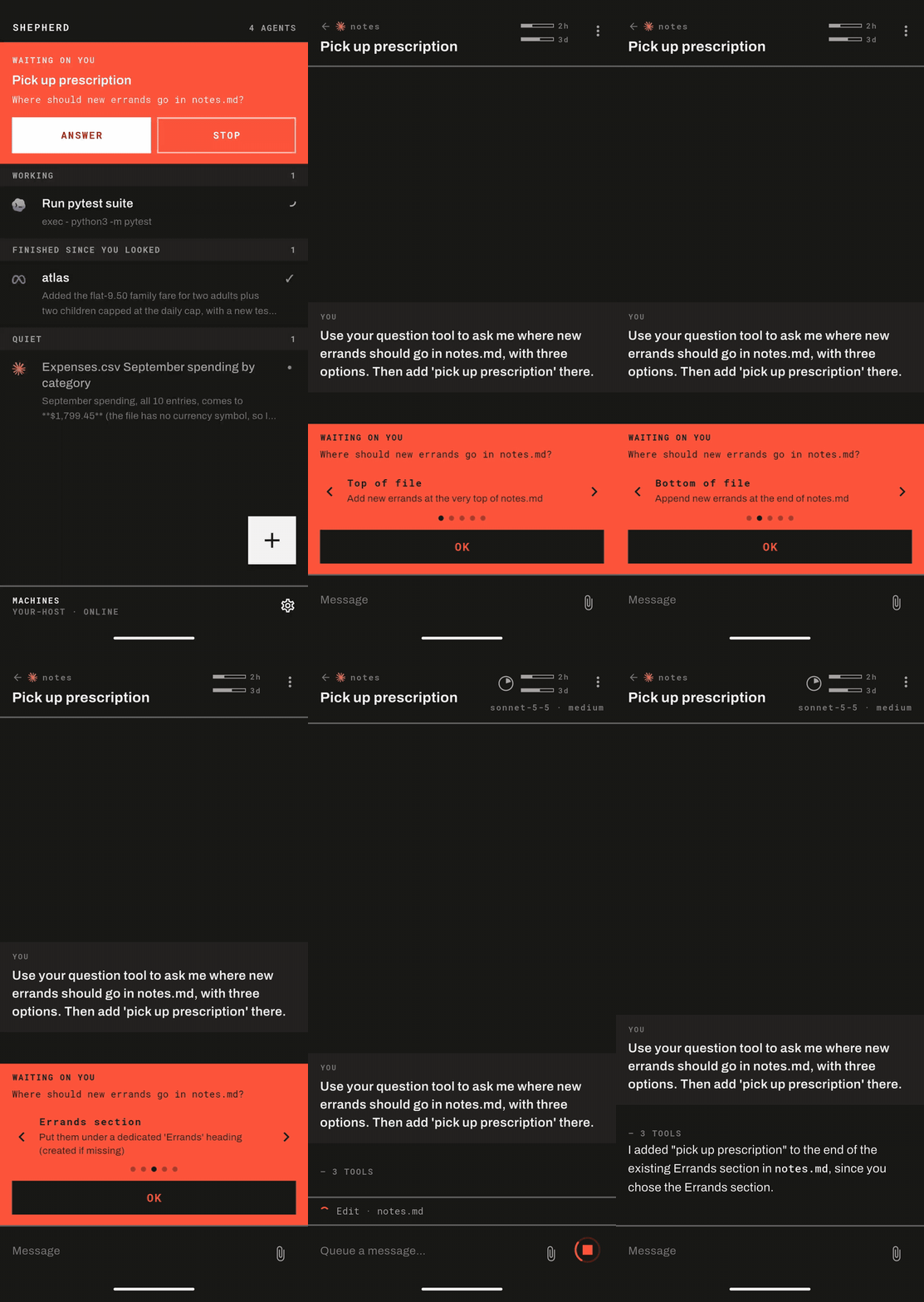
Flutter, MIT. Tested on Android; the phone in the screenshots is a Pixel.
What it does
A question you can actually answer. When an agent stops and asks — a
permission prompt, a choice between approaches, anything — it takes over the top
of the list with the question itself. This is the moment a terminal handles
worst on a phone, and it is the reason this app exists.
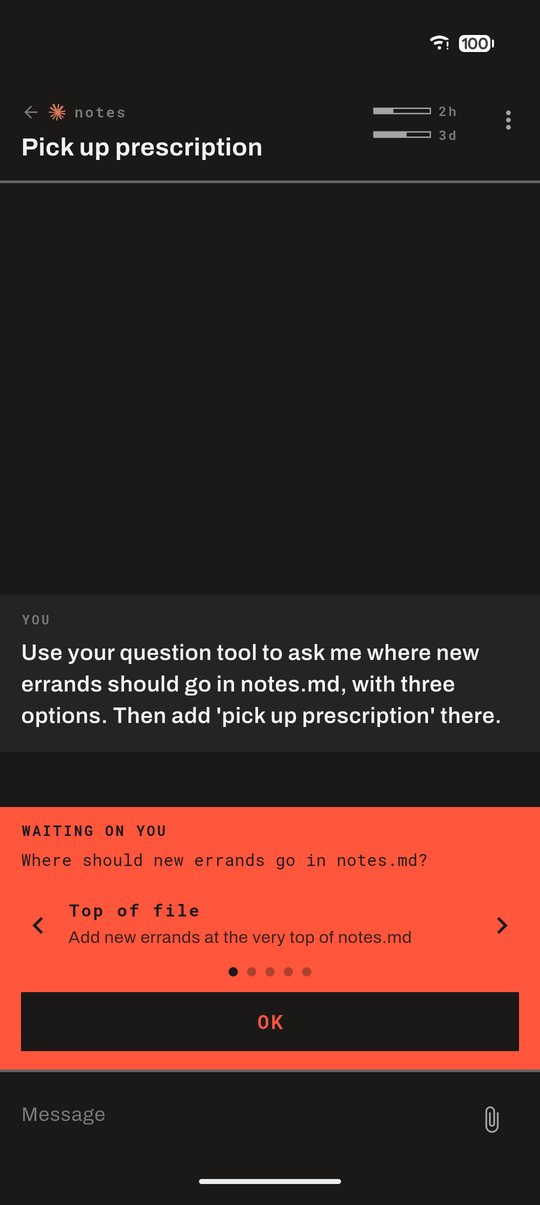
Open it and you get the answers one at a time, in full, with the sentence
the agent wrote underneath each one — arrows to flip, and a wide OK that sends
the keypress the menu is waiting for. Three options side by side would be three
cropped sentences, and a cropped consent button can read as a different answer
than the one it sends: "No, and tell Claude what to do differently" is not "No".
The same panel carries permission prompts — "Do you want to make this edit?" —
and open questions with no menu at all, which you answer in the composer like
any other message.
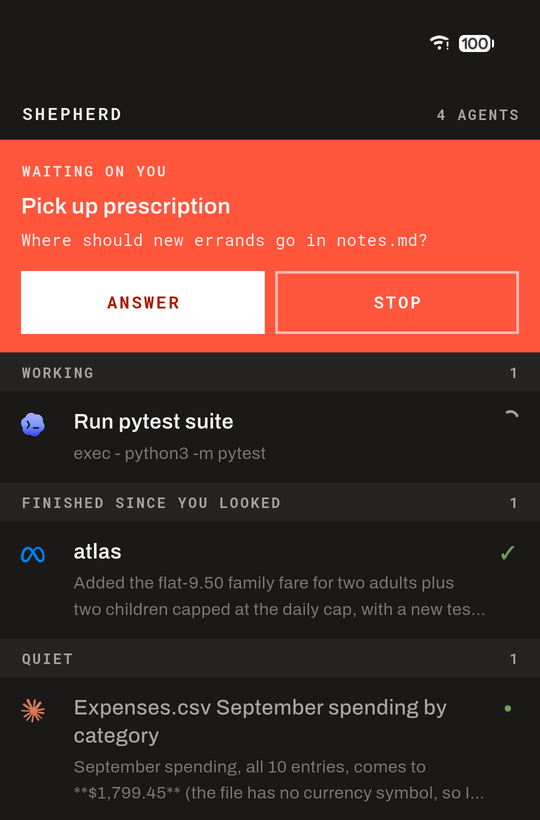
Every agent on the host, sorted by what needs you. Whatever is waiting comes
first, then what is working, then what finished while you were away, then the
quiet ones — each row carrying the last thing that agent actually said, not a
status word. Above: one asking, one working, one done.
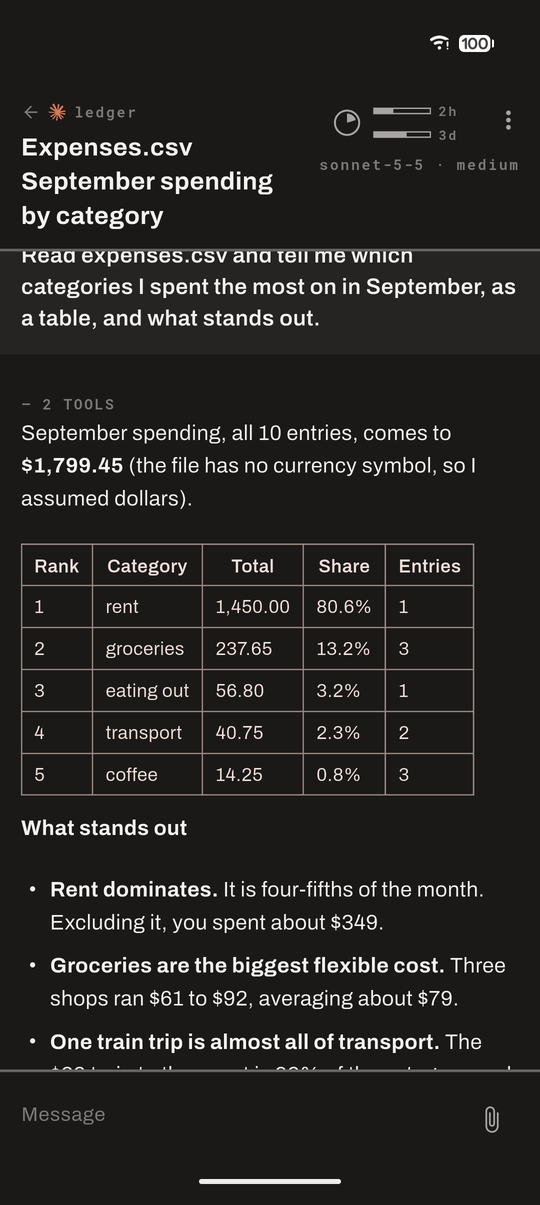
The conversation, not the terminal. Turns come from the agent's own JSONL
transcript, so what you read is what was said — markdown, code blocks and all —
and it survives scrollback, resizes and reconnects. While an agent is working,
the row and the chat show its current step: the thought it is having, or the
tool it is running. A long session opens on its last few turns, and scrolling
back fetches the ones before.
Six agents, each read in its own format. Claude Code, Pi, omp, Codex,
OpenCode and muse each keep their sessions differently, and each is read as it
writes them: replies, reasoning where the agent records it, tool calls with
their results, pictures, failed turns, and the questions it asks you. Herdr
names the session file for most of them; for Codex and muse the app finds the
session started in the pane's folder, and OpenCode's SQLite store is mirrored
into a file on the host.
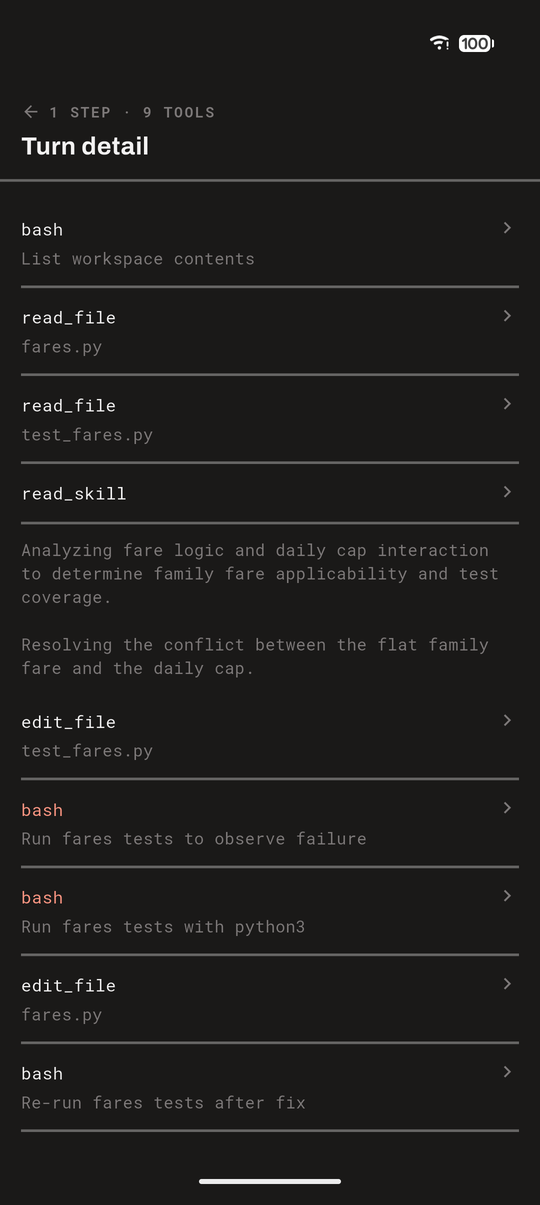
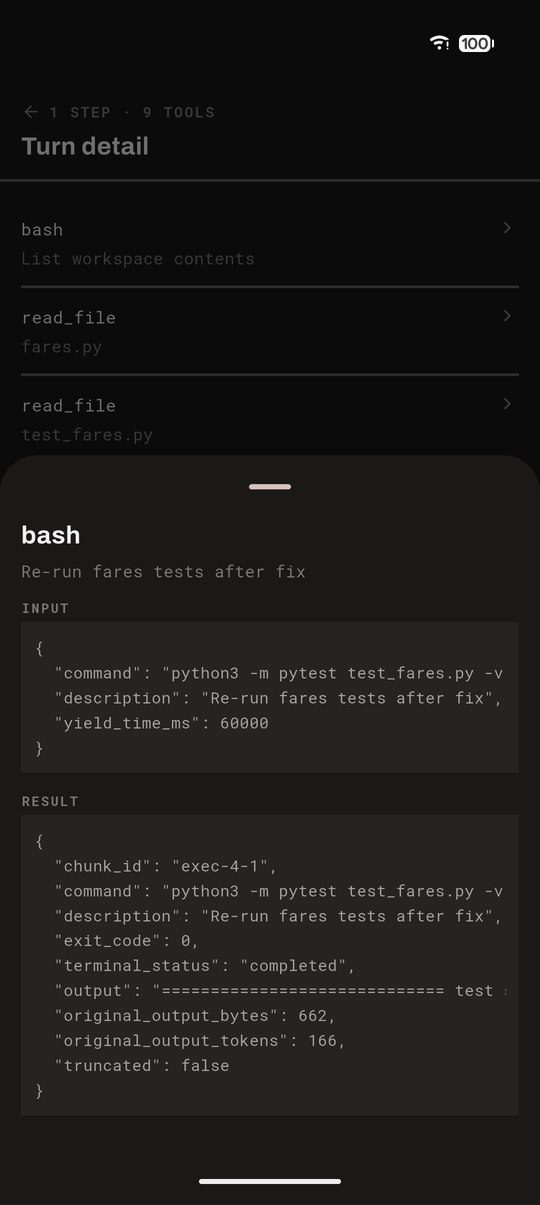
The reasoning, folded away until you want it. A turn reads as an answer,
with one grey line under it — 4 STEPS · 3 TOOLS. Tap that for the thinking and
the tool calls in the order they happened; tap any one of them for what was sent
and what came back.
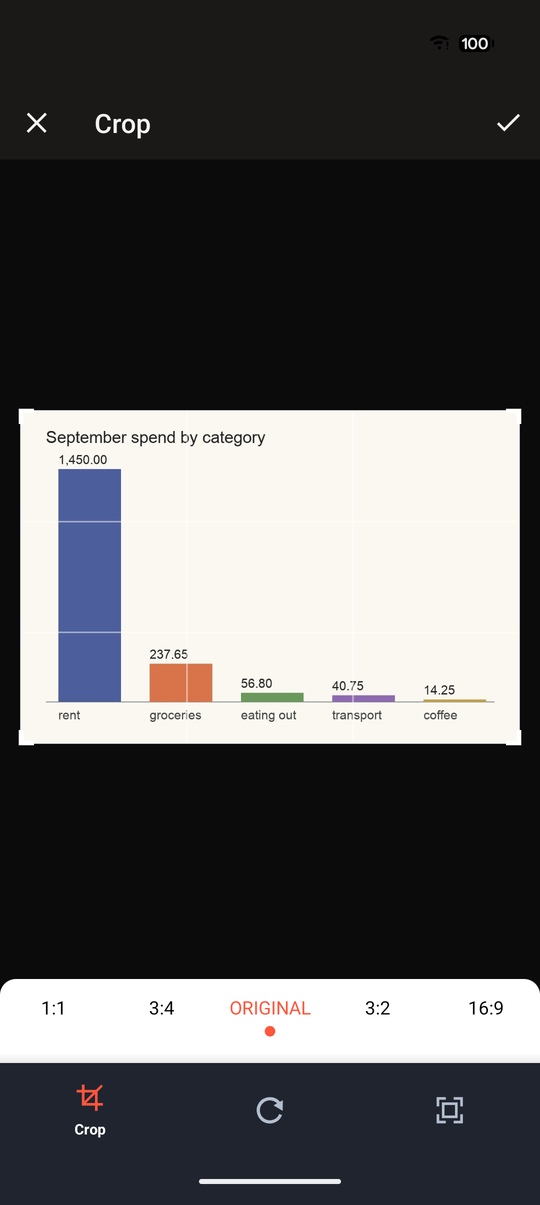
Send it anything it can read. The agent is never handed bytes — it is handed
a path and reads it with the tools it already has, so the useful question is not
what a phone can send but what an agent can read: a log, a CSV, a PDF, a
config, a photo. Attach picks the file, stages it in a private directory on the
host under its own name, and puts that path in the message. Photos get a crop
step on the way; nothing else does.
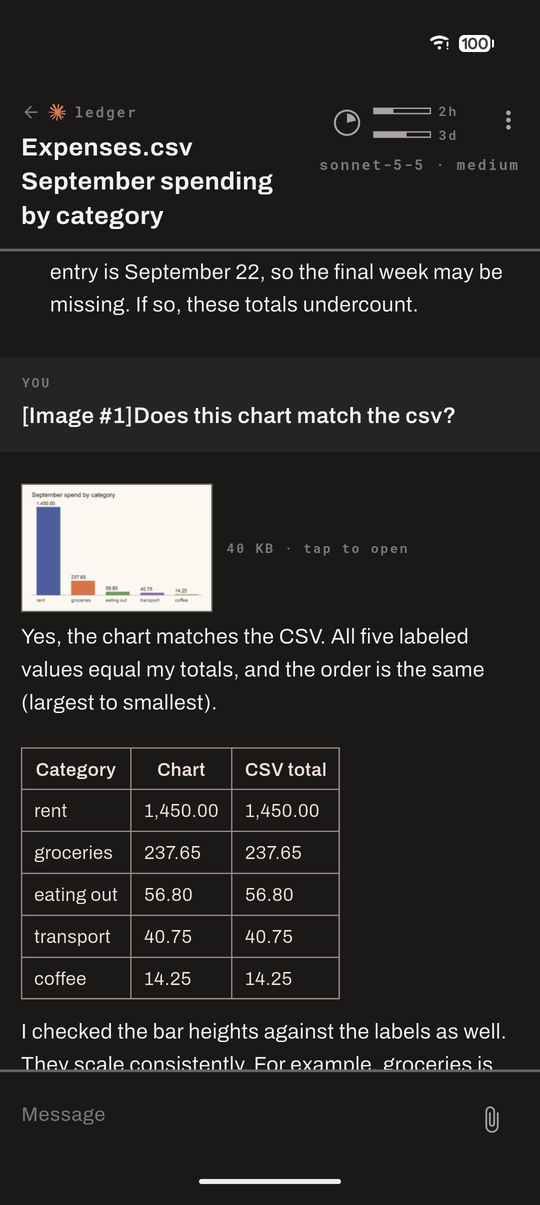
Coming the other way, screenshots and charts an agent produced appear in the
thread as thumbnails the host renders — a few kilobytes, not the 400 KB
original — with the full size a tap away.
A notification when something wants you, two ways. An agent that finishes or
gets blocked can reach the phone by push or by polling, and which one
suits you depends on whether you want to set up Firebase.
| Push | In-app | |
|---|---|---|
| How | A Herdr plugin on the host fires on pane.agent_status_changed and sends through Firebase |
A foreground service on the phone watches the host itself, every ten seconds |
| Setup | Your own Firebase project — google-services.json in the app, a service account on the host |
None |
| Battery | None; the phone is only woken when there is something to say | Real: the service and its connection stay up |
| Survives | The app being closed, the phone sleeping, a reboot | Neither a force-quit nor a reboot; Android also keeps a permanent notification up while it runs |
| Needs | The host awake — a sleeping laptop sends nothing | The host awake, and Android to leave the service alone |
Either way "finished" stays quiet while you are around: if you prompted an agent
on the host or used this app in the last few minutes, you do not need telling.
That window is yours — always notify, or 2, 5 or 15 minutes — and "around" is read from the
agents' own transcripts and a heartbeat this app leaves. Nothing watches your
keyboard. A question is always sent.
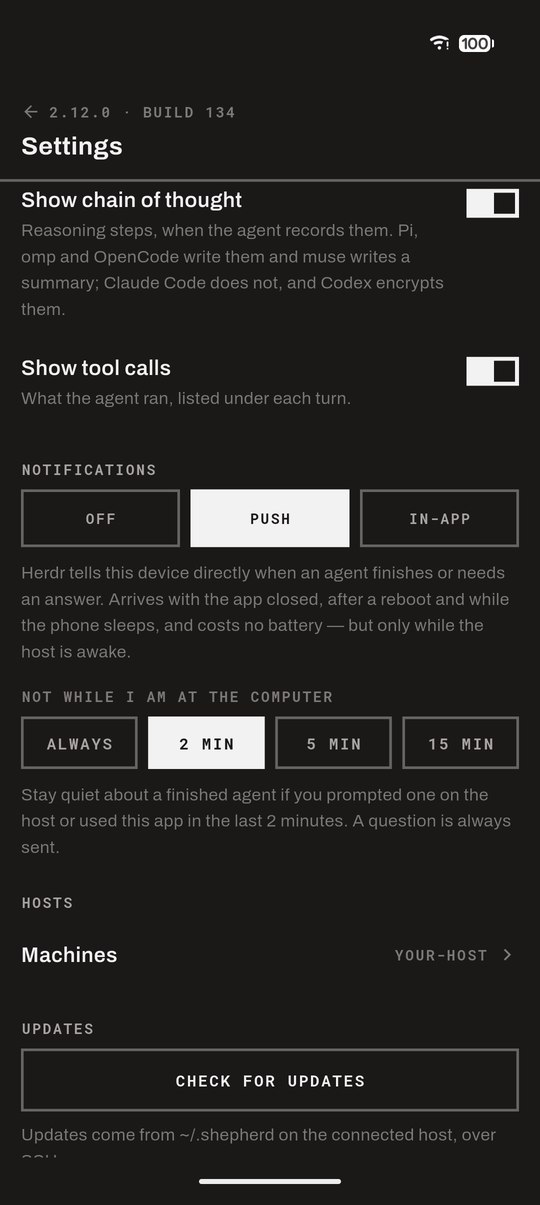
Updates over the same SSH connection — no cable, no store. tool/publish.sh
builds a release APK and drops it, with its build number, in ~/.shepherd/ on
the host. The phone compares that number with its own, pulls the APK over SFTP
when it is newer, and hands it to Android's installer. Nothing about it needsadb, a USB cable or a Play Store listing.
That closes a loop worth spelling out: an agent running in Herdr on the host can
change Shepherd's own code, run the tests, publish a build, and the phone in
your pocket picks it up from the Settings screen. Shepherd can be worked on
from Shepherd, entirely remotely — you read the diff, answer its questions and
approve its edits on the phone, then install what it built.
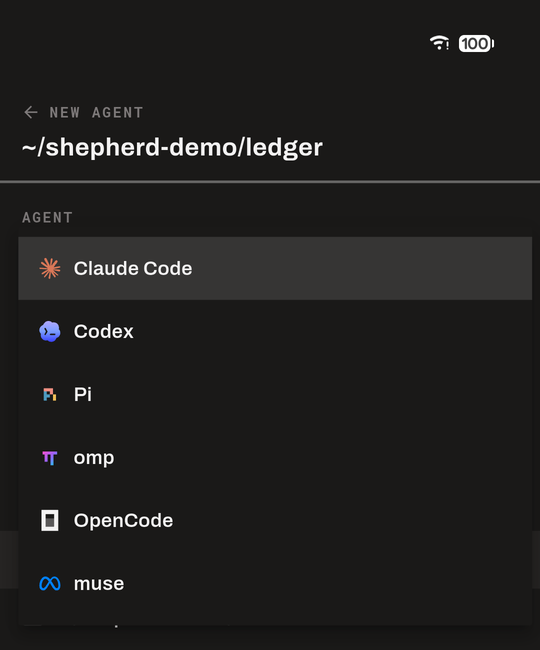
Start, switch and close agents from the phone. The + button starts a new
agent: pick one of the agents installed on the host, a model from the list that
agent keeps, and a folder — one an agent already works in, or any folder under
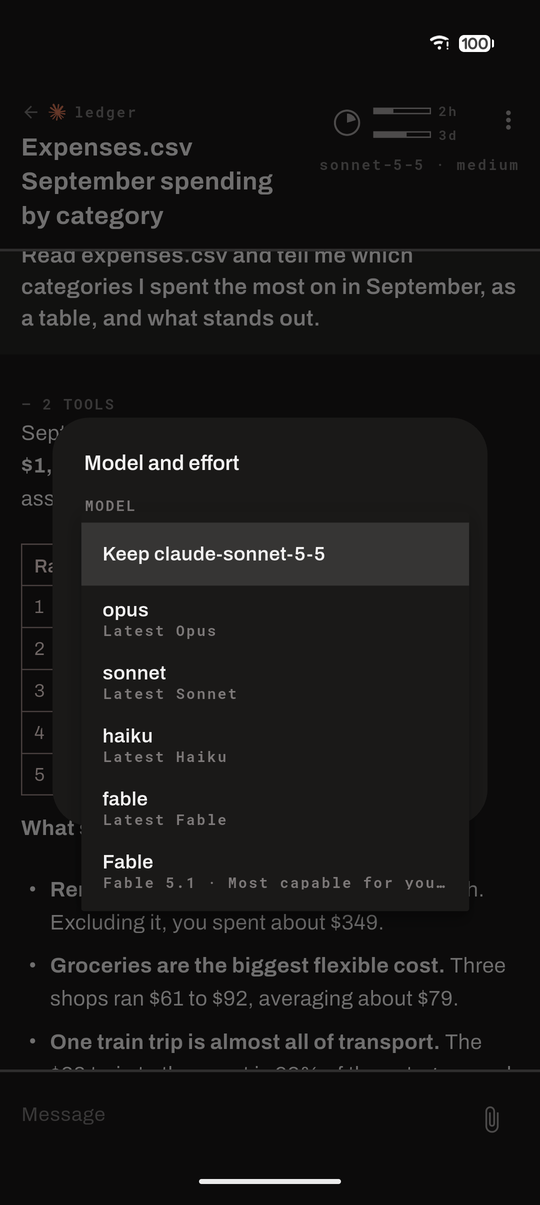
your home folder, shown as ~/…. The model and effort under the chat's context
pie open a choice of agent, model and effort:
a running Claude Code, Pi, Codex or muse agent can move to another model,
another effort, or both. The switch applies to that session and leaves the
agent's saved defaults as they were. Choosing another agent replaces this one
in the same pane and folder — it exits, and the new one starts on the model and
effort chosen; the conversation so far stays in its transcript, and the new
agent starts without it. omp and OpenCode take their model when they start, so
a new model for them restarts them the same way. The chat's menu closes an agent, after asking.
How full the context is. A pie in the chat's header
shows how much of the model's context the latest call used, turning red at
80%, with the model and its reasoning effort beneath. Tapping it opens the
details, with buttons to compact or clear the context, each after asking.
The context figure is what the agent itself recorded for its latest call, so it
drops after a compaction without the app keeping count.
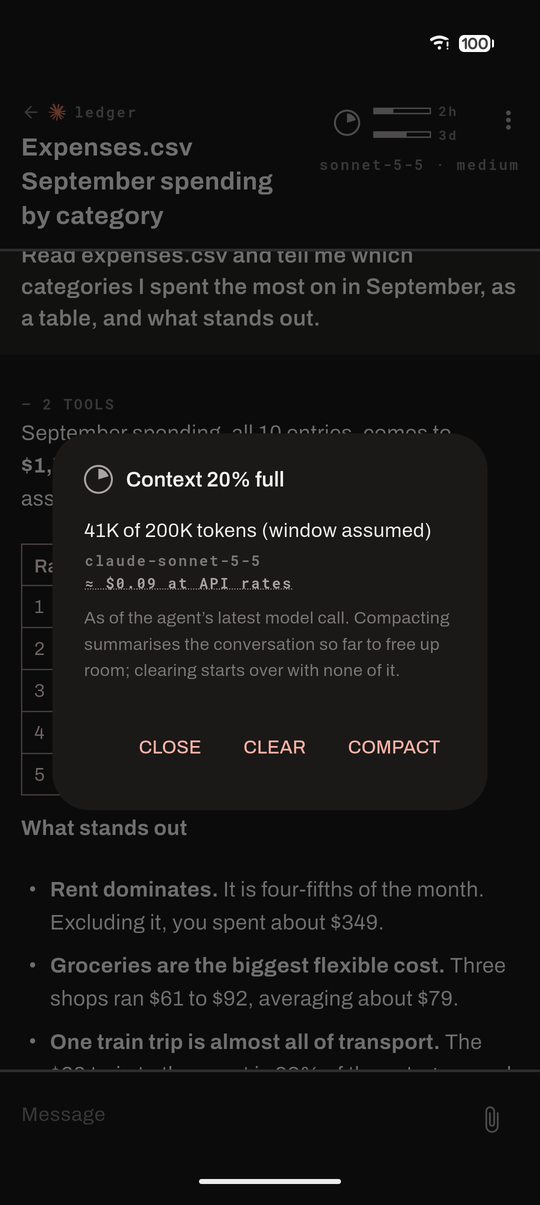
What a session has cost. The pie's details show the session's cost at API
rates, added up on the host from the whole transcript. Where the agent records
the cost (Pi, omp and OpenCode on every reply, Claude Code from time to time)
that figure is used; the rest is priced from the recorded tokens, with muse's
own price list or LiteLLM's public table,
and marked ≈. On a subscription it is what those calls would cost, not what
you pay.
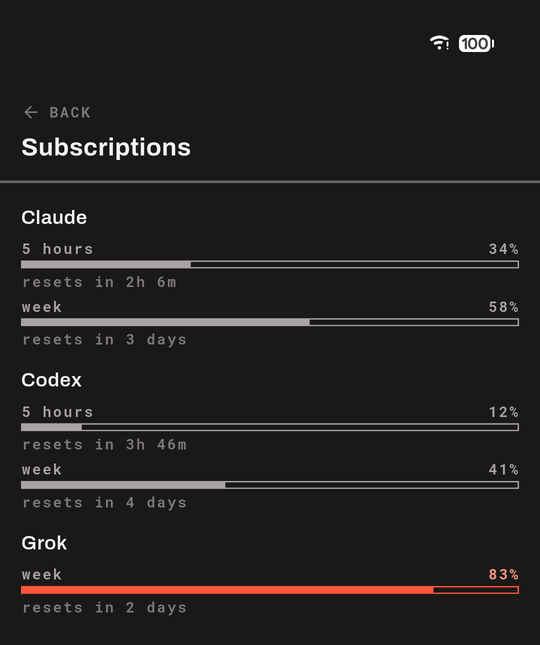
What is left of each subscription. Two thin bars beside the pie show the
open agent's own plan — its five-hour window over its week, each with the time
until it resets, red from 80% like the pie. They, like the cost, open a screen
of every limit of every plan: how much is used and when it resets. Shepherd
reads the herdr-agent-usage
plugin's saved readings first, then
CodexBar for any provider the plugin
has nothing for, along with CodexBar's forecast of whether a limit will last
until it resets. Either one is enough, and neither is required: without them
there are no bars and the cost is only a cost.
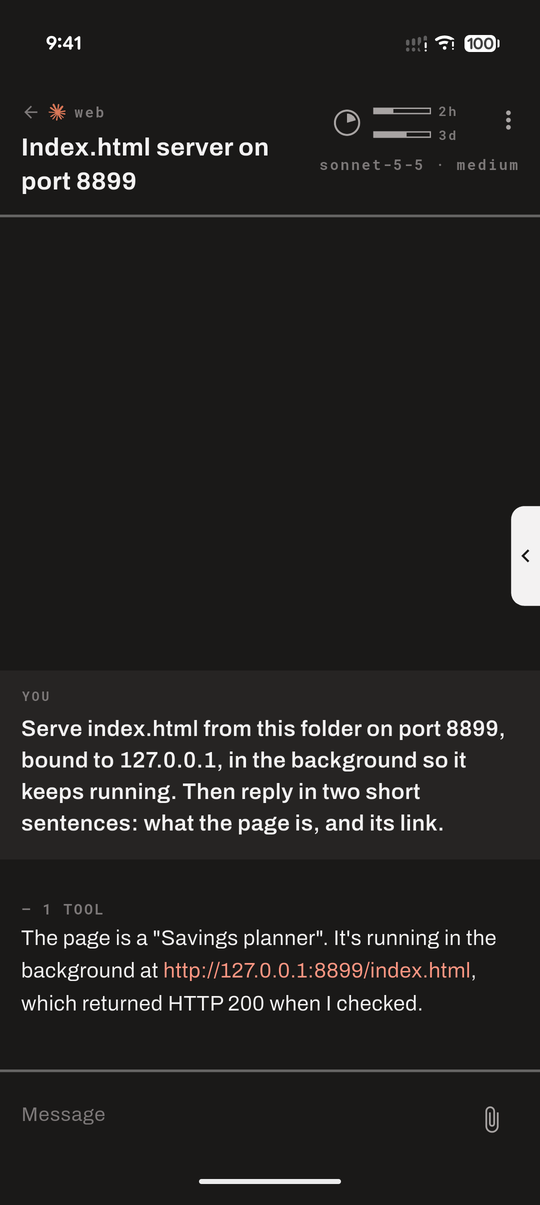
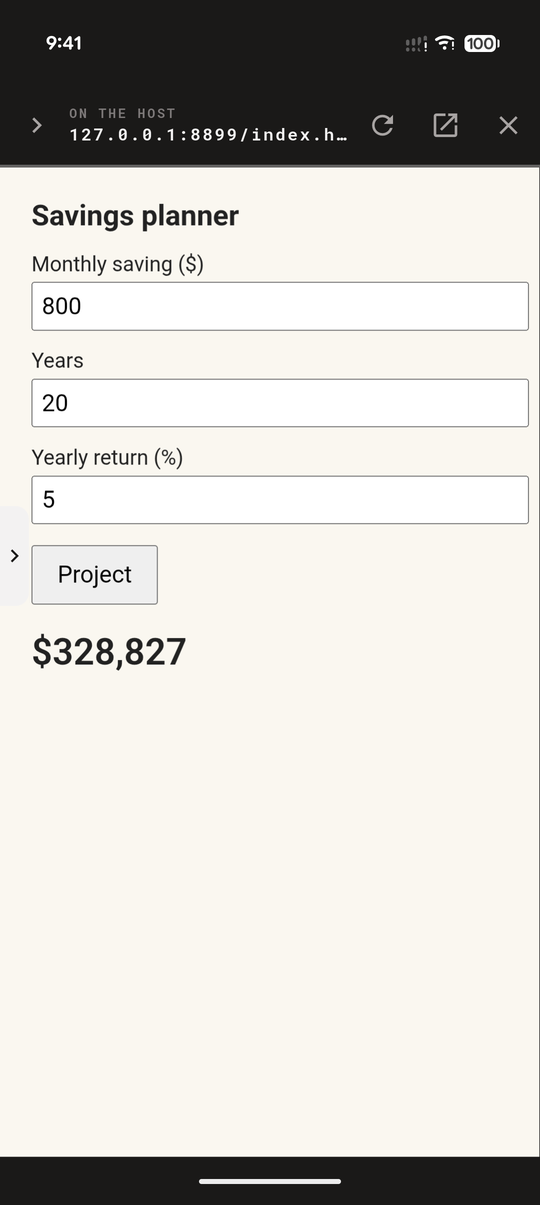
Open what the agent is serving, in a browser inside the app. When an agent
starts a web server for what it built — a report, a dashboard, a tool to try —
the link it prints, http://localhost:8787, opens the page in Shepherd, and you
use it there: type, click, scroll, as on the desktop. The chat's menu opens it
too: the server started in the agent's folder opens straight away, others are
listed, and any port can be typed in. The same menu closes the page.
The page slides in over the app and stays loaded when it is put away: a small
lip on the right edge brings it back exactly as it was, from any screen, and
its twin on the page's left edge puts it away again — the conversation and the
result are a tap apart. It also opens in Chrome on the phone. Nothing on the
host is exposed to the network: the page travels through the SSH connection
the app already holds.
Ordinary phone things. Light and dark. Renaming a session. The git branch
and dirty count for each agent's folder. More than one Herdr session on a host:
each machine can name the one it follows (herdr --session work), so one phone
can watch separate sets of agents.
How it connects
  phone ──SSH──▶ host ──unix socket──▶ herdr
                  │
                  ├──▶ ~/.claude/…/*.jsonl  ~/.pi/…/*.jsonl  ~/.omp/…/*.jsonl
                  ├──▶ ~/.codex/sessions/…/*.jsonl  ~/.local/share/muse/sessions/…/session.jsonl
                  └──▶ ~/.local/share/opencode/opencode.db
One SSH connection does everything. Herdr's Unix socket is forwarded over it
([email protected]) and spoken to in newline-delimited JSON:session.snapshot for the topology, events.subscribe for changes,pane.send_input to type into a pane. Herdr also tells us where each pane's
transcript file lives, and that file is where the conversation comes from. A
small follower on the host watches it and sends on what the phone reads,
leaving out what it does not — a picture becomes its size and a thumbnail, a
megabyte of tool output becomes its first few kilobytes — because every byte
that crosses is decrypted on the phone. Three agents differ. Herdr reports no session
for Codex or muse, so the app finds the newest one started in the pane's
directory.
OpenCode keeps its sessions in SQLite rather than in a file, so a helper copies
each finished part, once, into an append-only JSONL mirror under~/.shepherd/opencode/, and the app reads and tails that like any transcript.
A web page on the host is reached the way ssh -L would reach it: the app
listens on the phone's own loopback address, on the host's port number where
it is free, and carries each connection over the same SSH session to that port
on the host.
Nothing is installed on the host. The helper scripts that read transcripts are
Dart string constants inside the APK, sent down the channel as heredocs on
each call, so the code that runs is always the code the installed build carries.
The subscription bars are the exception that proves it: they appear only when
the host already has a reader of its own, the herdr-agent-usage plugin or
CodexBar.
Your host needs: sshd, Herdr 0.9+, and Python 3. Pillow or sips if you want
thumbnails; without either, pictures still open on demand.
Installing it
Download the APK from Releases
on your phone and open it; Android asks once to allow installs from your
browser. Then add a machine: host, user, and a key the app can generate for
you, with the line to put in authorized_keys.
The released build has no push of its own — push needs your own Firebase
project, below — so notifications come from the app itself (In-app in
Settings), or from the Herdr push plugin through the ntfy app. When it
crashes, it sends a crash report to Bugsee: the error, the device model and
Android version, and the app's recent log lines. It records no screen.
Shepherd is a Flutter app; it has been built and used on Android only, and
never on iOS.
Running it
flutter run # Flutter 3.47
Then add a machine: host, user, key or password, and the Herdr session if it is
not the default one. The app can generate a key and show the line to put inauthorized_keys. From an Android emulator the host machine is 10.0.2.2.
To skip the form during development, pass the config at build time:
flutter run --dart-define-from-file=dev_config.json
with SHEPHERD_HOST, SHEPHERD_USER and SHEPHERD_KEY_B64 (base64 of a
private key). Saved settings always win over these. Keep that
file out of the repo — it holds a private key.
Pi reports that it is waiting on you only with the small extension inplugin/pi-herdr-prompts/ installed; without
it a Pi question reads as working.
Crash reports go to Bugsee when the build is given a
token: put {"BUGSEE_TOKEN": "…"} in secrets.json at the top of the repo,
which is ignored by git, and tool/publish.sh passes it in. A build without a
token runs without Bugsee. Only crashes are reported, with recent log lines;
the screen is never recorded and there is no report-a-bug gesture.
tool/release.sh builds the public APK — without Firebase, signed with the
release key named in android/key.properties, which stays out of git — and
publishes it as a GitHub release.
Push notifications need your own Firebase project: drop itsandroid/app/google-services.json in place and link the plugin inplugin/herdr-push/ into Herdr. Without it,
in-app notifications work on their own.
There is also a headless check of the whole transport, useful when something
breaks and you want to know whether it is Flutter or the protocol:
dart run tool/e2e_check.dart <host> <user> <key-path> <socket-path>
Testing on a real phone against a real host is described in
docs/test-matrix.md.
What it does not do
- No terminal. Herdr sizes panes to whatever client attaches, so a PTY on a
phone would reshape the session on your desktop. - No terminal control beyond answering and a few commands. A question with
numbered choices is answerable, and so is anything that takes prose; so are
compact, clear, and a change of model or effort, each sent as the agent's own
slash command. Driving a TUI — cycling modes, scrolling a pager, anything that
wants a specific key — is not. Codex's model list is the one place the app
reads a screen: it finds the row it wants and moves to it. - Other agents are read as if they were Claude Code. Anything Herdr reports
beyond the six is read with the Claude-shaped parser, which tolerates more than
it should but was not written for it. - Codex's thinking stays sealed. Codex encrypts its reasoning on disk, so the
steps behind a Codex turn are its tool calls only. Claude Code does not write
its thinking at all; Pi, omp and OpenCode do, and muse writes a summary of
its own, all of which shows. - Untested outside Android. It is a Flutter app, and little in it is
platform-specific beyond the packaging and the notification plumbing — but
iOS has never been built or run.
Licence
MIT — see LICENSE.
Reviews (0)
Sign in to leave a review.
Leave a reviewNo results found