GitHub-AI-MCP
Health Warn
- License — License: MIT
- Description — Repository has a description
- Active repo — Last push 0 days ago
- Low visibility — Only 5 GitHub stars
Code Pass
- Code scan — Scanned 12 files during light audit, no dangerous patterns found
Permissions Pass
- Permissions — No dangerous permissions requested
No AI report is available for this listing yet.
Secure GitHub MCP server with a Windows desktop GUI, protected credentials, repository management, local diagnostics, automatic service startup, and optional tunnel support.
GitHub-AI-MCP

AI-assisted GitHub development, with local review and policy-controlled publication.
Русский · Quickstart · User guide · API reference · Security · MIT license
GitHub-AI-MCP is a desktop application and Model Context Protocol (MCP) server for controlled GitHub development. It combines local review, protected credentials, diagnostics and background service supervision with a policy-enforced Git workflow. It does not include an LLM or require an OpenAI API key for local Git/MCP work.
Distribution: one GitHub-AI-MCP.exe for Windows. The source project is Python 3.12+; end users of the built EXE need no separate Python or Git installation.
Getting started · Features · Architecture · Workflow · Security · Build on Windows · Usage · Documentation
Getting started
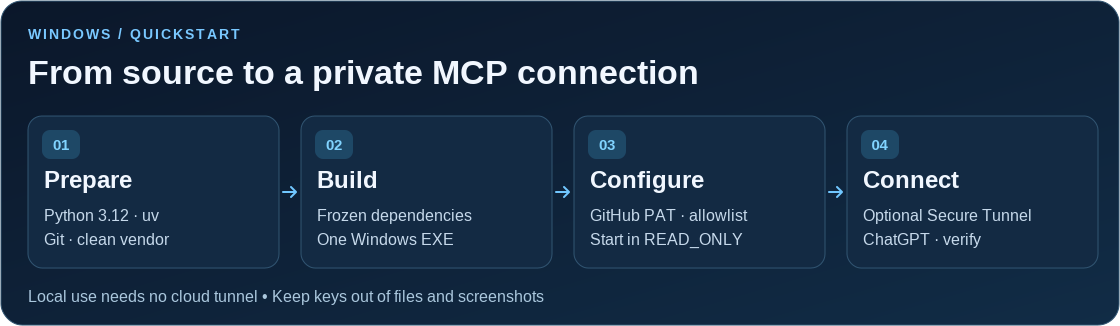
Start the step-by-step Windows guide → · Русская версия
| Your goal | Start here |
|---|---|
| Build my own Windows EXE | Tools, downloads and vendor setup |
| Use GitHub locally | First launch and authorization |
| Connect ChatGPT privately | Secure MCP Tunnel |
The tunnel is optional for local use. All vendor inputs are required for the current one-file build; public binary availability depends on release and license review.
Features
| Capability | What it provides |
|---|---|
| MCP connectivity | Local stdio, authenticated loopback Streamable HTTP and an optional existing official Secure MCP Tunnel profile. |
| Local review | Preview changes and bind approval to a specific snapshot, paths and messages. |
| Precise Git history | Exactly one genuinely changed path per commit; verify the final tree before publication. |
| Repository policy | Repository allowlists, path validation, secret detection and controlled push/PR operations. |
| Desktop control | Local setup, diagnostics, background service supervision, optional tray and Windows logon startup. |
| Recovery | Durable job state, ref reconciliation and metadata audit records. |
Architecture
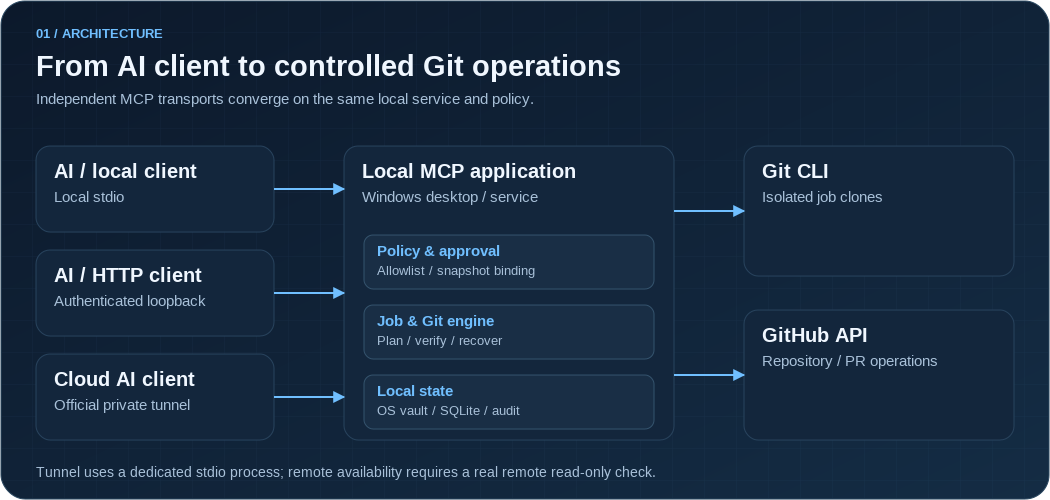
The GUI and CLI share the same service; MCP tools are wrappers around its Git and job engines. Local HTTP and tunnel stdio are independent transports. The tunnel is optional and requires an authorized, existing vendor profile. See architecture and MCP connection.
Workflow
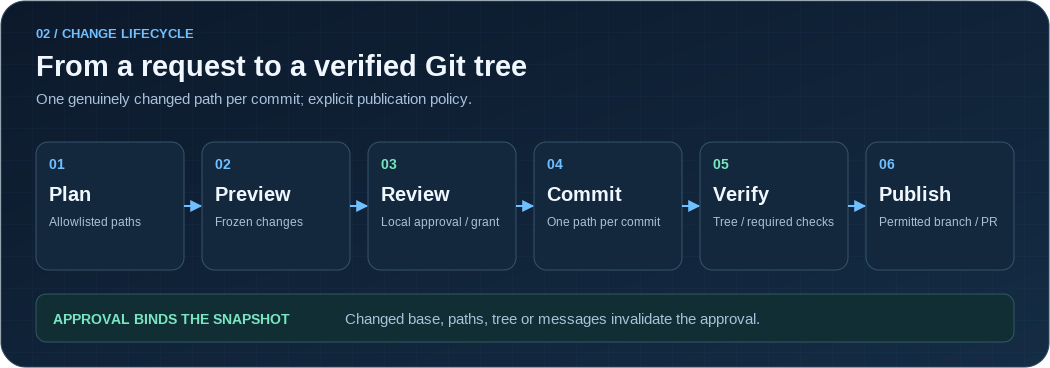
The engine freezes the desired tree and validates every commit against the approved plan. Publication additionally requires the configured checks, permissions and remote expectations. Default-branch and force pushes are forbidden by the application. No empty commits or fabricated timestamps are produced by the engine. See commit semantics and branch naming.
Security
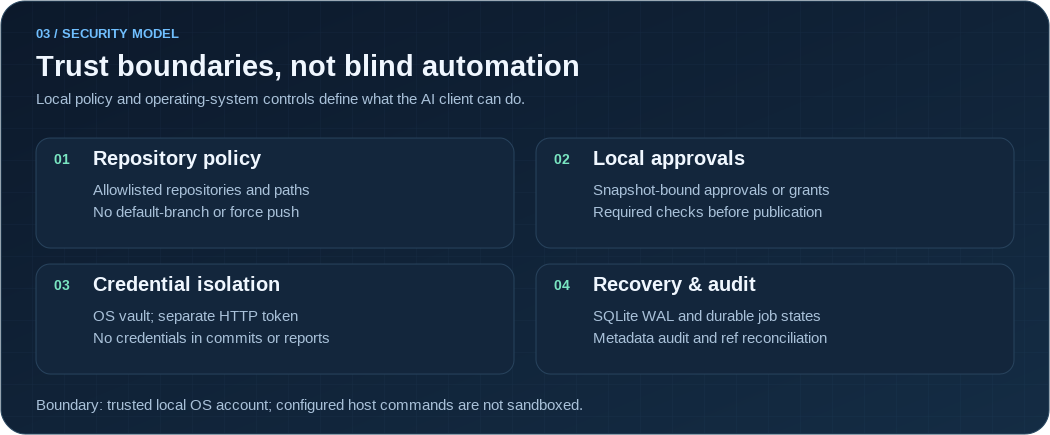
- GitHub and tunnel credentials use the OS vault; the local HTTP endpoint uses a separate token and binds to loopback.
- MCP tools cannot alter local administration or approvals; sensitive paths and detected credentials are denied.
- Configured host commands are not sandboxed. The local OS account is a trusted boundary; secret detection is heuristic.
Read the full security model and security policy before enabling write access.
Build on Windows
[!IMPORTANT]
Native Windows packaging and live GitHub/tunnel acceptance have not been verified by the original Linux delivery. A passing source suite is not Windows certification. See the Windows acceptance checklist.
1. Prepare the vendor runtime
Follow RELEASE_BUILD.md for the approved Git, GitHub CLI (gh) and official tunnel-client inputs. These binaries are absent from the supplied source archive; the build deliberately fails when an input is missing rather than producing a partial standalone application.
2. Build the executable
From the repository root in PowerShell:
uv sync --frozen --extra gui --extra dev
uv pip install --python .venv/Scripts/python.exe -r launcher/build-requirements.txt
.venv/Scripts/python.exe scripts/build.py
Use --runtime-dir C:/approved-runtime on the build command for an external runtime input. The default output is only dist/GitHub-AI-MCP.exe (no installer, ZIP, checksum/signature report or permanent build tree).
3. Launch and configure
Double-click the EXE, open Setup and configure the required services. Logon startup is opt-in and uses one per-user HKCU Run value. After moving the EXE, re-enable startup and repair the tunnel MCP command in Setup. User data stays in place. Closing the window may leave it in the tray; use Exit to stop its services.
The same executable dispatches the GUI and internal MCP workers. Vendor resources are extracted automatically to PyInstaller's temporary directory. Configuration, logs and database live in %LOCALAPPDATA%\GitHub-AI-MCP; credentials remain in the OS vault.
Usage
| Task | Entry point |
|---|---|
| Source desktop development | .venv/Scripts/python.exe -m github_ai_mcp.desktop.entry |
| Source test suite | uv run --frozen --extra gui --extra dev pytest -q |
| Packaged diagnostics | GitHub-AI-MCP.exe --cli --config <path> doctor |
| MCP client setup | Connection guide |
The packaged EXE does not allocate a console; redirect/capture CLI output. Start with read-only operations and verify health before enabling writes. Remote connectivity needs an actual remote read-only invocation, not merely a running tunnel process.
Documentation
| Getting started | Engineering and trust |
|---|---|
| English guide · Russian guide | Architecture |
| MCP connection | API reference |
| Release build | Commit semantics |
| Troubleshooting (RU) | Security model |
| GitHub authentication | Branch naming |
| Windows acceptance | License compliance |
Community and feedback
Trying GitHub-AI-MCP? Share your experience with the Windows setup or MCP integration in the early-user feedback thread. Feature requests and reproducible bug reports are welcome through Issues.
If this project is useful to you, consider starring it on GitHub. Please never include credentials, private repository data or unredacted logs in public feedback.
Contributing and license
See CONTRIBUTING.md and CHANGELOG.md. Released under the MIT license; bundled third-party components have their own licensing obligations.
GitHub-AI-MCP · Local control. Explicit review. Verifiable changes.
Reviews (0)
Sign in to leave a review.
Leave a reviewNo results found