firefight
Health Warn
- License — License: AGPL-3.0
- Description — Repository has a description
- Active repo — Last push 0 days ago
- Low visibility — Only 8 GitHub stars
Code Warn
- network request — Outbound network request in .github/workflows/ci.yml
- network request — Outbound network request in app/adapters/alert_providers.rb
Permissions Pass
- Permissions — No dangerous permissions requested
No AI report is available for this listing yet.
Agent ready incident management built for Slack
Firefight
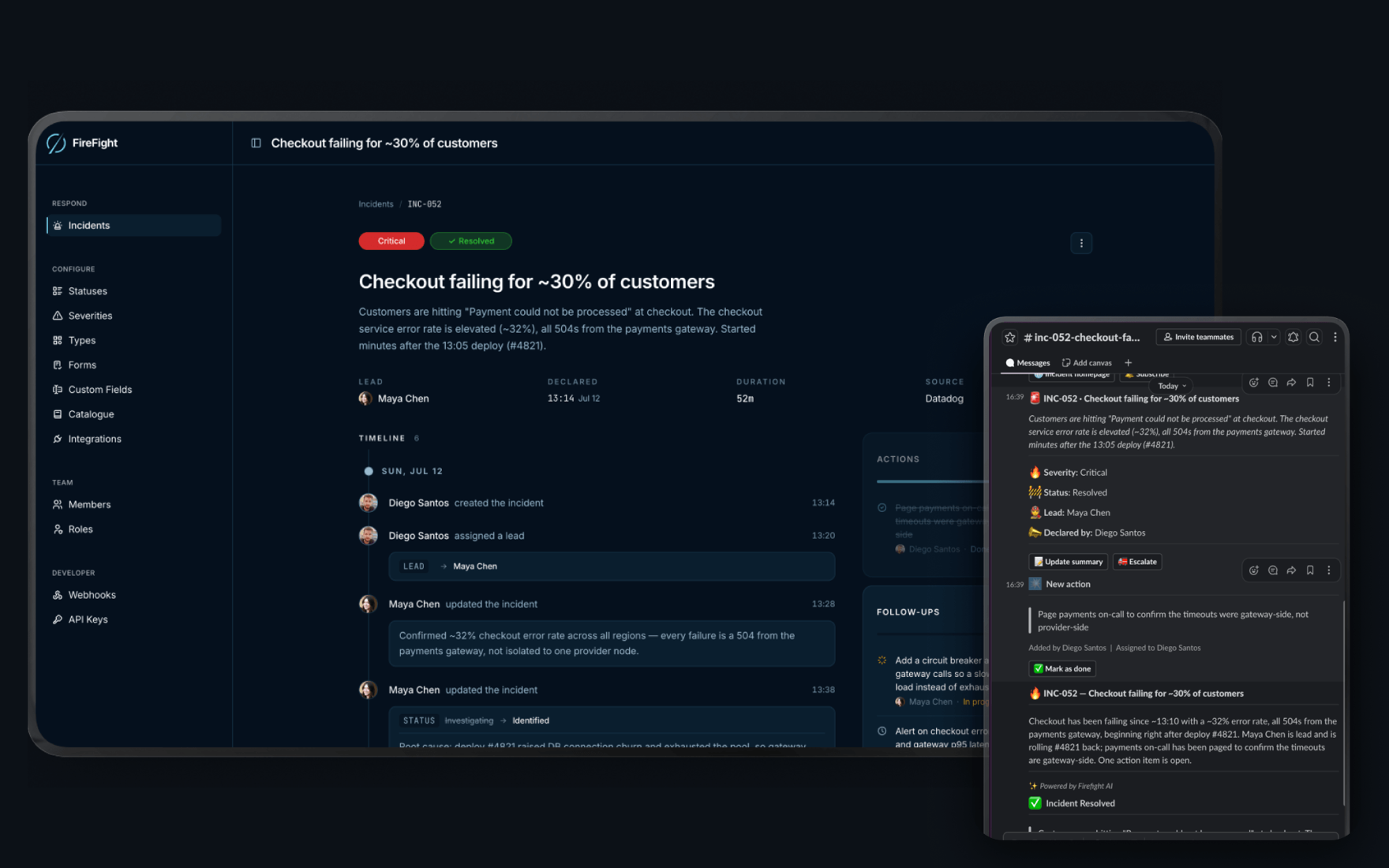
Open-source, agent-ready incident management
Run incidents from Slack, and let your AI agents work them too, with every action they take permissioned, approved, and on the record
Website · Docs · Self-hosting · Local development · Releases · Community



Questions, or want to talk about running it at your company? [email protected]
What is Firefight?
Firefight is an incident management platform. It records what broke, who responded, and what you changed so it doesn't happen again.
Declaring an incident opens its channel, pulls in the people who should be there, announces it to the rest of the company, and starts a timeline that records every decision from that point on. When it's over, the postmortem is drafted from what actually happened rather than from memory.
Agents work an incident the same way, over MCP or the REST API, under their own name and reaching only what you granted them.
Why Firefight?
An alerting tool, a chat thread, a doc template, a status page. Nothing holds them together except a process doc, and nobody opens a process doc at 3am.
- The first twenty minutes go to setup. Opening the channel, working out who to pull in, posting the first update. The incident has a head start before anyone is even in the room.
- The answers end up buried. Critical detail sits in DMs, threads, and someone's dashboard. Whoever joins late reads two hundred messages to learn what everyone else already knows.
- The fix ships and the write-up waits. Somebody still has to rebuild the timeline, chase the follow-ups, and write it up, usually after hours. So it gets skipped, and the same incident comes back in two months.
- Your agents are locked out. They can read your code and your logs, but not your incidents, your history, or the reasoning behind either. The one place that knows what actually happened is the one place they cannot reach.
It is AGPL-3.0, so you can read every line and run it yourself
Features
Incident response
- Slack-native flow: declare, update status and severity, assign a lead, invite responders, escalate, and close without leaving Slack
- Incident channels: created automatically with pinned quick actions, topic metadata, and announcement threads
- Audit-grade timeline: every state change is an immutable event with full attribution
- Roles, action items and follow-ups: assign who is accountable, track work during the incident and after it
- Incident relationships: link related incidents, or mark one a duplicate of another
Built for agents
- MCP server: every incident action and every settings screen has a tool behind it, so an agent can run an incident or set the workspace up without touching a browser
- Ability Gateway: every privileged call goes through one gate. Grant abilities individually or in named sets, scope them to an environment, and hold the risky ones for human approval
- Agents are first-class: an agent is its own principal with its own token and its own name on the timeline. It inherits nothing from whoever created it, and no machine can mint another machine
- Invocation ledger: every privileged call is recorded before it runs, with who asked, what for, and whether it was allowed, refused, or held for approval
- Governed transcripts: an agent can read what people actually said in an incident channel, but only once an admin turns it on and grants the ability, with secrets redacted before storage and a retention window you set
- Bring your own agent: Claude Code, an internal support bot, whatever you already run. It connects over MCP or the API and works the incident
AI built in
- AI postmortems: a structured draft generated from the incident's full timeline and channel transcript, ready for human editing
- AI catchups: joining an incident late? Get a summary of what's happened so far
- Timeline notes: the theories tested, the decisions made and the root cause, lifted out of the conversation onto the timeline with the quote and the person
- Cost-tracked inference: every AI call is logged with tokens, latency, and cost
Alerts
- Ingest from anything: point anything that can POST JSON at a per-source endpoint
- Routing rules: first-match-wins rules that open an incident, attach to an open one, notify a team, or drop it
- Storm control: deduplication, flap handling, and grouping, so an alert storm becomes one incident rather than forty
- Test before you ship: dry run a rule against a sample alert and see exactly why it did or did not match, without notifying anyone
Make it yours
- Custom fields: text, numbers, links, single and multi select, or a reference into your catalog
- Lifecycle forms: decide what responders are asked when they declare, update, resolve or cancel, with fields that only appear when they are relevant
- Severities, statuses, types and roles: your vocabulary, not ours, all of it renameable and reorderable
- Runbooks: the procedure for a known failure, attached automatically to the incidents that match it
- Service catalog: services, teams, environments and anything else you track, with typed attributes and relationships
Platform
- Web dashboard: the incident list, the incident itself, the postmortem editor, and every settings screen
- REST API: the whole product over HTTP, from declaring an incident to configuring every settings screen, with bearer-token auth, granular per-key permissions, idempotency keys, and an OpenAPI document covering every operation
- Outbound webhooks: subscribe external systems to incident events, with delivery tracking and retries
Documentation
Full documentation is at firefight.app/docs
| Your first incident | Start here |
| Slack command reference | Every /ff command |
| MCP server | Connecting an agent, and every tool it gets |
| REST API | Auth, endpoints, and the OpenAPI document |
| The gateway | Permissions, approvals, and the activity log |
Engineering references for people working on Firefight itself live in docs/
Getting started
| Firefight Cloud | The fastest way to get started: managed hosting with AI features included. Sign in at app.firefight.app |
| Self-hosting | Run Firefight on your own infrastructure, free under the AGPL. See SELF_HOSTING.md |
Self-hosting
Firefight ships as a Docker image with every release, and the repository carries a docker-compose.yml that runs it with Postgres and TLS.
cp .env.selfhost.example .env   # fill in your hostname, Slack app, and secrets
docker compose up -d
You need a machine with Docker, a hostname pointing at it, and a Slack app, which Firefight ships the manifest for. SELF_HOSTING.md walks through all of it, plus upgrades, backups, and running it without Compose.
Your instance talks to Slack, to Postgres, and to whatever AI provider you configure. It sends us nothing.
Local development
mise install                          # Ruby + Node toolchain
docker run -d --name firefight-postgres -e POSTGRES_USER=postgres \
  -e POSTGRES_PASSWORD=postgres -p 5432:5432 \
  -v firefight-postgres-data:/var/lib/postgresql postgres:18.3
bundle install
bin/rails db:prepare && bin/rails db:prepare RAILS_ENV=test
bin/dev
CONTRIBUTING.md has the full setup: creating the Slack app, the environment variables, the local tunnel for Slack callbacks, and how the multi-database layout works
Open source vs. paid
This repository is licensed under AGPL-3.0: free to use, self-host, and modify. If you run a modified version as a service, you must share your changes under the same license.
Firefight Cloud is our managed offering: hosting, upgrades, and AI features with usage included in the plan. Self-hosters bring their own LLM API key for the AI features.
Security
Found a vulnerability? Please report it privately, see SECURITY.md. Do not open a public issue for security problems.
Contributing
Contributions are welcome: bug reports, fixes, and features. Start with CONTRIBUTING.md for the development setup and conventions, and CODE_OF_CONDUCT.md for how we work together. Fork PRs run the full CI suite, no secrets required.
License
AGPL-3.0 © Firefight Labs
Reviews (0)
Sign in to leave a review.
Leave a reviewNo results found