zusia
Health Warn
- License — License: MIT
- Description — Repository has a description
- Active repo — Last push 0 days ago
- Low visibility — Only 6 GitHub stars
Code Warn
- process.env — Environment variable access in scripts/updates.mjs
Permissions Pass
- Permissions — No dangerous permissions requested
No AI report is available for this listing yet.
Zusia, a study buddy inside Zotero: ask Claude Code, Codex or Antigravity about the paper you are reading. LaTeX, drawings, theorem links, glass UI.

Zusia
Your study buddy inside Zotero.
Ask about the paper you're reading. Get maths, drawings and proofs back.






TL;DR
- 💬 A chat next to the PDF, in Zotero's side pane.
- ✏️ Answers with LaTeX, drawings and numbered theorem boxes.
- 🔑 Uses Claude Code, Codex or Antigravity with your own login. No API keys.
- ⏱️ Install in 2 minutes: jump to Install.
1. Ask about the paper
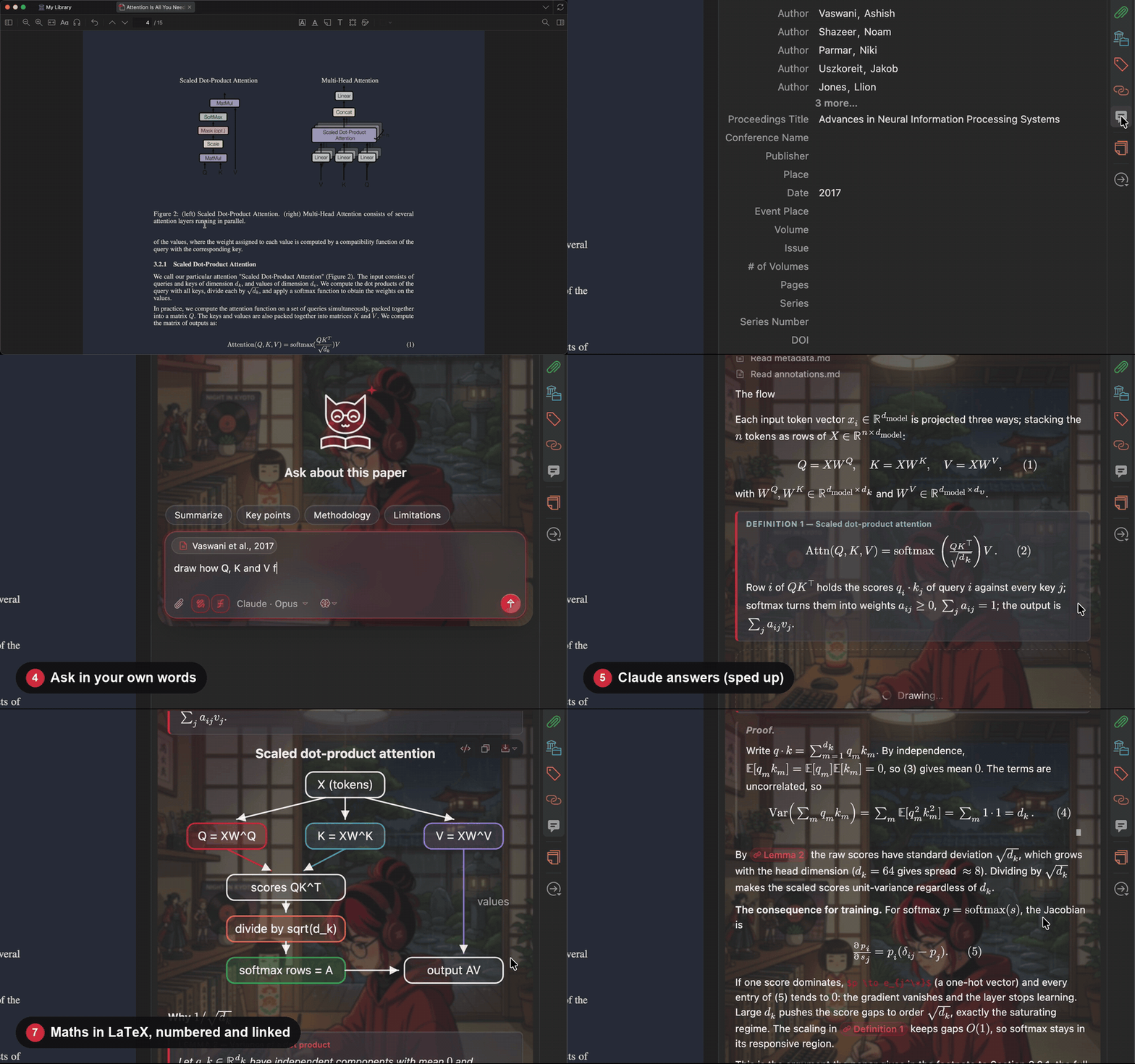
Open the side pane → Zusia → ask. Turn on Drawing and LaTeX for a diagram and real maths.
Real recording: Zotero on a Mac, Attention Is All You Need, a live answer from Claude. 27 seconds, with the wait sped up.
2. Make it yours
Settings → Zusia. Style, buddy, pattern, accent colour, background image and button labels, all updating live in the sidebar. Glass, corners, font, answer length, level and tone are there too.
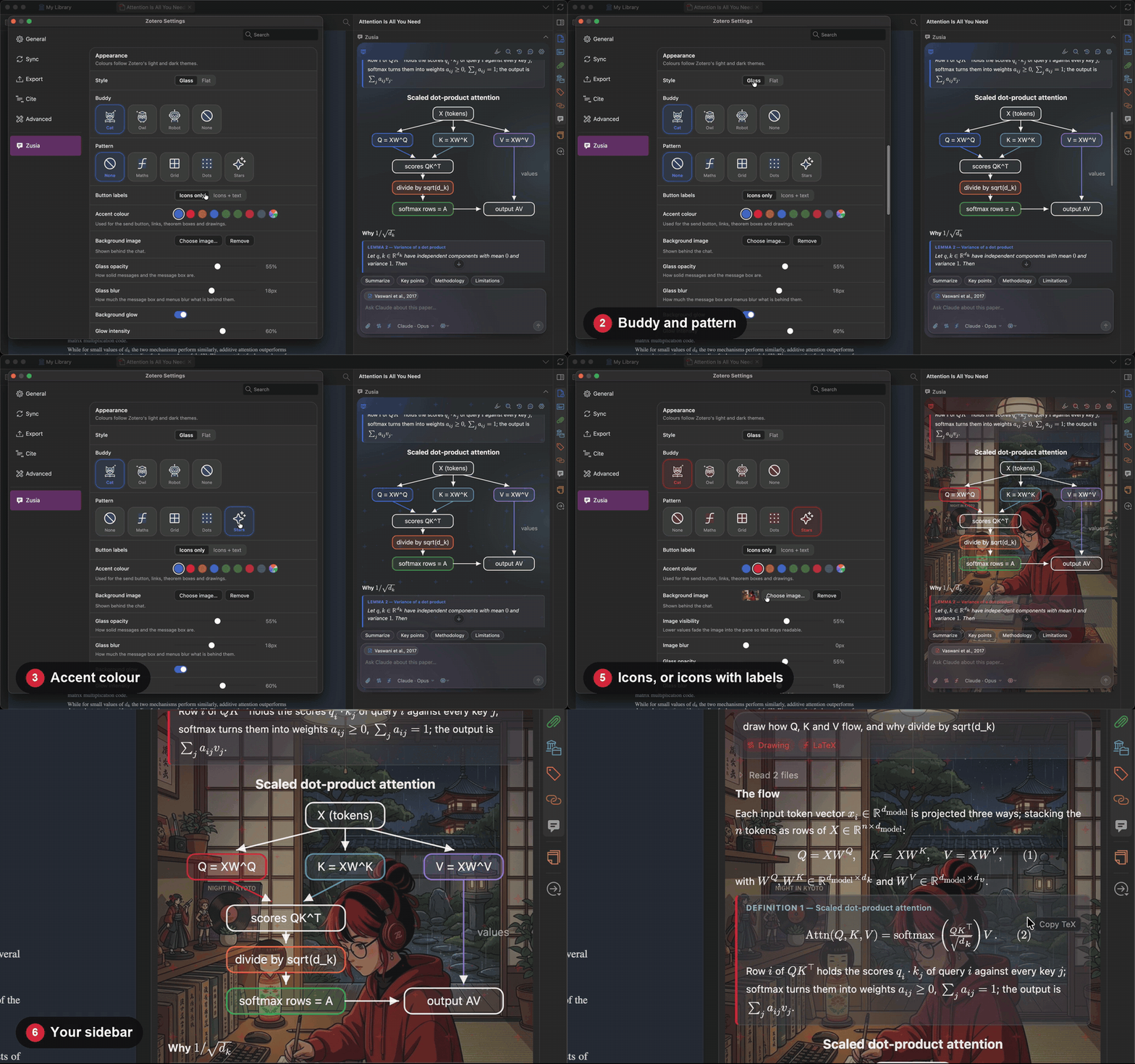

Eight accents. Red on black is the one in every video here.
3. Follow a proof
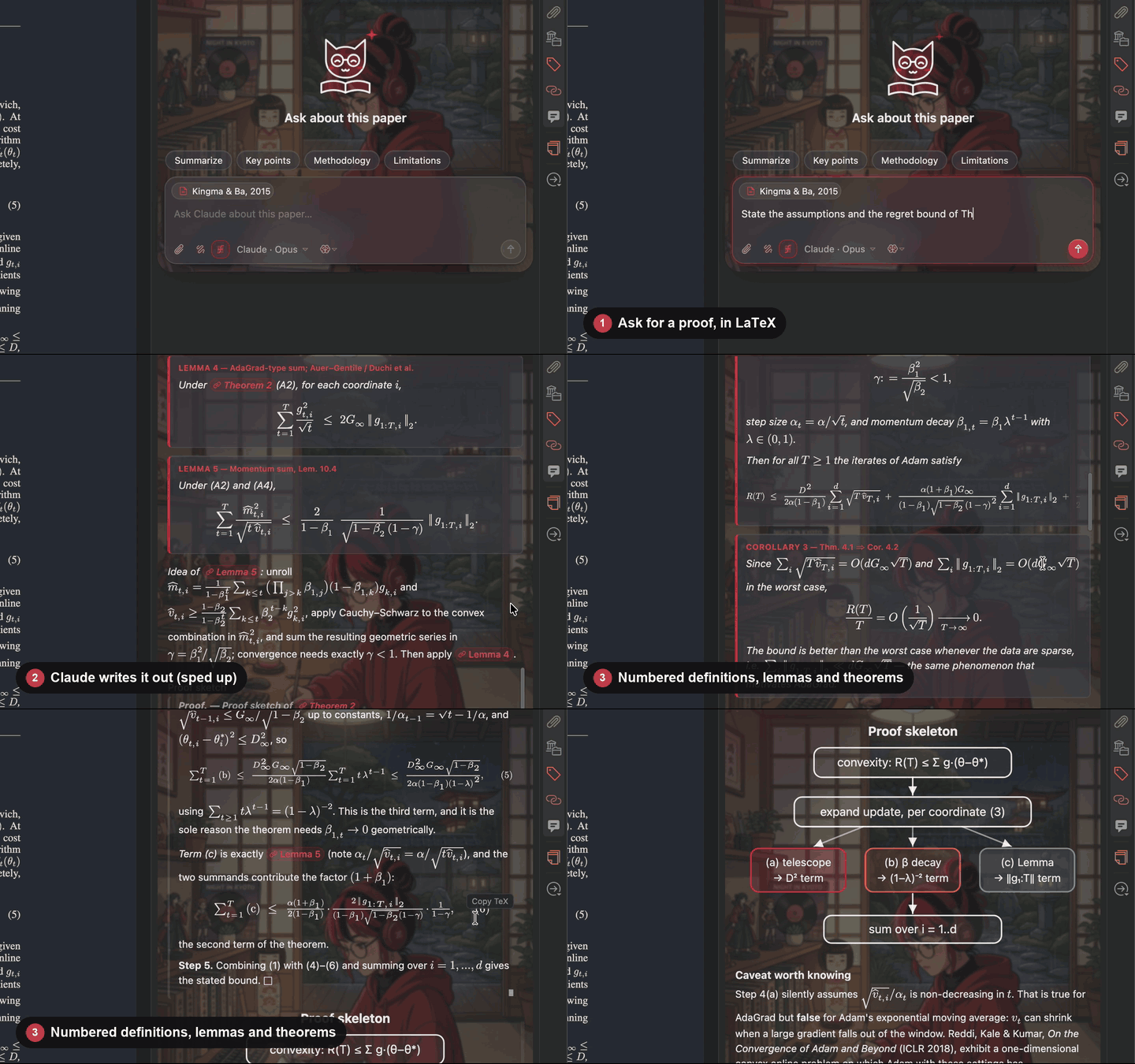
Turn on LaTeX. Definitions, lemmas and theorems come back as numbered boxes, and every
\refis a link: click to jump, Back (⌥←) to return.
4. Didn't click? Ask again, better
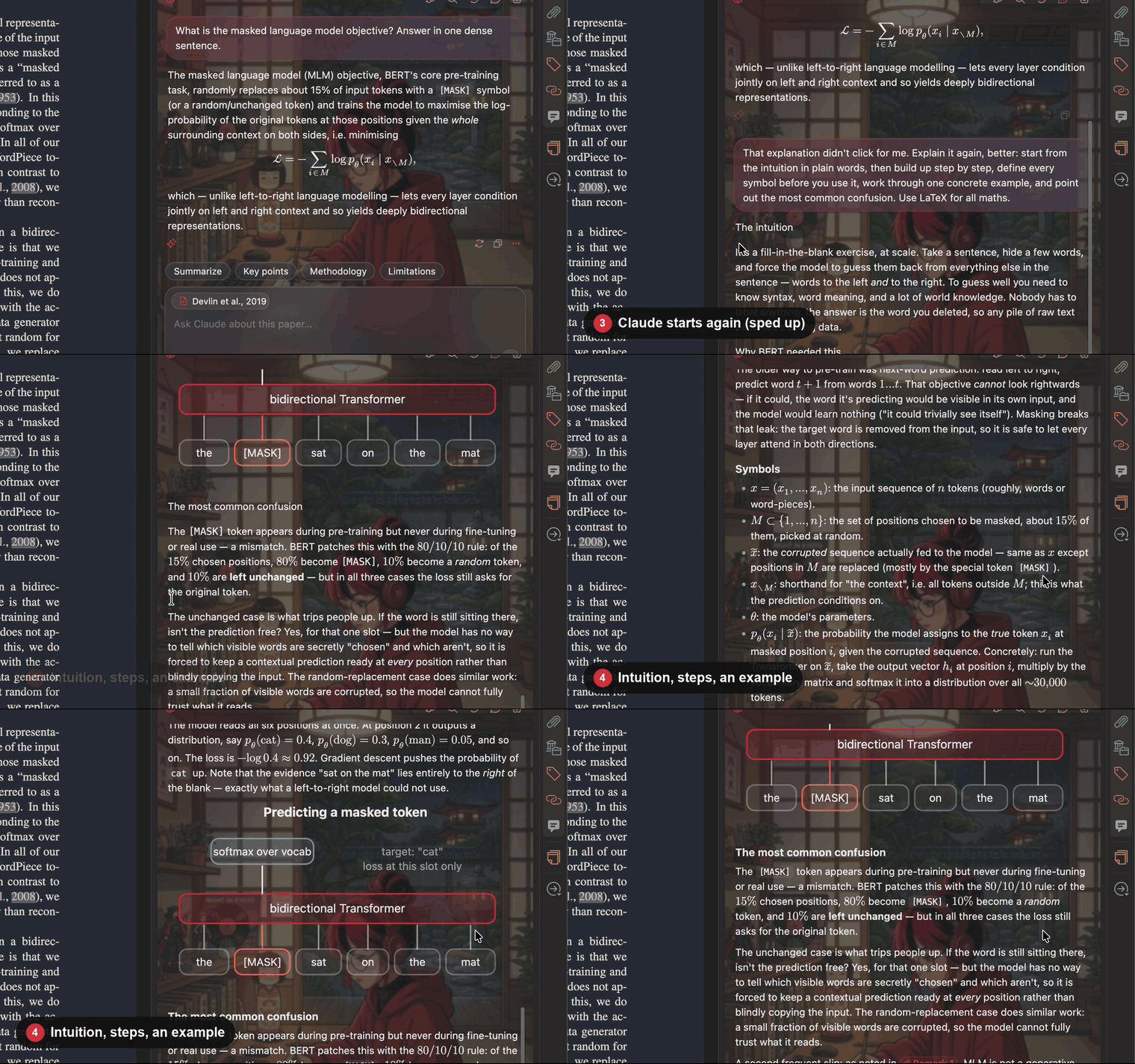
One button under every answer. It comes back with the intuition first, then the steps, an example and the usual trap.
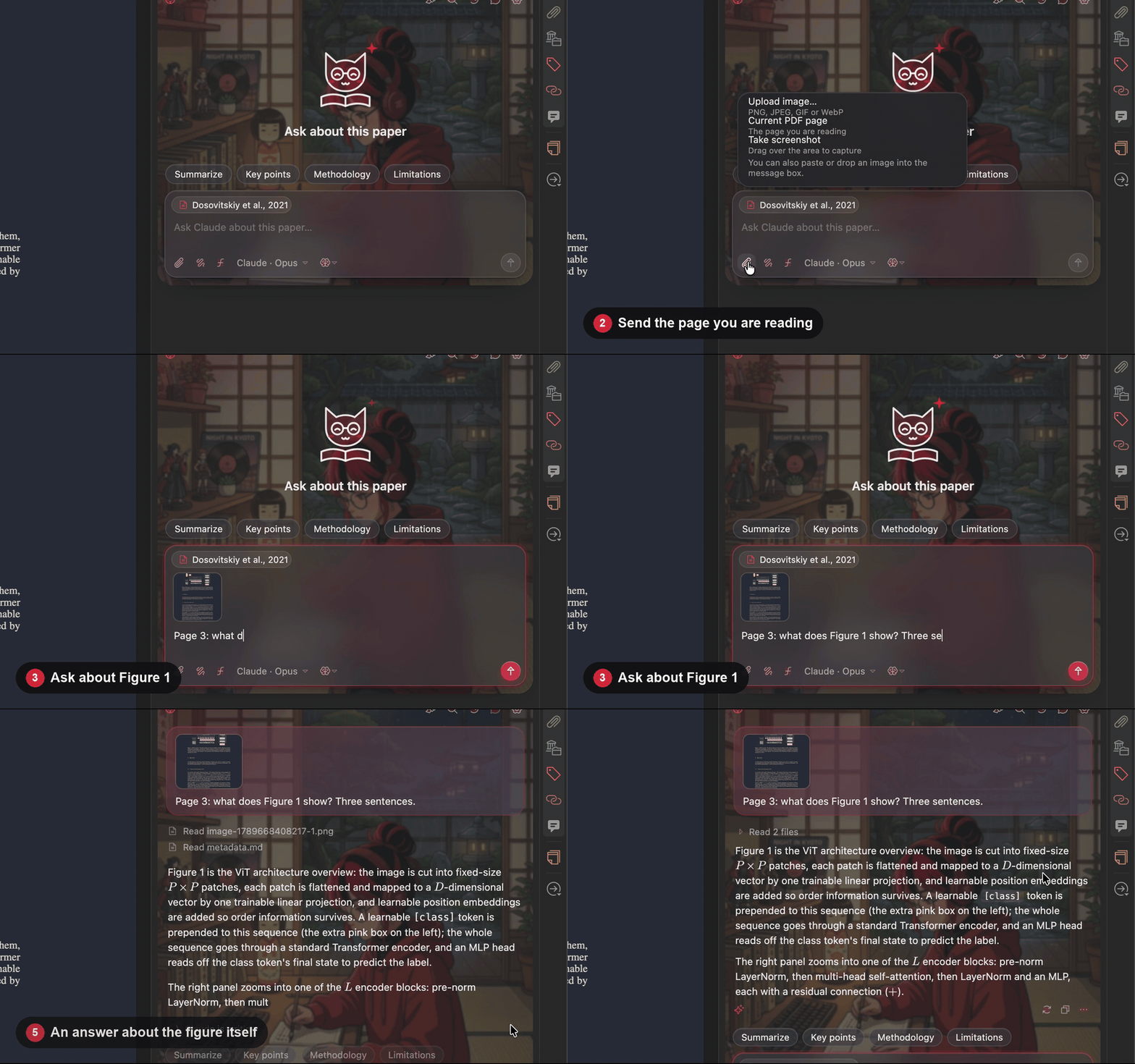
5. Ask about a figure
📎 → Current PDF page. The page you are looking at goes with the question, so figures and tables can be asked about. Upload, paste, drop or screenshot work too.
Everything else, in one line each
| Feature | How | |
|---|---|---|
| 🔴 | Explain a passage | Select text in the PDF → Explain this |
| 🟠 | Ask about a passage | Select text → Ask your assistant about this, then add your question |
| 🩷 | Clarifications | Every Ask and Explain is saved: highlighter icon → passage, prompt, answer |
| 🟣 | Notes | Save any answer or drawing as a Zotero note under the paper |
| 🔵 | Search | 🔍 searches the chats of every paper |
| 🟢 | Models | Pick assistant, model and reasoning effort from the message box |
| ⚫ | Setup | A visual wizard on first run |
Install
- Install one assistant CLI and sign in: Claude Code, Codex or Antigravity (
agy). - Download
zusia.xpifrom the latest release. - In Zotero: Tools → Plugins → ⚙ → Install Plugin From File… → pick the
.xpi. Restart if asked. - Open a paper. Zusia appears in the side pane and starts the setup wizard.
Updates arrive on their own after that: Zotero checks the release feed.
Privacy
- 🖥️ The assistants run on your computer with your own login. No server, no API keys.
- 📄 They get the paper's metadata and your annotations, never the PDF's full text. Plus any image you attach.
- 📁 Chats, clarifications and images stay in
zusia/inside Zotero's data folder.
Build
npm ci
npm run build        # writes zusia.xpi
Test
npm test             # unit tests (jsdom): rendering, settings, wizard, backends, repo checks
npm run shots        # screenshots of the UI in headless Firefox (optional)
npm run test:zotero  # headless Zotero integration run (Linux, Flatpak)
ZUSIA_BACKGROUND=path/to/illustration.jpg npm run videos   # re-records the README videos (macOS)
The videos are recorded in a real Zotero with its own demo profile and library, so your library is never used. The scenes move the real pointer: don't touch the Mac while they run. Needs ffmpeg, cliclick, the claude CLI, and Screen Recording and Accessibility permission for the terminal.
Release
Bump version in package.json and src/manifest.json, then tag it:
git tag v1.1.0 && git push origin v1.1.0
The tag is what releases. .github/workflows/release.yml refuses to run if the tag and the two versions disagree, then runs the tests, builds the .xpi, writes updates.json and attaches both to a GitHub release. Pushing to main never publishes anything.
New behaviour starts with a failing test; see CONTRIBUTING.md.
Credits
Icons: Phosphor Icons (MIT). Maths: KaTeX (MIT) and Latin Modern Math (GUST Font License). The study buddies are original to this project; the illustrations were made for Zusia with Google Gemini. Papers in the videos: arXiv 1706.03762, 1512.03385, 1810.04805, 2010.11929, 2005.14165, 1412.6980. Details in THIRD_PARTY_NOTICES.md.
Zusia is MIT licensed. See LICENSE.
Reviews (0)
Sign in to leave a review.
Leave a reviewNo results found