PromptPlus
Health Pass
- License — License: MIT
- Description — Repository has a description
- Active repo — Last push 0 days ago
- Community trust — 67 GitHub stars
Code Pass
- Code scan — Scanned 3 files during light audit, no dangerous patterns found
Permissions Pass
- Permissions — No dangerous permissions requested
No AI report is available for this listing yet.
Interactive command-line toolkit for .Net core with powerful controls and commands to create professional console applications.

PromptPlus
PromptPlus transforms your console apps with a modern .NET library that delivers polished, interactive experiences — from text input with history and searchable lists to masked fields, date/time pickers, file browsers, progress bars, charts, and more — all streamlined through one sleek fluent API.





🤖 New: pick the right ConsolePlus/PromptPlus layer and control conversationally with the ConsolePlus + PromptPlus Plugin — works with Claude Code or GitHub Copilot to choose the layer, check whether an interactive control can run in your context, pick the right one of PromptPlus's 21 controls, implement it, and audit existing usage. Learn more ↓
Highlights
- 20+ interactive controls — from a simple key-press to multi-column tables and tree browsers
- 6 output-only widgets — render sliders, calendars, banners, charts and more without blocking
- Fluent API — every control is configured with readable method chains
- Two-layer config — set defaults once with
PromptPlus.Config, override per control with.Options() - Abort anywhere — Esc aborts any control; result carries an
IsAbortedflag - History persistence — last confirmed value saved and pre-loaded automatically
- Terminal-safe — auto-detects size, re-renders on resize, enforces 80×10 minimum gracefully
- Cross-platform — Windows, Linux, macOS; .NET 8, 9 and 10
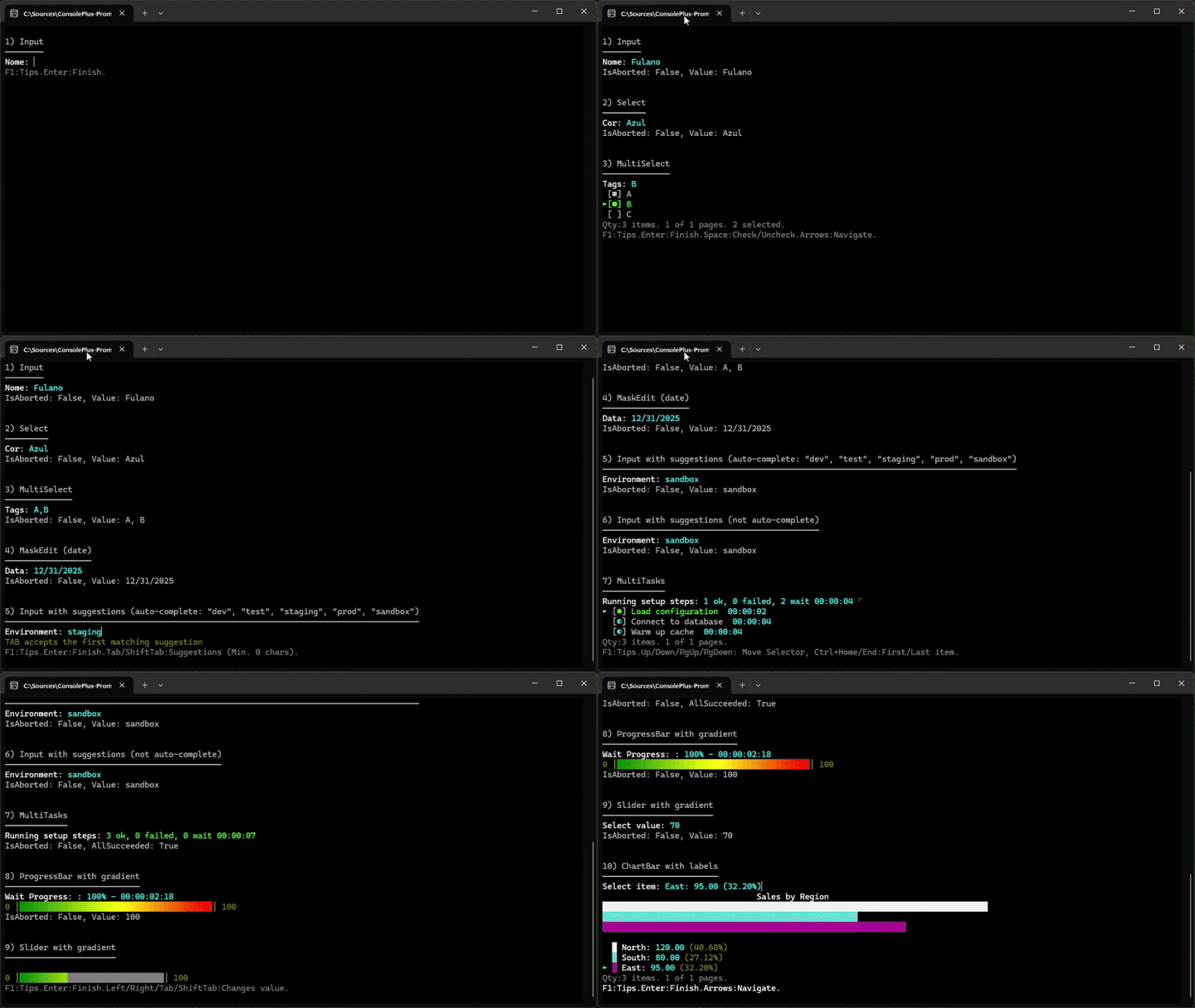
- Demo Mode — script keyboard input to auto-record GIFs of your controls, no human needed (
AutoDemoSamples)
What's new in the latest version
📢 Release Note – PromptPlus V.6.X Release Candidate
🚀 Release Candidate Phase
- The 6.X version officially enters the Release Candidate phase.
- Purpose: final validation before the stable release — no new features expected, only stabilization fixes.
🛠️ Source Code
- Available in the main branch.
📦 NuGet Package
- Latest update: 6.0.0-rc[seq].
- To install, you must enable the pre-release option in NuGet.
💬 Community Feedback
- This space is open for:
- Sharing feedback
- Reporting issues
- Suggesting enhancements
Installation
PromptPlus 6.x is currently in Beta — you must enable pre-release packages to install it.
dotnet add package PromptPlus --prerelease
Or via the Package Manager Console:
Install-Package PromptPlus -IncludePrerelease
Quick Start
using PromptPlusLibrary;

// Ask for a name
var nameResult = PromptPlus.Controls.Input("Your name").Run();
if (nameResult.IsAborted) return;

// Choose a color
var colorResult = PromptPlus.Controls
    .Select<string>("Favorite color")
    .AddItems(["Red", "Green", "Blue"])
    .Run();

// Deconstruct result
var (color, aborted) = colorResult;
if (!aborted)
    PromptPlus.Console.WriteLine($"Hello {nameResult.Content}, you chose {color}!");
💡 Tip: Every control returns
ResultPrompt<T>. Use.Contentfor the value,.IsAbortedto detect Esc, or deconstruct withvar (value, aborted) = result.
Two-Layer Configuration
Layer 1 — Global defaults (applied to all controls)
using PromptPlusLibrary;

PromptPlus.Config.PageSize = 8;
PromptPlus.Config.HideAfterFinish = true;
Layer 2 — Per-control override (.Options() fluent method)
PromptPlus.Controls
    .Input("Notes")
    .Options(o => o
        .HideAfterFinish(false)
        .ShowTooltip(false))
    .Run();
Per-control settings always win over global config. See docs/global-behaviors.md for the full property reference.
Persist config to disk
// Write PromptPlus.config to the current directory
PromptPlus.Config.ToFile(".");
On next run, PromptPlus automatically reads PromptPlus.config from the working directory.
Global Behaviors
| Behavior | Observable effect |
|---|---|
| Terminal resize detection | Control re-renders its own area; surrounding output is untouched |
| Minimum terminal size (80×10) | Shows a resize prompt and waits — never crashes |
| Culture isolation | DefaultCulture applied only during .Run(); thread culture always restored |
| Single-line rendering | Newlines stripped; sliding window with … when value is too wide |
| History persistence | Last confirmed value saved to disk; pre-loaded on next run |
| HideAfterFinish | Control UI erased after confirmation; only the final answer line remains |
| HideOnAbort | Control UI erased when user presses Esc |
| Ctrl+C handling | Intercepted by default → triggers abort; set RemoveHandlerCtrlC = true to pass to OS |
| Tooltip visibility | ShowTooltip = true shows keyboard hints below the prompt |
| Abort key hint | ShowMessageAbortKey = true includes the abort-key name in the tooltip |
| Auto-initialization | PromptPlus initializes on first access: detects terminal, loads config, registers error log |
Localization
PromptPlus ships 11 built-in locales as embedded resources. The active locale is selected automatically from CultureInfo.CurrentCulture; override it at any time with:
PromptPlus.Config.DefaultCulture = new CultureInfo("pt-BR");
| Culture code | Language |
|---|---|
| (default) | English |
pt-BR |
Portuguese (Brazil) |
de-DE |
German |
es-ES |
Spanish |
fr-FR |
French |
it-IT |
Italian |
ja-JP |
Japanese |
ko-KR |
Korean |
nl-BE |
Dutch (Belgium) |
ru-RU |
Russian |
zh-CN |
Chinese (Simplified) |
If
DefaultCultureis set to a culture that has no embedded resource, PromptPlus falls back to the default English strings.
Adding a custom locale
If your target culture is not listed above, you can provide your own satellite resource:
- Copy
PromptPlus/Resources/PromptPlusResources.resxfrom the source tree (or extract it from the NuGet package). - Translate every message value to your language, keeping the existing key names and format placeholders unchanged.
- Compile the
.resxfile into a binary.resourcesfile — see Compiling .resx files (Microsoft docs). - Place the compiled file, named
PromptPlus.<culture-code>.resources(e.g.PromptPlus.pl-PL.resources), in the same directory as your application binaries.
PromptPlus will discover and load it automatically at runtime via the standard .NET resource fallback chain.
Controls Reference
| Control | Factory method | Returns |
|---|---|---|
| Text input | PromptPlus.Controls.Input(prompt) |
ResultPrompt<string> |
| Secret / password | PromptPlus.Controls.Secret(prompt) |
ResultPrompt<string> |
| Key press | PromptPlus.Controls.KeyPress(prompt) |
ResultPrompt<ConsoleKeyInfo?> |
| Confirm (yes/no) | PromptPlus.Controls.Confirm(prompt) |
ResultPrompt<ConsoleKeyInfo?> |
| Single select | PromptPlus.Controls.Select<T>(prompt) |
ResultPrompt<T> |
| Multi select | PromptPlus.Controls.MultiSelect<T>(prompt) |
ResultPrompt<IEnumerable<T>> |
| Table select | PromptPlus.Controls.TableSelect<T>(prompt) |
ResultPrompt<TableSelectResult<T>> |
| Table multi-select | PromptPlus.Controls.TableMultiSelect<T>(prompt) |
ResultPrompt<T[]> |
| Tree select | PromptPlus.Controls.TreeSelect<T>(prompt) |
ResultPrompt<T?> |
| Tree multi-select | PromptPlus.Controls.TreeMultiSelect<T>(prompt) |
ResultPrompt<T[]> |
| File browser | PromptPlus.Controls.File(prompt) |
ResultPrompt<FileInfo> |
| Multi-file | PromptPlus.Controls.MultiFile(prompt) |
ResultPrompt<IEnumerable<FileInfo>> |
| Calendar | PromptPlus.Controls.Calendar(prompt) |
ResultPrompt<DateTime> |
| Progress bar | PromptPlus.Controls.ProgressBar(prompt) |
ResultPrompt<double> |
| Task | PromptPlus.Controls.Task(prompt) |
ResultPrompt<StateTask> |
| Multi-tasks | PromptPlus.Controls.MultiTasks(prompt) |
ResultPrompt<IEnumerable<MultiTaskResult>> |
| Chart bar | PromptPlus.Controls.ChartBar(prompt) |
ResultPrompt<double> |
| Mask — string | PromptPlus.Controls.MaskEdit(prompt) |
ResultPrompt<string> |
| Mask — integer | PromptPlus.Controls.MaskInteger(prompt) |
ResultPrompt<int> |
| Mask — long | PromptPlus.Controls.MaskLong(prompt) |
ResultPrompt<long> |
| Mask — decimal | PromptPlus.Controls.MaskDecimal(prompt) |
ResultPrompt<decimal> |
| Mask — decimal currency | PromptPlus.Controls.MaskDecimalCurrency(prompt) |
ResultPrompt<decimal> |
| Mask — double | PromptPlus.Controls.MaskDouble(prompt) |
ResultPrompt<double> |
| Mask — double currency | PromptPlus.Controls.MaskDoubleCurrency(prompt) |
ResultPrompt<double> |
| Mask — date & time | PromptPlus.Controls.MaskDateTime(prompt) |
ResultPrompt<DateTime> |
| Mask — date only | PromptPlus.Controls.MaskDate(prompt) |
ResultPrompt<DateTime> |
| Mask — DateOnly | PromptPlus.Controls.MaskDateOnly(prompt) |
ResultPrompt<DateOnly> |
| Mask — time only | PromptPlus.Controls.MaskTime(prompt) |
ResultPrompt<DateTime> |
| Mask — TimeOnly | PromptPlus.Controls.MaskTimeOnly(prompt) |
ResultPrompt<TimeOnly> |
Widgets Reference
Widgets are output-only — no user input, no ResultPrompt. Banner and Dash render immediately;
the fluent widgets (Slider, Calendar, Switch, ChartBar) render when you call .Show().
| Widget | Factory method | Output |
|---|---|---|
| Slider (display) | PromptPlus.Widgets.Slider(value, min, max, fracionaldig) |
ISliderWidget |
| Calendar (display) | PromptPlus.Widgets.Calendar(dateref) |
ICalendarWidget |
| Switch (display) | PromptPlus.Widgets.Switch(value) |
ISwitchWidget |
| Banner | PromptPlus.Widgets.Banner(text) |
immediate render |
| Dash separator | PromptPlus.Widgets.Dash(text) |
immediate render |
| Chart bar (display) | PromptPlus.Widgets.ChartBar() |
IChartBarWidget |
ConsolePlus Integration
ConsolePlus gives you a rock-solid rendering foundation: styled output, markup, colors, widgets,
cursor/screen control, and capability detection. PromptPlus is the complementary product that builds on top of that foundation to deliver intelligent,
professional, interactive console controls — the kind of rich prompts you'd otherwise have to build
by hand.
In one sentence: ConsolePlus is how you render; PromptPlus is how you interact.
Why two products?
ConsolePlus deliberately stays focused on rendering primitives. It ships the input building
blocks you need for simple scenarios — ReadLine, ReadKey, and even
Emacs-style line editing — but it intentionally stops
short of full interactive UI.
PromptPlus picks up exactly where those primitives end, adding stateful, keyboard-driven controls
with validation, paging, filtering, history, and theming — all rendered through the same ConsolePlus
engine, so colors, markup, and capability fallbacks behave identically.
How they fit together
┌──────────────────────────────────────────────┐
│                  Your app                    │
├────────────────────────┬─────────────────────┤
│      PromptPlus        │                     │
│  (interactive controls)│                     │
│  Input · Select · ...  │   ← optional layer  │
├────────────────────────┴─────────────────────┤
│                 ConsolePlus                  │
│  output · markup · colors · widgets · ANSI   │
│  cursor/screen · capability detection        │
└──────────────────────────────────────────────┘
PromptPlus references ConsolePlus and reuses its console driver directly. In fact,PromptPlus.Console is the ConsolePlus driver — so anything you learned in the
Writing Output, Markup, and Colors guides applies
unchanged inside PromptPlus.
The PromptPlus entry point
Just like ConsolePlus, PromptPlus is a static facade. It exposes four members:
| Member | Type | Purpose |
|---|---|---|
PromptPlus.Console |
IConsole |
The shared ConsolePlus console driver |
PromptPlus.Controls |
IControls |
Factory for interactive controls |
PromptPlus.Widgets |
IWidgets |
Banners, dashes, calendar and other visual widgets |
PromptPlus.Config |
IPromptPlusConfig |
Global configuration (themes, behavior) |
using ConsolePlusLibrary;
using PromptPlusLibrary;

// Rendering — identical to ConsolePlus
PromptPlus.Console.WriteLine("[Teal]Powered by ConsolePlus[/]");

// Widgets
PromptPlus.Widgets.Banner("PromptPlus", Color.Bisque);
PromptPlus.Console exposes the same IConsole driver as ConsolePlus. Use it to write styled text, manage cursor, and compose output alongside your controls:
using ConsolePlusLibrary;
using PromptPlusLibrary;

// These two are the same object:
PromptPlus.Console.WriteLine("Hello, [bold]world[/]!");
ConsolePlus.WriteLine("Hello, [bold]world[/]!");
Samples
The samples/ folder contains runnable projects for every control and widget — one sample per
concept — plus AutoDemoSamples, which scripts a walkthrough of
several controls using Demo Mode and is the actual source used to record the
demo GIF above.
Documentation
| Page | Description |
|---|---|
| Getting Started | Install, first app, config walkthrough |
| Architecture | Entry points, lifecycle, ResultPrompt |
| Global Behaviors | Full IPromptPlusConfig reference |
| Keyboard Bindings | Emacs shortcuts, physical key reference |
| Visual Symbols | Symbol catalog |
| Global Styles | Style override API |
| Widgets | Output-only widgets guide |
| Demo Mode | Scripted keyboard input for recording GIFs/videos of console apps |
| Controls index | All pages in one place |
| Migration Guide v5.x → v6.x | Upgrading from v5.x |
| API Reference | Auto-generated API docs |
Using PromptPlus with Claude Code or GitHub Copilot
Prefer describing what you need in plain language instead of driving the API by hand? The official
ConsolePlus + PromptPlus Plugin
lets Claude Code or GitHub Copilot
choose and implement the right control for you:
- A skill (
select-promptplus-control) that decides whether the need is ConsolePlus rendering or aPromptPlus.Controlsinteractive control, checks whether that control can even run in the target
context (redirected input, CI, hosted services), picks the right one of PromptPlus's 21 controls,
and implements it against the real, version-pinned fluent API — not a guess from memory. - A
promptplus-auditoragent that audits existing ConsolePlus/PromptPlus usage in a codebase (the
redirected-input guard gap, uncheckedIsAborted,IWidgetsnamespace mix-ups, globalConfig
vs..Options()) and produces a read-only report. - A
promptplus-precommit-checkagent that catches the two cheapest bug-risk patterns on just the
pending diff, before a commit/PR.
Requires PromptPlus 6.0 or later; applies to console-type .NET projects only — enforced automatically
by a hook on Claude Code, or checked by the skill itself on Copilot, which has no hook mechanism.
Architecture Decision Records (ADR)
PromptPlus documents its significant architectural and design decisions as
Architecture Decision Records (ADR), following the
AdrPlus convention. Each record
captures the context, the decision, the alternatives considered, and the
consequences — so the reasoning behind the library's design stays traceable over
time.
👉 See the ADR index for the full list of decisions.
Code of Conduct
This project has adopted the code of conduct defined by the Contributor Covenant to clarify expected behavior in our community.
For more information see the Code of Conduct.
Contributing
See the Contributing guide for developer documentation.
Special thanks
- ividyon for their continued contributions to product improvement.
License
PromptPlus is licensed under the MIT License.
Reviews (0)
Sign in to leave a review.
Leave a reviewNo results found