Agentic-Engineering-Infrastructure
Health Pass
- License — License: NOASSERTION
- Description — Repository has a description
- Active repo — Last push 0 days ago
- Community trust — 58 GitHub stars
Code Warn
- network request — Outbound network request in bridges/app/_tools/translations-dialog/client/use-translations.ts
- network request — Outbound network request in bridges/app/_tools/video-trim/client/video-trimmer.client.tsx
- network request — Outbound network request in bridges/app/_tools/voice-input/client/voice-input.client.tsx
Permissions Pass
- Permissions — No dangerous permissions requested
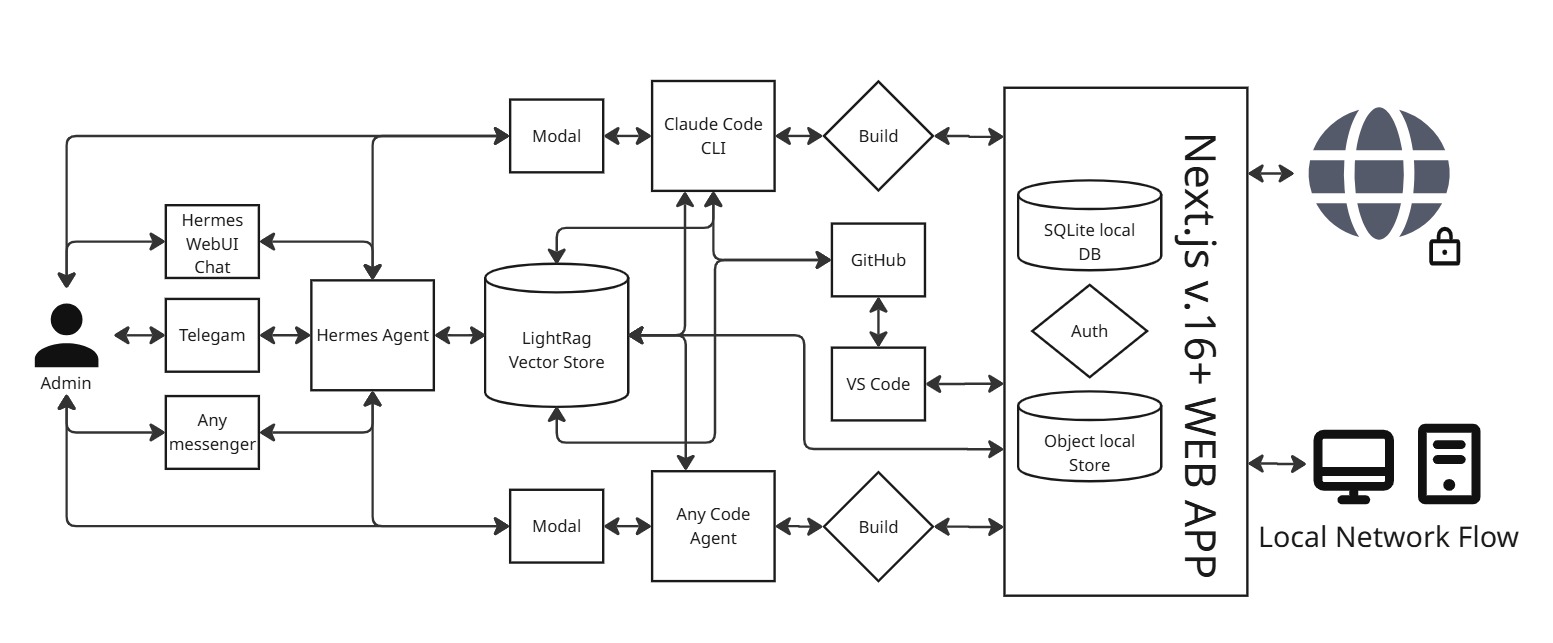
This self-hosted, open-source web application provides a browser-based workspace to run multiple AI coding agents (like Claude Code and Gemini CLI) in parallel. It includes built-in authentication, database management, and local S3 storage so developers can keep their code and data on their own private servers.
Security Assessment
The overall risk is rated as Medium. The project does not request dangerous system permissions and no hardcoded secrets were found. However, the automated scan flagged several areas requiring attention. Client-side components make outbound network requests, which is expected for an application communicating with external AI APIs, but developers should verify these connections are secure. Environment variables are accessed directly in the frontend code, meaning you must be careful not to expose sensitive API keys or credentials. As a tool that executes AI agents, it inherently involves shell interactions, so proper configuration of the self-hosted environment is critical to prevent unauthorized access.
Quality Assessment
The project appears to be actively maintained, with its last code push occurring today. The README mentions an MIT license, though the automated scanner failed to detect a formal license file in the repository, which is a minor administrative concern. The biggest drawback is its extremely low community visibility; having only 5 GitHub stars means the codebase has not undergone broad peer review, making it difficult to gauge real-world reliability and trust.
Verdict
Use with caution — the tool offers promising functionality for private AI development, but its lack of community oversight and client-side environment variable handling require you to perform a manual code review before exposing it to sensitive projects.
Deploys your OS, databases, and SSL on your VPS in just 10 minutes. Orchestrates a team of AI agents for coding, marketing, and sales. The built-in optimizer saves up to 90% on token costs, letting you build and manage your online business directly through chat. Fully open-source.
Fractera: Agent Engineering Infrastructure
Stop vibe coding. Start engineering. Fractera delivers a production-grade multi-agent development environment that configures itself on your own hardware. Automatically deploy a 50,000-line Next.js enterprise boilerplate (or any Git repo) to your private VPS in 10 minutes — leveraging a fundamentally new, deterministic MCP-First architecture built to eliminate context window inflation at scale.

ENGINEERED TO SLASH TOKEN COSTS BY 















The DevOps Barrier is Over. Break Free From Cloud Lock-In.
Building custom software shouldn't mean surrendering your profit margins to third-party cloud ecosystems. Until now, creators and product managers were caught in a trap: either spend weeks manually configuration-wiring Nginx reverse proxies, issuing SSL certificates, routing production databases, and managing server ports—or submit to the vendor lock-in of platforms like Vercel, Supabase, and Clerk whose metered API fees scale aggressively with user traffic. Miss a single payment cycle or fall victim to a sudden price hike, and your live application vanishes.
Fractera completely dissolves this friction by operating as an automated self-hosted alternative to Vercel designed explicitly for industrial agent engineering. You feed it a bare Ubuntu 24.04 virtual environment, and our robotic installer takes over the entire deployment process.
In under 10 minutes, Fractera provisions a private, secure substrate from the metal up: custom Nginx routing, automated HTTPS certificates, multi-tenant role-based authentication, a low-latency database layer, and local object media storage—all pre-wired to an on-server multi-agent development environment. Your code, your data ownership, and your execution context stay completely isolated on your own server. No middleman, no volatile cloud subscriptions, and absolute infrastructure sovereignty.
"Fractera finally turns deployment from a costly DevOps bottleneck into a 10-minute automated utility. I own the machine, I own the agents, and my operational costs are flat."
Any Framework, Any Git Repo — One-Click Agent Substrate
Fractera treats the cloud host not as static storage, but as an active execution field for agent engineering. You are never locked into a single frontend environment. Bring any framework or any public Git repository, and our deployment automation instantly builds a secure, self-configuring infrastructure around it.
The moment your repository lands on the private VPS, Fractera injects our unified core layers: an isolated write-ahead logging database, a local media processing node, multi-role enterprise authentication, and direct browser terminal connectivity to our full multi-agent development environment (five specialized code-generation engines coordinated by the Hermes orchestrator). One click, absolute deployment autonomy, running completely cloud-free on your own metal.
Today, the Next.js Aircraft Carrier starter deploys end-to-end. The remaining optimized structural frameworks are arriving on a rolling development schedule—each new production-grade blueprint is announced in our official Platform News hub as it drops live.
 Fractera Pro |
 Next.js |
 React |
 Vue |
 Angular |
 SvelteKit |
 Nuxt |
 Astro |
 Remix |
 Gatsby |
 SolidStart |
 Qwik |
 React Router |
 TanStack Start |
 Hugo |
 Jekyll |
 Eleventy |
 Vite |
 Ember |
 Redwood |
 Express |
 NestJS |
 Fastify |
Hono |
 Django |
 Flask |
 FastAPI |
Reflex |
 Laravel |
 Symfony |
 Rails |
 Phoenix |
 Spring |
 .NET |
The Next.js Aircraft Carrier — 50,000 Lines of Pre-Built Code
Most traditional scaffolding tools provide empty, "Hello World" skeletons. Fractera reverses this by landing a massive, production-grade Next.js enterprise boilerplate on your server the second deployment wraps up. Approximately 50,000 lines of highly optimized, industrial-grade code patterns—fully integrated with multi-language i18n routing, static production SEO trees, a low-latency SQLite WAL-mode engine, and NextAuth v5 session state management—ship completely written, typed, compiled, and verified.
This sprawling, rock-solid layout serves as an infrastructure shield specifically engineered to prevent AI context window inflation. When you use unconstrained coding tools, they spend thousands of cents constantly scanning your workspace files, re-parsing architecture dependencies, and trying to re-invent basic system components.
With Fractera, 99% of your base web architecture is static and immutable under the hood. Your agent never has to process or guess the layout history; it simply hooks into pinpoint business logic lines. This turns the 50,000 pre-engineered codebase lines into a defensive barrier for your wallet, establishing a true zero-token overhead framework loop.
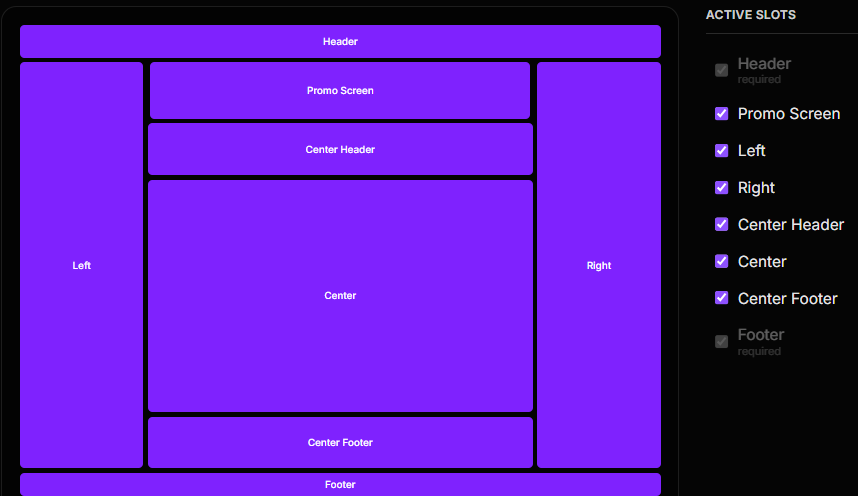
Next.js Parallel Routing & On-Demand ISR for Infinite Scale
Our advanced parallel routing matrix functions as the primary structural rail for your agent-engineered frontend applications. Within a single, unified URL context, your AI models can independently target, swap, and compose multiple dynamic slots—such as sliding right-side dashboards, persistent navigation menus, conditional promotional screens, or center modal flows—updating the view instantly without triggering a heavy window reload or wiping out application client state.
This structural fragmentation acts as a security runtime isolation sandbox: if a single slot component fails or throws a compilation error, the remaining active panels remain unaffected and active.
Combined with Next.js on-demand ISR (Incremental Static Regeneration), this setup lets a single application chassis scale to tens of thousands of static, lightning-fast pages without increasing background resource usage or causing conversational memory blowouts. The agents don't refactor code; they simply interact with an immutable design token network.
Read the full technical blueprint on the Next.js Enterprise Boilerplate page.
Deterministic Assembly via the MCP-First Paradigm

Standard "vibe coding" relies on a highly volatile, unconstrained cycle: you ask an AI model to modify a user interface section, and it launches an exhaustive generative loop. It recursively parses directory trees, re-reads file systems, and manually rewrites entire frontend components line-by-line. This uncontrolled file access is the primary vector for catastrophic context window inflation and compounding API bill spikes.
Fractera shifts the entire layout assembly away from fragile, ad-hoc code-generation toward a deterministic agent engineering model by treating your web application architecture like a Rubik's Cube.
The underlying platform serves as an immutable, optimized matrix of pre-engineered facets. The AI models don't write new layout scaffolding or style modules from scratch to build a visual state; they simply rotate and combine structural primitives that already exist safely on your server disk.
Atomic MCP Commands over File System Manipulation
Instead of running heavy, unconstrained file-writing agents that rapidly drain your development tokens, Fractera drives your workflow through an integrated Model Context Protocol (MCP server architecture web layouts) controller. Governed by Hermes orchestration, natural language intents are instantly translated into atomic, low-overhead MCP tool executions.
When you modify page layouts, toggle components, or adjust typography parameters within your chat session, the AI never rewrites your actual framework source files. It passes pinpoint parameters to rotate the architectural cube, triggering lightning-fast Next.js static path updates behind the scenes.
By completely bypassing heavy code-generation loops, Fractera drives development token consumption to absolute zero while preserving 100% layout compilation stability across thousands of dynamic pages.
Deep dive into AI Token Cost Optimization architecture.
Full breakdown on the Token Economics page.
Fractera Design System: Zero-Agent On-Demand Rendering

Visual styling and layout orchestration are traditionally the most expensive phases of AI web development. Standard workflows force a generative model to recursively crawl directory trees and rewrite heavy Tailwind layouts or CSS modules file-by-file, which destroys your context window within minutes.
The Fractera Design System completely decouples visual assembly from the code-generation budget. It operates as an optimization and abstraction layer built directly into our global scalable web application architecture. Want to apply a new typography rule, inject a streaming background, or hot-swap an active layout slot? You don’t run a brittle file-writing agent—you simply pass an architectural token instruction via our custom MCP server.
Multi-Page Synchronization via On-Demand ISR
This structural abstraction unlocks peak next js on demand isr performance at an institutional scale. When a layout or theme adjustment is requested inside your chat session, our server immediately converts that intent into a lightweight design token modification rather than raw code mutations.
Instead of waiting for an AI agent to compile code and trigger a heavy, multi-minute CI/CD pipeline build, the platform instantly triggers a targeted Next.js static path cache revalidation using revalidatePath and revalidateTag.
The structural modification propagates across a single route, selected layout slots, or tens of thousands of static pages simultaneously in less than 50 milliseconds. You achieve absolute, granular frontend layout control over 99.9% of production scenarios with zero code generation overhead and near-zero API consumption. It is the definitive framework for high-speed, cost-effective mcp first ai development.
Quick start — two ways
1. Website (zero terminal)
Enter your VPS credentials. Watch it deploy. Done in ~10 minutes.

2. MCP connector (from your AI chat)
Add to Claude, Cursor, or any MCP-compatible client:
{
  "mcpServers": {
    "fractera": {
      "url": "https://www.fractera.ai/api/mcp"
    }
  }
}
Tell your agent: "Deploy Fractera on my server at IP x.x.x.x" — provide credentials when asked.
The agent runs the full deployment and reports back when your workspace is live.
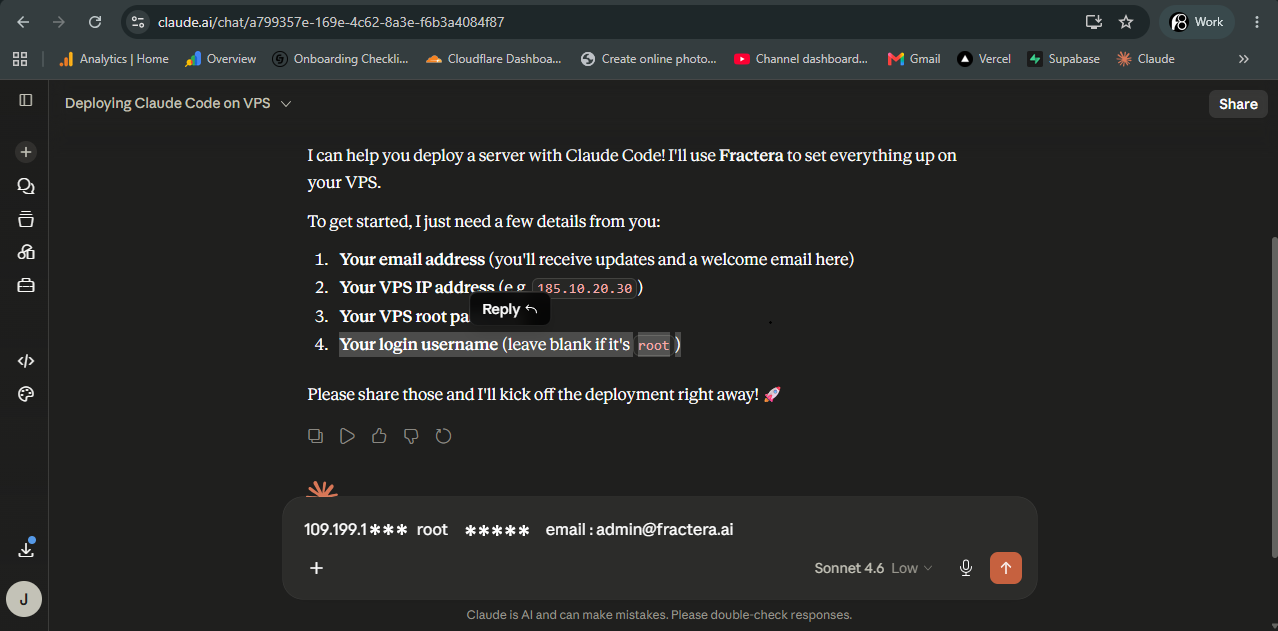
MCP connector: https://www.fractera.ai/api/mcp · Open, no auth
What You Land In — Your Private Industrial Engineering Cockpit
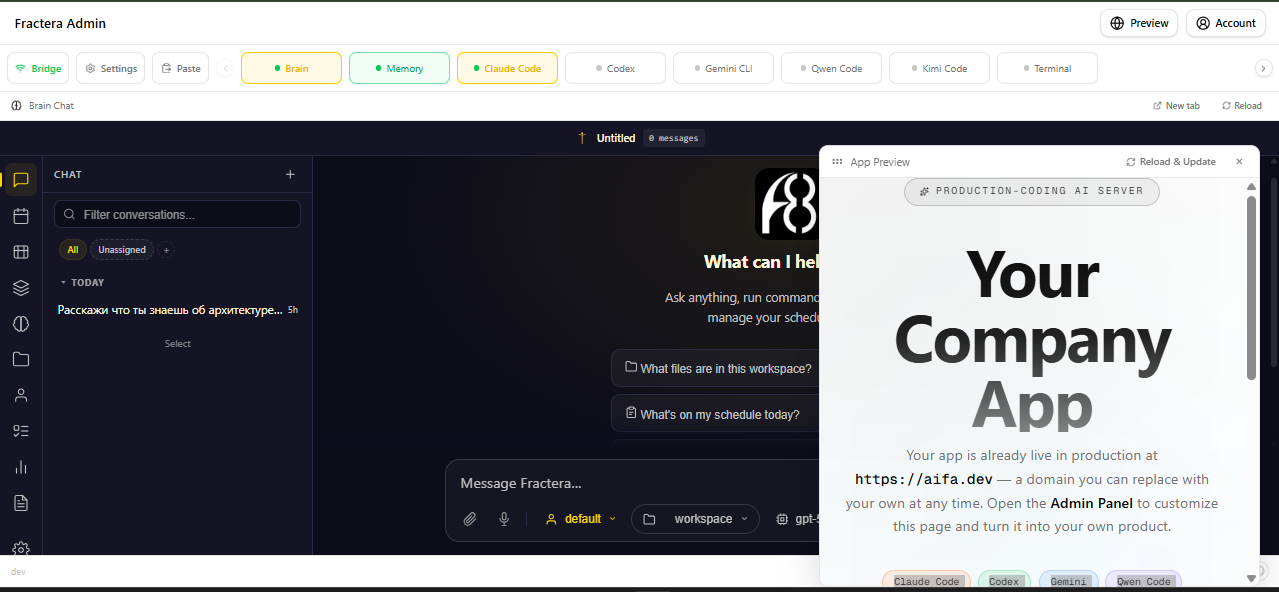
The millisecond our 10-minute automated installer completes its routine, your virtual private infrastructure transitions into a unified, hardened cockpit. This is a complete, self-hosted web development environment engineered to bind multi-agent logic, state-tracking, and codebase assets under one local structural context:
- The Sovereign Command Post (Hermes Chat UI): You interface directly with a browser-native workspace terminal governed by the Hermes Orchestrator. Activating Hermes boots your dedicated LightRAG Graph Memory layer. By automatically profiling your repository's technical constraints, framework rules, and design system states directly into the graph network, Fractera grounds every subsequent model prompt—permanently eliminating session context drift and conversational amnesia.
- The Unified Multi-Agent Control Room: The top cockpit matrix maps low-latency browser PTY (Pseudo-Teletype) nodes for all five AI coding platforms (Claude Code, OpenAI Codex, Gemini CLI, Qwen Code, and Kimi Code). These execution blocks run concurrently using your existing developer accounts and vendor subscriptions. They execute complex file changes, massive structural refactoring, and command-line diagnostics locally without routing your logic through third-party telemetry proxies or volatile pay-per-token middleware.
- The Dynamic Assembly Deck (Live Preview & Visual Debugger): A split-screen environment integrates your live production frontend. Operating through an absolute mcp first ai development loop, you can click any component on your live staging view to capture its exact layout token or DOM identifier. This coordinate is instantly piped back into Hermes, translating raw human feedback into a clean, deterministic agent engineering instruction while bypassing heavy, unconstrained code rewrites.
- Self-Extending Open-Code Architecture: Because the entirety of Fractera is source-available (Open Code) under the PolyForm Small Business license — free for individuals and small businesses, with a separate commercial license for larger companies — your orchestrated agent layers can recursively inspect, parse, and safely modify Fractera's own infrastructure code—including this administrative panel itself. It is a completely autonomous, self-improving engineering loop built for product developers who demand absolute ownership of their technical assets. Pull requests are always welcome.
Explore the deep subsystem schematics on the AI Workspace Architecture page.
Production-Grade Agent Engineering + Local IDE: The Hybrid Pipeline
Fractera is not built to trap you or your models inside a restrictive, remote browser-only terminal. If you prefer writing code and testing structural modifications on your local machine, our platform functions flawlessly as a decentralized, self-hosted alternative to Vercel for your active production runtimes:
- Initialize the Infrastructure Bridge: Connect your live Fractera production environment directly to a secure, private GitHub repository and push your core application patterns.
- Zero-Friction Local Workspace: Clone the repository locally. Program inside your native, customized IDE (VS Code, Cursor, Zed) utilizing your standard hot-reload frameworks—zero developer habits changed.
- Commit the Architectural Increments: Push your verified agent modifications, new features, or business logic updates back to your decentralized GitHub origin when ready to ship.
- Instant Production Revalidation: Open your Fractera cockpit, pull the updated repository branch in a single click, and trigger the compilation sequence.
Your software mutations propagate live to your public production endpoint in minutes. GitHub functions as a clean, secure version-controlled bridge between your low-level local machine and your hardened, remote private VPS.
Best of all, your local runtime engineering environment can pipe data queries straight into the isolated SQLite database and media storage buckets already active on your remote host. This completely removes the need for separate cloud data proxies, subscription bills, or third-party telemetry tracking hooks.
Web Application Infrastructure: What is Included
| Component | Architecture & Technical Specification |
|---|---|
| Next.js Enterprise Boilerplate | Pre-built 50,000-line immutable framework. Features 13 isolated parallel-routing slots configured with Next.js stable cacheLife states, production SEO trees, static metadata trees, and the native Fractera Design System abstraction layer—ready to serve traffic the moment your server installation finishes. |
| 5 AI Coding Engines | Claude Code, OpenAI Codex, Gemini CLI, Qwen Code, and Kimi Code initialized in parallel web PTY container nodes. Runs inside your existing developer accounts and subscriptions with zero external proxy overhead or local key management requirements. |
| Hermes Orchestrator | High-speed, multi-model execution and orchestration engine. Functions as an isolated context manager, mapping natural-language user intent into atomic design token states and clearing processing history files automatically after each cycle. |
| Built-in Workspace Chat | Your primary remote command post interface. Connects directly to the Hermes core runtime, automatically exposing an authenticated, secure chat.<your-domain> subdomain with custom session state isolation whenever a personal domain is attached. |
| LightRAG Graph Memory | Private, graph-based vector retrieval-augmented generation (RAG) knowledge engine shared across all 5 engines. Profiles repository dependencies, code rules, and architecture constraints to permanently prevent AI context window inflation. |
| Enterprise Authentication Stack | Out-of-the-box multi-role session configuration (NextAuth v5). Includes Google OAuth hooks, cryptographically secure magic-link tokens, traditional credentials access, and multi-tenant operational security control matrices. |
| Local SQLite Runtime Database | High-performance, isolated SQLite layout initialized with write-ahead logging (WAL mode) enabled. Delivers zero-cloud bill persistence, absolute local data sovereignty, and flat operational overhead directly on your server disk. |
| S3-Compatible Local Storage | Integrated object storage block and media processing pipeline node. Serves assets, code templates, and system documents locally without third-party S3 bucket subscription fees, transfer tolls, or privacy compromises. |
| Telegram Gateway Hub (Optional) | Secure secure webhook channel to interface with the Hermes orchestrator core directly from your mobile device via a private bot API token. |
| Automated Custom Domain & SSL | One-click reverse-proxy and Nginx routing automation. Automatically provisions custom domain mappings, handles DNS binding parameters, and manages automated Let's Encrypt SSL certificate generation cycles. |
| Upstream Git-Ops Integration | Native GitHub authentication and lifecycle workflow managed straight from your cockpit panel. Triggers code pulls, branch pushes, and automated production builds without manual SSH identity configurations. |
| Immutable Self-Updates | Automated, one-click platform sync layer. Fetches upstream platform core updates directly from the official Fractera repository without requiring manual bash terminal intervention. |
Autonomous Engineering: The Pinpoint Development Loop
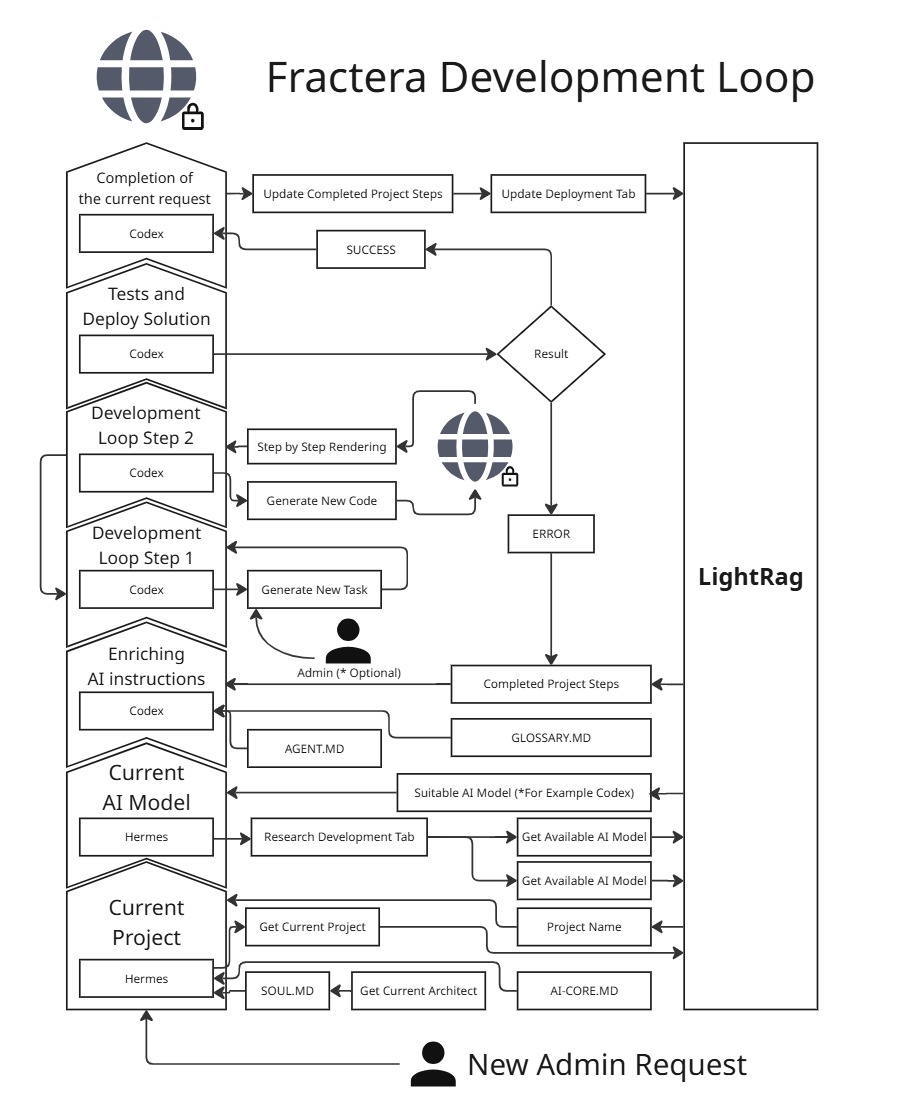
One natural-language request is parsed into tested, compiled, and deployed software mutations without a human developer writing a single line of boilerplate. Fractera replaces chaotic, unconstrained loops with a rigorous pipeline optimized for high-velocity, cost-effective agent engineering:
- Orchestration: Hermes acts as the high-speed task manager, breaking down your broad product intent into atomic execution specifications and routing them to specialized assets.
- Execution: A browser-isolated terminal engine processes the code mutations using your existing accounts, forcing strict deterministic agent engineering patterns and eliminating open-ended filesystem mutations.
- Grounding: LightRAG graph memory captures real-time logs, compilation states, and slot layout tests at every single pass of the system.
Because each loop iteration updates your private knowledge graph instead of inflating your active chat history, the entire cycle operates as a zero-token overhead AI framework. Every subsequent execution pass starts smarter, faster, and cheaper than the last, entirely under your control.
See the complete step-by-step cycle breakdown on the AI Development Loop page.
Architecture
┌──────────────────────────────────────────────────────────┐
│                    Fractera Workspace                     │
│                                                          │
│  fractera-app              :3000  Shell (Next.js)         │
│  fractera-auth             :3001  Auth (NextAuth v5)      │
│  fractera-admin            :3002  Admin UI (bridges/app)  │
│  fractera-bridge           :3200–3206  AI platform PTYs  │
│  fractera-data             :3300  Media + SQLite          │
│  fractera-rag              :9621  LightRAG memory         │
│  fractera-hermes           :9119  Hermes dashboard        │
│  fractera-hermes-gateway   —      Telegram/messaging      │
└──────────────────────────────────────────────────────────┘
Tech stack: Next.js 16.2 · React 19 · Tailwind v4 · shadcn/ui · SQLite · NextAuth v5 · Node.js · PM2
Real-world use cases
Private team workspace — editors collaborate on content planning in a secure authenticated environment, nothing exposed publicly.
Lead dispatch Kanban — inbound emails from a website form auto-create Kanban cards, routed to field engineers by proximity to minimize travel costs.
Adaptive AI tutor — child completes coding challenges on a public page; parent sees results in a private dashboard and adjusts lessons via Telegram.
Autonomous content loop — agent monitors Telegram channels for trending topics, enriches them via web search, publishes to a blog, and reports traffic stats back to Telegram.
⭐ Star this repo
If Fractera saves you from writing another Nginx config — a star makes a real difference. It helps other developers find the project.
FAQ
Why does Hermes drive cost-effective agent engineering rather than increase overhead?
There is a widespread belief that an orchestration layer like Hermes is wasteful—that it is better to talk directly to a coding model and skip the middleman. We disagree completely.
The real cost driver in AI-assisted development is not the number of requests—it is context window inflation. Every message in a direct, unmanaged coding session appends to the running context. After two or three hours on a typical project, the context window carries the full transcript of the session. Because every new message pays for everything before it, API costs grow exponentially. Real-world data shows a standard Claude Code session on a mid-size project in hour three costs five to ten times what it cost in the first fifteen minutes. When you fail to manage the context window yourself, that cost compounds rapidly.
Hermes is the external infrastructure observer that prevents this. It runs on inexpensive models (like gpt-5-mini or qwen-turbo) that cost a fraction of frontier coding models. These orchestration models do not need complex multi-line reasoning; they read a spec, extract what matters, execute an atomic MCP task, and immediately clear the processing context before the next call.
What Hermes handles specifically within our agent engineering infrastructure:
- Eliminates Session Amnesia: Without persistent memory, every new session spends the first 10–30% of its tokens re-reading the project from scratch. By accessing the LightRAG knowledge graph, Hermes ensures the coding prompt is laser-focused from word one.
- Generates Precise Task Specifications: Instead of passing a vague "build a dashboard" instruction, Hermes profiles LightRAG and generates an explicit architectural directive: "In
app/dashboard/page.tsx, add a component using the Card pattern fromcomponents/ui/card.tsx, following the auth pattern fromlib/auth.ts." This eliminates several back-and-forth exploratory loops. - Instant Context Clearing: The moment an execution block completes, Hermes purges the coding engine's context history. The next engineering task starts clean, unburdened by past conversation logs.
- Intelligent Model Routing: Simple tasks (file moving, documentation edits, refactoring) are routed to cheap or free local engines. Heavy architectural decisions are handed to frontier models. You only pay frontier prices for frontier work.
- Anti-Pattern Tracking: Hermes records what has worked in your workspace and what has caused compilation errors, preventing coding models from falling down the same dead ends twice.
This is the system-level approach that stops redundant filesystem searches, prevents models from re-solving problems handled last week, and cuts out conversational overhead before it becomes expensive.
The same AI platforms—yet Fractera ensures a zero-token overhead framework. Why?
Regular "vibe coding" forces the AI to do all the heavy lifting simultaneously: design the architecture, write boilerplate, locate files, and recall past session choices. Every token wasted on infrastructure overhead is a token not spent on shipping your core feature.
Fractera removes this baggage through a pre-engineered asset ecosystem:
- Production-Ready Starters: Enterprise auth, local databases, file storage, and scalable routing slots deploy fully pre-configured. Your agents skip months of scaffolding and write feature logic from day one.
- Structural Blueprints over Raw Code: Because the 50,000-line Next.js chassis acts like an optimized Rubik's Cube, models do not reinvent structural patterns. They follow the rigid, token-efficient patterns already baked into the template.
- Component Highlighting: Click any UI element on your live site to capture its exact identifier token. No API budget is wasted asking "where is this navbar source file?".
- LightRAG Coordination: All five execution platforms share the same persistent vector memory graph, allowing you to switch from Claude Code to Gemini CLI without losing the thread.
Tasks that typically require 10–20 back-and-forth messages in a vanilla chat window resolve in 2–3 focused exchanges inside Fractera.
How does Fractera keep your project stable?
The temporary illusion of "free cloud tiers" looks great on day one: Clerk for auth, Supabase for databases, and miscellaneous SaaS hosting APIs. Then, vendor pricing tiers quietly update, or user traffic scales up. If you miss a single subscription bill, your entire live business application goes dark without a grace period.
Fractera consolidates everything inside a private, resilient substrate on your own host:
- One Server, Flat Bill: Your infrastructure expenses do not scale with your user traffic.
- Data Sovereignty: If you pause your active development, your databases do not vanish. Create an immutable environment snapshot, download the archive, and restore it when ready.
- Git-Ops Isolation: Your code assets reside on GitHub. Recovery is always a git-pull away, even if packages age.
- Built-in Agent Monitoring: Special service pages visualize agent calls and execution logs. If a dependency deprecates, you can run evolutionary tests to train and reinforce your agents to fix the layout safely.
Do I pay per token for the AI, or use my own subscription?
You use your own existing subscriptions—that is the core principle of our multi-agent architecture. The five main coding engines (Claude Code, OpenAI Codex, Gemini CLI, Qwen Code, and Kimi Code) run directly on your existing developer accounts like a local CLI wrapper. There are no surprise metered API bills here.
The only per-token cost is minimal and auxiliary: the Hermes Orchestrator and LightRAG Memory require a single OpenAI API key. Running an inexpensive model like gpt-5-mini costs roughly a cent per operational hour, and if your multi-agent workloads grow heavy, you can swap it to a flat Codex subscription instead.
- Coding Engines: Driven via your standard developer subscriptions; zero token markups.
- Orchestration + Graph Memory: Governed via one cheap OpenAI API key (~1¢/hour).
What server specs do I need?
For active multi-agent engineering workloads, we recommend a minimum of 6 cores / 8 GB RAM with a baseline of 75 GB storage.
Once your heavy application development wrap-up is complete and the product is running in pure production, you can scale down your VPS host to 2 cores / 4 GB RAM—typically costing a flat €2–4 per month.
Can I combine local development with Fractera?
Yes. For developers who want to keep working inside their native IDE (VS Code, Cursor, Zed) with local hot-reloading, the hybrid pipeline is the standard choice:
- Configure your Fractera host workspace and connect it directly to your private GitHub repository.
- Pull the codebase down to your local machine and develop features exactly how you always have.
- Push your verified changes back to your GitHub repository origin.
- Open your Fractera admin panel, click pull, and hit Deploy.
Your updates compile and propagate live to your production URL in minutes. Your private server effectively becomes an Open Code alternative to Vercel, while your local machine hooks straight into the persistent SQLite database and media buckets hosted on your VPS.
Can I bring my existing project into Fractera?
Yes. Connect your public or private GitHub repository to your Fractera workspace interface. Our built-in agent assistants will instantly profile your repository code, guide you through any necessary migration steps, and set up your local infrastructure scaffolding automatically.
Can I deploy a finished project to Vercel instead?
Yes. Once your application architecture is fully baked and no longer requires active multi-agent engineering, you can export your codebase to Vercel.
Keep in mind that doing so means leaving the Fractera environment behind—the browser-native PTY terminals, LightRAG graph memory, and Hermes context clearing layer only exist on your own server hardware. Moving to the public cloud also exposes you to traffic-metered bandwidth and hosting bills.
Can I deploy a project without AI?
Yes. You can disable the agent layers during deployment and provision a plain server substrate. Experienced software developers frequently choose this path to instantly offload cloud DevOps overhead, automate Nginx/SSL tasks, and secure an isolated database and asset storage layer with zero external platform dependencies.
Do I need a Claude Code subscription to deploy via the MCP connector?
No. If the Fractera connector is your only active custom Model Context Protocol tool, you can interface with our API on Anthropic's free tier.
If you use multiple custom tools simultaneously, you will need a standard Claude Pro or Team account (~$20/month) to run multiple MCP servers concurrently within their chat interface. This billing is handled strictly by Anthropic; Fractera's core software is always free and source-available (Open Code).
Step by step — what does the full path from buying a server to shipping a product look like?
- Provision Infrastructure: Secure an empty Ubuntu 24.04 VPS (Contabo recommended) and gather your root credentials.
- Launch Installer: Feed the server details into our website interface or activate our open MCP connector directly inside your AI chat (
https://www.fractera.ai/api/mcp). Our robotic system configures the host and sends start/completion emails. - Claim the Workspace: Open the admin panel link sent to your inbox. The first email to register becomes the Master Architect.
- Bind the Domain: Input your custom domain inside Settings, point your DNS A-records at the server IP, and Fractera will automatically provision Let's Encrypt SSL certificates.
- Authorize Engines: Log into your personal developer accounts inside the browser-native PTY terminals to wake up the 5 coding platforms.
- Initialize Memory: Brief the Hermes orchestrator via the workspace chat UI or route voice commands from your phone using our private Telegram bot gateway.
- Deploy Software Mutations: Issue a macro instruction (e.g., "Direct Claude Code to optimize the analytics slot and have Codex bind it to the WAL database").
- Ingest Documentation: Upload your feature specs, project briefs, or business constraints into the LightRAG Company Brain to update the system knowledge graph.
- Instant Production Sync: Your web site updates automatically after each verified engineering cycle with zero manual CI/CD pipelines to configure.
Regional FAQ
🇷🇺 Russia — compliance and sovereigntyDoes Fractera comply with Russian data residency requirements (152-ФЗ)?
Yes. The entire production runtime—including your users' personal data, authentication profiles, write-ahead logging database tables, and media assets—resides exclusively on your designated host disk. By selecting a local server provider (such as Timeweb Cloud or RuVDS), your production environment achieves absolute data sovereignty under Russian jurisdiction. Fractera provides the underlying compliant substrate; your final processing compliance depends on your system design.
The primary coding CLIs are external. Does this conflict with local import substitution laws?
No. The AI coding platforms (Claude Code, Gemini CLI, etc.) function purely as local development assets within your private administrative cockpit. They are completely isolated from your public users' processing logic. If total sovereign execution is an absolute project requirement, you can selectively toggle off Western platforms and run your workspace exclusively through Qwen Code (Alibaba) and Kimi Code (Moonshot), which operate outside Western data restrictions.
How exactly does the platform reduce API token consumption?
The bulk of your savings stems from the LightRAG knowledge graph layer. By creating an indexed map of your code patterns and technical decisions, it feeds highly targeted context vectors to the models. This stops agents from wasting tokens parsing your entire repo directory tree to handle basic modifications. Coordinated by Hermes orchestration and atomic MCP tools, 15-message exploratory loops are reduced to 2 simple, predictable token transactions.
Roadmap & vision: The Product Loop
When you launch an enterprise for the first time, every step introduces volatile unknowns: business registration, corporate banking structures, traffic distribution pipelines, customer support flows, and unit economics optimization. AI agents can help navigate each phase, but they typically operate in an ephemeral vacuum—proposing independent choices that either conserve capital or waste it.
Until now, this invaluable end-to-end entrepreneurial context lived exclusively inside a founder's mind. Fractera is built to digitize this execution sequence.
The same underlying agents that analyze your code, ingest your meeting audio, and process your financial models can organize your operational journey into a living, conditional knowledge base. Not a flat checklist, but an executable decision map that can be refactored, optimized, and adapted across different business markets.
We call this the product loop—and it is the core infrastructure we are engineering next.
Do you have a partner program?
Yes. Fractera uses a decentralized, provider-agnostic referral architecture. You advocate for Fractera deployments on your blog, channel, or engineering stream, and your audience secures a VPS from any hosting provider hosting an affiliate program (Hetzner, Hostinger, DigitalOcean, Contabo).
You plug your affiliate tracking tokens directly into your partner cabinet, and the hosting providers pay your commissions straight to your account. Fractera is never in the middle of your revenue pipeline.
→ Partners page · Questions: [email protected]
Regional partnerships — we are looking for co-founders, not resellers
Fractera is an infrastructure substrate, and deep architecture is only as dependable as the regional support network surrounding it. We are actively auditing official regional partners to co-launch localized nodes of the platform: tailored to native data residency regulations, delivered in local languages, and managed by engineers who understand their territory's unique market constraints.
This is a co-venture model, not a standard franchise. A regional partnership grants you full ownership of your branded product layout, user directory, and localized revenue streams, built on top of our production-ready, Open Code repository core. We handle the system engineering substrate; you secure market trust, localized documentation, and enterprise client relations.
If you operate in a jurisdiction with strict corporate compliance requirements, or where developers demand dedicated local technical assistance, let's build the localized future of agent engineering together.
→ Regional Partners · [email protected]
License — Open Code (source-available)
Fractera's core (this repository) is Open Code: the full source is public — read it, fork it, modify it, self-host it — under the PolyForm Small Business License 1.0.0.
- Free for individuals and small businesses (fewer than 100 people and under 1,000,000 USD annual revenue).
- Larger companies need a separate commercial license — contact [email protected].
Open Code is source-available, not OSI "open source": everything stays open to read and build on, with a single boundary — large corporations license commercial use. The starters (e.g. fractera-next-starter) remain MIT.
Links
- Website & deploy: fractera.ai
- Knowledge base for AI agents: fractera.ai/mcp-info
- MCP connector:
https://www.fractera.ai/api/mcp - Contact: [email protected]
Built for developers who are done thinking about deployment.
Reviews (0)
Sign in to leave a review.
Leave a reviewNo results found