nano-banana-mcp
Health Warn
- License — License: Apache-2.0
- Description — Repository has a description
- Active repo — Last push 0 days ago
- Low visibility — Only 6 GitHub stars
Code Fail
- network request — Outbound network request in scripts/doctor.mjs
- exec() — Shell command execution in scripts/launch-chrome.mjs
- process.env — Environment variable access in scripts/launch-chrome.mjs
- exec() — Shell command execution in src/browser.ts
- network request — Outbound network request in src/browser.ts
- os.homedir — User home directory access in src/config.ts
- process.env — Environment variable access in src/config.ts
Permissions Pass
- Permissions — No dangerous permissions requested
No AI report is available for this listing yet.
Free AI image generation MCP server — no API key, no billing. Nano Banana via Google Flow with your own Google account. Exact pixel sizes, reference images, $0 per image.

nano-banana-mcp
Free AI image generation for Claude and any MCP client.
No API key. No billing account. No per-image cost. Just the Google account you already have.





English · Leer en español
generate_image(prompt: "an orange fox on a white background", size: "1200x630")
-> images/an-orange-fox-on-a-white-background.jpg   1200x630   0 credits
Every image in this README was generated by this server. The banner above, the crops below, and the
logo renders further down. Nothing was touched up by hand.
Why this one is different
Every other image MCP server bills you. You register for an API key, attach a credit card, and pay per image —
a few cents each, which quietly becomes real money once a model is iterating on a design and throwing away nine
attempts out of ten.
This one doesn't, because it isn't calling a paid API at all. It drives Nano Banana, the image model inside
Google Flow, through the web app you already have access to. Flow charges
credits for video. Images cost zero.
| API-based image MCPs | nano-banana-mcp | |
|---|---|---|
| API key | Required | None |
| Billing account | Required | None |
| Cost per image | Cents each, and it adds up | $0.00 |
| Setup | Register, key, billing, secret | Sign into Google in a Chrome window |
| Exact pixel sizes | Rarely | Yes |
| Reference images | Sometimes | Yes |
The trade-off is honest and worth stating: it needs a real Chrome window that you are signed into, so it can't
run headless or in CI. That's the price of not having a bill.
What it solves
Flow generates in five fixed aspect ratios: 16:9, 4:3, 1:1, 3:4 and 9:16. Real design work almost never lands on one
of them — an Open Graph card is 1200×630, a repo banner is 1456×180, an avatar is 400×400.
This server generates at the closest native ratio and crops to the exact size, using saliency detection so the crop
doesn't decapitate your subject. Ask for 1200x630, get a 1200×630 file.
What "exact size" does and doesn't mean. The model is not generating at your dimensions — Flow always returns
its own native resolution, around 1 megapixel (1376×768 for 16:9, 1024×1024 for 1:1). The exact size is produced
here, locally, by cropping and scaling that result. The file you get really is 1200×630; the pixels in it came from
a 1376×768 render.That's a genuine convenience when you're going down from native, which covers most web work. Going up it
will still hand you the file you asked for — request 3000×3000 and you get 3000×3000 — but those extra pixels are
interpolated, not generated. There is no more detail in them. The server prints a warning when this happens; if you
need real resolution beyond native, upscale deliberately with a tool built for it.
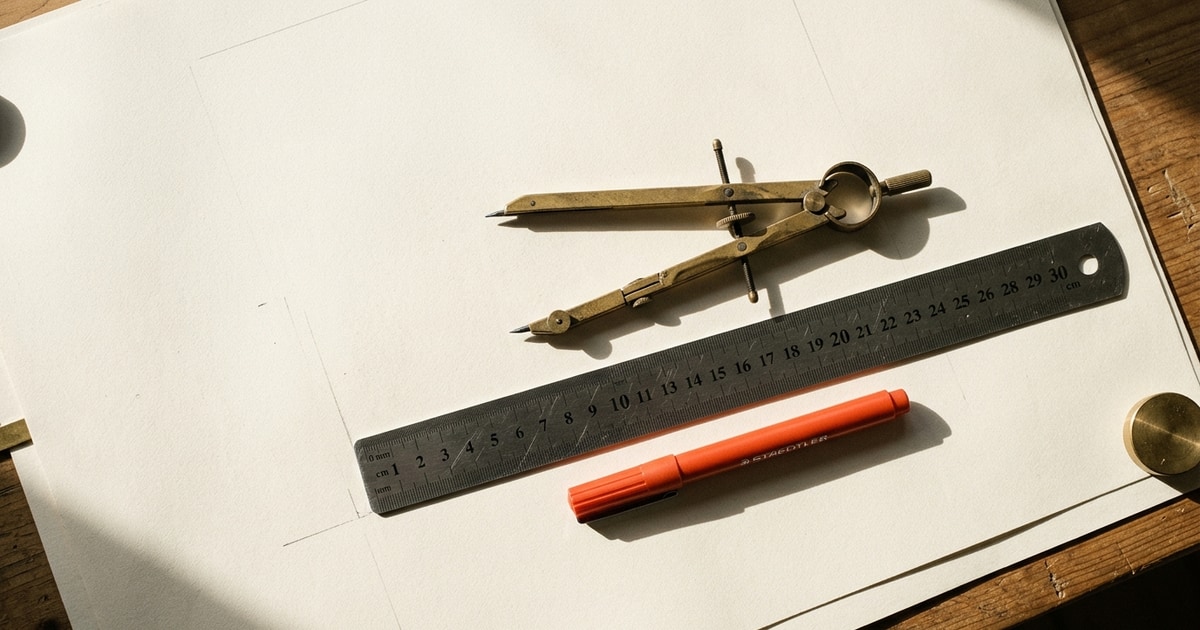
One generation, three sizes. Same source image, cropped three ways — note how the crop follows the subject
instead of blindly taking the centre:
1200x630 — Open Graph |
400x400 — avatar |
|---|---|
 |
 |
1456x180 — repo banner

Reference images
Give it an image and the prompt stops describing what to create and starts describing what to change. Feed it a
flat logo and ask for it letterpressed into cotton paper, or cast as a matte signage object:
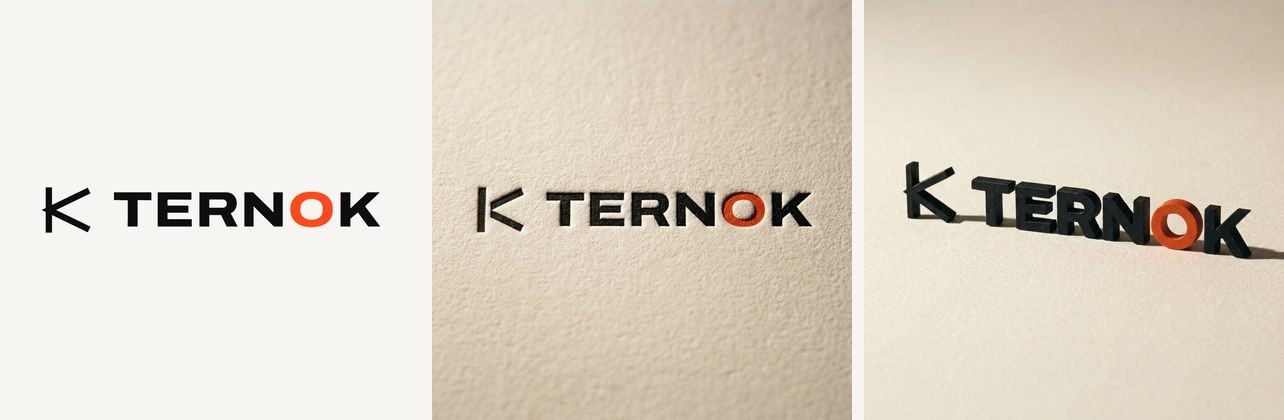
Left: the source vector, handed in as a reference. Centre and right: two generations from it, four variants each,
0 credits, about a minute per batch.
generate_image({
  prompt: "this logo letterpressed into thick warm off-white cotton paper, raking side light",
  reference_images: ["assets/logo.png"],
  count: 4
})

// iterating on the same reference? don't re-upload it
generate_image({
  prompt: "same, but with a deeper impression and visible paper tooth",
  reference_library_names: ["logo.png"],
  count: 4
})
Flow doesn't take a file straight into the composer: it uploads to the project library first, and you pick it from
there. Both steps are handled for you, including the confirm click that actually attaches it. Any reference left over
from a previous turn is cleared first — a forgotten one silently changes the image, and the result gets blamed on the
prompt.
How it works
Flow has no public API. Its internal generation call is signed with a reCAPTCHA Enterprise token minted by the page's
own JavaScript, so it cannot be replayed from outside the browser — and this project does not try to. That single
constraint shapes the whole design.
So it does what a person would do: type into the composer and press Enter. What's different is how it reads the result.
It intercepts the page's own network response instead of watching the library for something new to show up. That
response already carries the media id, the true dimensions and a signed URL, so there's no polling, no guessing which
thumbnail is yours, and no ambiguity when several generations are in flight. The only fragile part left is typing the
prompt.
One request, four responses. Ask for four variants and Flow doesn't return an array — it sends four separate HTTP
responses, staggered by a couple of seconds. Waiting for "the next response" quietly drops three of them and looks
exactly like an account limit. The collector listens to the whole stream and closes on whichever comes first: all
expected images, a 20-second silence, or the hard timeout. It never discards what already arrived.
UI anchors are Material Symbols ligature names (crop_16_9, image, add_2) and numeric labels (16:9, x4).
Those are identifiers, not translatable text, so it behaves the same whether the interface is in English, Spanish or
Japanese.
The cost gate closes before sending. The server reads the cost Flow itself computes in its settings panel and
aborts if it exceeds FLOW_MAX_COST, which defaults to 0. The refusal happens while refusing is still free. If the
number can't be read, it doesn't send either — it won't guess.
Requirements
- Node.js 20 or newer
- Google Chrome
- A Google account with access to Flow
That's the whole list. No API key, no cloud project, no billing account, no secret to rotate.
Install
git clone https://github.com/frannkurt/nano-banana-mcp.git
cd nano-banana-mcp
npm install
npm run build
Setup
1. Launch Chrome with remote debugging
Easiest — use the bundled launcher (persistent, dedicated profile so you sign in only once):
npm run chrome
It opens flow.google.com in a dedicated profile (<userData>/nano-banana-flow-profile) with the debug port on,
without touching your everyday Chrome. Sign in once; the session persists for next time.
Or do it by hand, with a profile separate from your everyday one.
Windows
"C:\Program Files\Google\Chrome\Application\chrome.exe" --remote-debugging-port=9222 --user-data-dir="%USERPROFILE%\.nano-banana-mcp\chrome" https://flow.google.com
macOS
"/Applications/Google Chrome.app/Contents/MacOS/Google Chrome" --remote-debugging-port=9222 --user-data-dir="$HOME/.nano-banana-mcp/chrome" https://flow.google.com
Linux
google-chrome --remote-debugging-port=9222 --user-data-dir="$HOME/.nano-banana-mcp/chrome" https://flow.google.com
2. Sign in and open a project
In that window, sign in with your Google account and open a Flow project. The URL must end up atflow.google.com/project/<id>.
Without an open project there is no composer, and without a composer nothing can be generated.
3. Register the server
In Claude Code:
claude mcp add nano-banana --env FLOW_CDP_URL=http://127.0.0.1:9222 --env FLOW_OUTPUT_DIR=./images -- node /path/to/nano-banana-mcp/dist/index.js
Or by hand, in your MCP client's config:
{
  "mcpServers": {
    "nano-banana": {
      "command": "node",
      "args": ["/path/to/nano-banana-mcp/dist/index.js"],
      "env": {
        "FLOW_CDP_URL": "http://127.0.0.1:9222",
        "FLOW_OUTPUT_DIR": "./images",
        "FLOW_MAX_COST": "0"
      }
    }
  }
}
4. Check it
node scripts/doctor.mjs
That checks the browser, session, project, composer and balance in order, and stops at the first thing that's
wrong with instructions for fixing it. Once it's clean, try a real generation:
node scripts/smoke.mjs "an orange fox on a white background" 1200x630
Tools
flow_status
Connection state: session, account, open project, credit balance. Start here when something fails.
generate_image
| Parameter | Type | Default | What it does |
|---|---|---|---|
prompt |
string | — | Image description, in any language |
size |
string | native | Exact output size, "WIDTHxHEIGHT", e.g. "1200x630" |
aspect |
16:9 4:3 1:1 3:4 9:16 |
derived from size |
Native ratio to generate at |
count |
1–4 | 1 | How many variants |
reference_images |
string[] | — | Local paths to use as references; uploaded and attached for you |
reference_library_names |
string[] | — | Files already in the project library, attached without re-uploading |
out_dir |
string | FLOW_OUTPUT_DIR |
Destination folder |
basename |
string | derived from prompt | Base filename |
format |
jpg png webp |
jpg |
Output format |
fit |
cover contain |
cover |
cover crops to fill, contain pads the edges |
background |
CSS color | #ffffff |
Padding color when fit is contain |
upscale |
2k 4k |
— | Ask Flow's own upscaler for real detail beyond native (see below) |
Returns the saved paths, each media id, and a thumbnail of every result — so the model can see what came out and
decide whether it's worth another try.
generate_batch
Generates several different prompts at once — one browser tab per prompt, up to 4 jobs, each with its own optionalsize, aspect and basename. Shared out_dir, format, fit and background.
Chrome freezes requestAnimationFrame in background tabs, so the UI can only be driven in the frontmost one. The tool
splits each job in two phases: the UI phase (settings + submit, a few seconds) runs one tab at a time, bringing each to
the front; the wait for Flow's answer — which is what actually takes time — runs in parallel for all of them. Two jobs
land in roughly the time of one and a half.
One failed job doesn't sink the rest: you get the saved files that worked and a per-job error for the ones that didn't.
list_library
Lists the images in the project library, newest first: uploads (with the exact filename reference_library_names
expects) and generated images (with their prompt and media id). Read via the project API — no UI is touched. Filter
with only: uploaded, generated or all.
download_image
Fetches an existing image by media id, with optional cropping (size, fit, background). Useful for recovering
something generated earlier, or pulling several sizes out of the same original. Accepts upscale too.
upscale_image
Upscales an image that already exists in the open project, by media id, with Flow's own upscaler, and saves it
(out_file, optional size/fit/background). target is 2k (default) or 4k.
Upscaling
Nano Banana delivers 1024x1024 in square and 1376x768 in landscape, and that is where real detail ends: a largersize on its own only interpolates. Flow ships its own upscaler that reconstructs the image at 2K or 4K, and it is
the only thing that adds detail. Pass upscale: "2k" to generate_image or download_image, or callupscale_image on a media id.
| Native | 2K |
|---|---|
| 1376x768 | 2752x1536 |
| 1200x896 | 2400x1792 |
| 1024x1024 | 2048x2048 |
2K is free and takes about 10 s per image. 4K is offered only on paid plans; on a free account the menu entry is
disabled and the tool says so instead of trying. Like generation, this goes through the interface (the upscale RPC
is signed with a single-use reCAPTCHA token): the tool right-clicks the tile, picks Download → 2K and takes the
result from the download the page itself starts. That means the image must belong to the project open in the Flow
tab, and upscales run one at a time.
Configuration
| Variable | Default | What it does |
|---|---|---|
FLOW_CDP_URL |
http://127.0.0.1:9222 |
Chrome's debugging endpoint |
FLOW_OUTPUT_DIR |
~/nano-banana-images |
Where images are saved |
FLOW_MAX_COST |
0 |
Credit ceiling per generation |
FLOW_GENERATE_TIMEOUT_MS |
180000 |
How long to wait for Flow to answer |
FLOW_LANG |
system locale, else en |
Language of this server's messages: en or es |
Languages
Two different languages meet in this project, and it's worth not confusing them.
Flow's interface language is whatever your Google account is set to, and this server never depends on it. It
anchors on Material Symbols ligature names (crop_16_9, add_2, image) and numeric labels (16:9, x4) — those
are identifiers, not copy, so they read the same in every locale. It never matches translatable text like "Add to
prompt". Tested against a Spanish interface; the anchors are language-independent by construction.
The one place that used to depend on it was reading the cost. That's now taken from the panel's structure — the leaf<a> element holding the number — instead of matching the word next to it. It matters because the cost gate refuses
to send when it can't read the number, so a German user seeing "0 Punkte" would have been blocked from generating
anything at all. Safe, but useless.
This server's own messages — errors, warnings, status, and the MCP tool descriptions your model reads — come in
English and Spanish. It picks from FLOW_LANG, falling back to your system locale, defaulting to English.
FLOW_LANG=es node dist/index.js
Code comments stay in Spanish. That's a choice about how this codebase is written, not something a user ever sees.
Generating in parallel
The composer is a single element per tab, so two generations in the same tab overwrite each other's prompt. Give each
worker its own tab and they don't collide — each waits for its own network response, so there's no question which
image belongs to whom.
The generate_batch tool does this for you: up to 4 different prompts, one tab per prompt. There's one wrinkle worth
knowing: Chrome freezes requestAnimationFrame in background tabs, so React stops responding to clicks in any tab
that isn't frontmost. That's why each job's UI phase (settings + submit) runs one tab at a time, and only the wait for
Flow's answer runs truly in parallel. The wait is where nearly all the time goes, so the speedup survives.
For scripts, the same two-phase split is available as a library API:
import { ensureFlowTabs } from "nano-banana-mcp/dist/browser.js";
import { startGeneration } from "nano-banana-mcp/dist/generate.js";

const tabs = await ensureFlowTabs(4);
const started = [];
for (const [i, prompt] of prompts.entries()) {
  await tabs[i].page.bringToFront();                  // UI phase: one at a time
  started.push(await startGeneration({ prompt, aspect: "16:9", count: 4, page: tabs[i].page }));
}
const results = await Promise.all(started.map((s) => s.harvest));  // the wait: all at once
Four tabs × four variants is sixteen images per cycle. In practice that's roughly 40 images in five minutes.
On cost
Images in Flow cost 0 credits. Video costs, and it costs a lot.
The gate described above is what keeps that true by accident rather than by trust: the server reads Flow's own quoted
cost and refuses to send anything above the ceiling.
Roadmap
Video and scene generation are in development. Not shipped yet — today this server generates images only.
Video is where the cost gate stops being a formality, so it will land behind an explicit, non-zero FLOW_MAX_COST
and a per-call confirmation. Nothing that spends credits will ever run because a default let it.
Privacy and credentials
- It never handles a credential. It attaches to a session you opened yourself.
- The balance is read with a token that is fetched and used inside the tab. That token never crosses into this
process, is never written to disk, and is never logged. - Nothing is sent anywhere except Google Flow.
Troubleshooting
Run node scripts/doctor.mjs first — it checks the whole chain in order and stops at the first thing that's wrong.
The messages below are the English ones; with FLOW_LANG=es you'll see the Spanish equivalents.
Known issue — Google is rolling out a new Flow interface. If generation fails with "Couldn't find the
generation settings control on the page", and your Flow settings open as a full page with atunebutton
instead of a small popover, you have the new UI. It changes three things at once: the settings trigger, the
panel (which no longer quotes a cost, so the cost gate refuses to send), and the generation endpoint itself.
This is diagnosed in detail and being worked on in
issue #1 — there's nothing to fix on your end yet.
The rollout is gradual, so accounts still on the old interface are unaffected.
"Couldn't connect to Chrome at …" — Chrome isn't running with --remote-debugging-port=9222, or you launched it
without its own --user-data-dir and it attached to an existing instance. Close every window of that profile and
relaunch with the command above.
"No Flow (flow.google.com) tab is open in that Chrome" — open Flow in that Chrome window.
"Couldn't find the prompt composer on the page" — you're on the project list, not inside a project. The URL must
contain /project/.
"I couldn't read what this generation would cost, so I'm not sending it" — Flow's interface changed. If the text
the error quotes mentions "Confirm before generating", that's the new UI: see the known issue above. Otherwise the
error includes the text it did read; open an issue pasting it and it gets fixed in one place. Either way this is a
refusal, not a crash: nothing was sent and nothing was spent.
"Couldn't find X in the library picker" — the reference file isn't in this project's library, or the name doesn't
match. Check the exact filename as it was uploaded.
"Selected X in the library but it didn't attach to the composer" — the picker's confirm button moved. Open an
issue with the Flow's interface changed template.
It generated but the crop is wrong — try fit: "contain", or pass an explicit aspect closer to your final size
instead of letting it be derived.
Limitations
- Images only. Video and scenes are in development, not available yet.
- Needs a visible, signed-in Chrome window. It does not work headless or in CI.
- It depends on Flow's interface to type the prompt. Google can change it; when they do, the submit step breaks and
needs adjusting. - Not a Google product. Not endorsed by or affiliated with Google.
Contributing
Yes, please — see CONTRIBUTING.md. The most valuable contribution is a fix for a Flow UI change,
and that guide explains how to diagnose one properly instead of guessing at selectors.
Also welcome: setup reports from macOS and Linux (this was built on Windows), and testing against interfaces in
languages other than Spanish and English.
By participating you agree to the Code of Conduct. Security issues go
here, privately.
License
Apache-2.0. See LICENSE and NOTICE.
Not a Google product. Not endorsed by or affiliated with Google.
Reviews (0)
Sign in to leave a review.
Leave a reviewNo results found