leglas
Health Pass
- License — License: MIT
- Description — Repository has a description
- Active repo — Last push 0 days ago
- Community trust — 21 GitHub stars
Code Pass
- Code scan — Scanned 12 files during light audit, no dangerous patterns found
Permissions Pass
- Permissions — No dangerous permissions requested
No AI report is available for this listing yet.
Compare design directions inside existing apps. Try many variations of a component, feature, page or user-flow quickly. Try all your ideas.

Your app is the canvas.




Every direction in the rail, the selected one running as your actual app. Arrow keys flip between them.
Code is becoming the source of truth. Features go from prompt to
working code in minutes, and mockups/design files eventually lag behind the product and drift out of sync. The
fastest teams already design in the medium they ship. Leglas is built
for working that way: it lets you explore many design directions at
once, live, in your own app.
The goal is to help devs and designers try many variations of a component, feature, page or user-flow quickly and make coming up with ideas extremely easy.
Ask your agent for a handful of directions for the landing page,
or the checkout component, or the empty states, or your onboarding flow. Leglas runs them all as your
actual app, side by side in one place, and holds your notes on each. Explore far and wide without losing focus: you see more ideas
without losing your opinion of any of them.
And because every variation is the real product, your judgment is real
too. Everything behaves the way it will in production, motion and data
included. Choosing between two directions is choosing between two
things that already exist, and the winner never has to be rebuilt from
a picture or design file.
Your app doesn't change to make any of this work. Leglas proxies the same
dev server in your project: one config file to delete when you're done
and sessions that clean up after themselves.
What it does
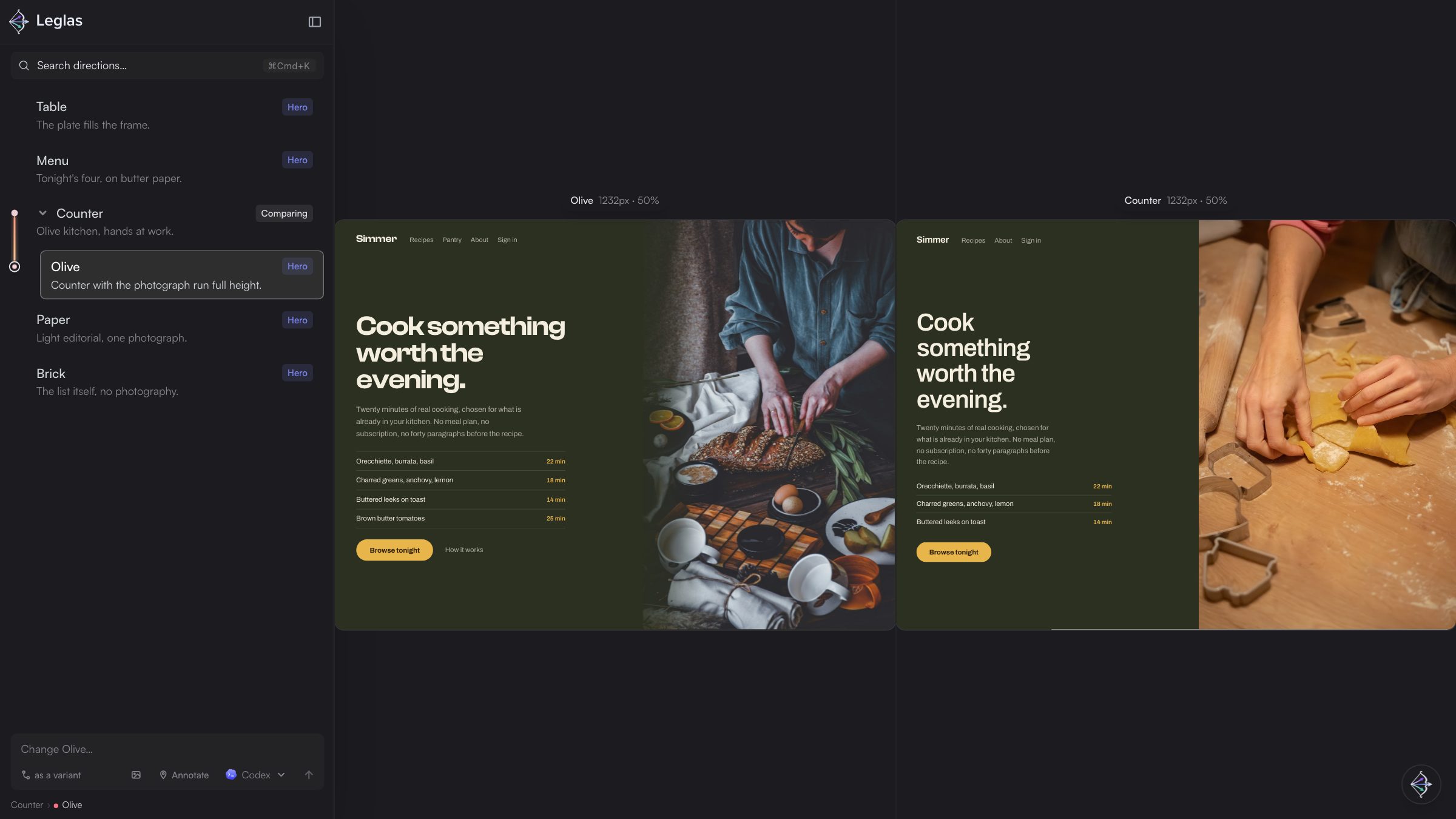
Two directions for the same page, running side by side as the actual app.
- Put any two directions side by side when it gets hard to choose.
- Name each direction, drag to reorder, set aside the ones that don't feel
right. Your opinion of every idea survives a long exploration. - Share the rail with someone who has no repo: a client, a cofounder, a
teammate on another machine. They get the real app, in your order, and
cannot change anything. See Sharing. - Compare things no design tool can hold: three git branches, a local build
against production, yesterday's direction against today's. - Hand the workflow to your coding agent.
leglas initteaches it, andleglas explorebriefs an exploration: five separate ideas, or five
variants of the one you already like. You choose the spread; your agent
supplies the taste. - Ask for changes without leaving the comparison. Describe what you want on
the direction you are looking at, or point at it, and Leglas turns that
into a precise request for your agent, file path and screenshots
included. The agents on your machine are one click away next to the send
button. Your agent, your subscription, no keys. - A change makes a variant, not a rewrite. The result registers under the
direction it came from, with the original still there to compare against. - Keep the winner with one command. Leglas moves it into your source tree,
writes down what the exploration decided and clears the rest away. - No app yet? Plain HTML files compare the same way, no dev server needed.
Get started
Start your dev server, then run Leglas from the project directory:
npx leglas
Leglas starts on port 4100, proxies your app and openshttp://localhost:4100/leglas. With no configuration you get a single
preview of your app root. To compare more than one thing, createleglas.config.ts at the project root:
export default {
  devServer: "http://localhost:3000",
  previews: [
    { title: "Current", url: "/" },
    { title: "Wave", url: "/?v-hero=wave", note: "Full-bleed, anchored low." },
    { title: "Dot grid", url: "/?v-hero=dotgrid", note: "Lattice that wakes near the pointer." },
  ],
};
Each preview is a URL your dev server already answers. Every field, plain
HTML files with no dev server, git branches side by side and how the proxy
works are in Setting up a project.
It works with whatever you are building in. Leglas never imports or
executes your framework, so the target can be Next, Vite, Remix, SvelteKit,
Astro or a folder of static files. It needs Node 24 or newer, and nothing
else: npx fetches the CLI on first use and starts from the cache after
that. To pin a version for a project, npm install -D leglas; to typeleglas without the prefix, npm install -g leglas.
With your agent
npx skills add FredAmartey/leglas
One install, and your agent recognises "give me a few directions for the
pricing page" as a Leglas exploration in any project, including ones that
have never seen Leglas. In a project, npx leglas init writes the whole
workflow into AGENTS.md, so Claude Code, Cursor, Codex or whatever you
switch to next opens the project already knowing how to add design
directions to it. The one rule that workflow centers on, the commands an
agent runs, the MCP server and the Agent Plugin are in
Working with agents.
Documentation
| Page | What it covers |
|---|---|
| Using Leglas | The rail and the stage, comparing, asking for a change, pointing at the problem, the keys, updating |
| Sharing | Sending the rail to someone with no repo, how far a viewer can go, links and the tunnel |
| Setting up a project | The config file and every field, plain HTML without a dev server, comparing branches, how the proxy works, limitations |
| Working with agents | Add beside, never rewrite; the commands an agent runs; running requests; the MCP server; the Agent Plugin |
| Command line | Every command and the flags they share |
| Changelog | What each release changed |
Contributing
Bugs and ideas go in issues.
Two packages are published from this repository, leglas and leglas-mcp,
and the repository is also the Agent Plugin. How to build, what a pull
request needs and how a release is cut are in
CONTRIBUTING.md.
License
Reviews (0)
Sign in to leave a review.
Leave a reviewNo results found