skiller
Health Warn
- License — License: Apache-2.0
- Description — Repository has a description
- Active repo — Last push 0 days ago
- Low visibility — Only 5 GitHub stars
Code Pass
- Code scan — Scanned 12 files during light audit, no dangerous patterns found
Permissions Pass
- Permissions — No dangerous permissions requested
No AI report is available for this listing yet.
Runtime for YAML-defined AI agents. Durable runs, persistent loops, terminal UI, tools, and multiple LLM providers.
Skiller
Runtime for YAML-defined AI agents.
Durable runs, persistent loops, terminal UI, tools, and multiple LLM providers.
Website · Documentation · PyPI
Why Skiller
- Agents defined in YAML. Combine agents, tools, deterministic steps, and external input in readable workflows.
- Persistent executions. Keep run state and history across process restarts. Wait for a message or webhook and continue the same run later.
- Your models and tools. Choose OpenAI-compatible, Codex, or Bedrock connections per agent, with configurable tools and operational guardrails—not a security sandbox.
- Visibility from your terminal. Chat with agents and follow their execution in STUI, or start runs, send tasks, and inspect events through the CLI.
Get started
Install Skiller and open the terminal UI:
pipx install skiller
skiller
First-time setup guides you through connecting an LLM provider, then starts Flows, the built-in agent that helps you create workflows and custom agents.
Installation guide · Meet Flows
Create your own agent
Define an agent that receives a task, responds, and waits for the next message:
name: helper
description: "A helpful custom agent"
version: "0.1"
start: ask_user

steps:
  - wait_input: ask_user
    prompt: "Write a task."
    next: helper

  - agent: helper
    config:
      file: "~/.skiller/profiles/agent.helper.json"
    system:
      file: "./system.md"
    task: '{{output_value("ask_user").payload.text}}'
    tools:
      - shell
    next: ask_user
Save this as helper/helper.yaml. Follow Create a custom agent to add the system prompt and tool profile. The profile inherits your configured provider and model.
Run in STUI
The interactive terminal UI is the best way for people to work with agents: send tasks, follow tool calls, and read responses in one conversation.
From the directory containing helper/, open skiller and enter:
/run @helper
Run from the CLI
The CLI is designed for automation, scripting, and invocation by other agents. It uses the same runtime, workflow definitions, and persisted runs as STUI.
1. Create a run. From the directory containing helper/, start the agent:
skiller run @helper
The agent waits for input. Copy the returned run ID for the following commands.
2. Send a task and wait for the response. Use --wait to stay attached until the run finishes or reaches its next waiting state:
skiller input receive <run_id> --text "List the files in the current directory." --wait
Reuse the same run ID to send another task.
3. Inspect the run. Check its current state with status and read its persisted events, including responses and errors, with logs:
skiller status <run_id>
skiller logs <run_id>
Trigger a task via webhook
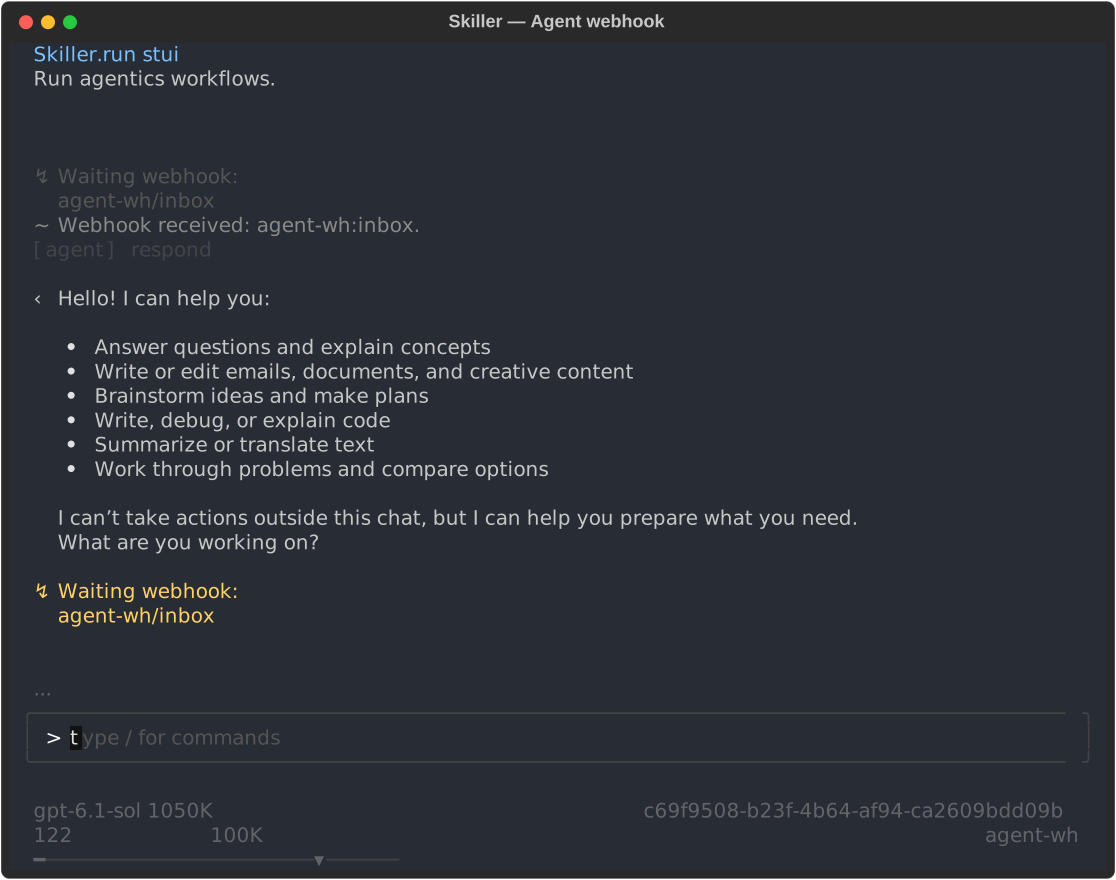
A workflow can wait for an HTTP request instead of terminal input. This minimal flow receives a message, runs the agent, and waits for the next request:
name: agent-wh
start: wait_task

steps:
  - wait_webhook: wait_task
    webhook: agent-wh
    key: inbox
    next: respond

  - agent: respond
    system: "Respond to the user's message clearly and concisely."
    task: '{{output_value("wait_task").payload.message}}'
    tools: []
    next: wait_task
The agent uses your global model configuration and exposes no tools. Follow the webhook demo to start the server, register the webhook, and launch the run. Then send a message using the registered secret in WEBHOOK_SECRET:
curl --fail-with-body -X POST http://127.0.0.1:8001/webhooks/agent-wh/inbox \
  -H 'Content-Type: application/json' \
  -H "X-Webhook-Token: $WEBHOOK_SECRET" \
  --data '{"message":"Hello! What can you help me with?"}'
Observe the response in STUI or inspect the run through the CLI. The HTTP response acknowledges delivery; it does not contain the agent's answer.
Explore the demos
- Create a custom agent — define its behavior, tools, and profile.
- Automate a pull request — let an agent invoke a workflow to create a PR.
- Trigger an agent with a webhook — send a task over HTTP and observe the response.
Documentation
- Runtime — database, logging, webhook server, and workflow search paths.
- LLM providers — supported APIs, connections, credentials, and models.
- Agent harness — profiles, model selection, context, loop limits, events, and debugging.
- Harness tools — available tools, configuration, and permission guardrails.
Contributing
See the development instructions for setup and checks, and the Runtime architecture for implementation boundaries.
License & disclaimer
Apache-2.0. See LICENSE.
This project is provided "as is", without warranties of any kind. The authors and
contributors are not responsible for production incidents, data loss, service
interruptions, security issues, regulatory non-compliance, third-party integration
failures, or any direct or indirect damages resulting from its use.
Reviews (0)
Sign in to leave a review.
Leave a reviewNo results found