claude-usage-panel
Health Uyari
- License — License: MIT
- Description — Repository has a description
- Active repo — Last push 0 days ago
- Low visibility — Only 5 GitHub stars
Code Basarisiz
- exec() — Shell command execution in claude-code/accounts.js
- fs.rmSync — Destructive file system operation in claude-code/accounts.js
- os.homedir — User home directory access in claude-code/accounts.js
Permissions Gecti
- Permissions — No dangerous permissions requested
Bu listing icin henuz AI raporu yok.
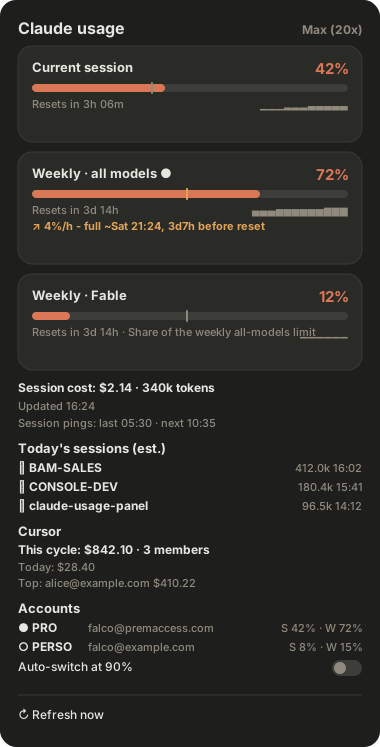
See your Claude Code plan usage everywhere: GNOME top bar, macOS menu bar, a status line under the Claude Code prompt, and a get_usage MCP tool for Claude Code + Cursor. Session, weekly & per-model (Fable/Opus) limits from the official usage API, with burn-rate forecasts. One-line install, self-updating.
Claude Usage Panel
See your Claude Code plan usage at a glance - in the GNOME top bar, the macOS
menu bar, under your Claude Code prompt, or by just asking Claude.
Session, weekly, and per-model limits (Fable, Opus…) - the same numbers as/usage, always visible, auto-refreshing. Plus an optional Cursor
team-spend section.





Install
One line - it detects your platform and installs the sensible set:
curl -fsSL https://fschmutz.github.io/claude-usage-panel/install | bash
One-click Add to Cursor / Install in Claude Code buttons live on the
install page →
Name targets to be explicit (bash -s -- <target…> through the one-liner, or./install.sh <target…> from a clone):
| Target | What you get | Details |
|---|---|---|
gnome |
Top-bar panel + dropdown, alerts, sparklines (GNOME Shell 45–50) | docs/GNOME.md |
macos |
Native SwiftUI menu-bar app, starts at login (macOS 13+) | macos/README.md |
statusline |
One-line usage gauge under the Claude Code prompt | claude-code/README.md |
mcp |
get_usage + account tools inside Claude Code and Cursor - ask "how much of my plan have I used?" or "switch me to PERSO" |
mcp/README.md |
accounts |
claude-account CLI: save each Claude login under a name (PRO, PERSO) and switch between them without a browser |
wiki |
autoupdate |
Daily check for a new release, installed automatically (on by default) | wiki |
plan |
Recommend sessionping times for your working day (./install.sh plan --compare 09:00) |
read-only helper |
sessionping |
Scheduled claude pings that open the 5h session window at your chosen times (opt-in, one haiku turn per ping) |
wiki |
Two subscriptions, one machine. claude-account save PRO, sign in to the
other one once, claude-account save PERSO - then switch from any client in one
click, with each account's usage side by side, and an optional auto-switch to
the account with the most headroom when the one you are on hits 90%. Only the
login changes; settings, hooks, MCP servers and history stay. Off by default in
the panels - one switch in the preferences turns it on. Details and the
exact files touched: wiki/Accounts.
Pick up where you left off. The GNOME dropdown and the macOS menu list
today's sessions ranked by the tokens each one spent; clicking one opens your
terminal on that project with claude --resume <that session>. The MCP tool
returns the same list (with the resume command) and the status line can show the
day's biggest spender with --segments=…,sessions.
Where did the tokens go? node scripts/token-attribution.mjs --days 7
breaks your spend into exploration / implementation / verification / rework /
correction, so you can see whether the budget went into progress or into
re-doing things.
Any other Linux bar - waybar, tmux, polybar, i3blocks - is one command, no
install target needed: node linux/usage-bar.mjs --format waybar (see
linux/README.md). Not sure when to schedule your session
pings? ./install.sh plan --compare 09:00 scores your current schedule and
prints the better one.
The status line renders like this, right under the prompt input:
Context ▌░░░░░ 8% Session █▌░░░░ 26% 59m Week █▌░░░░ 24% 4d2h ∑ 1.2M tok ping 05:30
(ping 05:30 appears only once you schedule session pings; it is silent
otherwise.)
Everything is reversible and idempotent: update --pull upgrades what you
have, --uninstall [target…] reverses it, --dry-run previews, --list
shows what's detected and installed.
It keeps itself current. On a git checkout the autoupdate target is part
of the default set: once a day it looks for a newer released tag and, if there
is one, fast-forwards and reinstalls exactly the clients you have. It never
touches a checkout with local changes or a diverged branch - it logs the reason
and waits. scripts/auto-update.sh --status shows where you stand;./install.sh --uninstall autoupdate turns it off.
The MCP tool also installs without any clone - as a Claude Code plugin
(/plugin marketplace add fschmutz/claude-usage-panel, then/plugin install claude-usage@claude-usage-panel) or one CLI line
(claude mcp add claude-usage -- npx -y github:fschmutz/claude-usage-panel).
Why this one
The numbers are read, not reconstructed. Every other Claude usage tool in
circulation rebuilds your cost by parsing local JSONL logs and multiplying by a
price table it has to keep current. This one reads your account's own usage
endpoint, so the limit percentages are the same figures /usage prints. Those
are different classes of number - an official one can be stale or unreachable,
an estimated one can be quietly wrong - so every value in the UI carries a
provenance marker (official / est.) and the panel never blurs the two.
Most Claude usage indicators also read the endpoint's legacy five_hour /seven_day fields and show only the aggregate session + weekly pair. This one
reads the modern limits[] array, so it shows every limit the Claude
app shows - including per-model weekly limits (Fable, Opus…) that the
others miss - on both Linux and macOS, with native UI on each (no Electron),
plus terminal and in-conversation projections.
| 📊 All plan limits | Session, weekly, per-model - one card each, severity colors + reset timers from the API |
| 📈 Burn-rate forecast | "↗ 4%/h - full ~Sat 21:24, 3d7h before reset": each limit is projected from your recent pace, the top bar turns amber the moment a limit is on track to run dry before its reset, and a notification fires once - trouble visible at 50%, not at 90% |
| ⏱ Against the clock | A caret under each bar marks how much of the window has gone, so 60% used with 20% of the window left reads as trouble at a glance - the reading a burn rate alone cannot give |
| 🧮 Pool-aware | A per-model card (Fable) is labelled as a share of the weekly all-models limit, not extra quota - because that is what it is |
| 🔔 Alerts + sparklines | Desktop notification at 90% / 100% and on projected exhaustion, tiny trend graph per limit |
| ⏱️ Session pings, everywhere | Schedule the claude ping that opens the 5h window from the GNOME preferences or the macOS settings, not only from the CLI - and every client shows when it last fired |
| ▶️ Resume today's sessions | The dropdown lists today's five biggest token spenders and opens one in a terminal, resumed where you left it, in its own project directory |
| 👥 Named accounts | Save each login as PRO / PERSO, see every account's limits side by side, switch in one click (or let it switch for you at 90%) - no logout, no browser |
| 🪝 Run your own command | One setting: a shell command fired when a limit crosses 90/100% or a window resets, with the event, label, percent and threshold substituted (shell-quoted) |
| 🗓 90 days of history | Every poll that moved is kept locally, so each card can say "peak 71% this week · 84% last" long after Claude's own 30-day cleanup |
| 💤 Polls when it matters | Idle windows back off to 15 min, a poll always lands just after a reset, and both panels refresh on wake from sleep and when the network returns |
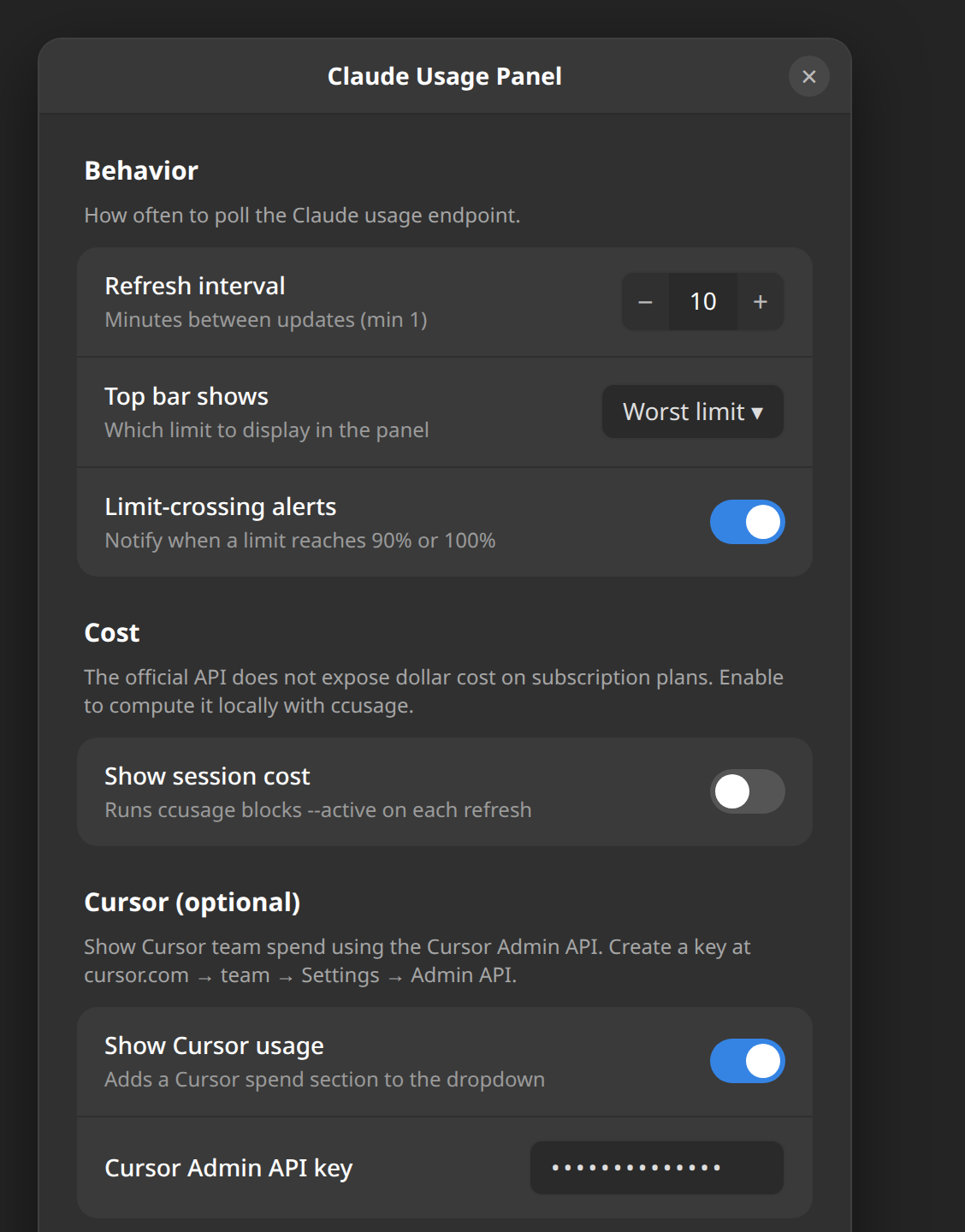
| 💲 Optional extras | Local ccusage session cost · Cursor team spend via Admin API |
| 🌍 Seven languages | English, French, German, Spanish, Italian, Portuguese, Japanese, Simplified Chinese - catalogs gated in CI |
| 🔒 Read-only & private | Uses your existing local token and never writes it - the one exception is a switch you ask for, which installs another login you saved. No telemetry, talks only to official APIs |
Screenshots
| Dropdown | Settings |
|---|---|
|
 |
How it works
Every client reads the OAuth token Claude Code already stores locally
(~/.claude/.credentials.json on Linux, the login Keychain on macOS) and calls
the official usage endpoint:
GET https://api.anthropic.com/api/oauth/usage
    authorization: Bearer <token>
    anthropic-beta: oauth-2025-04-20
The response's limits[] array drives one card per limit. If the token
expires, the panel tells you to run any Claude Code command (which refreshes
it) - it never writes the token itself. The only time a client writes into~/.claude is a switch you asked for: claude-account use PERSO (or the same
click in a panel) installs the tokens you saved for that account and updatesoauthAccount in ~/.claude.json, nothing else. An idle saved account's token
is refreshed with its own refresh token when it is needed, into the panel's
store only. The status line is even cheaper: it renders purely from what
Claude Code pipes on stdin, no credentials or network at all. The optional extras stay just as private: cost runs ccusage locally
against ~/.claude/projects/*.jsonl, and Cursor spend calls api.cursor.com
with your own admin key.
Documentation
| Doc | Covers |
|---|---|
| docs/GNOME.md | GNOME install, Wayland relog, settings, nested-shell testing |
| macos/README.md | macOS build, release, notarization, Homebrew cask |
| claude-code/README.md | Status line segments, token modes, manual setup |
| mcp/README.md | MCP server, get_usage + account tools, all four install paths |
| wiki/Accounts | Named accounts: what a switch touches, token refresh, auto-switch, CLI |
| CONTRIBUTING.md | Dev setup, pre-commit hooks, parity-test contract |
| PUBLISHING.md | Store listings, release flow |
| CHANGELOG.md | Version history |
Roadmap
- extensions.gnome.org listing (needs a GNOME store account - PUBLISHING.md)
- Notarized macOS
.app+ Homebrew cask (needs an Apple Developer signing cert)
License
MIT - see LICENSE.
Keywords: Claude Code usage monitor · Claude usage GNOME Shell extension · Claude plan limits top bar · macOS menu bar Claude usage · Claude Code status line usage · Claude usage MCP server · Add to Cursor MCP · Anthropic usage API · ccusage · Fable / Opus per-model weekly limit · Cursor Admin API spend · Ubuntu GNOME extension · SwiftUI MenuBarExtra
Yorumlar (0)
Yorum birakmak icin giris yap.
Yorum birakSonuc bulunamadi