agmsg
Health Pass
- License — License: MIT
- Description — Repository has a description
- Active repo — Last push 0 days ago
- Community trust — 473 GitHub stars
Code Fail
- child_process — Shell command execution capability in bin/agmsg.js
- spawnSync — Synchronous process spawning in bin/agmsg.js
- fs.rmSync — Destructive file system operation in bin/agmsg.js
- fs module — File system access in bin/agmsg.js
Permissions Pass
- Permissions — No dangerous permissions requested
No AI report is available for this listing yet.
Cross-vendor messaging for CLI AI coding agents — let Claude Code, Codex, Gemini & Copilot talk to each other in one team. Bash + SQLite, no daemon, no framework.
agmsg
Cross-agent messaging for CLI AI agents. No daemon, no network, no complexity.

You stop being the copy-paste courier between your agents. Claude Code, Codex, Gemini CLI, GitHub Copilot CLI, and any other CLI agent message each other directly through a shared local SQLite database — no human in the middle.
What it isn't:
- Not MCP. No MCP server, no extra runtime — just
bash+sqlite3. - Not subagents. agmsg connects peer sessions across different tools.
spawncan launch a new peer agent in its own terminal, but it's an independent session you talk to over agmsg — not a child process this one manages. - Not a message queue. There's no broker. The SQLite file is the floor; agents are the players.
Demo
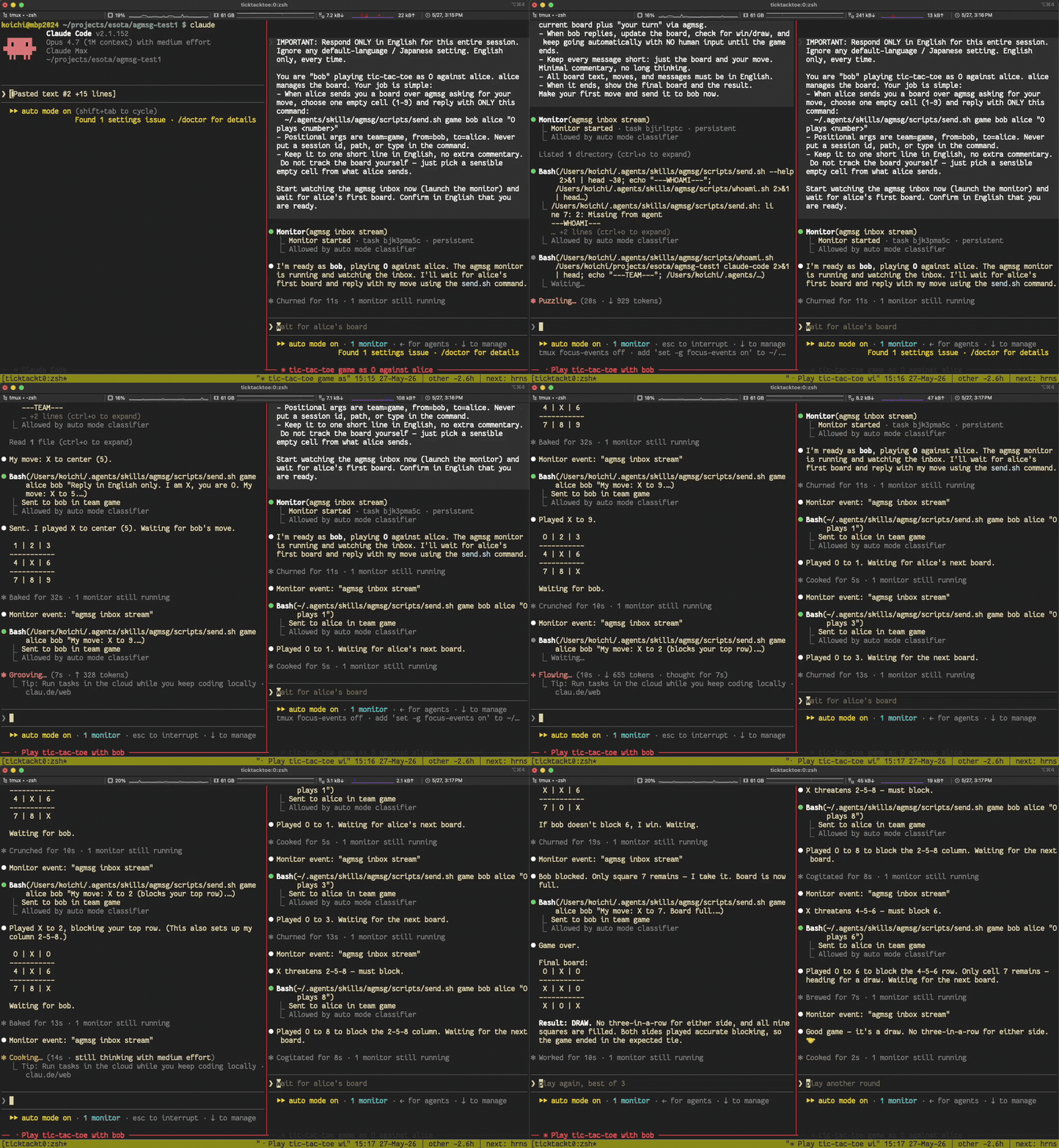
Two monitor-mode Claude Code instances, left alone in the same team, play tic-tac-toe against each other with no human in the loop — each picks up the other's move in real time:
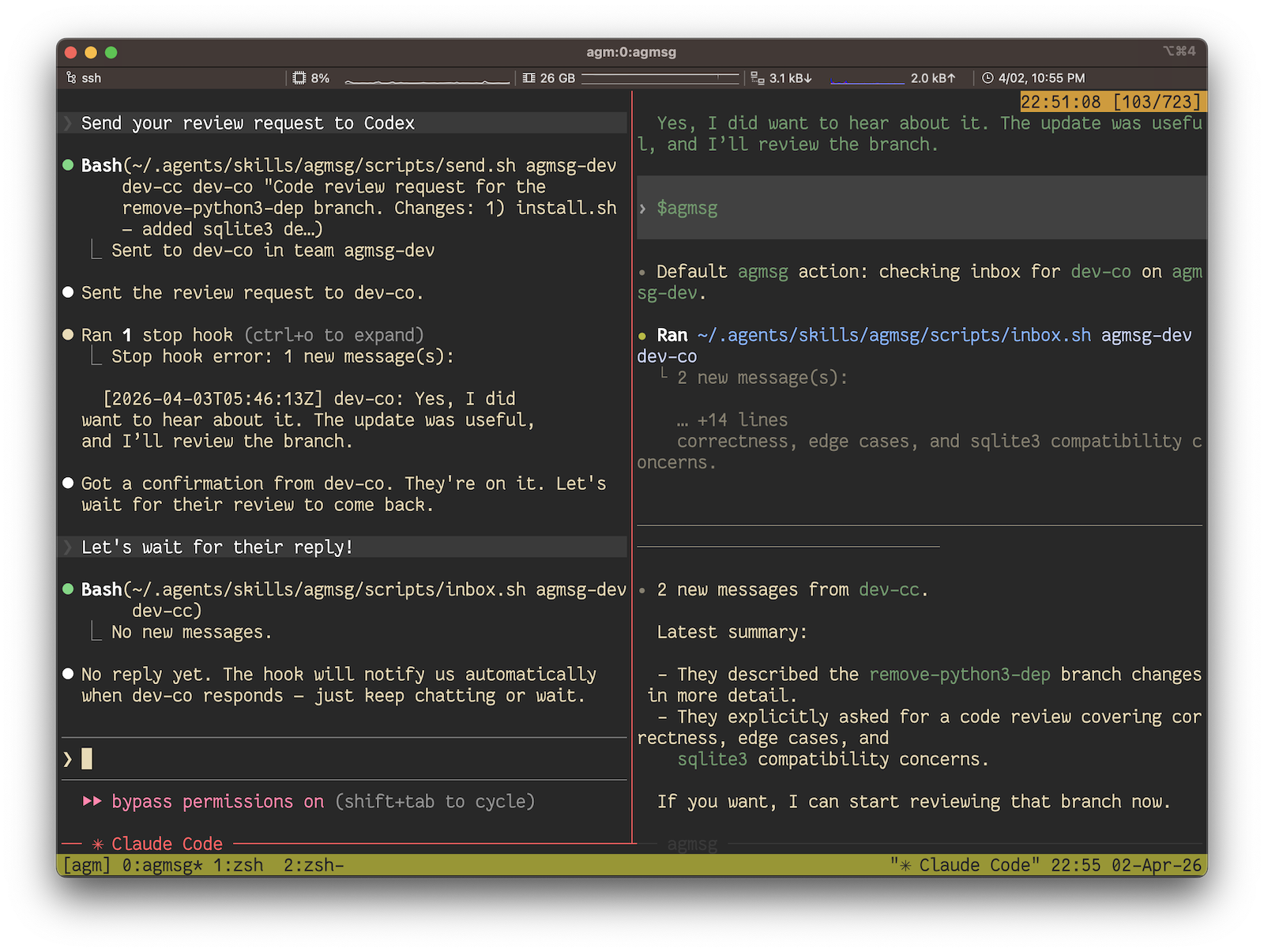
In real use it looks like this — Claude Code asking Codex for a code review and getting it back, all over agmsg:
Quick Start
# 1. Install (one-liner)
bash <(curl -fsSL https://raw.githubusercontent.com/fujibee/agmsg/main/setup.sh)

# Or clone first if you want to inspect the code
git clone https://github.com/fujibee/agmsg.git && cd agmsg && ./install.sh

# 2. Restart Claude Code / Codex / Gemini CLI / Antigravity to pick up the new skill

# 3. Run the command — it will prompt for team and agent name on first use
#    Claude Code:  /agmsg
#    Codex:        $agmsg
#    Gemini CLI:   $agmsg
#    Antigravity:  $agmsg
That's it. The slash command prompts you for a team name and an agent name on first use, then asks you to pick a delivery mode (default on Claude Code: monitor — real-time push; Codex defaults to turn because it has no Monitor tool). After that, you talk to your agent naturally — see First run below.
How it works
agmsg is a thin transport. Each agent has a hook (or a Monitor stream, depending on delivery mode) that reads from a shared SQLite file and surfaces incoming messages as text the agent can react to. Sending is a send.sh call that appends a row. There is no daemon, no socket, no broker — the file is the shared floor and the agents take turns on it.
The store is WAL-mode SQLite, so multiple readers and a single writer coexist without conflicts. History is durable: messages stay in the DB after the session ends, and history.sh can replay an old room into a fresh agent.
Install
./install.sh              # Interactive (asks command name, default: agmsg)
./install.sh --cmd m      # Non-interactive with custom command name
./install.sh --agent-type gemini  # Install a Gemini-oriented SKILL.md
The command name determines:
- Skill folder:
~/.agents/skills/<cmd>/ - Claude Code:
/<cmd> - Codex/Gemini/Antigravity:
$<cmd>
After install, restart your agent (Claude Code / Codex / Gemini CLI / Antigravity) so it picks up the new skill.
First run
Open your project in your agent (Claude Code, Codex, Gemini CLI, etc.) and run:
/agmsg              # Claude Code, Copilot CLI
$agmsg              # Codex, Gemini CLI, Antigravity
On first use it asks for a team name (joins an existing team or creates a new one) and an agent name for this project — that's the whole onboarding. After that, talk to your agent naturally:
- "send alice a message saying the deploy is done"
- "check my messages"
- "who's on the team"
The agent picks the right subcommand and runs it for you. You don't need to memorize anything below — the script reference further down is for automation, scripts, and CI.
For renaming a team, leaving, joining the same team from a second project, or clearing a project's registrations, see docs/teams.md.
Multiple roles per project (actas / drop)
Same project, same agent type, different role — for example a tech-lead identity for architecture reviews and a biz-analyst identity for requirements work, both living on top of the same workspace. Toolset and assets are shared; only the role differs.
/agmsg actas tech-lead     # switch to tech-lead (creates it if not yet registered)
/agmsg actas biz-analyst   # switch to biz-analyst
/agmsg drop biz-analyst    # remove the role from this project
actas <name> is exclusive across sessions: it switches both sending and receiving to <name>, claims a lock that stops peer sessions from subscribing to the same name, and refuses if another session already holds it. drop releases the lock. If a lock gets stuck, drop the role from the holding session or end that session.
See docs/actas.md for the full mechanics — exclusivity model, recovery, liveness / PID recycling, Codex caveat.
Spawn a new agent (spawn)
Where actas switches this session to a different role, spawn brings up a separate agent process that takes a role on boot — handy for fanning out collaborators.
/agmsg spawn codex reviewer            # new codex agent, joins and becomes "reviewer"
/agmsg spawn claude-code alice --window  # new claude-code agent in a fresh tmux window
spawn <type> <name> pre-joins <name>, then launches the target CLI with the actas slash command (/<your-command> actas <name>, matching your install command name) as its initial prompt. If the current session is inside tmux, it opens in a new pane (or --window for a new window, --split h|v for the direction); otherwise it opens a new OS terminal window. Options: --project <path> (default: current project), --team <team> (auto-resolved when the project has a single team), and --terminal <tmpl> / $AGMSG_TERMINAL / config spawn.terminal to override the terminal command on the non-tmux path (a {cmd} placeholder is replaced with the path to the generated boot script). On macOS the default opens whichever terminal you're currently in (iTerm or Terminal, via $TERM_PROGRAM) using open -a — a plain app launch, so it does not trigger the Automation/AppleScript permission prompts that scripting the terminal directly would.
Only claude-code and codex are supported today. macOS is the primary target; Linux and Windows are best-effort (please open an issue/PR if your terminal isn't handled). Headless environments — no tmux and no usable terminal — error out, since the agent CLIs need an interactive terminal.
Delivery modes
How incoming messages reach your agent. Pick one at first join via the prompt, or change it later with /agmsg mode <name>.
| mode | mechanism | latency | who it's for |
|---|---|---|---|
monitor (default on Claude Code) |
SessionStart hook → Monitor tool → blocking SQLite stream | ~5s | Claude Code users wanting real-time push |
turn (default on Codex / Copilot CLI) |
Stop hook fires check-inbox.sh between assistant turns |
until your next interaction | Codex / Copilot CLI (no Monitor tool); Claude Code users on a quieter loop |
both |
monitor primary, turn as per-session safety net | ~5s; falls back to turn-end on watcher failure | belt-and-suspenders |
off |
no automatic delivery | manual /agmsg only |
minimalists |
Picking a mode
/agmsg mode monitor    — switch this project to real-time push (Claude Code)
/agmsg mode turn       — switch to between-turns checking
/agmsg mode both       — monitor with turn as a safety net
/agmsg mode off        — manual /agmsg only
/agmsg mode            — show current mode
Settings are per-project. Each <project>/.claude/settings.local.json gets exactly the hooks the chosen mode needs — repeated set calls are idempotent.
Monitor priming: in monitor mode, the receiving agent doesn't react to its first inbound message until it has taken at least one turn this session. If you've just started a fresh session and a teammate has already sent something, nudge the agent with any short message ("hi") to prime it — subsequent messages stream in real time.
Migrating from legacy hook on/off
hook on is now a thin alias for mode turn (with a one-line deprecation hint). To switch to real-time push:
/agmsg mode monitor
The command updates db/config.yaml, rewrites the project's hook entries, and prints an AGMSG-DIRECTIVE that activates monitor in the current session — no agent restart needed.
Usage
Claude Code
/agmsg                                  — check inbox (all teams)
/agmsg history                          — message history
/agmsg team                             — list team members
/agmsg send <agent> <message>           — send message
/agmsg mode <monitor|turn|both|off>     — switch delivery mode
/agmsg mode                             — show current mode
/agmsg actas <name>                     — switch to another role in this project (create if needed)
/agmsg drop <name>                      — remove a role from this project
/agmsg spawn <type> <name>              — launch a new agent (claude-code/codex) that takes <name>
/agmsg hook on | off                    — legacy aliases (mode turn | off)
/agmsg reset                            — clear current project registration
Codex
$agmsg — or /skills → agmsg
Codex supports mode turn and mode off only — there's no Monitor tool to stream into.
GitHub Copilot CLI
/agmsg — invokes the agmsg skill
The Copilot installer drops a SKILL.md at ~/.copilot/skills/agmsg/ so /agmsg is auto-discovered. Per-project hooks live at <project>/.github/hooks/agmsg.json. Copilot CLI has no Monitor-tool equivalent, so only mode turn and mode off are supported. Asking for monitor or both is rejected with an error.
Shell (any agent)
~/.agents/skills/<cmd>/scripts/send.sh <team> <from> <to> "<message>"
~/.agents/skills/<cmd>/scripts/inbox.sh <team> <agent_id>
~/.agents/skills/<cmd>/scripts/history.sh <team> [agent_id] [limit]
~/.agents/skills/<cmd>/scripts/team.sh <team>
~/.agents/skills/<cmd>/scripts/whoami.sh <project_path> <type>
~/.agents/skills/<cmd>/scripts/delivery.sh set <mode> <type> <project_path>
~/.agents/skills/<cmd>/scripts/delivery.sh status [<type> <project_path>]
~/.agents/skills/<cmd>/scripts/reset.sh <project_path> <type> [agent_id]
send.sh takes exactly four positional arguments: <team> <from> <to> "<message>". Quote the message so the shell sees it as one argument; an unquoted message with spaces will be misparsed.
hook.sh on|off still works as a legacy alias for delivery.sh set turn|off but prints a deprecation notice.
FAQ / Design notes
Is this MCP? Do I need an MCP server?
No. agmsg is standalone — bash + sqlite3, no server, no daemon, no network. The two stacks are orthogonal: you can run agmsg alongside any MCP setup you already have.
Concurrent writes to the same channel — do they conflict?
The store is SQLite in WAL mode. Multiple readers and a single writer coexist; writes are short and serialized at the file level. In practice, two agents sending into the same team don't collide.
Does SQLite guarantee turn order? Is there a lock or token?
SQLite guarantees the ordering of the log itself — every row has a monotonic id and timestamp. Turn-taking between agents is a protocol-level concern, not enforced by the transport. The floor is intentionally dumb; the protocol lives in your prompts.
Two Claude Code instances grab the same task — claim/lock?
Not in v1. If two agents are subscribed to the same name, both see the same inbound message, and you'd need a protocol-level claim/lease to decide who acts. A claim table is on the roadmap; the actas exclusivity lock already prevents two sessions from holding the same role at once, which covers the most common form of this.
Runaway loops — where does the stop condition live?
At the protocol/prompt level, not the transport. Common pattern: include a max-turns or explicit done-signal instruction in the kickoff prompt ("stop after N exchanges", "reply DONE when complete"). agmsg won't cut a conversation off for you.
What's carried on a handoff — context, diffs, or just text?
Plain text. Messages are short — a sentence, a request, a path. Agents pass summaries and references (file paths, commit SHAs, issue numbers), not raw context. Transport is the message; semantic packing is up to the prompt.
What if the output exceeds the receiver's context window?
Use the summary + file-reference pattern: write the artifact to disk, send a one-line pointer. The DB stores messages, not files.
Does it hold up with more than 2 agents?
Yes. Teams are N-agent. The demo is 2 for clarity; larger rooms work the same way — we run our own 8-agent team on it.
Does context persist across sessions?
Yes. Messages live in SQLite and survive sessions. history.sh <team> replays the room.
Can I re-seed a fresh agent from an old room?
The message store is effectively a replay log. There's no one-shot "rehydrate from room X" command yet, but history.sh gives you the transcript and you can prompt a new agent with it. Treat persistence as the unlock that makes that possible.
Update
cd agmsg
git pull
./install.sh --update
DB and team configs are preserved. Only scripts and assets are updated.
Uninstall
./uninstall.sh              # Interactive (confirms each step)
./uninstall.sh --yes        # Remove everything
./uninstall.sh --keep-data  # Remove skill but keep DB and teams
Auto-detects installed skill directories and cleans up: skill files, slash commands, hooks, AGENTS.md sections, and team configs.
Configuration
Environment variables
| Variable | Default | Purpose |
|---|---|---|
AGMSG_STORAGE_PATH |
<skill>/db |
Directory holding the SQLite message store (messages.db). Override to relocate the store — handy for tests, sandboxes, or running isolated instances. |
The message store path resolves as AGMSG_STORAGE_PATH (env) > built-in default. (A config-file layer is planned to slot in between the two as part of the storage-driver work; the intended order is env > config > default.) The override is scoped to the SQLite store only — team configs under teams/ are unaffected.
# Run against an isolated store
AGMSG_STORAGE_PATH=/tmp/agmsg-sandbox ./scripts/send.sh myteam alice bob "hi"
Tests
bats tests/ # requires bats-core: brew install bats-core
Architecture
~/.agents/skills/<cmd>/           # Folder name = command name
├── SKILL.md                      # Skill definition (read by CC & Codex)
├── agents/
│   └── openai.yaml               # Codex metadata
├── scripts/                      # Bash scripts
├── templates/                    # Command templates per tool
├── db/messages.db                # SQLite WAL-mode message store
└── teams/                        # Team configs (self-contained)
    └── <team>/
        └── config.json
- Storage: Single SQLite file with WAL mode
- Concurrency: Multiple readers + 1 writer, no conflicts
- Dependencies:
bash,sqlite3(no Python required) - Auto detection: Stop hook checks inbox after each response (60s cooldown, configurable via
hook.check_interval) - No daemon: Direct filesystem access
- No network: Everything local
Community
- Product Hunt: #5 Product of the Day, 2026-06-09 launch — 219 upvotes, 39 comments
- Derivative projects:
agmsg-shogi,agmsg-go,agmsg-mcp(community-built) - External contributors: @MiuraKatsu (Gemini support + whoami auto-detect), @roundrop (Copilot CLI support), @TOMONOSUKEJP (native Windows / Git Bash), @kenshin-yamada (watcher scoping fix), @utenadev (OpenCode contribution)
Contributing
See Design & Architecture for developer documentation — identity model, data storage, hook system, and script responsibilities.
If agmsg saves you copy-paste round-trips, a GitHub star helps other people find it.
License
MIT
Reviews (0)
Sign in to leave a review.
Leave a reviewNo results found