claude-nomad
Health Warn
- License — License: MIT
- Description — Repository has a description
- Active repo — Last push 0 days ago
- Low visibility — Only 5 GitHub stars
Code Pass
- Code scan — Scanned 12 files during light audit, no dangerous patterns found
Permissions Pass
- Permissions — No dangerous permissions requested
No AI report is available for this listing yet.
Sync your full Claude Code setup across machines: skills, settings, and session history, with path remapping and per-host overrides
claude-nomad





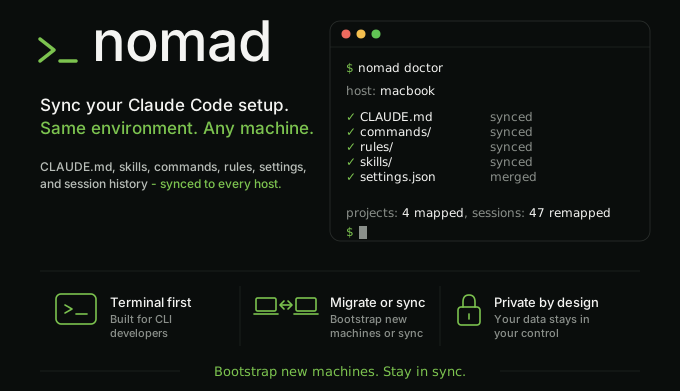
Your entire Claude Code setup, on every machine. History included, every push secret-scanned.
Open Claude Code on a second machine and it is a blank slate: none of your custom skills, slash
commands, tuned settings, or past conversations. claude-nomad keeps all of it in sync through a
private Git repo you control. Run nomad sync on any machine and everything is there, conversations
included; it pulls in your latest config first, then publishes your local changes, so you never have
to remember which one to run first.
Not dotfiles, not rsync. claude-nomad understands Claude Code's state, so your session history
survives different file paths and your secrets never ride along.
Full documentation: https://funkadelic.github.io/claude-nomad/
Features
- Sessions follow you across machines. Start a conversation on your desktop, run
claude --resumeon your laptop, and it is there. claude-nomad rewrites the machine-specific file
paths Claude Code embeds in every transcript, so history survives projects living at different
paths on different hosts. - One shared setup, per-machine exceptions. Your own skills, slash commands, rules, and your
CLAUDE.mdlive in one place and follow you everywhere.hooks/andagents/are installed
per-host by@opengsd/gsd-corevia npm and are not synced (syncing them caused version-skew
churn). Skills sync as a filtered copy: your own skills travel,gsd-*skills are excluded (seeSHARED_LINKSandsrc/skills-sync.tsinsrc/config.ts). Settings merge a shared base with a
per-host override, so one machine can run a different model or MCP URL without forking the rest.
GSD-owned hook entries (scripts whose basename starts withgsd-) are filtered out of the
generated~/.claude/settings.jsonduring pull and stripped fromshared/settings.base.jsonon
the next push; GSD reinstalls the correct per-host hook set itself. A non-gsd hook you add to your
live settings syncs normally vianomad capture-settings. - Every push is secret-scanned. Only an explicit allow-list of paths ever leaves the machine,
credentials never sync, and gitleaks scans the exact files about to be published. The push aborts
on any hit, with an interactive menu to redact, allow, or drop the finding. Always publish throughnomad push: the sync repo is an ordinary Git repo, so a manualgit pushfrom it skips the scan
entirely and can leak a secret thatnomad pushwould have caught. Steady-state pushes scan only
the transcripts that changed since the last successful push (incremental); a cold start, a
gitleaks version change, a config file change, or--full-scanforces a full rescan.nomad doctor --check-sharedalso runs a read-only advisory over memory notes and skill files
already synced to the repo, flagging (but never blocking on) a secret that already made it through
in a past push; the fix is the same interactive Redact stepnomad pushoffers. - Preview before you trust it.
nomad diffshows offline what a pull would change (gsd-owned
hook churn is filtered the same as on pull, so the preview matches what a real pull writes), and--dry-runon pull and push prints the plan without writing anything. - One command tells you what is wrong.
nomad doctoris a read-only health check: wedged sync
repo, broken hook references, hooks that would crash on session start because of a missing--preserve-symlinks-mainflag, version drift, oversized backup cache, missing git committer
identity in the sync repo (a push fails at commit time without one), path-map entries whose local
project folder no longer exists on this machine, a multi-host repo where this machine's
hostname-derived key matches nohosts/<HOST>.jsonor path-map entry (a signNOMAD_HOSTis
unset here, so per-host settings and session sync will not line up with the other hosts), synced
skills with local edits that differ from the shared copy, and settings drift in both directions:
keys present in the repo merge but absent from your livesettings.json(behind; the nextnomad pullwill restore them, fix:nomad pull) and keys present locally but not yet in the
repo (ahead; local-only additions, fix:nomad capture-settings). Each issue includes a fix hint.
By default the report is compact: it shows only checks that need action plus a one-line verdict.
Add--verbose(or--all/-v) to see the full per-check tree, including everything that
passed. - Self-healing sync. Every overwrite is backed up first, and
nomad pull --force-remote
recovers two kinds of stuck sync repo: a repo stuck mid-rebase or mid-merge (aborts the operation,
parks stranded work on a branch, refuses if shared config is at risk), and a repo where the rebase
was interrupted but the git index was left with unmerged entries and no active operation (clears
the index viagit reset --mixed HEAD, surfaces any orphaned stash entry left by the interrupted
autostash, never discards working-tree edits). - Easy off.
nomad ejectreplaces every managed~/.claude/symlink with a real copy in one
step, so your setup keeps working after you delete the sync checkout and uninstall the CLI.
See the full feature tour for the rest:
opt-in per-project sync, transcript redaction, backup pruning, and more.
Quickstart
nomad works with two directories, and the difference is the one thing worth learning up front:
~/claude-nomad/is your private sync repo. This is the one you edit.~/.claude/is Claude Code's live config. nomad regenerates it on everypull.
Edit the repo, never the live config. In particular, never hand-edit ~/.claude/settings.json: it
is rebuilt from the repo on every pull and your changes are lost. Change shared/settings.base.json
(or hosts/<HOST>.json) in the repo instead, or run nomad capture-settings to pull local changes
back into the repo (see Changing settings).
First host (once, ever):
# 1. Install the CLI.
$ npm i -g claude-nomad

# 2. Create your private sync repo and scaffold it. If you already have a
#    ~/.claude/ worth keeping, init offers to seed the repo from it.
$ nomad init                   # prompts for a repo name (default: claude-nomad-config)
$ nomad init --repo my-config  # set the repo name without the prompt
$ nomad init --snapshot        # seed from existing ~/.claude/ without being asked

# 3. Add a stable host label to ~/.zshrc or ~/.bashrc, then reload.
export NOMAD_HOST=<your-host-label>

# 4. Publish the scaffold to your private repo.
$ nomad push
Each additional host:
$ npm i -g claude-nomad
$ gh repo clone <your-username>/claude-nomad-config ~/claude-nomad
export NOMAD_HOST=<your-host-label>   # add to ~/.zshrc or ~/.bashrc
$ nomad pull
Windows
claude-nomad also runs natively on Windows, no WSL required (WSL2 still works fine too, if you
prefer it). The steps are the same as above with a couple of PowerShell-specific swaps:
# 1. Install the CLI.
> npm i -g claude-nomad

# 2. Create your private sync repo and scaffold it.
> nomad init

# 3. Add a stable host label. PowerShell has no ~/.bashrc equivalent, so set it
#    as a persistent user environment variable instead, then restart your
#    terminal so the new value is picked up.
> [System.Environment]::SetEnvironmentVariable('NOMAD_HOST', '<your-host-label>', 'User')
#    Using cmd instead of PowerShell? The equivalent one-liner is:
#    setx NOMAD_HOST <your-host-label>

# 4. Publish the scaffold to your private repo.
> nomad push
A few Windows-specific things worth knowing:
- Installing gh:
winget install GitHub.cli(orscoop install gh), thengh auth login.
Needed beforenomad initon the first host; later hosts only clone with it. - Installing gitleaks:
winget install gitleaks.gitleaks(orscoop install gitleaksif you
use Scoop).nomad doctorprints the same hint whenever gitleaks is missing from PATH. - Shared config is copied, not symlinked. On macOS and Linux, files like
CLAUDE.mdand your
skills live in the sync repo and are symlinked into~/.claude/, so there is one source of truth
on disk. Creating a symlink on Windows needs Developer Mode or admin rights, so on Windows these
are real copies instead. What this means for you: after editing a shared file on Windows, runnomad pushbefore your nextnomad pullornomad sync.nomad syncalways pulls first, and
the pull half overlays the repo's copy onto yours (the prior content is snapshotted to the backup
dir first, so it is recoverable, but it is still reverted in place); pushing first is what
actually captures your edit. This is the same behavior claude-nomad'sskills/sync already has
on every platform. - A
.gitleaksignoreallow entry may not travel across hosts. gitleaks fingerprints each
finding using the file path exactly as it saw it: backslashes on Windows, forward slashes on
macOS/Linux. If you allow a finding withnomad push --allow(ornomad allow) on Windows, the
identical finding can reappear as "new" the first time it is scanned from a macOS/Linux host, and
the same happens in reverse. This is a known gitleaks limitation, not a claude-nomad bug; just
allow it again from the other host. - Line endings stay put. A fresh
nomad initwrites a.gitattributeswith* -text, so Git
never converts line endings between hosts. If you are joining a sync repo created before this file
existed, add that one line from any host (or watch for thenomad doctorwarning that nudges
you), otherwise a Windows checkout with the commoncore.autocrlf=trueGit default would rewrite
every text file's line endings, and every host would then see the whole tree as permanently
changed.
Everyday loop on any host:
$ nomad doctor   # confirm setup
$ nomad sync     # pull config, then publish local changes, in one step
nomad sync is the command to reach for day to day: it always pulls first (so changes from your
other machines land before anything is pushed, and work that exists only on this machine is kept,
not deleted) and then pushes, under one lock, so there is no ordering to remember. Output is compact
by default: a run prints only a short Sync summary, not the full status tree; passnomad sync --verbose (or --all / -v) to see the full tree. nomad pull and nomad push are
still available as lower-level commands for cases sync does not cover: recovering a wedged repo
with nomad pull --force-remote, or resolving a detected secret without the interactive menu vianomad push --redact-all / --allow / --allow-all (see Changing settings
and Recovery flows). The
FAQ covers what sync does under the hood and the
push/pull order it enforces.
Make your sessions follow you
Session history only syncs for projects you list in path-map.json, and a fresh init starts with
none, so no sessions sync until you add a mapping. Each entry maps a logical project name to the
absolute path it lives at on each host:
{
  "projects": {
    "my-app": {
      "laptop": "/Users/you/code/my-app",
      "desktop": "/home/you/projects/my-app"
    }
  }
}
The host keys (laptop, desktop) are the same labels you set in NOMAD_HOST on each machine.
After editing path-map.json, nomad push publishes the matching sessions and nomad pull on
another host copies them into place, rewriting the embedded file paths so claude --resume finds
them at that host's path.
Changing settings
There are two ways a settings change reaches the repo, and the right one depends on where you made
it:
- You are deciding the change: edit
shared/settings.base.json(shared by every host) orhosts/<HOST>.json(one machine only) in the repo, thennomad push. - Something else already wrote it (Claude Code or a tool added keys to your live
~/.claude/settings.json): runnomad capture-settingsto promote those keys into the repo
before the nextnomad pulloverwrites them. Add--hostto land machine-specific values (such
as absolute paths) inhosts/<HOST>.jsoninstead of the shared base.
During nomad push and nomad pull, long-running steps (rebase, secret scan, git push, session
sync) show an animated progress indicator on an interactive terminal so the CLI does not look hung.
In CI and when output is piped, only plain text lines are printed, with no ANSI control codes, so
log output remains grep-stable.
When nomad push detects a potential secret, it drops into an interactive menu (TTY) or aborts with
a recovery hint (non-TTY/CI). Three non-interactive recovery paths are available without the menu:
nomad push --full-scan-- ignore the per-host push manifest and rescan all transcripts, then
rewrite the manifest on success. Use this after upgrading gitleaks, after editing a gitleaks
config file, or whenever you want to be certain nothing slipped through an incremental scan.
Composes freely with--dry-runand all resolution modes.nomad push --redact-all-- scrub every finding from the local transcript in place, then push.
All-or-nothing: if any finding cannot be redacted (an active session, or one that does not map to
a synced transcript), nothing is changed and the push stops so you can handle those sessions.nomad push --allow <rule>-- record findings matching one gitleaks rule id as false positives
(appends their fingerprints to.gitleaksignore), then re-scan and push.nomad push --allow-all-- record every current finding as a false positive, then re-scan and
push.nomad allow <fingerprint>...-- pre-record specific fingerprints in.gitleaksignorewithout
going through a push cycle.
All allow paths always re-scan after writing the allowlist; a surviving finding still aborts the
push. See Recovery flows for the full
decision tree.
If a previous nomad pull left the sync repo in a stuck state, run nomad pull --force-remote to
auto-recover. It handles two cases: a repo stuck mid-rebase or mid-merge (aborts the in-progress
operation, parks stranded commits on a nomad/stranded-<ts> branch, resets to origin/main, then
re-pulls; refuses if stranded or dirty tracked changes touch synced config), and a repo where the
rebase was torn down but the git index still has unmerged entries with no active rebase or merge in
progress (clears the stuck index via git reset --mixed HEAD, preserving working-tree edits,
surfaces any orphaned autostash entry, then re-pulls; stops after the index repair if any conflicted
file still carries conflict markers, so they are never copied into your live config). Runnomad doctor first if you are unsure which state you are in; the Repository section names the
specific problem and points at the right fix.
If an external tool (such as Claude Code or GSD) wrote new keys into your ~/.claude/settings.json
that are not yet in your shared repo, run nomad capture-settings to promote them before the nextnomad pull overwrites them. With --host, the keys land in hosts/<NOMAD_HOST>.json instead ofshared/settings.base.json (useful for machine-specific values such as absolute paths). --dry-run
shows what would be written without touching anything. Before it writes, capture-settings shows
the destination and the keys and asks you to confirm; pass --yes (or -y) to skip the prompt,
which is required when running without an interactive terminal. nomad push also warns when it
detects ahead-drift so you have a prompt to act before the push completes.
Claude Code plugin
An optional companion plugin puts nomad one slash away inside Claude Code and warns you at session
start when your synced setup has drifted. It is a thin layer over the CLI: install claude-nomad
first (minimum version >= 0.35.0), then add the plugin.
/plugin marketplace add funkadelic/claude-nomad
/plugin install nomad@claude-nomad
It adds /nomad:sync (preview only), /nomad:pull, /nomad:diff, /nomad:push (preview only),/nomad:doctor, and /nomad:clean, plus a session-start drift check. The plugin versions
independently from the CLI, but requires nomad >= 0.35.0 because it calls recent subcommands
(nomad diff, nomad clean --backups) and reads the doctor command's status output. See the
plugin guide for details.
Requirements
- Node.js 22.22.1 or newer (24 LTS recommended)
- Git
gitleaks(required fornomad push)gh(GitHub CLI), required bynomad init
Works on macOS, Linux (including WSL2), and native Windows (PowerShell or cmd). See
Windows above for the Windows equivalents of the install and host-label steps, the
copy-sync trade-off, and the .gitleaksignore cross-host caveat.
Optional: curl or wget for the
version-staleness check and nomad doctor --check-schema. The CLI works without them. The opt-innomad doctor --check-remote flag reads the locally-cached origin/main remote-tracking ref (no
curl or wget needed) and verifies that shared/ and a valid path-map.json are present there; it
skips with a ⚠︎ when the ref is unavailable, and is non-fatal in all cases.
Exit codes
Every nomad subcommand exits with one of a small set of codes, so a script or cron wrapper can
branch on $? without parsing stderr text.
| Code | Name | Meaning |
|---|---|---|
| 0 | Success | Completed successfully. |
| 1 | Generic failure | Unclassified failure; the default for any error not covered below. |
| 2 | Usage | Bad argv: an unknown subcommand, an unknown flag, or a malformed flag value. |
| 4 | Conflict | The sync repo is wedged (e.g. an unresolved rebase) and needs manual git resolution. |
| 5 | Leak blocked | gitleaks confirmed a secret in the staged tree and the push was aborted. |
| 130 | Interrupted | You pressed Ctrl+C at an interactive prompt, so nomad stopped without finishing. |
A run skipped because another nomad process already holds the lock also exits 0: this is an
intentional no-op skip, not a failure, so a backgrounded shell-rc or cron invocation never raises a
false alarm from a concurrent run. Value 3 is reserved for future use.
Crash reports
If nomad ever hits an unexpected bug, it no longer dumps a raw stack trace at you. Instead it
prints a short "this looks like a bug" banner (with a link to the issue tracker) and writes a small
report you can attach to a bug report if you choose. The exit code is unchanged: an unexpected crash
exits 1, and a documented failure still exits with its own code from the table above. A prompt you
cancel yourself is not a crash: it exits 130 and writes no report.
What this means for you:
- The report stays on your machine. It is written to
~/.cache/claude-nomad/crash/and nothing
is ever uploaded anywhere. The file just sits there until you decide to share it or delete it. - The saved report is scrubbed twice. First a structural pass rewrites your home directory to
~and your hostname to a placeholder (absolute paths are personal information a secret scanner
would not catch), and redacts credential-shaped tokens it recognizes (GitHub, GitLab, Slack, and
AWS keys, plus any credentials embedded in a URL); this pass needs no external tools. Then a
best-effort secret scan runs the same gitleaks-based redaction nomad already uses for session
transcripts. The secret scan works on a temporary, owner-only (0o600) copy that already has the
structural scrub applied; that scratch file is deleted immediately after the scan, and only the
fully-redacted report is kept. - It degrades safely without gitleaks. If gitleaks is not installed, the structural scrub and
the credential-shape backstop still run and the report is still written, with a one-line note that
the deeper secret scan did not run. The backstop catches common token shapes but not everything,
so still give the report a glance before posting it publicly. - It is small and bounded. The report contains only the nomad version, the command you ran
(bounded, and including any flag values you typed), the error name and message, a trimmed stack,
your platform, the Node.js version, and a timestamp. It never includes an environment dump or the
contents of any file. - The directory manages itself. Only the most recent reports are kept; older ones are pruned
automatically on the next crash. There is nonomad cleanflag for the crash directory, by
design: it self-manages.
Learn more
- How it works -- path remapping,
settings merge, what syncs and what doesn't - GSD-aware sync -- what nomad does for
GSD users out of the box - Setup and migration -- full setup
walkthrough, migrating an existing~/.claude/ - Recipes -- copy-pasteable example configs
for common setups, from scratch to cross-OS remapping and GSD integration - Commands reference -- all CLI flags
- Claude Code plugin -- /nomad slash commands
and the session-start drift check - Recovery flows -- backups, drop-session,
redact, gitleaks allowlist, non-interactive allow - FAQ -- common questions, like the right
push/pull order when both sides have changes - Contributing
- Security policy
Reviews (0)
Sign in to leave a review.
Leave a reviewNo results found