passiton
Health Warn
- License — License: NOASSERTION
- Description — Repository has a description
- Active repo — Last push 0 days ago
- Low visibility — Only 5 GitHub stars
Code Fail
- child_process — Shell command execution capability in electron/main.cjs
- process.env — Environment variable access in electron/main.cjs
- fs module — File system access in electron/main.cjs
- process.env — Environment variable access in scripts/deploy-check.mjs
- spawnSync — Synchronous process spawning in scripts/run-tests.mjs
- process.env — Environment variable access in scripts/run-tests.mjs
- exec() — Shell command execution in src/adapters/api/base.ts
- network request — Outbound network request in src/adapters/api/base.ts
Permissions Pass
- Permissions — No dangerous permissions requested
No AI report is available for this listing yet.
Local-first multi-agent orchestration: run tasks across CLI agents and API models, pass work between agents when one dies. Sessions, workflows, human-in-the-loop.
Passiton
Passiton is a local-first control plane for the CLI coding agents you already have — Claude Code, Codex, Gemini, and more. Run single tasks, two-agent sessions, or multi-step workflows with human review. Operate it by hand through the web UI, or entirely over a self-describing HTTP API that another AI can drive.
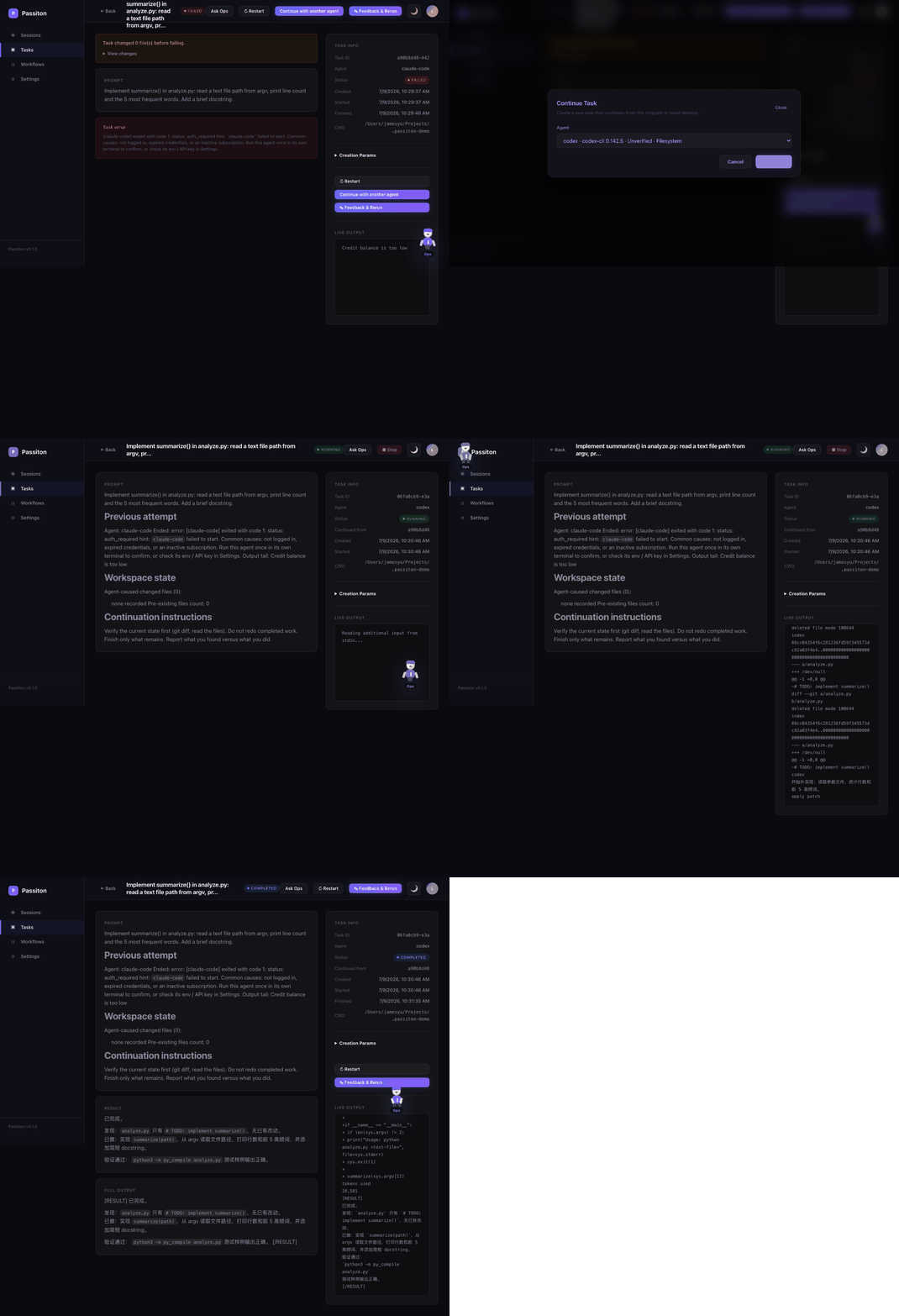
Key Features
- Task / Session / Workflow: run one agent, pair two agents, or chain multi-step workflows with dependencies and approvals.
- Operate by UI or API: every action -- create agents, dispatch tasks, run workflows, hand off failed work -- is available in the web UI and over a self-describing HTTP API (
GET /api/docs) that an AI operator can drive. - Any CLI agent: Claude Code, Codex, Gemini CLI, and OpenCode are auto-discovered, auto-configured, and verified automatically; register anything else (aider, goose, qwen-code, ...) as a custom CLI agent via the UI or
POST /api/config/agents. - Agent priority: reorder agents with arrows in Settings; tasks created without an explicit agent go to the highest-priority usable agent.
- Human-in-the-loop: pause, resume, inject feedback, approve workflow steps, and rerun downstream steps after changes.
- Local-first SQLite: defaults to
127.0.0.1, stores config and state under~/.passiton/, and keeps the legacyturing.dbfilename for compatibility. - CLI and API agents: Codex, Claude Code, Gemini CLI, OpenCode, Anthropic, OpenAI, DeepSeek, Zhipu, Qwen, Moonshot, and OpenAI-compatible endpoints.
- Agent handoff: continue running, errored, or stopped tasks (running tasks are stopped automatically first) with another ready agent; the handoff includes the previous output tail and verified git workspace state when available.
- i18n: English is the default UI language; Simplified Chinese is available in Settings.
Quick Start
npx passiton
Open http://localhost:4590.
From source
git clone https://github.com/fusae/passiton.git
cd passiton
npm install
npm run build
npm start
Optional verification:
npm test
For local development, use npm link after npm run build to get the passiton command on your PATH.
First Task Walkthrough
- On first launch, the four preset CLI agents (Claude Code, Codex, Gemini CLI, OpenCode) are auto-discovered, auto-added, and verified automatically in the background.
- In
Settings, they reachreadywith zero clicks. - An installed-but-unusable CLI (e.g. not logged in) shows
invalid; theDiagnosebutton explains why. - Open
Tasks, enter a prompt, and optionally setcwd— the agent picker defaults to "Auto (highest priority)", so choosing an agent is optional. - Agents that are not auto-discovered can be added as a custom CLI agent in
Settings→Agents→Add custom agent, or withPOST /api/config/agentsusing adaptercustom-cli; see Community adapters.
Tasks with cwd require a filesystem-capable local CLI agent. API assistants can plan and review, but they cannot read or write local files directly.
On Windows, custom agents should use a native .exe, an npm-generated .ps1 shim, or node.exe plus the CLI JavaScript entrypoint. Passiton automatically switches a .cmd shim to its matching .ps1 sibling so cmd.exe cannot split multi-line prompts.
Drive It Your Way: UI Or API
Passiton can be operated by clicking the web UI, or entirely over the self-describing HTTP API that an AI operator such as Claude Code, ChatGPT, or any HTTP-capable agent can drive by reading GET /api/docs.
BASE=http://127.0.0.1:4590
TOKEN="$(curl -s -X POST "$BASE/api/auth/local" | node -pe "JSON.parse(fs.readFileSync(0, 'utf8')).token")"

curl -s "$BASE/api/docs"

curl -s -X POST "$BASE/api/config/agents" \
  -H "Authorization: Bearer $TOKEN" \
  -H "Content-Type: application/json" \
  -d '{
    "name": "my-aider",
    "adapter": "custom-cli",
    "command": "aider",
    "args": ["--message", "{prompt}"],
    "timeout": 600000,
    "env": { "AIDER_MODEL": "sonnet" }
  }'

curl -s -X POST "$BASE/api/tasks" \
  -H "Authorization: Bearer $TOKEN" \
  -H "Content-Type: application/json" \
  -d '{
    "agent": { "adapter": "my-aider" },
    "prompt": "Summarize this repository."
  }'
agent is optional — omit it and the task goes to the highest-priority usable agent.
Configuration
Passiton reads ~/.passiton/config.json, merged with config/default.json. Existing installs using ~/.turing/ are still detected.
Common environment variables:
| Variable | Purpose |
|---|---|
PORT |
HTTP port; default 4590 |
PASSITON_HOST |
bind host; default 127.0.0.1 |
PASSITON_HOME |
data directory for config.json and turing.db |
PASSITON_JWT_SECRET |
stable JWT secret for exposed/server mode |
PASSITON_ENCRYPTION_KEY |
key material for encrypted provider keys |
PASSITON_LOCAL_ACCESS |
local auto-login; default true |
PASSITON_ALLOW_REGISTRATION |
user registration; default false |
PASSITON_ALLOWED_ORIGINS |
comma-separated CORS origins beyond localhost |
PASSITON_LOCAL_CLI_AGENTS |
auto-discover local CLI agents; default true |
PASSITON_ALLOWED_WORKSPACES |
path-delimited roots that CLI agents may use |
PASSITON_CODEX_COMMAND / PASSITON_CLAUDE_COMMAND / PASSITON_GEMINI_COMMAND / PASSITON_OPENCODE_COMMAND |
override CLI binary paths |
PASSITON_DREAMINA_COMMAND / PASSITON_GEMINI_SKILL_SCRIPT |
enable bundled experimental providers |
Legacy TURING_* variables are accepted as fallbacks for the matching PASSITON_* names.
Security Model
Passiton is designed for local use by one trusted user. Defaults:
- server binds to
127.0.0.1 - local auto-login is enabled
- registration is disabled
- JWT and encryption secrets are generated on first run
- CLI agents run as local processes and can act inside allowed workspaces
If you expose Passiton beyond localhost through a LAN, tunnel, or public host, startup requires:
PASSITON_LOCAL_ACCESS=falsePASSITON_JWT_SECRETorauth.jwtSecret- non-empty
policy.allowedWorkspaces
Permission modes:
safe(default): use for read-only analysis, review, and planning. Passiton does not bypass the CLI agent's sandbox or approval prompts, so unattended file writes may fail or wait for input.trusted: use for unattended work that creates, edits, or deletes files, installs dependencies, runs build/test commands, or creates commits. It enables the supported CLI agent's auto-approve or full-access flag and therefore requires a narrowly scopedcwd.
AI callers must send both cwd and permissionMode: "trusted" whenever the requested result requires filesystem writes or command execution. API assistants still cannot access local files in either mode. See SECURITY.md.
HTTP API
The server exposes JSON endpoints for every UI operation, including agents, tasks, sessions, workflows, provider keys, auth tokens, file previews, logs, and stats. Use GET /api/docs as the self-describing reference:
GET /api/docs
Most /api/* endpoints require Authorization: Bearer <token>. Local mode can obtain a token through POST /api/auth/local.
MCP Integration
Passiton provides a Streamable HTTP MCP gateway at POST /mcp and POST /api/mcp. Use a Bearer token or token query parameter.
Tool names use the passiton_* prefix, including:
passiton_list_agentspassiton_create_taskpassiton_get_task_resultpassiton_create_sessionpassiton_send_feedbackpassiton_get_progresspassiton_create_workflowpassiton_get_workflowpassiton_approve_steppassiton_retry_steppassiton_stop_runpassiton_read_artifact
When connecting from a remote MCP client, use HTTPS and the exposure requirements above.
External Task Providers
The core router is not tied to a vendor. Integrations that submit remote jobs and poll until done implement ExternalTaskProvider from src/types.ts and register with router.registerExternalTaskProvider(provider).
Providers can:
- parse agent output for external job IDs
- own workflow steps through
handledNodeTypes - poll for completion and attach output paths
- resume polling after server restart
Bundled examples:
- Dreamina video provider in
src/examples/dreamina/, enabled byPASSITON_DREAMINA_COMMAND - Gemini Image adapter, enabled by
PASSITON_GEMINI_SKILL_SCRIPTandGEMINI_WEB_COOKIE_PATH
Data Retention
Persistent state lives in ~/.passiton/turing.db by default. Existing ~/.turing/ data is reused when present.
Messages are retained for 30 days by default via policy.messageRetentionMs. Provider keys are encrypted at rest. Protect the data directory like any other local credential store.
More Docs
Reviews (0)
Sign in to leave a review.
Leave a reviewNo results found