gate
Health Pass
- License — License: MIT
- Description — Repository has a description
- Active repo — Last push 0 days ago
- Community trust — 22 GitHub stars
Code Pass
- Code scan — Scanned 12 files during light audit, no dangerous patterns found
Permissions Pass
- Permissions — No dangerous permissions requested
No AI report is available for this listing yet.
A deterministic privacy boundary between your data and AI.
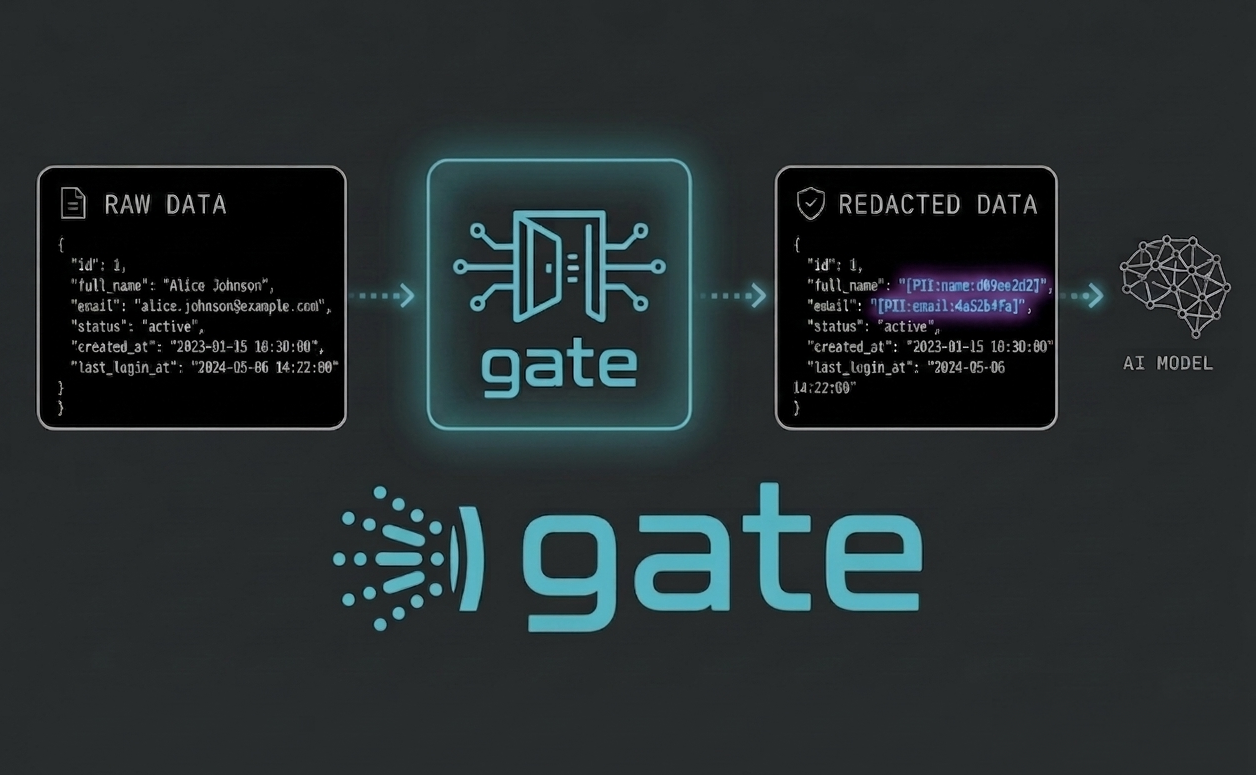
A deterministic privacy boundary between your data and AI.
Intercepts query results before the model sees them — rule-driven, reproducible, and audit-ready.



AI agents increasingly access internal databases and APIs through CLI tools, scripts, and MCP servers. Without safeguards, sensitive data such as emails, phone numbers, tax identifiers, and payment details can be unintentionally exposed to LLM context windows.
gate intercepts query results before they reach the model and automatically redacts detected PII fields without requiring changes to existing agent workflows or prompts. It covers both access paths agents use: Bash commands (via a harness hook) and MCP server calls (via a wrap-style stdio proxy).
Demo
The demo walks through three steps:
gate scandetecting PII columns across the schema before any query runs- An agent querying the transactions table with gate disabled —
card_numberfully visible - The same queries with gate enabled —
card_numberredacted across both MCP and Bash paths

Also works with OpenCode, Cursor, and GitHub Copilot CLI — see Supported AI Tools for the full compatibility matrix.
For the design rationale, threat-model walkthrough, and detection-pipeline deep dive, read Introducing gate.
Scan your schema
Before installing the hook, use gate scan to assess how much PII your schema exposes. Pipe a TABLE_NAME, COLUMN_NAME query into it and gate prints a risk report across every table. No config is required for gate scan itself — if you haven't created one yet, run gate config --init-only first.
psql -U <user> -h <host> -d <dbname> -c "SELECT TABLE_NAME, COLUMN_NAME FROM INFORMATION_SCHEMA.COLUMNS WHERE TABLE_SCHEMA = 'public' ORDER BY TABLE_NAME, ORDINAL_POSITION" | gate scan
See docs/scan.md for queries against MySQL, MS SQL Server (including native sqlcmd), Databricks, and toolkit-managed clients.
Risk level is weighted by category sensitivity — one SSN column matters more than twenty address columns. Exits with code 1 if any PII columns are found (scriptable in CI). Pass --verbose to show all detected columns, or --json for machine-readable output.
| Sensitivity | Categories | Risk floor |
|---|---|---|
| Critical | Government IDs, Health & medical, Financial, Biometric | HIGH always; CRITICAL if ≥3 columns or >10% of schema |
| Elevated | Contact, Names, Date of birth, Location of birth, Family & relationships, Employment | HIGH if >5% of schema; CRITICAL if >25% |
| Standard | Address & location, Online & technical, Demographics | HIGH if >25% of schema |
Note:
gate scandetects PII by column name only. A LOW result means your column names look clean — it does not mean the data is safe. Gate 2 additionally inspects values at query time, catching PII in free-text, JSON, and ambiguously-named columns that scan cannot see.
For false positives (e.g. city in a products table), run gate scan --review to triage interactively and add columns to the allowlist. Allowlisted columns skip name-based redaction only — Gate 2 still checks their values against regex patterns and the Luhn algorithm. Manage the list directly with gate allowlist add/remove/list.
Quickstart
Install gate
# Homebrew — macOS and Linux (recommended)
brew tap GaaraZhu/gate && brew install gate

# cargo binstall — downloads a prebuilt binary
cargo binstall gate

# Or grab a binary from the releases page
# https://github.com/GaaraZhu/gate/releases
Create your config (opens
~/.config/gate/config.yamlin your editor):gate configRegister the hook with your agent harness:
# Claude Code (default)
gate init

# OpenCode
gate init --harness opencode

# Cursor
gate init --harness cursor

# GitHub Copilot CLI (project-scoped, run from repo root)
gate init --harness copilot-cli
Add
--scope projectfor project-only setup. Restart your OpenCode or Cursor session aftergate initto load the hook. For Copilot CLI, the generated.github/hooks/PreToolUse.jsonis gitignored by default — each developer runsgate init --harness copilot-clionce in their local clone.(Optional) Register MCP server proxies so
tools/callresponses also pass through gate:# Claude Code (default) — dry-run, shows what would change gate init --wrap-mcp # OpenCode gate init --harness opencode --wrap-mcp --yes # Cursor gate init --harness cursor --wrap-mcp --yes # Copilot CLI gate init --harness copilot-cli --wrap-mcp --yesAdd
--scope projectfor project-level MCP config. For Cursor project-scoped MCP, re-enable the servers in Settings → Tools & MCPs after registration. See docs/mcp.md for--servers, per-harness paths, and manual single-server registration.Start your AI session —
gateintercepts query commands automatically. No changes to your prompts or tools required.
Run gate validate to confirm your config is valid before the first session.
How it works
gate covers two access paths agents use to reach data. The blog post has the full walkthrough; the short version:
Bash tooling path
Every Bash command passes through gate hook first. Commands that match a configured tool are silently rewritten to gate run -- <original command>, which spawns the subprocess and pipes stdout through the two-gate detection pipeline. The rewrite happens in the harness's pre-tool-execution hook — it is enforcing in Claude Code, OpenCode, Cursor, and GitHub Copilot CLI; the agent cannot bypass it. Humans and CI scripts running outside the harness are untouched.
AI asks to run: tkpsql query --sql "SELECT * FROM users"
                        │
         harness hook fires (PreToolUse / tool.execute.before)
                        │
              gate hook rewrites to: gate run -- tkpsql query --sql "..."
                        │
         ┌──────────────┴──────────────┐
         │ Gate 1: SQL inspection      │  SELECT * → no column hints, defer to Gate 2
         │ Gate 2: Value scanning      │  regex + column-name heuristics + Luhn check
         └──────────────┬──────────────┘
                        │
         {"id": 1, "full_name": "[PII:name]", "email": "[PII:email]", ..., "_gate_summary": {...}}
MCP path
gate mcp is a transparent stdio proxy registered in the harness as the MCP server. It forwards all JSON-RPC traffic verbatim except tools/call responses, which pass through Gate 2 before reaching the model. No changes to the upstream server are required.
Note: only
tools/callresponses are redacted —resources/read,prompts/get, and other MCP message types are forwarded without inspection.
AI ──tools/call──> gate mcp ──forward──> upstream MCP server
                       │
                       │ <── tools/call response with PII
                       │
                       │ Gate 2 scan + redact
                       │
AI <───redacted result─┘
Output format
Redacted output preserves the original JSON structure. PII values are replaced with [PII:<type>] placeholders. A _gate_summary field is appended reporting what was redacted.
{
  "rows": [{"id": 1, "email": "[PII:email]", "ssn": "[PII:ssn]"}],
  "count": 1,
  "_gate_summary": {"redacted": 2, "types": ["email", "ssn"], "warnings": []}
}
With hash_values: true in config, each placeholder gains an 8-char hex suffix derived from the original value ([PII:email:7f83b165]). The same raw value always produces the same suffix, so the AI can join or deduplicate across rows without ever seeing the underlying data. Error responses from the underlying tool pass through unchanged.
Protection retrospective
_gate_summary reports a single response. gate retro aggregates across all of them — total queries seen, PII fields redacted, hit rate, plus a breakdown by tool and PII category. Useful for periodic audits and for confirming the boundary is doing real work.
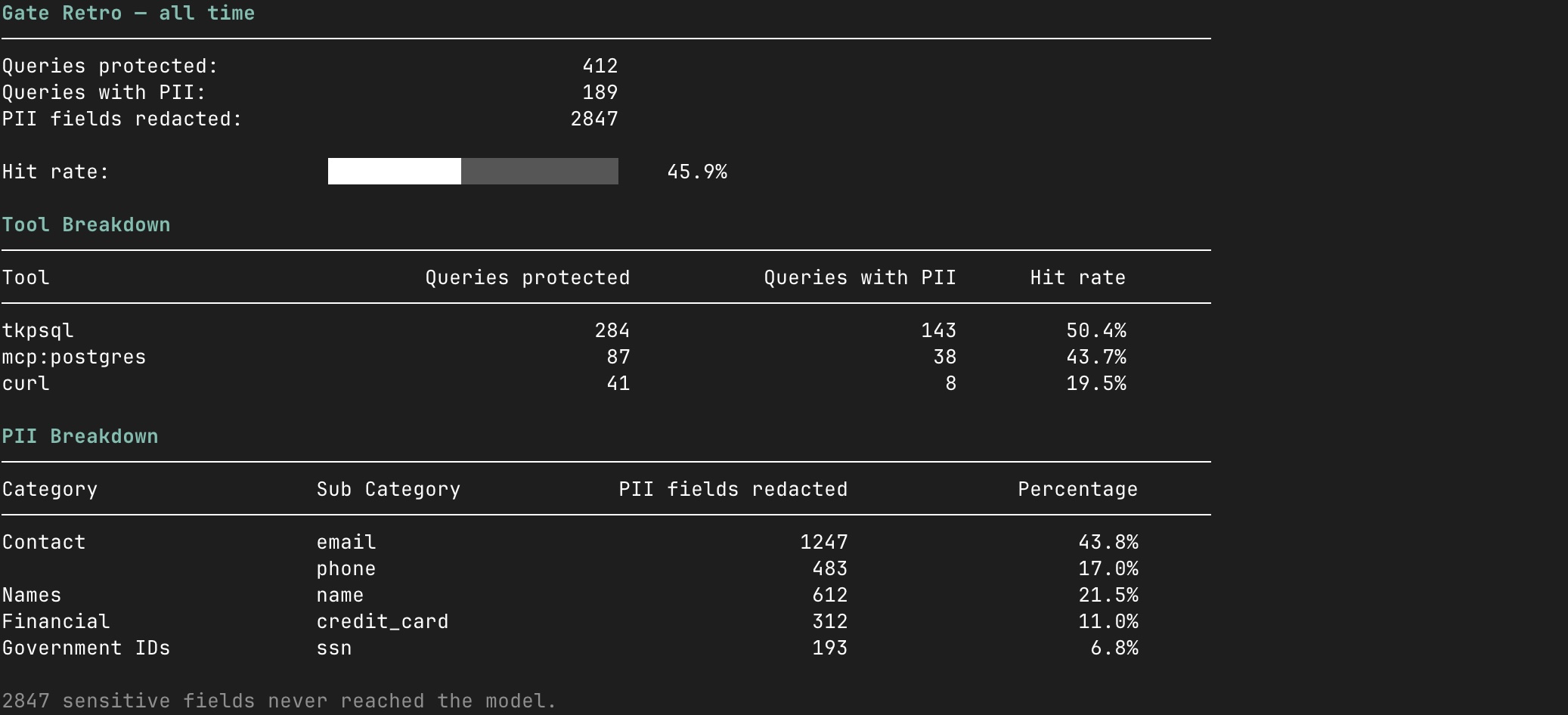
Stats are collected by default and written to a local JSONL log on disk — they never leave your machine. Disable with stats.enabled: false in config.
What gate does NOT protect against
gate is a deterministic redaction layer, not a sandbox. It assumes the agent is non-adversarial and only inspects output from commands listed under tools: in config. The following are deliberately out of scope:
- Adversarial agents / prompt injection. Gate's threat model is an agent that inadvertently exfiltrates PII.
gate protect(Unix) blocks the most direct bypass — a hijacked agent disabling gate via config edits — by transferring config ownership to root. But a determined attacker can still route around gate by invoking commands not intools:, requesting non-JSON output formats, piping through encoders, or removing the hook entry from the harness settings file for the next session. Pair gate with a harness-level Bash allowlist to close the residual gap. - Commands not in
tools:. The AI can invoke them freely; their output is never inspected. - Non-JSON tool output. Plain text, CSV, and other formats pass through unchanged. Configure tools to emit JSON.
- Encoded or obfuscated PII. Base64-encoded emails, URL-encoded values, or deliberately spaced strings (
a l i c e @ e x a m p l e . c o m) are not detected. - Non-US PII by value alone. The built-in SSN regex requires dashes and the phone pattern is US-centric. Non-US formats rely on column-name matching — extend
pii.column_namesorpii.patternsfor your region. - PII already in the model's context from prior turns, system prompts, file reads, or earlier summarisation. Gate filters what goes into the model from configured tools; what's already there stays there.
- Tool-side network exfiltration. If a configured tool sends data to an external service directly (rather than returning it via stdout), gate never sees it.
- Write operations.
INSERT,UPDATE,DELETEare not inspected or blocked. - Credential exposure. Gate holds no credentials; that is the responsibility of the underlying tool. Prefer toolkit commands or MCP servers over raw clients that take credentials on the CLI.
For a stronger boundary, combine gate with harness-level tool restrictions and database-level read-only roles. See THREAT-MODEL.md for the full attacker model and known bypasses.
Supported query tools
Any command that returns JSON can be configured as a gate target — database clients, internal API calls via curl, or any other tool your AI agent uses to fetch data. The AI sees the same structured response it always did, with PII values replaced in-place.
| Command | Type | Notes |
|---|---|---|
tkpsql |
PostgreSQL (toolkit-managed) | sql_arg: "--sql" |
tkmsql |
MS SQL Server (toolkit-managed) | sql_arg: "--sql" |
tkdbr |
Databricks (toolkit-managed) | sql_arg: "--sql" |
databricks |
Databricks CLI (native) | sql_arg: "--json", json_sql_path: "statement" |
curl |
HTTP data sources | pipe: "jq -c ." |
psql, mysql, mariadb |
Raw DB clients | Not enabled by default — see Raw database clients |
Prefer toolkit commands or MCP servers over raw clients: raw clients typically require credentials on the command line, which lands in the agent's transcript, shell history, and process listing. Toolkit commands (tk*) inject credentials from a secrets store; MCP servers hide the connection string entirely. gate works with any JSON-returning command — toolkit is not required.
Commands
gate --help                    # full subcommand list
gate <subcommand> --help       # details for any subcommand
The ones you'll use most:
| Command | Purpose |
|---|---|
gate init |
Register the hook with your harness (see Quickstart) |
gate config |
Create and edit the YAML config |
gate scan |
PII risk report across your schema |
gate allowlist add/remove/list |
Manage column-name false positives |
gate retro |
Protection retrospective — total queries & PII fields redacted, breakdown by tool and PII type/category, hit rate with visual progress bar |
gate enable / gate disable |
Toggle redaction without uninstalling |
gate validate |
Check config for errors before the first session |
gate protect / gate unprotect (Unix only) |
Transfer config ownership to root |
gate uninstall |
Remove everything gate added to your system |
See docs/commands.md for the full reference, including gate run, gate mcp, and the --wrap-mcp / --scope / --harness flags.
Config file protection (Unix only)
For a stronger guarantee, transfer ownership of the config to root so the agent cannot modify it:
sudo gate protect      # any future enable/disable/config/allowlist now needs sudo
sudo gate unprotect    # restore direct write access
Enforced at the OS level across all harnesses (Claude Code, OpenCode, Cursor, GitHub Copilot CLI). Not supported on Windows.
Supported AI Tools
| AI Tool | Bash Hook | MCP Wrap | Notes |
|---|---|---|---|
| Claude Code | ✅ | ✅ | |
| Cursor | ✅ | ✅ | Restart session after gate init to load the hook |
| OpenCode | ✅ | ✅ | Restart session after gate init to load the hook |
| GitHub Copilot CLI | ✅ | ✅ | Hook is project-scoped; each developer runs gate init once |
Documentation
- Configuration — full YAML schema and built-in PII detection rules
- Commands — full subcommand reference
- MCP setup — wrapping existing MCP servers and registering new ones
- Scan queries — schema-query examples for each database
- Config file locations — where each harness stores hooks and MCP settings
- Troubleshooting — common issues and fixes
Uninstallation
gate uninstall
brew uninstall gate
gate uninstall removes gate hooks from all harnesses, the config directory at ~/.config/gate/, and any gate-generated plugin files. It shows what will be deleted and asks for confirmation.
Contributing
Bug reports and pull requests are welcome. For significant changes, open an issue first to discuss the proposal. See CONTRIBUTING.md for the dev setup, pre-commit checklist, and safety rules for redaction changes.
License
MIT — see LICENSE.
Disclaimer
See DISCLAIMER.md.
Reviews (0)
Sign in to leave a review.
Leave a reviewNo results found