Api-Test-MCP
Health Pass
- License — License: MIT
- Description — Repository has a description
- Active repo — Last push 0 days ago
- Community trust — 24 GitHub stars
Code Pass
- Code scan — Scanned 12 files during light audit, no dangerous patterns found
Permissions Pass
- Permissions — No dangerous permissions requested
This framework provides a YAML-first approach to API testing, optimized for AI coding assistants. It operates as an MCP server to help tools like Claude or Cursor generate and execute test cases without writing repetitive boilerplate code.
Security Assessment
Overall Risk: Medium. Because it is an API testing framework, its core function is to make outbound network requests to your specified endpoints, validate responses, and execute test code. The automated rule-based scan confirms no dangerous patterns or hardcoded secrets were found in the 12 audited files. However, testers should be aware that the framework's auto-authentication and variable resolution engines will naturally handle sensitive tokens and dynamic data execution.
Quality Assessment
The project is actively maintained, with its most recent push occurring just today. It utilizes the highly permissive and standard MIT license. While still a relatively niche tool with a modest 24 GitHub stars, this indicates an emerging and growing community trust. The provided documentation is extensive, clearly explaining its architecture and setup.
Verdict
Safe to use. The codebase is clean of malicious patterns, though standard security precautions should always be applied since the tool inherently processes authentication credentials and interacts with external APIs.
A YAML-first API testing framework built for AI-assisted API workflows.
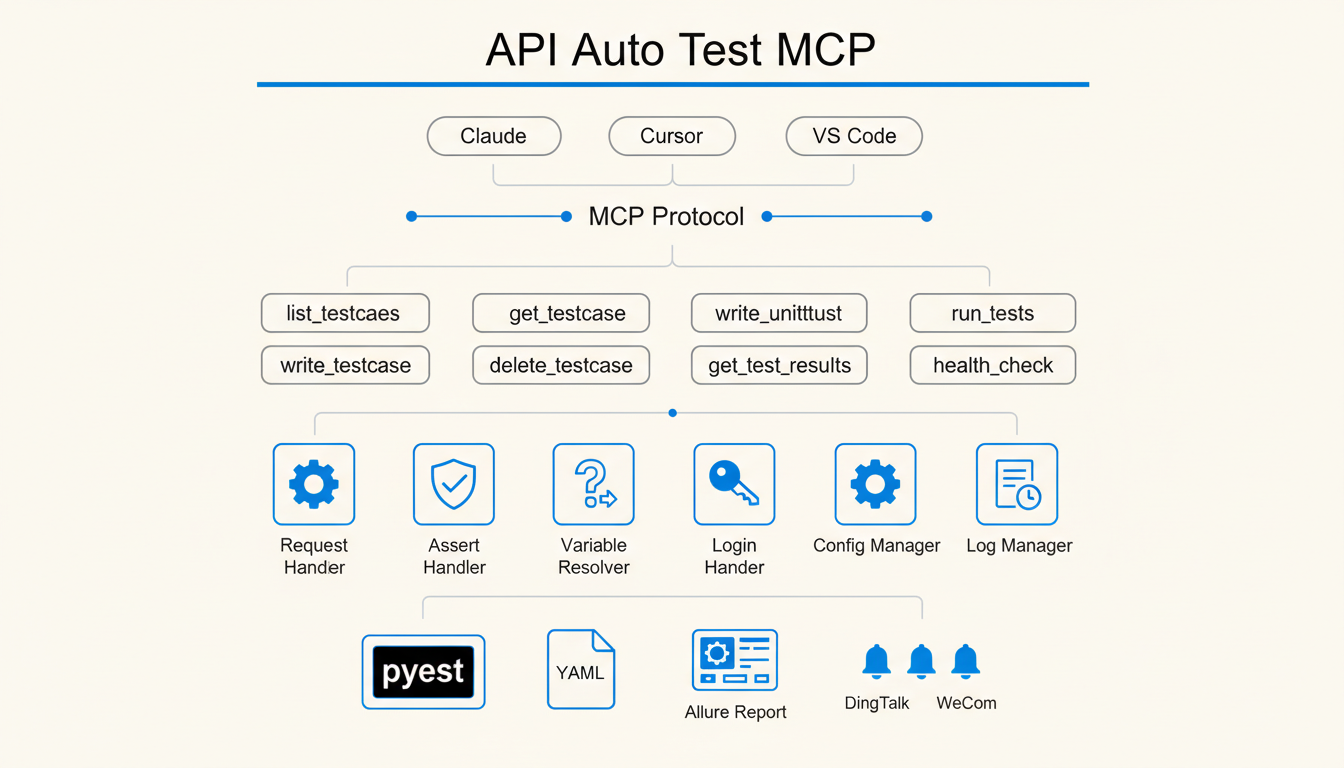
API Auto Test Framework


YAML Declarative API Testing Framework, Optimized for AI Coding Assistants
Case study | AgentsGalaxy | GitHub
Quick Start | MCP Integration | YAML Spec | Unit Testing
Why This Framework?
When asking AI to write API tests, you might encounter these issues:
Scenario 1: Repetitive Work
Every time you ask AI to generate tests, you need to re-describe the project structure, authentication method, and assertion style. For 10 API tests, the same fixture and setup code gets generated 10 times.
Scenario 2: Token Black Hole
A simple login API test generates 200 lines of code. You find an assertion is wrong, ask AI to fix it, and it generates another 200 lines. After 3 revisions, you've consumed 2000+ Tokens, and you still end up fixing it manually.
Scenario 3: Debugging Dead Loop
AI-generated tests fail to run. You paste the error message, AI fixes it but still wrong. After 5 rounds of conversation, the problem persists, and you've burned 5000+ Tokens.
This Framework's Solution:
Traditional: Natural Language -> AI Generates Full Code -> Run Error -> Paste Error -> AI Regenerates -> Loop...
This Framework: Natural Language -> AI Generates YAML -> Framework Executes -> Locate Issue -> Fix 1 Line YAML
| Metric | Traditional AI | This Framework |
|---|---|---|
| Test 1 API | ~200 lines code | ~20 lines YAML |
| Modify Assertion | Regenerate all code | Fix 1-2 lines YAML |
| 10 API Tests | Repeat setup 10x | Shared config, 0 repeat |
| Debug Issue | 3-5 rounds avg | Usually 1 round |
Key Features
| Feature | Description |
|---|---|
| YAML Declarative Tests | Test logic separated from execution code, AI generates structured data only |
| MCP Server | Seamless integration with Claude/Cursor and other AI editors |
| API Workflow Orchestration | Multi-step API calls in single file, with data passing and assertions between steps |
| Variable Resolution Engine | Support for cross-step data transfer, global variables, and dynamic function calls |
| Auto Authentication | Token acquisition and refresh handled by framework |
| Data Factory | Built-in mock data generation, no Java dependencies |
| Multi-format Reports | Allure (offline/online), pytest-html (standalone HTML, styled) |
| Multi-channel Notifications | DingTalk, Feishu, WeCom |
| Unit Testing | Python code unit testing with automatic mock dependency injection |
Quick Start
Installation
# 1. Install uv (if not installed)
curl -LsSf https://astral.sh/uv/install.sh | sh

# 2. Install MCP server (recommended: install as a tool)
uv tool install git+https://github.com/GalaxyXieyu/Api-Test-MCP.git

# Verify
api-auto-test-mcp --help

# Manage tools
uv tool list
uv tool uninstall api-auto-test   # use the tool name shown by `uv tool list`
Run without installing (uvx):
uvx --from git+https://github.com/GalaxyXieyu/Api-Test-MCP.git api-auto-test-mcp --help
Common mistake: uvx install ... is wrong. uvx treats the first word after it as the tool name, so it will try to resolve a package literally named install and fail.
Configure Editor
Add the following to your editor's MCP settings:
{
  "mcpServers": {
    "api-auto-test": {
      "command": "api-auto-test-mcp"
    }
  }
}
| Editor | Config Location |
|---|---|
| Claude Desktop | ~/Library/Application Support/Claude/claude_desktop_config.json |
| Cursor | Settings -> MCP Servers |
| VSCode + Continue | .vscode/mcp.json |
Local Development
# Recommended with uv
uv pip install -r requirements.txt

# Or with pip
pip install -r requirements.txt
Create Test Case
# tests/cases/user_login.yaml
testcase:
  name: user_login
  description: User login API test
  host: http://localhost:8000
  steps:
    - id: login
      path: /api/auth/login
      method: POST
      data:
        username: "test_user"
        password: "123456"
      assert:
        - type: status_code
          expected: 200
        - type: equals
          field: data.code
          expected: 0
Generate and Run
# Generate pytest scripts
python -m atf.case_generator

# Run tests
pytest tests/scripts/ -v

# Generate Allure report
pytest tests/scripts/ --alluredir=tests/allure-results
allure serve tests/allure-results

# Generate pytest-html report
pytest tests/scripts/ --html=report.html
MCP Server Integration
Through MCP, AI editors can directly call framework tools to generate and execute tests.
Efficiency Comparison
| Metric | Without MCP | With MCP | Improvement |
|---|---|---|---|
| Total Cost | $0.0214 | $0.0099 | -54% |
| API Latency | 11 sec | 4 sec | -64% |
| Output Tokens | 585 | 238 | -59% |
| Cache Read | 42.0k | 21.0k | -50% |
Test Scenario: Same API test generation task (pure consultation/analysis conversation)
Core Advantages:
- 54% cost reduction: MCP directly calls tools, avoiding lengthy code generation context
- 64% faster API response: Tool calls are more efficient than natural language interaction
- 59% less token consumption: Only necessary parameters needed, no need to repeat project structure
Available Tools
| Tool | Description |
|---|---|
list_testcases |
List test cases |
get_testcase |
Read test case content |
write_testcase |
Create/update test case and generate pytest script |
write_unittest |
Create unit test |
delete_testcase |
Delete test case |
run_tests |
Execute tests |
get_test_results |
Get test execution history |
health_check |
Service health check |
Usage Example
Tell AI:
Create a test for /api/users interface, verify returned user list length > 0
AI will call write_testcase to generate YAML and corresponding pytest script.
Project Structure
api-auto-test/
├── atf/                    # Framework core
│   ├── core/               # Request, assertion, variable resolution modules
│   ├── mcp/                # MCP Server implementation
│   └── handlers/           # Notification, report handlers
├── tests/
│   ├── cases/              # YAML test cases
│   └── scripts/            # Generated pytest scripts
├── config.yaml             # Project config (environment, database, notifications)
└── pyproject.toml
YAML Test Case Spec
Basic Structure
testcase:
  name: test_name              # Case name, used for filename
  description: Description     # Optional
  host: http://localhost:8000  # API host, can also be configured globally in config.yaml
  steps:
    - id: step1                # Step ID, used for later reference
      path: /api/endpoint
      method: POST
      headers:
        Authorization: "Bearer {{ login.data.token }}"  # Reference response from other step
      data:
        key: value
      assert:
        - type: status_code
          expected: 200
        - type: equals
          field: data.id
          expected: 1
Assertion Types
| Type | Description | Example |
|---|---|---|
status_code |
HTTP status code | expected: 200 |
equals |
Exact match | field: data.id, expected: 1 |
contains |
Contains | field: data.name, expected: "test" |
length |
Array/string length | field: data.list, expected: 10 |
regex |
Regex match | field: data.email, expected: "^\\w+@" |
Variable Reference
# Reference response data from other steps
token: "{{ login.data.token }}"

# Reference global config
host: "{{ merchant.host }}"

# Call built-in functions
timestamp: "{{ tools.get_timestamp() }}"
uuid: "{{ tools.generate_uuid() }}"
Teardown
testcase:
  name: create_and_delete_user
  steps:
    - id: create_user
      path: /api/users
      method: POST
      data:
        name: "test_user"
  teardowns:
    - id: delete_user
      operation_type: api
      path: /api/users/{{ create_user.data.id }}
      method: DELETE
Unit Testing
Support for writing unit tests for Python code, automatically generating test cases through MCP tools.
Unit Test YAML Format
unittest:
  name: UserService Test
  target:
    module: app.services.user_service
    class: UserService
    function: get_user
  fixtures:
    setup:
      - type: patch
        target: app.services.user_service.UserRepository
        return_value:
          id: 1
          name: "test_user"
  cases:
    - id: test_get_user_success
      description: Test get user success
      inputs:
        args: [1]
        kwargs: {}
      assert:
        - type: equals
          field: result.id
          expected: 1
        - type: equals
          field: result.name
          expected: "test_user"
Assertion Types
| Type | Description |
|---|---|
equals |
Exact match |
not_equals |
Not equal |
contains |
Contains |
raises |
Expect exception to be raised |
is_none |
Result is None |
is_not_none |
Result is not None |
called_once |
Mock called once |
called_with |
Mock called with specific arguments |
Configuration File
# config.yaml
projects:
  merchant:
    test:
      host: http://192.168.1.100:8080
      is_need_login: true
      login:
        url: http://192.168.1.100:8080/login
        method: POST
        data:
          username: admin
          password: "123456"
    online:
      host: https://api.example.com
      is_need_login: true

notifications:
  dingtalk:
    webhook: "https://oapi.dingtalk.com/robot/send?access_token=xxx"
    secret: "SECxxx"
License
MIT License
Links
Reviews (0)
Sign in to leave a review.
Leave a reviewNo results found