didatodolist-mcp
Health Pass
- License — License: MIT
- Description — Repository has a description
- Active repo — Last push 0 days ago
- Community trust — 81 GitHub stars
Code Fail
- os.homedir — User home directory access in openclaw-openapi-plugin/index.ts
- process.env — Environment variable access in openclaw-openapi-plugin/index.ts
- network request — Outbound network request in openclaw-openapi-plugin/index.ts
Permissions Pass
- Permissions — No dangerous permissions requested
This is a Python-based MCP server that integrates TickTick (Dida365) task and goal data into AI workflows using official OAuth 2.0 and Open APIs. It provides features like task analytics, goal tracking, and keyword extraction.
Security Assessment
Overall Risk: Medium. The tool is designed around official OAuth 2.0, which is a significant security plus, but the automated scan and manual setup reveal notable surface areas. The scan flagged access to the user's home directory and environment variables in a bundled TypeScript plugin (`openclaw-openapi-plugin/index.ts`). The tool also makes outbound network requests, which is expected since it needs to communicate with the TickTick API. Developers should be aware that the `.env` file stores sensitive API keys and OAuth access/refresh tokens. Additionally, the setup requires running a local callback server for authentication. While there are no hardcoded secrets, users must be careful to protect their `.env` file and `MCP_API_KEY`.
Quality Assessment
Quality is good. The project is highly active, with its last push occurring today, and has earned 81 GitHub stars, indicating decent community trust and adoption. It is properly licensed under the permissive and standard MIT license. The README is comprehensive, offering clear, step-by-step quickstart guides and detailing exactly which official API endpoints are utilized.
Verdict
Use with caution: The project is active, well-documented, and relies on secure official OAuth, but developers must carefully manage API keys and tokens stored in local environment variables.
Bring TickTick task and goal data into MCP workflows with official OAuth and Open API support.
TickTick MCP Service
Bring TickTick task and goal data into MCP workflows with official OAuth and Open API support.
Case study · AgentsGalaxy · GitHub
didatodolist-mcp connects TickTick (Dida365) data to MCP-friendly workflows, with goal management, task analytics, and automation-friendly interfaces built on top of the official auth and API surface.
Why it matters
- official OAuth 2.0 and Open API support makes the integration easier to trust
- MCP packaging makes task data more useful inside AI-native workflows
- the repo is suitable for productivity tooling, research flows, and personal operating systems
Quick Start
- Clone the repo and install Python dependencies.
- Configure
.envwith your client credentials. - Run the OAuth helper once to get access and refresh tokens.
- Start the MCP service and connect it to your editor or automation runtime.
中文说明
滴答清单 MCP 服务
滴答清单MCP(Memory-Context-Planning)服务是一个基于Python的后端服务,为用户提供目标管理、任务统计分析、关键词提取和任务-目标匹配等功能。该服务作为滴答清单主应用的辅助功能,帮助用户更好地规划和跟踪个人及团队目标完成情况。
最新更新:已从逆向接口切换到官方 OAuth 2.0 + Open API。详见
docs/openapi_oauth_guide.md。
重要:本项目已全面对齐滴答清单开放平台(/open/v1)端点。
- 项目:GET/POST/POST(id)/DELETE /open/v1/project
- 任务:POST /open/v1/task,POST /open/v1/task/{taskId},POST 完成 /open/v1/project/{projectId}/task/{taskId}/complete,DELETE /open/v1/project/{projectId}/task/{taskId}
- 汇总任务:官方无全局任务列表,使用 GET /open/v1/project/{projectId}/data 聚合
- 已完成任务:GET /open/v1/project/{projectId}/task/completed(用于拉取 completed 任务,部分文档未覆盖该端点)
- 标签:暂无写接口,当前工具仅提供只读聚合视图
主要功能
- 目标管理:创建、查询、更新和删除个人目标
- 任务统计分析:生成任务完成情况统计报告
- 关键词提取:基于任务内容提取关键词(基于jieba分词)
- 任务与目标匹配:智能匹配任务与相关目标
- 目标完成进度计算:分析并可视化目标完成进度
安装要求
- Python 3.8+
- 滴答清单账号(支持通过token、手机号或邮箱进行认证)
快速开始
- 克隆项目
git clone https://github.com/GalaxyXieyu/didatodolist-mcp.git
cd didatodolist-mcp
- 安装依赖
pip install -r requirements.txt
- 配置与认证(.env-only)
推荐使用 OAuth 2.0(仅 .env):
获取 Client ID / Secret:
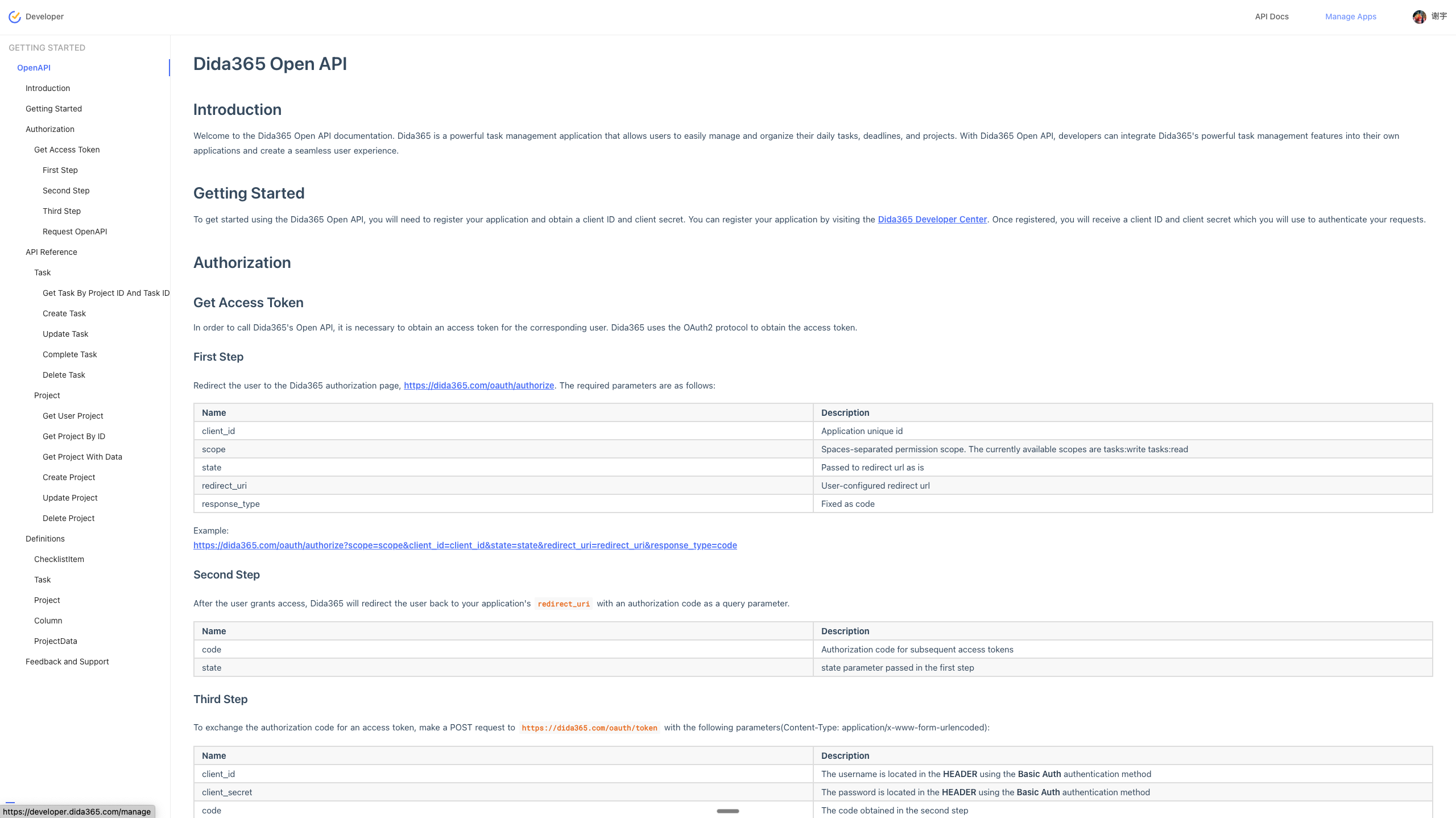
- 打开滴答清单开放平台文档入口:https://developer.dida365.com/docs#/openapi
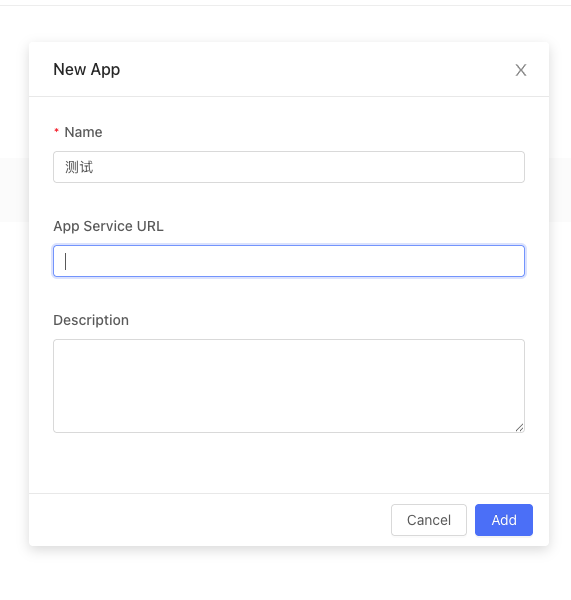
- 在开放平台创建一个应用(填写名称)。
- 在应用设置中将 OAuth Redirect URL 填写为:
http://localhost:38000/callback - 复制应用的
client_id与client_secret,用于下方.env配置。
参考图:
- 在
.env中配置MCP_API_KEY=...、DIDA_CLIENT_ID、DIDA_CLIENT_SECRET;运行python scripts/oauth_authenticate.py --port 38000完成一次性授权,脚本会将DIDA_ACCESS_TOKEN、DIDA_REFRESH_TOKEN写入.env。
最小可用步骤:
cp .env.example .env
# 编辑 .env,至少填写 MCP_API_KEY、DIDA_CLIENT_ID、DIDA_CLIENT_SECRET
python scripts/oauth_authenticate.py --port 38000  # 成功后写入 DIDA_ACCESS_TOKEN/DIDA_REFRESH_TOKEN 到 .env

# 启动服务
export MCP_API_KEY=your-strong-key  # 或直接在 .env 中配置
python main.py --sse --host 127.0.0.1 --port 3000
# 客户端请求头需带:x-api-key: your-strong-key
可选的 .env 示例:
MCP_API_KEY=your-strong-key
# 以下变量由 .env-only 管理
# DIDA_CLIENT_ID=...
# DIDA_CLIENT_SECRET=...
# DIDA_ACCESS_TOKEN=...
# DIDA_REFRESH_TOKEN=...
更多文档:
- 统一 OAuth 指南(.env-only):
docs/openapi_oauth_guide.md - 文档索引:
docs/openapi_index.md - 项目接口:
docs/openapi_project.md - 任务接口:
docs/openapi_task.md - 数据模型定义:
docs/openapi_definitions.md - 本地调试(Inspector/mcp-cli):
docs/dev_debug_inspector.md - OpenClaw 插件:
docs/openclaw_plugin.md - OpenClaw 原生插件(Open API):
docs/openclaw_openapi_plugin.md
OpenClaw 原生插件(推荐)
该插件直接调用滴答清单官方 Open API,不依赖 MCP 服务。
1) 安装插件
openclaw plugins install -l ./openclaw-openapi-plugin
2) 写入 OpenClaw 配置并完成 OAuth
推荐使用脚本自动写入(会把 token 写入 ~/.openclaw/openclaw.json,并确保 allowlist):
python3 scripts/oauth_openclaw.py --open-browser
脚本会读取以下配置(如果缺失可手动写入):
{
  "plugins": {
    "enabled": true,
    "entries": {
      "dida-openapi": {
        "enabled": true,
        "config": {
          "clientId": "<YOUR_CLIENT_ID>",
          "clientSecret": "<YOUR_CLIENT_SECRET>",
          "redirectUri": "http://localhost:38000/callback",
          "accessToken": "<ACCESS_TOKEN>",
          "refreshToken": "<REFRESH_TOKEN>",
          "timeoutMs": 15000,
          "autoRefresh": true
        }
      }
    }
  },
  "tools": {
    "allow": ["dida-openapi"]
  }
}
3) 重启 Gateway 使配置生效
openclaw gateway restart
4) 验证是否可调用
openclaw plugins info dida-openapi
openclaw agent --agent main --message "请调用工具 dida_get_projects 并返回结果" --thinking minimal --timeout 30 --json
如果 UI 提示“未配置 accessToken”,说明 Gateway 未读到最新配置或 token 已过期:请先运行授权脚本,再重启 Gateway。
Docker/Compose 部署(.env-only)
推荐在本机先完成一次性 OAuth 授权,把令牌写入 .env 后再部署容器(云上无需开放 38000)。
- 本地预授权(写入
.env)
cp .env.example .env
# 填写 MCP_API_KEY、DIDA_CLIENT_ID、DIDA_CLIENT_SECRET
python scripts/oauth_authenticate.py --port 38000  # 成功后写入 DIDA_ACCESS_TOKEN / DIDA_REFRESH_TOKEN
- 使用 Docker Compose 运行(仅需 3000 端口)
# 将授权后的 .env 复制为 data/.env(或直接放置)
mkdir -p data && cp .env data/.env

docker compose up -d --build mcp
# SSE 入口: http://<host>:3000/sse (Headers: x-api-key: <你的 MCP_API_KEY>)
- 使用 MCP Inspector 或 mcp-cli 连接
- Inspector:
npx @modelcontextprotocol/inspector,Transport 选 SSE,URLhttp://<host>:3000/sse,Headersx-api-key: <你的 MCP_API_KEY> - mcp-cli:
npx @wong2/mcp-cli,选择 SSE,填相同 URL 与 Headers
说明与最佳实践:
- callback(38000) 仅发生在“授权当时”,容器运行不依赖该端口;云上只需暴露 3000 或经反代直通
/sse。 - 强随机化
MCP_API_KEY并通过反向代理透传x-api-key;生产可限制来源 IP。 - 令牌过期时,服务端会尝试利用
DIDA_REFRESH_TOKEN自动刷新;默认仅在内存更新,重启后继续从.env读取。
使用方法
启动(stdio)
python main.py
启动(SSE,推荐调试)
python main.py --sse --host 127.0.0.1 --port 3000
指定配置文件路径
已统一为 .env-only,不再支持单独的配置文件路径参数。
安装到 MCP 客户端
python main.py --install
端口与鉴权
回调端口(一次性授权):
38000- 与环境变量
DIDA_REDIRECT_URI对齐,例如http://localhost:38000/callback - 仅在运行
scripts/oauth_authenticate.py进行 OAuth 授权时临时监听
- 与环境变量
MCP 服务端口(SSE):
3000- 通过
python main.py --sse --host 127.0.0.1 --port 3000启动 - 客户端连接 MCP 时请在请求头携带
x-api-key
- 通过
示例:
export MCP_API_KEY="your-strong-key"
python main.py --sse --host 127.0.0.1 --port 3000
# 客户端请求头:x-api-key: your-strong-key
端口与鉴权(摘要)
- 回调端口:38000(OAuth 回调一次性使用,与
redirect_uri对齐) - 服务端口:3000(SSE 连接 MCP 服务)
- 鉴权:客户端连接时需携带
x-api-key,服务端校验MCP_API_KEY
认证机制(.env-only)
- 服务 → 官方 API:从
.env读取DIDA_ACCESS_TOKEN/DIDA_REFRESH_TOKEN进行 OAuth 调用。 - 自动刷新:当返回 401 时,使用
DIDA_REFRESH_TOKEN自动刷新并回写新的令牌到.env。 - 不再支持手机号/邮箱密码直登;也不使用任何
oauth_config.json/config.json文件。 - 客户端 → 服务:通过
x-api-key请求头,服务端校验MCP_API_KEY。
功能模块
目标管理
目标管理功能允许用户创建、跟踪和管理不同类型的目标:
- 阶段性目标:有明确截止日期的短期目标
- 常规目标:长期持续的目标
- 习惯性目标:需要定期执行的行为习惯
统计分析
统计分析功能提供多维度的任务完成情况分析:
- 时间维度:按日/周/月分析任务完成情况
- 项目维度:按项目分类统计任务完成率
- 标签维度:按标签分析任务分布
关键词提取
基于jieba分词库,从任务内容中提取关键词,支持生成词云和热度分析。
任务-目标匹配
使用内容相似度和关键词匹配算法,智能关联任务与目标,帮助用户将日常任务与长期目标对齐。
开发历程
本项目采用了系统化的开发方法,遵循以下开发阶段:
- 规划阶段:定义了项目范围、功能要求和技术规范
- 架构设计:完成核心数据结构的设计
- 基础功能开发:实现核心API和数据访问层
- 高级功能实现:开发统计分析和目标匹配算法
- 优化与测试:改进性能和用户体验
贡献
欢迎提交问题和改进建议!请fork本仓库并创建pull request。
许可证
Reviews (0)
Sign in to leave a review.
Leave a reviewNo results found