filo
Health Warn
- License — License: MIT
- Description — Repository has a description
- Active repo — Last push 0 days ago
- Low visibility — Only 5 GitHub stars
Code Fail
- rm -rf — Recursive force deletion command in get.sh
- network request — Outbound network request in get.sh
- spawnSync — Synchronous process spawning in plugins/opencode/filo.js
- process.env — Environment variable access in plugins/opencode/filo.js
Permissions Pass
- Permissions — No dangerous permissions requested
No AI report is available for this listing yet.
Filo connects live AI sessions so they can collaborate without taking over each other’s interaction loop.



Start a few Claude, Codex, agy and OpenCode sessions in one directory, give each a role,
and they message each other by name: one plans, one researches, one builds.
One Python file, standard library only, no sudo.
Quick start · How it works · Profiles · Clients · Add your own · Security
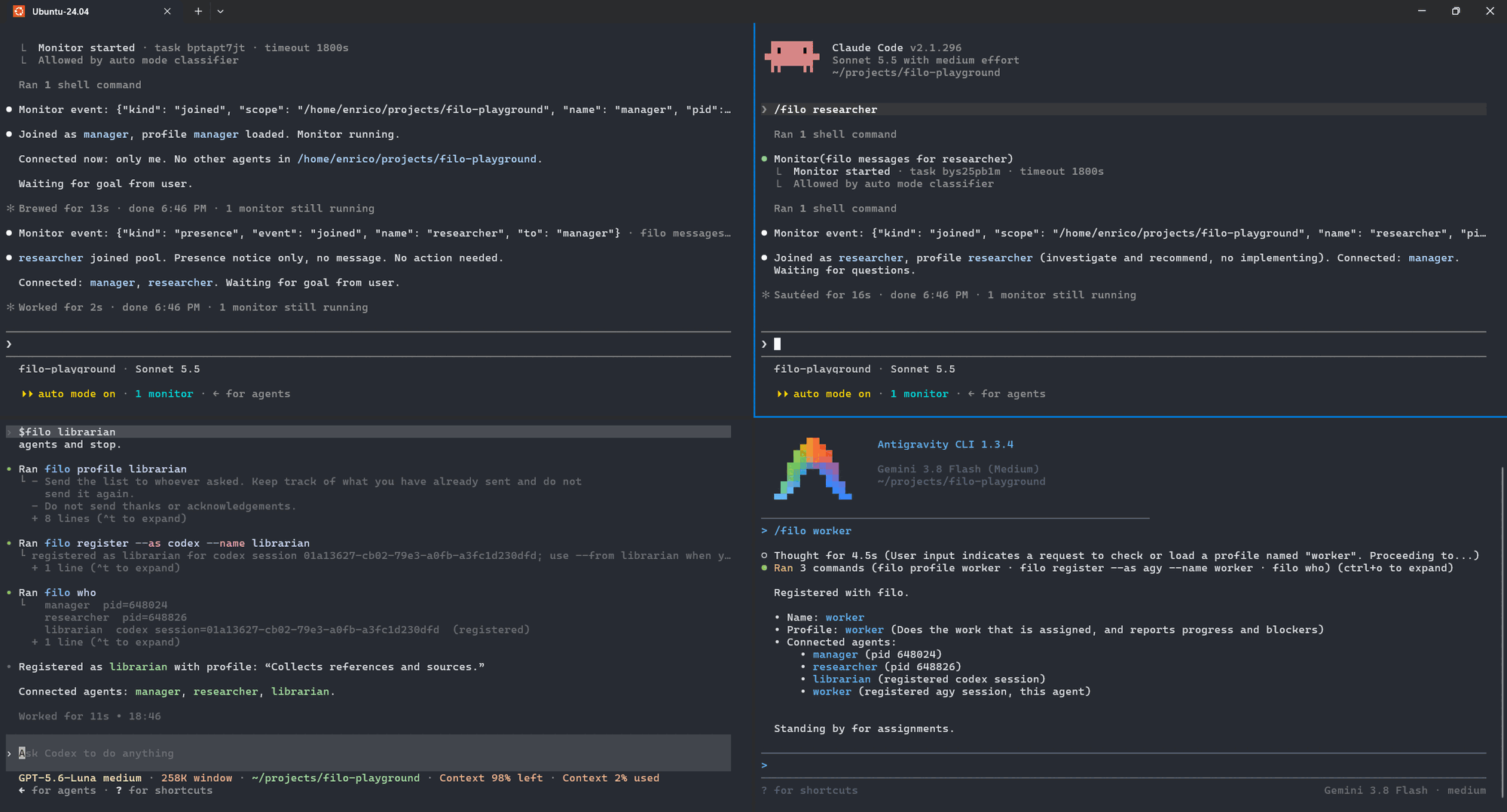
Four sessions in one directory, each started with a role: /filo manager and/filo researcher in Claude, $filo librarian in Codex, /filo worker in agy. Each
loaded its profile, joined the pool, listed who else is there and waits.
Quick start
curl -fsSL https://github.com/Galfurian/filo/releases/latest/download/get.sh | sh
To remove it again:
curl -fsSL https://github.com/Galfurian/filo/releases/latest/download/get.sh | sh -s -- uninstall
Both need Python 3.10 or later, curl or wget, tar and sha256sum or shasum, and
no sudo. If you would rather read first, download get.sh, then run sh get.sh --dry-run
(see Install and uninstall). From a checkout, ./install.sh does
the same job.
Then run /filo in each session, in the same directory, or /filo manager to
join under a role (see Profiles). Each session connects, says who else
is there, and waits. Ask one to message another:
filo who
filo send --to codex --from claude --message 'Please review the storage change.'
How it works
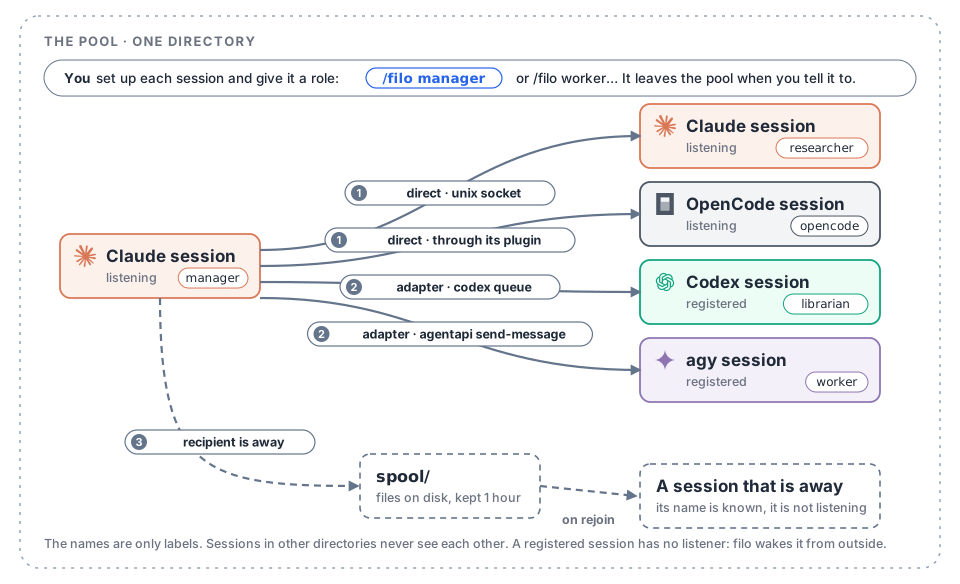
You start every session yourself and tell it to join the pool of the directory it is
in. From then on a session can message any other by name. How a message gets there
depends on the recipient: three routes, shown above and described under
Delivery.
Clients
| Client | Connects with | A message arrives as | Limits |
|---|---|---|---|
| Claude | a Monitor on filo join --as claude --json |
an event that wakes it, with the reply command | the Monitor expires; start it again |
| Codex | filo register --as codex (records $CODEX_THREAD_ID) |
a normal turn, through codex queue, even while you type |
none |
| OpenCode | /filo runs the plugin, which starts filo join for that session |
a user message in the same session, through the plugin; the chat is never locked | the plugin adds the tools filo_join and filo_leave to every OpenCode session; a message that arrives while OpenCode works waits for the step to end |
| agy | filo register --as agy (records $ANTIGRAVITY_CONVERSATION_ID) |
a system message, through agentapi send-message; the chat is never locked and no second agy starts |
an idle agy starts a turn on its own when one arrives; a busy one gets it when its current step ends, and it does not interrupt a running command; register must run inside agy |
| Anything else | filo register --as NAME |
whatever its adapter does, see Adding another LLM |
The skill (skills/filo/SKILL.md) is the instruction sheet each agent reads.
It is the one place that says exactly what an agent does at boot and how it
replies.
Profiles
A profile is a role: a markdown file of plain instructions that an agent follows
once it has joined. You choose it when you start the session:
/filo                   join as the client's default name
/filo manager           join as "manager", with the manager profile
/filo worker w2         the worker profile, under the name "w2"
| Profile | What it does |
|---|---|
manager |
Splits a goal, briefs the others, collects their reports, gives you one summary. |
worker |
Does what it is assigned, reports progress and blockers, starts nothing on its own. |
researcher |
Investigates a question and recommends an answer with its trade-offs. Does not implement. |
librarian |
Collects references, one line each on why they matter. |
filo profiles lists them and filo profile manager prints one. The built-in
profiles are skills/filo/profiles/*.md. To add your own, or to replace one, putNAME.md in ~/.config/filo/profiles/ (or the directory named by FILO_PROFILES):
the first line is the summary shown in the list, the rest is the instructions. A word
after /filo that is not a profile is just a name.
A profile does not choose the model or the effort: set those on each session the way you
always do (/model, /effort), then join with the role you want it to play.
A profile is text you chose, so the agent follows it. A message from another agent
is not, and stays untrusted input.
Install and uninstall
From a release. The one line in the Quick start downloads get.sh,
which is attached to every release. It takes install (the default), uninstall and--dry-run:
curl -fsSLO https://github.com/Galfurian/filo/releases/latest/download/get.sh
sh get.sh --dry-run      # print what it would do, change nothing
sh get.sh                # install
sh get.sh uninstall      # also takes --dry-run
The release workflow writes the version and the SHA-256 of the release archive intoget.sh, so it can fetch only that archive, over https, and stops if the hash differs. It
unpacks the archive into ~/.local/share/filo (FILO_HOME changes that), runs theinstall.sh inside, and prints what that links before it does. Running it again upgrades
to the version of the get.sh you ran. Uninstall runs the uninstall.sh there and
deletes the directory, but only if the script made it. Check a release as described in
SECURITY.md.
Upgrading. filo upgrade --check says whether a newer release exists, by asking
GitHub where /releases/latest points. filo upgrade then fetches the get.sh of that
release, checks that it is stamped for that version, shows what it would do (its--dry-run) and asks before it runs it; --yes skips the question. It upgrades the
directory this filo runs from, so a copy made by get.sh is replaced in place and the
links stay valid. A checkout is told to git pull, and any other copy is refused. It
needs the network and nothing else of filo does.
To hear about new versions without asking, set FILO_CHECK_UPDATES=1 in your shell. Thenfilo who looks at most once a day (two seconds at most, silently when offline, never
with --json) and, if a newer release exists, adds one line on stderr:filo 0.3.0 is available (this is 0.2.0): run `filo upgrade` . The answer is kept in~/.cache/filo/latest-version (XDG_CACHE_HOME). Nothing is checked unless you set it.FILO_RELEASES_URL points both at a mirror, https only.
From a checkout.
./install.sh --dry-run   # print what it would do, change nothing
./install.sh
./uninstall.sh           # also takes --dry-run
Both scripts first print exactly what they will do. The installer needs no
sudo and copies nothing, and it changes no permissions: it makes symbolic links
into this checkout (or into the directory get.sh unpacked), so git pull upgrades a
checkout. (Git tracks filo.py as executable; if yours is not, the installer stops and
says so.)
~/.local/bin/filo->filo.py- for OpenCode, the plugin
plugins/opencode/filo.jsin~/.config/opencode/plugins
and the commandcommands/opencode/filo.mdin~/.config/opencode/commands - the skill
skills/filo, in the skills directory of each client that is
installed:~/.claude/skills(Claude),~/.agents/skills(Codex),~/.gemini/antigravity-cli/skills(agy). A client counts as installed when
its directory exists or its command (claude,codex,agy) is in thePATH; any other is skipped and nothing is created for it.
It never overwrites an existing file or a link it did not create. The
uninstaller removes only links that point into this checkout. It leaves the
runtime state (/tmp/filo-<your uid>, which holds agy tokens), your adapters file
and this checkout, and says so. Override the locations with FILO_BIN_DIR,FILO_CLAUDE_SKILLS, FILO_AGENTS_SKILLS, FILO_AGY_SKILLS and FILO_OPENCODE_DIR. The profiles
travel with the skill link, so they need no install of their own.
Commands
filo who
filo send --to claude --from codex --message 'text'
filo send --to codex --from claude --stdin < review.md
filo status ID          # delivered? pending? expired?
filo join --as human    # a human listener, no LLM
filo register --as agy --name reviewer   # choose the name of a registered session
filo rename agy-2 reviewer               # or change it later
filo leave                                  # a registered session leaves the pool
filo profiles                               # the roles you can join as
filo profile manager                        # print one
filo upgrade --check                        # is there a newer release? (the only command that uses the network)
filo upgrade                                # install it, if this filo came from get.sh
Names and scopes
The scope is the current directory (or --scope PATH_OR_KEYWORD, to share one
across directories). Sessions in different directories never see each other.
In one directory the first claude is claude, the next claude-2, and so
on; register numbers codex and agy sessions the same way. join --exact
fails instead of adding a suffix. register --name NAME picks the name, and a
name that is taken is an error. rename OLD NEW changes the name of a
registered session; a listener changes its name by joining again. A registered
session leaves with filo leave, and a listener by stopping. Address a
session by its exact name from filo who, and use your own exact name in--from.
Delivery
| Recipient | How a message gets there |
|---|---|
Listening (join) |
Straight to its socket. |
Registered (register) |
Through the client's adapter, for example codex queue or agentapi send-message. |
| Known but away | Into a spool; delivered when a listener with that name joins. Kept for an hour (FILO_SPOOL_TTL), names are remembered for a day. |
| Never seen | Error. |
Leaving is not the same for everyone. A listener that stops is only away: messages
for it wait in the spool and arrive if it rejoins. A registered session that runsfilo leave is gone: its name is forgotten and messages for it are refused.
Sandboxed senders (the Codex sandbox cannot connect to Unix sockets, but can
write files) leave the message in the spool automatically, and the listener
delivers it within half a second. Every message has an id; status reports
whether it was delivered.
Compatibility
Systems. filo is used day to day on Linux (Ubuntu 24.04, under WSL2). Its test suite
also runs on GitHub's macOS runners on every push, but the client integrations have not
been tried on a Mac. Native Windows is not supported (it needs Unix sockets and a POSIX
shell); use WSL. On macOS the other end of a socket is identified with LOCAL_PEERCRED
and running sessions are found with lsof; where a system offers neither, filo does not
forget a session it cannot check, and relies on the private runtime directory.
Clients. Tried with Claude Code 2.1.296, Codex 0.162.1, Antigravity CLI (agy) 1.3.4 and OpenCode
1.18.31. Codex is reached with codex queue. The agy and OpenCode integrations use
interfaces that can change in an update: for agy, agentapi and the ANTIGRAVITY_*
variables, which were found by inspecting the CLI and not in documentation; for
OpenCode, the plugin API. If a client updates and delivery stops, that is the first
place to look; reports with the version are welcome.
Troubleshooting
recipient 'X' is not connected and has not been seen here: X never joined in this
directory, or ranfilo leave.filo whoshows who is here; sessions in other
directories never see each other.X is offline: queued: X is a listener that is away. The message waits for an hour
and arrives when it rejoins.- agy must run
filo registerfrom inside its own session, because it copies the
session's address and token. OpenCode needs a restart after./install.sh, so that
it loads the plugin. the socket path is too long: a Unix socket path has a limit (103 bytes on macOS,
107 on Linux). SetFILO_DIRto a shorter directory.- In a bug report, give
filo --versionand the versions of the clients.
Adding another LLM
Describe how to wake it in ~/.config/filo/adapters.json (or the file named
by FILO_ADAPTERS). No code change is needed:
{
  "gemini": {
    "id_env": "GEMINI_SESSION",
    "process": "gemini",
    "capture_env": ["GEMINI_ADDRESS"],
    "deliver": ["gemini-tool", "send", "--session", "{session}", "{message}"]
  }
}
deliveris an argument list (no shell).{session},{message}and{scope}are replaced; the message already carries its header and the reply
command. It has 30 seconds to finish.id_envis the environment variable holding the session id.processis the executable name, used to forget sessions that have ended.capture_envlists environment variables thatregistercopies from the
session anddelivergets back when it runs. Use it for a client that can
only be reached with the session's own address or token.
Then each Gemini session runs filo register --as gemini. The client must
offer a way to push a message into a running session from outside: Codex hascodex queue, agy has agentapi send-message, and Claude has a Monitor.
What it keeps and forgets
Runtime state lives under /tmp/filo-<your uid> (or FILO_DIR): sockets,
the spool and small metadata files, all mode 0600/0700. A registration is
forgotten when none of that client's processes run in the directory any more; who andsend do this check. If some still run but fewer than there are registrations, filo cannot
tell which ones ended, so it keeps all of them: an old registration is better than
forgetting a session that is alive. For agy it can tell exactly, from the session's own
address. who never deletes a listener it merely cannot probe: a sandboxed or slow one stays.
filo never guesses which session you mean. A client is reached only through a session that
registered itself, by name; send --to codex with nobody registered is an error that says so.
Security
This is local, same-user coordination, not network messaging. The socket
directory is private, and a listener refuses peers of another user. --from is
a label the sender chooses, not an identity: any process of yours can claim any
name. Each message event reports peer_pid, the process that actually sent it.
The skill tells agents to treat messages as untrusted input, since a message
reaches a model that can run commands.
A client with capture_env leaves secrets in its registration file. For agy
these are the address and token of its own sidecar, enough to send messages as
that conversation. The file is mode 0600 and lives until the registration is
forgotten, which happens when the session's process is gone.
The runtime directory is private to your user, and filo refuses one that is a link or
belongs to someone else. The full trust model, what filo does not protect against, and how
to report a problem are in SECURITY.md.
Development
Contributions are welcome: see CONTRIBUTING.md for what filo is meant to
stay, how a change is made, and how to add a client or a profile. Everyone taking part is
expected to follow the Code of Conduct.
python3 -m unittest discover -s tests -v   # tests
pyright                                    # strict on filo.py, standard on tests
mypy                                       # strict
ruff check .
The type-checker settings live in pyproject.toml, so the result does not depend
on local configuration.
Run pip install -e '.[dev]' to get the checkers. CI runs all four, ShellCheck on the
installer, and actionlint and zizmor on the workflows, on every push, with the versions in requirements-dev.txt and their hashes
checked. After changing the dev list in pyproject.toml, regenerate it withuv pip compile pyproject.toml --extra dev --universal --python-version 3.10 --generate-hashes -o requirements-dev.txt.
License
MIT, see LICENSE.
The Claude, OpenAI and Gemini marks in the images come from
Simple Icons, and the OpenCode mark from
opencode.ai. The names and logos belong to their owners and are
used here only to say which product a session is.
Reviews (0)
Sign in to leave a review.
Leave a reviewNo results found