galyarder-agent
Health Pass
- License — License: MIT
- Description — Repository has a description
- Active repo — Last push 0 days ago
- Community trust — 11 GitHub stars
Code Warn
- process.env — Environment variable access in backend/agent/bridge/src/index.ts
Permissions Pass
- Permissions — No dangerous permissions requested
This project is an open-source assistant runtime designed for practical workflow automation. It provides persistent, agentic characters with long-term memory and self-hosted model routing, allowing users to interact via CLI, Telegram, or WhatsApp.
Security Assessment
The tool accesses environment variables to load its configurations, which is standard but requires you to secure your `.env` files. Because it integrates with external platforms like Telegram and WhatsApp, it inherently makes external network requests. It acts as an agent capable of executing workflows and interacting with external services like Google Workspace, meaning it handles sensitive data and tokens. While the audit found no hardcoded secrets or explicitly dangerous permission requests, running an autonomous agent with external messaging integrations always introduces an elevated attack surface. Overall risk: Medium.
Quality Assessment
The project has a clean bill of health. It is actively maintained with a repository push occurring just today, and it operates under the highly permissive and standard MIT license. However, community trust and adoption are currently very low, as indicated by its 11 GitHub stars. The documentation is thorough, emphasizing user control, local execution, and tool policies, which reflects a security-conscious development mindset.
Verdict
Use with caution — it is a capable, actively maintained agent framework with solid local privacy policies, but its low community adoption and external messaging integrations mean you should carefully isolate its permissions and monitor its network access.
Cross-platform Agentic characters for real workflow, can send selfie or mirror with consistency face in ur agents, also have long-term memory about u, automation ur work, and self-hosted model routing.

Galyarder Agent
Agentic Intelligence characters for real workflow, can send selfie or mirror with consistency face in ur agents, also have long-term memory about u, automation ur work, and self-hosted model routing.







What Is g-agent?
g-agent is an open-source assistant runtime you run on your own machine, with your own policies, through channels you already use (CLI, Telegram, WhatsApp).
It is built for one outcome: practical automation without losing control.
Why This Project Exists
Most assistant projects drift to one of two extremes:
- feature-heavy platforms with unclear internals,
- minimal demos that look clean but break in real operations.
g-agent is built in the middle.
It keeps the powerful parts (agent loop, tools, memory, scheduling, integrations) while keeping the runtime understandable and auditable.
If your assistant can act but you cannot explain what it can access, who can talk to it, and where it runs, it is not really your assistant.
Philosophy
- Useful over flashy: solve real tasks first.
- Understandable over abstract: keep code and behavior inspectable.
- Private over cloud-lock: local memory, local control, explicit policy.
- Controlled over magical: allowlists, approvals, scoped tools.
If your assistant cannot run reliably on your own machine, it is not your assistant.
What You Can Do Today
- Chat through CLI, Telegram, or WhatsApp with persistent history and enhanced editing.
- Run models through configurable OpenAI-compatible proxies (MiniMax, CLIProxyAPI, vLLM, LiteLLM, etc.) via LiteLLM routing.
- Keep durable memory across sessions (
MEMORY.md,PROFILE.md,PROJECTS.md,LESSONS.md). - Schedule recurring jobs and proactive reminders.
- Run workflow packs like
daily_brief,meeting_prep, andinbox_zero_batch. - Send multimodal replies (text, image, voice, sticker, document).
- Connect Google Workspace (Gmail, Calendar, Drive, Docs, Sheets, Contacts).
Requirements
- Linux, macOS, or Windows
- Python
3.11+ - Node.js
20+(for WhatsApp bridge) - Optional:
espeak-ng+ffmpeg(generated voice-note output) - Optional:
GROQ_API_KEY(voice-note transcription via Whisper)
Quick Start
Option A: Installer script (recommended)
| OS | Command |
|---|---|
| Arch / Arch-based | curl -fsSL https://raw.githubusercontent.com/galyarderlabs/galyarder-agent/main/deploy/arch/install.sh | bash |
| Debian / Ubuntu | curl -fsSL https://raw.githubusercontent.com/galyarderlabs/galyarder-agent/main/deploy/debian/install.sh | bash |
| macOS | curl -fsSL https://raw.githubusercontent.com/galyarderlabs/galyarder-agent/main/deploy/macos/install.sh | bash |
| Windows (PowerShell) | irm https://raw.githubusercontent.com/galyarderlabs/galyarder-agent/main/deploy/windows/install.ps1 | iex |
Option B: From source
git clone https://github.com/galyarderlabs/galyarder-agent.git
cd galyarder-agent/backend/agent
pip install -e .
First run
g-agent onboard
g-agent status
g-agent gateway
Then set provider/model in ~/.g-agent/config.json.
Installer flags (optional)
- Common:
G_AGENT_INSTALL_DIR=/path/to/repo(default:~/galyarder-agent)G_AGENT_DATA_DIR=/path/to/data(default:~/.g-agent)
- Arch:
G_AGENT_SKIP_PACMAN=1G_AGENT_SKIP_SERVICES=1G_AGENT_AUTO_START_SERVICES=0
- Debian/Ubuntu:
G_AGENT_SKIP_APT=1G_AGENT_SKIP_SERVICES=1G_AGENT_AUTO_START_SERVICES=0
- macOS:
G_AGENT_SKIP_BREW=1G_AGENT_SETUP_LAUNCHD=1G_AGENT_AUTO_START_SERVICES=0
- Windows:
G_AGENT_SKIP_WINGET=1G_AGENT_SETUP_TASKS=1
Uninstall
| OS | Command |
|---|---|
| Arch / Arch-based | curl -fsSL https://raw.githubusercontent.com/galyarderlabs/galyarder-agent/main/deploy/arch/uninstall.sh | bash |
| Debian / Ubuntu | curl -fsSL https://raw.githubusercontent.com/galyarderlabs/galyarder-agent/main/deploy/debian/uninstall.sh | bash |
| macOS | curl -fsSL https://raw.githubusercontent.com/galyarderlabs/galyarder-agent/main/deploy/macos/uninstall.sh | bash |
| Windows (PowerShell) | irm https://raw.githubusercontent.com/galyarderlabs/galyarder-agent/main/deploy/windows/uninstall.ps1 | iex |
Optional flags:
G_AGENT_REMOVE_SERVICES=0keep startup services/tasksG_AGENT_REMOVE_REPO=1remove repo directoryG_AGENT_WIPE_DATA=1remove full~/.g-agentdata
Usage Examples
From CLI:
g-agent agent -m "Summarize my priorities for today."
g-agent agent -m "/pack daily_brief focus revenue --sticker --silent"
g-agent proactive-enable
From Telegram/WhatsApp:
- Ask questions.
- Request reminders.
- Trigger workflow packs.
- Send images/voice and get multimodal responses.
Core Commands
| Command | Purpose |
|---|---|
g-agent onboard |
Initialize config and workspace |
g-agent status |
Runtime and integration status |
g-agent gateway |
Run Telegram/WhatsApp gateway |
g-agent agent -m "..." |
One-shot chat from CLI |
g-agent channels login |
Pair WhatsApp via QR |
g-agent channels status |
Show channel config status |
g-agent plugins list/doctor |
Inspect plugin loading and policy health |
g-agent google configure/auth-url/exchange/verify |
Google OAuth flow |
g-agent doctor --network |
Connectivity diagnostics |
g-agent proactive-enable |
Enable default proactive jobs |
g-agent cron add/list/remove/enable/run |
Manage scheduled jobs |
Channel Setup
Supported channels and typical setup effort:
| Channel | Setup |
|---|---|
| Telegram | Easy (bot token + user ID allowlist) |
| Medium (Node bridge + QR pairing) | |
| Discord* | Medium (bot token + intents + invite URL) |
| Feishu* | Medium (app credentials + event subscription) |
* Experimental in current release.
Telegram
{
  "channels": {
    "telegram": {
      "enabled": true,
      "token": "BOTFATHER_TOKEN",
      "allowFrom": ["123456789"]
    }
  }
}
{
  "channels": {
    "whatsapp": {
      "enabled": true,
      "bridgeUrl": "ws://localhost:3001",
      "allowFrom": ["6281234567890"]
    }
  }
}
Pair WhatsApp:
g-agent channels login
g-agent gateway
Discord / Feishu (experimental)
- See
docs/channels.mdfor full step-by-step setup. - Keep
allowFromstrict for any public-facing deployment.
Google Workspace (OAuth)
g-agent google configure --client-id "YOUR_CLIENT_ID" --client-secret "YOUR_CLIENT_SECRET" --calendar-id "primary"
g-agent google auth-url
# open URL, approve consent, copy value after ?code=
g-agent google exchange --code "PASTE_CODE"
g-agent google verify
Default scopes include:
gmail.modifycalendardrive.readonlydocumentsspreadsheetscontacts.readonly
Memory Model
Memory lives in workspace/memory:
MEMORY.md: long-term notesPROFILE.md: identity/preferencesRELATIONSHIPS.md: people contextPROJECTS.md: active project contextLESSONS.md: behavior improvementsYYYY-MM-DD.md: daily memory notes
Architecture
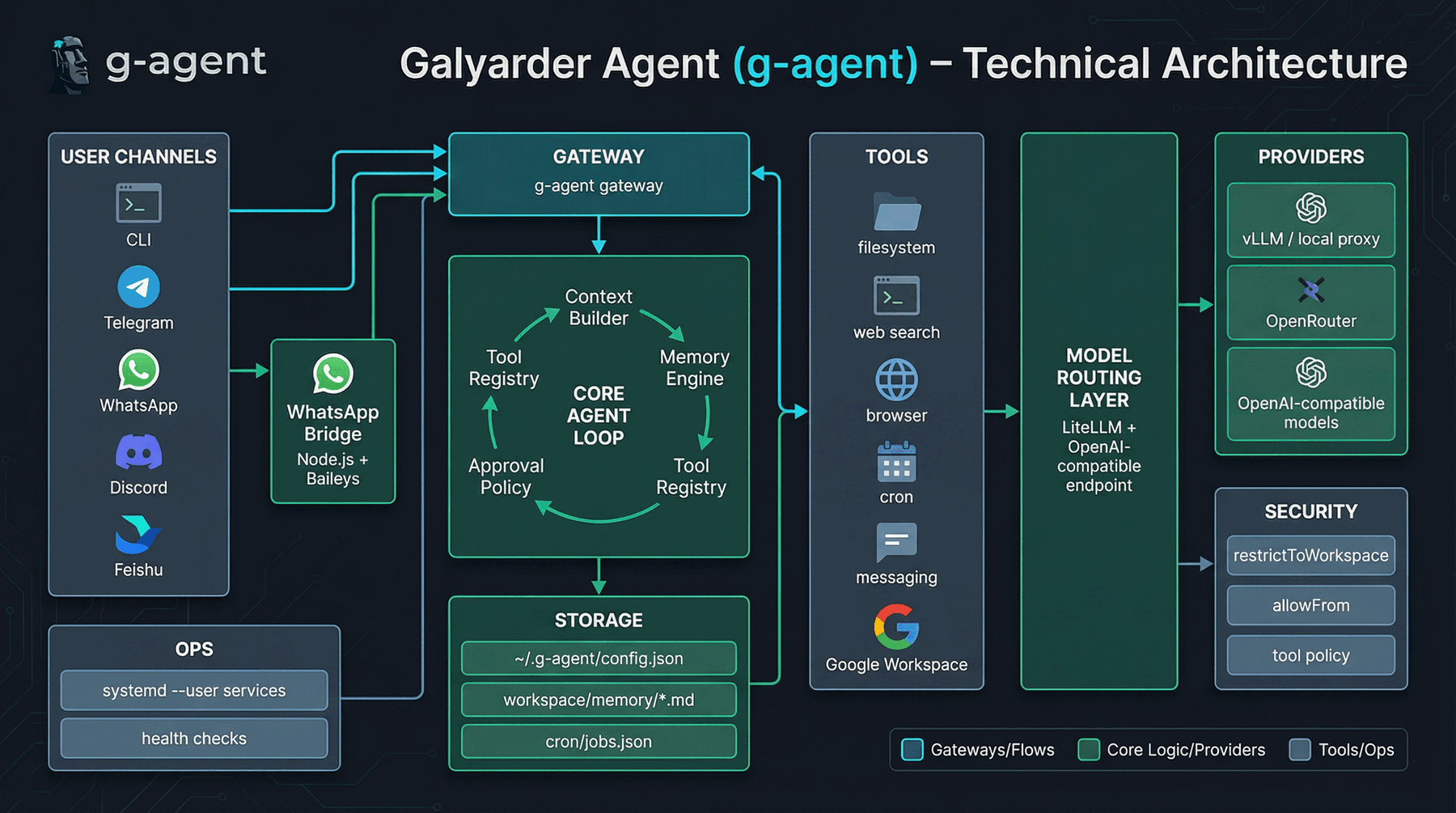
Execution flow:
Channel Input -> Message Bus -> Agent Loop -> Tools + Memory + Scheduler -> Outbound Dispatcher
Runtime model:
- Python process for agent runtime
- Node.js bridge for WhatsApp transport
- local filesystem for state and memory
Security Model (Plain Language)
tools.restrictToWorkspacekeeps file/shell access inside allowed workspace.channels.*.allowFromcontrols who can send messages to the assistant.- approval mode can require confirmation for risky actions.
- policy presets (
personal_full,guest_limited,guest_readonly) control tool risk. - separate profiles via
G_AGENT_DATA_DIRisolate personal and guest environments.
For details, read SECURITY.md and backend/agent/SECURITY.md.
24/7 Service Mode (systemd --user)
systemctl --user enable --now g-agent-wa-bridge.service
systemctl --user enable --now g-agent-gateway.service
Check:
systemctl --user status g-agent-wa-bridge.service
systemctl --user status g-agent-gateway.service
Optional lingering:
sudo loginctl enable-linger "$USER"
Docker Quick Run
docker build -t g-agent ./backend/agent
docker run -v ~/.g-agent:/root/.g-agent --rm g-agent g-agent onboard
docker run -v ~/.g-agent:/root/.g-agent --rm g-agent g-agent status
docker run -v ~/.g-agent:/root/.g-agent -p 18790:18790 g-agent g-agent gateway
Guest Profile Isolation
mkdir -p ~/.g-agent-guest
G_AGENT_DATA_DIR=~/.g-agent-guest g-agent onboard
G_AGENT_DATA_DIR=~/.g-agent-guest g-agent status
Each profile has isolated config, memory, cron jobs, bridge data, and OAuth/session artifacts.
Troubleshooting
Telegram timeout
curl -sS "https://api.telegram.org/bot<YOUR_TOKEN>/getMe"
WhatsApp bridge reconnect loops
g-agent channels login --rebuild
systemctl --user restart g-agent-wa-bridge.service g-agent-gateway.service
Production Checklist
1) Lock access
- Keep
channels.*.allowFromnon-empty on enabled channels. - Keep
tools.restrictToWorkspace: true. - Keep
tools.approvalMode: "confirm"or stricter. - Use separate
G_AGENT_DATA_DIRfor guest/public assistants.
2) Monitor health
g-agent doctor --network
systemctl --user status g-agent-gateway.service g-agent-wa-bridge.service
journalctl --user -u g-agent-gateway.service -u g-agent-wa-bridge.service -n 120 --no-pager
3) Backup critical state
mkdir -p ~/.g-agent-backups
tar -czf ~/.g-agent-backups/g-agent-$(date +%F).tar.gz \
  ~/.g-agent/config.json \
  ~/.g-agent/workspace/memory \
  ~/.g-agent/cron
4) Rotate keys safely
NEW_TG_TOKEN='YOUR_NEW_TOKEN'
tmp=$(mktemp) && jq --arg v "$NEW_TG_TOKEN" '.channels.telegram.token = $v' ~/.g-agent/config.json > "$tmp" && mv "$tmp" ~/.g-agent/config.json
systemctl --user restart g-agent-gateway.service
FAQ
Why choose g-agent?
Choose g-agent if you want a lean runtime with faster auditability and simpler day-to-day operations.
What makes g-agent practical for daily use?
It emphasizes focused workflows, policy presets, workflow packs, and operational docs that stay close to real runtime usage.
Is this suitable for production personal use?
Yes, with proper allowlists, workspace restrictions, approval settings, and credential hygiene.
Can I use this as my always-on personal assistant?
Yes. The typical production flow is user services + allowlists + restricted workspace + approval mode.
Is it safe enough for personal data?
It is built with practical controls (allowFrom, restrictToWorkspace, approvals, profile isolation).
You still need to review your configuration and keep tokens scoped/rotated.
Runtime Roadmap
Roadmap and implementation status:
docs/roadmap/runtime-roadmap.md
Documentation
- Docs site: https://galyarderlabs.github.io/galyarder-agent/
- Getting started:
docs/getting-started.md - Configuration:
docs/configuration.md - Channels:
docs/channels.md - Install matrix:
docs/install-matrix.md - Operations:
docs/operations.md - Troubleshooting:
docs/troubleshooting.md - FAQ:
docs/faq.md - Backend docs:
backend/agent/README.md - Roadmap:
docs/roadmap/runtime-roadmap.md - Changelog:
CHANGELOG.md
Contributing
We welcome focused contributions:
- security hardening,
- reliability improvements,
- performance improvements,
- documentation clarity.
Please read CONTRIBUTING.md and CODE_OF_CONDUCT.md before opening a PR.
License
MIT — see LICENSE.
Star History
“Digital sovereignty is not isolation — it is ascendancy with ownership: your memory, your tools, your systems, your future.”
Reviews (0)
Sign in to leave a review.
Leave a reviewNo results found