mcpsafetywarden
Health Warn
- License — License: NOASSERTION
- Description — Repository has a description
- Active repo — Last push 0 days ago
- Low visibility — Only 6 GitHub stars
Code Pass
- Code scan — Scanned 12 files during light audit, no dangerous patterns found
Permissions Pass
- Permissions — No dangerous permissions requested
This tool acts as a security proxy and auditing middleware that sits between your AI agent and other MCP servers. It profiles tool behavior, blocks destructive actions, and runs comprehensive security audits before allowing external tools to execute.
Security Assessment
Overall Risk: Low. The static code scan of 12 files found no dangerous patterns, hardcoded secrets, or requests for dangerous system permissions. By design, the proxy inherently intercepts tool calls, analyzes arguments, and makes network requests to perform security scans and leverage LLMs. It acts as an active network middleman. Because it must inspect the data flowing between your agent and other servers, it processes whatever data is passed through it.
Quality Assessment
The project is new and actively maintained, with its most recent push occurring today. It features a clear, professional README and a published PyPI package. The CI pipeline is active. However, community trust and visibility are currently very low; the repository has only 6 GitHub stars, indicating it has not yet been widely battle-tested by the open-source community. The license is marked as NOASSERTION, which means there are no clearly defined legal terms for use, modification, or distribution.
Verdict
Use with caution—the code itself is clean and safe to run, but you should wait for broader community adoption and a clear open-source license before relying on it in highly sensitive production workflows.
MCP servers expose tools with no information about what they actually do at runtime. mcpsafetywarden sits between your agent and any MCP server, profiling tool behavior, blocking destructive calls, and running active security audits before you trust them in a workflow.
MCP safety warden is a proxy server that wraps any MCP server and adds behavioral profiling, security scanning, risk gating, and safe execution to its tools.



Contents
- Overview
- Prerequisites
- Installation
- Configuration
- MCP Integration
- CLI Reference
- Auxiliary Integrations
- Development
- Testing
- Further reading
Overview
Use as a proxy to add safety gating to any MCP server, or point it at a server you don't own and run a full security audit without making a single tool call.
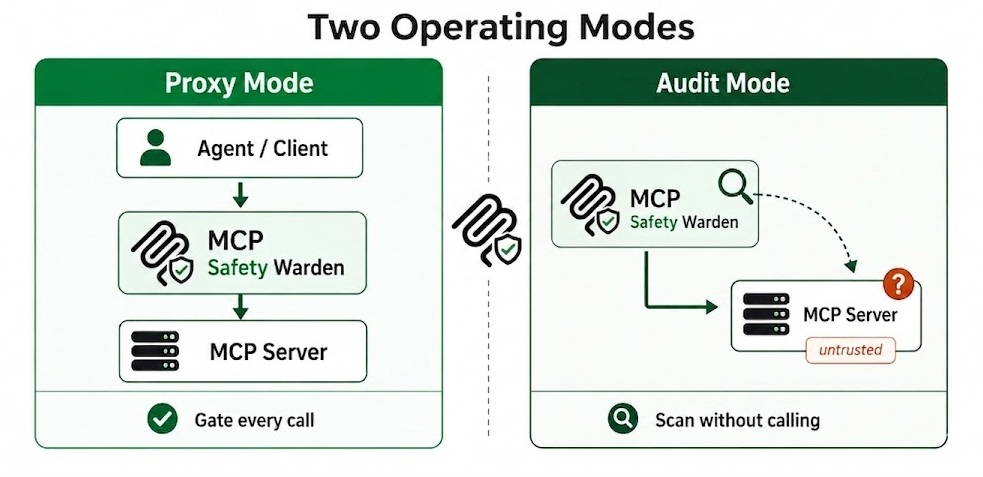
Fig 1. Two operating modes: proxy and audit
Behavioral profiling: Effect class, retry safety, destructiveness. LLM-assisted (Anthropic, OpenAI, Gemini, Ollama) with rule-based fallback. Observed stats (latency p50/p95, failure rate, output size) updated after every proxied call.
Security scanning: mcpsafety+ five-stage pipeline (Recon, Planner, Hacker, Auditor, Supervisor). Cisco AI Defense (AST/YARA). Snyk (metadata analysis). Kali and Burp Suite integrations enrich the pipeline with real network data and HTTP-layer probes. Source code scanning from GitHub with entropy, AST, taint flow, and rug-pull detection.
Fig 2. mcpsafety+ five-stage pipeline, triggered when you run a full security audit on any MCP server
Safe execution: Argument scanning (20+ attack categories, LLM second-pass). Two-layer output injection scanning. Risk gating with alternatives and per-tool policies. Drift detection on every call and standalone check.
Fig 3. Safe execution pipeline: the five checks every proxied tool call passes through
CLI: 24 subcommands, interactive risk menu, --json flag on every command, --yes for CI.
What it detects
- Prompt injection: tool outputs trying to hijack the agent: role hijacking, jailbreaks, fake system prompts, instruction overrides. Detects 11 obfuscation techniques including Unicode lookalikes, zero-width characters, and base64-encoded payloads.
- Malicious tool metadata: descriptions containing injection strings, hardcoded secrets, suspicious download URLs, tool impersonation (shadowing), direct financial execution, system service modification, and untrusted external dependencies. Backed by 19 Snyk checks.
- Argument injection: 20+ attack categories checked on every tool call before the call is forwarded: SSRF to cloud metadata endpoints (AWS, GCP, Azure, Alibaba), path traversal, credential file access (.aws, .ssh, .kube, .env), command injection, SQL/NoSQL/LDAP/XPath injection, XXE, template injection (SSTI), CRLF, null byte, deserialization payloads (Java, Python pickle, PHP, .NET), Windows UNC/ADS attacks, and base64-obfuscated variants of all of the above.
- Source code risks: fetches the server's GitHub source and runs 6 analysis layers: entropy scanning for hardcoded secrets, AST taint flow tracking (parameter to dangerous sink), description-vs-implementation mismatch, Bandit and Semgrep SAST, and LLM cross-function reasoning. Supports Python and TypeScript/JavaScript.
- Rug-pull and drift: stores a SHA-256 hash of the server's source on first scan and alerts if it changes. Catches description swaps, schema changes, and tool removal live on every call via a per-call drift guard.
- Behavior anomalies: classifies every tool by effect class, destructiveness, and 7 risk tags: credential exposure, arbitrary execution, data exfiltration, filesystem access, lateral movement, privilege escalation, and prompt injection surface.
- Composition attacks: analyzes tool sets for chaining risks: IDOR chains, read-write pairs, auth flow exploitation, write-then-execute sequences, and data accumulation + exfiltration paths across multiple tools.
- Network and host risks: when Kali Linux MCP is registered: open ports, running services, OS fingerprint via nmap. When Burp Suite MCP is registered: HTTP-layer active probing and blind SSRF via out-of-band callbacks.
- Credential exposure in outputs: redacts secrets from tool responses before storage. Injection-flagged responses are quarantined and never returned to the calling agent - stored under a run ID for forensic review.
- CVE research and Arxiv findings: the mcpsafety+ Auditor stage cross-references discovered capabilities against known vulnerabilities and recent security research.
Prerequisites
- Python 3.10 or later
- At least one wrapped MCP server to proxy (stdio, SSE, or streamable_http)
- Recommended: an LLM API key (Anthropic, OpenAI, or Gemini)
Without a key the wrapper operates in rule-based-only mode: lower confidence tool classification, regex-only injection scanning, no alternatives in the risk gate, no mcpsafety+ pipeline. For a fully local setup, run Ollama, set OLLAMA_MODEL, and pass --provider ollama explicitly (Ollama is not auto-detected).
[!NOTE]
stdio servers that require local setup (stdioservers that need local configuration before starting - missing config files, credentials, data directories, or OS-specific dependencies) cannot be inspected by the wrapper - tool discovery will fail and 0 tools will be stored. You can still run a full source-code security scan without spawning the server by passing--github-urltoscan/onboard, or thegithub_urlparameter tosecurity_scan_server. The mcpsafety+ pipeline will fetch and analyze the source directly from GitHub.sseandstreamable_httpservers are not affected.
Installation
pip install mcpsafetywarden
With all optional extras:
pip install "mcpsafetywarden[all]"
Or specific extras:
pip install "mcpsafetywarden[anthropic,snyk]"
From source:
git clone https://github.com/gautamvarmadatla/mcpsafetywarden
cd mcpsafetywarden
pip install .
The SQLite database is created automatically on first run in the platform user data directory (~/.local/share/mcpsafetywarden/ on Linux, ~/Library/Application Support/mcpsafetywarden/ on macOS, %APPDATA%\mcpsafetywarden\ on Windows). Override with MCP_DB_PATH.
Credential protection (automatic, no action required)
Secret values passed to register_server or onboard_server (Bearer tokens, API keys in headers or env) are automatically detected and replaced with opaque cref_ identifiers before anything touches the model context. The real credential is stored encrypted in the database and resolved silently at connection time. The model, conversation history, and logs only ever see cref_<id>.
Optional: at-rest encryption for stored credentials
pip install cryptography
python -c "from cryptography.fernet import Fernet; print(Fernet.generate_key().decode())"
Set the printed key as MCP_DB_ENCRYPTION_KEY before starting the server. This encrypts both server credentials and cref_ values at rest.
Configuration
All configuration is via environment variables.
| Variable | Default | Purpose |
|---|---|---|
MCP_TRANSPORT |
stdio |
Transport mode: stdio, sse, or streamable_http |
MCP_HOST |
127.0.0.1 |
Bind address for HTTP transports |
MCP_PORT |
8000 |
Bind port for HTTP transports |
MCP_AUTH_TOKEN |
(unset) | Bearer token for HTTP transport auth |
MCP_DB_ENCRYPTION_KEY |
(unset) | Fernet key to encrypt stored credentials at rest |
ANTHROPIC_API_KEY |
(unset) | Enables Anthropic as LLM provider |
OPENAI_API_KEY |
(unset) | Enables OpenAI as LLM provider |
GEMINI_API_KEY or GOOGLE_API_KEY |
(unset) | Enables Gemini as LLM provider (GEMINI_API_KEY preferred) |
OLLAMA_MODEL |
(unset) | Model name for Ollama (e.g. llama3.1) |
OLLAMA_BASE_URL |
http://localhost:11434/v1 |
Ollama API base URL |
SNYK_TOKEN |
(unset) | Enables Snyk E001 prompt-injection detection |
MCP_SCANNER_API_KEY |
(unset) | Cisco AI Defense cloud ML engine key |
MCP_SCANNER_LLM_API_KEY |
(unset) | LLM key for Cisco internal AST analysis |
MCP_DB_PATH |
(unset) | Override the SQLite database file path |
MCP_GRAPH_POLICY |
warn |
Graph enforcement in safe_tool_call: off (disabled), warn (attach risk context to response), block (hard-block critical/high blast-radius tools unless approved=True) |
GITHUB_TOKEN |
(unset) | GitHub personal access token for source-code scanning (raises rate limit from 60 to 5,000 req/hour) |
Security note: Never commit API keys or the encryption key. The wrapper strips its own secrets from child process environments before spawning stdio servers.
MCP Integration
Connecting with Claude Desktop
Add the wrapper to claude_desktop_config.json:
{
  "mcpServers": {
    "mcpsafetywarden": {
      "command": "mcpsafetywarden-server",
      "args": [],
      "env": {
        "ANTHROPIC_API_KEY": "sk-ant-...",
        "MCP_DB_ENCRYPTION_KEY": "<generated_fernet_key>"
      }
    },
    "filesystem": {
      "command": "npx",
      "args": ["-y", "@modelcontextprotocol/server-filesystem", "/Users/yourname/Documents"]
    }
  }
}
Register each server with the wrapper before use:
mcpsafetywarden register filesystem --transport stdio \
  --command npx \
  --args '["-y", "@modelcontextprotocol/server-filesystem", "/Users/yourname/Documents"]'
For a mandatory gateway setup where all tool calls must go through the wrapper, see docs/DEPLOYMENT.md.
Available MCP tools
See docs/TOOLS.md for the full tool reference.
| Tool | What it does |
|---|---|
onboard_server |
Register + inspect + security scan in one call |
register_server |
Register a server; optionally auto-inspect |
inspect_server |
Refresh tool list and profiles |
check_server_drift |
Detect schema and tool-list drift against stored baseline |
list_servers |
List all registered servers |
list_server_tools |
List tools on a server with summary profiles |
preflight_tool_call |
Risk assessment without execution |
safe_tool_call |
Execute with risk gating and alternatives |
get_tool_profile |
Full behavior profile with observed stats |
get_retry_policy |
Retry and timeout recommendations |
suggest_safer_alternative |
LLM-ranked safer substitutes |
run_replay_test |
Idempotency test (calls tool twice) |
security_scan_server |
Live security audit (mcpsafety+, Cisco, Snyk) |
scan_all_servers |
mcpsafety+ pipeline across all registered servers |
get_security_scan |
Latest stored scan report |
set_tool_policy |
Permanent allow/block policy for a tool |
get_run_history |
Recent execution history for a tool |
ping_server |
Reachability check with latency |
discover_servers |
Scan filesystem for MCP client configs and extract server entries |
onboard_discovered_servers |
Register discovered servers in bulk |
get_risk_graph |
Build or query the inventory risk graph (servers, tools, findings, agent clients) |
explain_tool_risk |
Walk risk paths for a tool: blast radius, composition risks, MITRE tags, recommended action |
explain_client_risk |
Analyze cross-server risks for all servers under one agent client |
analyze_cve_blast_radius |
Report CVEs affecting multiple servers under the same client |
export_graph |
Export risk graph as JSON or Mermaid diagram |
CLI Reference
24 subcommands covering all 25 MCP tools. Every command supports --json for machine-readable output and --yes / -y to skip confirmation prompts.
See docs/CLI.md for the full reference with flags and examples.
Auxiliary Security Tool Integrations
Kali Linux MCP, Burp Suite MCP, and Snyk each integrate automatically once registered. Kali enriches the Recon stage and ping_server with real nmap/traceroute data. Burp adds raw HTTP probing, out-of-band callbacks, and proxy evidence. Snyk analyses tool metadata for injection strings, tool shadowing, hardcoded secrets, and 16 other checks.
See docs/INTEGRATIONS.md for setup instructions.
Development
Install in editable mode:
pip install -e ".[all]"
Run the server and observe logs:
mcpsafetywarden-server 2>server.log
Every module uses logging.getLogger(__name__). The server does not call logging.basicConfig itself - configure logging in your entry point before importing.
Testing
pytest tests/ -v
Set an LLM API key to include LLM-assisted tests; without one they are skipped automatically. See docs/TESTING.md for step-by-step verification of classification, injection scanning, risk gating, and policy enforcement.
Further reading
| Doc | Contents |
|---|---|
| docs/TOOLS.md | Full reference for all 25 MCP tools |
| docs/CLI.md | CLI subcommands, flags, and examples |
| docs/INTEGRATIONS.md | Kali, Burp Suite, and Snyk setup |
| docs/DEPLOYMENT.md | stdio, HTTP, container, and gateway deployment |
| docs/TROUBLESHOOTING.md | Common errors and fixes |
| docs/SECURITY.md | Secrets, auth, isolation, and scanning details |
| docs/TESTING.md | Verification steps for each feature |
| docs/COMPARISON.md | Comparison with related tools |
| docs/ROADMAP.md | Planned features |
Contributing
See CONTRIBUTING.md for code standards and pull request guidelines.
License
Apache License 2.0. See LICENSE for details.
Reviews (0)
Sign in to leave a review.
Leave a reviewNo results found