ddd-ts-kit
Health Warn
- License — License: MIT
- Description — Repository has a description
- Active repo — Last push 0 days ago
- Low visibility — Only 5 GitHub stars
Code Warn
- fs module — File system access in .dependency-cruiser.cjs
Permissions Pass
- Permissions — No dangerous permissions requested
No AI report is available for this listing yet.
Domain-Driven Design (DDD), Clean Architecture (hexagonal, ports and adapters) and Clean Code for TypeScript and Node.js backends: CLI to bootstrap, scaffold and check, runtime packages, ESLint plugin, CI pipelines, and a plugin for Claude Code, Codex and GitHub Copilot.
English · Français

ddd-ts-kit
Domain-Driven Design (DDD), Clean Architecture (hexagonal, ports and adapters) and Clean Code for
TypeScript and Node.js backends, held by tools rather than by good intentions. You describe the
business; your AI coding agent (Claude Code, Codex or GitHub Copilot) builds it with the kit, and
the kit holds it to the architecture.





Documentation ·
Quick start ·
Example ·
Article ·
Changelog ·
Discussions ·
Contributing
Why ddd-ts-kit
Domain-Driven Design and Clean Architecture erode one shortcut at a time: a new Date() in a
handler, an import across two contexts, a rule checked in a controller. Under a deadline, and even
more with an AI agent that writes a hundred files an hour, a guideline in a wiki does not hold.
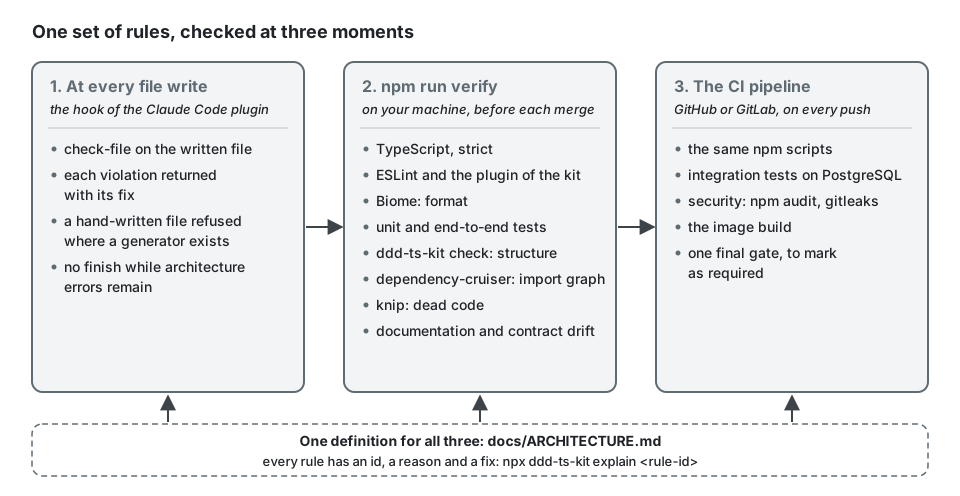
ddd-ts-kit turns the architecture into rules with ids, and checks them at every file write, before
every merge and on every push.
- Rules, not guidelines. Each rule has an id, a reason and a fix
(npx ddd-ts-kit explain <rule-id>), checked by a zero-dependency CLI, an ESLint plugin and
dependency-cruiser. - Generate, do not type.
ddd-ts-kit generatewrites 36 kinds of building blocks with their
spec, fake and registration, and leavesTODO(domain)where a business decision is expected. - Made for coding agents. A plugin for Claude Code, Codex and GitHub Copilot: skills that
conduct the work step by step, agents for parallel work and review, and a hook that refuses a
write which breaks a rule. - Your stack, not ours. Express, Fastify, Hono or NestJS; zod, class-validator, TypeBox or any
Standard Schema library; tsyringe, NestJS or manual wiring; Drizzle, Knex, Prisma or TypeORM;
RabbitMQ, Kafka, NATS JetStream or Redis Streams; JWT or Keycloak; roles, attributes or
relationships. - Production concerns built in. Transactional outbox and idempotent consumers, a permission
per use case, audit trail, OpenTelemetry, multitenancy, OpenAPI and AsyncAPI contracts, a CI
pipeline for GitHub and GitLab. - Ready to split. Every bounded context owns its data and talks to the others by events: it
can run as its own service the day the team needs it.
The story behind it, on Medium:
Your AI writes code fast. Your architecture decides whether it lasts.
(in French).
The documentation is also a website, with search, in English and in French:
https://gbourgeat.github.io/ddd-ts-kit/. Every page has its French translation next to it,
starting from README.fr.md.
Quick start
You do not run ddd-ts-kit yourself: your coding agent does. You describe the business, answer its
questions and review what it writes; the agent runs the generators, the checks and the gate, and
the hook of the plugin refuses a write that breaks a rule.
1. Install the plugin in the agent you use. This repository is its marketplace:
| Agent | Install | The start skill |
|---|---|---|
| Claude Code | /plugin marketplace add gbourgeat/ddd-ts-kit, then /plugin install ddd-ts-kit@ddd-ts-kit |
/ddd-ts-kit:start |
| Codex | codex plugin marketplace add gbourgeat/ddd-ts-kit, then install ddd-ts-kit from /plugins and trust its hooks in /hooks |
$start |
| Copilot CLI | copilot plugin marketplace add gbourgeat/ddd-ts-kit, then copilot plugin install ddd-ts-kit@ddd-ts-kit |
by its name, start |
| Copilot cloud agent, VS Code | declared by the .github/copilot/settings.json the project gets at its bootstrap |
by its name, start |
2. Open a session in an empty directory, and give it your needs:
/ddd-ts-kit:start An API for a shop: customers place orders, each order is billed, then shipped.
The agent conducts the nine steps one at a time and stops for your decision at
each strategic choice. It writes the discovery, the bounded contexts and their glossaries underdocs/architecture/ for you to review, then bootstraps the project, plans the slices and builds
them one commit at a time, green on the whole gate at every step. A later session resumes fromdocs/architecture/plan.md: the same skill, with no argument.
The machine needs Node 22.12 or later: the agent runs the CLI through npx. Without the plugin,
the AGENTS.md and the rules by layer that the bootstrap writes still guide any agent.
Start a project
Follow these steps in order: it is the supported path, and the tools are built to hold it. Each
step is a skill of the plugin (/ddd-ts-kit:<skill>), or a command, and leaves a file the next
one reads. /ddd-ts-kit:start conducts steps 1 to 7 one at a time, and npx ddd-ts-kit status
says at any time which step is next.
| # | Step | Skill or command | Produces |
|---|---|---|---|
| 1 | Discover the domain | discover-domain |
docs/architecture/discovery.md: actors, commands, events, policies |
| 2 | Find the bounded contexts | bounded-contexts |
docs/architecture/contexts.md: each boundary and its reason |
| 3 | Write the glossaries | glossary |
the ubiquitous language of each context |
| 4 | Draw the context map | context-map |
who is upstream of whom, and by which pattern |
| 5 | Choose the stack and bootstrap | bootstrap, ddd-ts-kit init, generate context |
the project, green on verify, one CONTEXT.md per context |
| 6 | Plan the slices | plan-slices |
docs/architecture/slices.md: one use case per slice, in order |
| 7 | Build slice by slice | use-case (parallel-work for several workers) |
the code and its tests, one commit per slice |
| 8 | Pass the quality gate | quality-gate, npm run verify |
a green gate before each merge |
| 9 | Document | document, npm run docs:generate |
current contracts, context map and decision records |
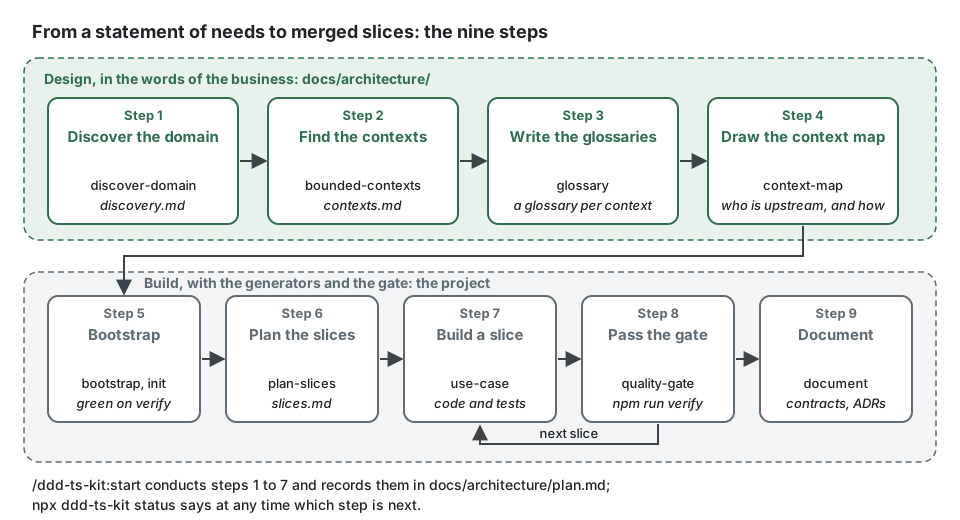
The methodology is the reference for each step and says what
skipping one costs; which command, when gives the command for each
moment of a project.
What the agent runs
Behind each step, the agent types the commands of the CLI: you see them in its session, you may
type them yourself, and the pipeline runs the same ones. A new project starts with:
mkdir orders-api && cd orders-api
npx ddd-ts-kit init
pnpm install
pnpm run verify           # types, lint, format, tests, e2e, architecture, import graph, dead code, documentation drift
init without a flag takes Express, zod, tsyringe, Drizzle on PostgreSQL, Vitest and pnpm,
which corepack provides at the release package.json pins (corepack enable, once per machine).
The project is green from that first verify, before a line of business code, and stays so at
every step. Then, the ubiquitous language first, code second:
pnpm exec ddd-ts-kit generate context ordering --classification core \
  --term "Order=A customer's request to buy products" --term "Place=To submit an order for fulfilment"
pnpm exec ddd-ts-kit generate context billing --classification supporting --upstream ordering:customer-supplier
pnpm exec ddd-ts-kit generate aggregate ordering Order
pnpm exec ddd-ts-kit generate repository ordering Order
pnpm exec ddd-ts-kit generate command ordering PlaceOrder --permission order.place --grant customer --aggregate Order
pnpm exec ddd-ts-kit generate route ordering PlaceOrder --method POST --path /orders
pnpm run docs:generate    # the OpenAPI contract follows the new route
pnpm run verify
pnpm exec ddd-ts-kit status   # what is left: TODO(domain), TODO(platform) and it.todo per context
These two blocks are run as they are written, line by line, by the end-to-end suite of this
repository, on pnpm and on npm. With npx ddd-ts-kit init --package-manager npm the same lines
read npm install, npm run <script> and npx ddd-ts-kit <command>. To see the application
run: cp .env.example .env, pnpm run infra:up (PostgreSQL, in Docker),pnpm run db:generate initial, pnpm run db:migrate, then pnpm run dev (auto reload; API
documentation on /docs).
A name that is not in the context's glossary is refused, and so is a command or a query that
declares neither a permission nor --public. One slice, end to end
follows the request POST /orders through the four layers and shows the code once theTODO(domain) places are filled.
What is enforced
A handler written the quick way breaks four rules at once, and each finding names its rule:
// application/commands/place-order/place-order.handler.ts, written the quick way
import { CommandHandler } from '@ddd-ts-kit/kernel/declarations';
import { PlaceOrderCommand } from '@/contexts/ordering/application/commands/place-order/place-order.command';
import { db, orders } from '@/contexts/ordering/infrastructure/database'; // layer/application-inward

@CommandHandler(PlaceOrderCommand)
export class PlaceOrderHandler implements CommandHandler<PlaceOrderCommand> {
  async execute({ customerId, productIds }: PlaceOrderCommand): Promise<string> {
    if (productIds.length === 0) {
      throw new Error('Empty order'); // domain/no-generic-error
    }

    const id = crypto.randomUUID(); // purity/no-ambient-randomness

    await db.insert(orders).values({ id, customerId, productIds, placedAt: new Date() }); // purity/no-system-clock

    return id;
  }
}
| Instead of | Write | Rule |
|---|---|---|
new Date() |
this.clock.now(), the Clock port received in the constructor |
purity/no-system-clock |
crypto.randomUUID() |
this.ids.next(), the IdGenerator port |
purity/no-ambient-randomness |
throw new Error('Empty order') |
throw OrderError.empty(), a refusal with a stable code |
domain/no-generic-error |
an import of infrastructure/ in a handler |
the OrderRepository port, bound to its adapter by the platform |
layer/application-inward |
an import of another context's domain/ |
that context's published-language/, or an integration event |
context/published-language-only |
The same use case written inside the rules is in One slice, end to end.
The rules cover, among others:
- Layers and contexts (
layer/*,context/*,tree/*): the domain imports nothing but
itself and the kernel; another context is reached only through its published language; no
cycle. - Ubiquitous language (
language/*): domain classes and use cases are named with the terms
of the context's glossary. - Tactical DDD and purity (
domain/*,application/*,events/*,purity/*): encapsulated
aggregates, immutable value objects, specific errors, time and identifiers through ports. - Ports and wiring (
ports/*,declarations/*,composition/*): a port is an abstract class
and its own injection token, assembled in one place. - Access control (
authz/*): every use case declares its permission or says it is public,
decided in the application layer, with an explicit actor. - Clean code and tests (
clean/*,test/*): small functions in stepdown order, no escape
hatch, a spec for every unit of behaviour, no mocks.
npx ddd-ts-kit rules lists every id with its severity; the
architecture reference defines them.
The plugin for coding agents
This repository is the marketplace of the plugin for Claude Code, Codex and GitHub Copilot; the
quick start says how each agent installs it. Twenty-two skills conduct a project from a statement of needs to working contexts, four agents
explore, build one context in its own worktree, write the specs and review, and the hook refuses
a hand-written file where a generator exists and checks every file written. Without any plugin,
the AGENTS.md and the rules by layer that init writes still guide every agent.
The plugin for coding agents lists the skills and says what each
host runs.
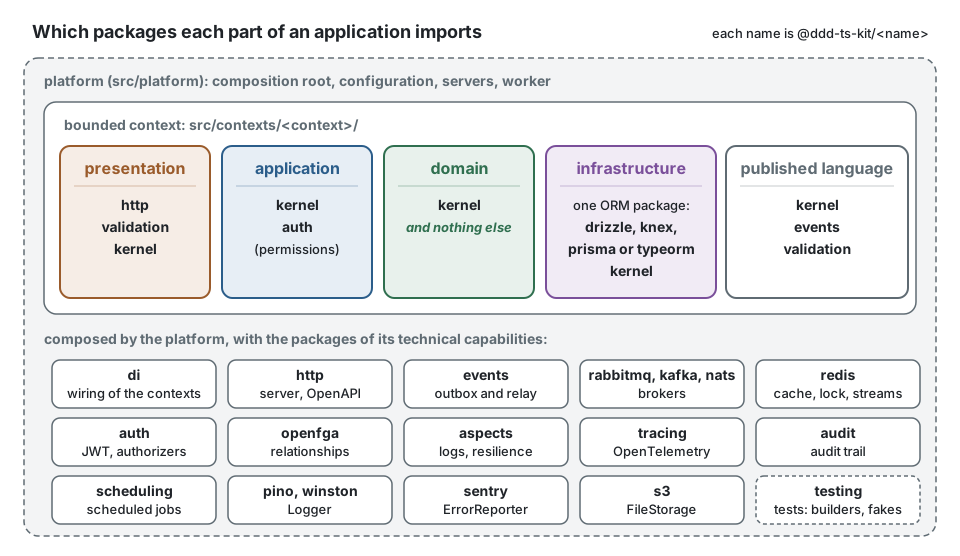
Packages
| Package | What it gives |
|---|---|
ddd-ts-kit |
the CLI: init, generate, check, docs, sdk, status, rules, explain and more |
@ddd-ts-kit/kernel |
entities, aggregates, value objects, errors, ports, the declarations, command, query and event buses, the standard interfaces; no dependency |
@ddd-ts-kit/events |
typed integration events, transactional outbox and relay, AsyncAPI and event catalog |
@ddd-ts-kit/rabbitmq, kafka, nats, redis/event-bus |
broker providers behind one contract: acknowledged publishing, durable subscriptions, retries, dead letters |
@ddd-ts-kit/scheduling |
jobs run by time that only trigger use cases, one run across instances |
@ddd-ts-kit/auth |
actors, a permission per use case, deny by default; role, attribute and relationship authorizers; JWT |
@ddd-ts-kit/openfga |
the relationships of auth on an OpenFGA server |
@ddd-ts-kit/aspects |
logging, metrics, retry, timeout, circuit breaker, cache and bulkhead applied from outside |
@ddd-ts-kit/audit |
hash-chained, append-only audit trail |
@ddd-ts-kit/redis |
cache, lock, rate limiter and relay signal on Redis, Dragonfly or Valkey |
@ddd-ts-kit/s3 |
file storage on AWS S3, MinIO, OVHcloud, Scaleway or Cloudflare R2 |
@ddd-ts-kit/http |
routes declared once, mounted on Express, Fastify, Hono or NestJS; RFC 9457 errors; OpenAPI 3.1; HTTP caching |
@ddd-ts-kit/validation |
one Schema port over zod, class-validator, TypeBox and Standard Schema |
@ddd-ts-kit/di |
context modules on tsyringe, port classes as tokens, a test application with fakes |
@ddd-ts-kit/pino, winston |
the kernel Logger port on pino or winston |
@ddd-ts-kit/sentry |
the kernel ErrorReporter port on Sentry or GlitchTip |
@ddd-ts-kit/tracing |
OpenTelemetry wired once by the platform |
@ddd-ts-kit/testing |
builders, given/when/then scenarios, contract suites, end-to-end harness |
@ddd-ts-kit/drizzle, knex, prisma, typeorm |
unit of work, outbox store, read models, tenant isolation, event store |
@ddd-ts-kit/eslint-plugin |
the code rules on the syntax tree, with presets |
Everything talks through ports of the kernel, so each piece is replaceable: another broker, ORM or
HTTP framework is an adapter that passes the same contract suite. Each package README says its
limits and what was verified.
Pipeline
init --ci github|gitlab|both installs the same gates on either platform: type check, lint,
architecture, dead code, unit tests with coverage thresholds, integration tests on PostgreSQL,
end-to-end tests, documentation and contract drift, security and image build, behind a single
final gate. Every tool is free on any repository. Details: pipeline/README.md.
Documentation
- Documentation index: every page, and a reading order for a newcomer to DDD,
a tech lead adopting the kit and a contributor. - Architecture reference (normative) and
configuration. - Concepts: one page per idea, from bounded contexts to event sourcing.
- Guides and tool comparisons:
the methodology, team and parallel work, and one page per technical choice.
Example application
examples/scheduling is an appointment scheduling platform built
with the kit the way a user would build it: from a statement of needs, through the nine steps, by
several workers in parallel. Four bounded contexts on Express, class-validator, tsyringe, Knex on
PostgreSQL, the transactional outbox, Keycloak and relationship-based authorization.
Requirements
Node 22.12 or later. The generated projects type-check with the native TypeScript 7 compiler and
keep TypeScript 6 for the tools that still need its API.
Community and support
- Questions and ideas: GitHub Discussions.
- Bugs and proposals: issues,
from their templates. - Security: never in a public issue; see SECURITY.md.
- Everyone who takes part follows the code of conduct.
Contributing
ddd-ts-kit is built in the open, and contributions of every size are welcome: a typo, a
translation, a test, an adapter or a new rule. Good places to start:
- issues labelled
good first issue
or help wanted; - an adapter for a broker, an ORM or an HTTP framework the kit does not support yet: it passes
the contract suite of its port; - the documentation, in English or in French, and the example application;
- feedback from a real project, in Discussions:
what held, what got in the way.
CONTRIBUTING.md gives the setup, the ground rules and how a change reachesmain. If ddd-ts-kit helps you, a star on GitHub helps others find it.
Contributors
The people who build ddd-ts-kit, then everyone whose commits reached main.
 Gary Bourgeat maintainer |
 Jean-Daniel Bargy |
License
MIT © Gary Bourgeat and the contributors.
Reviews (0)
Sign in to leave a review.
Leave a reviewNo results found