aat
Health Warn
- License — License: Apache-2.0
- Description — Repository has a description
- Active repo — Last push 0 days ago
- Low visibility — Only 5 GitHub stars
Code Pass
- Code scan — Scanned 12 files during light audit, no dangerous patterns found
Permissions Pass
- Permissions — No dangerous permissions requested
No AI report is available for this listing yet.
Model your API as a graph once. Long-chain integration tests, layer × environment matrices, CI-ready runs, and an MCP server — all from the same YAML.
AAT — Adaptive API Toolkit
Model your API as a graph once. Get long-chain integration tests, layer × environment matrices, CI-ready runs, and an MCP server for AI coding tools — all from the same YAML.




One description of your API does four jobs:
- Test real flows, not single calls. Chains of dependent calls over REST and gRPC, with the data wired between steps, every response checked, and what was created cleaned up afterwards.
- Test locally without editing anything. Point one operation at your laptop and the rest of the flow keeps running against the real environment, with its auth intact.
- Know when an API you depend on changes. Run the plans on a schedule against a vendor's sandbox; when its behaviour changes, a run goes red and leaves one file with the exact exchange to send them. That is how a nightly run caught a regression in Shippo's test environment, which Shippo confirmed.
- Get an integration working, then hand it to an agent. An agent authors, validates, and runs against the sandbox until the calls work — the Stripe project took about an hour that way — and then
aat mcp servehands a coding assistant the same graph. Working clients have come out of a single prompt in Java, Go, Python, C#, Perl, and Lisp.
The same YAML does all four; nothing is copied per job. Every job runs through the same guardrails — strict files, a validator that names the wrong line, a run that names the failing step — which is what AAT puts at the interface between agents and APIs.
60-second quick start
With aat and aat-sandbox installed and on your PATH, the offline shop example runs with no signup and no network:
aat-sandbox init shop && cd shop   # extract the example project
aat-sandbox serve &                # shop API on :8765, payments on :8766, payments over gRPC on :8767
aat run plan full-lifecycle        # one order through every state, verified and cleaned up
aat run plan smoke --env eu        # the same purchase with EU prices and VAT
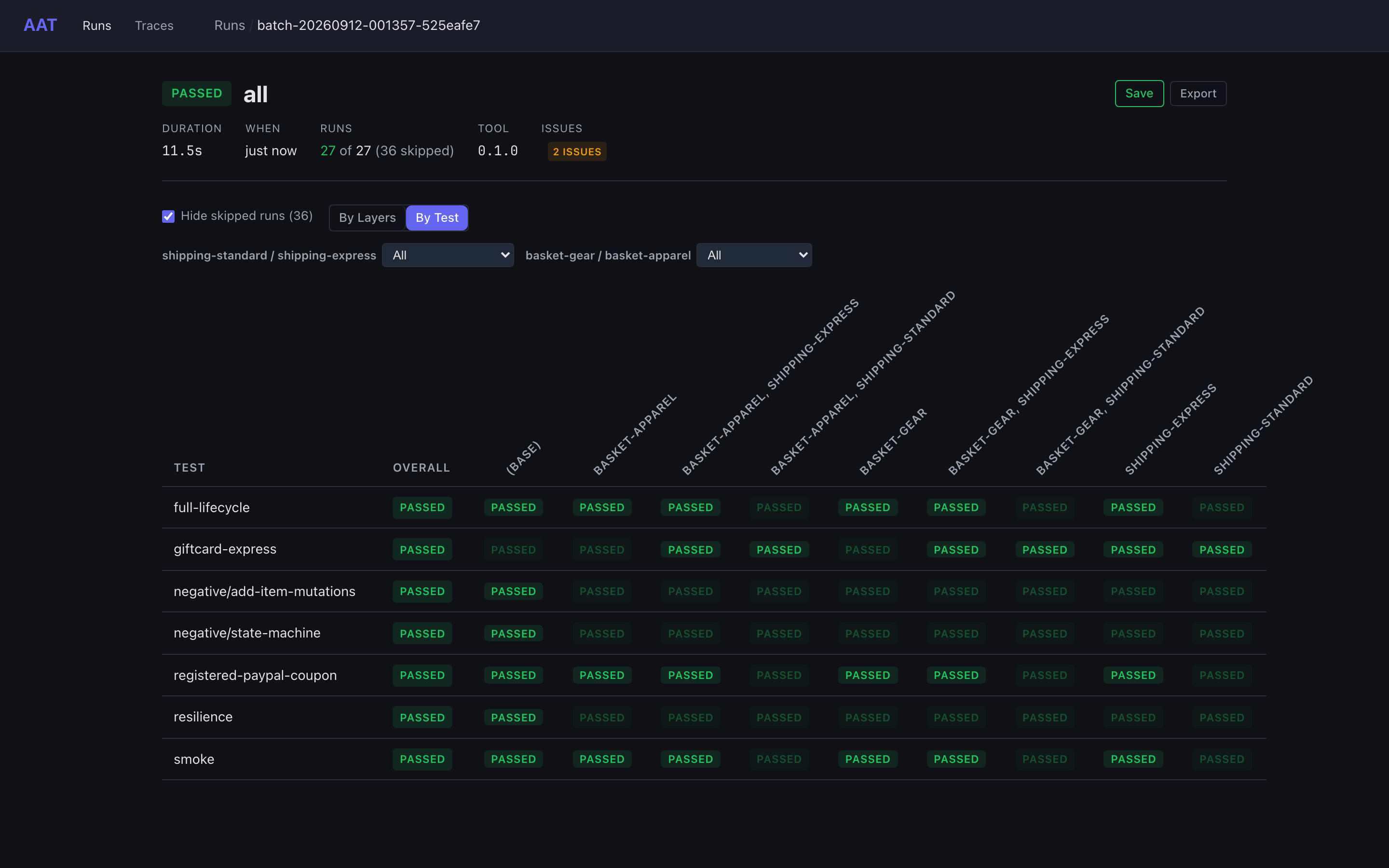
aat run batch --layer-group shipping-standard,shipping-express --layer-group basket-gear,basket-apparel --parallel 4
aat web view latest                # the batch in the web UI; press Ctrl+C when done
kill %1                            # stop the sandbox
  [ 1/15] listProducts         200  0ms
  [ 2/15] checkInventory       200  609ms  retried 1x: response_error
  [ 3/15] createCart           201  0ms
  [ 4/15] addProduct (addItem) 201  0ms
  ...
  [ 8/15] checkout             201  0ms
          Order: ord_0001
          Total: $130.66
  [ 9/15] paymentCharge        201  351ms
  [10/15] shipOrder            201  601ms
  [11/15] getShipment          200  1.3s  retried 2x: transient
  ...
  [15/15] verify_getOrder      200  0ms

  cleanup:
    deleteOrder            204  0ms
    deleteCart             204  0ms

PASSED (15/15 steps, 2.9s)
Nobody wired the data by hand: the graph says where each input comes from, and the plan only lists steps. The shop README walks through what each command shows.
Use it to
- Test your own API's real flows in CI. An order through cart, checkout, payment, shipping, and refund, cleaned up afterwards, with exit codes and JUnit for the pipeline: the shop and CI/CD.
- Test the third-party APIs you depend on, every night. Clone a project, export your test key, run it, then schedule it: Stripe, Shippo, and Duffel. Each plan asserts the exact status and error body, so a red run says what changed, and a defect you have reported can be pinned with a deadline instead of loosened.
- Run one plan across every configuration. Regions, card brands, parcel sizes: layers multiply plans into a matrix, and permutations that would send the same requests are skipped: Matrix testing.
- Give integrators a kit their AI tools can code against. The graph your tests keep true, served over MCP; a working client has taken a single prompt: Share your API with integrators.
- Send a run instead of a screenshot. One file with every request, response, resolved value, retry, and assertion, opened in the same viewer by whoever you send it to: Archives.
- See what an agent did to your API. A plan reads as a list of named steps, and a run shows every request and response on a timeline: the demo an API never had, for whoever is checking an agent's work without reading its code: Why AAT.
Why
I was changing a service I could not test on its own.
It was one of a set of badly factored microservices, and reaching the one I was touching meant standing up everything in front of it first: a dozen calls to create the account, the records, and the state it expected before it would do anything interesting. What I had for that was half a dozen Postman collections, all slightly different, none of which worked all the time.
They had worked, at first. Then the team grew. Everyone had their own copy with their own tweaks, and none of them were reliable. Nothing was in source control, so there was no diff, no review, and no way to tell whose version was right. Every new test case meant editing a collection in place, so the case it replaced was gone. The chaining lived in pre-request scripts, which put the interesting part of a flow — what depends on what — inside JavaScript instead of in front of you. And none of it was legible to an AI coding tool: the export was one file too large to read, in a shape nothing else consumes.
The underlying problem is that real integrations are not one call. Buying something means browse, cart, checkout, pay, ship, and maybe return and refund: 8 to 20 calls, each needing IDs from the calls before it, leaving state behind that someone has to clean up. A collection is a folder of single requests. Everything that makes those requests a flow has to live somewhere else, and that somewhere was scripts.
Postman is good at what it is for: exploring an API by hand, one request at a time. It is a poor place to keep the knowledge of how an API works. That knowledge ends up in a format only Postman reads, in a workspace rather than your repository, and it scales by copying.
Two attempts came before this one. The first was a recording proxy that found the values chaining between calls on its own and generated a Postman collection with the extraction scripts already written; it worked, but the wiring it found was baked into the recording, so reaching the same goal another way meant recording again — the pile of slightly different collections, now generated. The second handed an LLM a list of operations and a goal, and failed for the mirror-image reason: nothing had written the connections down, so every run was a fresh guess. The connections are a fact about the operations, not about a run. Attaching them there is what AAT is.
So the knowledge moved into the repository. AAT keeps three things apart. API knowledge is a graph of operations and request templates, written once. Test intent is a plan that lists steps, not wiring. Variation is layers (named sets of test data) and environments that turn one plan into a matrix. Small files, reviewed like code, that an AI coding tool can read one at a time and a person can follow without opening a debugger.
Describing the API that precisely turned out to be worth more than the tests it was written for. The question stopped being what else should this run? and became what else can read this? The same graph is what aat mcp serve hands an AI coding tool, so it calls the API correctly instead of guessing at it — and it is what makes a run archive worth sending: every request, response, resolved value, retry, and assertion in one file the other team opens in the same viewer, rather than a screenshot of one pane. Neither was a roadmap; both fell out of having the graph.
One description also does several jobs. The batch a developer runs while changing something is the batch CI runs on every commit, and the batch you run in front of whoever signs off a release; debugging your own build is that same run with one node pointed at your laptop, not a fork of the suite. What a pipeline leaves behind is an artifact you open in the viewer rather than scrollback to reconstruct. And with one description instead of a copy per person, a template corrected or an assertion tightened lands once and holds for everyone who runs it next.
The point is not that the files are tidy. It is that they run: every claim in this repository and in the four projects below is something aat executed and recorded. Scripted API tools, in source control or not, keep the wiring inside each test and share Postman's fragility; how AAT differs is its own section of Why AAT exists, which tells the longer version.
Pick your demo
| Example | What it shows | Needs |
|---|---|---|
| Shop | Everything: an 18-operation graph, workflows with slots and addons, layers and matrices, two regions, a separately hosted payments API, negative tests, retries, checkpoints, an integration kit, MCP | Nothing: it runs offline against aat-sandbox |
| Petstore | The smallest working project: four operations, two workflows, cleanup pairing | Network access to the public Petstore |
| gRPC payments | One plan across two protocols: a cart opened and checked out over HTTP, then charged and refunded over gRPC, and a negative test that names a gRPC status | Nothing: it runs offline against aat-sandbox. aat-sandbox init --example grpc-payments <dir> extracts it |
Four complete projects against real, public APIs live in their own repositories. Three were built against an API's live test mode and the fourth against the database itself, in a local container; every claim in each README is something a run recorded:
| Project | Scale | What it shows |
|---|---|---|
| aat-duffel | 66 operations, 47 plans, 14 layers; 47/47 in ~3½ min | Flight search and booking, against an API with no official OpenAPI spec; everything in the README came from runs |
| aat-stripe | 82 operations, 53 plans, 14 layers; 53/53 in ~5 min | Card and bank payments, saved cards, refunds: ~6,300 lines of graph and templates against Stripe's 205,000-line vendored spec, with every exchange checked against it |
| aat-shippo | 46 of 70 operations, 28 plans, 9 layers; 28/28 in ~2½ min | Rating, buying, refunding, and tracking shipments: layers as the headline, with a lane × parcel matrix, six deterministic tracking fixtures, and real shipping labels rendered in the web UI |
| aat-qdrant | all 52 public unary gRPC methods, 77 operations, 38 plans, 6 layers; 38/38 in ~70 s | A vector database over gRPC: the protobuf a real API sends (oneofs, maps, 64-bit ids, a cursor that is a message), errors asserted by status name, credentials as metadata, and a few REST reads of the same data checked against Qdrant's OpenAPI spec. It is what AAT's gRPC support was stress-tested against |
Each is a complete AAT project in its own repository: clone it, export a free test-mode key, and it runs against your account. aat-qdrant needs no account: it runs against a pinned Qdrant in Docker, and needs aat 0.3.0 or later, the first release with gRPC. Real APIs says what each covers and leaves out.
They have also done real work. aat-shippo's nightly run is the one that caught Shippo's refunds changing behaviour overnight in September 2026, in test only, with live unaffected; What a nightly run caught is the diagnosis, from the one file the failing run left behind. And before any of the four were built, coding agents in clean rooms, given only AAT's published docs and the API's public documentation, built a Duffel project twice and a Stripe project three times, from one prompt each. Every attempt validated clean and passed every plan it wrote; the Duffel runs handled 13 of the 14 flows asked for unaided, the Stripe runs 13 of 13. The projects above are separate builds with more human curation; the launch post has the clean-room story.
What it does
| Graph, not scripts. Operations, data flow, ordering, and cleanup live in YAML once; plans list steps. | Long chains. Values flow between steps, retries follow error categories, verification runs after the flow, and cleanup unwinds what was created. |
Layers → matrix. --layer-group runs every plan across every layer permutation and skips permutations that would send identical requests. |
Multi-environment. Named environments share a base through extends and vars, and single operations can route to another host with other credentials. |
| Archives with a decision trail. Every request, response, resolved value, retry, and assertion is recorded, with secrets redacted, and browsable in the web UI. | CI-native. Exit codes 0/1/2/130, --json, JUnit XML via tools/aat-to-junit.py, and a Docker image. |
Checkpoints. --stop-after keeps resources alive and --dump-state hands their IDs to another tool, with the session's credentials on request. |
Depth testing. expectFailure, mutations, rawBody, and overlay files (per-run input values and expected failures) turn happy paths into negative tests. |
HTTP and gRPC. A node names a REST operation or a gRPC method, and one plan can span both: an order checked out over HTTP is charged over gRPC, its id passed straight across. Statuses are asserted by name (NOT_FOUND), and aat validate checks gRPC nodes against a descriptor set offline. Unary methods. See the gRPC guide, and aat-qdrant for a real API driven this way. |
An offline API to try it on. aat-sandbox serves a shop, a separately hosted payments API, and the same payments over gRPC, with regions, two kinds of auth, a declined card, and chaos hooks, so every example runs with no network and no account. |
From OpenAPI and back. aat generate scaffolds from a spec; aat validate --strict holds the graph to it, and --oas-validate strict the request and response bodies of every exchange; aat docs generate writes Markdown. |
AI where it helps. The MCP server teaches AI coding tools your API, and aat prompt can draft a plan; see AI tools and MCP. |

Layers and environments
An environment file holds as many named environments as you need. The shop's two regions share everything through _base and differ only in variables; payments go to their own host with their own API key:
# abridged: auth, headers, and the apiHost/payHost vars are left out
environments:
  _base:
    apiBaseUrl: http://${apiHost}/${region}/v1
    overrides:
      - match: "payment*"
        baseUrl: http://${payHost}/${region}/v1
        auth: {type: apikey, headerName: X-API-Key, credentials: {key: {source: literal, value: pay-demo-key}}}
  us: {extends: _base, vars: {region: us, postalCode: "78701"}}
  eu: {extends: _base, vars: {region: eu, postalCode: "10115"}}
A layer is a named set of input values. Each --layer-group adds a dimension, so the quick start's batch runs 7 plans × 9 permutations, skips the 36 runs that would repeat another run's requests, and passes the other 27. Pick the environment with --env eu, and send one operation to a local build without editing any file:
aat run plan full-lifecycle --override checkoutCart=http://localhost:9000/us/v1
One graph, run many ways: that is the adaptive in the name.
How it works
| File | What it holds |
|---|---|
Graph (graph.yaml) |
Operations with typed inputs and outputs, where each input's value comes from, ordering tokens, and cleanup pairings |
Templates (templates/) |
One request and response template per operation: an HTTP method, path, headers, and body, or a gRPC method, metadata, and message; and what to extract |
Environments (env.yaml) |
Base URLs, auth, headers, and per-operation routing for each named environment |
Workflows (workflows/) |
Reusable step sequences with slots (pick one option) and addons (splice extra steps in) |
Layers (layers/) |
Named sets of input values that multiply plans into a matrix |
Plans (plans/) |
Tests: recipes that pick a workflow and its options, or full step lists with values and assertions |
A node in the shop's graph (abridged):
checkoutCart:
  adapter: checkoutCart
  inputs:
    - name: cartId
      default: {from: createCart.cartId}    # wired from an earlier step
    - name: shippingTier
      type: enum[standard, express, overnight]
      default: standard
  outputs:
    - name: orderId
      display: Order                        # printed in run output
  cleanup: deleteOrder                      # undone after the run
  requires: [cartPopulated]                 # runs once something is in the cart
  satisfies: [orderCreated]
A recipe, which is a whole test:
kind: recipe
selection:
  workflow: Checkout
  choices:
    customer: Registered
    payment: PayPal
  addons: [Apply Coupon, Return After Delivery]
One framework, two wins
An OpenAPI spec describes calls one at a time. The project you build to test your API describes how they work together: which calls reach a goal and in what order, where each input comes from, which fields of a large schema matter, what a failure looks like, and what undoes what. Your test runs keep all of it true, and it is what integrators need, in a form a machine can act on. A second manifest names the part you share, and a short CI step packages it as a kit. Your integrators' AI coding tools read the kit through aat mcp serve and write a working client in their own language. Negative tests, internal environments, and archives stay with you.
my-api-tests/
  aat-project.yaml     your tests: everything
  aat-kit.yaml         the subset integrators get
  graph.yaml  openapi.yaml  env.yaml  templates/  workflows/
  plans/               reference flows (shipped)
  internal/plans/      negative, chaos, regression (kept)
The shop is laid out this way. See Share your API with integrators.
AI tools and MCP
aat mcp serve gives an AI coding tool the whole workflow as tools rather than prose: each operation's exact request, the order calls must run in, what each call needs from the calls before it, composed integration flows, the domain's rules and values, OpenAPI schemas, and sample responses from real runs. The api persona, the tool set for integrators, has 24 read-only tools (17 without an OpenAPI spec); the test persona, for your own team, has 26 for writing, running, and debugging plans. The shop ships this .mcp.json:
{
  "mcpServers": {
    "shop-api": {"command": "aat", "args": ["mcp", "serve", "--manifest", "aat-kit.yaml", "--persona", "api"]},
    "shop-test": {"command": "aat", "args": ["mcp", "serve", "--manifest", "aat-project.yaml", "--persona", "test"]}
  }
}
With that much machine-readable detail, a working client has taken a single prompt in every language tried: on a 74-node airline API, AI coding tools built search-and-booking clients this way in Java, C#, Go, Python, Perl, and Lisp. That project is private, but the same test on the shop is reproducible: Reproduce the single-prompt test has the exact prompt, the setup, and the results of a Python run and a Go run.
Execution never calls an LLM, so a run is deterministic: the same plan sends the same requests every time, costs nothing beyond the API calls themselves, and does not change when a model does. LLMs help at authoring time only: aat prompt can draft a plan, and the MCP server teaches AI tools your API.
Install
Homebrew (macOS or Linux) installs aat and aat-sandbox:
brew install gburgyan/tap/aat
The latest release on macOS or Linux:
curl -fsSL "https://github.com/gburgyan/aat/releases/latest/download/aat_$(uname -s | tr '[:upper:]' '[:lower:]')_$(uname -m | sed 's/x86_64/amd64/;s/aarch64/arm64/').tar.gz" \
  | sudo tar -xz -C /usr/local/bin aat aat-sandbox
Windows, in PowerShell (then open a new terminal):
$dir = "$env:LOCALAPPDATA\Programs\aat"
Invoke-WebRequest https://github.com/gburgyan/aat/releases/latest/download/aat_windows_amd64.zip -OutFile "$env:TEMP\aat.zip"
Expand-Archive "$env:TEMP\aat.zip" -DestinationPath $dir -Force
[Environment]::SetEnvironmentVariable('Path', [Environment]::GetEnvironmentVariable('Path', 'User') + ";$dir", 'User')
Docker, with aat only (no sandbox):
docker run --rm -v "$PWD":/work ghcr.io/gburgyan/aat validate
Go, for the CLI and MCP server (the web UI needs a release build or a source build):
go install github.com/gburgyan/aat/cmd/aat@latest
go install github.com/gburgyan/aat/cmd/aat-sandbox@latest
From source
Requires Go 1.25.7+, Node.js 18+, and make:
git clone https://github.com/gburgyan/aat.git && cd aat
make build   # the web UI, then ./aat and ./aat-sandbox
export PATH="$PWD:$PATH"   # so the quick start finds both
Release binaries are not notarized. If macOS blocks one you downloaded with a browser, run xattr -d com.apple.quarantine aat aat-sandbox; the Homebrew cask removes the attribute for you. The install guide covers checksums, Docker ports, and what each method includes.
Commands
| Command | What it does |
|---|---|
aat run plan <name> |
Run one plan or recipe |
aat run batch [dir] |
Run every plan, optionally across layer groups and in parallel |
aat run show <run> |
Print a run's steps, or one step's request, response, inputs, outputs, or response shape |
aat run clean |
Delete old, unsaved run archives |
aat run rebuild-summaries |
Rebuild run summaries from the full archives |
aat validate |
Check the graph, templates, workflows, layers, and plans (--strict fails on warnings) |
aat web |
Browse runs and batches in the web UI |
aat web view [latest|file.aar] |
Open one run, or an exported archive, in the browser |
aat import <file.aar|file.aab> |
Import an exported run or batch |
aat env list |
List the environments of the environment file |
aat plan list |
Summarize the saved plans and recipes |
aat mcp serve |
Serve the project to AI coding tools over MCP |
aat generate --oas <spec> |
Scaffold a graph and templates from an OpenAPI spec |
aat docs generate |
Write Markdown documentation from the graph |
aat docs primer |
Print the primer AI coding assistants read, as Markdown |
aat prompt "<text>" |
Draft a plan from a sentence (needs LLM configuration) |
aat-sandbox serve |
Run the offline shop API and payments API, and the payments API again over gRPC |
aat-sandbox init <dir> |
Extract the shop example project, or the gRPC one with --example grpc-payments |
Documentation
The full documentation is at gburgyan.github.io/aat. Good places to start:
- Shop example: every command above, explained
- Real APIs: Duffel, Stripe, and Shippo, and what each project covers
- Tutorial: build a project by hand against the sandbox
- Matrix testing: layers, layer groups, and dedup
- Environments: auth,
extends,vars, and per-operation routing - gRPC: descriptor sets, gRPC templates, status names, and how protobuf reads as JSON
- MCP server: personas, tools, and IDE setup
- Share your API with integrators: package a kit in CI
- CI/CD: exit codes, JSON output, and JUnit
Status
Pre-1.0, with one maintainer. AAT was built and proven against a private 74-node airline booking API with 63 workflows, 53 recipes, and 6 environments, and against the four public projects above. The graph and plan formats may still change before 1.0; breaking changes are listed in the changelog, and the roadmap says what's next.
Contributing
Contributions are welcome; see CONTRIBUTING.md. By submitting a pull request, you agree to the Contributor License Agreement.
License
Apache 2.0; see LICENSE.
Reviews (0)
Sign in to leave a review.
Leave a reviewNo results found