Meshwright
Health Pass
- License — License: NOASSERTION
- Description — Repository has a description
- Active repo — Last push 0 days ago
- Community trust — 20 GitHub stars
Code Pass
- Code scan — Scanned 12 files during light audit, no dangerous patterns found
Permissions Pass
- Permissions — No dangerous permissions requested
No AI report is available for this listing yet.
Know why your model won't print. Fix it. Prove it. — mesh analysis, repair and smart retopology for 3D printing, by Geekatplay Studio
Meshwright
Know why your model won't print. Fix it. Prove it.
Mesh analysis, repair and STL preparation for 3D printing
by Geekatplay Studio · Vladimir Chopine





☕ Support development · Quick start · Features · Docs · MCP server · Troubleshooting
Most "mesh repair" tools give you a spinner and a green tick. Meshwright tells you what is wrong, exactly where it is on the model, what it did about it, and what the result actually measures — and it never silently throws your work away.
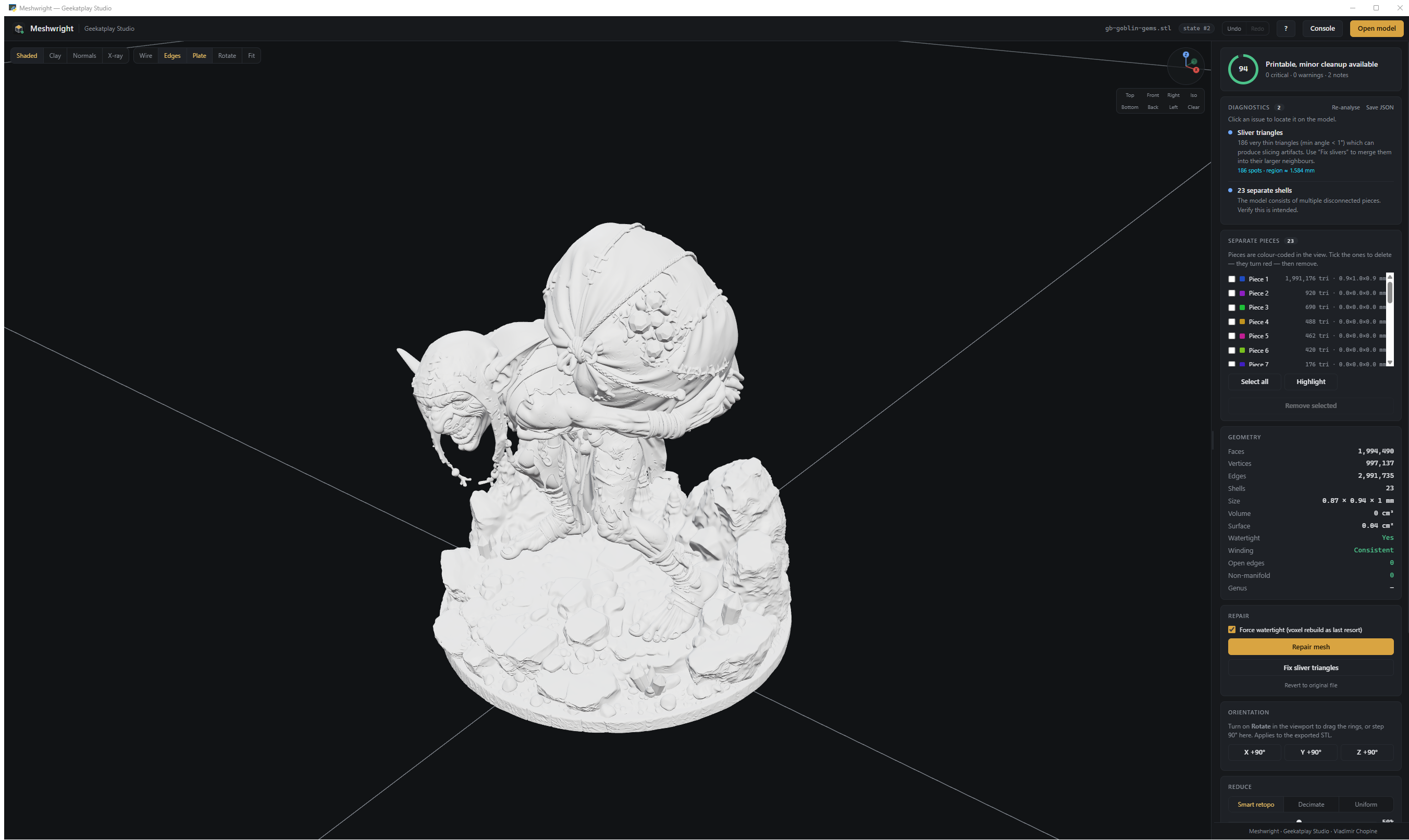
A real 1,994,490-triangle miniature analysed in ~23 s: readiness score, every issue with its location, and all 23 separate pieces listed.
Why Meshwright
| Typical repair tool | Meshwright | |
|---|---|---|
| Diagnosis | "Mesh has errors" | 12 named checks, each with counts and a clickable location on the model |
| Repair | One black box | 6 measured stages — each kept only if it provably helped |
| Result | "Done ✓" | Before → after table, verified by a fresh re-analysis of the repaired mesh |
| Mistakes | Overwrites your model | Numbered states, Ctrl+Z / Ctrl+Y, explicit revert |
| Crash | Work lost | Background snapshots, recovery offered on next start |
| Reduction | One decimation slider | QuadriFlow smart retopology, uniform remesh, or quadric collapse — with measured surface deviation |
| Export | "Here is your STL" | Seven formats, and it says when the file is not a solid — the shell that slices with no infill |
| Automation | GUI only | MCP server + Python API on the identical engine |
Quick start
- Install Python 3.10 or newer from python.org —
tick “Add python.exe to PATH” in the installer. Python 3.12 is the version Meshwright is
tested against. - Download Meshwright and extract the ZIP to a normal folder such as
C:\Meshwright
(running it from inside the ZIP installs into a folder Windows later deletes). - Run
install.bat, thenstart.bat.
git clone https://github.com/GeekatplayStudio/Meshwright.git
cd Meshwright
install.bat          # or:  .\install.ps1
start.bat            # or:  .\start.ps1
Node.js is optional (linting and refreshing the vendored Three.js).
Meshwright does not come with a 3D model — it is a workshop for the files you already have.
Drop one onto the window, press Ctrl+O, or click Load demo model in the
empty viewport to try everything on a built-in broken test object.
The installer creates an isolated
.venvinside the project folder. Meshwright pulls in
numpy, scipy and several mesh libraries; installing those into a shared Python can silently
upgrade numpy and break unrelated projects that pin it (numba, pyarrow, torch, …).start.bat
andstart.ps1use that.venvautomatically. Pass-Globaltoinstall.ps1if you really
want it in your system Python.
Installer options:
| Command | What it does |
|---|---|
install.bat |
Normal install into .venv |
install.bat -Check |
Reports every Python on the machine and what is installed — changes nothing |
install.bat -Recreate |
Deletes .venv and builds it again from scratch |
install.bat -NoOptional |
Required packages only, no extra mesh engines |
install.bat -Python "C:\Path\to\python.exe" |
Use one specific interpreter |
Every run writes install-log.txt next to install.bat; that file is what to send if you need help.
Installing by hand into an environment of your own:
python -m venv .venv
.venv\Scripts\python -m pip install -r requirements.txt
.venv\Scripts\python -m pip install -r requirements-optional.txt   # extra mesh engines
.venv\Scripts\python app.py
requirements.txt holds only packages that install with no compiler on every supported Python.
The engines in requirements-optional.txt are compiled extensions, and a brand-new Python release
often has no ready-made build for one or two of them; the installer adds them one at a time and
skips any that fail, so a single missing build can never abort the installation. Whatever is absent
is simply not offered inside the program — run .venv\Scripts\python scripts\check_install.py to
see exactly what your copy has.
What it does
1 · Diagnose — 12 checks, every one locatable
Open holes · boundary edges · non-manifold edges · face winding · inside-out normals · degenerate triangles · duplicate faces · duplicate vertices · unused vertices · sliver triangles · separate shells · unusual scale — plus volume, surface area, genus and bounding size.
Click any issue and Meshwright flies the camera to it and marks the exact spots in cyan, with a translucent sphere so even a single bad triangle on a huge model is findable.
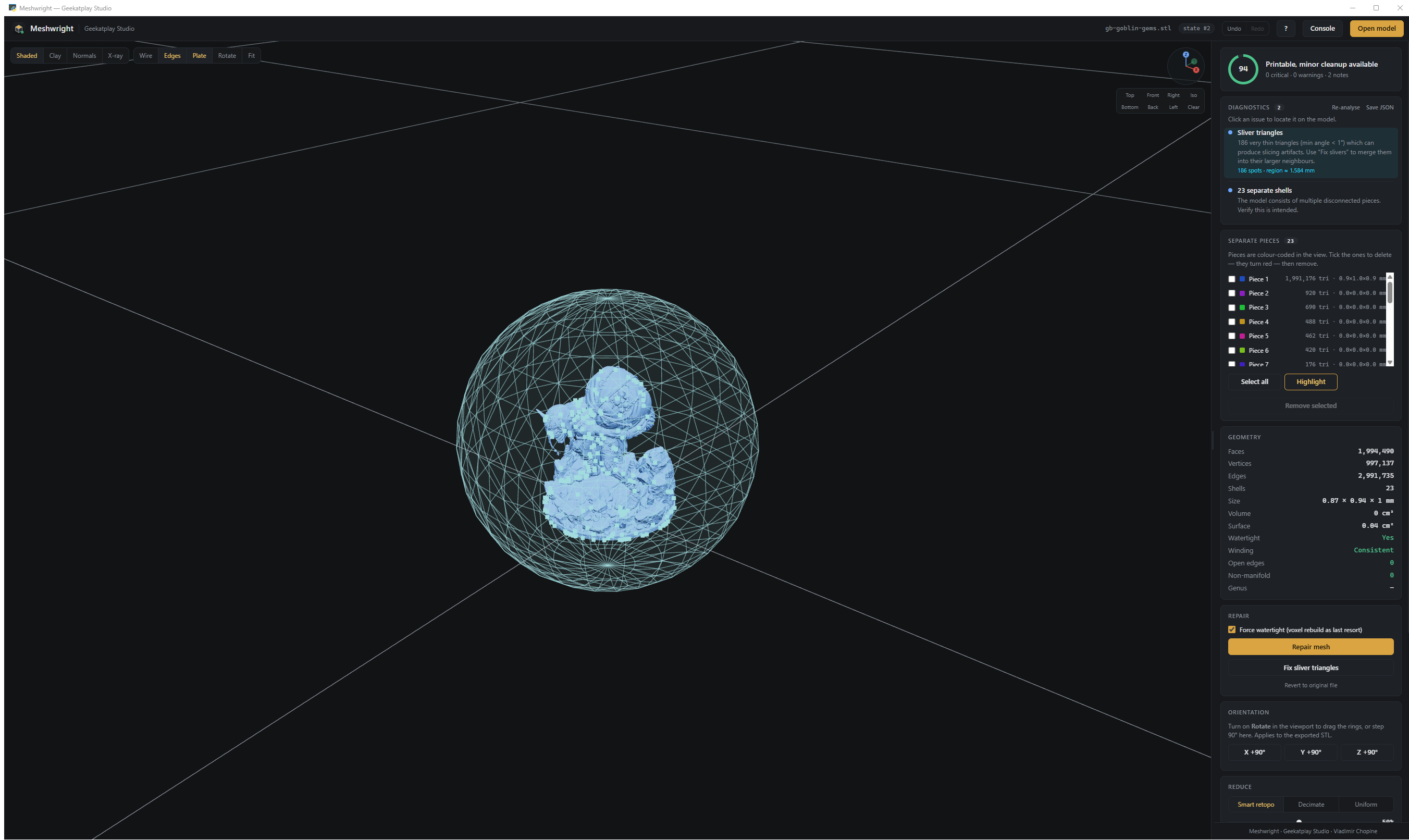
186 sliver triangles located on the model — not just counted.
Every issue carries a severity, and the 0–100 readiness score tells you at a glance whether the model is ready to slice.
2 · Repair — six stages, each one measured
Cleanup → Orientation → Hole filling → MeshFix → MeshLab → Manifold3D → Voxel remesh
A stage is only recorded as a fix if the diagnostics actually changed. The pipeline repeats until the mesh stops changing, then re-analyses the result from scratch — the report you see is measured on the repaired mesh, never predicted.
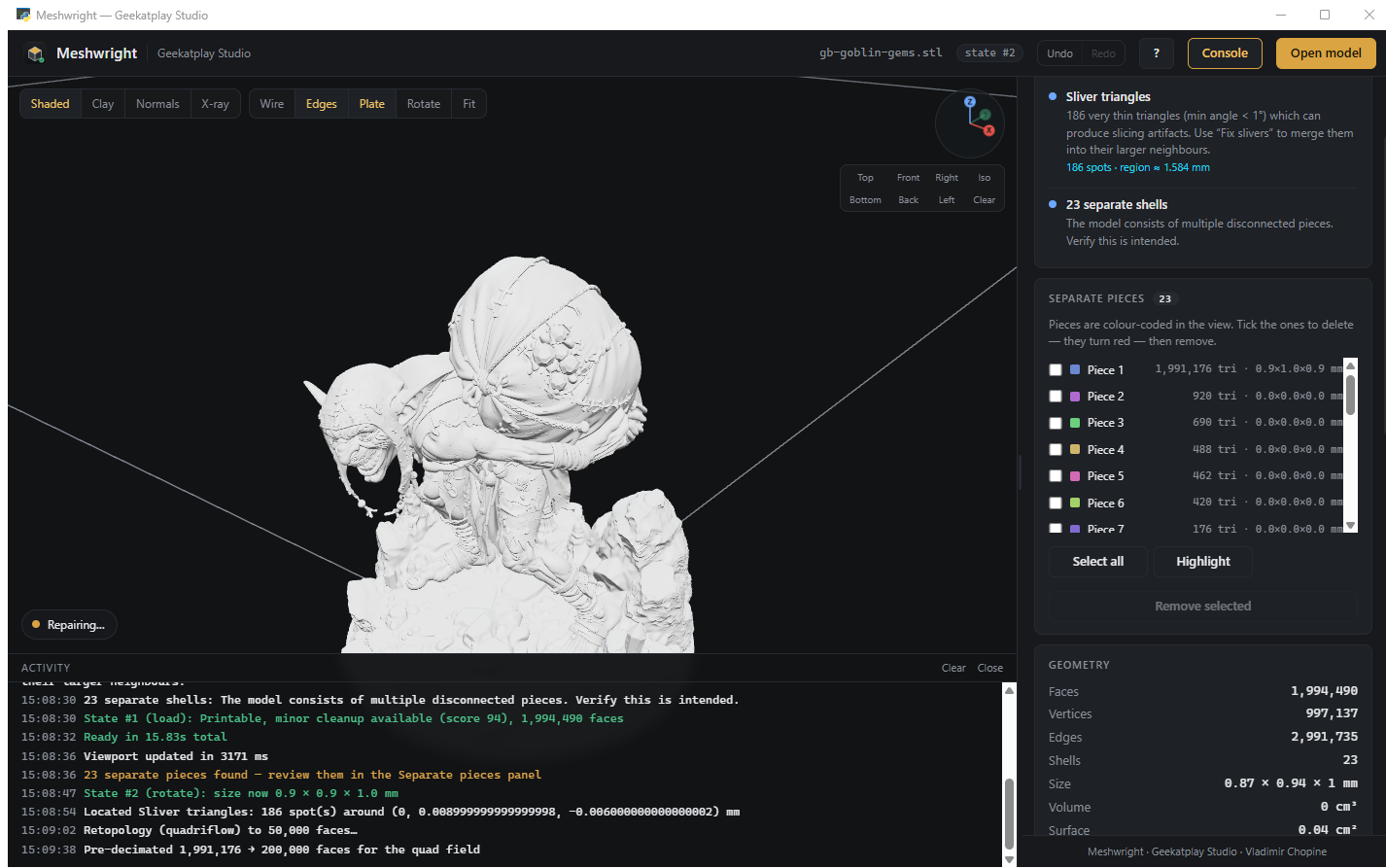
"What was fixed" plus a before → after table. If anything remains, it says so.
3 · Reduce — smart retopology down to low-poly
Three engines, one absolute face target, presets from 500 to 50k:
- Smart retopo — QuadriFlow, the quad remesher used inside Blender. Rebuilds the surface as clean, evenly sized, curvature-aligned quads. Best for sculpts, scans and true low-poly.
- Decimate — MeshLab topology-preserving quadric collapse. Sharpest; keeps hard edges.
- Uniform — isotropic remesh to equal-size triangles, then collapse. Best for noisy scans.
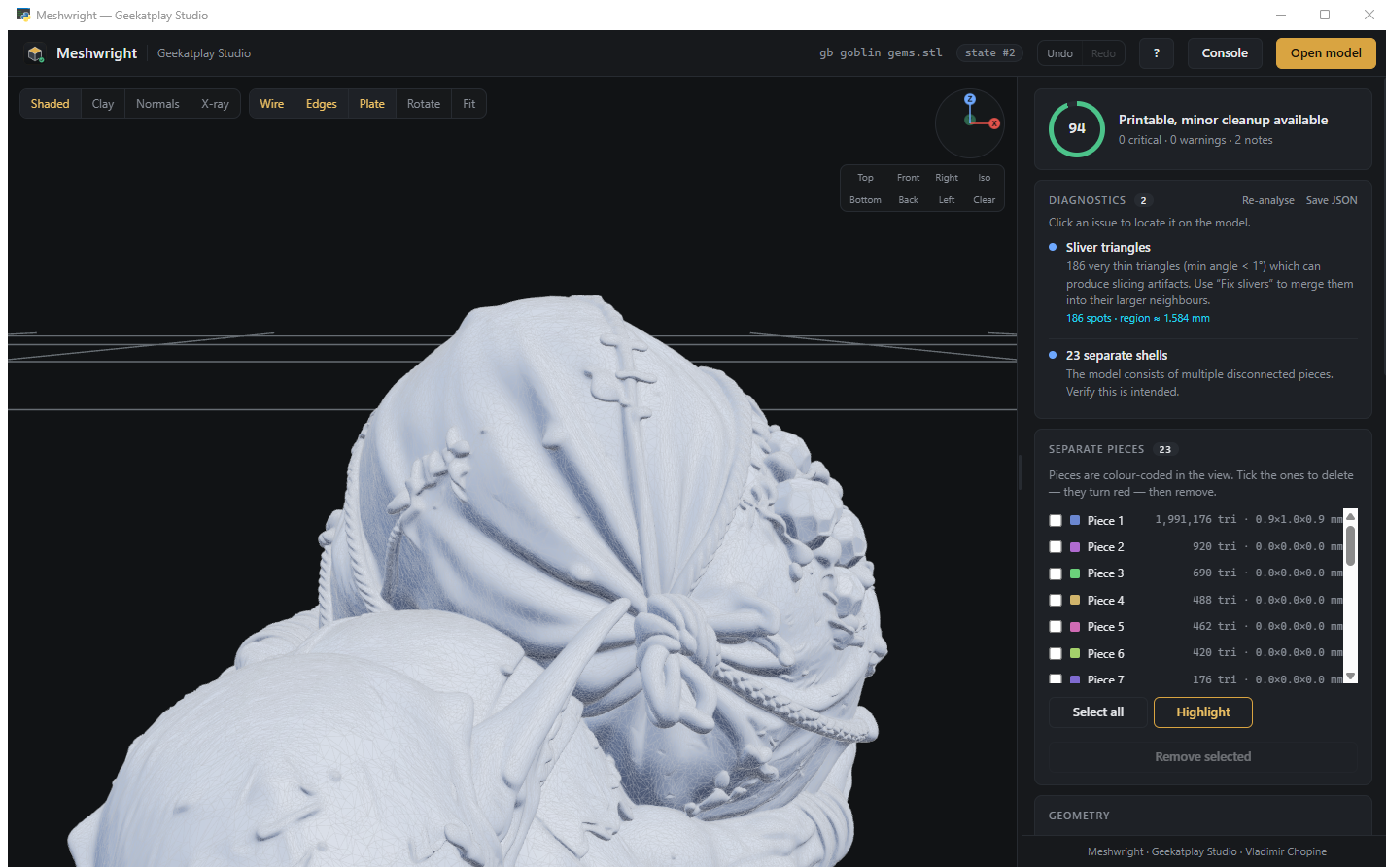 Before — 1,994,490 triangles |
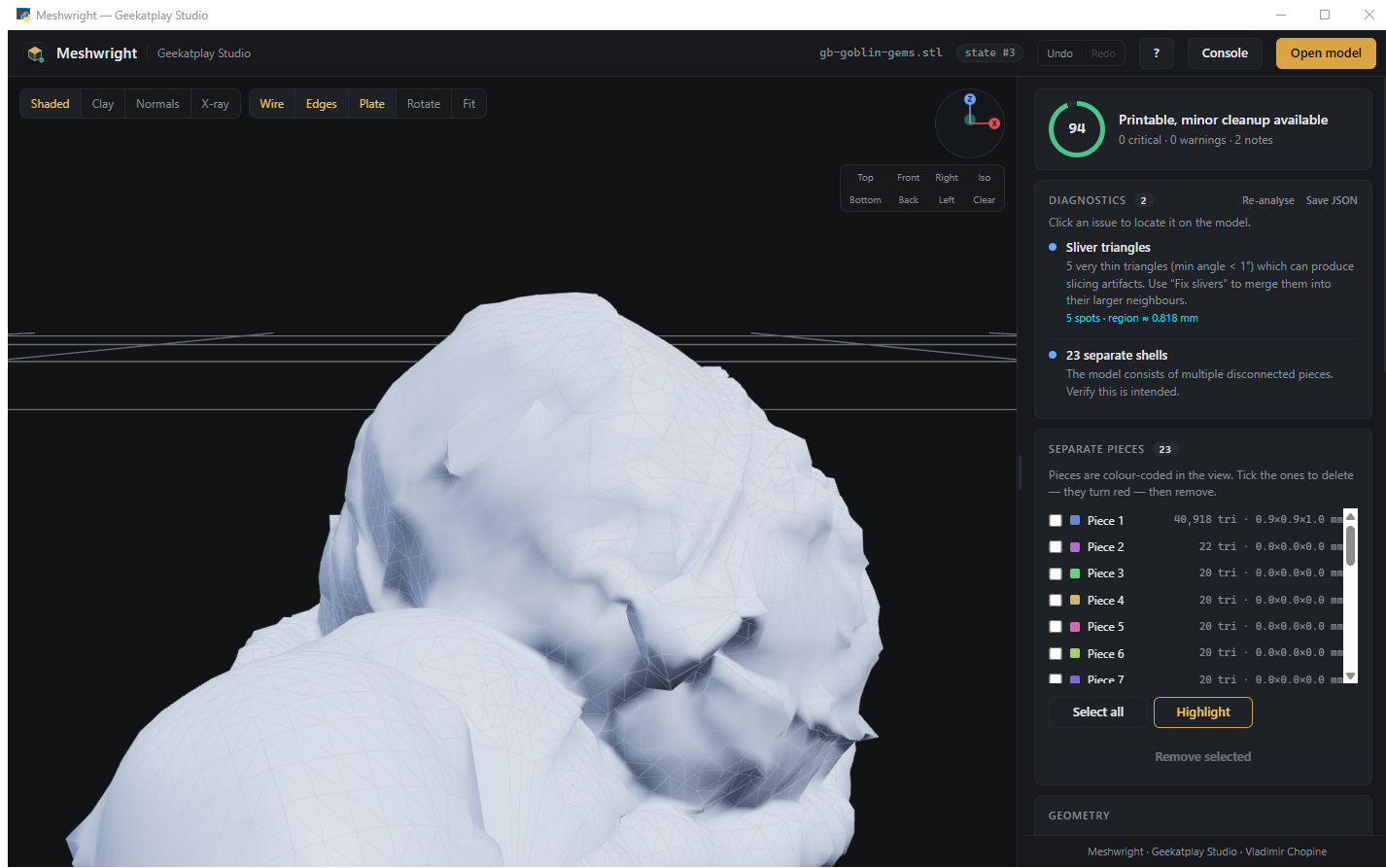 After — 41,198 triangles, clean quad flow |
That is a 97.9 % reduction in about 90 seconds, and the readiness score stayed at 94 — still watertight, all 23 pieces intact, with a measured maximum surface deviation of 0.043 mm (4.3 % of the model size).
Every reduction reports how far the result strays from the original, in millimetres and as a percentage of model size. No guessing.
Remeshers can open holes on topologically complex shapes (this miniature is genus 114). Meshwright checks the result of every piece and repairs it with MeshFix — or falls back to a different engine — so a reduction never hands back a worse mesh than it was given.
4 · Separate pieces
Multi-part models are split, colour-coded and listed with triangle counts and sizes. Tick the ones you don't want — they turn red in the viewport — then remove them. Select all with Ctrl+A.
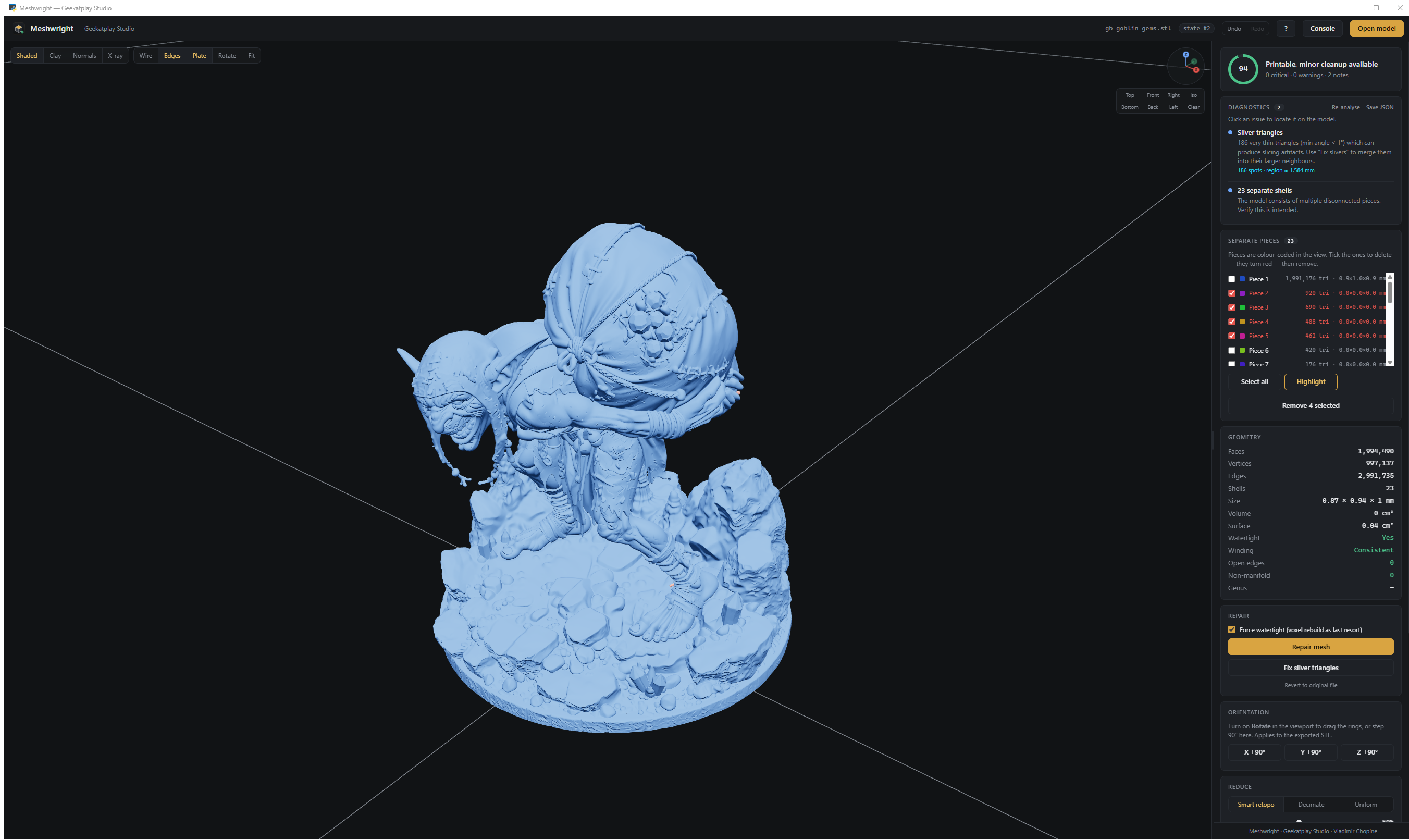
5 · Nothing is ever lost
Every change creates a numbered state.
- Ctrl+Z / Ctrl+Y move between states — nothing else moves backwards.
- A change that would add critical problems or discard most of the geometry is rejected, your previous state is kept, and you are offered "apply anyway".
- Every accepted state is snapshotted to disk in a background thread. If the app dies, the next start offers to recover it.
- Revert to original is explicit, confirmed, and itself undoable.
6 · Always know what it is doing
Long operations announce themselves before they start — how many faces they are about to process and
roughly how long it will take — then show a live timer and progress bar in the bottom-right corner.
Results stay on screen long enough to read and can be dismissed with a click.
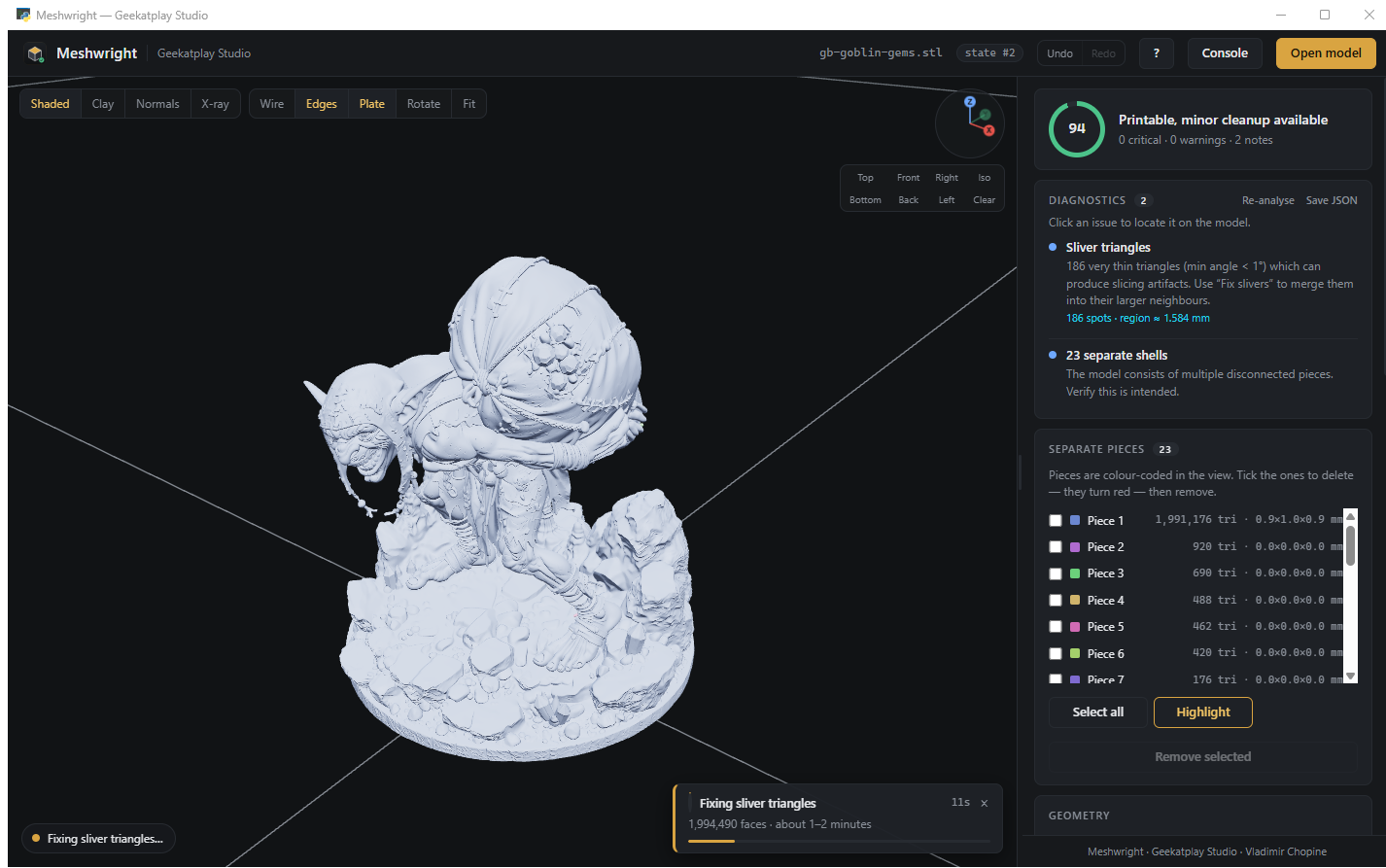
"1,994,490 faces · about 1–2 minutes" — no more wondering whether it froze.
Everything also goes to the activity console with timestamps, and to stdout, so a long run can be
followed from the terminal.
7 · Export
STL, OBJ, PLY, OFF, GLB, glTF or 3MF with source-unit scaling (mm / cm / in) and build-plate
alignment, plus a JSON report of the diagnostics and every operation applied — good for client
sign-off or a print-farm audit trail.
Meshwright checks the mesh as it writes it, and says so on screen when the file is not a closed
solid: an open surface makes a slicer produce a single-wall shell with no infill, no matter what
the slicer settings say. Inside-out models are turned the right way out on the way to the file.
The viewport
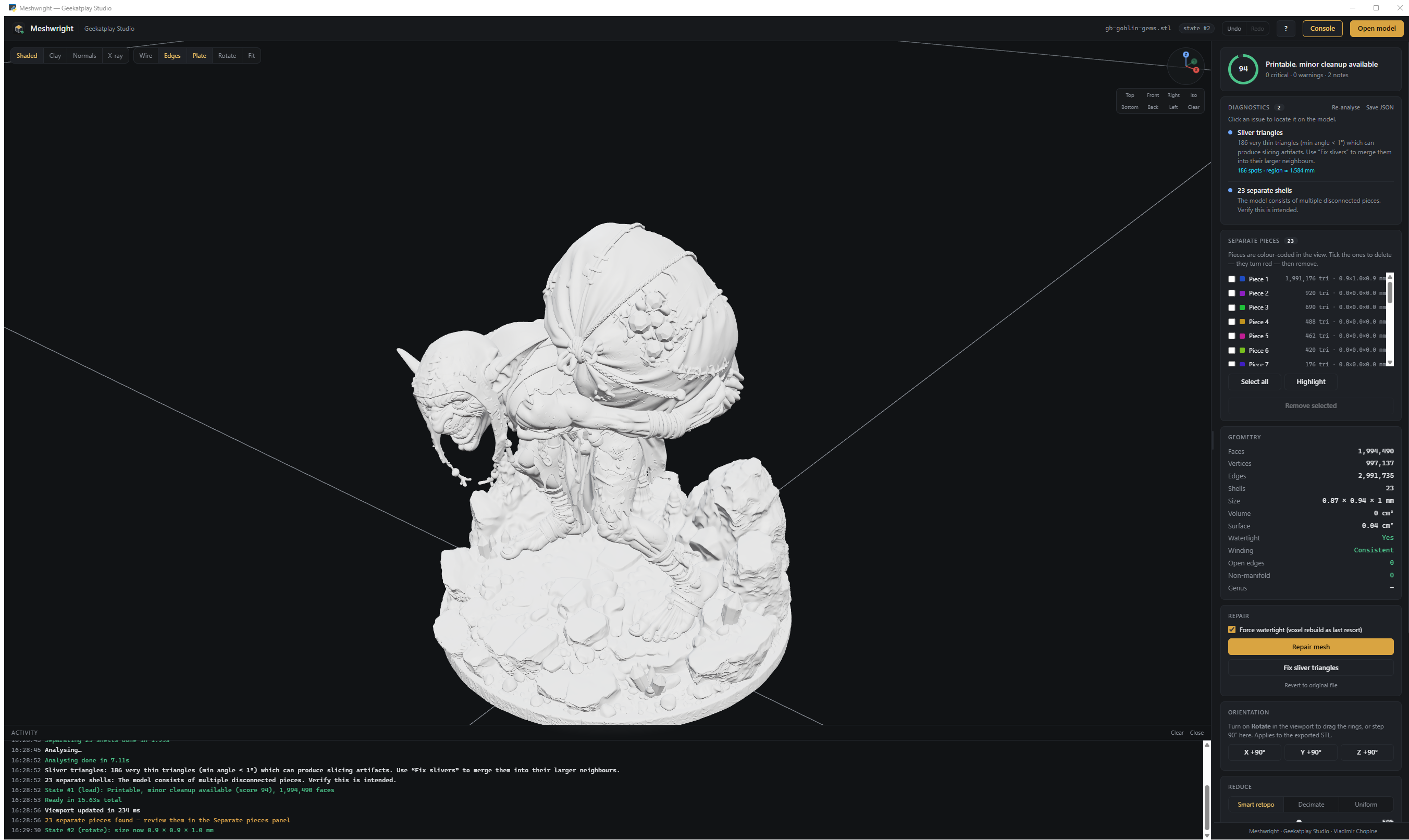
The slide-out console reports every backend step with timings — you always know what is happening.
- Shading: Shaded · Clay · Normals · X-ray
- Overlays: wireframe, red open-edge highlight, build plate
- XYZ compass and one-click Top / Front / Right / Iso / Bottom / Back / Left
- Rotation gizmo — drag rings or step 90°; applies to the exported STL
- Movable key light, resizable panel (remembers its width)
Keyboard
| Ctrl+O Open | Ctrl+S Export STL | Ctrl+⇧+S Save report | Ctrl+Z Undo |
| Ctrl+Y Redo | Ctrl+R Repair | Ctrl+U Re-analyse | Ctrl+A Select pieces |
| Del Remove pieces | R Gizmo | F Fit | W Wireframe |
| E Open edges | G Plate | 1–7 Views | ? Help |
Automation — MCP server & Python API
The desktop app is a thin shell over one engine. The same engine is available to AI assistants, editors and scripts.
// claude_desktop_config.json
{ "mcpServers": {
    "meshwright": { "command": "python", "args": ["D:/path/to/Meshwright/mcp_server.py"] }
} }
14 tools — load_model, analyze, repair, fix_slivers, simplify, retopologize, remove_shells, rotate, undo, redo, revert, states, export_stl, export_report — plus a meshwright://report resource.
from engine.service import MeshService

svc = MeshService()
svc.load("miniature.stl")
svc.repair()                                   # measured, verified, undoable
svc.retopo(20000, method="quadriflow")         # smart retopology
svc.export_stl("miniature_print_ready.stl")
Every input is validated, every call is guarded and undoable. See docs/MCP.md and docs/API.md.
Supported formats
In — OBJ · FBX · GLB · GLTF · STL · PLY · 3MF · DAE · OFF · 3DS
Out — STL (binary) · OBJ · PLY · OFF · GLB · glTF · 3MF · JSON report
Every export is unit-scaled, rested on the build plate, checked for solidity and named<original>-GS-<timestamp>-fixed.<ext>, so it never overwrites what you opened.
Built on
Meshwright is a careful integration of the best open mesh libraries. Full credit where it is due:
| Library | Role | Licence |
|---|---|---|
| trimesh | Loading, geometry, analysis, export | MIT |
| QuadriFlow via pyQuadriFlow | Smart quad retopology | BSD-3 / MIT wrapper |
| MeshFix via pymeshfix | Hole filling, self-intersection repair | GPL-3 ⚠ |
| MeshLab via PyMeshLab | Non-manifold repair, decimation, isotropic remesh | GPL-3 ⚠ |
| Manifold3D | Guaranteed-manifold solid reconstruction | Apache-2.0 |
| fast-simplification | Fast quadric decimation | MIT |
| scikit-image | Marching cubes for voxel remesh | BSD-3 |
| NumPy · SciPy | Array maths, spatial queries | BSD-3 |
| Three.js r128 | WebGL viewport | MIT |
| pywebview | Desktop shell (Edge WebView2) | BSD-3 |
| ufbx | FBX fallback loader | MIT |
| MCP SDK | MCP server | MIT |
⚠ Licensing note — Meshwright's own code is MIT. PyMeshLab and pymeshfix are GPL-3. Using them is fine; redistributing a bundled binary means complying with the GPL. Both are optional — the pipeline degrades gracefully without them. See docs/LICENSES.md.
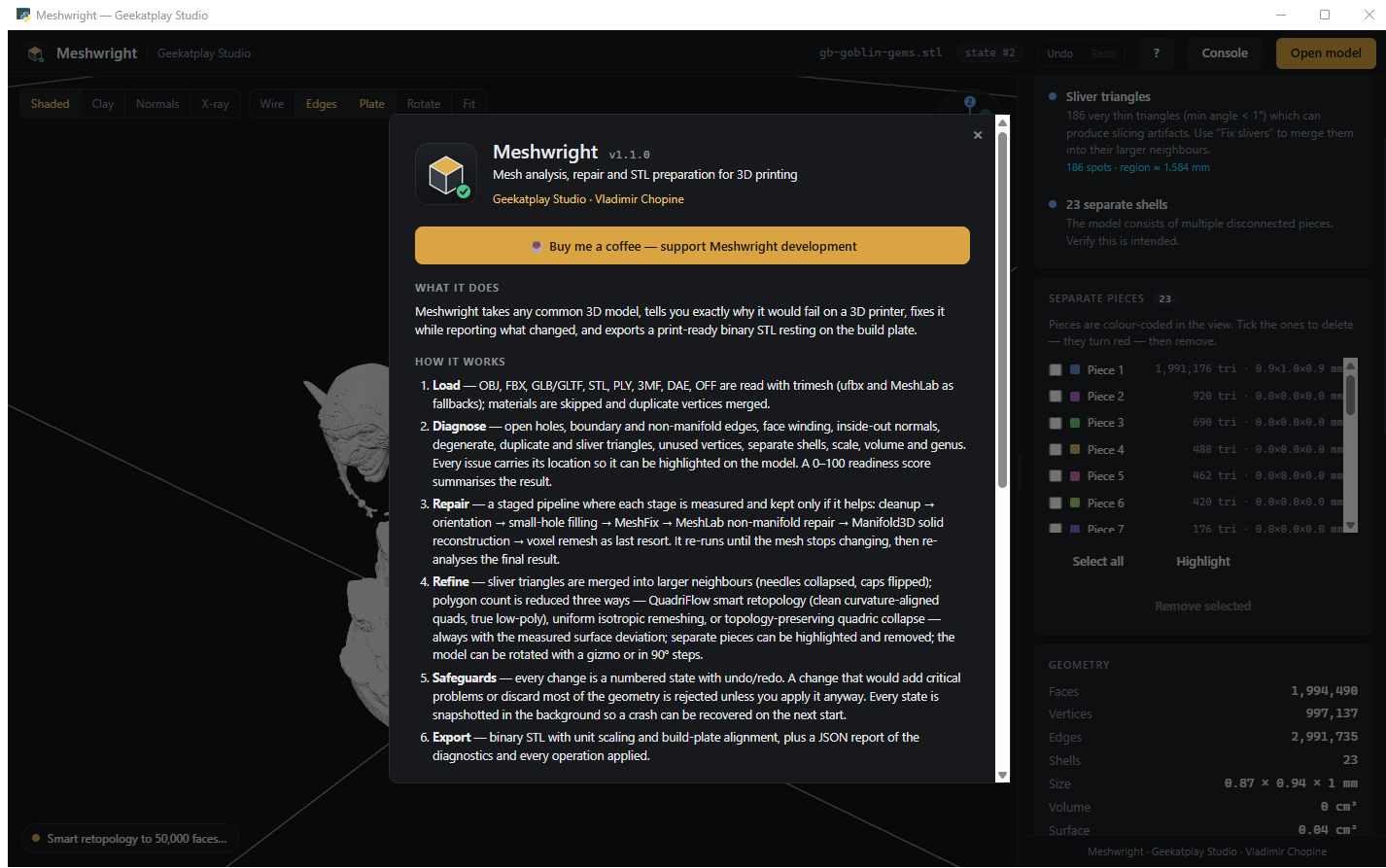
The in-app About panel lists every engine with its installed version — click the studio name, top-left.
Documentation
| docs/USER_GUIDE.md | Every panel, button and workflow |
| docs/DIAGNOSTICS.md | What each check means and how to fix it |
| docs/REDUCTION.md | Choosing between retopology, decimation and remeshing |
| docs/MCP.md | MCP server setup and every tool |
| docs/API.md | Python API reference |
| docs/ARCHITECTURE.md | How the engine is put together |
| docs/LICENSES.md | Third-party licences in full |
| CONTRIBUTING.md | Development setup, tests, style |
| CHANGELOG.md | Release history |
Troubleshooting
“Python was not found; run without arguments to install from the Microsoft Store”
Windows ships a placeholder python.exe that only prints that message. It is on PATH out of
the box, so it looks like Python is installed when nothing is. Any one of these fixes it:
- Install Python from python.org and tick
“Add python.exe to PATH” in the first screen of the installer. Then open a new window and
runinstall.batagain — an already-open window keeps the oldPATH. - Or switch the placeholder off: Settings → Apps → Advanced app settings → App execution
aliases, turn off python.exe and python3.exe. - Already have Python somewhere unusual? Point the installer at it:
install.bat -Python "C:\Path\to\python.exe"
install.bat -Check lists every interpreter Meshwright can find on the machine, which is the
quickest way to see what is really there.
“[ERROR] Could not create the virtual environment”
Older versions printed this straight after the message above, because they believed the
placeholder was Python. The current installer tests each interpreter by running it, so this now
means something else — the message says which:
- The folder cannot be written to. Move Meshwright out of
Program Files, out of a
read-only share, and preferably out of OneDrive, into something likeC:\Meshwright. - The install is running from inside the ZIP. Extract it first: right-click the ZIP →
Extract All…. Double-clickinginstall.batinside a ZIP unpacks a copy into a temporary
folder that Windows deletes later. - A half-finished
.venvis in the way. Runinstall.bat -Recreate.
The install ends with “Engines skipped: …”
That is not a failure. Those engines are compiled extensions, and a Python released a few weeks ago
usually has no ready-made build for one or two of them yet. Meshwright runs and reports which
repair or retopology methods are unavailable; installing Python 3.12 and runninginstall.bat -Recreate gets the complete set.
Meshwright opened, but there is no model
Meshwright ships no 3D models — nothing to download, no folder to point it at. It works on the
files you already have: Open model, Ctrl+O, or drag a file onto the
window. To try it immediately, click Load demo model in the empty viewport; that builds a small
deliberately broken object in memory so you can watch the diagnostics and the repair work.
The black terminal window that opens next to it is the activity log. Keep it open — closing it
closes Meshwright.
The exported STL slices as a thin shell — one layer, no infill
The slicer is right: the file is a surface, not a solid. A slicer fills the inside of a closed
volume; an open surface has no inside, so it becomes a single-wall shell however the infill is set.
Meshwright now says this out loud when it writes the file (“Saved, but this is not a printable
solid”), and the diagnostics panel flags it before that — look for open holes or
boundary edges, and the readiness score will be low. The fix is to press Repair and export
again; the panel must say watertight for a slicer to treat the model as solid.
Two related cases the export warning also covers:
- “The model is hollow with walls averaging 0.4 mm.” The model really is a shell — often a
scan, or a surface exported from a CAD program with zero thickness. Give it thickness in the
program it came from, or use the slicer’s vase/spiral mode deliberately. - Inside-out models. Meshwright turns the winding the right way out as it exports, so a mesh
the slicer used to read as a cavity comes out as a solid.
Something else
Every install writes install-log.txt next to install.bat, and.venv\Scripts\python scripts\check_install.py prints exactly which engines your copy has. Those
two outputs are what to attach to a bug report.
Development
python -m venv .venv
.venv\Scripts\python -m pip install -r requirements-dev.txt
npm install       # vendors Three.js into ui/vendor and installs eslint

npm test          # pytest, 68 tests
npm run lint      # eslint + ruff
npm run mcp       # start the MCP server
Dependency versions in requirements.txt are deliberately bounded (numpy>=1.26,<2.6 and so on) so
an install can never drag a shared environment to an incompatible version. Anything that needs a
compiler belongs in requirements-optional.txt, never in requirements.txt.
☕ Support Meshwright
Meshwright is free and open source. If it saved you a failed print, a wasted spool, or an evening of hunting for a hole in a mesh — consider buying me a coffee.
Geekatplay Studio · Vladimir Chopine
geekatplay.com · YouTube · Gumroad
Released under the MIT License.
Reviews (0)
Sign in to leave a review.
Leave a reviewNo results found