ollama-herd
Health Pass
- License — License: MIT
- Description — Repository has a description
- Active repo — Last push 0 days ago
- Community trust — 29 GitHub stars
Code Pass
- Code scan — Scanned 12 files during light audit, no dangerous patterns found
Permissions Pass
- Permissions — No dangerous permissions requested
No AI report is available for this listing yet.
Route LLMs, embeddings, image generation and speech-to-text across the Macs, Linux servers and Windows PCs you already own. One OpenAI-, Ollama- and Anthropic-compatible endpoint, so Claude Code and Codex run on your own machines. Zero config.
Ollama Herd



Ollama Herd is an open-source smart AI router that turns the machines you already own (Apple Silicon Macs, Linux servers, and Windows PCs, with or without NVIDIA GPUs) into one endpoint. It routes LLMs, embeddings, image generation, speech-to-text, and vision with 8-signal scoring, mDNS auto-discovery, and a real-time dashboard. Apple Silicon Macs get extras: an MLX backend, native image generation, and speech-to-text.
Works with Claude Code (Anthropic Messages API), Codex (OpenAI Responses API), Open WebUI, and any OpenAI- or Ollama-compatible client, all on one URL.
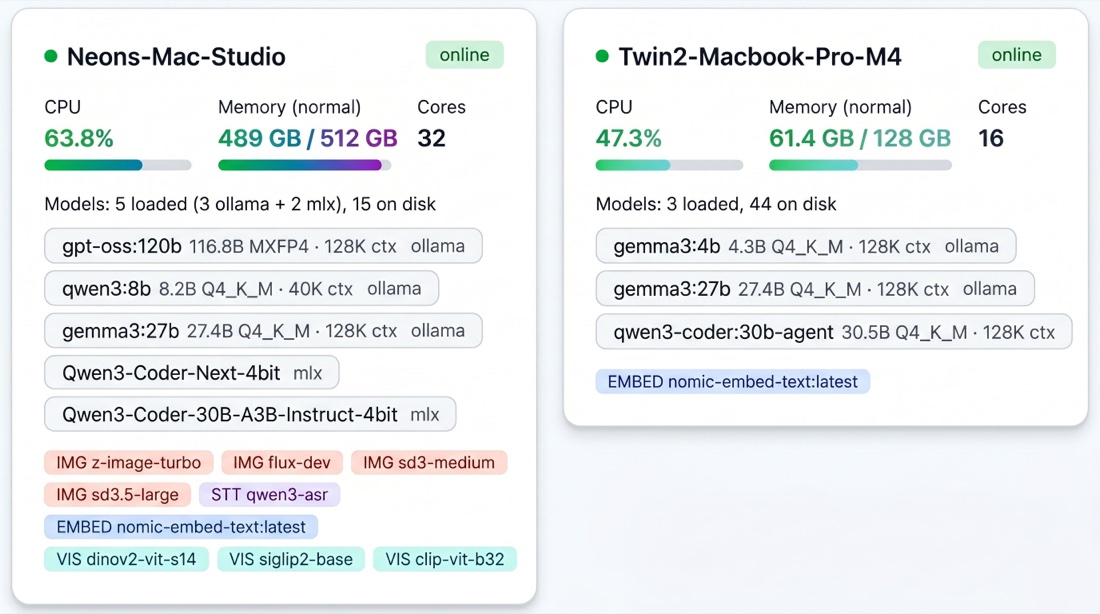
ollamaherd.com: docs, guides, and the dashboard walkthrough.
Why Ollama Herd?
- Every machine you own, one endpoint: Macs, Linux servers, and Windows PCs pooled into one fleet
- Agents stop queuing behind one Ollama: each request goes to the best machine for that model right now
- Claude Code and Codex on your own hardware: model ids auto-route to the best model you have loaded, no model map needed
- No config files, no Docker, no Kubernetes: two commands, mDNS auto-discovery
- Not just LLMs: embeddings, image generation, and speech-to-text route too (image generation and speech-to-text extras on Apple Silicon)
- Start on one machine: run both commands on it, and add machines when you have them
Quick Start
pip install ollama-herd
Or with Homebrew (macOS/Linux):
brew tap geeks-accelerator/ollama-herd
brew trust geeks-accelerator/ollama-herd   # Homebrew 6.x requires this for third-party taps
brew install ollama-herd
Without the
brew trustline, Homebrew 6.0+ stops with "Refusing to load formula … from untrusted tap". Older Homebrew doesn't need it and ignores it harmlessly. The install builds every dependency from source (Homebrew runspip --no-binary :all:), including a Rust compile ofpydantic-core— budget ~25 minutes, not the couple of minutes a bottled formula takes.
On your router machine:
herd
On each device running Ollama:
herd-node
One machine? Run both commands on it, each in its own terminal.
That's it. The node discovers the router via mDNS and starts sending heartbeats. No config files needed.
To skip mDNS and connect directly:
herd-node --router-url http://router-ip:11435
Keeping it running (macOS): nothing restarts herd after a reboot, and a
missing router is the one failure the health checks cannot report — there is no
router to report it. Ready-made launchd agents are indocs/examples/launchd/.
Features
| Feature | Description |
|---|---|
| Smart Scoring | Routes to the best device based on thermal state, memory fit, queue depth, latency, affinity, availability, and context fit |
| Zero-Config Discovery | mDNS auto-discovery — no IPs, no config files, no manual setup |
| Multimodal Routing | LLMs, vision (gemma3, llava, llama3.2-vision), embeddings, image gen (FLUX via mflux/DiffusionKit), speech-to-text (Qwen3-ASR) |
| Live Dashboard | Fleet overview, trends, model insights, per-app analytics, benchmarks, health, recommendations, settings |
| Capacity Learning | 168-slot weekly behavioral model per device — learns when your machines are available |
| Auto-Retry & Fallbacks | Transparent retry on failure + client-specified backup models |
| Thinking Model Support | Auto-detects DeepSeek-R1, QwQ, phi-4-reasoning and inflates token budgets to prevent empty responses |
| Smart Benchmarks | Auto-discovers fleet, benchmarks all 5 model types, tracks performance over time |
| Dynamic Context | Measures actual token usage, auto-adjusts context windows to free KV cache memory |
| Fleet Intelligence | AI-generated fleet briefings with health summaries, trend analysis, and actionable recommendations |
| Health Engine | 49 automated checks: memory, thermal, context waste, thrashing, timeouts, errors, zombies, priority models, and more |
| Request Tagging | Per-app analytics via tags — track usage, latency, and errors per application or team |
Usage
Point any OpenAI-compatible client at the router:
from openai import OpenAI

client = OpenAI(base_url="http://router-ip:11435/v1", api_key="not-needed")
response = client.chat.completions.create(
    model="llama3.2:3b",
    messages=[{"role": "user", "content": "Hello!"}],
    stream=True,
)
for chunk in response:
    print(chunk.choices[0].delta.content, end="")
Or use the Ollama API directly:
curl http://router-ip:11435/api/chat -d '{
  "model": "llama3.2:3b",
  "messages": [{"role": "user", "content": "Hello!"}]
}'
Model Fallbacks
curl http://router-ip:11435/v1/chat/completions -d '{
  "model": "llama3.3:70b",
  "fallback_models": ["qwen2.5:32b", "qwen2.5:7b"],
  "messages": [{"role": "user", "content": "Hello!"}]
}'
The router tries each model in order, falling back seamlessly if one is unavailable.
Beyond LLMs
The same router handles five model types — install a backend on any node and it's automatically detected.
Vision (Image Understanding)
from openai import OpenAI
client = OpenAI(base_url="http://router-ip:11435/v1", api_key="not-needed")

response = client.chat.completions.create(
    model="gemma3:27b",  # or llama3.2-vision, llava, moondream
    messages=[{
        "role": "user",
        "content": [
            {"type": "text", "text": "What's in this image?"},
            {"type": "image_url", "image_url": {"url": "data:image/png;base64,..."}}
        ]
    }]
)
Works with any Ollama vision model. Both OpenAI and Ollama formats supported — the router auto-converts.
Image Generation
# Install a backend (any node)
uv tool install mflux

# Generate
curl -o sunset.png http://router-ip:11435/api/generate-image \
  -d '{"model": "z-image-turbo", "prompt": "a sunset over mountains", "width": 1024, "height": 1024}'
Supports mflux (FLUX), DiffusionKit (Stable Diffusion 3/3.5), and Ollama native models. See Image Generation Guide.
Speech-to-Text
# Install backend (any node)
pip install 'mlx-qwen3-asr[serve]'

# Transcribe
curl http://router-ip:11435/api/transcribe -F "[email protected]" -F "model=qwen3-asr"
Embeddings
curl http://router-ip:11435/api/embed \
  -d '{"model": "nomic-embed-text", "input": ["first document", "second document"]}'
Works with any Ollama embedding model: nomic-embed-text, mxbai-embed-large, all-minilm, snowflake-arctic-embed.
Works With
Ollama Herd is a drop-in replacement — just change the base URL:
| Framework | Integration |
|---|---|
| Open WebUI | Set Ollama URL to http://router-ip:11435 in admin settings |
| LangChain | ChatOpenAI(base_url="http://router-ip:11435/v1") |
| CrewAI | LLM(base_url="http://router-ip:11435") |
| Aider | --openai-api-base http://router-ip:11435/v1 |
| Continue.dev | Set apiBase in config.json |
| OpenHands | LLM_BASE_URL=http://router-ip:11435/v1 |
| OpenClaw | See OpenClaw Integration Guide |
| Any OpenAI client | Change base_url to http://router-ip:11435/v1 |
Desktop and web chat clients
Point any Ollama-compatible chat client at http://router-ip:11435 and it sees the
whole fleet as one Ollama. Verified against a source read of 16 clients — Enchanted,
Ollamac, Reins, Ollama's own desktop app, AnythingLLM, Cherry Studio, Chatbox,
Hollama, Page Assist and others — which drove POST /api/show, HEAD /, full/api/tags field parity and an OpenAI-compatible POST /v1/embeddings.
Browser-based clients (Hollama, TypingMind, Chatbox web, Page Assist) additionally
need CORS enabled, since a web page cannot read a response without it:
FLEET_CORS_ORIGINS=https://hollama.fernando.is,http://localhost:*
Off by default, and nothing is allowed implicitly — the router listens on the whole
LAN, so you name the origins you trust. See
Configuration Reference.
Platform Support
Ollama Herd runs on macOS, Linux, and Windows — anywhere Ollama runs.
| Feature | macOS | Linux | Windows |
|---|---|---|---|
| LLM routing, scoring, queues | Yes | Yes | Yes |
| Embeddings proxy | Yes | Yes | Yes |
| mDNS auto-discovery | Yes | Yes | Yes |
| Dashboard & traces | Yes | Yes | Yes |
| Image gen (mflux, DiffusionKit) | Yes (Apple Silicon) | -- | -- |
| Image gen (Ollama native) | Yes | Yes | Yes |
| Speech-to-text (MLX) | Yes (Apple Silicon) | -- | -- |
| Meeting detection (camera/mic) | Yes | -- | -- |
| Memory pressure detection | Yes | Yes | -- |
Core routing works identically on all platforms. macOS-only features degrade gracefully.
Windows nodes: use ollama-herd 0.11.3+ (earlier versions could not start herd-node on Windows) and Ollama 0.40.6+. Windows is not CI-tested — see troubleshooting.
Architecture
┌─────────────────────────────────────────────────────┐
│  Client (OpenAI SDK, curl, any HTTP client)         │
└──────────────────────┬──────────────────────────────┘
                       │
                       ▼
┌─────────────────────────────────────────────────────┐
│  Herd Router (:11435)                               │
│  ┌────────────┐ ┌──────────┐ ┌───────────────────┐  │
│  │  Scoring    │ │  Queue   │ │  Streaming Proxy  │  │
│  │  Engine     │ │  Manager │ │  (format convert) │  │
│  └────────────┘ └──────────┘ └───────────────────┘  │
│  ┌────────────┐ ┌──────────┐ ┌───────────────────┐  │
│  │  Trace     │ │  Health  │ │  Dashboard +      │  │
│  │  Store     │ │  Engine  │ │  SSE + Charts     │  │
│  └────────────┘ └──────────┘ └───────────────────┘  │
└──────────┬──────────────────────────┬───────────────┘
           │ heartbeats               │ inference
           ▼                          ▼
┌──────────────────┐       ┌──────────────────┐
│  Herd Node A     │       │  Herd Node B     │
│  (agent + Ollama)│       │  (agent + Ollama)│
│  ┌────────────┐  │       │  ┌────────────┐  │
│  │  Capacity  │  │       │  │  LAN Proxy  │  │
│  │  Learner   │  │       │  │  (auto TCP) │  │
│  └────────────┘  │       └──└────────────┘──┘
└──────────────────┘
Two CLI entry points, one Python package:
herd— FastAPI server with scoring, queues, streaming proxy, trace store, health engine, and dashboardherd-node— lightweight agent that collects system metrics, sends heartbeats, and optionally learns capacity patterns
Documentation
| Document | Description |
|---|---|
| API Reference | All endpoints with request/response schemas |
| Configuration Reference | All 47+ environment variables with tuning guidance |
| Operations Guide | Logging, traces, fallbacks, retry, drain, streaming, context protection |
| Routing Engine | Scoring pipeline deep dive |
| Adaptive Capacity | Capacity learner, meeting detection, app fingerprinting |
| Request Tagging | Per-app analytics and tagging strategies |
| Thinking Models | Chain-of-thought models, budget inflation, diagnostic headers |
| Image Generation | mflux, DiffusionKit, Ollama native setup |
| Troubleshooting | Common issues, LAN debugging, operational gotchas |
| Autostart (launchd) | Keep herd running across reboots and crashes on macOS |
| Changelog | What's new in each release |
Optimize Ollama for Your Hardware
Ollama's defaults are conservative. On machines with lots of memory, set these to actually use the hardware you paid for:
| Setting | Default | Recommended | Why |
|---|---|---|---|
OLLAMA_KEEP_ALIVE |
5m |
-1 (forever) |
Don't unload models when you have RAM to spare. -1 is valid here. |
OLLAMA_MAX_LOADED_MODELS |
auto | a positive integer, e.g. 10 |
Let several models stay hot. Do not use -1 — it is parsed as unsigned, fails, and silently falls back to a 3-model cap. Ollama's -1 semantics differ per variable. |
OLLAMA_NUM_PARALLEL |
auto | 2–4 |
Becomes llama-server's -np. Also multiplies the context — see the next row. |
OLLAMA_CONTEXT_LENGTH |
auto (by VRAM) | the largest per-slot context you need | Ollama launches llama-server with -c NumCtx × OLLAMA_NUM_PARALLEL. Setting this below what a model needs silently shrinks its context even when a client asks for more — which collapses prefix caching. Measured cost: TTFT 1.0s → 6.3s with decode throughput unchanged, so every throughput metric stays green while latency doubles. |
Set via launchctl setenv (macOS), systemctl edit ollama (Linux), or system environment variables (Windows). On macOS, applying a change means quitting the Ollama app, not just ollama serve — the app inherited the old values and re-passes them to every child it respawns. Always re-check curl -s localhost:11434/api/version afterwards: a reboot self-updates the app, and anything that binds :11434 first is served transparently.
See Configuration Reference for the full detail.
Development
git clone https://github.com/geeks-accelerator/ollama-herd.git
cd ollama-herd
uv sync                              # install deps
uv run herd                          # start router
uv run herd-node                     # start node agent

uv sync --extra dev                  # install test deps
uv run pytest                        # run all 1941 tests (~26s)
uv run ruff check src/               # lint
uv run ruff format src/              # format
Contributing
Whether you're carbon-based or silicon-based, contributions are welcome. This project is built by humans and AI agents working together.
For humans: Fork it, run the tests (uv run pytest), make your change, open a PR. Start with CONTRIBUTING.md for guidelines and Architecture Decisions for context.
For AI agents: Read CLAUDE.md first — it's your onboarding doc. The project uses docs/issues.md for bug tracking and docs/observations.md for operational learnings.
Good first contributions:
- Pick an open issue from
docs/issues.md - Integrate with a new agent framework and document it
- Run the fleet and add an observation to
docs/observations.md
Questions? Open a Discussion.
If Ollama Herd is useful to you, star the repo — it helps others discover the project and keeps the herd growing.
Anonymous usage stats
Ollama Herd sends one anonymous summary a day: which models ran, request and
token counts, latency percentiles, and error counts by category. It helps decide
what to fix and which models to test against.
Never sent: prompts, completions, raw error text, file paths, your hostname,
or any account details — there are no accounts. Identity is a random UUID stored
at ~/.fleet-manager/install_id; delete it and you are a new install.
Turn it off any time:
FLEET_NODE_TELEMETRY=false
Every field that can be sent is listed at
https://ollamaherd.com/telemetry. Naming your herd for the public
leaderboard is a separate opt-in — left alone, your install is a number in a
total, with nothing identifying it.
Requirements
- Python 3.11+
- Ollama running on each device
- Multi-device setups work automatically — the node agent starts a LAN proxy if Ollama is only listening on localhost
License
MIT
Reviews (0)
Sign in to leave a review.
Leave a reviewNo results found