geniro-app
Health Warn
- License — License: Apache-2.0
- Description — Repository has a description
- Active repo — Last push 0 days ago
- Low visibility — Only 5 GitHub stars
Code Fail
- execSync — Synchronous shell command execution in .claude/skills/run-desktop/driver.mjs
- fs.rmSync — Destructive file system operation in .claude/skills/run-desktop/driver.mjs
- os.homedir — User home directory access in .claude/skills/run-desktop/driver.mjs
- process.env — Environment variable access in .claude/skills/run-desktop/driver.mjs
- network request — Outbound network request in .claude/skills/run-desktop/driver.mjs
- rm -rf — Recursive force deletion command in apps/daemon/package.json
Permissions Pass
- Permissions — No dangerous permissions requested
No AI report is available for this listing yet.
Local-first macOS desktop app for running CLI coding agents (claude, cursor-agent) — one at a time in a chat, or as a team wired together as a DAG. Everything runs on your machine: no cloud, no account, no telemetry.
Geniro
A local-first macOS desktop app for running CLI coding agents: one at a
time in a chat, as a team wired together as a graph, or card by card from a
task board.
Geniro drives the coding CLIs you already have (claude, cursor-agent andcodex) headlessly and gives them a proper interface. That means a transcript
that renders diffs, charts, findings and interactive pages; a canvas where
several agents become a DAG; a board whose cards run themselves in their own
git worktrees; a permission gate you can see; and a record of what it all
cost.
Everything runs on your machine. There is no Geniro backend, no account
and no telemetry. The agents sign in with their own CLI logins, so Geniro
stores no API keys. You can open the same live sessions from your phone over
your own Wi-Fi.
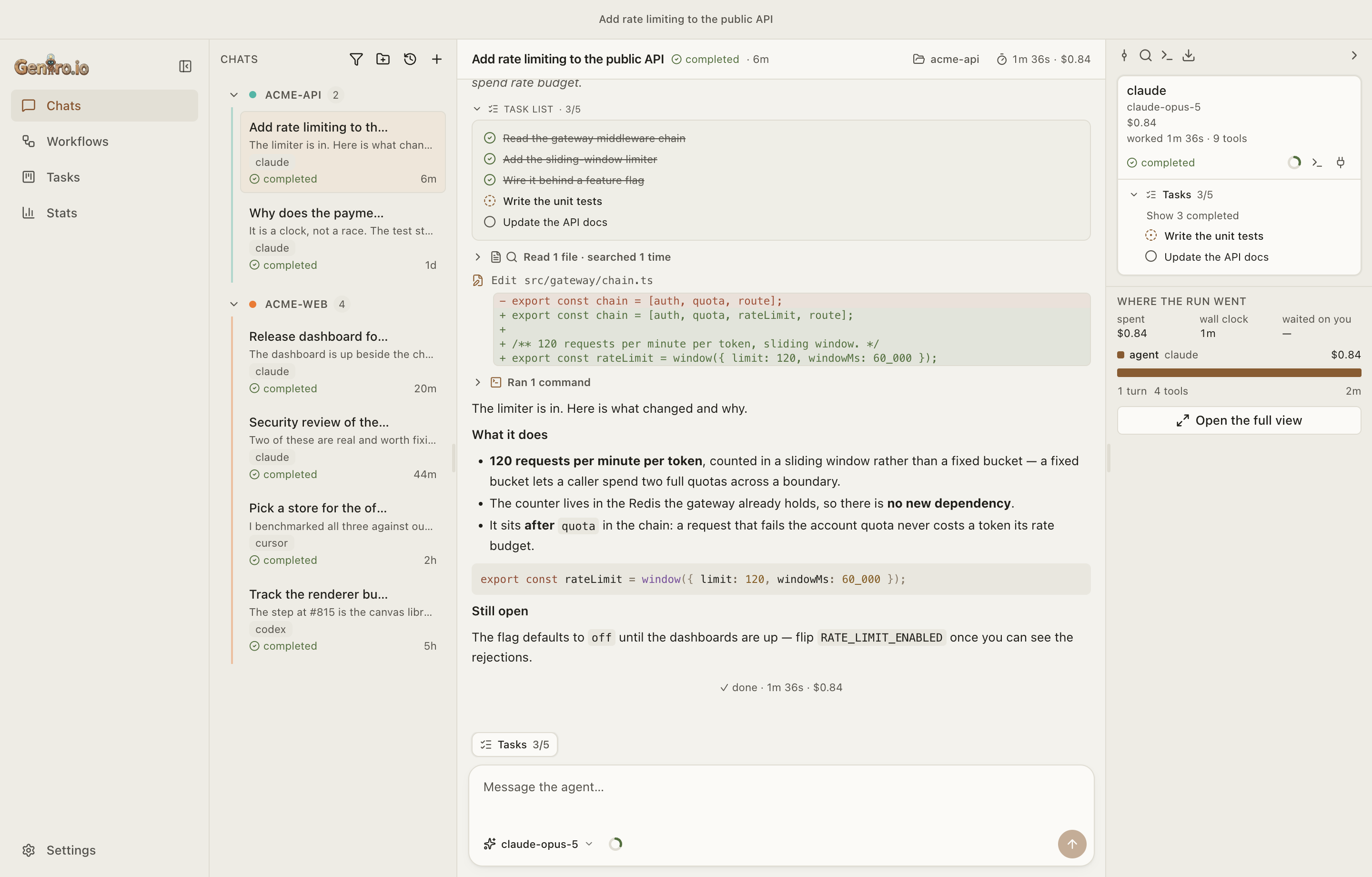
The screenshots on this page use synthetic data from a made-up
acme-web/acme-apiproject. None of it is anyone's real work.
Contents
What it does · Chats ·
Rich transcripts ·
Workflows ·
Agents that call agents ·
Tasks board ·
Context and cost ·
Your phone ·
Your CLIs, your accounts ·
Local-first ·
Install · Develop ·
Architecture · Releasing · License
What it does
| Chat with one agent | Pick a folder, a CLI, a model, a reasoning effort, a context window and how much you want to be asked before it acts. |
| Compose a team | Wire agents into a DAG on a canvas, or describe the change to an agent docked under it. Fan out, fan in, and attach shared instruction blocks. |
| Let agents call agents | A node can call another node in the middle of its turn, then steer it, stop it or wait for its answer. |
| Run a board | Each card gets its own worktree, branch and chat. The agent moves its own card and writes its report. An autopilot can work through the queue for you. |
| See what they did | Diffs, plans, task lists, sub-agents, background commands, findings, charts, scorecards, comparisons, image galleries and interactive pages the agent builds for you. |
| Stay in control | Any tool call can be gated. Proposed patches and plans get a card, and you can attach a note to your yes or no. |
| Know what it cost | A waterfall of who worked when and what it cost, plus a usage ledger broken down by day, agent, model, project and workflow. Deleting a chat does not erase its spend. |
| Take it with you | Pair your phone once and follow or steer the same live sessions from it. Hand any conversation back to your own terminal with one press. |
Chats — one agent at a time
A chat is one CLI agent working in one folder. The composer holds the choices
that change a run, and remembers them per CLI so the next chat opens the way
you last worked:
- Folder, and optionally an agent config directory. The config
directory points the chat at a different profile, which in practice means a
different account, subscription and set of tools, without touching your
default one. Name and colour your profiles in Settings, and sign each one in
and out there. - Model, reasoning effort, context window, and any other setting
your CLI offers for that model (for example Cursor's Auto router or Claude's
fast mode). These lists come from the CLI itself, not from a table built
into Geniro, and they are cached across launches so switching agents is
instant. - Approval mode:
auto,accept edits,askorplan, limited to the
modes each CLI actually has. - Auto-compact at a share of the context window you choose. Claude is told
the threshold and compacts itself mid-turn; the other CLIs compact between
turns. - Run configurations save a whole setup (folder, branch, agent, model,
effort, approval, profile) under a name you can start from. Fast actions
are your own named prompts, one press away under the composer.
You can send a message while the agent is working. Where the CLI supports
it, the message goes into the running turn; where it doesn't, it is queued.
The button tells you which before you press it.
Finding things: search inside one conversation (the whole history, not
just what's on screen), open a timeline of your messages with the time,
tokens and cost after each one, see what changed in the folder since the
chat started as a file tree with line counts, and export a thread to
Markdown.
Organising: group threads into coloured folders that fill automatically by
folder or workflow, pin threads, archive what's done (reversible), and delete
from the archive when you're sure. An optional retention window clears the
archive on a schedule; it is off until you turn it on.
Starting from a conversation you already had: Geniro lists the sessions
each CLI keeps on this machine and imports one. For claude you can search by
content, not just by title, and the matching line is quoted.
Retry resends the message a failed turn was answering, on every CLI.
Stop works on background commands too.
Rich transcripts — what an agent can draw
Every chat is connected to Geniro's own MCP server, so the agent can put a
real card in the transcript instead of spending its answer on ASCII art:
| Tool | What appears in the transcript |
|---|---|
report_findings |
A code-review report, grouped by file, with a verdict on each finding. |
show_chart |
A line, bar or area chart from typed numbers. |
show_metrics |
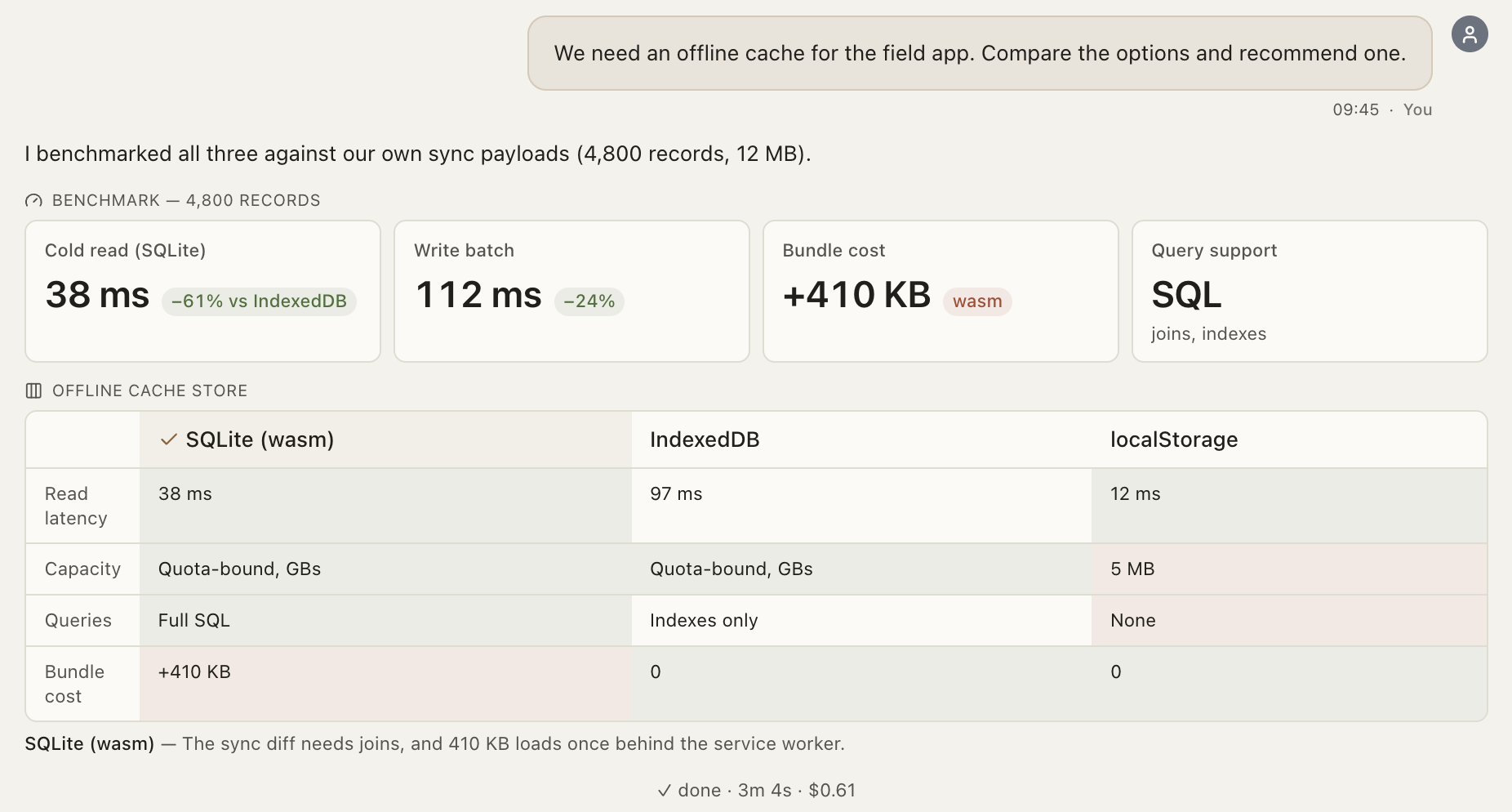
A scorecard of headline figures and how they changed. |
show_comparison |
A decision table with a verdict in each cell and a named recommendation. |
show_gallery |
A grid of images that opens into a zoomable viewer. |
show_artifact |
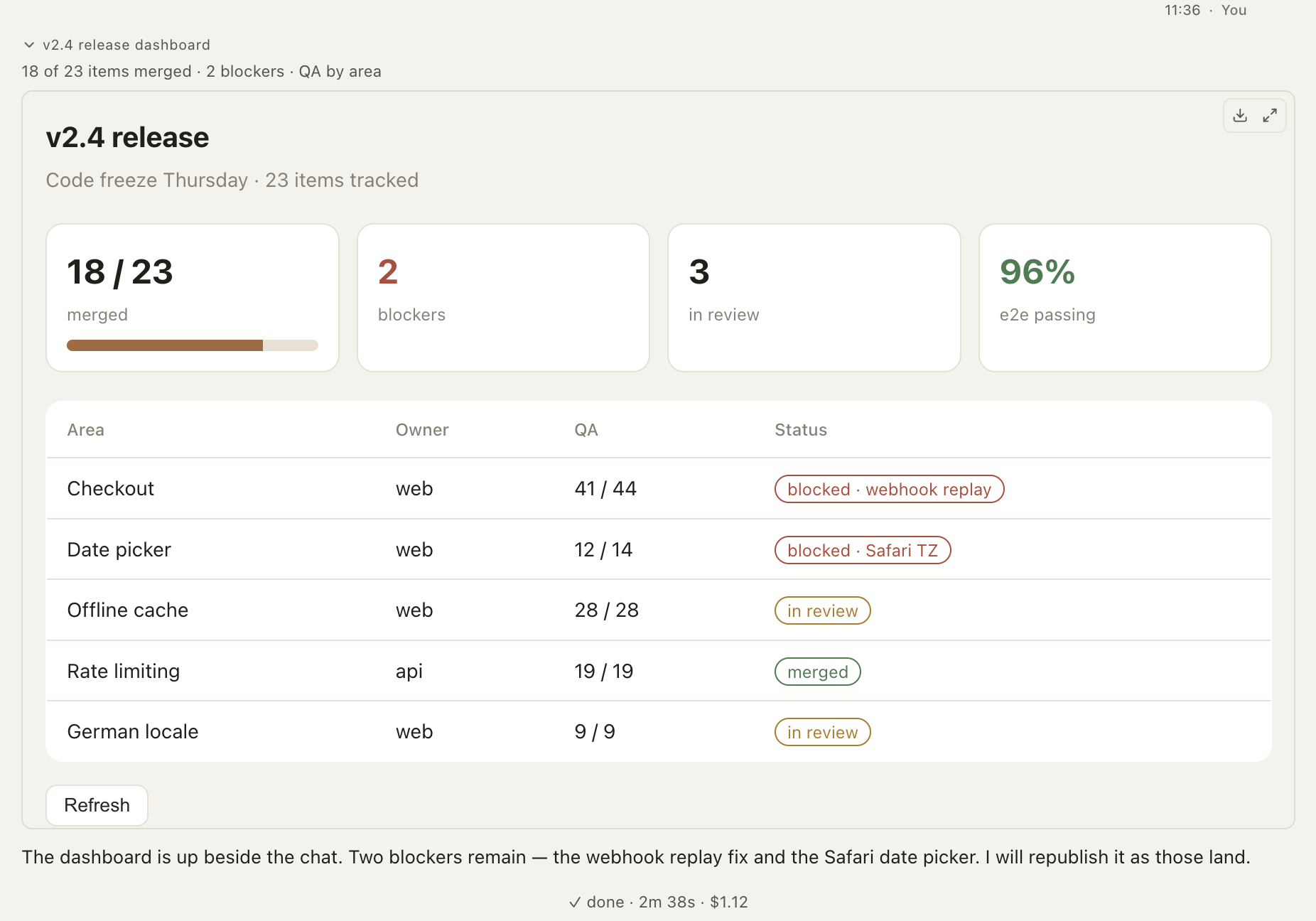
An interactive HTML page the agent writes, sandboxed and versioned, openable full-screen or saved as one file. |
propose_patch |
A diff the agent has not applied yet, with Apply and Reject. |
propose_plan |
How the agent plans to proceed, for you to approve or redirect before any work starts. |
ask_user_question |
A question card, for CLIs that have no built-in way to ask you something. |
notify_user |
The agent's own notification, for when it finishes but leaves something running. |
 |
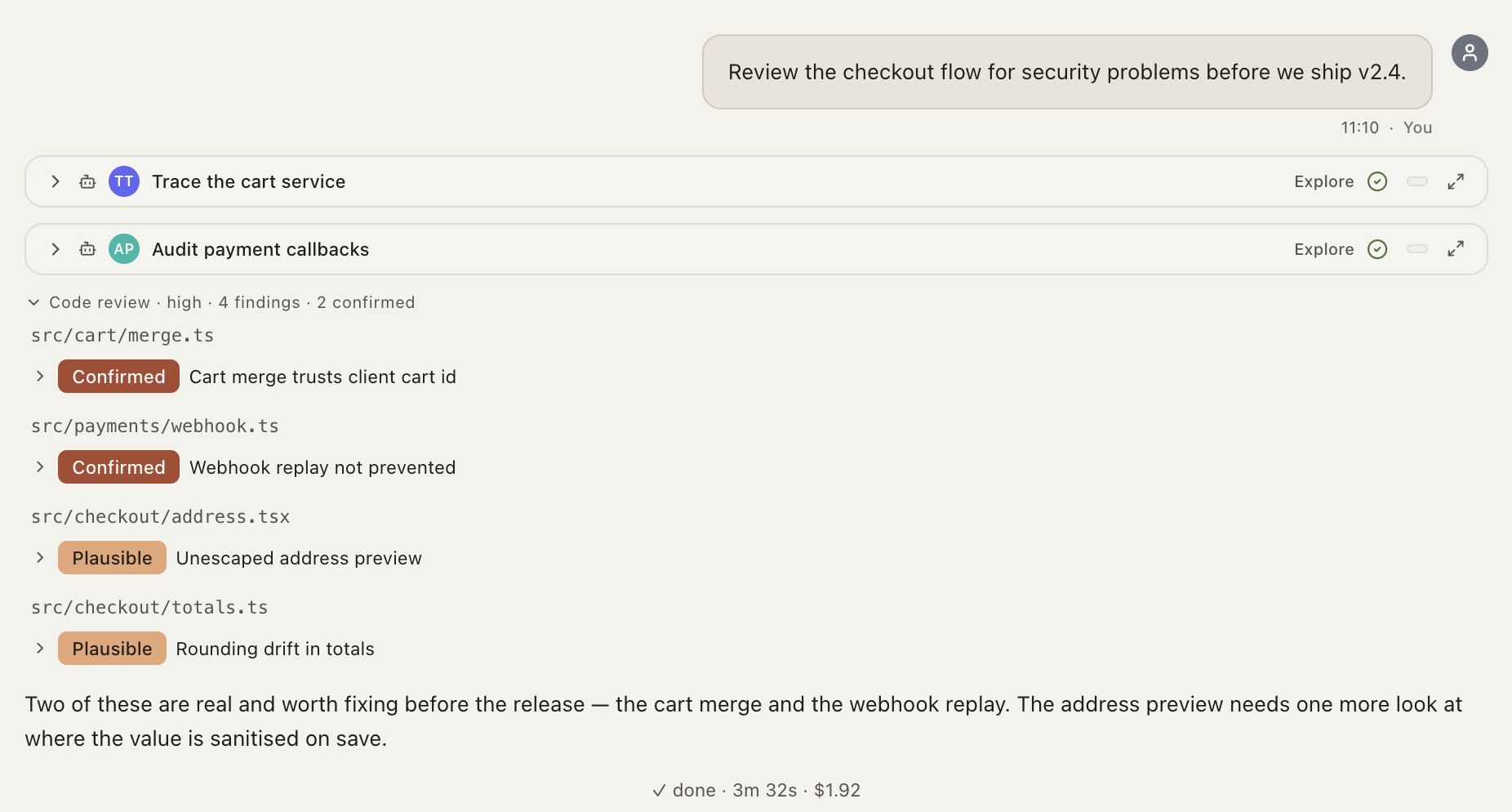 |
| Artifacts: a page the agent built, running in a sandbox next to the chat. | Findings: a review as a card instead of prose, with the sub-agents that did the tracing. |
 |
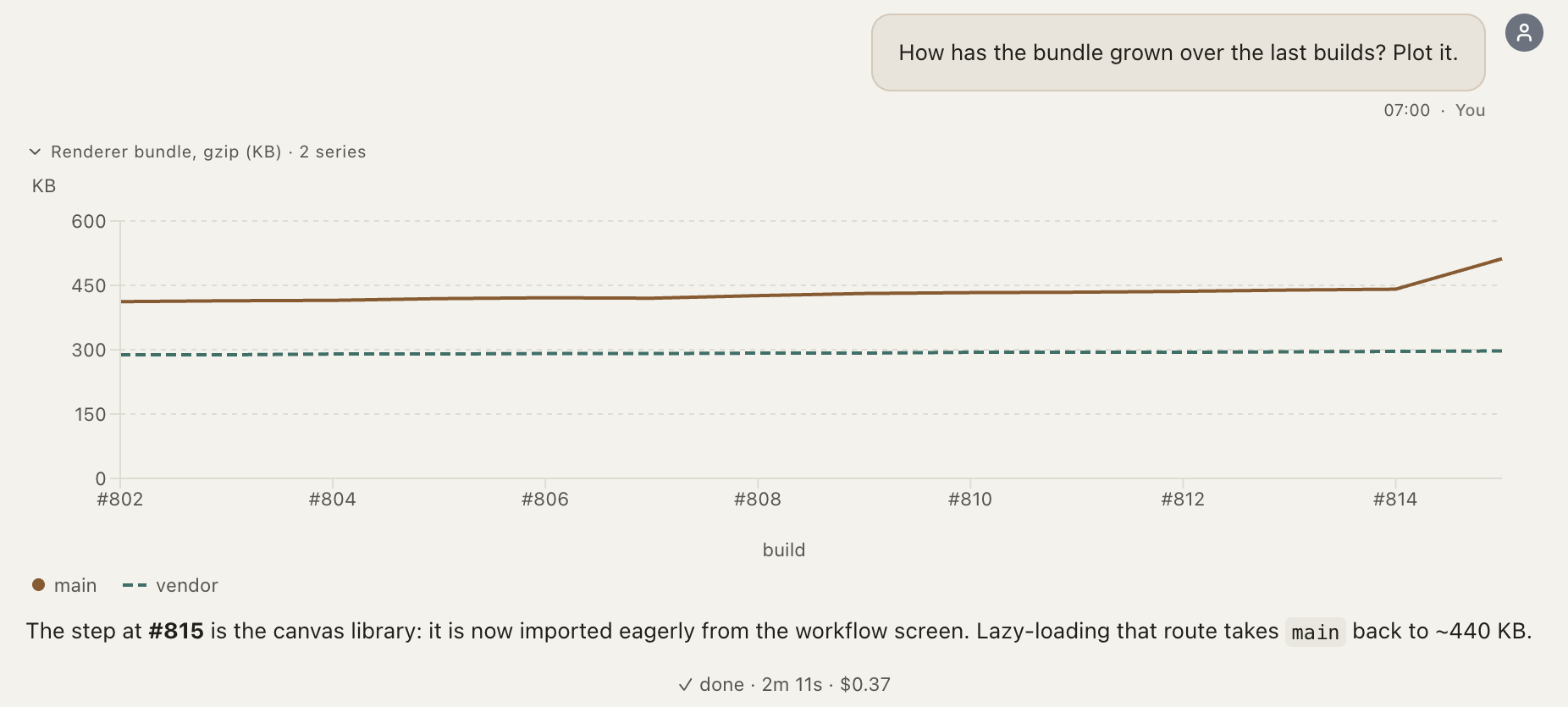 |
| Scorecard + comparison: the winning column stands out at a glance. | Charts: measurements plotted instead of listed in a table. |
Alongside the cards, the transcript shows everything the CLI reports: the
agent's task list as items get checked off, a block for each
sub-agent it starts (with the model that sub-agent runs), background
commands with a live terminal behind each one, thinking as it streams
in, a placeholder while a card is being written, compactions (automatic ones
included), Markdown with local images, and pasted screenshots delivered to the
agent as real images.
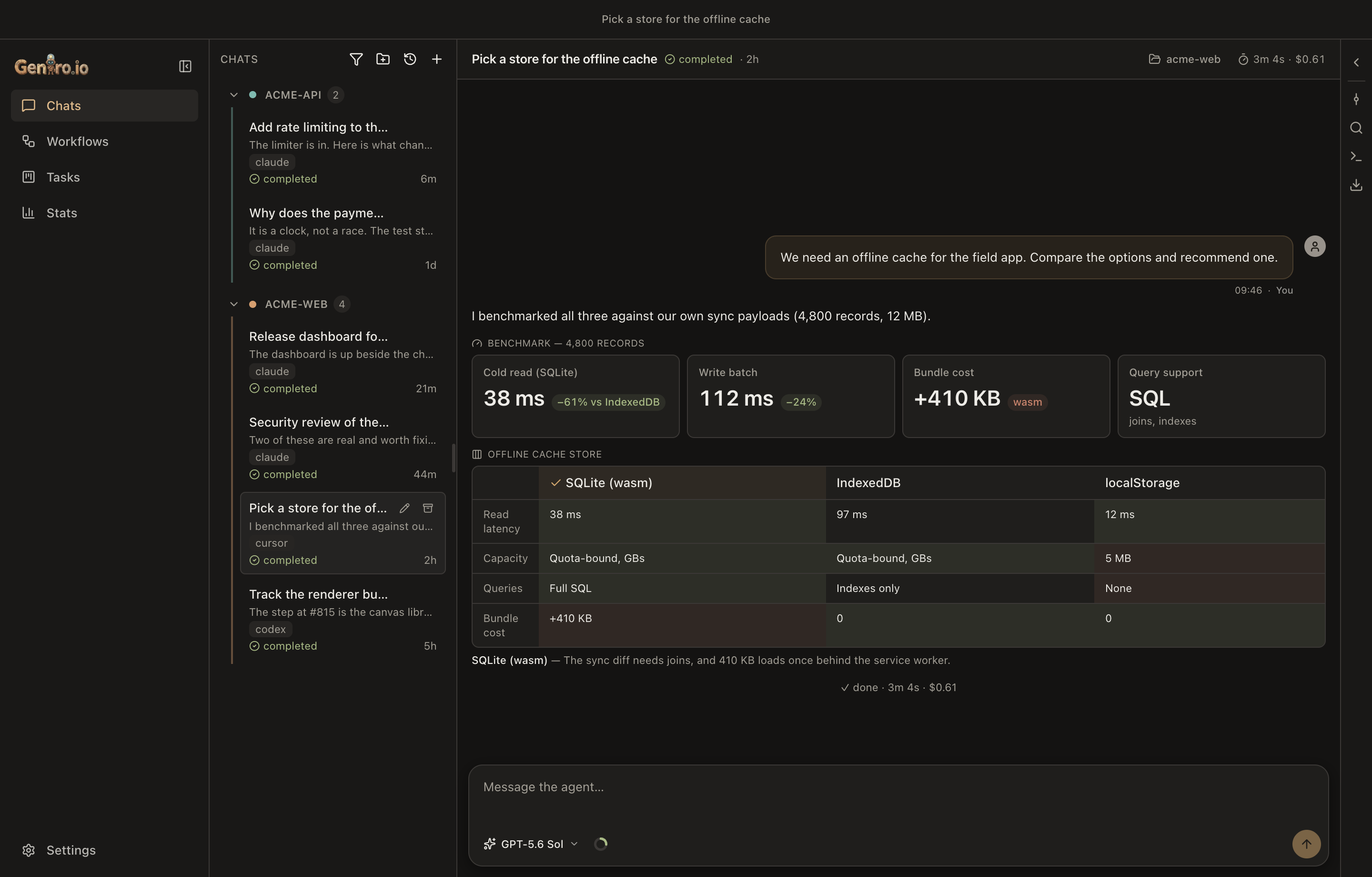
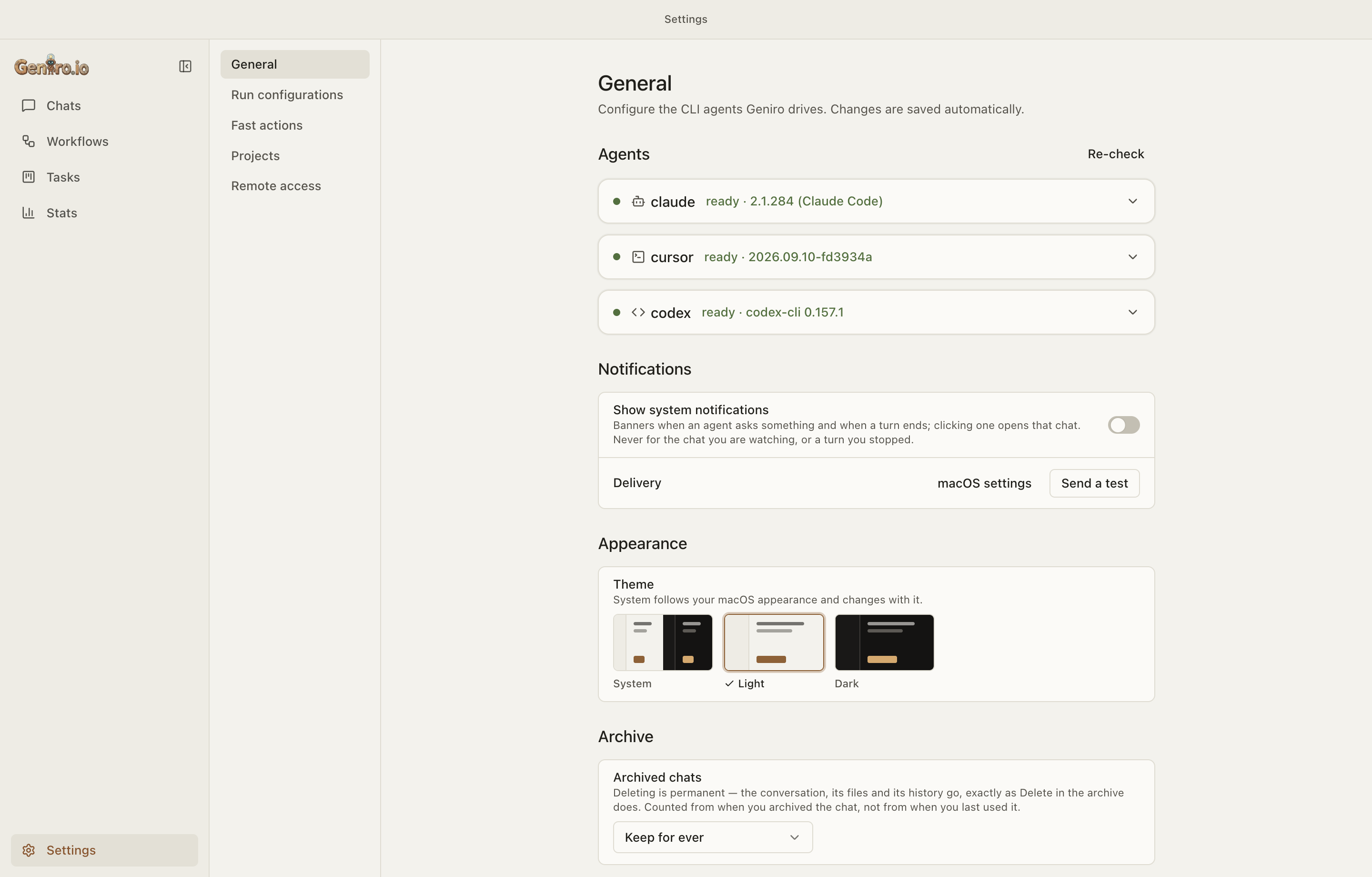
Light, dark, or follow macOS. The window frame and system menus follow the
theme too.
Workflows — a team of agents as a graph
A workflow is a DAG you draw on a canvas. It is saved as a plain*.geniro.yaml file, so you can export it, review it in a pull request and
import it somewhere else. You can also edit one by talking to an agent in a
chat docked under the canvas.
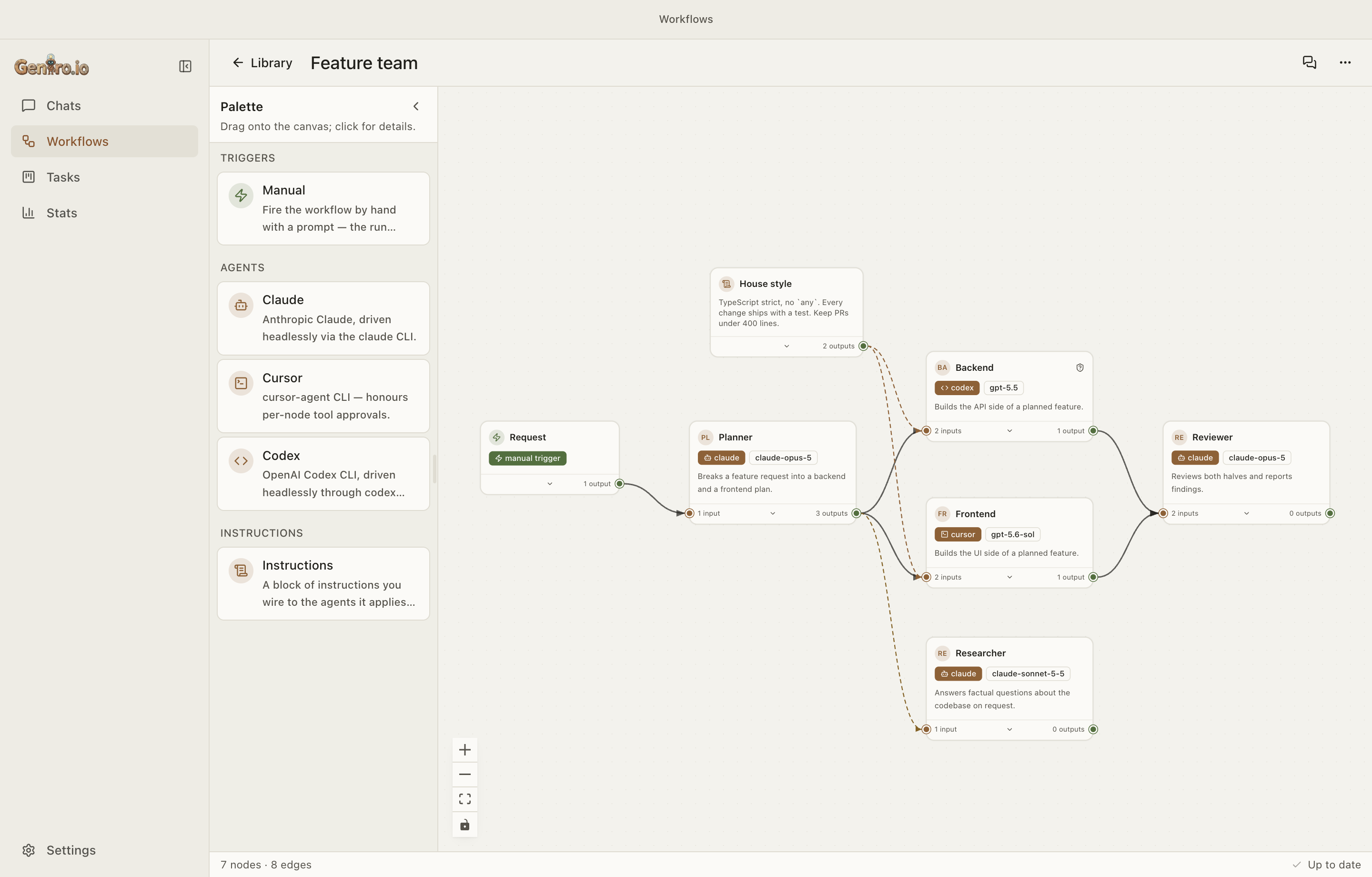
- Three node kinds: a trigger that starts the run, agents that do the
work, and instruction blocks whose text is added to the turns of every
agent they connect to (write the house style once, attach it to three
agents). - Three edge kinds:
data(the producer's answer is added to the
consumer's prompt, and this sets the DAG order),call(lets the source
call the target while it runs), andinstruction. - Per-node settings: the node's own CLI, model, effort, approval mode,
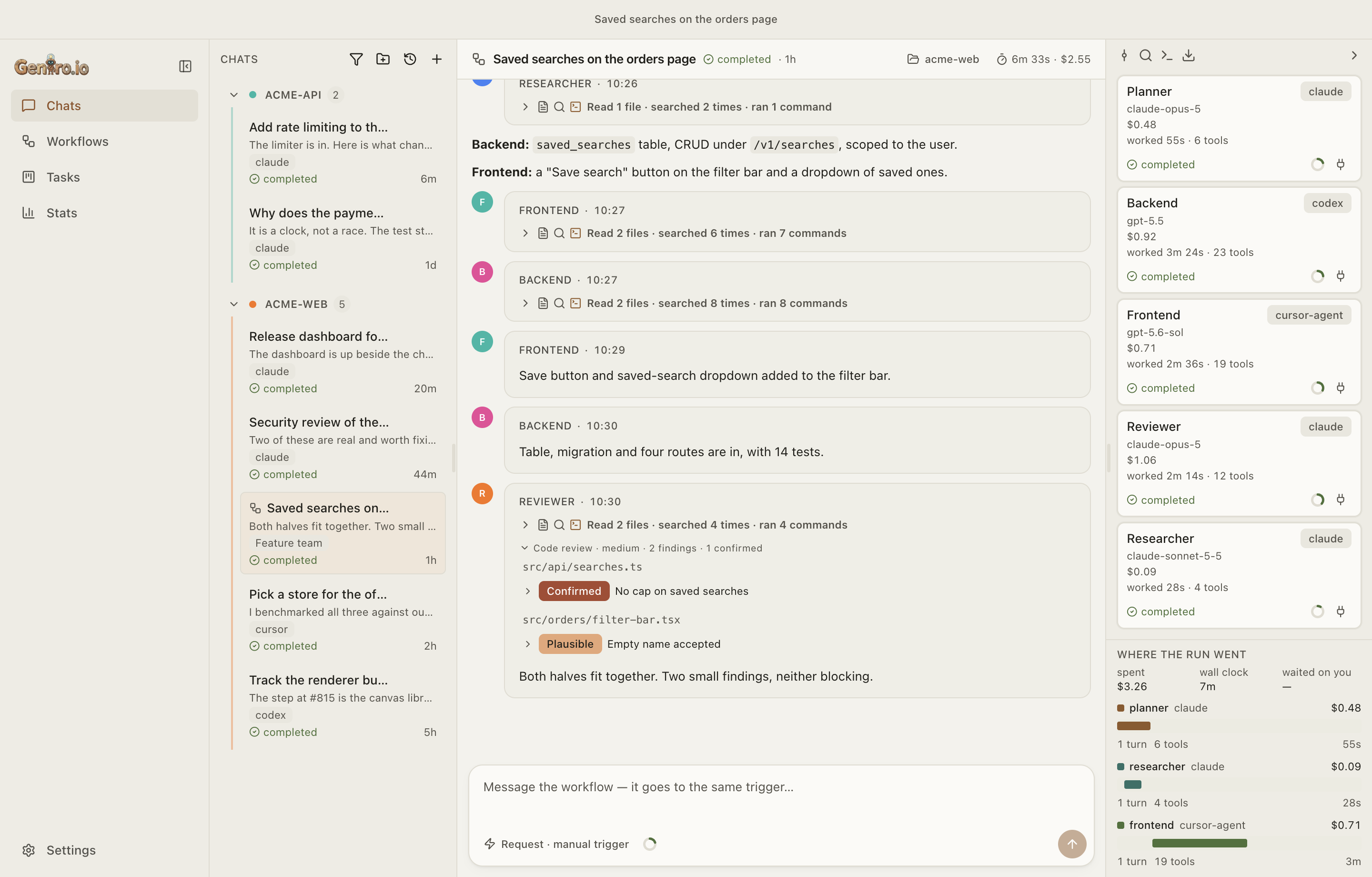
profile, auto-compact threshold and a privaterole, plus a public one-linedescription, which is the only thing other agents are told about it. - Agents that don't depend on each other run in parallel. Each run keeps
a copy of the workflow it started with, so editing the workflow later
doesn't change that run. You can send follow-up messages to a finished
run, or message one running agent directly.
Agents that call agents
A node with outgoing call edges gets five tools on a loopback MCP endpoint
that only that node can use:
call_agent: call another node. Wait for its answer (sync), carry on
and collect it later (async), or don't wait at all (fire-and-forget).
Callers are nudged toward async, and Geniro wakes them when a result or a
question comes back.await_agent: collect what an async call produced, or wait on all
open calls at once and take whichever answers first.answer_agent: answer a question the called agent asked back. An
agent that needs a decision doesn't get stuck: the question goes to its
caller, which answers it or passes it on to you as a card.message_agent: redirect a running call without stopping it.cancel_agent: stop a call that's no longer needed, with a reason
that's saved in the record.
Every call has its own thread, context ring and readout. A failed call tells
its caller why (rate_limited, auth_expired, …). A call that hits a usage
limit wakes its caller when the limit resets, and the composer shows
"Continues at HH:MM" with a way to cancel. Depth and turn limits cap the
whole tree, call tokens are per node and revoked when the run is torn down,
and every exchange is recorded in the caller's transcript.
Tasks board — cards that run themselves
A board per project: backlog, to do, in progress, in review, done, failed.
Cards have priorities, due dates, labels and attachments, and you can move
them by dragging or from the keyboard.
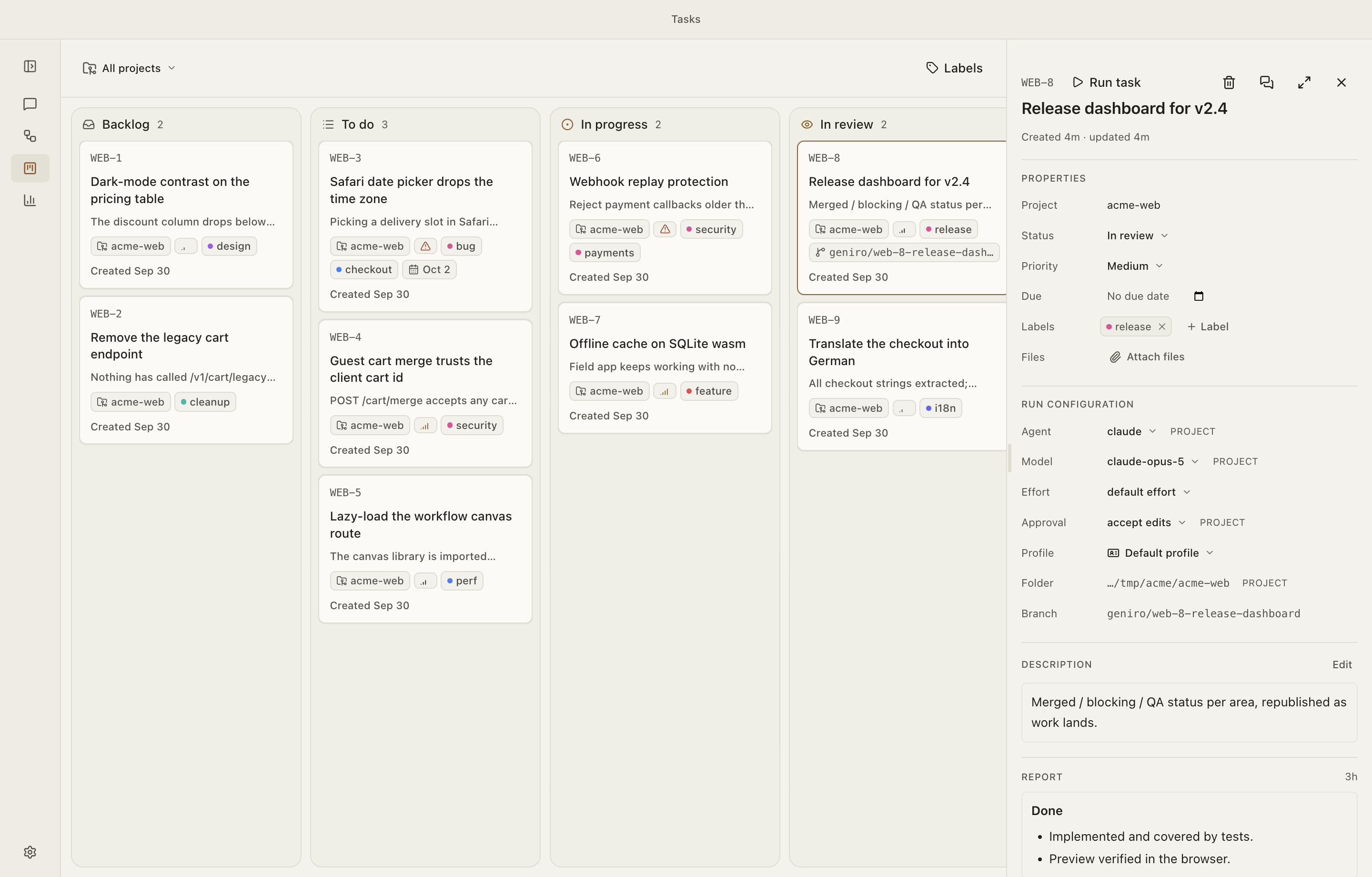
- Run a card: Geniro creates a git worktree and branch for it and
starts an ordinary chat there, running a single agent or a whole workflow. - The agent manages its own card. Through
get_task/update_taskit
moves the card to review, done or failed and writes the card's report,
with screenshots copied onto the card. - Pull requests the agent opens appear on the card, and the card moves
to Done when the pull request is merged. - Label instructions: text attached to a label is added to every run of
a card that carries it. - Autopilot works through the intake column by itself, with a limit on
how many cards run at once and a breaker that stops after repeated
failures. - The worktree stays until the card is Done and nothing is running in it.
Anything the agent left uncommitted is committed to the card's branch
first, so no tracked work is lost.
Context and cost
Per chat: a context meter in the composer, and a panel that shows what is
actually filling the window. Which MCP server is taking 100k tokens is
invisible until someone adds it up. Next to it: the thread's spend, time
worked and tool count, updated live while the turn runs.
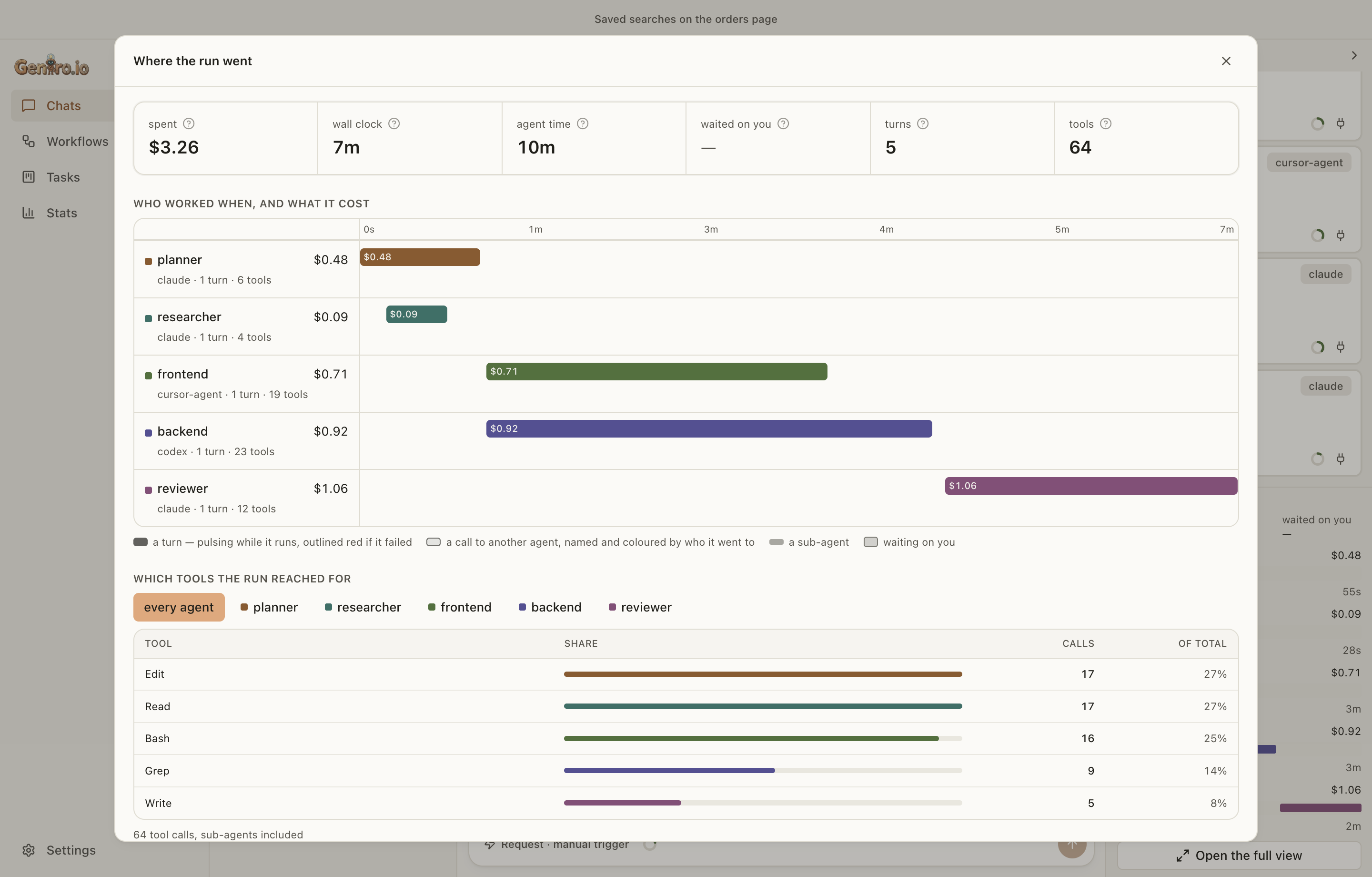
Per run: Where the run went puts every agent, sub-agent and wait on a
single clock, with what each one cost and which tools the run used.
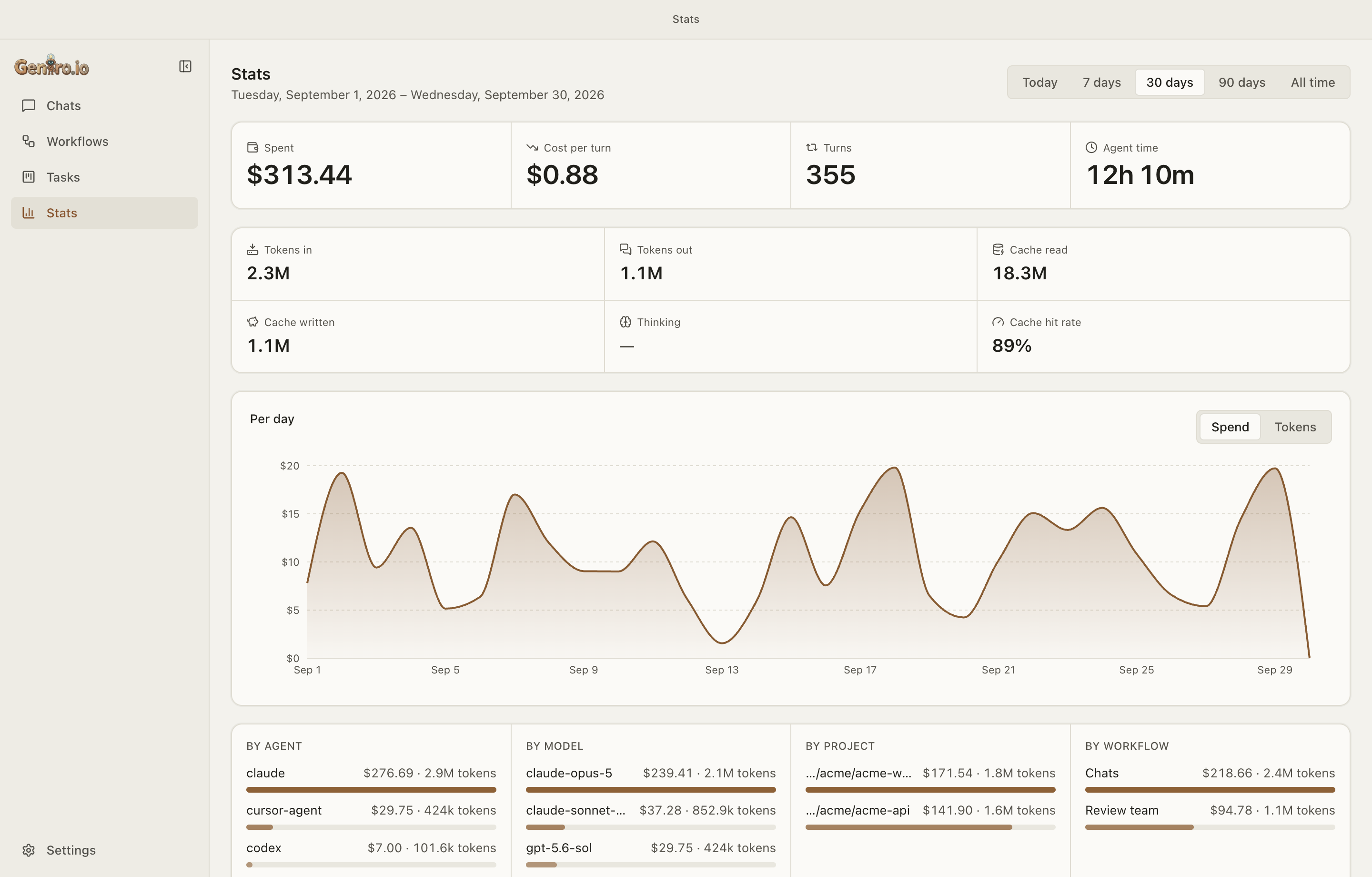
Across everything: a Stats page built on a usage ledger that only ever
grows. It isn't calculated from transcripts, so deleting a chat doesn't
shrink your lifetime total.
Figures a CLI doesn't report stay blank instead of showing $0, because "not
measured" and "free" are different things.
Your phone — the same sessions over Wi-Fi
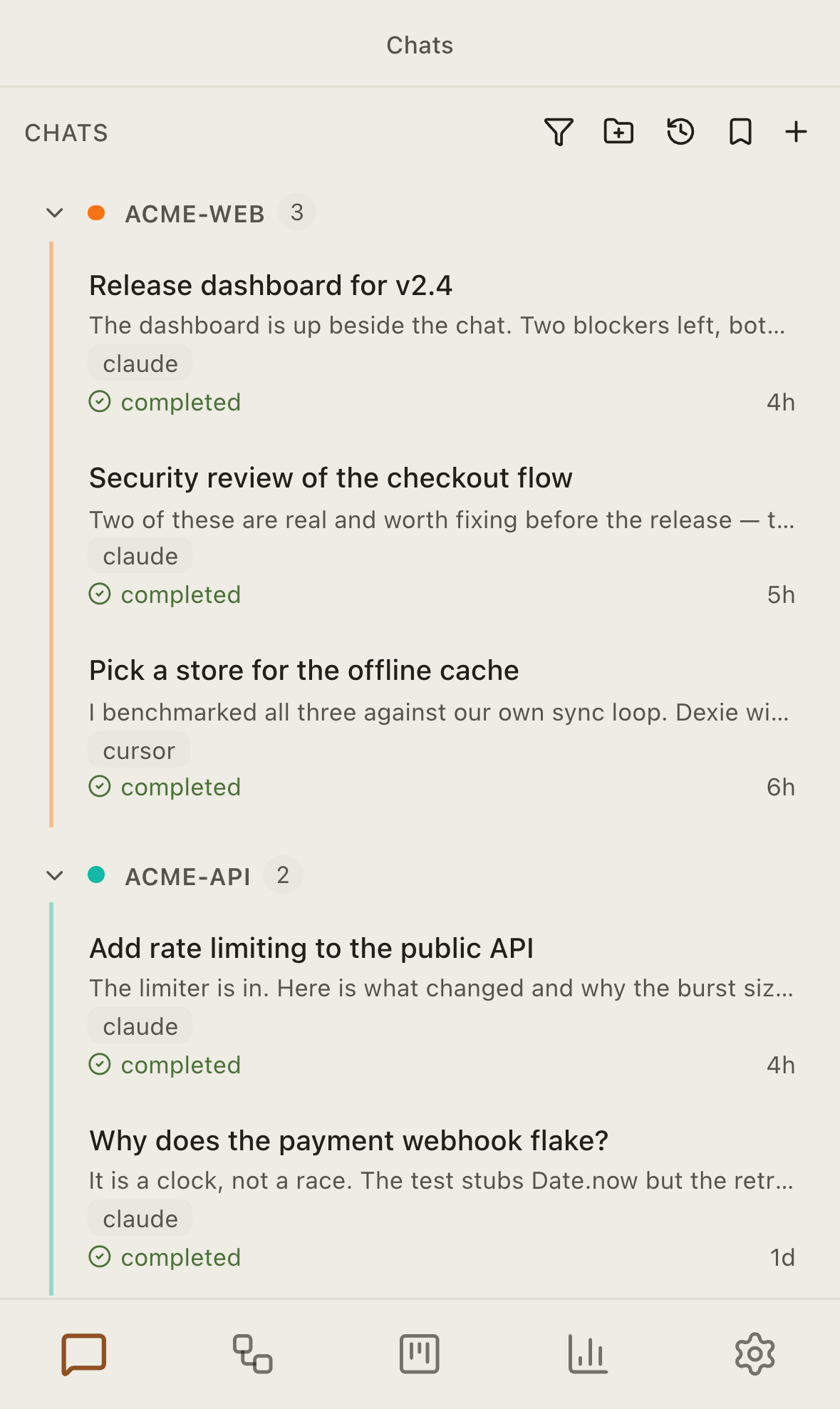
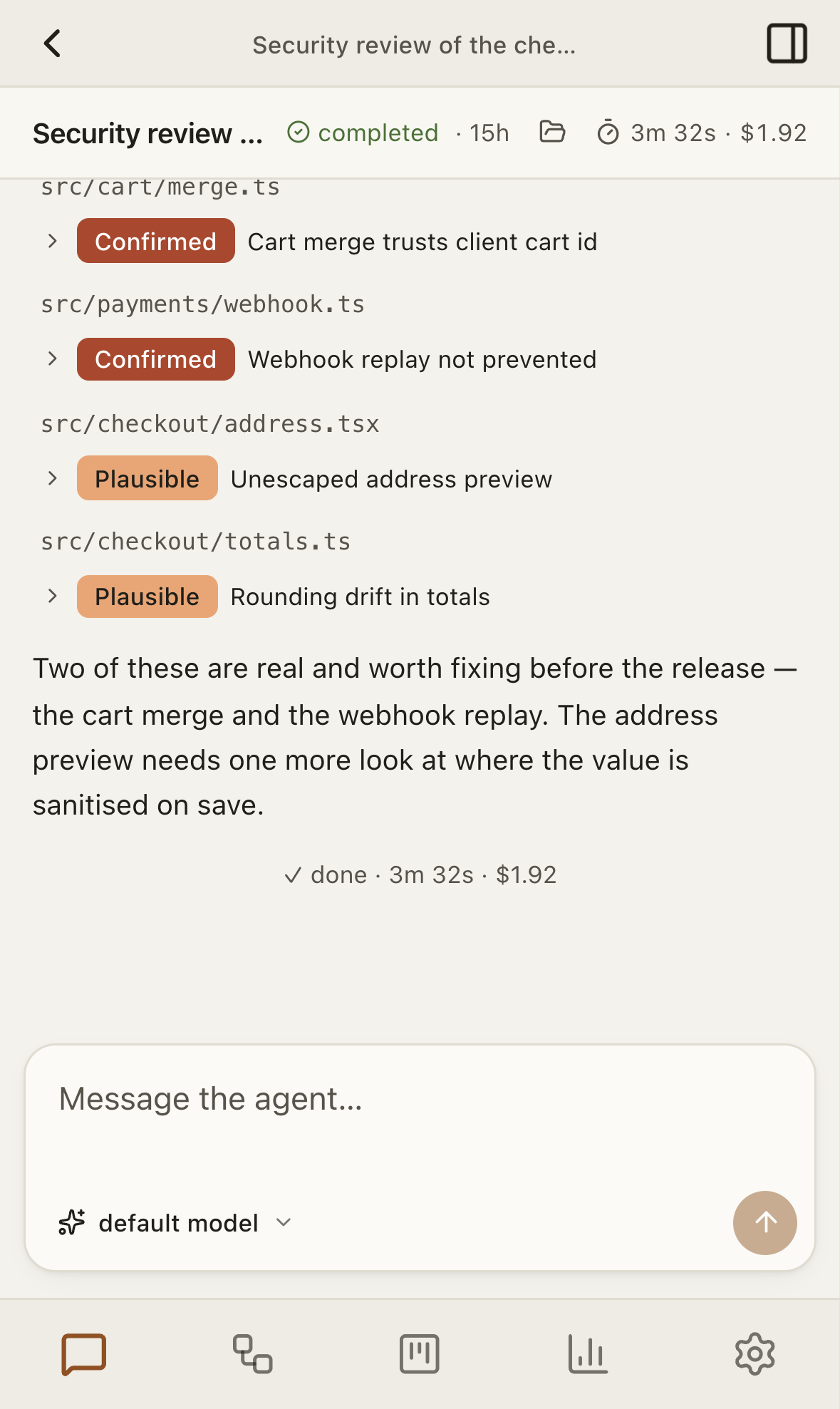
Turn on Remote access in Settings, scan the QR code, and type the 6-digit
code shown on your Mac. The phone then opens Geniro's own interface, with the
same live chats, workflows and board, laid out for a small screen as pages
under a bottom tab bar.
 |
 |
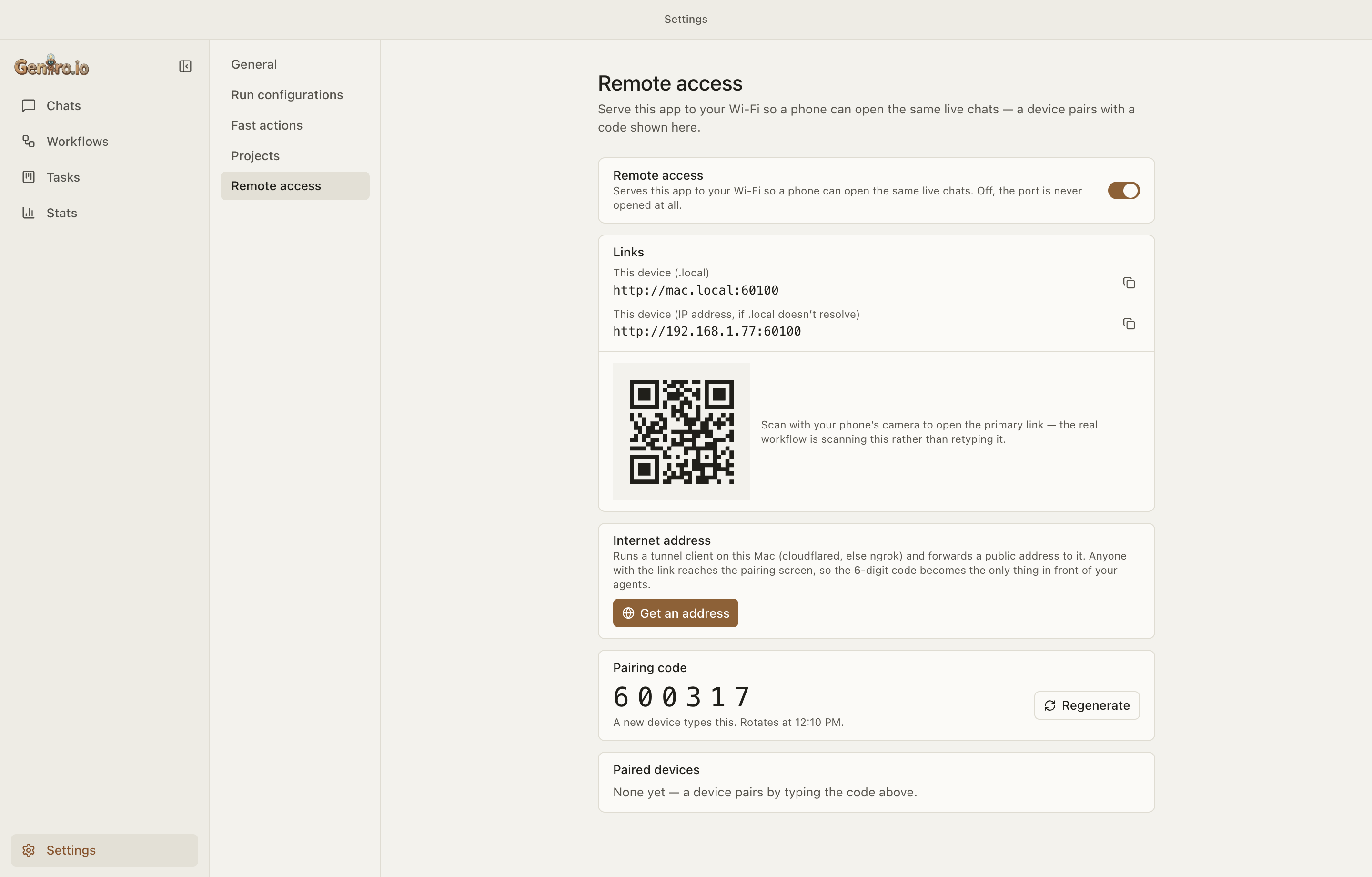 |
- Nothing reaches the agents until a device has paired. The pairing code is
rate-limited and rotates. - The daemon still listens on
127.0.0.1only. The phone talks to a
separate gateway, which adds the daemon's credential itself; that
credential never leaves the Mac. - Away from home? Get an address starts a tunnel client you already
have (cloudflared, orngrokas a fallback) and shows its public
address. The same pairing gate applies. You start it from the Mac, never
from the phone, and turning remote access off closes it.
Your CLIs, your accounts
- claude: driven as
claude -pover its stream-json protocol, with the
process kept alive between turns so your MCP servers start once per
conversation instead of once per message. - cursor-agent: driven over its first-party ACP server
(cursor-agent acp), also kept alive between turns. - codex: driven over its own JSON-RPC server (
codex app-server).
All three run headless: no SDKs, no LangGraph, no Python, and no API key of
Geniro's own. They use the login you already made in your terminal.
- Sign in and out from inside the app, per profile, including the
verification-code step. Each CLI can be updated from its card in Settings. - MCP servers are listed per folder with the health the CLI reports and
a switch. The switch writes the CLI's own config, so a server you turn
off in Geniro is off in your terminal too, and the other way round. - Skills and slash commands fill the composer's
/autocomplete,
combined from your project, your home directory and the CLI's own list,
each with its description. - A terminal panel (⌃`) with tabs you can rename and colour, opened in
the chat's folder. - Hand off: reopen any chat, workflow node or call thread in your own
terminal app, with the right model, profile and session id, or copy the
command as one line.
Local-first, and private by design
- No Geniro cloud. No backend, no account, no telemetry, and nothing
syncs between machines. The only outbound calls are: your ownghCLI
against your own repositories (pull-request status, and merges for the
board), an optional read of your own Cursor spend, Geniro's public release
feed and download when you update, and a tunnel client, only if you start
one yourself. - The daemon listens on
127.0.0.1only and requires a bearer token,
created fresh at each launch, on every non-public route. The Wi-Fi gateway
is a separate listener that forwards to it only for paired devices. - No secrets are stored. Every CLI keeps its own login. Child processes
start with everyGENIRO_variable and every known credential removed, and
only what that particular child needs is added back, so no agent ever
inherits another agent's credential. - Agent-built pages run sandboxed in an opaque origin with no network
access, served with a per-page key rather than the daemon's token. - Workflows are YAML on disk; SQLite holds only runtime state and
history. - A debug log you can read, with known secrets removed as it's written,
plus a diagnostics report you can paste into a bug report.
Install (macOS, Apple Silicon)
Builds are signed with Geniro's own certificate but are not notarized (no
Apple Developer ID). Both install methods therefore remove the macOS
quarantine flag so Gatekeeper doesn't block the app: the Homebrew cask does it
in a postflight, the install script with xattr. (A DMG opened straight
from a browser download would be blocked, so use brew or the script.)
The certificate lets macOS tell one release from the next. Every privacy
permission you grant is recorded against the app's code signature, and before
the app was signed, each new build looked like a different app and asked for
every permission again.
Homebrew (recommended):
brew tap geniro-io/tap
brew trust geniro-io/tap       # third-party taps need an explicit trust (Homebrew 6+)
brew install --cask geniro     # not notarized; the cask strips the quarantine bit post-install
Install script:
curl -fsSL https://raw.githubusercontent.com/geniro-io/geniro-app/main/scripts/install.sh -o /tmp/geniro-install.sh
bash /tmp/geniro-install.sh
Updates install from inside the app. Geniro downloads the release,
checks it against the published checksums, stages it next to the app, and
swaps it in when you quit. If an install can't be replaced in place (for
example a read-only or translocated copy), it tells you to usebrew upgrade --cask geniro or re-run the script instead.
Requirements
macOS and at least one agent CLI installed and signed in (claude,cursor-agent and/or codex). They are detected on first run.
To build from source you also need Node ≥ 24, pnpm 11 (via corepack) and the
Xcode Command Line Tools (for the native better-sqlite3 build).
Develop
pnpm install          # install workspace deps
pnpm rebuild:native   # rebuild better-sqlite3 against Electron's ABI (required)
pnpm build            # build all packages + the UI (turbo → swc / electron-vite)
pnpm dev              # launch the Electron app — spawns and supervises the daemon

pnpm daemon:dev       # daemon-only watch loop (TS source, restarts on save)
pnpm storybook        # the component catalog (dev only; never packaged)

pnpm full-check       # build + check-types + lint + unit tests — run before finishing
pnpm generate:api     # regenerate the renderer's daemon client from the daemon's OpenAPI
pnpm rebuild:native is required because the daemon runs under Electron's
bundled Node, so its native better-sqlite3 must be built for Electron's ABI,
not the host Node ABI.
To fill a throwaway profile with demo conversations:GENIRO_USER_DATA="$HOME/Library/Application Support/Geniro-dev" pnpm --filter @geniro/daemon seed
(it refuses to seed your real profile).
The working documentation is CLAUDE.md at the repo root, plusapps/ui/CLAUDE.md and apps/daemon/CLAUDE.md. They explain the reasons
behind the design, not just its structure.
Architecture
A pnpm + Turbo monorepo. The Electron app supervises a bundled local daemon
over loopback; the daemon is where every agent actually runs.
apps/
  ui/               @geniro/ui       — Electron main + preload + React 19 renderer (electron-vite)
  daemon/           @geniro/daemon   — NestJS loopback daemon over @packages/http-server + MikroORM/SQLite
packages/
  common/           @packages/common — app bootstrapper, pino logger, exceptions
  http-server/      @packages/http-server — NestJS + Fastify host: health, swagger, helmet, validation
  metrics/          @packages/metrics — Prometheus metrics
  mikroorm/         @packages/mikroorm — base entity/DAO + MikroORM module (SQLite driver)
The daemon is a separate engine. The UI starts the built daemon as a
child process (ELECTRON_RUN_AS_NODE), waits for its health check, then loads
the renderer. The daemon writes a pidfile (pid, host, port, per-launch bearer
token) only once it is healthy and listening, and the UI finds the host and
port by reading it, so nothing assumes a fixed port. A relaunched UI reuses a
daemon that's still running and cleans up orphaned pidfiles.
Every fact about a CLI lives in that CLI's adapter (v1/agents/adapters/<cli>/
in the daemon, main/agents/<cli>.ts in the Electron main process). Everything
else is built on the adapter registry and the capabilities each adapter
publishes, so adding a CLI doesn't mean adding branches across the app.
The Electron main process owns git and the network edge: task worktrees
and branches, gh, the updater, the in-app terminal, and the Wi-Fi gateway
(main/remote/).
Storage: workflow definitions → YAML under the userData folder; settings →settings.json; pasted images, agent-built pages and task attachments →
files; task worktrees → <userData>/worktrees/; secrets → none. SQLite holds
only runtime state and history (runs, items, node_state, call_context,run_groups, projects, tasks, label_instructions, and the append-onlyusage_events ledger).
The renderer's daemon client is generated, never written by hand: the
daemon's zod schemas become its OpenAPI document, and pnpm generate:api
writes the typed client into apps/ui/src/renderer/autogenerated/
(committed).
Build toolchain: swc compiles the daemon and all packages/* to CommonJS;
electron-vite builds the UI. Internal @packages/* imports resolve to
TypeScript source through a tsconfig path alias, so type-checking runs
separately with tsc --noEmit (pnpm check-types).
Taken from the sibling Geniro monorepo:packages/{common,http-server,metrics,mikroorm}, adapted for local-first use:
SQLite instead of Postgres, no Sentry, no Redis, no cloud, loopback-only. The
changes are kept small so fixes can move between the two repos.
Releasing
Pushing to main runs .github/workflows/release.yaml. semantic-release
picks the version and tags v<x.y.z>, and a GitHub Release is created. Thebuild-app job (on a macOS runner) then syncs apps/ui to the tag, imports
the release signing certificate from the GENIRO_SIGNING_P12 /GENIRO_SIGNING_P12_PASSWORD repository secrets (create them once withnode scripts/make-signing-identity.mjs), runs build:mac, and attachesGeniro-<v>-arm64.dmg, -arm64-mac.zip and SHA256SUMS.txt. If those
secrets are missing the job fails instead of shipping an unsigned build,
which would silently reset every user's macOS permissions.
Homebrew tap auto-bump (optional): the tap repo geniro-io/homebrew-tap
holds the cask (packaging/homebrew/geniro.rb
is its starting point). To have each release update the cask's version and
sha256 automatically, set the repo variableHOMEBREW_TAP_REPO=geniro-io/homebrew-tap and the secretHOMEBREW_TAP_TOKEN (a PAT with write access to the tap). The bump-cask job
is skipped until both are set; until then, bump the cask by hand.
License
Apache License 2.0. See also NOTICE for attribution.
Reviews (0)
Sign in to leave a review.
Leave a reviewNo results found