gensee-crate
Health Pass
- License — License: Apache-2.0
- Description — Repository has a description
- Active repo — Last push 0 days ago
- Community trust — 65 GitHub stars
Code Pass
- Code scan — Scanned 12 files during light audit, no dangerous patterns found
Permissions Pass
- Permissions — No dangerous permissions requested
No AI report is available for this listing yet.
Runtime safety for AI coding agents with real-time enforcement, system-event monitoring, and long-horizon provenance. Supports Claude Code and Codex on native macOS.
 Gensee Crate
Full-stack, long-horizon runtime safety for AI coding agents.
Gensee Crate watches system events, user requests, agent tool calls, skills and memory behind unmodified coding agents such as Claude Code, Codex, and Omnigent. It follows long-horizon agent behavior across requests and sessions and runs as a low-latency sidecar beside the agents on native hosts like macOS. Real-time enforcement happens within chat interface of the coding agents, while offline event tracking, lineage, and provenance can be viewed in a web dashboard and command line.




gensee.ai · Docs · Join Discord
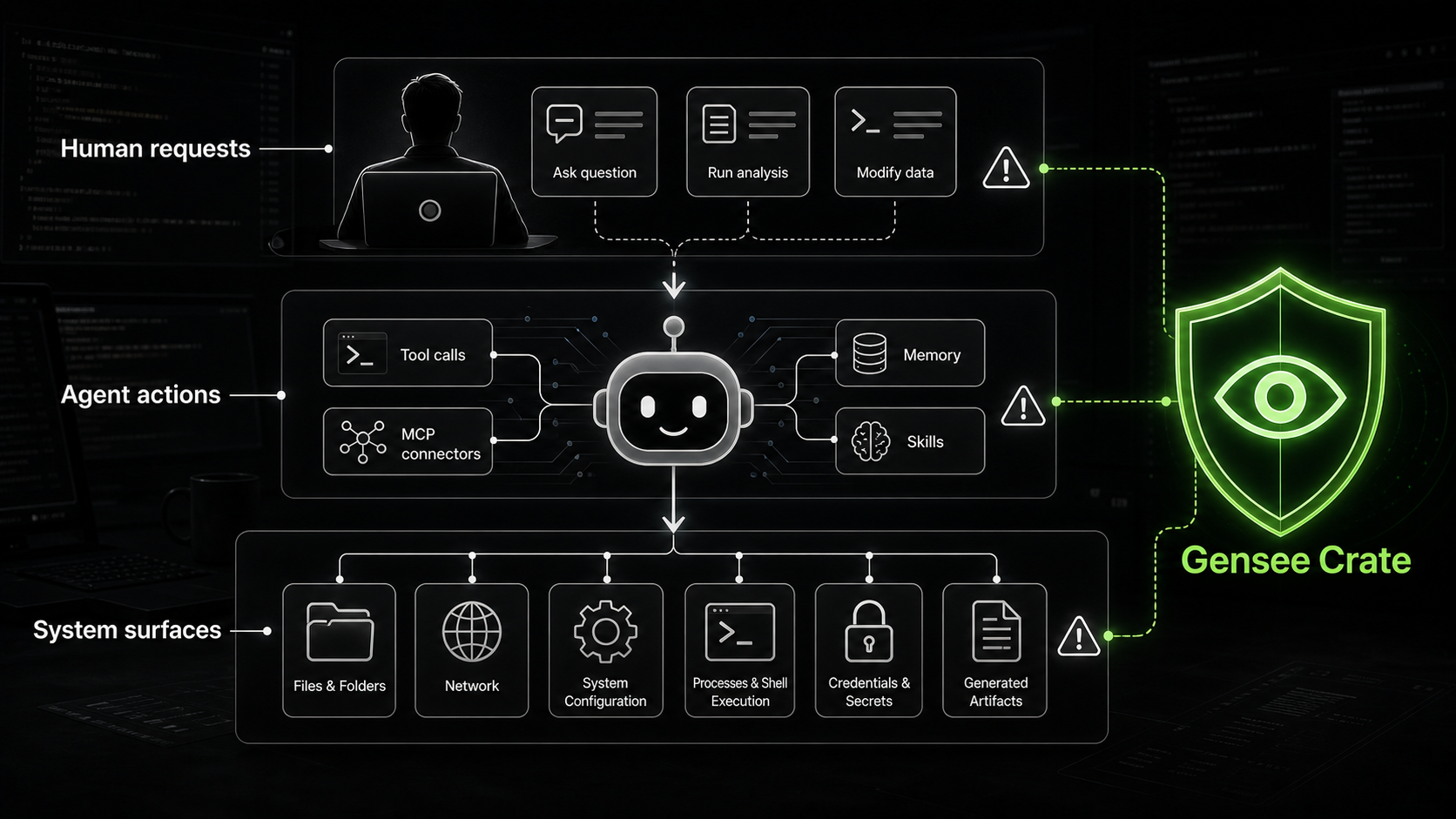
Need company-enforced rules, credential and identity controls, and oversight across a distributed fleet of developer endpoints? Contact GenseeAI.
Why Gensee Crate?
Gensee Crate helps you:
- Watch what your agent actually does. Capture files read and written,
commands run, network targets reached, hook intent, alerts, and timeline
context in one local store. - Enforce policy before risky tools run. Enforces a deterministic, configurable policy that can allow, ask, or
deny secret reads, destructive ops, out-of-workspace writes, cloud-metadata
access, control-plane writes, dangerous executable content, and more. - Trace provenance across sessions. Lineage graphs link prompts,
tool calls, filesystem effects, artifacts, alerts, and review verdicts so long-horizon safety issues such as memory poisoning and data exfiltration can be prevented in time and examined afterward. - Seamless integration with your current workflow. Run
gensee watchbeside an
agent or launch an agent in a sandbox withgensee runwith additional safety.
Manage policy withgensee policyand inspect activity in the local dashboard.
Preliminary Benchmark Results
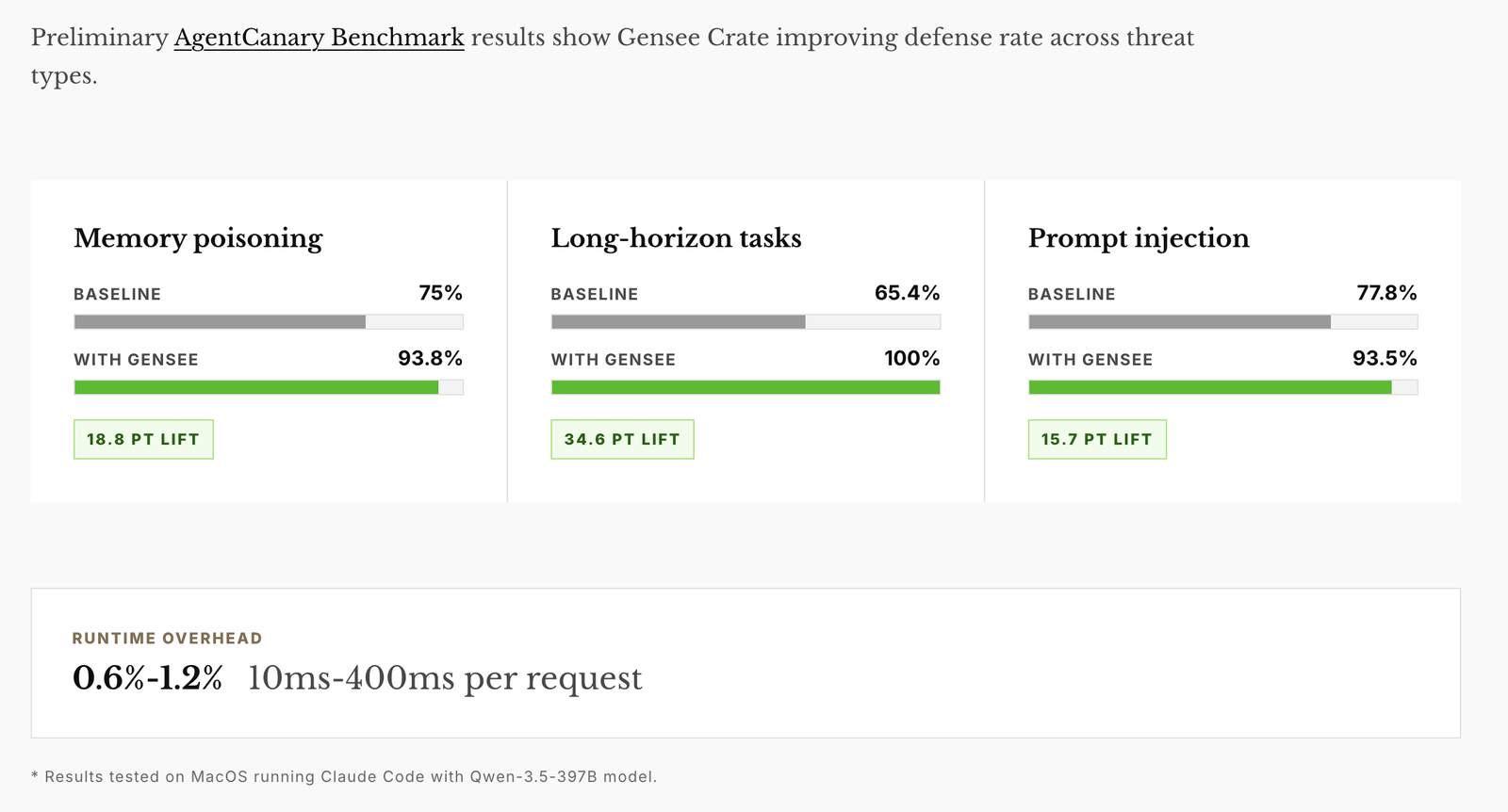
Preliminary AgentCanary benchmark results show Gensee Crate improving defense
rate across memory poisoning, long-horizon, and prompt-injection threat types
with low runtime overhead.
Quick start
1. Install
One command installs Gensee Crate and checks or installs its command-line
prerequisites on macOS. At the end, the installer can configure supported agent
hooks for active safety policy enforcement, lets you choose GENSEE_HOME, and
lets you keep the bundled default policy or create an editable local policy:
curl -fsSL https://raw.githubusercontent.com/GenseeAI/gensee-crate/main/scripts/install_oss.sh | bash
For non-interactive installs that should configure Claude Code and Codex hooks:
curl -fsSL https://raw.githubusercontent.com/GenseeAI/gensee-crate/main/scripts/install_oss.sh | GENSEE_CONFIGURE_CLAUDE=1 GENSEE_CONFIGURE_CODEX=1 bash
Build the CLI from source:
git clone https://github.com/GenseeAI/gensee-crate.git
cd gensee-crate
cargo build -p gensee-crate-cli
The binary is now at target/debug/gensee. For convenience, either add that
directory to your PATH, or install gensee globally:
cargo install --path crate/gensee-crate-cli # puts `gensee` on PATH
Gensee stores its local state under ~/.gensee by default. Set GENSEE_HOME to
override it, and use the same GENSEE_HOME for watch, hooks, andtimeline so the signals appear together:
export GENSEE_HOME="$HOME/.gensee"
The local store can include redacted prompts, commands, paths, policy alerts,
and lineage data. Fresh telemetry stores are encrypted at rest by default with a
local key in $GENSEE_HOME/gensee.key. Keep that key private and do not share
it with store snapshots; sharing the key and store together gives readers access
to the telemetry. Existing plaintext development stores remain readable rather
than breaking hooks; move or remove the old GENSEE_HOME to start a fresh
encrypted store. Set GENSEE_STORE_ENCRYPTION=0 only for local debugging
stores.
- macOS. v0.1 supports macOS only; Linux and Windows support are planned.
- Claude Code or Codex for hook-based enforcement. Other agents are planned.
- Rust toolchain (
cargo) andjq.
Install the required command-line tools on macOS:
xcode-select --install

curl --proto '=https' --tlsv1.2 -sSf https://sh.rustup.rs | sh -s -- -y
source "$HOME/.cargo/env"

brew install jq
To capture prompt/tool intent and enforce the safety policy,
configure your agent's hooks to call the matching gensee hook endpoint. The
installer offers to do this for you. To run the setup step later for Claude
Code:
gensee setup claude-code --gensee-home "$GENSEE_HOME"
Or for Codex:
gensee setup codex --gensee-home "$GENSEE_HOME"
If you are running from a source checkout instead of an installed binary:
./target/debug/gensee setup claude-code --gensee-home "$GENSEE_HOME"
./target/debug/gensee setup codex --gensee-home "$GENSEE_HOME"
The setup commands back up the previous hook settings, update~/.claude/settings.json or ~/.codex/hooks.json, and use the absolute path to
the gensee binary you invoked. Fully restart Claude Code after configuring
Claude Code hooks. Open /hooks in Codex to review and trust the hook command
before testing enforcement. Full manual config and what gets recorded (plus
redaction details) are in docs/claude-code-hooks.md
and docs/codex-support.md.
Rerun the installer to update gensee in place:
curl -fsSL https://raw.githubusercontent.com/GenseeAI/gensee-crate/main/scripts/install_oss.sh | bash
If you installed from a source checkout, pull the latest changes and reinstall:
git pull --ff-only
cargo install --path crate/gensee-crate-cli --force
2. Run
Gensee has three protection levels you can combine:
Hooks only: Agent requests and tool calling are checked and protected by the safety
policy rules. Require agent hook installation (part of Step 1 above). No running commands needed.gensee watch: performs system-level event watching such as file system operations, macOS EndpointSecurityLogger events, etc. On macOS,--system-events esloggerneeds Full Disk Access for the host app andsudoso it can create an EndpointSecurity client.
gensee watch # optional flags: --workspace --watch-root --duration-seconds --system-events
If you use --system-events eslogger on macOS, open Apple menu > System Settings > Privacy & Security > Full Disk Access, click +, add the app hosting gensee (for example Terminal, iTerm, or Visual Studio Code), then quit and reopen that app. Run the command with sudo as well.
gensee run: adds managed macOS sandbox confinement and staged, reviewable workspace writes around the launched agent.
gensee run -- claude # or: gensee run -- codex
For orchestration frameworks such as Omnigent, use the same primitives as a
thin outer safety layer:
gensee watch --workspace . --watch-root ~/.omnigent
gensee run --workspace-mode staged -- omnigent run path/to/agent.yaml
Inspect what happened at any time:
gensee run list   # list guarded run sessions and staged workspaces
gensee timeline   # show prompts, tool intent, file effects, and policy decisions
See docs/watch.md anddocs/run-and-sandbox.md for the full options.
3. Open the dashboard
The local dashboard reads the same GENSEE_HOME store as watch, hooks, andtimeline. It shows live agent activity, policy decisions, alerts, file and
request lineage, and the active policy document; users can record review
verdicts and edit validated policy settings from the browser.
Launch it from the repository checkout against your active store:
cd /path/to/agent-shield
GENSEE_HOME="$PWD/.gensee-dev" npm --prefix "$PWD/dashboards/web" run dev
# open http://localhost:5173
If you launch it from another directory, use absolute paths and the sameGENSEE_HOME that your hooks or gensee watch use:
REPO=/path/to/agent-shield
GENSEE_HOME="$REPO/.gensee-dev" npm --prefix "$REPO/dashboards/web" run dev
See dashboards/web/README.md for requirements,
demo data, and policy editing notes.
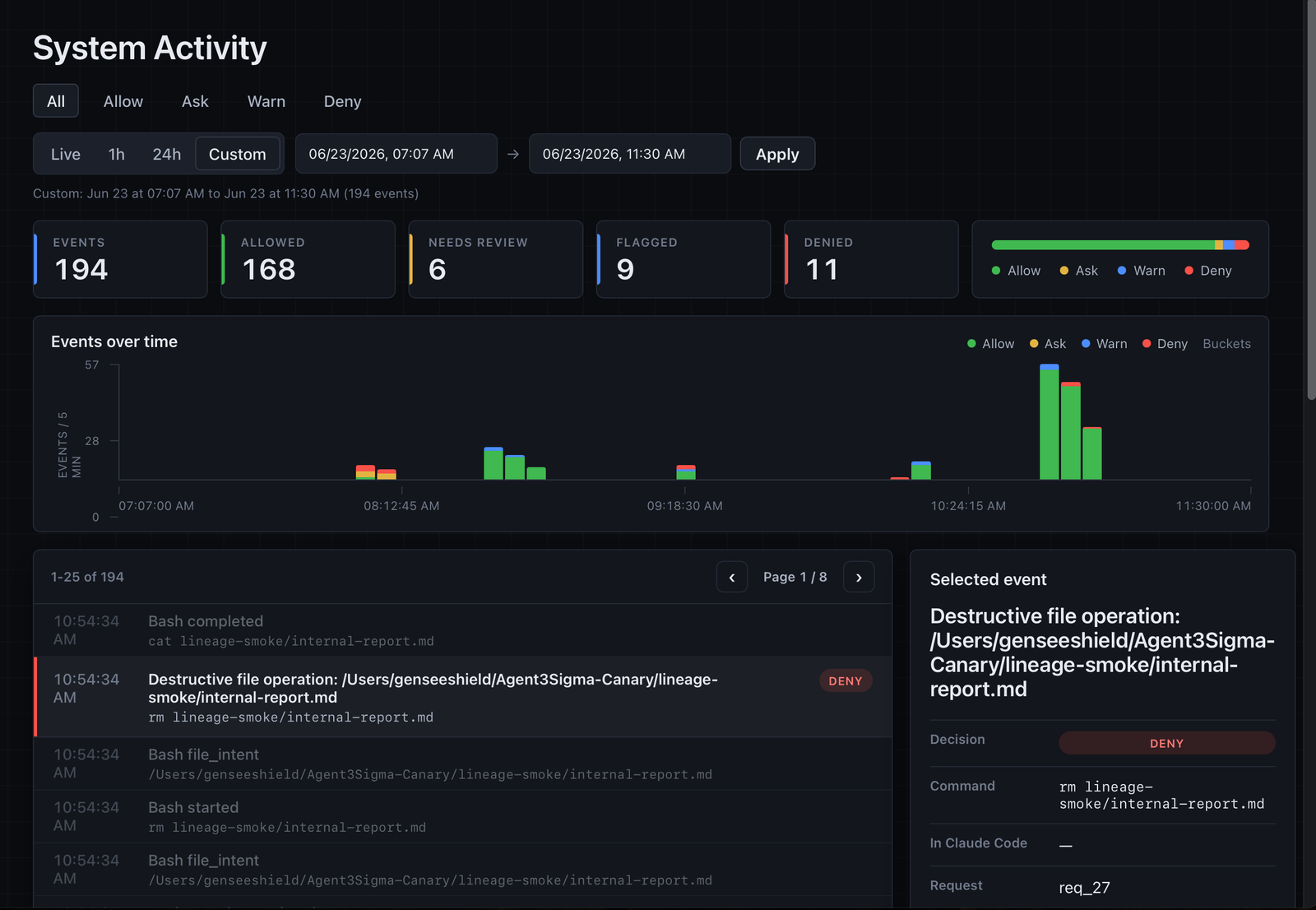
The activity view brings policy decisions, timeline filtering, event details,
and command/tool context into one local browser surface.
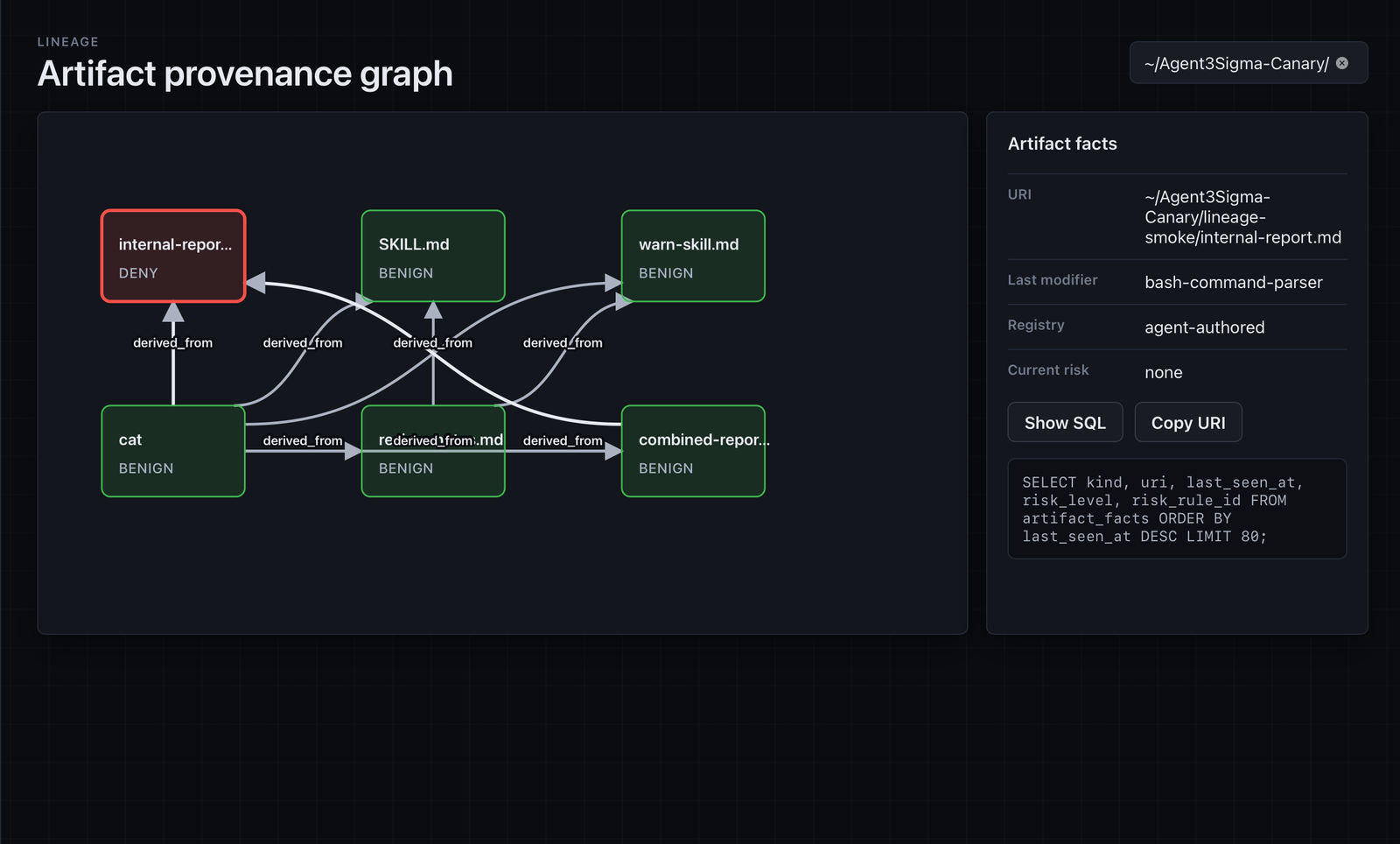
The lineage view links derived artifacts and shows the facts behind each path,
including current risk state and the policy/query context used to inspect it.
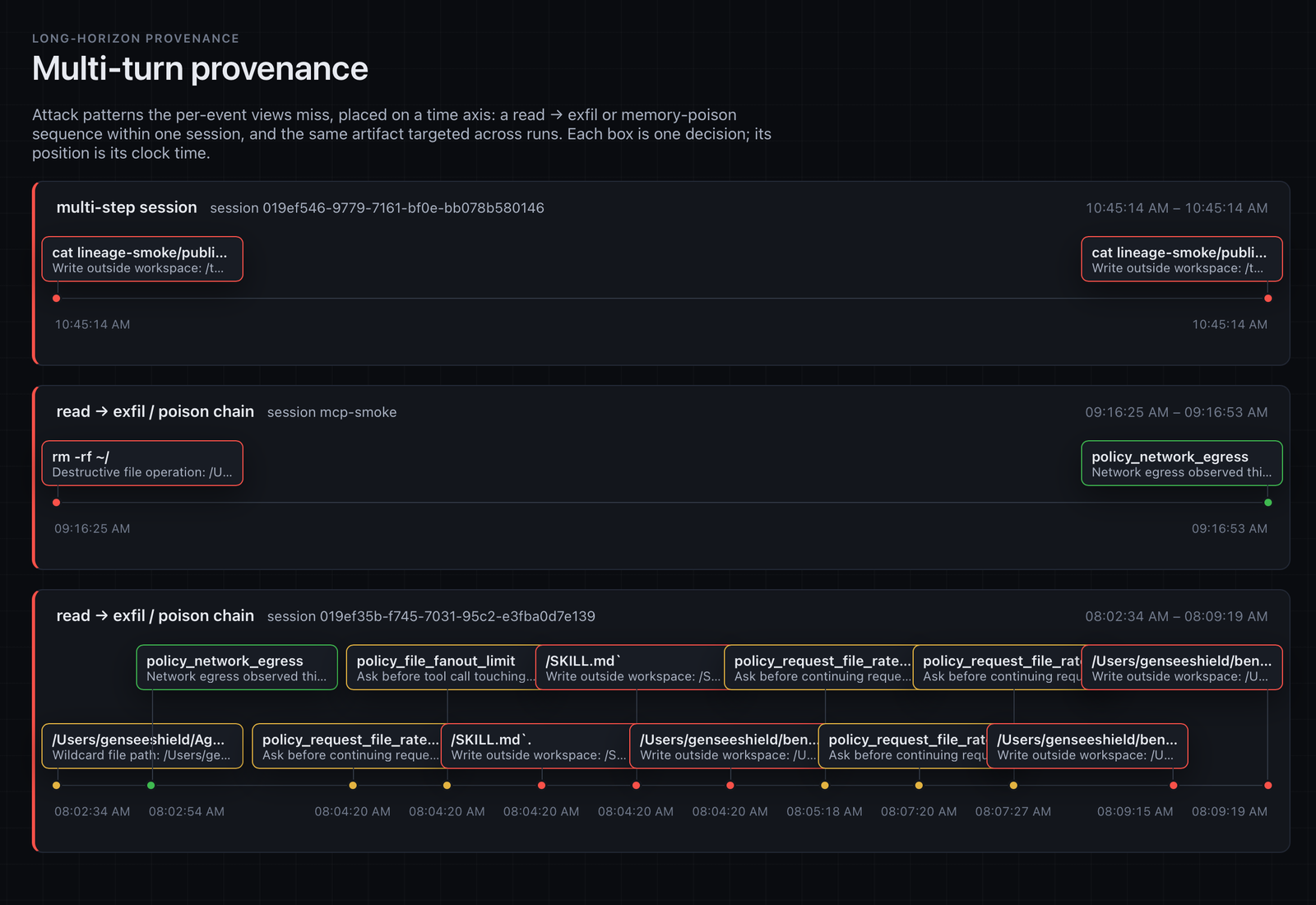
The multi-turn view highlights long-horizon patterns across a session, including
read-to-exfiltration chains, memory-poison signals, repeated artifact targeting,
and policy decisions over time.
4. Manage policy
gensee policy lets you inspect, initialize, validate, and edit the active
policy document without copying files by hand:
gensee policy path
gensee policy setup
gensee policy validate "$GENSEE_HOME/policy.json"
gensee policy setup walks through the same dashboard-style policy settings,
artifact definitions, and decision rules. Use it to tune resource limits,
network egress, runtime, enforcement, watch system events, allowlisted paths,
what counts as executable/memory/skill/control-plane artifacts, and whether
each safety rule denies, asks, or allows.
Use gensee policy print-default to inspect the bundled default policy. The
guided setup flow writes the user policy to $GENSEE_HOME/policy.json, which is
auto-loaded by the hook, CLI, and dashboard when GENSEE_POLICY_FILE is unset.
You can also point GENSEE_POLICY_FILE at a custom policy path; seedocs/policy.md for the full policy workflow.
5. Test
Run the unit/integration test suite:
cargo test --workspace
Prepare a populated dashboard store for UI testing:
cargo build --release -p gensee-crate-cli
dashboards/web/scripts/demo.sh
# open http://localhost:5173
Smoke-test the policy without launching an agent by feeding a samplePreToolUse payload to a hook — a secret-path read should come back deny:
echo '{"session_id":"s1","hook_event_name":"PreToolUse","cwd":"'"$PWD"'","tool_name":"Bash","tool_use_id":"t1","tool_input":{"command":"cat ~/.ssh/config"}}' \
  | GENSEE_HOME="$PWD/.gensee-dev" ./target/debug/gensee hook claude-code
# => {"hookSpecificOutput":{"hookEventName":"PreToolUse","permissionDecision":"deny",...}}
For Codex, use ./target/debug/gensee hook codex with the same sample payload.
End-to-end: with hooks configured and the agent restarted or trusted, ask it to
read a sensitive file (e.g. ~/.ssh/config); Gensee denies it, then the
decision and alert show up in the timeline:
GENSEE_HOME="$PWD/.gensee-dev" gensee timeline
Documentation
Full docs live in docs/:
- Architecture — the v0.1 wedge, workspace crates, and roadmap.
gensee watch— sidecar filesystem and system-event audit, backends, and watch roots.gensee runand the macOS sandbox — managed launch and staged workspaces.gensee policy— inspect, initialize, validate, and edit local policy settings.- Claude Code hooks — wiring Claude Code prompts and tool intent into Gensee.
- Codex hooks — wiring Codex prompts and tool intent into Gensee.
- Omnigent integration — thin sidecar/managed-run support and the deeper policy-bridge plan.
- Safety policy — the data-driven allow/ask/deny engine and
gensee policyworkflow. - SQLite lineage graph — the provenance schema and example queries.
- Endpoint Security spike —
esloggersystem events and the future signed EndpointSecurity path.
Reviews (0)
Sign in to leave a review.
Leave a reviewNo results found