claude-load
Health Warn
- License — License: MIT
- Description — Repository has a description
- Active repo — Last push 0 days ago
- Low visibility — Only 7 GitHub stars
Code Fail
- exec() — Shell command execution in hooks/posix.ts
- exec() — Shell command execution in hooks/register.tsx
Permissions Pass
- Permissions — No dangerous permissions requested
No AI report is available for this listing yet.
See which Claude Code session eats your CPU and memory: per-session load, orphaned dev processes, graphs, filters and one-click cleanup. Windows, macOS, Linux; 8 languages.
English · Русский · Deutsch · Español · Français · Português · 中文 · 日本語
claude-load
See which Claude Code session eats your CPU and memory — and clean it up in one click.




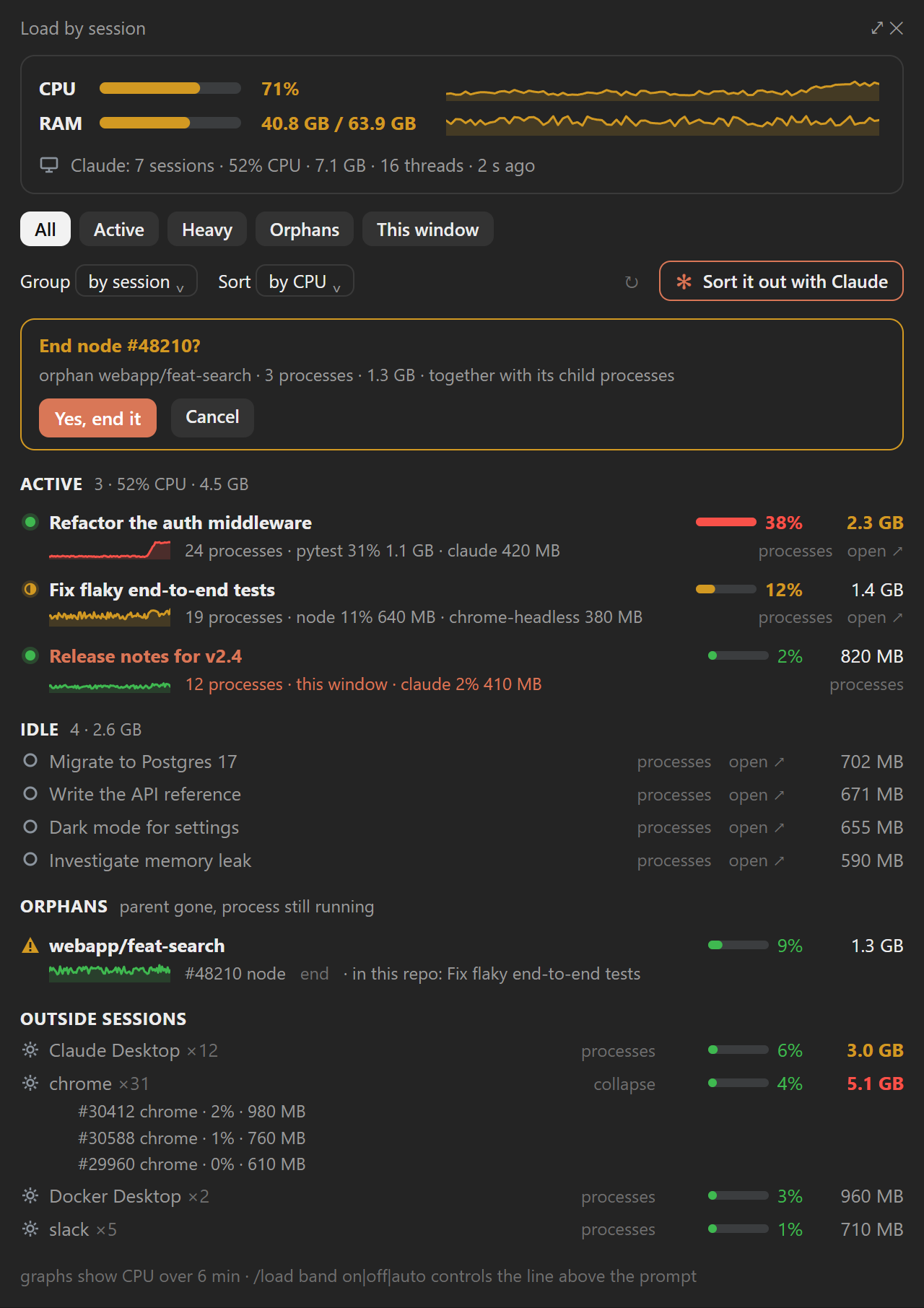

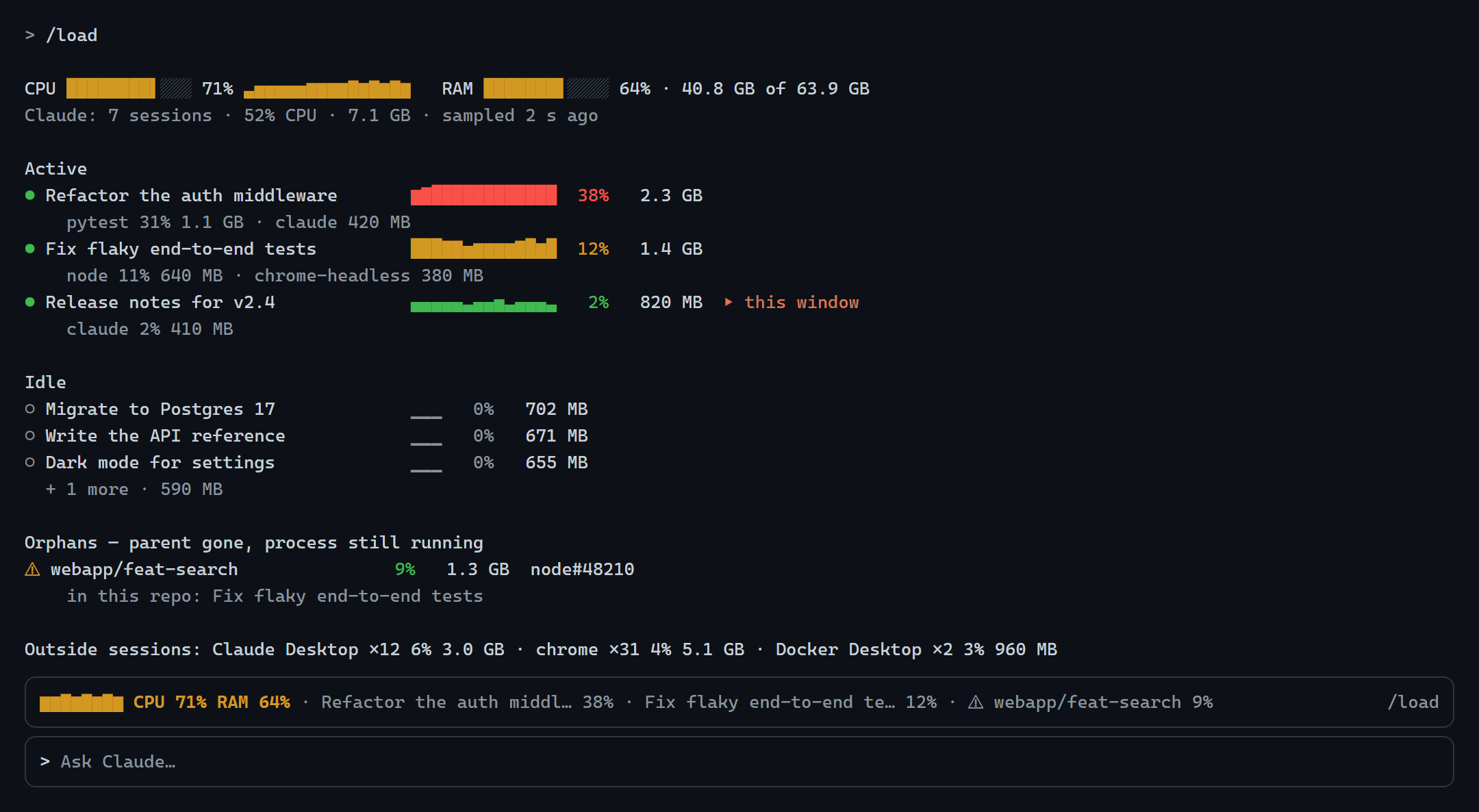
Rendered from demo data in the mod's own design.
Install
One command; pick your shell. It adds this repository as a plugin marketplace and installs
the mod for your user, so it loads in every new session, in the terminal and in the Claude
desktop app alike.
macOS · Linux · Git Bash on Windows
claude plugin marketplace add Gerrux/claude-load && claude plugin install claude-load@claude-load --config language=auto
Windows — PowerShell (5.1 and 7)
claude plugin marketplace add Gerrux/claude-load; if ($?) { claude plugin install claude-load@claude-load --config language=auto }
Windows — Command Prompt (cmd)
claude plugin marketplace add Gerrux/claude-load && claude plugin install claude-load@claude-load --config language=auto
Claude desktop app only (no claude command in your terminal): click + next to
the prompt box → Plugins → Add marketplace → Gerrux/claude-load → Add plugin
→ claude-load.
Inside a Claude Code terminal session:
/plugin marketplace add Gerrux/claude-load
/plugin install claude-load@claude-load
Then, in a session that was already open, run /reload-plugins and /load.
| Requires | Claude Code with mods support, 2.1.287 or later (claude --version); Windows 10/11, macOS or Linux |
| Language | --config language=auto follows Claude Code's language, then the system locale. Pin one with en, ru, de, es, fr, pt, zh or ja, or change it later in /config |
| Update | claude plugin marketplace update claude-load then claude plugin update claude-load@claude-load, then /reload-plugins |
| Remove | claude plugin uninstall claude-load@claude-load (and claude plugin marketplace remove claude-load) |
Why
Run a few Claude Code sessions in parallel, each with subagents, MCP servers, dev servers
and test runners, and the machine crawls while Task Manager shows a wall of node andclaude. claude-load splits the load by session:
| 📊 Per session | CPU, memory, process count, the heaviest processes inside, a 6-minute CPU graph |
| ⚠️ Orphans | dev processes whose parent died (a vite server, a language server, a Python run left behind), placed in their repository or worktree by working directory, ended with one click after a confirmation |
| 🧩 Everything else | other processes folded by name (chrome ×31), so you see whether the problem is Claude at all |
| 🔎 Filters & groups | all · active · heavy · orphans · this window; by session, by repository (worktrees folded in), by process name; sort by CPU or memory |
| ✻ Sort it out with Claude | one button: the bundled sessions-triage skill classifies idle sessions and orphans, asks once, archives or ends only what you approve |
| 🚦 Load line | above the prompt under high load (CPU ≥ 50% or memory ≥ 85%), with the top consumers |
| 🌍 8 languages | English, Русский, Deutsch, Español, Français, Português, 中文, 日本語 |
Use
| Command | What it does |
|---|---|
/load |
Opens the pane and prints a compact report in the transcript |
/load all |
The same, with every idle session listed |
/load band on · off · auto |
The load line above the prompt: always, never, or only under high load (default) |
In the pane:
- processes expands a session into its processes by name and its heavy PIDs.
- end on a process or an orphan ends it with its child processes after
Yes, end it. First the PID is checked again against a fresh sample under the same
name, then the live process under it must have the start time of the row you clicked:
a PID reused by a new process of the same name is refused. Sessions' ownclaude
processes, the shells other sessions run in, and PIDs not in the current sample cannot
be ended from here. - open ↗ switches to that session in the Claude desktop app.
- ✻ Sort it out with Claude asks Claude in the current session to triage the load.
Archiving sessions needs the desktop app's session tools; in a terminal Claude tells you
what to close instead.
Filter, grouping and sorting are remembered across sessions.
Language: the plugin's language option (/config) takes auto, en, ru, de,es, fr, pt, zh or ja. auto follows Claude Code's language setting, then the
system locale, then English.
How it works
One sampler per machine writes ~/.claude/state/load/snapshot.json; each session's mod
only reads it every 5 seconds, so the cost does not grow with the number of sessions.
- Windows: a hidden PowerShell process (
sampler/load-sampler.ps1) started by the
mod. It readsGet-Processevery 4 seconds and the parent tree from CIM only when new
processes appear, and exits 3 minutes after the last session closes. Measured on a
12-thread machine with 15 sessions: about 0.35% CPU and 130 MB of memory. - macOS and Linux: one session's mod holds a lease and samples with
ps; another
session takes over within 15 seconds if it goes away.
A session is a PID from ~/.claude/sessions/<pid>.json, and its load is its whole process
tree. An orphan is a process tree whose parent died (on macOS and Linux: reparented toinit, systemd or launchd) and that contains a dev tool. Its working directory comes
from the process itself (Windows reads it from the process's memory, Linux from/proc/<pid>/cwd, macOS from lsof).
Privacy: everything stays on your machine. No network calls, no telemetry.
Troubleshooting
- "The sampler does not start" (Windows): PowerShell scripts are blocked by policy
(AllSignedor Constrained Language Mode). The sampler needs to runsampler/load-sampler.ps1from the plugin folder. - "This process cannot be ended from here" for every process after updating to 1.0.1
(Windows): a 1.0.1 session replaces a running 1.0.0 sampler within a few seconds; if
the button still refuses, end the hiddenpowershell.exerunningload-sampler.ps1in
Task Manager. A process younger than about 8 seconds cannot be ended yet: its start
time is not sampled. - Nothing shows on macOS/Linux: check that
psis onPATH;lsof(macOS) is
needed only for orphans.
Status
Developed and used daily on Windows 11 with the Claude desktop app. The macOS and Linux
sampler is covered by unit tests on recorded ps, vm_stat, /proc/meminfo and lsof
output but has not yet run on a real Mac or Linux box. Reports and fixes are welcome.
Develop
claude plugin validate .
claude plugin test .
claude --plugin-dir .
Screenshots are rendered from docs/mock/index.html; see docs/mock/README.md.
License
Reviews (0)
Sign in to leave a review.
Leave a reviewNo results found