LiveBridge
Health Warn
- License — License: MIT
- Description — Repository has a description
- Active repo — Last push 0 days ago
- Low visibility — Only 7 GitHub stars
Code Pass
- Code scan — Scanned 12 files during light audit, no dangerous patterns found
Permissions Pass
- Permissions — No dangerous permissions requested
No AI report is available for this listing yet.
Talk to Claude Code by voice: GPT-Live (via Codex, ChatGPT subscription) as the voice front desk, your Claude Code session as the worker. Unofficial.
English · 简体中文 · हिन्दी · Español · Français · Русский · Українська
LiveBridge
Talk to an open Claude Code session by voice.



getlivebridge.com · Quick start · Install · Use · Billing · Privacy · Limitations · Help wanted · Contributing
LiveBridge is a macOS menu bar app that keeps a GPT-Live voice line ready through codex app-server
on your ChatGPT login (no API key). The voice is the front desk: it chats, asks what you mean, and
hands real work to your Claude Code session through a small Claude Code mod, livebridge. Claude
does the work with its own model, tools and permission mode, and the voice tells you the result.
The voice also follows what you type in the session and what Claude
answers, so you can switch between speaking and typing.
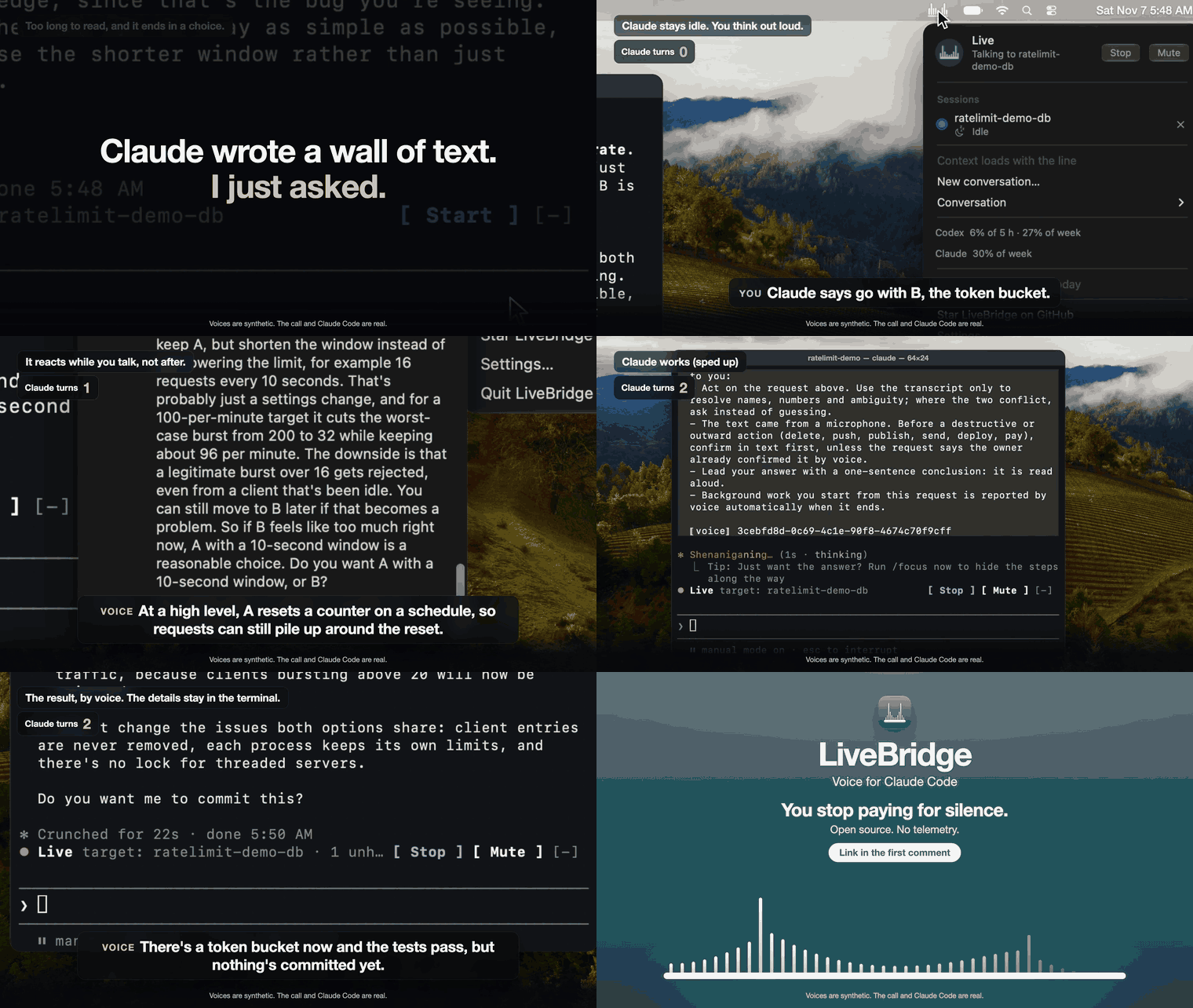
A conversation, not dictation. GPT-Live listens while it talks: cut in and it stops and hears you
out, think out loud and it can drop in a quick "mm-hmm". You stop paying for silence: OpenAI
prices voice by the minute, so after a stretch of quiet you set in Settings the line
closes, and it opens again when you speak, with the conversation where you left it
(Billing).
- Claude's turns go to the work. Ask "what did you mean?" or "what is the risk with B?" and
the voice is told to answer it from the conversation it shares with the session, so the
question does not start a turn of Claude's. Once you have decided, it hands Claude a brief, with
what was said since the last request quoted after it; a question that needs the code still goes
to Claude. When the voice lacks part of the session, the line asks for a short summary on the
side, written by the model set in Settings (Haiku 5.5 by default) (while Pause sync is on,
only when it has no summary). - Walk away while Claude works. Claude's answer to your request opens the closed line again
and the voice says it. If the voice stays silent, the answer chimes and waits, so it is not lost
(what can go wrong). - Claude's questions, talked through. When Claude stops to ask you something with options, the
voice is given the question to put to you: it explains the options in its own words for as long
as you like, and your choice goes back as the answer. It may not bring the question up by itself
(known limitations). - One voice for all your sessions. Join several sessions and pick the one to talk to from the
menu; another session's result that arrives while the line is closed chimes and waits until you
next speak. - Your language. The voice is told to answer in the language you speak
(one limit).
Claude Code's own /voice turns what you say into a prompt for Claude. LiveBridge is someone to
talk it over with first, while Claude keeps working or waits.
Local by design. No telemetry and no server of its own: LiveBridge is a bridge on your Mac
between your own codex and your own Claude Code. The mod talks to the app over a Unix socket only
your user can open, and the app listens on no network port. Your voice, and what you type in a joined
session, and Claude's answers and summaries go to OpenAI through your codex, only while a line is
open; Claude's work goes to
Anthropic through your Claude Code. The app's only traffic of its own is a usage read through
your codex when you open the menu, and updates from GitHub, whose automatic check
you can turn off. Privacy lists exactly what reaches OpenAI and every request to
GitHub; SECURITY.md says what this does and does not protect against.
Free and open source under the MIT license. The voice runs on your ChatGPT plan, so
there is no API key and no separate bill: its minutes come out of your plan's
Codex usage (Billing).
Unofficial. Not affiliated with, endorsed by or supported by Anthropic or OpenAI. It relies
on codex's experimental realtime API, which can change with any codex release.
Quick start
You need macOS 14+ on Apple Silicon, Claude Code 2.1.301+, and
codex signed in (codex login) to a ChatGPT plan whose Codex
includes voice; to build the app yourself, also Xcode with Swift 6.0+. The details are under
Requirements.
# 1. The app, from LiveBridge's own Homebrew tap
brew install --cask getlivebridge/tap/livebridge

# 2. The mod, from this repository's marketplace
claude plugin marketplace add getLiveBridge/LiveBridge
claude plugin install livebridge@livebridge
- Open LiveBridge. Releases after 0.4.2 are notarized: the first time, macOS asks whether to
open an app downloaded from the internet; click Open. 0.4.2 and earlier are not, so
macOS blocks the first launch until you allow it under System Settings > Privacy & Security >
Open Anyway. - In the Claude Code session you want to talk to, type
/live. - Press Start in the band above the prompt, allow the microphone, and talk.
No Homebrew? Each release has
the app as a disk image, built and attested by GitHub Actions
(From the disk image), or build it yourself
(From source). The mod is installed the same way whichever you choose.
If /live is not found in a session that was already open, reopen the session
(why). Updating, permissions, keeping the microphone permission across
rebuilds and uninstalling are under Install.
Requirements
- macOS 14 or later on Apple Silicon.
- Claude Code 2.1.301 or later.
- Codex CLI (
codex, tested with 0.166.0), installed with
Homebrew (brew install --cask codex) or npm (npm install -g @openai/codex), on thePATH
your shell sets in a Terminal window, and signed in withcodex loginto a ChatGPT plan whose
Codex includes voice (Plus, Pro, Business, Enterprise or Education, per
OpenAI's Codex pricing). LiveBridge refuses a codex
whosecodex features listit cannot read, so another version may not start until LiveBridge
is updated. - To build the app: Xcode with a Swift 6.0 toolchain or later. The tested versions are in
CONTRIBUTING.md. The built app runs on macOS 14 or later.
Install
The mod comes from this repository's marketplace (the Quick start commands),
which names the latest release's tag, so the mod you install is that release's. The app goes in/Applications whichever way you install it: with Homebrew, from the disk image, or built from
source. From the first release after 0.4.2, the disk image, which Homebrew installs too, is
signed with LiveBridge's Developer ID and notarized by Apple; 0.4.2 and earlier were signed ad
hoc and not notarized, and a build from source is neither signed with the Developer ID nor
notarized.
From the disk image
Download
LiveBridge.dmg
from the latest release.Check it with the GitHub CLI, in the folder you saved it to:
gh attestation verify LiveBridge.dmg --repo getLiveBridge/LiveBridge \
  --signer-workflow getLiveBridge/LiveBridge/.github/workflows/release.yml \
  --source-ref refs/tags/vX.Y.Z --deny-self-hosted-runners
with
vX.Y.Zthe release's tag, as its page names it. This passes only for an image that
this repository's release workflow built from that tag, on a
GitHub-hosted runner, and that has not changed since. On a release after 0.4.2, the Developer
ID signature, which macOS checks by itself, says who signed the image, and this says what it
was built from; on 0.4.2 and earlier, whose ad hoc signature names no one, this is the image's
one proof of origin. It does not prove that anyone reviewed the code.Open it and drag LiveBridge to Applications.
On first launch, a release after 0.4.2 makes macOS ask whether to open an app downloaded
from the internet; click Open. 0.4.2 and earlier are blocked until you allow them under
System Settings > Privacy & Security > Open Anyway.
With Homebrew
brew install --cask getlivebridge/tap/livebridge
This installs the same disk image from LiveBridge's own tap, which is not one of Homebrew's
casks. Homebrew may ask you to trust the tap first, and macOS asks at the first launch as above. The
app then updates itself, as below.
From source
scripts/build-app.sh --release builds the app, installs it in /Applications (your account
must be able to write there, as an administrator's can) and opens it. Run it again to rebuild.
The build is signed ad hoc, so macOS asks for the microphone again after each rebuild. To keep
the permission, run scripts/build-app.sh --make-signing-identity once: it asks first, then
creates a self-signed code-signing certificate in your login keychain, and later release builds
are signed with it.
The marketplace pins the mod to the last release's tag, so an app built from the default branch
runs with that release's mod. To match them, build the release's tag (git checkout vX.Y.Z), or
load the working tree's mod with claude --plugin-dir plugin.
A build from source checks for updates by itself only if you turn that on in Settings.
Installing an update replaces it with the release's image, which is signed with LiveBridge's
Developer ID, not your self-signed certificate, so macOS asks for the microphone once more;
Install says so and asks first.
Updating
LiveBridge updates itself and its mod when you click Install, and never on its own. Only
the copy at /Applications/LiveBridge.app updates; any other copy says so in Settings.
- Check for updates automatically, in Settings (on by default, off for a build from
source): once a day, the app asks GitHub which release is the latest. A newer one is
announced once, with a notification whose Install installs it, and the menu bar menu
offers Install LiveBridge X.Y.Z… until it is installed, asking GitHub again at each launch
to keep that item. Check for update in Settings asks at once. - Install needs the GitHub CLI signed in (
gh auth login);
without it, Install downloads nothing and links to the release page. It downloads the
release's image, checks it with the samegh attestation verifyas above, then checks the
app inside it, and installs nothing unless every check passes. It waits while Claude is still
on a voice request, updates the mod withclaude plugin marketplace update livebridgeandclaude plugin update livebridge@livebridge, stops the call, puts the new app in place in one
step and opens it. - Afterwards Settings says which version it updated from. If the mod could not be updated, it
shows those two commands for you to run. Claude Code sessions already open keep the old mod
until they restart; Settings lists the joined ones that still do. - The update's download sets no quarantine attribute, so macOS should not stop the updated
app's first launch to ask, as it did after the first download; this follows from the code and
has not yet been observed. The checks above are what stands in its place
(SECURITY.md). Releases after 0.4.2 are signed with
LiveBridge's Developer ID, so the microphone permission should carry over from one to the
next; this follows from how macOS keys the permission and has not yet been observed. 0.4.2 and
earlier were signed ad hoc, so the first update from one of them asks for the microphone once
more, at the first Start.
To update by hand instead, run /live off in every session (the mod reopens the app at/Applications whenever the app stops answering), quit LiveBridge, install the newer image as
above and run the two claude plugin commands.
Permissions
The first Start asks macOS for the microphone. If it was refused, the call stops with a
sentence and the menu bar menu's Open Microphone Settings opens Privacy & Security >
Microphone, where you allow LiveBridge. macOS asks again at the first Start after the first
update from an ad hoc release, and after every rebuild from source signed ad hoc (see above).
macOS may also ask whether LiveBridge may find
devices on your local network. The voice line needs that second permission too; without it the
call stops with a sentence that says where to allow it.
Uninstall
In the copy in /Applications, the menu's Feedback & Support ▸ Uninstall LiveBridge… asks
first, then moves the app to the Trash; if it cannot, it says so and changes nothing else. Then
a call open ends and every session leaves LiveBridge, as the menu's × does, so /live
turns off in each instead of opening LiveBridge again; LiveBridge removes its login item and
microphone permission and quits, and once it has quit, the files it keeps (listed below) go to a
folder in the Trash, until you empty it. It leaves the Claude Code mod, and
copies the command that removes it, claude plugin uninstall livebridge@livebridge, for you to run
in Terminal. A session that was not open then may still look for LiveBridge when it opens again;
removing the mod ends that.
Installed with Homebrew? brew uninstall --cask getlivebridge/tap/livebridge removes the app
and Homebrew's record of it; the steps below still cover the files the app keeps.
From a clone, scripts/build-app.sh --uninstall removes /Applications/LiveBridge.app,
however it was installed, its login item and every file it keeps, and prints the two commands
it leaves to you: tccutil reset Microphone com.getlivebridge.livebridge andclaude plugin uninstall livebridge@livebridge.
By hand, without a clone, turn off Open at login in LiveBridge's Settings, quit LiveBridge, and run
the same steps in Terminal:
rm -rf /Applications/LiveBridge.app ~/Library/Application\ Support/LiveBridge \
  ~/Library/{Caches,WebKit}/com.getlivebridge.livebridge \
  ~/Library/HTTPStorages/com.getlivebridge.livebridge{,.binarycookies} \
  ~/Library/Preferences/com.getlivebridge.livebridge.plist
tccutil reset Microphone com.getlivebridge.livebridge
claude plugin uninstall livebridge@livebridge
None of these removes a copy named /Applications/.LiveBridge-update-….app, which an update stopped
mid-install can leave behind. The app removes such copies at its next launch; after an
uninstall, delete one by hand if it is there.
claude plugin uninstall may leave the mod's snapshot, ~/.claude/plugins/store/livebridge_*.json:
Claude Code's documentation of what it deletes does not name that file, and this was not run. Delete
it by hand if it is there.
Use
Commands
In the Claude Code session you want to talk to:
| Command | What it does |
|---|---|
/live |
Joins LiveBridge under the session's title, and opens the app if it is not running. In a joined session it brings back the band and answers in one line: the call, the target, unheard results, minutes today. |
/live off |
Leaves LiveBridge. |
The command is /live, not /voice, because /voice is Claude Code's own voice mode. Whether a
session's typing is kept out of the voice while the call is stopped is not a command: it is one
setting for every session, in LiveBridge's Settings window.
The band and the menu
Press Start, in the band above the prompt or in the menu bar menu, and talk.
- The band's Start makes its session the target and starts the call; the line it opens is seeded
with the session's conversation, and loads a summary of the session as well when the voice would
lack part of it (see Load context below), but while Pause sync is on or after a
pause only when it has none yet (details). With a mod of this
release the summary is asked for at Start and when the target changes during the call, and the
line waits for it before it connects, at most 10 seconds from the ask: what you say meanwhile is
held on the Mac and played to the voice once the line opens. Stop or a target change during the
wait drops what was held, and so does a reconnect after Connect over TCP changes, which keeps
at most the last 2 seconds for the line that opens again. While the call talks to another
session, the band shows Talk here. If the band is not there in a joined session,/live
brings it back. - The menu bar menu has the call, the joined sessions (click one to make it the target),
Load context, the target's Conversation as LiveBridge keeps it (with a Task line
for each request the voice handed to Claude and a Loaded context line where a summary was
loaded), the usage limits, the minutes, Quick Settings (checkmark items for Connect over
TCP, Play sounds for requests and answers, Notify when a result is waiting, Pause
sync while the call is stopped and Load a session's context on its first call),
Settings…, Feedback & Support (Report a Bug… opens the repository's bug report form,
LiveBridge Website opens getlivebridge.com, Star LiveBridge on GitHub opens the
repository's page, then Debug Mode and Show Debug Files…, debug mode's
switch and folder, and Uninstall LiveBridge… (Uninstall)) and Quit LiveBridge. Quick Settings is there even when the menu shows
only the call. During a call Conversation shows your words and the voice's as codex transcribes them, so yours can appear a
moment after you say them and the voice's a moment before you hear them. When each is finished,
its final text replaces them. Only final text is kept: words still waiting for it when the line
closes are gone. - Mute (beside Stop, in the band and in the menu's call card; Unmute while muted)
releases your microphone while the call goes on: an answer from Claude still opens the line and
goes to the voice to say. The band keeps the phase and adds· muted; the menu says "Muted — line
closed" while no line is open. Mute does not close a line: an open line closes after the usual
silence, counted from Mute if you were speaking, and when it would have without Mute if the line
was already quiet; it is billed like any silence, so Mute does not save realtime minutes.
Unmute takes the microphone again, and the call ends with the reason if it cannot (denied,
busy, missing). Stop ends the call and the mute; the next Start begins unmuted. Mute is
not a lock: any process running as you can unmute
(SECURITY.md). - Load context is enabled only when the voice lacks part of the target: it has no summary
and Pause sync stops the next line loading one, a turn did not arrive, a question or permission notice did not reach the app, turns ran while the
mod was off, the lines since the summary no longer all fit what the voice can carry (a long
conversation outgrows that), the session was paused and has a summary, or its mod does not sync. Otherwise the item
reads Context up to date and is disabled, because the voice already has the conversation. With
no line open, when the next line will load the summary and nothing else is missing, it reads Context loads with the line and is disabled, because
the next line asks for one by itself. While a summary of the target is on its way, whatever asked
for it, the item reads Loading context… and is disabled, for at most the 60 seconds the mod allows it (on an older mod it stays Load context); one that arrives shows Context
loaded for a moment, and an empty answer goes back to Load context. A summary carries no date, so one can be ignored while the item stays enabled
(BR-002). - New conversation… erases the target's conversation and its loaded context, and a session's ×
removes it and erases its own; both ask first. The voice starts afresh from the next time the line
opens. Results it has not said yet stay and are added again; only Stop clears them. Claude's
waiting questions follow other rules (details). With
Load a session's context on its first call on, or Pause sync off and the session not paused, the next line loads a summary of the same session's
transcript by itself, which holds the conversation's text (an app and a mod of this release leave
out tool output, thinking and reminders, but not text that quotes them, and an older one sends the
whole request);/clearthe session first to avoid
that, then press New conversation./livein a removed session joins it again.
Settings
Settings… opens LiveBridge's Settings window, in four tabs in its toolbar.
The menu's Quick Settings holds five of its switches (the menu): each
item is the setting itself, so a change in one place shows at once in the other, and it asks what
the switch here asks.
General holds notifications, Open at login, updates and debug mode:
- Notify when a result is waiting (on by default): with the chime for a result that waits
while the line is closed, a macOS notification names the session ("Alpha has a new result —
speak to hear it"), never the result itself. Clicking it opens the menu bar menu. - Open at login (off by default).
- Updates: the running version, Check for update, Check for updates automatically
and what the last update did (Updating). - Debug mode (off by default): during a call, a row a second of the voice's network numbers
(packets lost and discarded, jitter, concealed samples, whether the line runs over TCP), one CSV
per call, in~/Library/Application Support/LiveBridge/debug/call-stats/; no audio, no
transcript, no session names. Turned on during a call, it records the open line from then; turned
off, it stops at once, and the files stay until you delete them. Show Debug Files opens the
folder. It is also Debug Mode in the menu's Feedback & Support
(reading the numbers).
Voice holds what you hear during a call:
- Voice: one of the realtime voices your codex offers, which codex lists when this tab
opens, or Codex default. It is heard from the next time the line opens. - Prompt (empty by default): your own instructions for the voice, such as "Speak with me in
Spanish", up to 2,000 characters. They are added after LiveBridge's own rules for the voice,
which win where the two disagree, and apply from the next time the line opens. - Play sounds for requests and answers (on by default): a short sound for each request the voice
hands off (why), and one for each answer, failure or question from Claude
that reaches an open or opening line while nobody is speaking. The chime for a result that waits
plays either way.
Line holds how long the line stays open in quiet and how it connects:
- Silence before the line closes (20 seconds by default), Wait for a first word on a line
a result opened (5 seconds) and Sound without words before the line closes (90 seconds):
how long each kind of quiet keeps an open line, from 0 to 300 seconds. 0 switches the silence or
the sound without words off, and a first-word wait of 0 waits as long as the silence. With all
three at 0, quiet never closes the line: it stays open, billed all the while
(Billing), until you press Stop, change the target or OpenAI closes
it. A short silence closes the line inside ordinary pauses, and each reopening takes a few
seconds before the voice answers, so Settings warns at 1 to 9 seconds; so it does for sound
without words, which your speech counts as until it is recognised, and at 1 to 3 seconds for the
first word, as the voice often starts about 2 seconds after the line connects. A timer you turn
on starts at once on a quiet open line; one already counting keeps its time. - Connect over TCP (off by default): if the voice breaks up on a poor connection, turn this on.
The line then prefers the TCP route the media server offers (port 443 in the answers seen) to
UDP, and can still fall back to UDP. On a lossy connection that can turn breakups into short
pauses between phrases (how far it is tested). A line that is open when you
change it closes and opens again at once, after you confirm; what the voice was saying is cut
off, and a result the line was waiting for still comes to the new one.
Context holds how your sessions reach the voice:
- Pause sync while the call is stopped (off by default): by default, what you type in a joined
session and Claude's final answer to it are kept in that session's conversation with the voice
even while the call is stopped, and the voice has them when the next line opens. None of it
reaches OpenAI until a line opens. For text you do not want to reach OpenAI, turn this on, turn off the next
setting if the session may have no summary yet, press Stop, then type: nothing you type while the call is stopped is recorded, and the session is marked as
paused. While it is on, no line loads a summary by itself, and neither does one after a pause,
except for a session with no summary (the next setting); otherwise only Load context does. That
summary is written from the transcript, so it carries what you paused. Typing into a turn that runs a voice request fails its
answer, with nothing of it recorded or said. It removes nothing already recorded, and Claude's
later answers may repeat paused text; SECURITY.md says what
it does and does not do. - Load a session's context on its first call (on by default; off if Pause sync was on when you updated to it): Start, a
change of target during the call, or a line that opens, for a session the voice has no summary
for, asks for one even while Pause sync is on or the session is paused, an old chat or a chat after New conversation included. That summary
is written from the transcript, so it carries what you paused, and it goes to OpenAI. Once
a session has a summary, the pause governs what follows. With this off, only Load context
loads a summary under the pause. - Summary model (Haiku 5.5 by default, on an update too; or Sonnet 5.5, Opus 5.5 or
Custom…): the model that writes the summary the voice gets as context, always at low effort,
on your Claude usage. If another model fails, Haiku 5.5 writes it instead, unless that model ran
out of time. A line under it says when the last summary came from Haiku 5.5 instead, or from no
model, and why. A session on a mod from before this setting ignores it and writes with the
session's own model. Custom… takes
a model id and Check and save, which has a joined session send that model one short request
("Reply with OK.") on your Claude usage, and saves the id only if it answers; otherwise the
reason shows beside the field and the previous choice stays. It needs a session on a mod of
this version, and speaks for that session's Claude Code: another session can differ, and a
saved id is not checked again.
What the voice does
- It answers small talk and explanations itself, and hands off anything that needs the
repository or the session: tasks, questions about the code, decisions, corrections and stops. - Before it hands off anything destructive or outward (delete, push, publish, send, deploy,
pay) it repeats the request and asks "yes?". This is a habit the voice is told to keep, not a
safeguard; SECURITY.md says what is one. - It reads results back in a sentence or two, with the session's name. Code blocks and tables
stay in the session, and credentials it recognises are redacted. - It comes back when Claude is done. You need not keep the line open: the line closes when the talk
goes quiet, and Claude's answer to your request opens it again and is given to the voice to say,
so you can walk away while Claude works. That holds for the session you are talking to; another
session's result chimes and waits (how it is billed). If the voice
stays silent on the reopened line, the answer chimes and waits too, so it is not lost. A question
Claude asks you or a permission prompt it waits on opens the line the same way, but the voice may
not say it: do not rely on that when away from the Mac (known limitations). - When Claude asks a question, it is given to the voice to put to you, and your answer goes back to
that session. So it is with a question Claude asks while it works (the dialog with options): the
voice is given it to tell you about, explain the options in its own words and talk them over with
you for as long as you like, without asking Claude. What you decide, an option or a question back
to Claude, answers the dialog; you can still answer it at the keyboard instead. Work Claude
finishes later in the background goes to the voice as an update. - When Claude is waiting for a permission prompt, the voice is given a notice and may say so, except
where an organization manages Claude Code. You answer the prompt in Claude
Code; LiveBridge never answers it for you. - It is given what you type. While a session is joined, what you type in it and Claude's final
answer to each turn that was not a voice request go into that session's conversation with the
voice, as context: they never chime and do not open a closed line (the limits on
this). A line that is open gets them at once; a line opened later is seeded
with them. A voice answer that a newer request superseded is not said but is kept and added the
same way. Claude's text in the middle of a turn is not synced, except what it wrote just before a
question or a permission prompt, which goes with that; subagents and tool output are not synced. A
question or a permission prompt in the target is given to the voice, whichever turn caused it; in
another session it goes as a result from that session would, except that one from a turn that was
not a voice request is only recorded. A turn the pause keeps out has none of this. When a question
or a prompt is settled without the voice, or a turn ends without an answer, the voice is given a
line saying so (which lines).
Billing-aware by design
A realtime voice session costs while it is open, so LiveBridge opens it only while someone is
talking, while Claude's answer to a request you just made may still come, or to say that answer,
a question Claude asks you, or that Claude waits for your approval:
- While a call is on and nobody is talking, the microphone feeds only a voice detector on your
Mac. No audio is sent anywhere.
While muted, LiveBridge holds no microphone, and macOS's microphone indicator shows that. - When you start speaking, the line opens. The 2 seconds before you started are kept and sent
first, so your first words are not lost. - The line closes after a stretch of silence, and sound without words (music, a TV) closes it after
a stretch of its own. Settings sets each; at 0, that one does not close it. - When the voice hands a request to Claude (a handoff), the line stays open for up to 2 minutes
after that handoff, billed like any open line, and Claude's answer goes to the voice to say once
nobody is talking. A later handoff starts the 2 minutes again; an exchange that sends nothing to
Claude closes after the usual silence. - Claude's answer to a request you handed the session you are talking to, a question Claude asks you
there, or a permission prompt it waits on opens the line again when it comes after the line
closed, and is given to the voice to say, billed like any open line. Anything else that arrives
while the line is closed (anything from a session you switched away from, a later update) plays a
chime and waits: the band and the menu show it as unheard, and it goes to the voice when you next
speak (when it counts as
heard). - Each Claude Code session has its own conversation with the voice. It is carried over to the
next realtime session, and across Stop and Start, so the voice remembers what you said a minute
ago. A new target switches the conversation: an open line closes, and your next words open it
with the new target's. - The menu shows the minutes the line was open, counted by the app from when the voice connects, so
your plan may count a little more. OpenAI prices desktop voice per minute of your Codex usage
budget, and on its API the same model family bills silence too
(details,
limits); your plan's own usage page is the
authority. - The menu shows how much of your Codex and Claude usage is used, a row each, as the percent used
of every window the plan reports (up to three a row, for example7% of 5 h · 19% of week),
orange from 90 %; hover a row for when each window resets. Codex's figures are read each time
the menu opens, at most once a minute, by a short-lived codex; Claude's come from a joined
session once it has answered. A row with nothing to show is left out, and the Codex row saysblockedwhen codex reports ordinary usage as not allowed. The last Codex reading shows at once and
a new one replaces it a few seconds later, so the figures can change with the menu open; right
after launch the row appears when the first read lands, and if reads fail a reading goes after
15 minutes. Which limit stops the voice first
is not documented (details).
Privacy
LiveBridge has no telemetry and listens on no network port; the mod talks to the app over a Unix
socket in a folder only your user can open. What goes to OpenAI, through codex's realtime
session:
- microphone audio while the line is open, from 2 seconds before you started speaking (or, for a
line Claude's answer, question or approval notice opened, from when it opened) until it closes
(while muted LiveBridge captures nothing, so none goes; speech you said before pressing Mute, on a
line that was already connecting, may still go); - the voice's instructions: LiveBridge's own rules, then your Settings Prompt if you wrote
one; - the target session's recent conversation (up to the last 64 lines, and no more than codex takes:
128 items and about 8,192 tokens with the context and open tasks) to continue it in a new realtime
session. It holds what you typed in that session and Claude's final answer to each turn that was
not a voice request, whatever started it (a turn you typed, a schedule, another agent, a
background task), as well as the mod's notes and your speech and the voice's, so typing in a
session sends it to OpenAI once a line opens with that session. While a line is open, each new
line of the target goes in at once. Another session's synced lines go only when a line opens with
it as the target; its results, questions and approval notices go into the open line whichever
session it is; - the target session's requests still open, as their one-line briefs;
- each result, question, update, approval notice, typed text, answer to a turn that was not a voice
request, voice answer a newer request superseded and note of the mod's, as one line of at most
2,000 characters, with code blocks and tables removed (typed text that is only code or a table is
replaced by a sentence saying that code was typed). The mod's notes name the tool of a permission
prompt that was allowed or settled, and say that a question was closed or that a turn ended
without an answer. A question Claude asks mid-turn, and the approval notice for a permission
prompt of Claude's main loop (not a subagent's), also carry what Claude wrote just before asking.
An update is Claude's answer in a later turn started by a background task's notification, for up
to 10 minutes after a voice request and until any other turn starts in the session; - the target session's context summary, as one line of at most 1,500 characters. It is saved
when it is loaded and sent every time the line opens while that session is the target, across
Stop and Start and app restarts. The menu's Conversation submenu shows that line exactly as it
is sent; - with every line above, its session's label: the Claude Code session title (up to 80 characters),
or the session folder's name when it has none. The label is not redacted and the pause does not
touch it, so a title written from text you paused goes out on every line; - the WebRTC offer, which lists the Mac's local network addresses as connection candidates.
With Connect over TCP on, the audio still goes to OpenAI's media server, and may go over TCP
(port 443 in the answers seen) instead of UDP.
Results, questions, updates, summaries and the lines of typed turns pass through a redactor of
known credential shapes first (private keys, JWTs, common API tokens, URL passwords,password=-style fields). It is a list of patterns, not a guarantee: anything else you type
goes as typed.
The codex thread that carries the voice is ephemeral and read-only, with every codex feature
turned off except where it keeps your login and how it uses your proxy, and every MCP server
off; it is there only to talk. Claude's work goes to Anthropic as your Claude Code session
always does.
Opening the menu makes LiveBridge start a short-lived codex that asks OpenAI, with your ChatGPT
login, how much of your Codex usage is used (each window's percent and reset time). It happens at
most once a minute, also while the call is off, and sends no audio or text. Claude's figures reach
the app from the mod over the socket and go nowhere else; the app keeps both only in memory.
For updates the app talks to GitHub. With Check for updates automatically on, once a day
(and at each launch while a release it announced is not installed) it asks GitHub's API, without
credentials, which release is the latest; GitHub sees your Mac's IP address. Check for update
in Settings sends the same request when you press it. When the automatic check finds a newer
release, the app runs gh auth status to say whether the image can be verified. Only when you
click Install does it download the image and run gh attestation verify andclaude plugin, which reach GitHub, and Sigstore for gh's trust root, under your own logins.
SECURITY.md lists each request.
On your Mac the app keeps its settings, the usage meter, when it last checked for an update and
which versions it announced, what the last update did and, for each of the 20 sessions used
last, its recent conversation (up to 64 lines, what you typed in it included, recorded with no
call running unless you turned on Pause sync) and the context line last loaded from it, in~/Library/Application Support/LiveBridge, a folder only your user can open
(how it is kept). A session's lines go when you press New
conversation with it as the target or remove it with ×. A session that has left keeps them
until 20 sessions used since push them out; to erase them sooner, run /live in it again and
press New conversation. Uninstalling removes them all; the menu's Uninstall LiveBridge moves
them to the Trash, so they are gone once you empty it. The mod keeps a snapshot of its own in Claude Code's plugin store (what it holds).
Debug mode, off by default, writes the voice's network numbers during a call to a file in that
folder, and nothing more (Settings).
SECURITY.md has the threat model: in short, anything your microphone can hear
can become a request that Claude runs under the session's own permission mode.
Known limitations
- Connect over TCP prefers TCP; it does not force it, and nothing shows during a call which
transport a line took, so a line that fell back to UDP can still break up. The route was measured
once, in a debug build that removed the UDP candidates (no audio lost in 10 minutes); the shipped
way, lowering their priority, was seen once to choose TCP. Debug mode records
the transport (onTcp) (CONTRIBUTING.md). - The voice sometimes says it is looking ("On it", "Looking now") without handing the request off,
so nothing reaches Claude: about one request in five with the rule as first written, and 0 of 20
with the rule now, too few to tell from luck (BR-001). It can also claim
work it has not done, as in "I'll take a look.", also from lines it only has as context (ADR 0001
(n), (o)). The app plays a short sound when it queues a
request for Claude, not the one an answer has; if the voice says it is looking and that sound
does not follow, say the request again.
The app cannot tell such a promise from an answer by its words, since the voice speaks your
language. - A question Claude asks, or a permission prompt it waits on, is only given to the voice, and the
voice may not say it; nothing makes it. So do not rely on the voice to announce a prompt when you
are away from the Mac: Claude may be waiting unannounced. The prompt still waits in Claude Code,
and it is the one control; the voice is not a control, and LiveBridge never answers the prompt. In
the checks, a typed turn's permission notice on a live line was said before the keyboard answer in
0 of 3 runs, a count and not a rate (ADR 0001 (n)). A closed
line opens for either only when the target's conversation holds a turn of yours; otherwise the app
chimes, and with the call off it is only recorded. - What the Claude desktop app reports as a typed prompt's origin was not observed (ADR 0001
(m)). The mod records a prompt as yours only when its origin
iscomposer. If a prompt typed there arrives as anything else, nothing typed there is recorded,
no gap is marked, the menu says Context up to date, and the pause reaches less
(details). - A result that arrives while the line waits for it goes to the voice as text to say; codex has no
call that makes the voice speak at once, so the model decides when. In testing it spoke within a
few seconds. If it does not, the result stays unheard: it goes to the voice again with your next
words, or it chimes when the line closes. - When Claude's answer opens the line again, the voice can stay silent: it did in 4 of 14 measured
runs, a small sample (ADR 0001 (n)). The line then closes
once its wait for a first word ends (Settings), and the answer chimes and waits, as
below. Where the voice spoke, it started within about 2 seconds of the connect; one that would
start after the wait is cut off. - When your next words reopen the line, the voice sometimes answers only them and does not say
the waiting result. The result is not lost: it stays waiting, chimes and posts a notification
when the line closes, and goes to the voice again the next time the line opens. - At your ChatGPT plan's usage limit the voice stops until the limit resets. The menu and the band
say so, in codex's sentence with its reset time where codex gives one, and the call ends, so
speech does not open lines that fail. Claude Code keeps working, answers keep waiting, and Start
tries once more. The app recognises a limit only by codex's wording or the service's error code,
as nothing else reports it (details). A refusal it
does not recognise, such as a line that drops with no reason given ("The voice session closed
(transport_closed)."), leaves the call on, so your next words try again; press Stop until the
limit resets. - A prompt not typed in the composer (a host's message, a schedule, another agent and presumably
Remote Control) is not recorded in the voice's conversation as your words, though Claude's answer
to it is, and it does not refuse a running turn under the pause
(SECURITY.md says which prompts count as yours). - Where Claude Code's provider (Bedrock, Vertex or Foundry) does not offer the model set as
Summary model, or the organisation does not allow it, that model fails and Haiku 5.5 writes
the summary; where Haiku 5.5 is not offered either, the voice gets no summary, which Settings
says. Before this setting the session's own model wrote it, which works wherever the session
does. That a pinned id resolves on those providers comes from Claude Code's documentation and
was not run. - A summary that fails is not remembered: while the session still needs one, Start, a change of
target and every line that opens ask again, and the mod sends the same transcript again, up to
120,000 characters, which a reply that came back empty or too late may bill each time. If
Context failed stays on the session's band, turn on Pause sync and leave Load a
session's context on its first call off. - A session still on a mod from before this release, until it restarts, is not synced: it loads a
summary as a session with missing turns does, and no pause refuses its lines (what else
differs). - A Claude Code session that was already open before the mod loaded may need to be reopened
before/liveworks in it. - In the Claude desktop app,
/livetyped in a session whose Claude Code process has not
started yet (a new session, or one just reopened) can show "/live isn't a command here." The
command still runs. The desktop lists such a session's commands from a check it runs with hooks
turned off, so the mod's code, which declares/live, does not run there; once the session is
running, the desktop takes its list from the session itself. The mod has no fix for this: a
static command file would be listed as/livebridge:live, not/live, and with hooks off it
would send its text to the model instead of running the mod. - Whether a reply has said a waiting result is judged by its words, with a list of common words
in English and Russian only
(the rule). In another
language a result can count as heard when the voice only mentioned it. - Where an organization manages Claude Code, nothing in LiveBridge tells you that a permission
prompt is waiting. Claude Code's built-in guard loads on a machine with managed settings and in
a session signed in to a Team or Enterprise plan, and there the mod's permission hooks do not
run. The prompt still appears in Claude Code and still waits for you, but the voice says nothing
about it and the menu shows Claude working, so look at Claude Code if an answer seems late./pluginnames the hooks, and recent versions of Claude Code also print a line saying a hook
was skipped. Claude's questions still reach the voice. The hooks were
measured in a Linux container; what the voice and the menu
bar do follows from the code, and no real line was run. The Team and Enterprise case comes from
Claude Code's documentation. - With
allowManagedHooksOnly,allowManagedModsOnlyordisableAllHooksin managed settings,
the mod does not load and/livedoes not work. An administrator can install the mod as the
organization's
own, from a
folder on each machine: then the permission hooks run, also with the first two settings
(measured). Claude Code's documentation says that turning
on the marketplace copy in managed settings is not enough.
How it works
docs/architecture/overview.md describes the components, the
wire between the mod and the app, and the message flows;
ADR 0001 records the platform facts the design rests on.
Roadmap and help wanted
LiveBridge today is one Mac app, one worker (Claude Code) and one voice provider (codex on a
ChatGPT login). The three meet at narrow seams, and each direction below is open to
contributors. Issues for them carry the
help wanted
label; CONTRIBUTING.md points to the files to read first.
- Windows and Linux. The menu bar app, its audio page and the socket server are tied to
macOS; the wire between the mod and the app, and the mod itself, are portable. A port starts
with an app for the new platform that speaks the same wire. - Other agents as the worker, such as Codex CLI, Hermes Agent or Gemini CLI: each needs its
own adapter that speaks the same wire as the Claude Code mod. - Other voice providers, such as the OpenAI Realtime API with your own API key or Google's
Gemini Live API: each would be another implementation of the app's realtime protocol.
Contributing
Contributions are welcome. For anything larger than a fix, open an issue first so the shape can
be agreed before the work starts. Good places to begin are the
help wanted
issues, the known limitations and the directions
above.
- CONTRIBUTING.md: the layout, the toolchain, the checks (
scripts/check.sh)
and the conventions. - Issue forms: report a bug or ask for a feature.
- CODE_OF_CONDUCT.md: how we treat each other here.
- SECURITY.md: report a vulnerability privately, not in a public issue.
- CHANGELOG.md: what changed in each release.
Credits
The wire protocol between the mod and the app was inspired by
claude-code-voice-mod. No code or text
was copied from it.
License
MIT.
Reviews (0)
Sign in to leave a review.
Leave a reviewNo results found