phonefast
Health Warn
- No license — Repository has no license file
- Description — Repository has a description
- Active repo — Last push 0 days ago
- Low visibility — Only 6 GitHub stars
Code Fail
- rm -rf — Recursive force deletion command in scripts/build-server.sh
- rm -rf — Recursive force deletion command in scripts/build.sh
- rm -rf — Recursive force deletion command in scripts/clean.sh
- rm -rf — Recursive force deletion command in scripts/cross-build-ffmpeg.sh
- rm -rf — Recursive force deletion command in scripts/install_pkg.sh
Permissions Pass
- Permissions — No dangerous permissions requested
No AI report is available for this listing yet.
phone as a native device for AI Agents
phonefast — Phone as a Native Device for AI Agents
phonefast turns your Android phone into a native peripheral for AI agents — just like a keyboard, mouse, and monitor are native peripherals for humans. It combines scrcpy video streaming with phone-friendly operation semantics, supporting both MCP protocol integration and local CLI usage.
Core features:
- 🚀 Daemon mode — Background persistent process, Unix Socket JSON-RPC, instant command response
- 📱 Direct mode — No daemon, creates a new connection each time, suitable for ad-hoc operations
- 🔌 MCP protocol — SSE / STDIO dual transport, AI assistants can control the phone directly
- 💓 Three-level keepalive — TCP Keepalive + application heartbeat + write-triggered recovery, auto-reconnect within 10 seconds
- 📝 Async logging — Coroutine-based file writes, recording all critical operations and function context
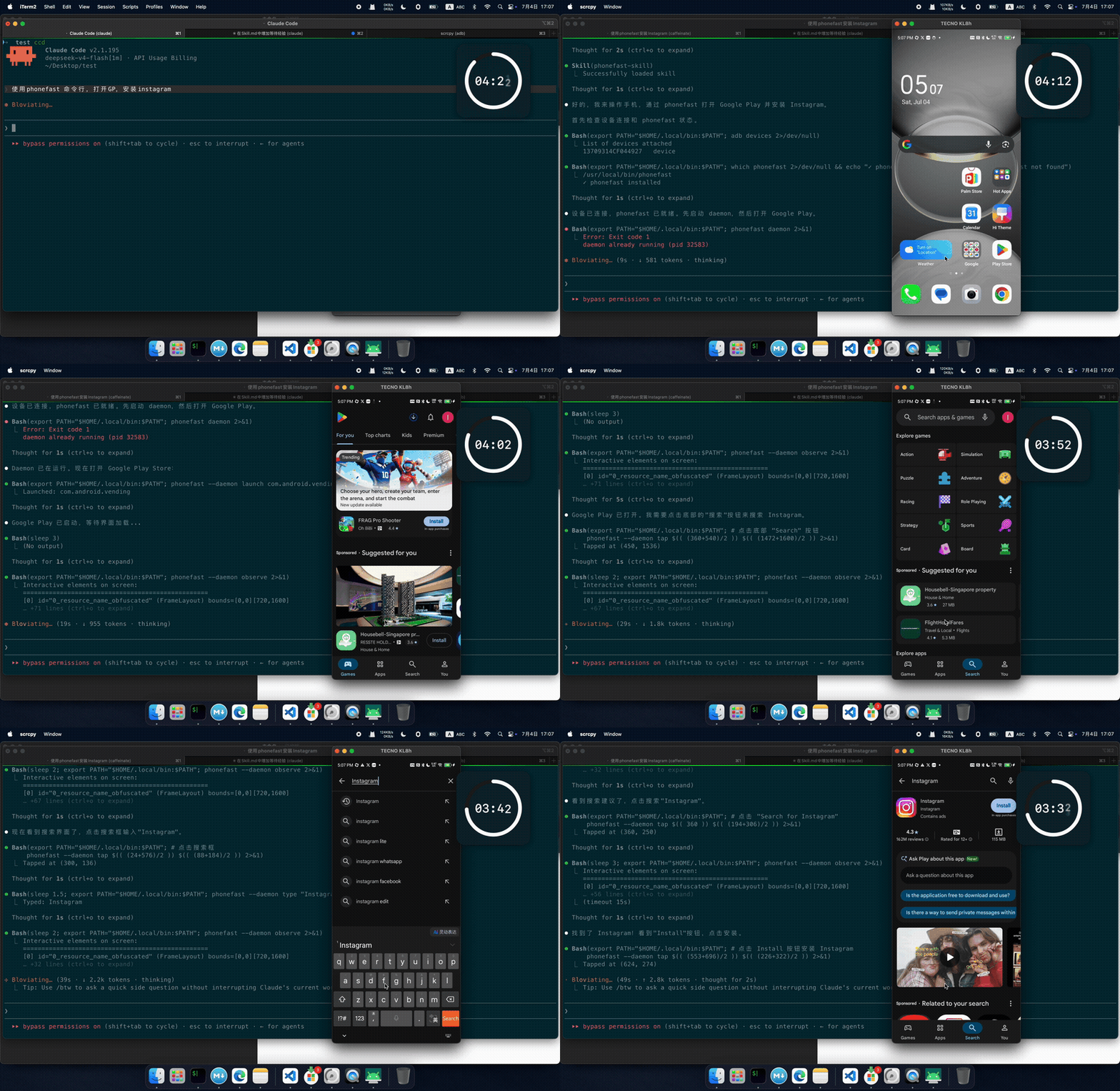
Live Demo: Claude Code + phonefast
4x speed — Real execution of Claude Code + phonefast.
Prompt:Use phonefast skill: open Google Play and install Instagram
Performance
phonefast's daemon mode delivers consistently low latency across all operations. Below are the results from a 12-hour stress test (v1.0.11, 145,843 operations, 100% success rate, zero reconnects):
| Operation | P50 | P95 | P99 | Notes |
|---|---|---|---|---|
tap |
13ms | 13ms | 14ms | Touch at coordinates |
back / home / press_key |
12-13ms | 13ms | 14ms | Hardware key events |
screenshot |
28ms | 126ms | 128ms | H.264 keyframe → PNG |
observe |
28ms | 126ms | 129ms | Screenshot + UI (atomic) |
get_ui_elements |
46ms | 132ms | 151ms | UI tree via UISocketHandler |
ocr |
81ms | — | — | Vision ANE detect + ONNX rec (14 boxes avg) |
swipe |
318ms | 322ms | 323ms | Gesture (includes 300ms duration) |
type_text / launch_app / status |
1ms | 1-2ms | 2-4ms | Fire-and-forget semantics |
wait |
33ms | 33ms | 33ms | Sleep command |
Key benchmarks:
- Daemon mode response time: <13ms for touch and key operations
- Screenshot P50: 28ms (4.3x faster than v1.0.0's 121ms)
- OCR: 81ms avg (onnx) / 58ms avg (ncnn, 28% faster) — Vision ANE detect + PP-OCR v3 rec, 20 images × 15 rounds
- Real physical memory: ~16MB steady-state (verified via vmmap)
- 12-hour stress test: 145,843 ops, 100% success, 0 reconnects
- 200 consecutive screenshots: P50 = 12ms, P95 = 13ms (hot decoder)
Detailed benchmark history, version comparison, and methodology at docs/benchmark.md.
Getting Started
Installation
Prerequisites: Go 1.21+, adb, ffmpeg, git, onnxruntime (see below)
ONNX Runtime Setup
The plain build loads libonnxruntime from the system at runtime. The -full
build embeds it (macOS arm64 only) so no system library is needed.
If you use the plain build or want to run OCR, install ONNX Runtime:
# ── macOS ──
brew install onnxruntime

# ── Linux (Ubuntu/Debian) ──
# Option 1: system package (Ubuntu 24.04+)
sudo apt install libonnxruntime-dev

# Option 2: manual download from GitHub releases
# amd64:
wget https://github.com/microsoft/onnxruntime/releases/download/v1.27.1/onnxruntime-linux-x64-1.27.1.tgz
tar -xzf onnxruntime-linux-x64-1.27.1.tgz
sudo cp onnxruntime-linux-x64-1.27.1/lib/libonnxruntime.so* /usr/local/lib/
sudo ldconfig

# arm64:
wget https://github.com/microsoft/onnxruntime/releases/download/v1.27.1/onnxruntime-linux-aarch64-1.27.1.tgz
tar -xzf onnxruntime-linux-aarch64-1.27.1.tgz
sudo cp onnxruntime-linux-aarch64-1.27.1/lib/libonnxruntime.so* /usr/local/lib/
sudo ldconfig
Note: The version must match the ORT version phonefast was built against
(currently 1.27.1). If you prefer zero-dependency, use the-fullbuild or
download the-fullrelease binary for macOS arm64.
# Build from source — two variants:
bash scripts/build.sh                       # Current platform (plain)
bash scripts/build.sh --full                # Also build self-contained -full
bash scripts/build.sh --all                 # Cross-platform build + packaging

# Or download prebuilt binary from GitHub Releases
# https://github.com/gezihua123/phonefast/releases
Build variants:
| Variant | Size | OCR Runtime | Runtime Dependency | Best For |
|---|---|---|---|---|
| plain (default) | 24MB | System libonnxruntime | onnxruntime installed | Environments with onnxruntime |
-full (--full) |
42MB | Embedded ORT 1.27.1 | None (self-contained) | Environments without onnxruntime |
Both variants embed PP-OCR v3 models (det + rec). The -full variant embeds the
ONNX Runtime shared library (macOS arm64 only) for single-file zero-dependency
deployment. NCNN engine is opt-in (-tags ncnn, 28% faster, see docs/DEV.md).
Build details (cross-compilation, FFmpeg static linking, Python build tool) → docs/DEV.md
Quick Start
# List connected devices
phonefast devices

# Default daemon mode — instant response (<10ms)
phonefast tap 540 960
phonefast back
phonefast screenshot /tmp/screen.png

# Direct mode — new connection each time (~2.5s), add --foreground
phonefast --foreground tap 100 200

# Start MCP server (for AI assistants)
phonefast serve
Command Reference
Format
phonefast [--foreground|--daemon] <command> [args...]
- Default uses daemon mode (auto-starts daemon), latency <10ms.
--foreground/--direct— Direct mode, creates a new scrcpy connection each time, ~2.5s.--daemon— Explicitly specify daemon mode (same as default, kept for compatibility).
Touch Operations
tap — Tap at coordinates
phonefast [--foreground|--daemon] tap <x> <y>
| Parameter | Description |
|---|---|
x |
X coordinate (pixels) |
y |
Y coordinate (pixels) |
phonefast tap 540 960                 # Tap screen center
phonefast --foreground tap 100 200    # Direct mode
tap_element — Tap UI element
phonefast [--foreground|--daemon] tap_element <index|text>
| Parameter | Description |
|---|---|
index |
UI element index (from ui command) |
text |
UI element text or description (fuzzy search) |
phonefast tap_element 5              # Tap the 5th UI element
phonefast tap_element "Settings"    # Tap element containing "Settings" text
swipe — Swipe gesture
phonefast [--foreground|--daemon] swipe <x1> <y1> <x2> <y2> [duration_ms]
| Parameter | Description | Default |
|---|---|---|
x1 y1 |
Start coordinates | — |
x2 y2 |
End coordinates | — |
duration_ms |
Swipe duration (milliseconds) | 500 |
phonefast swipe 540 1600 540 400 500   # Swipe up
phonefast swipe 200 500 800 500 300    # Swipe right 300ms
Text Input
type — Input text
phonefast [--foreground|--daemon] type <text>
Inputs text into the current focused input field.
phonefast type "Hello World"
phonefast type "Search keyword"
Key Operations
back — Back key
phonefast [--foreground|--daemon] back
home — Home key
phonefast [--foreground|--daemon] home
key — Send key event
phonefast [--foreground|--daemon] key <keyname|keycode>
Supported key names:
| Key Name | Description |
|---|---|
enter |
Enter |
tab |
Tab key |
delete / backspace |
Delete |
space |
Space |
escape / esc |
Escape key |
volume_up / volume_down |
Volume +/- |
volume_mute |
Mute |
power |
Power button |
menu |
Menu key |
search |
Search key |
camera |
Camera key |
back |
Back (same as back command) |
home |
Home (same as home command) |
dpad_up / dpad_down / dpad_left / dpad_right / dpad_center |
D-pad keys |
page_up / page_down |
Page up/down |
media_play_pause / media_stop / media_next / media_previous |
Media controls |
phonefast key enter
phonefast key backspace
phonefast key volume_up
phonefast key power
phonefast key dpad_down

# Can also use keycodes directly
phonefast key 4       # BACK
phonefast key 3       # HOME
phonefast key 66      # ENTER
App Operations
launch — Launch app
phonefast [--foreground|--daemon] launch <package>
Uses Android package name (display names like "Settings" or "Chrome" are not supported).
phonefast launch com.android.settings     # Settings
phonefast launch com.android.chrome        # Chrome
phonefast launch com.tencent.mm             # WeChat
Screen Capture & Analysis
screenshot — Take screenshot
phonefast [--foreground|--daemon] screenshot [file]
| Parameter | Description | Default |
|---|---|---|
file |
Save path | stdout (base64) |
phonefast screenshot /tmp/screen.png       # Save as PNG
phonefast screenshot                        # Output base64
ui — UI element list
phonefast [--foreground|--daemon] ui
Outputs all interactive UI elements on the current screen (max 50), including index, text, resource ID, class name, and clickable state.
[0] id="content" (FrameLayout)
[1] id="webView" (FrameLayout)
[2] text="Search" (EditText) [clickable]
[3] text="Settings" id="settings_btn" (Button) [clickable]
observe — Screenshot + UI
phonefast [--foreground|--daemon] observe
Concurrently captures screenshot and UI data in a single call for a complete screen state snapshot.
OCR — On-screen Text Recognition
phonefast [--foreground|--daemon] ocr
Recognizes text on the current screen using PP-OCR v3 (detection + recognition).
Returns text content with bounding boxes and confidence scores.
phonefast ocr                    # Recognize text on screen
phonefast --ocr-engine ncnn ocr  # Use NCNN engine (28% faster, needs -tags ncnn build)
phonefast --ocr-vision false ocr # Disable Vision ANE, use ONNX detection only
Performance (Apple M4 Pro, 20 images × 15 rounds, Vision ANE detection):
| Engine | Avg | Per-box | Notes |
|---|---|---|---|
| onnx (default) | 81ms | 5.73ms | Batch rec, dynamic width, clean output |
| ncnn (opt-in) | 58ms | 4.08ms | Per-box rec, 28% faster, minor phantom-tail artifacts |
OCR engine details, accuracy comparison, and NCNN setup → docs/DEV.md
Utility Commands
wait — Wait
phonefast [--foreground|--daemon] wait <ms>
| Parameter | Description | Default |
|---|---|---|
ms |
Milliseconds to wait | 1000 |
status — Daemon status
phonefast [--foreground|--daemon] status
# Example output
daemon running (pid 60977)
  device:    13709314CF044927 (488x1080)
  control:   true
  ui:        true
devices — List devices
phonefast devices
# Example output
Connected devices:
  13709314CF044927  device  [TECNO_KL8h]
run — JSON single operation
phonefast [--foreground|--daemon] run '<json>'
Suitable for script automation.
phonefast run '{"action":"tap","args":{"x":540,"y":960}}'
phonefast run '{"action":"screenshot"}'
phonefast run '{"action":"back"}'
phonefast run '{"action":"list_devices"}'
Supported actions: tap, tap_element, swipe, back, home, type_text, press_key, launch_app, screenshot, get_ui_elements, observe, list_devices, wait.
Daemon Management
The daemon is a background persistent process that holds long-lived device connections and receives JSON-RPC requests via Unix Socket.
# Start daemon (background)
phonefast daemon

# Foreground mode (view real-time logs)
phonefast daemon --foreground

# Specify device serial
phonefast daemon --serial 13709314CF044927

# Custom socket/PID file paths
phonefast daemon --socket /tmp/my-phone.sock

# Check daemon status
phonefast daemon --status

# Stop daemon
phonefast daemon --stop
Auto-management:
- When executing commands with
--daemonflag, the daemon auto-starts in the background if not already running - If the daemon process exists but is unresponsive, it is automatically killed and restarted
- Calling
phonefast daemonmultiple times will not start duplicate instances (exits if already running) - Three-level keepalive detects connection failures and recovers within 10 seconds
Detailed daemon lifecycle, startup flow, and recovery mechanism → docs/CLI.md#5-daemon-management
MCP Server
phonefast can serve as an MCP (Model Context Protocol) server, allowing AI assistants like Claude Desktop to control the phone directly.
# SSE mode (default port 8019)
phonefast serve

# Custom port
phonefast serve --port 8080

# Custom path
phonefast serve --path /mcp

# STDIO mode (Claude Desktop integration)
phonefast serve --transport stdio
Client Configuration
SSE mode:
{
  "mcpServers": {
    "phonefast": {
      "url": "http://localhost:8019/Phone/sse"
    }
  }
}
STDIO mode:
{
  "mcpServers": {
    "phonefast": {
      "command": "phonefast",
      "args": ["serve", "--transport", "stdio"]
    }
  }
}
MCP Tool List
| Tool | Parameters | Description |
|---|---|---|
list_devices |
— | List connected Android devices |
screenshot |
— | Capture current screen (base64 PNG) |
get_ui_elements |
— | Get interactive UI elements |
observe |
— | Screenshot + UI elements (single call) |
tap |
x, y |
Tap at coordinates |
tap_element |
index or text |
Tap UI element |
swipe |
start_x, start_y, end_x, end_y, duration_ms |
Swipe gesture |
type_text |
text |
Input text |
back |
— | Back key |
home |
— | Home key |
press_key |
keycode or key |
Send key event |
launch_app |
package |
Launch app (package name only, e.g. com.android.settings) |
wait |
duration_ms |
Wait for N milliseconds |
Mode Comparison
| Daemon Mode | Direct Mode | |
|---|---|---|
| Command format | phonefast <cmd> (default) |
phonefast --foreground <cmd> |
| Response speed | <10ms | ~2.5s |
| Resource usage | Single daemon process in background | Creates/destroys connection each time |
| Use case | Batch operations, script automation | Ad-hoc single operations |
| Auto-management | Auto-start/restart/recovery | Stateless |
Reference Docs
| Document | Content |
|---|---|
| docs/CLI.md | Full CLI manual: install, commands, daemon, MCP, architecture, logging, recovery |
| docs/DEV.md | Development notes: architecture decisions, build & release, cross-compilation |
| docs/benchmark.md | Full benchmark history: version comparison, methodology, memory analysis |
| docs/phonefast.md | Product comparison: phonefast vs agent-device vs adb |
| CHANGELOG.md | Version release history |
License
MIT
Reviews (0)
Sign in to leave a review.
Leave a reviewNo results found