ghost-vessel
Health Warn
- License — License: MIT
- Description — Repository has a description
- Active repo — Last push 0 days ago
- Low visibility — Only 6 GitHub stars
Code Warn
- network request — Outbound network request in player/vad/bundle.min.js
Permissions Pass
- Permissions — No dangerous permissions requested
No AI report is available for this listing yet.
A video-call avatar frontend for your local LLM agent (Hermes/OpenClaw) — replaces the messenger chat and serves the agent's exact slash-command menu. Open-core engine: emotion, mood, voice, build-your-own-avatar pipeline. GPU-free · MIT.
Ghost Vessel — give your local agent a vessel
Bind your local LLM agent (the ghost) into an avatar body (the vessel).
A monitor-resident, video-call-style avatar that fronts your personal AI agent
(Hermes / OpenClaw, or anything) — a full replacement for the Telegram/messenger chat
you keep open to talk to it, serving that agent's exact slash-command menu right in the
avatar's window. Not a waifu toy: a real agent client that happens to have a face.
Your agent replies; the avatar performs it: fine-grained facial emotion beats, a
persistent mood that sinks when you scold it and brightens when you praise it, idle
states that breathe, blink, and sometimes rest their eyes — all from pre-rendered
clips, so the GPU stays free at runtime (no live inference).
Demo
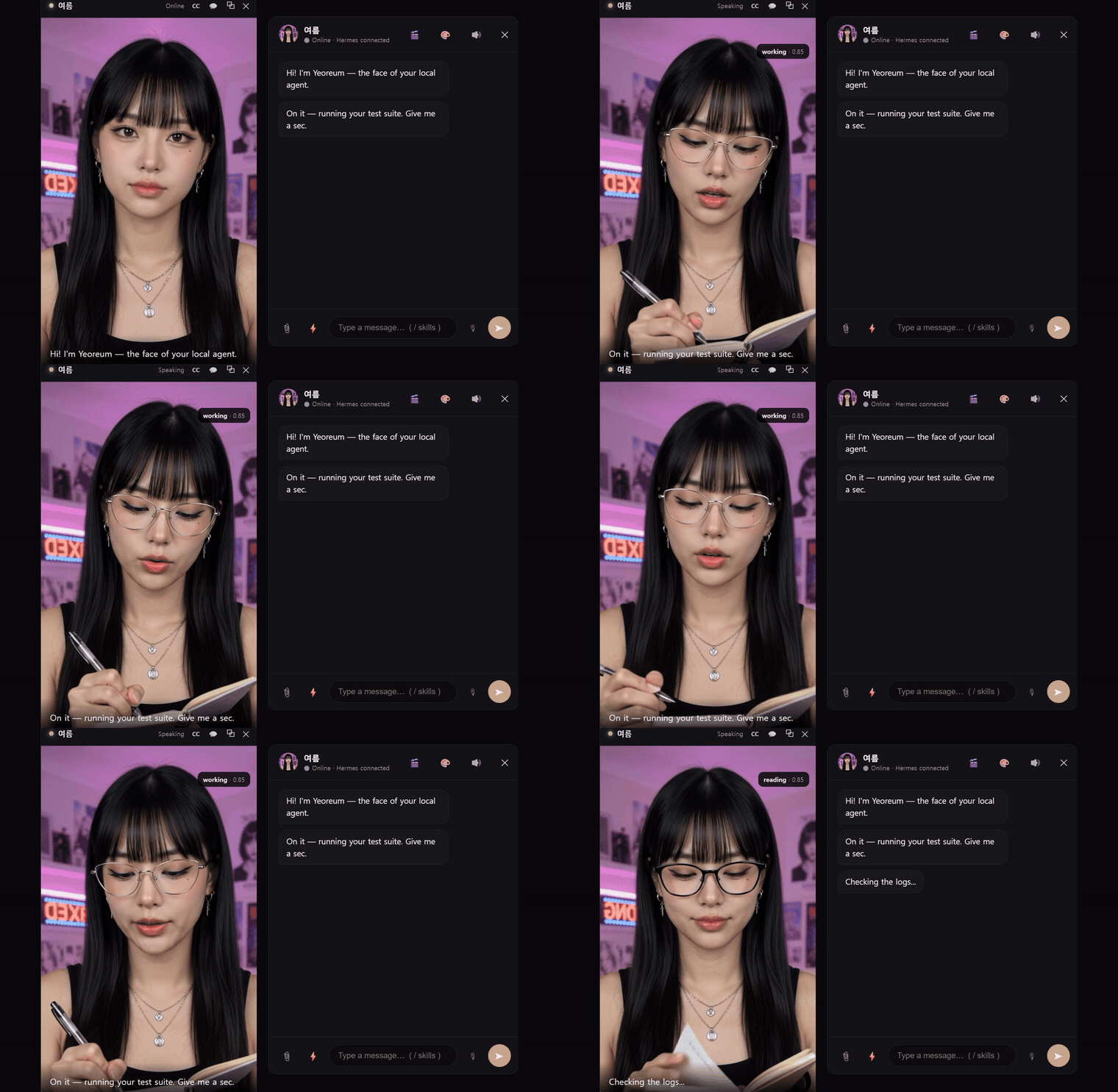
▶ Watch the full 45s demo with sound — emotion beats, the real Hermes slash menu, work loops, code cards, human-in-the-loop approval, and the floating monitor-resident windows.
📦 Download for Windows — dependency-free (no Python). Pay-what-you-want lifetime key (package from $5, preset from $1) at ghostvessel.space.
How it works
you type ──► chat UI ──► bridge ──► relay connector ──► your agent (Hermes/OpenClaw)
                                                            │ reply (emotion-tagged)
video window ◄── performance player ◄── parser (3 planes) ◄─┘
  ▲ emotion beat clips + mood-based idle           │
  └── mood/affinity tracker (praise/scold, persistent state)
- 3-plane output: the reply splits into action (emotion beats) / dialogue (spoken
via local TTS) / data (code & files → chat cards, never read aloud). - Emotion engine: expression segments (valence/arousal-tagged), tag-less fallback
(emoji/keyword inference), blink-aligned seamless idle loops, a head-pose "settle
gate" so expressions reveal when the head is frontal. - Mood & affinity: short-term mood decays toward a long-term relationship baseline.
Keep scolding → it rests in a subdued idle. Persistent across restarts. - Agent-agnostic: Hermes (relay connector contract, WS server) and OpenClaw
(gateway WS client) adapters, plus a demo responder with zero setup. The agent is
told only the emotions your avatar actually has, so partial avatars just work. - The messenger's menu, in the avatar: type
/and the chat pulls your agent's
live command menu — the same one you'd see in Telegram (e.g. 52 commands for Hermes:/model,/new,/goal,/status,/compress, …), served per-agent (Hermes or
OpenClaw). A real control surface, not a canned list; commands pass straight to the agent. - Swappable voice: local (Qwen3-TTS with voice cloning, MeloTTS, Piper) or cloud
(Edge — free & keyless, ElevenLabs, any OpenAI-compatible) — picked in settings, with
an in-app installer that surfaces each engine's deps. Voice input via VAD + local STT.
Quickstart (Windows)
- Prereqs: Python 3.11, an agent (optional — demo mode works without one).
- Get an avatar preset → drop its folder into
presets/, setpresets/active.txt. - Link your agent:
python bridge/setup_connector.py(picks Hermes/OpenClaw,
Windows/WSL2, writes the connection + injects the avatar output contract into the
agent's prompt, scoped to this channel). - Run the stack — TTS (:8899), bridge (:8900), connector (:8901), and a static server for
the player (python -m http.server 8777). Then either openhttp://127.0.0.1:8777/player/index.htmlin a browser, or run the desktop shell
(cd src-tauri && cargo tauri dev) for a frameless, always-on-top avatar window.
(Each component is a small local server — wire up a launch script for your own setup.)
Avatars (presets)
An avatar is a pure-data bundle (clips + persona + theme + voice + emotion map) —
no code runs, so installing one is safe. Presets are folder-mapped: drop a folder
of clips named by convention (happy.mp4, angry.mp4, idle.mp4, …) into presets/
and the engine maps them automatically — the folder name is the avatar's name.
- Get the demo avatar (Yeoreum) — pay-what-you-want: full package from $5, preset (.gvp) only from $1 — at ghostvessel.space.
- Commission a custom avatar — made to order: open an issue or ask at ghostvessel.space.
- Make your own — the full, reproducible build method (neutral still → image-to-video
expressions → loop-cut segments → package; LivePortrait works as a free local alternative)
and the bundle/filename spec are indocs/PRESET_FORMAT.md. Keep it SFW; own your likeness rights.
The repo ships engine only — no avatar bundled (presets/_template/ is a starter
skeleton). Bring your own, buy one, or commission one.
License
Engine: MIT (see LICENSE). Presets are separately licensed by their creators.
Open-sourced in donation-ware spirit — issues / PRs welcome. 🛠️
Reviews (0)
Sign in to leave a review.
Leave a reviewNo results found