gas
skill
Fail
Health Warn
- License — License: MIT
- Description — Repository has a description
- Active repo — Last push 0 days ago
- Low visibility — Only 5 GitHub stars
Code Fail
- rm -rf — Recursive force deletion command in scripts/build-release.sh
- rm -rf — Recursive force deletion command in scripts/make-dmg.sh
Permissions Pass
- Permissions — No dangerous permissions requested
No AI report is available for this listing yet.
Never hit your Claude or Codex limit by surprise. Live session and weekly usage in the macOS menu bar
README.md
gas
A macOS menu bar app that shows how much of your Claude and OpenAI (Codex / ChatGPT) plan you have used: the 5-hour session limit, the weekly limit, and per-model weekly limits.
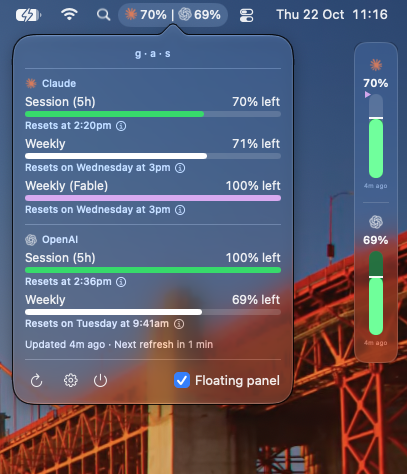
Unofficial. gas is not affiliated with Anthropic or OpenAI. It reads endpoints that are not documented, so a provider change can stop it until gas is updated.
Features
- Menu bar label: the percent for each provider, at a glance.
- Menu: each limit with its percent and reset time, and the time of the next refresh.
- Floating panel: a small glass strip that stays on top, shown by default. Drag it by the handle that shows when you point at it; the curved arrow next to the handle switches between a vertical and a horizontal layout. In Settings → Display, Separate bars splits each provider's bar into separate session and weekly bars; a plan with only a weekly limit shows one bar.
- Alerts: a warning and a critical level (65% and 85% by default) that you can change.
- Remaining or Used: show the percent left (the default), or the percent used.
- First-time setup: if Claude Code or Codex CLI is missing or signed out, a setup window installs it with the official installer and opens the sign-in page, after one click.
- Claude token renewal: when the Claude Code token expires, gas lets Claude Code renew it (see below).
- Copy diagnostics: Settings → Troubleshooting copies a report with no tokens in it.
Requirements
- macOS 14 or later. The glass look needs macOS 26.
- For Claude: Claude Code, signed in with a Claude subscription.
- For OpenAI: Codex CLI, signed in with ChatGPT.
Install
- Download the latest
gas-<version>.pkgfrom Releases and open it. - gas is not signed with an Apple Developer ID, so macOS blocks it the first time. Click Done, open System Settings → Privacy & Security, and click Open Anyway.
- When you update, macOS asks to let Installer modify apps. Click Allow.
How it works
| Claude | OpenAI | |
|---|---|---|
| Sign-in it reads | Claude Code's Keychain entry, through /usr/bin/security |
~/.codex/auth.json (or $CODEX_HOME) |
| Usage endpoint | api.anthropic.com/api/oauth/usage |
chatgpt.com/backend-api/wham/usage |
- gas refreshes every 5 minutes. A manual refresh is possible once a minute.
- gas only reads the sign-ins. It never changes them.
- When the Claude token expires, gas runs
claude -pone time, which is one short Haiku reply, so that Claude Code renews its own token. gas tries this at most once an hour. You can turn it off in Settings → Providers. - After a rate limit (HTTP 429), gas waits for the time the server gives. If Claude Code turns out to be signed out, gas shows "Not logged in. Run /login in Claude Code."
Privacy
- Tokens are never logged, shown, or sent anywhere except the provider's own usage endpoint.
- No analytics, no telemetry. All state stays on your Mac, in
~/Library/Application Support/Gas.
Build from source
You need Xcode and XcodeGen.
swift test
xcodegen generate && xcodebuild -project AgentUsage.xcodeproj -scheme AgentUsageApp -destination 'platform=macOS' build
To make the .pkg and .dmg, see scripts/README.md.
License
Reviews (0)
Sign in to leave a review.
Leave a reviewNo results found