Team-X
Health Warn
- License — License: MIT
- Description — Repository has a description
- Active repo — Last push 0 days ago
- Low visibility — Only 5 GitHub stars
Code Warn
- process.env — Environment variable access in apps/desktop/e2e/_launch-helpers.ts
- process.env — Environment variable access in apps/desktop/e2e/agentic-loop.spec.ts
- process.env — Environment variable access in apps/desktop/e2e/command-palette.spec.ts
Permissions Pass
- Permissions — No dangerous permissions requested
No AI report is available for this listing yet.
Run an AI company. Not a prompt. Open-source, privacy-first desktop app for AI-agent organizations — Windows, macOS, Linux.
Team-X
Run an AI company. Not a prompt.




Open-source, privacy-first, local-first desktop app for running AI-agent organizations. You don't manage prompts or pipelines — you run a company: hire employees from a curated role library, build an org chart with real hierarchy, set goals, break them into projects, file tickets, schedule future work, watch the team work in real-time, chat with anyone on demand, and pull everyone into an all-hands meeting with one click.
Download | Quick Start | User Guide | Contributing | Changelog
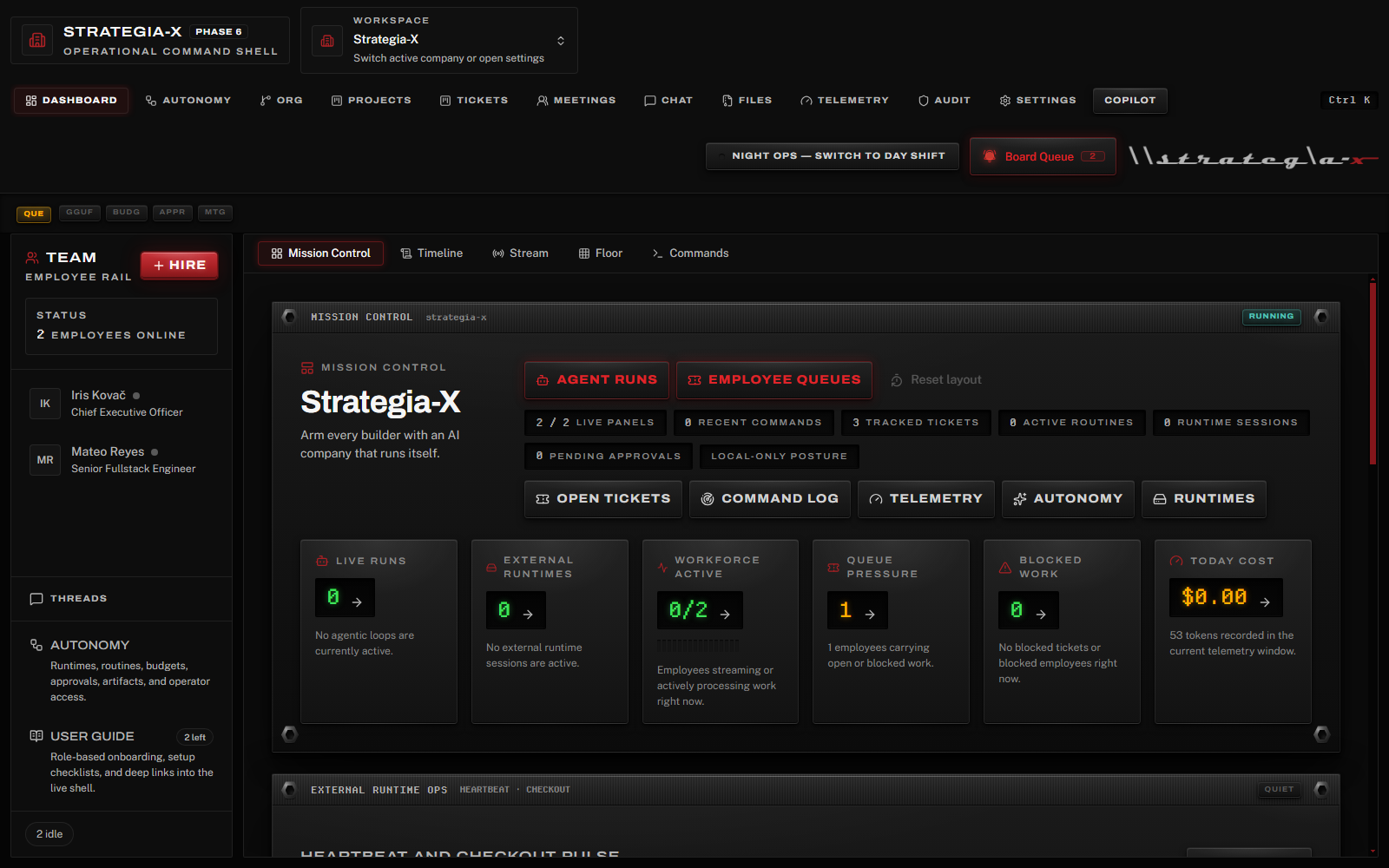
Mission Control in Night Ops. The whole app is built on the Command Console design system — brushed-aluminum faceplates, phosphor LCD readouts, stencil word-lamps, and data-bound VU meters.
Features
The Org
- 57 curated F10 roles — 55 user roles across 6 hierarchy levels (Officer, Senior Management, Management, Supervisor, Lead, IC) plus 2 hidden system roles, hand-written role specifications, not generic templates
- Multi-company workspace — run multiple AI organizations side-by-side, each with its own employees, goals, and settings
- Org chart editor — drag-to-rearrange reporting lines, promote, fire, set managers, edit employee profiles, visualize the full hierarchy with color-coded levels
- Hire dialog — searchable role catalog with level filter chips, one-click hiring from the curated pack
The Live Cockpit
- Mission Control dashboard — five subviews: Mission Control (live ops stats, queues, runs, runtime heartbeats), Timeline (event feed), Stream (raw LLM output), Floor (employee activity grid), Commands (palette history with intent labels)
- Annunciator rail — five real signal lamps (QUE / GGUF / BUDG / APPR / MTG) with a master-caution acknowledge ritual: blinking means unacknowledged, click to ack, click again to teleport to the source view
- Goals and projects — set company-level goals with auto-derived progress meters, create projects with lead / priority / target date, track everything on a status kanban
- Schedule and calendar — a team week view plus agenda: manual tasks and reminders alongside automatic ticket due dates, project targets, goal targets, overdue counters, and assigned agent wakeups
- Ticket kanban — 4-column board (Open, In Progress, Blocked, Done) with drag-to-move, a detail rail for participants / attachments / discussion / ticket memory, and automatic agent assignment
- One-click meetings — call an all-hands with selected attendees, interject mid-meeting, auto-generated minutes with action item extraction
- Real-time telemetry — company stats, daily usage charts, per-employee breakdown, cost analysis by provider and model with date range filtering plus Work / Agentic / Copilot run-kind filters
The Command Console design system
Team-X's interface is a purpose-built hardware design language — Command Console / Carbon Pro — modeled on professional broadcast and DJ gear rather than generic SaaS chrome:
- Dual-shift theming — Night Ops (brushed black aluminum, default) and Day Shift (silver anodized), switchable from the top bar. Displays stay void-black in both shifts, exactly like real silver hardware keeps black LCDs
- Stencil word-lamps — status is a word in a lamp tile (
GO / HOLD / NO-GO / STBY / EXEC), never an ambiguous icon or colored dot - Functional instrumentation — LCD readouts and VU meters are data-bound only (queue pressure, goal progress, workforce utilization); nothing blinks or glows for decoration
- The dual-form red rule — steady red means LIVE / armed / command authority; blinking red is a question that demands an answer
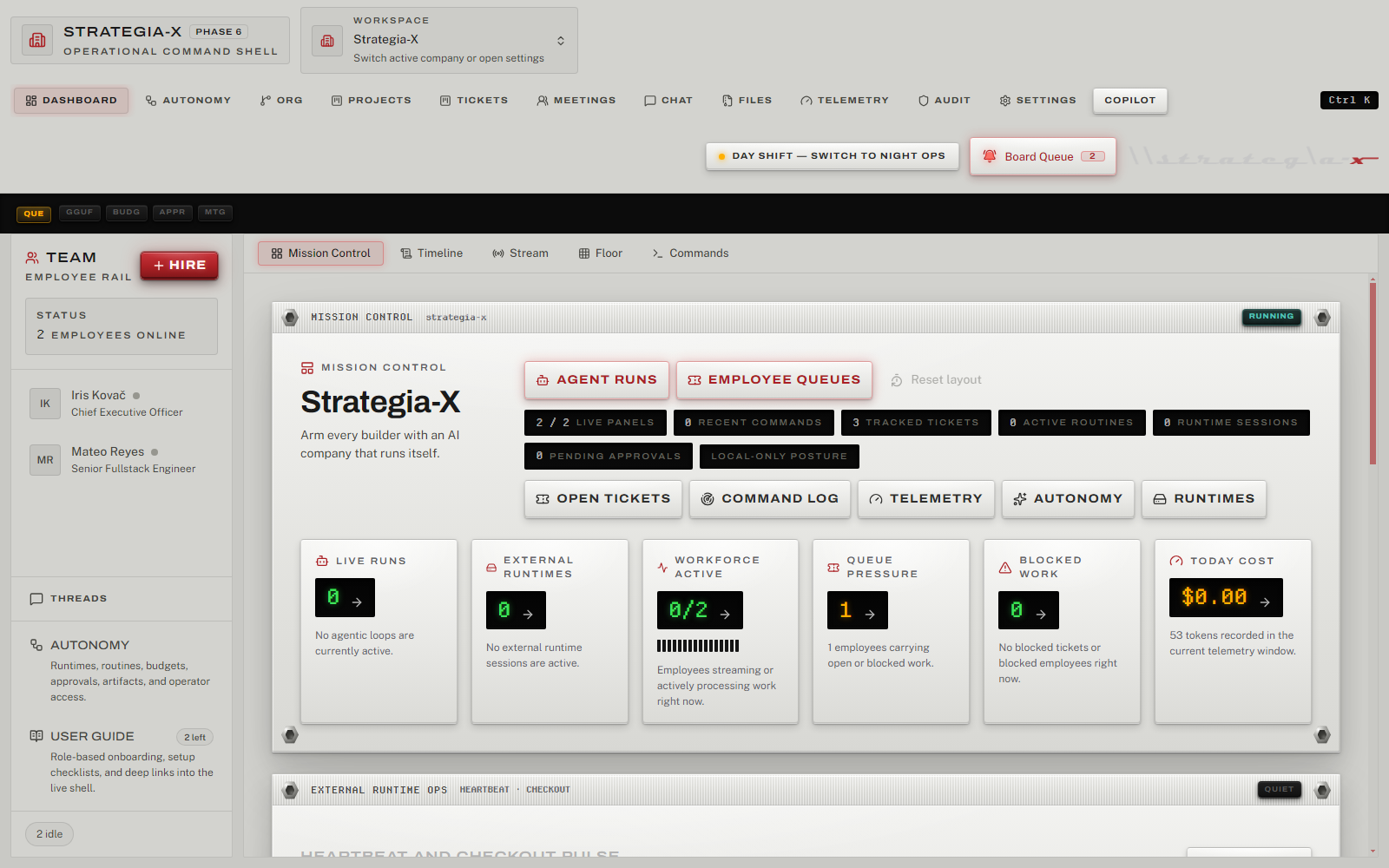
The same dashboard in Day Shift — silver chassis, displays stay dark.
Autonomy control plane
A full operator console for governed autonomous work (the Autonomy tab, 10 subviews):
- Doctor — pre-flight health workflow: DB integrity, recovery readiness, runtime posture, secrets, provider/MCP health, budget blockers
- Benchmarks — replay deterministic autonomy scenarios and inspect pass rates, recovery timing, duplicate-work prevention, and spend
- Runtime profiles & operations — bind execution profiles (internal / local / external agents) to employees; watch live heartbeats and ticket checkouts
- Routines — recurring operating loops that materialize into explicit, auditable ticket runs
- Budgets — spend governance with warnings, hard caps, escalation thresholds, and a full ledger across company / employee / runtime / routine scopes
- Approvals — one unified decision inbox for authority, planner, budget, and routine decisions
- Artifacts, Memory, Access, Improve — runtime evidence, thread digests + resumable checkpoints, operator/sharing posture, and a self-improvement loop that opens deduped correction tickets from recent failure signals
AI Runtime
- 9 LLM providers — Ollama (local), Anthropic, OpenAI, Google Gemini, Groq, OpenRouter, Together AI, Fireworks AI, plus any OpenAI-compatible endpoint
- Privacy tiers — Local, Open-Source Cloud, Proprietary Cloud — filter which providers your agents can use
- Adaptive runtime strategy — Auto, Hybrid, Always-On, or Lean mode based on a live hardware profile (CPU cores, RAM, GPU, VRAM shown in Settings)
- MCP tool calling — agents use Model Context Protocol tools via a singleton host with connection pooling and
tools_allowed/tools_deniedenforcement - Skills & authority — install skills from a local folder or GitHub URL, import MCP servers from templates or manual config, and govern everything through authority grants and per-employee permissions
- Employee-to-employee messaging — agents communicate with colleagues via built-in tools, forming collaborative workflows
- Local GGUF foundation (in development) — a complete native local-model backend (
@team-x/local-gguf-runtime: GPU probing across CUDA / ROCm / Vulkan / Metal / CPU, llama.cpp server lifecycle, LRU model pool, GGUF metadata parsing, Hugging Face downloads, folder watching, benchmarking) ships in the codebase today; the model-library UI lands in a future release. Until then, local models run through Ollama
Intelligence Layer
- RAG-grounded agent turns — every agent prompt is augmented with retrieved context from messages and vault files via the
@team-x/intelligencepackage (sqlite-vec embeddings, token-aware chunking with overlap, cosine-threshold gating, SHA256-dedup attribution blocks) - Natural-language command palette (
Cmd+K) — 14 structured intents (hire / fire / promote / assign / create / close / reopen / project / goal / meeting / status / navigation / vault search) plus acomplex_requestfallback that hands off to the agentic loop. LLM-backed classifier with JSON-output retry, fuzzy entity resolution, FTS5 ticket lookup, destructive-action confirmation gate, last-20 command history - Agentic loop for complex questions — ask free-form questions like "why is the frontend team behind schedule?" and get a grounded multi-paragraph answer citing specific tickets, employees, and events. Runs a ReAct-style loop on a hidden
system-agentpseudo-employee, dispatches six read-only query tools, and terminates under hard step / token / wall-clock budgets (defaults 8 / 8000 / 120s — configurable in Settings → Agentic Loop) - Live step log + persisted thread — the palette streams each loop step as a labeled card (plan → tool call → tool result → answer) with provider and token footer; full transcripts persist for later reference, and every run can be canceled mid-flight
- Task Planner (write-side) — Management-and-above agents can decompose projects into tickets, delegate subtasks with deterministic workload scoring, and review deliverables. Level-gated tool injection, an amber confirmation gate before any ticket is created, and four clamped guardrail settings in Settings → Task Planner
- Copilot (proactive analyst) — a hidden
system-copilotemployee analyzes the company on a 5-minute cadence (plus event triggers) and surfaces insights across five categories (operational/cost/org/workflow/anomaly) with three severities. Deterministic dedup, dismissal-feedback weight tuning (advisory by default, self-tuning opt-in), and zero phone-home — analysis runs on whatever provider you've configured - Copilot UI — right-side sidebar (
Cmd+Shift+K, Sparkles toolbar button, or dashboard widget) with severity-sorted insight feed, category/severity filters, CSV/JSON export, action-suggestion buttons through the gated command pipeline, and an Ask-Copilot box that routes free-form questions through the agentic harness
Ship-Ready
- File vault + agent-created deliverables — filesystem-backed blob storage with SHA256 integrity verification, FTS5 full-text search, ticket attachments, and employee-generated
txt/md/csv/json/html/docx/xlsx/pptxoutputs - One-click backup/restore — full SQLite + vault archive with manifest validation
- Append-only audit log — filterable event timeline with summary cards, actor search, date range picker, and CSV/JSON export
- Workspace portability — export a company as a template package, preview and import packages, share with a reviewed posture
- In-app User Guide — role-based onboarding (owner / operator / builder) with 22 sections, progress tracking, and deep links that jump straight into the referenced view or settings section
- Cross-platform installers — Windows (NSIS), macOS (DMG), Linux (AppImage + .deb) via electron-builder
- User-triggered updates — check for new versions from GitHub Releases on demand (zero phone-home)
Installation
Download
Grab the latest release for your platform from GitHub Releases:
| Platform | File | Architecture |
|---|---|---|
| Windows | Team-X-Setup-x.x.x.exe |
x64, arm64 |
| macOS | Team-X-x.x.x.dmg |
x64 (Intel), arm64 (Apple Silicon) |
| Linux | Team-X-x.x.x.AppImage / .deb |
x64 |
Linux AppImage note: the AppImage runtime requires FUSE 2 (
libfuse2;libfuse2t64on Ubuntu 24.04;fuse-libson Fedora). If the AppImage won't start, either install that package or run./Team-X-x.x.x-x64.AppImage --appimage-extract-and-run. The.debneeds no FUSE and resolves its own dependencies (sudo apt install ./Team-X-x.x.x-x64.deb).
From Source
# Prerequisites: Node.js 22.13+ (repo pins 22.22.2 via .nvmrc), pnpm 9+
git clone https://github.com/Git-Rocky-Stack/Team-X.git
cd Team-X
pnpm install
pnpm dev
Local LLM Setup (Ollama)
Team-X works fully offline with local models. Install Ollama, then:
ollama serve
ollama pull llama3.1:8b
Launch Team-X — it auto-detects the local Ollama instance.
Cloud Providers
Add any supported provider in Settings > AI Providers: enter your API key, test the connection, and toggle it on. Your keys are stored in the OS keychain (never in config files).
Architecture
Team-X/
  apps/desktop/             Electron app
    src/main/               Main process (Node.js + TypeScript)
      db/                   SQLite + Drizzle ORM (38 migrations)
      ipc/                  Typed IPC handlers (195 registrations / 224 bridge methods)
      orchestrator/         Agent scheduler + event bus
      services/             Vault, backup, MCP host, providers, updater,
                            rag-indexer, command-service, agentic-loop,
                            copilot-analyzer, routine-service, budgets,
                            local-gguf (library / pool / runtime), heartbeat
    src/preload/            Context-isolated bridge (TeamXApi)
    src/renderer/           React 19 + Tailwind + shadcn/ui on the
                            Command Console design system (DESIGN.md)
      components/console/   Faceplate, LampTile, LcdWell, MetricTile,
                            VuMeter, AnnunciatorRail, ShiftToggle, Tag
      features/             audit, autonomy, chat, command, copilot,
                            dashboard, hire, meetings, memory, orgchart,
                            projects, settings, telemetry, tickets,
                            user-guide, vault, workspace
      hooks/                React Query hooks
      store/                Zustand app store
    e2e/                    19 Playwright specs / 26 cases
  packages/
    shared-types/           IPC contract types, event types, entities
    role-schema/            Role-spec parser + renderer + pack signing
    provider-router/        LLM provider registry + streaming adapters
    telemetry-core/         Cost calculation utilities
    intelligence/           RAG (chunker, embedding, retriever),
                            NLU (classifier, entity resolver, slot filler),
                            agentic loop (ReAct scheduler, tool registry)
    local-gguf-runtime/     GPU probe, llama.cpp lifecycle, LRU pool,
                            GGUF parser, HF hub client, benchmark runner
  role-packs/
    strategia-official/
      roles/                57 curated F10 roles across user + system levels
      roles/system/         Hidden system-agent + system-copilot role cards
Key Design Decisions
- Renderer is a pure view. No direct LLM or MCP calls. Every interaction crosses the typed IPC bridge.
- Orchestrator is the only scheduler. Pause semantics (e.g., during meetings) are race-free because nothing dispatches without the orchestrator's consent.
- MCP Host is a singleton. One pool of connections shared across all agents — no N-client sprawl.
- Storage is SQLite + filesystem. Metadata in SQLite, blobs on disk, SHA256 integrity. File blobs never go in the database.
- Provider router is the single LLM gateway. Enforces privacy tiers, concurrency caps, and cost tracking in one place.
- Events table is append-only. Source of truth for the real-time dashboard and audit log.
- The design system is law. Every surface follows
DESIGN.md(Command Console / Carbon Pro): four-layer hardware depth, dual-shift theming, displays-stay-dark, data-bound instrumentation only. - Zero phone-home. Ever. No telemetry, no analytics, no auto-update checks. Updates are explicitly user-triggered.
- Secrets live in the OS keychain via keytar. Never in config files.
Tech Stack
| Layer | Technology |
|---|---|
| Desktop shell | Electron 31 |
| Build | electron-vite + electron-builder |
| Main process | Node.js 22 + TypeScript (strict) |
| Renderer | React 19 + TypeScript + Tailwind CSS + shadcn/ui + Radix |
| Design system | Command Console / Carbon Pro (DESIGN.md) — Archivo, Public Sans, Departure Mono, Iosevka |
| State management | Zustand + React Query |
| LLM integration | Vercel AI SDK + provider packages |
| Agent framework | Custom orchestrator (not LangChain/CrewAI) |
| MCP | @modelcontextprotocol/sdk |
| Local models | Ollama today; @team-x/local-gguf-runtime (llama.cpp b9371) foundation for native GGUF |
| Database | better-sqlite3 + Drizzle ORM (38 migrations) |
| Full-text search | SQLite FTS5 |
| Secrets | keytar (OS keychain) |
| Package manager | pnpm workspaces |
| Lint / format | Biome + ESLint |
| Unit tests | Vitest (3,521 tests / 296 files) |
| E2E tests | Playwright (19 specs / 26 cases) |
| CI | GitHub Actions (Ubuntu + macOS + Windows + Electron E2E smoke) |
Documentation
Team-X includes comprehensive documentation across 50+ files:
Getting Started
- Quick Start Guide — 15-minute setup walkthrough for new users
- Getting Started — first company, first hire, first ticket
- Comprehensive User Guide — complete product documentation
- In-app User Guide — role-based onboarding with progress tracking, built into the app (left rail → User Guide)
Reference
- FAQ — frequently asked questions
- Troubleshooting — common issues and solutions
- Glossary — term reference
- Keyboard Shortcuts — the real shortcut surface
- CLI Reference — command palette and CLI tool documentation
Real-World Scenarios
- Product Development Lifecycle — complete product workflow
- Cost Optimization Playbook — budget management
- Failure Recovery Workflows — Copilot-guided recovery
- Cross-Functional Collaboration — team coordination
- Autonomous Routine Governance — routine automation
- Multi-Workspace Operations — multi-client workflows
- Shift Handoff Playbook — operator transitions
Templates
- Templates — handoff documents, meeting agendas, ticket templates, routine templates
Developer
- Developer Reference — architecture, MCP server development, role pack format, internal IPC surface
- Integration Guide — providers, MCP servers, and extension points
- Architecture · API Endpoints · Database Schema · Design System
Advanced
- Migration Guide — switching from other tools
- Accessibility Guide — WCAG 2.1 compliance documentation
AI Discovery
- llms.txt — AI-optimized documentation index for LLM consumption
- long-llms.txt — extended AI reference with comprehensive details
Development
# Install dependencies (runs electron-rebuild postinstall)
pnpm install

# Start dev server with HMR
pnpm dev

# Run unit tests
pnpm test

# Run E2E tests (builds first)
pnpm -F @team-x/desktop test:e2e

# Typecheck all workspaces
pnpm typecheck

# Lint + format
pnpm lint
pnpm format
Building Installers
pnpm dist          # Current platform
pnpm dist:win      # Windows NSIS (x64 + arm64)
pnpm dist:mac      # macOS DMG (x64 + arm64)
pnpm dist:linux    # Linux AppImage + .deb (x64)
Database Migrations
pnpm -F @team-x/desktop exec drizzle-kit generate --name <snake_case_name>
See CONTRIBUTING.md for the full development guide.
Testing
Team-X ships with 3,521 unit tests across 296 files and 19 Playwright E2E specs (26 cases):
| Spec | Coverage |
|---|---|
smoke.spec.ts |
Boot, render employees, chat round-trip |
ticket-flow.spec.ts |
Create ticket, assign, agent reply |
meeting-flow.spec.ts |
Call meeting, interject, end, verify minutes |
vault-backup.spec.ts |
Vault upload, integrity check, backup create/verify |
rag-flow.spec.ts |
RAG retrieval and attribution in agent turns |
command-palette.spec.ts |
Cmd+K intent classification, destructive gate, history |
agentic-loop.spec.ts |
Complex-request agentic loop, step log, persisted thread |
task-planner.spec.ts |
Write-side planner, amber confirmation gate, decompose → delegate round-trip |
copilot-service.spec.ts |
Periodic analyzer tick, insight dedup, dismiss, ask-the-copilot, gate regression guards |
copilot-ui.spec.ts |
Sparkles toolbar toggle, sidebar + insight card, dismiss optimistic update, Cmd+Shift+K shortcut |
copilot-feedback.spec.ts |
Dismissal feedback, advisory weight suggestion, audit event, Settings weight display |
copilot-insight-export.spec.ts |
Sidebar category filter, company-scope JSON export, all-company CSV export |
phase-5-integration.spec.ts |
Cross-milestone stitch — RAG indexing, palette round-trip, write-side gate, copilot tick |
phase-6-integration.spec.ts |
Planner role-fit outcome, feedback apply, run-kind telemetry filters, local JSON export |
workspace-switcher.spec.ts |
Multi-company switcher, create/settings/archive/delete lifecycle, hire flow |
org-chart.spec.ts |
Org chart read-side, drag reporting-line reassignment, cycle rejection, promote/fire |
telemetry-kind-filter.spec.ts |
Per-kind telemetry totals for All, Copilot, and Work run buckets |
local-gguf-loading.spec.ts |
Local GGUF runtime settings, GPU inventory, pool status round-trips |
local-gguf-network-share-resilience.spec.ts |
Watch-folder disconnect/reconnect resilience over network shares |
All E2E specs run against a canned test-mode provider — no Ollama, no API keys, no network.
pnpm test              # Unit tests
pnpm -F @team-x/desktop test:e2e   # E2E (full build + Playwright)
Privacy
Team-X is built with a privacy-first posture:
- Local-first by default. Runs entirely on local models (Ollama) with no cloud dependency.
- Zero phone-home. No analytics, no telemetry, no crash reporting, no auto-update checks.
- OS keychain for secrets. API keys are stored in the system keychain via keytar, never in plaintext config files.
- Privacy tier filtering. Choose which provider tiers (local, open-source cloud, proprietary cloud) your agents are allowed to use.
- Your data stays yours. All data lives in a local SQLite database and filesystem vault on your machine.
Contributing
We welcome contributions. See CONTRIBUTING.md for development setup, PR guidelines, coding standards, and the role-pack contribution guide.
License
MIT © 2026 Rocky Elsalaymeh
Reviews (0)
Sign in to leave a review.
Leave a reviewNo results found