humane-agentic-design
Health Pass
- License — License: MIT
- Description — Repository has a description
- Active repo — Last push 0 days ago
- Community trust — 27 GitHub stars
Code Warn
- fs module — File system access in evals/axe/run_axe.js
Permissions Pass
- Permissions — No dangerous permissions requested
No AI report is available for this listing yet.
Humane Agentic Design — a human-centric design method cycle for people and agents
Humane Agentic Design
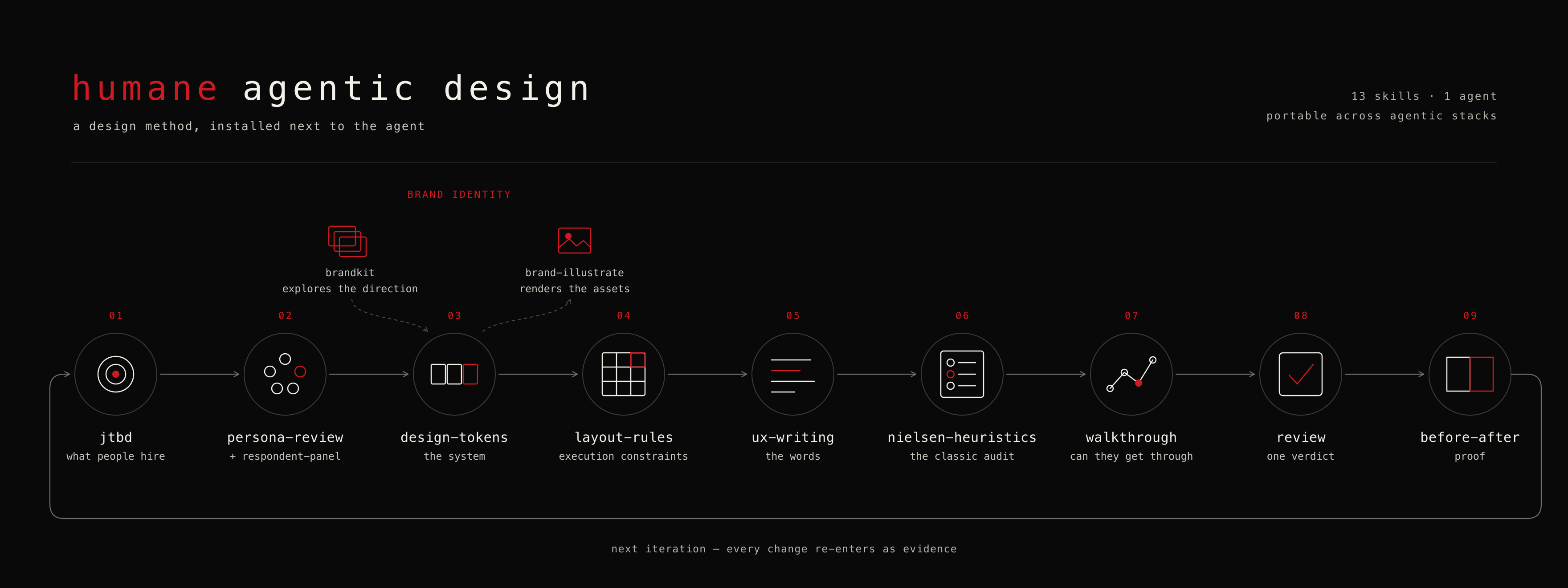
Taught live at the Agentic Design Lab — a 5-week cohort where designers, PMs, and founders build real products with agents using exactly this method.
Agent-produced interface slop is a method problem, not a model problem. A capable model still ships generic UI when it jumps straight to pixels with no idea who it is building for or under which constraints. The fix is not a better model — it is the method, installed next to the agent: what to build, for whom, under which constraints, then proof it got better. This plugin packages that method as a cycle, for people and for the agents working alongside them.
The cycle
Each skill knows its place in the method. Run them in order for a new project, or reach for any one on its own.
Start with humane:setup if this is a fresh machine, or if a skill ever complains it cannot find something. It resolves the configuration (corpus root, token base, image backend, task-export target, language — project file over global over environment over default), checks every dependency the cycle needs, and prints the exact command for each gap. It diagnoses read-only first and installs only what you confirm — and it never touches an API key.
1. jtbd — what people are hiring the product to do
A terminal-first Jobs-to-Be-Done engine. It runs a focused interview one question at a time, kills jargon as you speak it, and captures the four switching forces — Push (what hurts today), Pull (what attracts), Habit (what keeps them stuck), Anxiety (what scares them off). It also ingests material you already have: voice transcripts, customer-review exports, sales-call notes.
- Outputs:
~/jtbd/<slug>/jtbd.json(the machine-readable corpus every later step reads),one-pager.md,messaging-angles.mdderived from the Switch forces, and a GTM brief. - Also does: ODI-style opportunity scoring — each outcome gets importance / satisfaction and one of the eight process stages, so "underserved" is a number, not a hunch. Evidence gets ids (
[E1],[Q2]) you can cite later. - Tools:
scripts/graph.py(interactive corpus viewer, 11 views),scripts/report.py exec-summary <slug>. - Reach for it when: you're deciding what to build, rewriting positioning, or turning a pile of interviews into something decision-grade.
2. prototype — lookable and clickable, cheaply
Every prototype names, before anything is drawn, the single open question it will answer — is this the right structure, does the navigation make sense, does the screen read? A prototype chasing two questions answers neither. The question is settled by the user or a named reviewer's output, never by the maker's own impression.
- The fidelity ladder, in escalation order: ASCII (box-drawing sketch — is this the right structure?), SVG click-dummy (screens as SVG frames with
:targethotspots linking them, one self-contained HTML file — does the navigation make sense?), HTML (real markup — does the screen read?). Pick the lowest rung that can answer the question; an ASCII sketch that is wrong costs one message to redraw. - HTML fidelity is your choice: wireframe (grayscale, system font, no brand — the default when no token set exists) or token-faithful, rendering under the project's compiled
design-tokensCSS when one exists. It never invents a palette to fake it. - Notes travel with the file: every artifact carries an embedded notes block — the question it answers, the job it serves cited from the corpus (or "no corpus; structure is a guess"), and what is fake — so a reviewer doesn't report scaffolding as findings.
- The editable exit: when a design-file backend is available (
design_toolinsetup), a prototype can instead be an editable design file — not a higher rung but the opposite of one: a living document for carrying on designing, where the ladder produces disposable answers. - Outputs: every ladder prototype is a self-contained file at
.design/prototype-<name>.html, resolved viaartifact_path— double-click opens it, no CDN, no build step. A design file is the exception: it lives in the backend's own store and opens in the application, not the browser. - Reach for it when: you want to see or try an idea before committing to structure, tokens, or copy. Reactions go to
respondent-panel, task attempts towalkthrough, surviving structure todesign-tokens, and any string that outlives the prototype toux-writing.
3. persona-review + respondent-panel — who reacts, and how
Two pressure tests in different registers — experts reading carefully, and strangers glancing.
persona-review reviews a document from N stakeholder viewpoints. Pass names (engineer,designer,exec) or let it pick 3 relevant ones by document type (PRD → skeptical engineer / UX designer / business stakeholder; pitch → customer / investor / competitor). Each persona reads independently and returns perspective, gut reaction, and specific objections; the document can optionally be revised against the feedback in the same pass.
respondent-panel is the opposite: no expertise, no politeness filter, and — critically — no context. It runs ~5 synthetic respondents against a slogan, brand values, or a landing-page hero, each in an isolated context that has seen the artifact and nothing else. No brief, no rationale, no rejected drafts. Then it reads the panel for convergence (two respondents stumbling on the same word is the finding), divergence by demographic axis, a plain comprehension count, and dead spots — copy nobody reacted to is copy nobody read.
- Reach for it when: a brief or PRD is about to go out and you want the objections before the meeting (
persona-review); or copy is about to go live and you want to know how it lands on someone who hasn't read your reasoning (respondent-panel). - Claude Code extra:
respondent-panelruns on the bundledsynthetic-respondentagent, launched concurrently for real context isolation. On other agents it degrades to fresh sessions run one at a time. - Honest about itself: synthetic reactions surface confusion, clichés, and tone problems cheaply and early. They are a rehearsal for contact with real people, not a replacement for it — the skill refuses to attach confidence numbers or call itself market research.
4. design-tokens — the system, before any pixels
A dependency-free Python core over DTCG Format Module 2025.10. It scaffolds a token set, validates it, resolves {alias} references, and exports CSS custom properties. Its distinctive move is layering: a global brand base merged with a project override, so ten projects share one identity without copy-pasting hex codes.
- Outputs: validated
*.tokens.json, compiled CSS variables,DESIGN.md— a single generated brand render with provenance and a stale guard — and an on-brand context file that downstream generators (includingbrand-illustrate) read as their style contract. - Checks contrast, executably:
tokens contrast <file>measures every text/background role pair on both APCA Lc and the WCAG ratio, and proposes a fix that moves OKLCH lightness only, so your hue survives. The two disagree often enough to matter —#747474on white passes 4.5:1 and still fails APCA. Advisory by default, a hard error undervalidate --strict, so CI can gate on it. Colors it cannot parse are reported as not measured, never as failures. - Reach for it when: starting any project that will have a UI, or consolidating a brand that currently lives in a Figma file and three people's heads.
4b. type-specimen — the typeface, before it becomes a token
A foundry's specimen proves a font can look good. It says nothing about whether your prices align in your table at your size. This skill builds one standalone HTML page that sets every shortlisted family in your product's own copy — the real headline, the real price column, the real empty-state sentence — and loads them live from Google Fonts.
- Per family: a display line and figures, a weight ladder built from the weights the family actually ships, prose in columns, a data table, list rows, uppercase and small caps, per-character glyph coverage, and the variable axes it exposes.
- Edit in place, once: click any specimen text in any card and retype it. The edit writes to a single source of truth and lands in every family at once — so you are always comparing typefaces, never accidentally comparing copy. Copy link encodes the whole shortlist into the URL.
- Script coverage is checked, not assumed: Google Fonts serves a family whether or not it has your Cyrillic. Declare
scriptRangeand families missing it get badged instead of silently rendering in fallback. - Reach for it when: shortlisting fonts, or before a family enters
design-tokens. It chooses;design-tokensowns it from there, including any contrast remediation. - Honest about itself: it produces evidence, not a verdict. There is no score, no ranking, and coverage claims are limited to the glyph sets you actually asked it to test.
5. layout-rules — execution constraints
An avoid-list of 39 defect classes for tool, dashboard, viewer, and admin UIs — every one of them a bug or design smell actually caught in a real build-and-audit cycle, not a style opinion. Sections cover structure & hierarchy, footers/metrics/copy, tables & lists, color & contrast, URL state, JS traps, interaction correctness, accessibility & touch, i18n & theming, and de-slop.
- How it's used: as constraints in the plan before you design, as enforcement while building, and as a post-build checklist — screenshot-tested in a real browser, on both themes, and against an empty dataset.
- Reach for it when: before writing the first line of HTML/CSS for anything tool-like. This is the single highest-leverage skill for stopping agent slop.
6. ux-writing — the words inside the product
The strings are part of the interface, not a layer applied to it. This skill writes and reviews button labels, error messages, empty states, confirmations, settings labels, and placeholders — and it starts by reading the corpus, not a style guide.
- Grounded in evidence: the
switch_forces.anxietyfromjtbd.jsontells you what a destructive confirmation must defuse;habittells you what the old vocabulary was;evidence.quotes[]is the product's real vocabulary, so a noun taken from a quote beats an invented one — cite the evidence id beside the string. - Closes the loop: hand the result to
respondent-panelverbatim, treat convergent misreadings as defects in the copy rather than in the readers, revise, re-run the same briefs. - Reach for it when: writing any user-facing string, or when a review keeps turning up "Oops! Something went wrong",
Submitbuttons, and bare "No data" empty states.
7. nielsen-heuristics — the classic audit
A formal heuristic evaluation against Nielsen's 10 usability heuristics (Nielsen & Molich 1990, refined 1994). What it adds over "critique this UI" is a consistent rubric plus honesty guards: sharp per-heuristic probes, a per-finding severity scale, and a mandatory evidence locator — a finding without a pointer to where it happens doesn't ship.
- Accepts five input types: screenshot, live URL, codebase/HTML, a written interface description, or a JTBD/spec doc — and adjusts its rigor honestly to what is actually observable.
- Outputs: markdown by default, or a Tufte-style HTML report; findings above a severity threshold can be exported as Linear or Beads tasks after confirmation.
- Scope guard: it does one thing. Accessibility issues are flagged only when they're also heuristic violations; for multi-dimension auditing it defers to
humane:review(step 9), and toimpeccable:auditfor post-build polish.
8. walkthrough — can they actually get through?
Inspection asks whether an interface obeys principles; reaction asks how words land. Neither asks the question that decides whether the product works. walkthrough takes one job from the corpus — preferably an underserved ODI outcome — states it in the person's own words with no interface nouns in it, and attempts it step by step, answering the four cognitive-walkthrough questions at each decision: will they try it, notice the control, connect it to their goal, and see that progress was made?
- Any "no" is a break, recorded with its evidence locator and what the person most likely does next — recover, take a wrong path, or abandon. That last field is what separates friction from a dead end.
- Unhappy paths too: empty, error, slow, interrupted, permission. Reloading mid-task is the cheapest high-yield check there is.
- Honest about its ceiling: an analytical walkthrough is not a usability test. It finds missing affordances, vocabulary mismatches, and dead ends cheaply — it cannot tell you how frustrating something feels.
- Reach for it when: you want evidence rather than opinion, or before/after proof with a receipt — a blocked-then-completed task is the strongest input
before-aftercan get.
9. review — one verdict, honestly scoped
A user-invoked orchestrator over the review skills. It resolves scope and mode (quick caps at 5 findings, full at 15), runs the domains foundational-first, consolidates one root cause into one finding, and ends with a single Block / Needs changes / Approve.
What makes it worth having is what it refuses to do: it marks a domain Not reviewed and names the missing skill rather than improvising rules it doesn't own — including the domains humane deliberately doesn't cover, where it points at interfaces. It requires a Considered but Rejected table so restraint is visible, never converts a verification gap into a finding, and never pads to reach the cap. A short review is a valid result.
10. before-after — proof
Emotional Before/After transformation grids — the felt shift, not a feature list. It chains directly from jtbd.json (Push → primary BEFORE, Pull → primary AFTER, Anxiety → fear dimension flipped to confidence, and so on) or runs standalone from a 3-question interview. Cells are written in first person ("I check my dashboard with dread every morning" → "I glance at costs once a week, casually"), with somatic markers and valence scoring.
- Outputs: a 5–9 dimension grid ready to drop into a landing page, a slide, or messaging.
- Reach for it when: you need to show a change worked — or to articulate the transformation you're selling. If you can't fill the grid, question the change.
Ring 2 — brand identity
Two extra skills sit alongside the cycle for visual identity work:
brandkit(upstream of tokens) — explores a brand that doesn't exist yet. Generates premium brand-guidelines boards for several competing directions — logo systems, mockups, art-directed imagery — and then hands the winning direction into thedesign-tokensbrand block via a confirm-then-write handoff, so a token set is born with its art direction attached.brand-illustrate(downstream of tokens) — produces assets under an existing token contract. It reads the palette, fonts, shape language, and brand block, runs a short one-question-at-a-time questionnaire, merges thelayout-rulesde-slop negatives into the prompt, and generates a batch that reads as one family. Generators live outside the plugin: it shells out to whichever backend is installed (gpt-image-2,nano-banana) and stops with instructions if none is. Saves a reusable recipe and builds a cross-batch contact-sheet gallery of every version.
Adapter layer — design-frameworks
When a settled-enough prototype or existing implementation must enter a real
design system, humane:design-frameworks probes that system's native machine
surfaces and fits the implementation without changing the product decision
above it. Astryx is the first full preset; shadcn exercises a schema-governed
registry, and Storybook supplies a project-local catalog/test overlay. Every
write is previewed and approved, and framework compliance is reported
separately from Humane traceability.
This is not step 11. It is an implementation adapter between the method's
prototype and review stages.
Install
Claude Code
One plugin (humane), served by its own single-entry marketplace in this repo:
/plugin marketplace add glebis/humane-agentic-design
/plugin install humane@humane-agentic-design
The skills then activate on their triggers, and the synthetic-respondent agent becomes available for respondent-panel to launch (or for you to launch directly, one reaction at a time).
Any other agent (Codex, and others) via npx skills
The skills are stdlib-only and self-contained. Add them to any agent that reads the skills convention:
npx skills add glebis/humane-agentic-design
This one is interactive — it asks four questions rather than running straight through, so run it somewhere you can answer them:
- Which agents — 75 are supported; Claude Code is preselected.
- Scope —
Project(the default) installs into./.agents/skillsin the current directory, committed with that project.Globalmakes the skills available everywhere. Pick one deliberately: a per-project copy that drifts from a global one is the failure this repo exists to avoid. - Method —
Symlink(recommended) keeps one source of truth, so an update lands everywhere at once.Copyduplicates the files per agent. - A confirmation, behind a per-skill security-risk table.
Skills land in .agents/skills/<name>/, with each selected agent's own directory (.claude/skills/, and so on) symlinked to them. The bundled Python scripts come along and run from there.
If you would rather skip the installer: point your agent at this repo's humane/skills/ directory, or copy the individual skill folders wherever your agent loads skills from.
How to use it
Start a new product idea and let the cycle carry it end to end. The steps are the ten above, in order:
- Capture the job —
humane:jtbd. Saydescribe my project with humane:jtbd, or paste customer reviews or an interview transcript. Produces~/jtbd/<slug>/jtbd.json, the corpus every later step reads. Ask for the ODI pass while you're here: each outcome gets importance / satisfaction and one of the eight process stages, so "underserved" becomes a number. Honest scores beat flattering ones —creator-estimateis a valid, labeled source. - Sketch it cheaply —
humane:prototypenames the one open question, then answers it at the lowest rung that can: an ASCII sketch for structure, an SVG click-dummy for navigation, self-contained HTML for how a screen reads. Escalate only when the current rung's question is settled. - Pressure-test with people —
humane:persona-reviewon the brief for expert objections, thenhumane:respondent-panelon the copy — or the prototype — for gut reactions from people who have read none of your reasoning. - Set the system —
humane:design-tokensturns the brand into DTCG tokens and compiled CSS variables before any layout exists. Runtokens contrastonce per theme and fix what it flags.
If the typeface is still open, settle it first withhumane:type-specimen: it sets the shortlist in your own copy on one page, so the family enters the token set having already been seen doing the job. - Build under constraints — if the project already has a design system, run
humane:design-frameworksfirst to select and probe its preset, produce the fit plan, and preview any framework-owned writes. Then loadhumane:layout-rulesbefore writing any HTML/CSS and treat its avoid-list as hard rules. - Write the words —
humane:ux-writingturns the corpus into interface copy: the anxiety force shapes the confirmation, the quotes supply the vocabulary. - Audit it —
humane:nielsen-heuristicsfor the formal usability inspection. - Check someone can get through it —
humane:walkthroughtakes an underserved outcome and attempts it as the person who has it, including the empty, error, and interrupted paths. - Get one verdict —
humane:reviewconsolidates every domain, and tells you which ones it could not cover. - Prove it —
humane:before-after, strongest when a task that was blocked now completes. Feed what you learned back into step 1.
Two commands ship with the jtbd skill for looking at the corpus:
python3 <plugin>/skills/jtbd/scripts/graph.py            # interactive corpus viewer (11 views)
python3 <plugin>/skills/jtbd/scripts/report.py exec-summary <slug>   # one-page stakeholder summary
Learn the method live
Reading a method is not the same as running one. The full cycle — jobs, prototypes, personas, tokens, layout constraints, heuristic audits, proof — is taught hands-on at the Agentic Design Lab: a 5-week cohort where designers, PMs, and founders ship a real product with agents, using exactly these skills, with critique on each stage. Current cohort dates and the syllabus are on the site.
Works with any agent
The core skills carry no absolute paths and no Claude-only tool imperatives — they say "ask the user", not any one tool's name, and their scripts use only the Python standard library. Where a capability is genuinely Claude Code specific (the bundled Linear CLI for task export, the synthetic-respondent agent format), it is called out under a "Claude Code extras" note rather than assumed. On other agents, those steps degrade gracefully to plain instructions.
Humane, interfaces, and Impeccable
They complement each other, and there is a third worth naming:
- Humane — the method before code: what to build, for whom, under which constraints, in which words. Jobs, prototypes, personas, tokens, layout rules, copy, audit, proof.
- interfaces — craft in the code: typography mechanics, OKLCH palette construction, accessibility engineering, motion recipes. Humane deliberately does not cover these; where they matter, it defers.
- Impeccable — quality after: audit, normalize, polish, harden.
A project that runs all three starts from evidence, is built with craft, and ships without slop. Humane's review skills mark a domain Not reviewed and name the missing plugin rather than improvising rules they don't own — so installing the others makes the reviews genuinely broader, not just louder.
For agents
You, the agent reading this: consult the cycle before adding or changing anything user-facing.
- Before any UX edit, read the project's
jtbd.jsoncorpus (if present) and check which jobs your change touches. Do not add friction to an outcome marked underserved. - Before writing any HTML/CSS, load
layout-rulesand treat its avoid-list as hard constraints, not suggestions. - When you justify a design decision, cite evidence ids from the corpus (
[E1],[Q2]) — an unreferenced claim is an assertion, not a finding. - After a change, produce a
before-afterartifact. If you cannot show the difference, question the change.
Roadmap
Shipped since the first release: brandkit and brand-illustrate (Ring 2, described above), ux-writing, walkthrough, review, prototype, and executable contrast checking in design-tokens.
Planned next: dataviz — chart constraints, the layout-rules of data.
License
MIT © Gleb Kalinin
Reviews (0)
Sign in to leave a review.
Leave a reviewNo results found