vibe-bill
Health Pass
- License — License: MIT
- Description — Repository has a description
- Active repo — Last push 0 days ago
- Community trust — 51 GitHub stars
Code Warn
- process.env — Environment variable access in fixtures/express-anthropic-stack/src/server.js
Permissions Pass
- Permissions — No dangerous permissions requested
No AI report is available for this listing yet.
Claude Code skill that estimates what your vibe-coded app will cost to run at 100 / 1k / 10k / 100k users, flags code patterns that inflate the bill, and renders a shareable receipt.
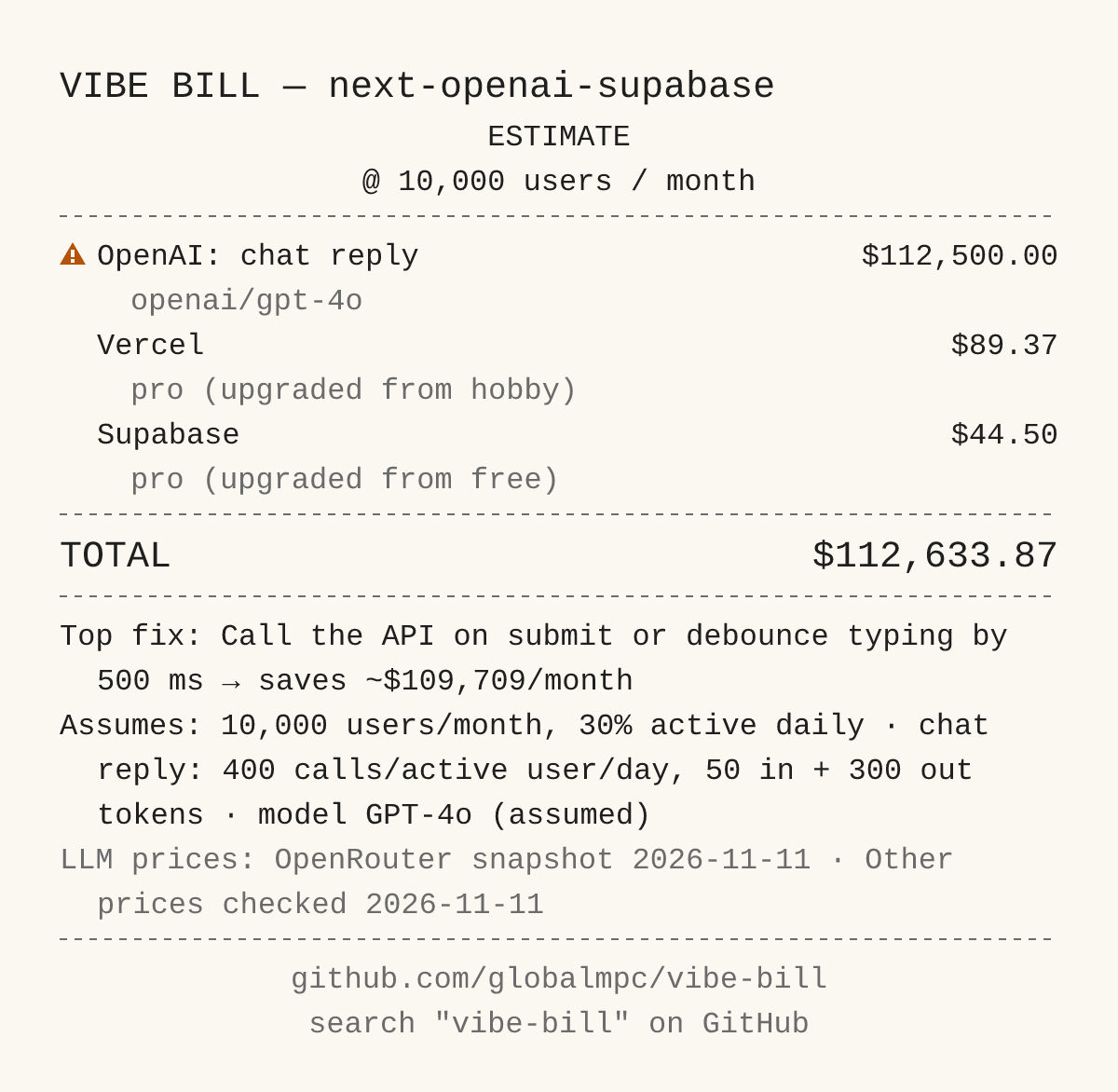
Example receipt generated from a fixture app in this repo (fixtures/next-openai-supabase), not a real project.
vibe-bill
You built an app with AI. What will it cost to run when people actually use it?
vibe-bill is a Claude Code skill. Type /vibe-bill in your project and it:
- estimates your monthly bill at 100, 1,000, 10,000 and 100,000 users (or any user counts you choose, see below),
- points out the things in your code that make the bill bigger than it needs to be,
- gives you a receipt image you can share (it shows one user count, 10,000 by default), and a plain-language report with the bill for every user count.
Install
You need Claude Code and Node 22 or newer (check with node -v).
Install (recommended)
Run these inside Claude Code:
/plugin marketplace add globalmpc/vibe-tools
/plugin install vibe-bill@vibe-tools
Manual install
Copy the skill folder by hand (Node 20 is enough to run the skill itself):
git clone https://github.com/globalmpc/vibe-bill.git /tmp/vibe-bill
mkdir -p ~/.claude/skills && cp -r /tmp/vibe-bill/skills/vibe-bill ~/.claude/skills/
That installs it for every project. For this project only, use .claude/skills/ instead of ~/.claude/skills/. It is then invoked as /vibe-bill.
Use it
- Open your app's folder in Claude Code.
- Type
/vibe-bill(/vibe-bill:vibe-billif you installed the plugin). - Answer up to 4 quick questions, like which AI model you use in production and which plan you pay for. Not sure? Pick your best guess; anything you skip is assumed and marked as assumed.
- Open
.vibe-bill/out/receipt.png. That's your receipt..vibe-bill/out/report.mdexplains the numbers.
Want no questions at all? Type /vibe-bill --no-questions (/vibe-bill:vibe-bill --no-questions as a plugin).
The examples below use the short form /vibe-bill; as a plugin, use /vibe-bill:vibe-bill.
Share the receipt, not the report. The receipt never shows file names, secret names or secrets. The report does mention file names from your code.
Is it safe?
- It never reads your secret values. It only looks at the names of your environment variables (like
OPENAI_API_KEY), never what's inside them. It will not open your.envfiles. - It never changes your code. The only thing it writes is a
.vibe-bill/folder in your project. - Your code is read by Claude, the same as any other Claude Code request.
- It uses the internet only for prices: the public OpenRouter model price list, and a web search for services it doesn't already know.
What it checks
- AI calls (OpenAI, Anthropic, Google, OpenRouter): which model you use, how often each call runs, and about how much text goes in and out.
- Services with a free tier (Supabase, Vercel, Clerk, Resend, Stripe): when you'd outgrow the free plan, when you'd have to upgrade, and the fees.
- Other services (for example Replicate): the price is looked up on the web once and shown as
(unverified). - Things that quietly burn money:
- an AI call on every keystroke or every re-render
- the whole chat history sent again on every message
- an expensive top model doing a simple job
- repeated identical AI requests with no caching
- a public AI endpoint with no rate limit (anyone can run up your bill)
- checking for updates constantly (polling)
- resizing every uploaded image into many versions
- loading whole database tables when you need a few rows
- files stored inside database rows
Good to know
- It's an estimate, not an invoice. Real traffic, discounts and free credits are unknown to it.
- AI prices are list prices from OpenRouter. Discounts from caching or batch pricing are not included, so your real bill may be lower.
- Every price shows where it came from and the date it was checked. Prices older than 30 days are marked "may be outdated".
- Usage is guessed. If your code can't tell how many messages a user sends, it assumes a typical number (see below) and the report tells you which.
- Some extras are not counted, for example CDN traffic, extra team seats, Stripe international and currency fees, and paid add-ons.
- It can miss things. It finds services by looking for known package names, variable names and code patterns.
- The AI never makes up a dollar amount. Claude only describes how your app uses things; the code does all the math.
Fresh prices
By default, vibe-bill uses a saved price list, so running it twice gives the same numbers. The date is printed on the receipt.
- AI model prices: want today's? Ask for fresh prices. It downloads the current OpenRouter list, and the price date on the receipt changes to today. Two ways to ask:
- Right after a run, tell Claude: "Run it again with fresh prices."
- Or start with it:
/vibe-bill . use fresh prices(the.means "this folder").
- Supabase, Vercel, Clerk, Resend, Stripe: these only change when the skill is updated. If the receipt says "may be outdated", update the plugin (
claude plugin update vibe-bill@vibe-tools, or/plugin marketplace update vibe-toolsfirst if you installed from a session) or reinstall the skill to get the latest.
Using a proxy or gateway (9router, LiteLLM, ...)?
vibe-bill finds your AI provider from your code: the SDK package or an env name like ANTHROPIC_API_KEY. If your app talks to Claude through a proxy, none of that is there, so it can't see the provider.
When it finds AI calls but no provider, it asks you which one (OpenAI, Anthropic, Google AI or OpenRouter) and remembers the answer. With --no-questions it stops and tells you what to add. You can also set it yourself in .vibe-bill/config.json:
{ "schema": 1, "llm_providers": ["anthropic"] }
Then run /vibe-bill again. The model question that follows ("Which model does production use?") is where you pick Sonnet, Haiku and so on.
Check a different number of users
The receipt shows 10,000 users. The report has a column for each of 100, 1,000, 10,000 and 100,000. Want to see 1,000,000 (or any other number)?
- Easiest: tell Claude "Run vibe-bill for 1,000,000 users."
- Or edit
.vibe-bill/config.jsonand run/vibe-billagain:
{ "schema": 1, "assumptions": { "tiers": [1000, 100000, 1000000] } }
You can list 1 to 6 whole numbers. The receipt shows the 10,000 one if it's in your list; otherwise it shows the biggest. With "tiers": [1000000] you get a receipt and a report just for 1M users.
Change the guesses
Every guess (active users per day, messages per user per day, ...) is listed in the report with the reason for it. To change one, put your own number in .vibe-bill/config.json and run /vibe-bill again:
{ "schema": 1, "assumptions": { "messages_per_active_user_per_day": 12 } }
The full list of guesses is in data/assumptions.default.json. If editing JSON feels like too much, ask Claude Code: "Set messages per user per day to 12 for vibe-bill and rerun it."
Contributing
Price corrections are the most useful help. See CONTRIBUTING.md.
License
MIT, see LICENSE. Third-party parts bundled in skills/vibe-bill/scripts/ keep their own licenses and are listed in THIRD_PARTY_NOTICES.md.
Maintained by Global MPC (Mineral Project Coin). Official site: https://globalmpc.tech
Reviews (0)
Sign in to leave a review.
Leave a reviewNo results found