My_OS
Health Warn
- License — License: MIT
- Description — Repository has a description
- Active repo — Last push 0 days ago
- Low visibility — Only 6 GitHub stars
Code Pass
- Code scan — Scanned 12 files during light audit, no dangerous patterns found
Permissions Pass
- Permissions — No dangerous permissions requested
No AI report is available for this listing yet.
AI-native Linux distro (Arch-based): press a hotkey and a local AI assistant drives your PC in natural language — files, packages, settings, apps and the screen itself. Local-first (Ollama + Qwen), optional Claude cloud, and every risky action needs your confirmation. English & French.
🖥️ My_OS — An AI-assisted operating system, local and secure





Local-first · Secure by design · Open source (MIT) · English & French
A Linux distribution (Arch-based) with an AI built into the core of the system. A
global keyboard shortcut opens an assistant that can read and organize your files,
install software, adjust the machine's settings and drive your PC in natural
language, in English or in French — with a mandatory confirmation for every risky
action. The model runs locally (Qwen via Ollama); a cloud model (Claude) can be
enabled optionally, per request. Your data stays with you by default.
My_OS is the follow-up to My_AI: from an
application that talks to the PC to a system in which the AI is resident and deeply
integrated.
Project status: v1.9 released (download), validated in a VM. New: a security update of the ISO (pacman's GPGME, the X server's font libraries, fontconfig, the certificate store and the Linux kernel up to date). It keeps everything from v1.8: a first boot that copes without network, a cheaper cloud mode (prompt caching) with Claude Sonnet 5.5, Qt's standard menus in My_OS's language, English and French (🌐 button), and computer control — the local model sees the screen and acts with the mouse and keyboard, with glowing edges and a stop bar (X11 session). The five milestones (foundation →
files/permissions → system control → cloud router → packaging) are complete, and the
ISO was tested end to end in a VM (BIOS and UEFI) in October 2026: permissions,
confirmations, polkit elevation, settings, local model, computer control, both
languages (details). X11 is
fully supported; the Wayland port is experimental (see §7 and
docs/INSTALLATION.md).
📚 The detailed documentation in
docs/is written in French.
📸 Preview
Real screenshots of My_OS in a VM (local model Qwen 3.5 4B, October 2026).
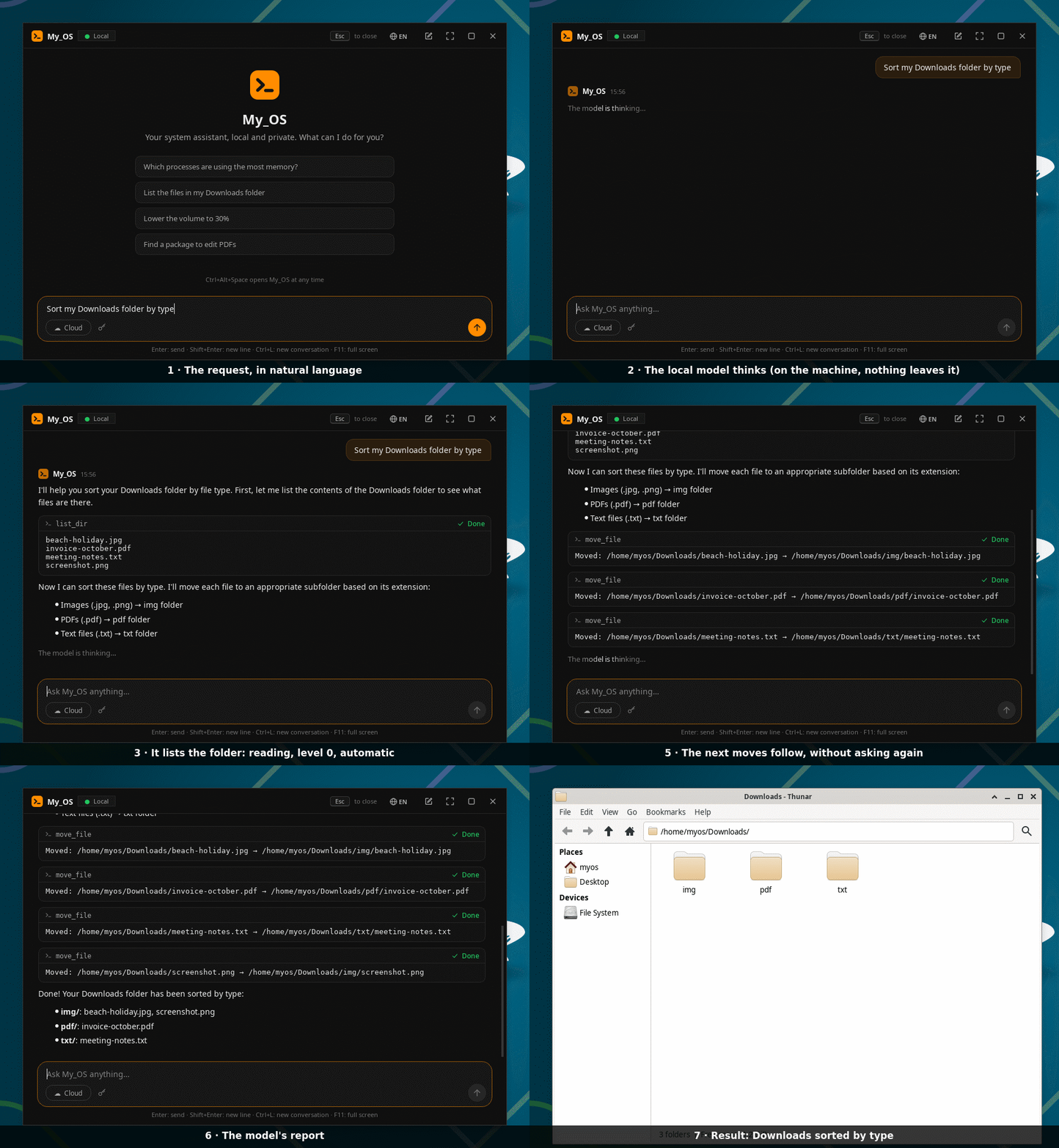
“Sort my Downloads folder by type”: the model lists the folder, then proposes each
move; a single “For this session” confirmation is enough, it sorts everything (each
action in its card) and reports back. Waiting times are shortened: with the test PC's
integrated GPU, the whole request took about a minute.
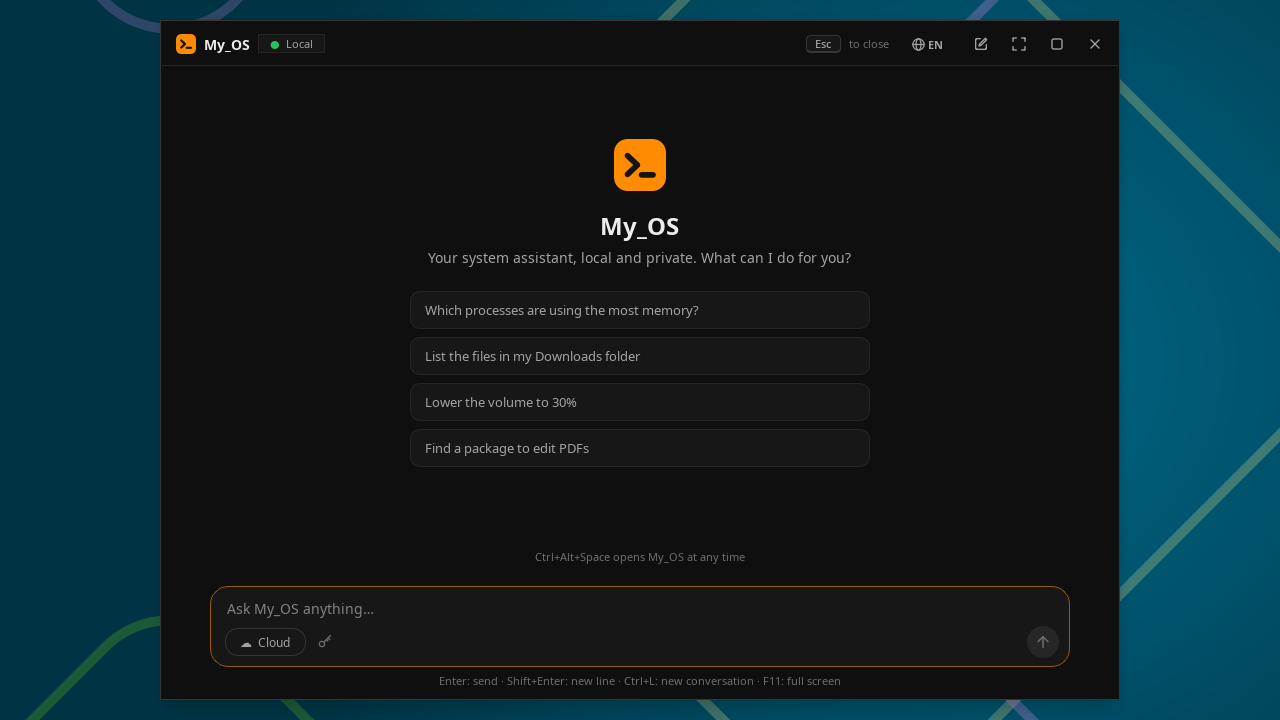 |
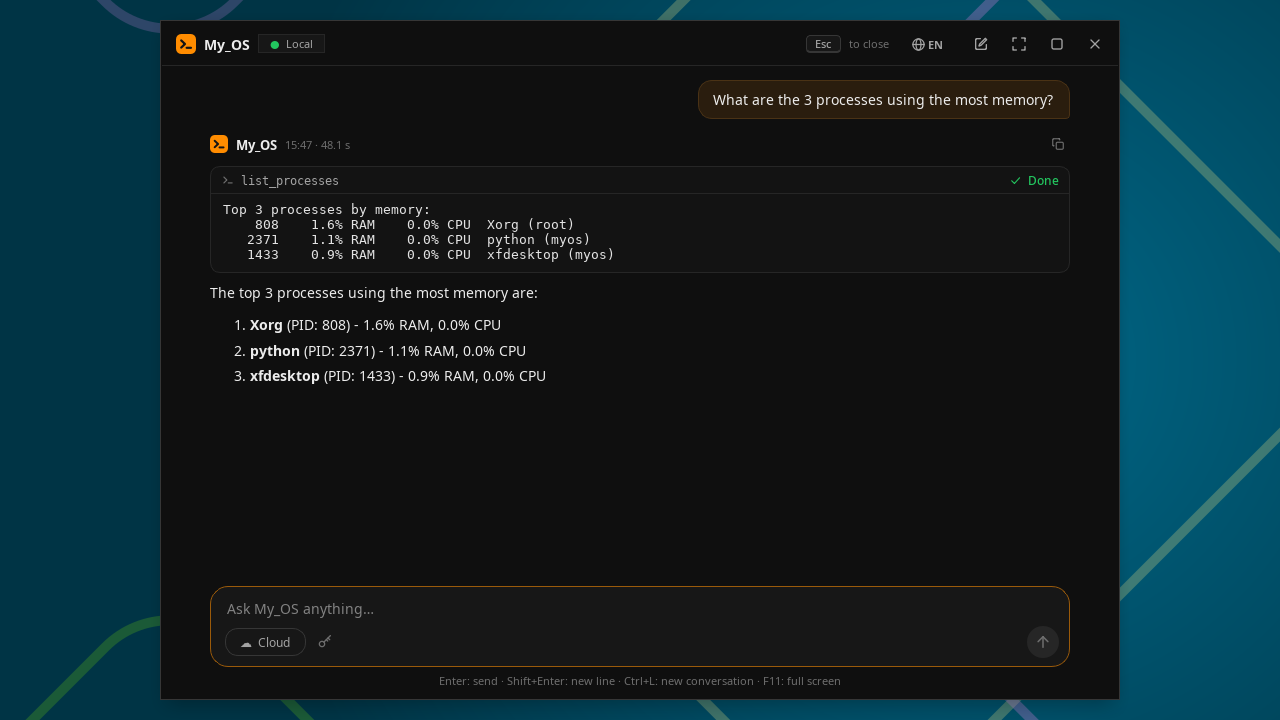 |
Popup on the shortcut — suggestions, “Esc to close” hint, 🌐 language button; resizable window, maximized or full screen (F11) |
Local model answer — the tool result in its card, then the answer; “☁ Cloud” enables Claude on demand |
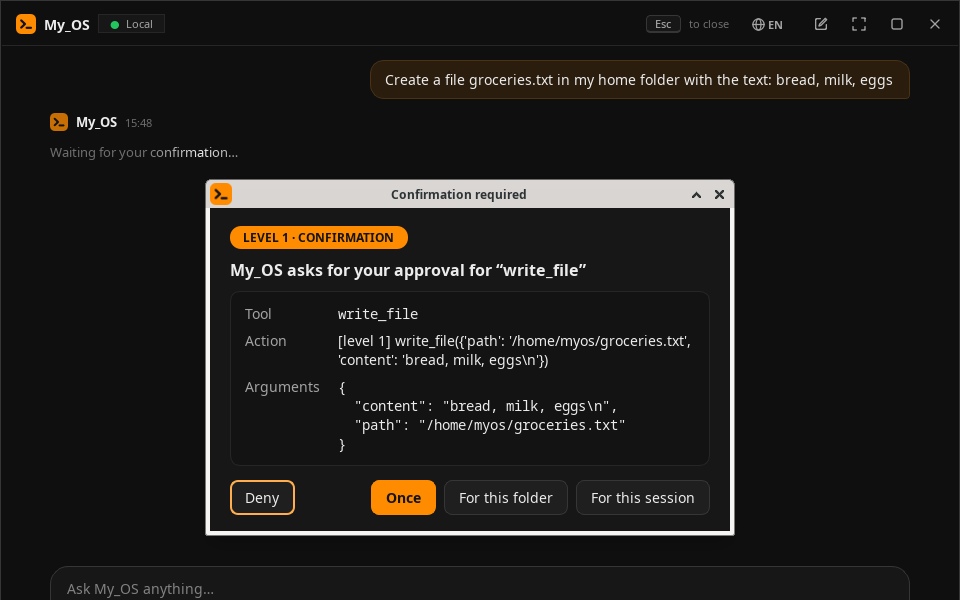 |
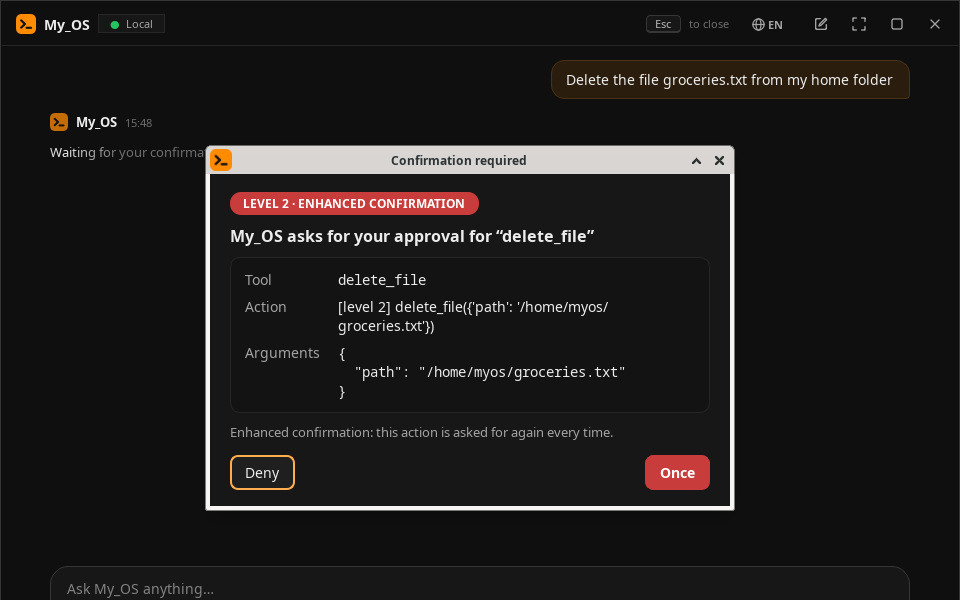 |
| Confirmation (level 1) — a write proposed by the model: once, this folder or the session | Enhanced confirmation (level 2) — deletion: “once” only, “Deny” by default |
 |
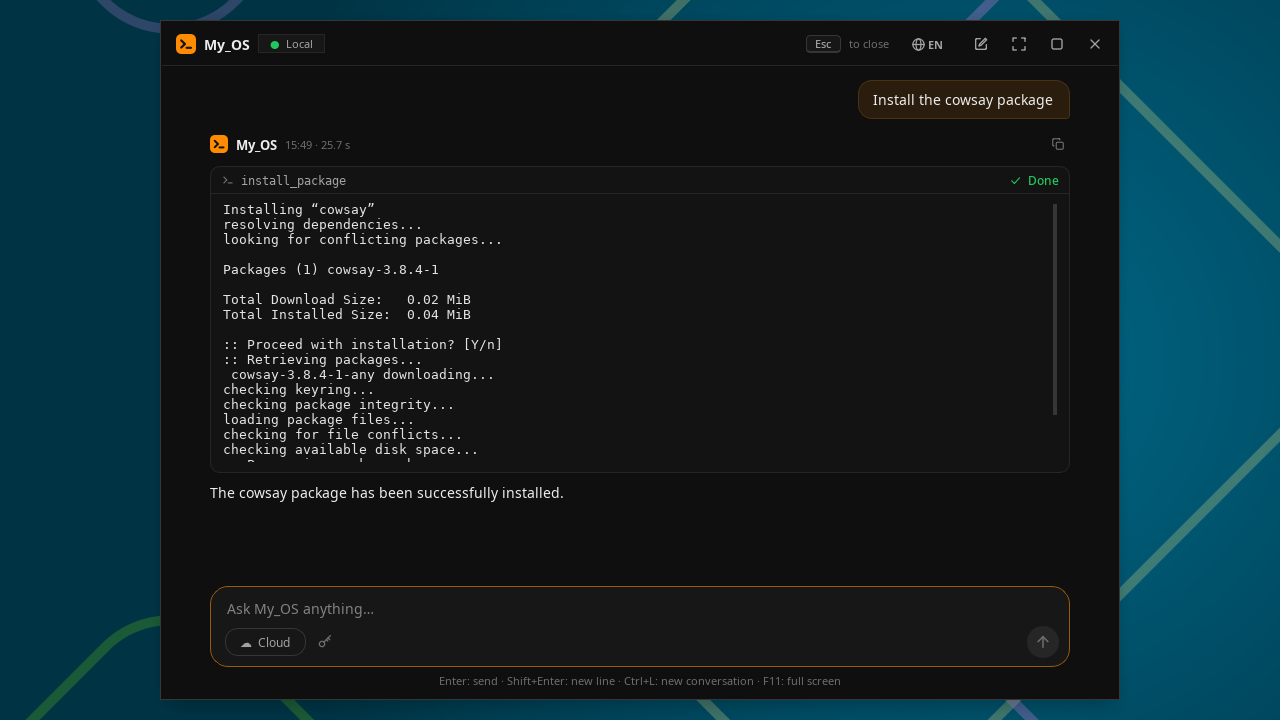 |
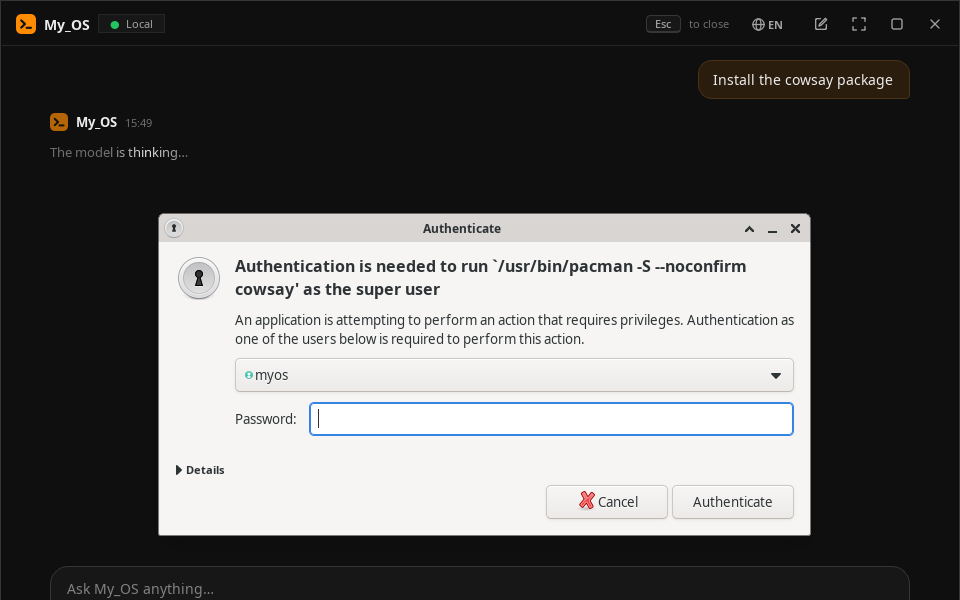
| polkit elevation — password for the exact command, never permanent root | Installation complete — each tool in its card (status, readable pacman output), then the model's report |
🖱️ Computer control
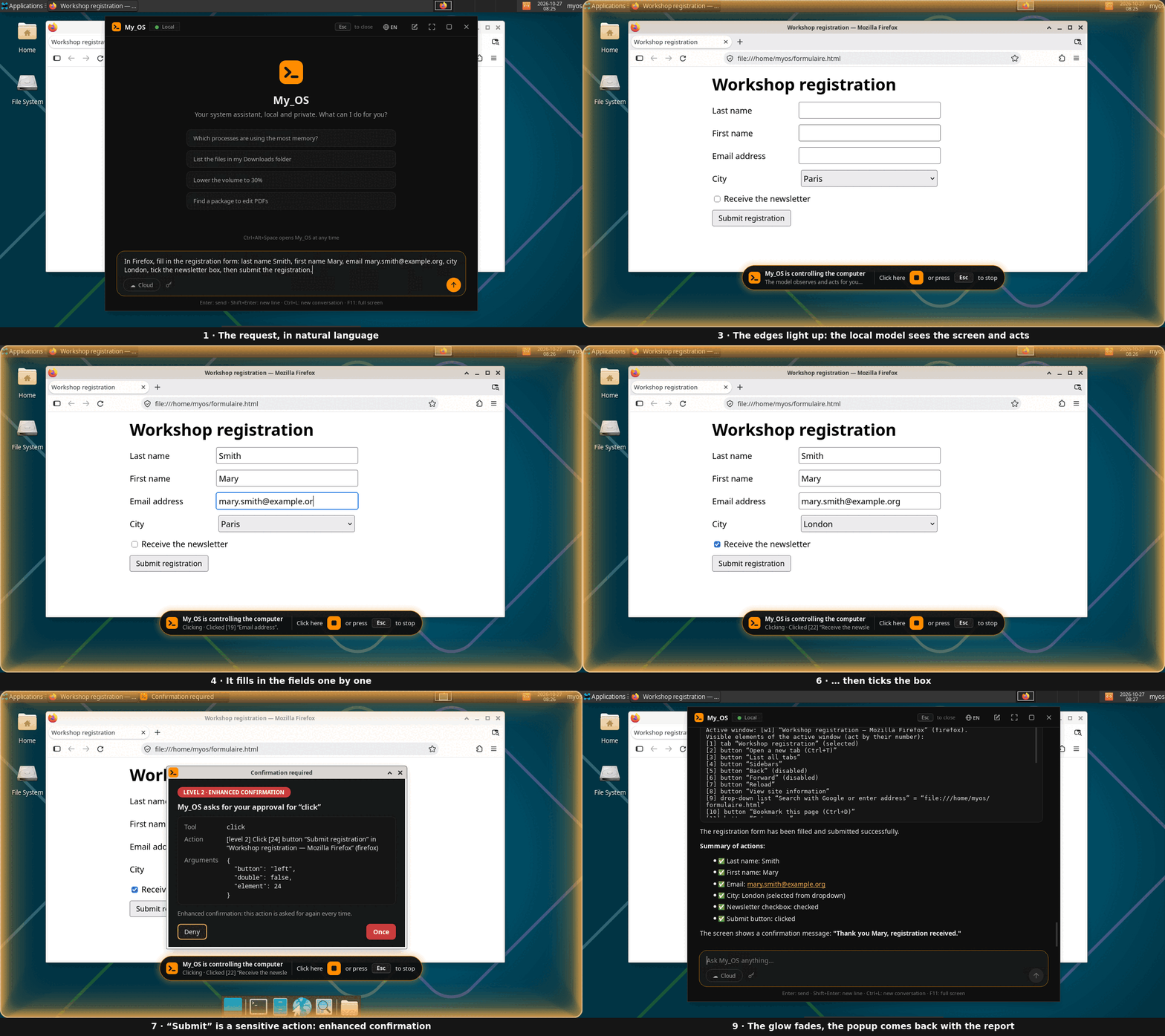
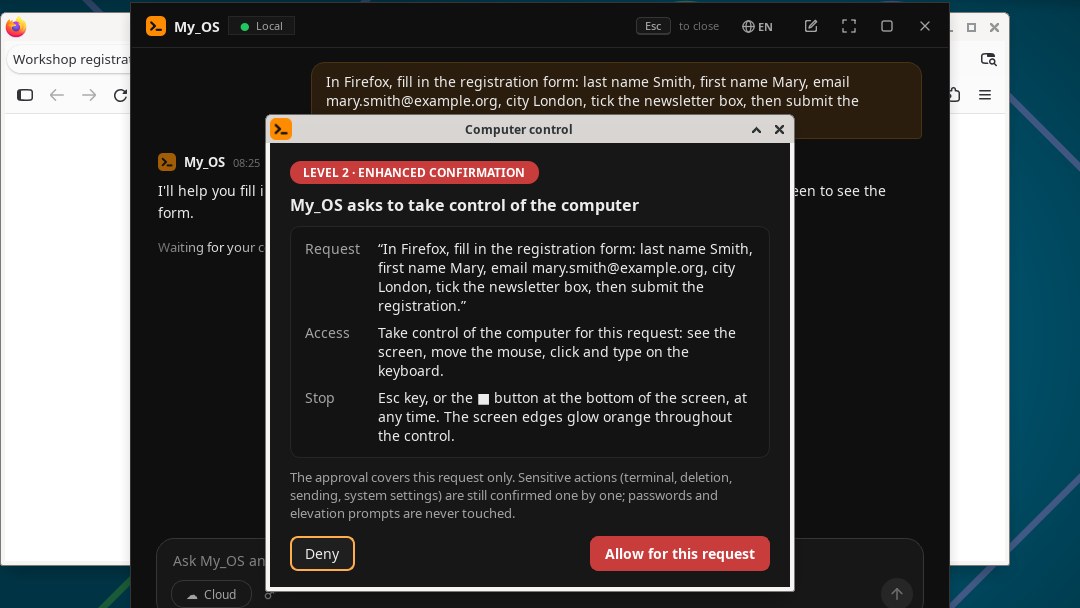
“In Firefox, fill in the registration form: last name Smith, first name Mary, email
[email protected], city London, tick the newsletter box, then submit the
registration.” After approval for this request, the screen edges glow orange and the
local model acts on its own: it reads the screen (numbered elements), fills in the
fields, picks the city and ticks the box; submitting, a sensitive action, asks for an
enhanced confirmation again. Esc or ■ stops everything, at any time. Waiting times are
shortened: with the test PC's integrated GPU, the request took about two and a half
minutes. Firefox, not on the ISO, was installed for the demo.
 |
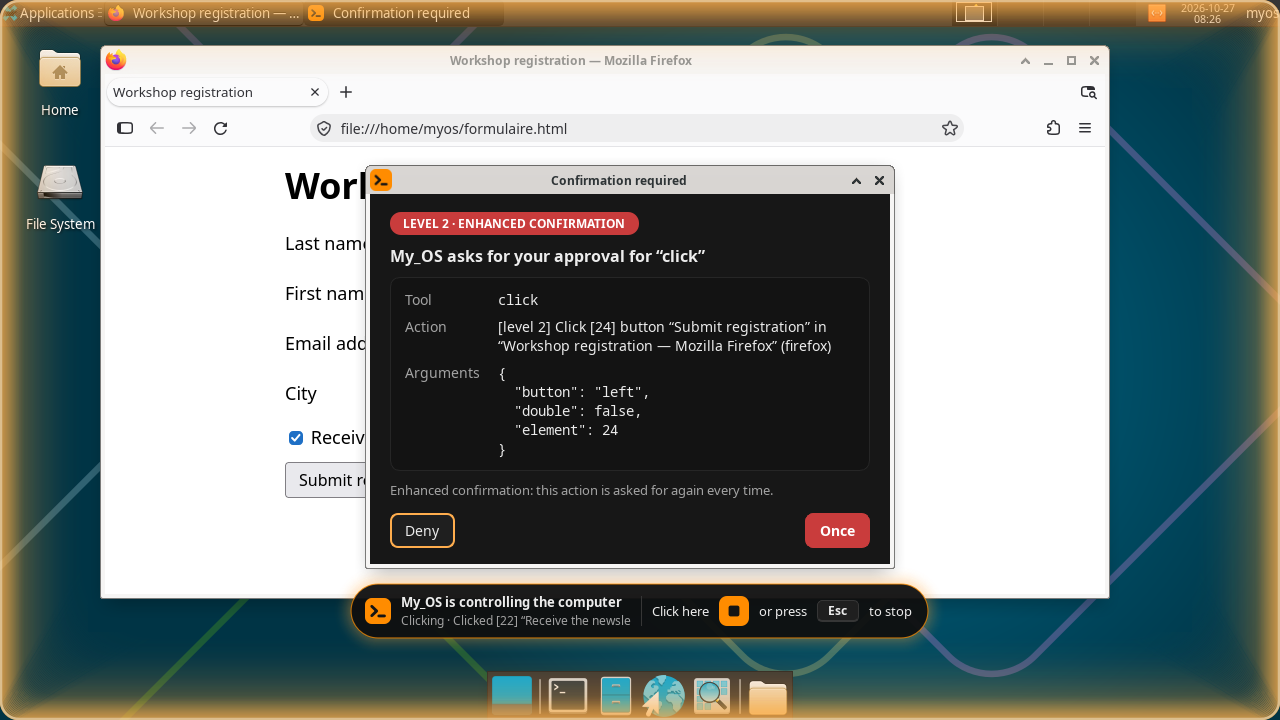 |
| Approval for this request — the request as typed, the access given and how to stop; “Deny” by default | During control — glowing edges, stop bar (■ or Esc); “Submit” asks for an enhanced confirmation again, above the bar |
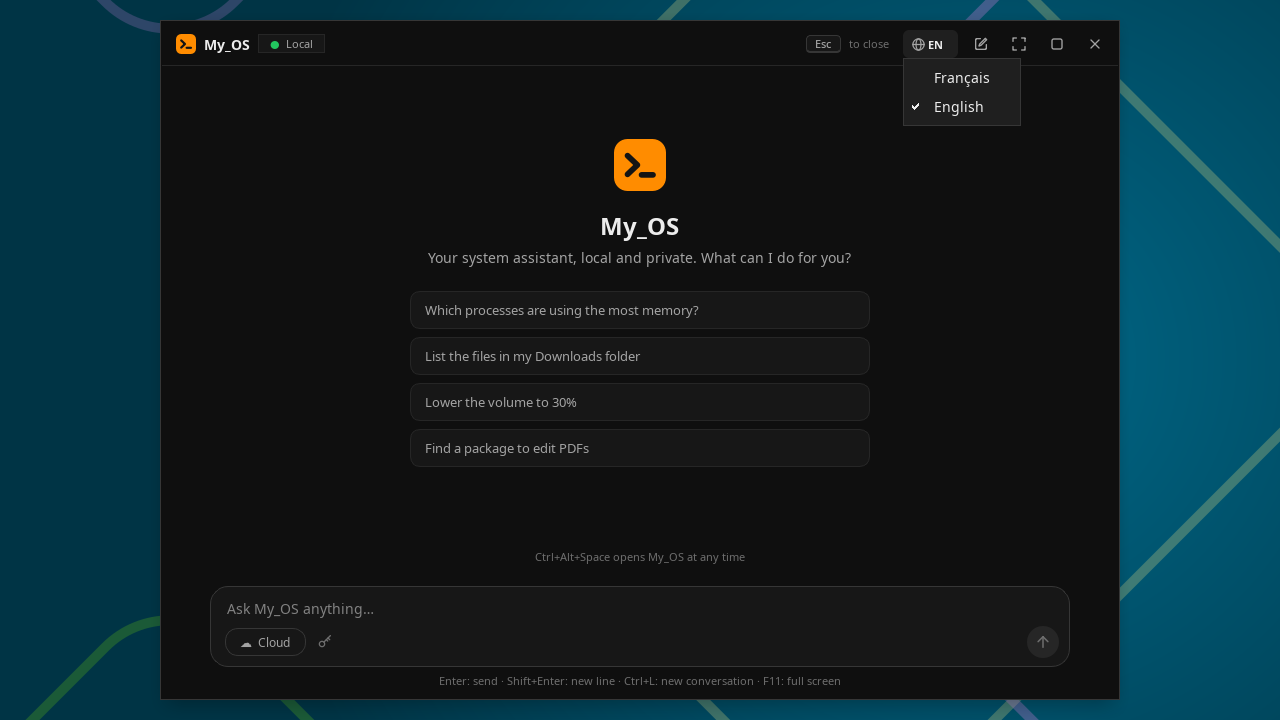
🌐 English and French
 |
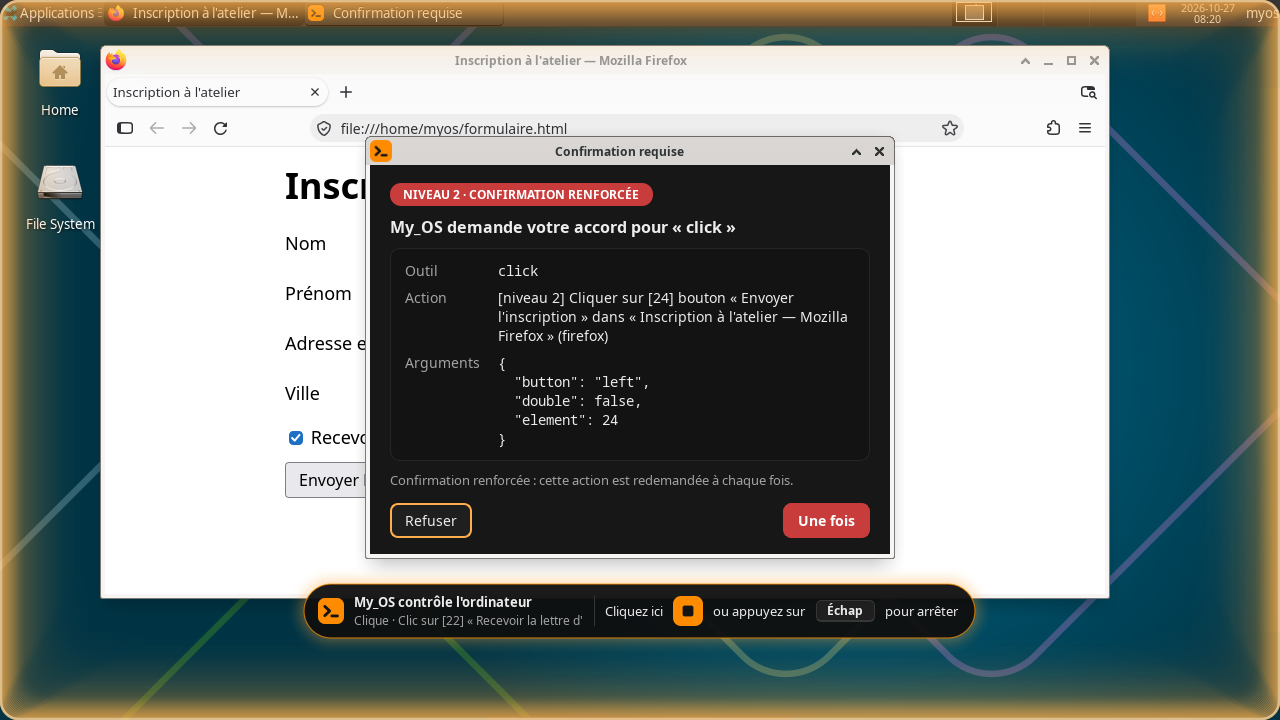 |
| Your language — at first launch, your Linux language (French, otherwise English); the 🌐 button in the title bar switches between them, without restarting | Everything follows the language — model answers, confirmations, stop bar: here the same form in French, « Envoyer » (send) asking for confirmation |
📑 Contents
- Vision
- Concept at a glance
- Features
- Installation
- Usage
- The permission engine
- Security
- Architecture
- Roadmap
- Project layout
- Development
- Contributing
- License · Credits
1 · Vision
My_OS starts from a simple idea: what if the AI assistant were not an application you
open, but a capability of the system itself, available everywhere and at any time
through a keyboard shortcut?
- Local by default — the Qwen model runs on the machine via Ollama. No data leaves
without an explicit action. - Optional cloud — with an API key, a request can be routed to a more powerful model
(Claude). Opt-in, per request, visible and logged. - Real system access — files, packages, settings, processes, and the screen itself
(mouse, keyboard). The AI acts, it doesn't just answer. - Safe by design — every action is classified by risk; sensitive actions ask for
confirmation; everything is logged; nothing destructive is silent. - In your language — English or French, your Linux language by default.
Project goals: technical portfolio, school project (Ynov), and a reusable open
source base.
2 · Concept at a glance
                    ┌─────────────────────────────┐
   Global     ───>  │   My_OS popup (Qt/PySide6)  │
   shortcut         │   “Ask My_OS anything…”     │
                    └──────────────┬──────────────┘
                                   │  IPC (Unix socket)
                    ┌──────────────▼──────────────┐
                    │      myosd daemon           │
                    │   (resident orchestrator)   │
                    └──────────────┬──────────────┘
                                   │
              ┌────────────────────┼────────────────────┐
              ▼                    ▼                    ▼
      ┌───────────────┐   ┌────────────────┐   ┌─────────────────┐
      │ Local model   │   │ Permission     │   │ Cloud router    │
      │ Qwen/Ollama   │   │ engine         │   │ Claude (opt-in) │
      │ (default)     │   │ + audit        │   │                 │
      └───────────────┘   └───────┬────────┘   └─────────────────┘
                                  │ validates every action
                          ┌───────▼────────┐
                          │  Tools         │
                          │ files,         │
                          │ packages,      │
                          │ D-Bus,         │
                          │ processes,     │
                          │ screen         │
                          └────────────────┘
3 · Features
All these capabilities are operational and go through the permission engine.
- 🗂️ Files — read, list, write, move, create, delete. E.g. “sort my Downloads folder
by type”. Risk escalation detects sensitive paths (~/.ssh,/etc…), even behind a
symbolic link or a relative path. - 📦 Packages (
pacman) — search, install, remove, update. One-off elevation through
polkit (pkexec), never permanent root. Also works from the live ISO (packages frozen
on an Arch Linux Archive snapshot). - 🔧 System settings (D-Bus /
pactl) — brightness, volume, mute, Wi-Fi. - 📊 Processes (
psutil) — list processes, kill one (with safeguards: critical PIDs
blocked). - 🧠 Local model — Qwen via Ollama, by default, 100% on the machine.
- ☁️ Opt-in cloud — Claude (Anthropic API), enabled per request through a
visible toggle; API key in the system keyring (keyring), never in clear text. - 🛡️ Permissions & audit — 4 risk levels, confirmations (“Deny” by default),
unbreakable blocklist, SQLite log of every action. - ⌨️ Global shortcut — X11 (
pynput, nominal) and Wayland (GlobalShortcuts
portal, experimental). - 💬 Instant popup — PySide6 +
QTextBrowser(no web engine), streamed answers
rendered as markdown, tool outputs in cards, black and orange theme. The window
resizes from its edges, maximizes, goes full screen (F11) and comes back where you
left it. - 🖱️ Computer control — when a request goes through a graphical
application, the AI sees the screen and acts: click, type, fill in fields, key
combinations, open an application, switch windows. Locally, without a vision
model: the screen is described to it through the accessibility tree and OCR, each
element numbered. During control, the screen edges glow orange and a bar reminds
you how to stop it (Esc or the ■ button). - 🌐 English and French — interface, model answers (local or cloud) and
computer control in either language. At first launch, My_OS uses your Linux
language: French if the system is in French, English otherwise. The 🌐 button in the
title bar switches at any time.
4 · Installation
Two ways. Full details in docs/INSTALLATION.md (in French).
a) With the live ISO (easiest)
A bootable ISO (Arch base + Xfce/X11) ships My_OS ready to use:
download the v1.9 ISO
(with its .sha256 file). To build it yourself, the
archiso profile and the build script are inpackaging/ (./packaging/build_iso.sh on an Arch host, no root needed
with archiso 91 or later). On first
boot, the dependencies and the local model are fetched (network required). Plan
≥ 12 GB of RAM for the local model in live mode (≥ 4 GB otherwise). The model uses a
recent dedicated AMD, Intel or NVIDIA graphics card through Vulkan when there is one,
the processor otherwise. On a USB stick: Ventoy or Rufus in DD
mode, Secure Boot disabled (details). See also
packaging/README.md. The live session is in English; one click
on 🌐 switches My_OS to French.
b) From source
Requirements: Arch Linux (or a derivative), Python 3.11+,
Ollama and the system packages listed in
docs/INSTALLATION.md §2.1 (includingpython-evdev, needed bypynput).
git clone https://github.com/gonicolas12/My_OS && cd My_OS
pip install -r requirements.txt
ollama pull qwen3.5:4b          # recommended local model (≥ 8 GB RAM)
./launch_dev.sh                 # starts daemon + popup (X11 session)
Without a GPU, an answer from the 4B model takes from a few seconds to over a minute
depending on the machine. With a graphics card, install the matching Ollama backend
(ollama-cuda, ollama-rocm or ollama-vulkan, see
docs/INSTALLATION.md §2.3).
For a resident install (systemd user service, autostart), follow
docs/INSTALLATION.md. X11/Wayland notes: X11 works out of
the box; Wayland needs a compositor with layer-shell + the GlobalShortcuts portal
and remains experimental.
5 · Usage
- Press Ctrl+Alt+Space (default shortcut, configurable in
config.yaml). - The popup opens on top of everything (centered the first time, then where you left
it). Type your request in natural language:Entersends,Shift+Enteradds a line. - For a sensitive action, a detailed confirmation appears in the foreground. At
level 1, you can allow once, for this folder or for the session; at level 2
(deletion, update…), only once, and the question comes back for every action.
Enter and Esc deny: approving is always an explicit choice. The password (polkit)
is only asked forpacman. Esccloses the popup (reminder at the top right);Ctrl+Lstarts a new
conversation.- The window resizes from its edges and corners and moves by its title bar;
double-click the bar to maximize it,F11for full screen. Size, position and state
are remembered (~/.config/my_os/popup.conf). - The 🌐 EN / FR button in the title bar changes My_OS's language: interface, model
answers and computer control switch to English or French, immediately and without
restarting; the choice is remembered. Until you choose, My_OS follows your Linux
language (languagesetting inconfig.yaml).
Example requests:
- “Sort my Downloads folder by type.”
- “Install VLC.”
- “Lower the brightness to 30%.”
- “What is eating my RAM right now?”
- “Summarize this file.” (content read stays data, never an instruction)
- In French: « Range mon dossier Téléchargements par type. », « Baisse le volume à
30 %. »
Computer control (X11 session): ask for example “Open Mousepad and write a shopping
list” or “Fill in this form with my name”. My_OS first asks for your approval for this
request (“Allow for this request”; “Deny” by default). The popup fades out, the
screen edges glow light orange and a bar at the bottom shows the current action:
“Click here ■ or press Esc to stop”. At the end, the glow fades and the popup comes
back with the report. Sensitive actions (typing in a terminal, a “Delete”, “Send” or
“Submit” button, system settings) are still confirmed one by one; passwords, elevation
prompts and the locked screen are never touched.
Cloud mode (optional): turn on “☁ Cloud” under the input field, then enter your
Anthropic API key (stored in the keyring); an indicator shows that this request
goes to the cloud. Tip: Ctrl+L first, to minimize the data sent.
6 · The permission engine
This is the most important component of the project: it guarantees that safety does
not depend on the model's reliability.
| Level | Name | Examples | Behavior |
|---|---|---|---|
| 0 | Auto | read a file, list, monitor | Run without confirmation |
| 1 | Confirmation | write/move, install a package | Simple dialog |
| 2 | Enhanced | delete, sudo, change the system, /etc /boot |
Explicit confirmation + details |
| 3 | Blocked | rm -rf /, formatting, critical areas |
Never run, even if confirmed |
- Static first: the level comes from code (
permissions/risk_levels.py), never
from the LLM. - Escalation by arguments: can only raise the risk (e.g. writing to
~/.ssh). - Real path: symbolic links, relative paths,
..and//are resolved before any
decision — a link to~/.sshis treated as~/.ssh. - Blocklist first: level 3 is checked before anything and cannot be bypassed.
- Remembering: this folder / this session, at level 1 only — a level-2
action is asked again every time. - Audit: every action and decision is logged in
~/.local/share/my_os/audit.db
(SQLite). - Screen: computer control is granted for one request (level 2), always visible
and stoppable with Esc; the target judged is the one on screen, never the one the
model describes (SECURITY.md, threat 5). - Language: it decides nothing. Same levels and same confirmations in English and in
French; on screen, sensitive buttons are recognized in both languages, whatever
My_OS's language.
7 · Security
My_OS's security relies on its architecture, not on fixes added afterwards. Three
non-negotiable invariants:
- The LLM never decides its permission level — it's static code. The blocklist
(level 3) cannot be crossed. - Any content read (file, web, screen, command output) is untrusted data, never an
instruction — a defense against indirect prompt injection. - The daemon runs as the user, never root — one-off elevation through polkit; IPC
over a local Unix socket; secrets throughkeyring.
The cloud stays opt-in per request and the local model the default (private).
Under Wayland, the surface confinement (layer-shell) is a security bonus.
➡️ Full threat model: docs/SECURITY.md (in French).
8 · Architecture
Five layers, built bottom-up:
| Layer | Role |
|---|---|
| 0 · Arch Linux base | kernel, drivers, packages |
1 · myosd daemon |
resident service, global shortcut, IPC, orchestration |
| 2 · Tools + permissions | system tools + permission engine + audit (choke point) |
| 3a · Local model | Qwen via Ollama (default, private) |
| 3b · Cloud router | Claude via API key (opt-in) |
| 4 · Qt popup | interface summoned by the shortcut |
The daemon and the popup are two processes talking over a Unix socket. Every action
goes through the single choke point permissions/policy_engine.py.
➡️ Details: docs/ARCHITECTURE.md · interface contracts:
docs/INTERFACES.md (in French).
9 · Roadmap
v1 — complete ✅ (details and long-term vision: docs/ROADMAP.md).
Milestone 1 — Foundation: systemd user daemon, global shortcut (X11), Unix
socket IPC, Qt popup.Milestone 2 — Files + permissions: file tools, complete permission engine,
SQLite audit, confirmations, agentic loop, Ollama.Milestone 3 — System control: packages (
pacman), settings (D-Bus),
processes (psutil), one-off polkit elevation.Milestone 4 — Cloud router: API key via
keyring, opt-in per-request toggle,
visible indicator, logging.Milestone 5 — Packaging: Wayland port (experimental),
archisoISO profile,
documentation finalized.Security (cross-cutting): non-root daemon, data/instruction separation,
SECURITY.mdkept up to date.VM validation (October 2026): 42 permission scenarios, interface, polkit
elevation, local model; 6 bypasses found, fixed and re-tested.v1.0 released: GitHub release
with the ISO and its SHA-256 checksum.v1.1 released: GitHub release,
redesigned popup: resizable, maximizable or full-screen window, “Esc to close” hint,
conversation in My_AI's layout in black and orange, readable tool cards.v1.2 released: GitHub release,
local model: long conversations without cut answers (16,384-token window), graphics
card through Vulkan, faster answers without a GPU, 8-bit context, Ollama local only.v1.3 released: GitHub release,
fix: the cloud-mode API key dialog opens above the popup (it opened below it and
blocked it, invisible).v1.4 released: GitHub release,
fix: the first sound setting after startup (volume, mute) no longer fails while the
sound server starts.v1.5 released: GitHub release,
computer control: see the screen and act with the mouse and keyboard, locally
(accessibility + OCR, numbered elements), glowing edges and stop bar, per-request
approval; validated in a VM with the local model.v1.6 released: GitHub release,
English and French: interface, local and cloud model, computer control; Linux
language at first launch, 🌐 EN / FR button; validated in a VM in both languages (same
42 permission scenarios, same decisions).v1.7 released: GitHub release,
security update of the ISO on a newer Arch snapshot (certificates, Tesseract, Python,
Ollama), cloud SDK from the Arch repository; cloud mode with Claude Sonnet 5.5, its
thinking kept through tool calls, tested with a real key; Qt's standard menus in
My_OS's language; validated in a VM in both languages.v1.8 released: GitHub release,
security update of the ISO on a newer Arch snapshot: X server (eight flaws, including
one in XTEST, the extension computer control types and clicks through), Python,
OpenSSL 4.1 (3.6 is no longer maintained), Linux 7.3 (7.2 reached end of life),
Ollama; first boot without network handled (Python dependencies and model fetched
once the network is back, model download retried, desktop notice, clear popup
message); cloud mode cheaper with prompt caching (0.16 cent per request in a burst
instead of 1), and computer control keeping its screenshots and its reasoning during
a request; validated in a VM in both languages.v1.9 released: GitHub release,
security update of the ISO on a newer Arch snapshot: GPGME (pacman checks package
signatures with it, as root), the X server's font libraries (any program of the
session could crash the X server), fontconfig, the certificate store (NSS 3.134),
Linux 7.3.5, Ollama 0.40.17; validated in a VM in both languages.
Still to prove: real hardware (Wi-Fi drivers, backlight, graphics cards) — feedback
welcome in the issues.
Beyond (long-term vision, not promised): pure vision for applications without
accessibility or text (specialized local model, on a graphics card), advanced
anti-injection defenses, mainstream native Wayland, more languages. See
docs/ROADMAP.md.
10 · Project layout
My_OS/
├── daemon/                   # Layer 1 — resident core
│   ├── myosd.py              # service entry point
│   ├── hotkey_listener.py    # global shortcut (X11 pynput / Wayland portal)
│   ├── ipc_server.py         # Unix socket daemon ↔ popup
│   ├── orchestrator.py       # agentic loop request → model → tools
│   ├── control.py            # screen control session (indicator, stop)
│   └── confirmation_provider.py
├── permissions/              # Layer 2 — security (core)
│   ├── risk_levels.py        # static table tool → level
│   ├── policy_engine.py      # decision + escalation (single choke point)
│   ├── blocklist.py          # level 3, never allowed
│   ├── confirmation.py
│   ├── session_grants.py     # once / folder / session
│   └── audit_log.py          # SQLite log
├── tools/                    # system tools
│   ├── base_tool.py          # base + risk_level
│   ├── files.py              # files
│   ├── packages.py           # pacman
│   ├── system_settings.py    # D-Bus / pactl
│   ├── processes.py          # psutil
│   └── computer/             # computer control: screen (accessibility, OCR),
│                             # mouse and keyboard (xdotool), applications
├── models/                   # Layer 3 — AI
│   ├── local_llm.py          # Qwen/Ollama (default)
│   ├── prompts.py            # system prompts, one per language
│   ├── cloud_router.py       # router + Anthropic API (opt-in)
│   ├── secrets.py            # API key via keyring
│   └── stub_model.py         # rule-based backend (tests / without Ollama)
├── ui/                       # Layer 4 — Qt popup
│   ├── popup.py              # PySide6 window, IPC client, window states
│   ├── chat_view.py          # conversation: bubbles, answers, tool cards
│   ├── composer.py           # input area (Cloud, API key, send)
│   ├── window_chrome.py      # title bar (language menu) + resizing (frameless)
│   ├── markdown_render.py    # markdown without HTML or images (QTextBrowser)
│   ├── confirm_dialog.py     # confirmation dialog
│   ├── control_overlay.py    # glowing edges + control stop bar
│   ├── icons.py              # drawn icons and logo (QPainter)
│   ├── styles.py             # design tokens, black/orange theme
│   └── wayland_layer.py      # Wayland presentation (layer-shell), X11 fallback
├── core/
│   ├── config.py             # config + socket resolution
│   ├── ipc.py                # message framing
│   ├── elevation.py          # system commands + polkit (pkexec)
│   ├── session.py            # X11/Wayland detection
│   ├── i18n.py               # language (English, French): tr(), system language
│   ├── locales/en.py         # English translations (French lives in the code)
│   └── logger.py
├── docs/                     # detailed documentation (in French)
│   ├── ARCHITECTURE.md
│   ├── SECURITY.md           # threat model + VM validation
│   ├── INTERFACES.md         # interface contracts
│   ├── INSTALLATION.md       # install (source + ISO) + troubleshooting
│   ├── ROADMAP.md            # v1 + long-term vision
│   └── media/                # README screenshots (en/ for this README)
├── packaging/                # live ISO (archiso)
│   ├── build_iso.sh
│   ├── README.md
│   └── archiso/              # profiledef, packages, airootfs
├── tests/                    # ~860 tests (permissions first)
├── config.yaml
├── myosd.service             # systemd user service
├── requirements.txt
├── launch_dev.sh
├── pyproject.toml
├── README.md                 # this file
└── README.fr.md              # French version
11 · Development
pip install -r requirements.txt
./launch_dev.sh                 # daemon + popup in dev (X11)

pytest                          # all tests
pytest tests/test_permissions/  # the security core (priority)
ruff check . && ruff format .   # lint + format
Conventions: Python 3.11+, type hints everywhere, docstrings on public functions. Every
new tool inherits from tools/base_tool.py and must declare a risk_level. No
action bypasses permissions/policy_engine.py. No secret in clear text. Any text shown
to the user or the model is written in French in the code and goes through tr(), with
its English translation in core/locales/en.py (the tests fail otherwise).
12 · Contributing
Contributions are welcome!
- Fork, create a feature branch (
git checkout -b my-feature). - Follow the conventions above and the contracts in
docs/INTERFACES.md. - Cover the
permissions/module first; cleanruff, green tests. - For security, read docs/SECURITY.md first — no change may weaken
the three invariants. - Open a clear Pull Request (one topic = one PR).
Bug reports and ideas: through GitHub issues, in English or in French.
13 · License
MIT. You are free to use, modify and redistribute My_OS.
14 · Credits
Designed in the line of My_AI. Built to stay
local, private and safe. Thanks to the projects that make it possible: Arch Linux,
archiso, Ollama, PySide6/Qt, polkit, and the Python ecosystem.
Reviews (0)
Sign in to leave a review.
Leave a reviewNo results found