boxd
Health Warn
- License — License: MIT
- Description — Repository has a description
- Active repo — Last push 0 days ago
- Low visibility — Only 5 GitHub stars
Code Fail
- process.env — Environment variable access in client/box-wake.mjs
- exec() — Shell command execution in dashboard/boxd-dashboard.mjs
- process.env — Environment variable access in dashboard/boxd-dashboard.mjs
Permissions Pass
- Permissions — No dangerous permissions requested
No AI report is available for this listing yet.
Build boxes for coding agents, on hardware you already own: one container or virtual machine per git worktree, on your own build server over ssh.

Build boxes for coding agents, on hardware you already own.



boxd ("boxed") moves the heavy work of coding agents off your own machine. Put box in front of a command
inside a git worktree and the command runs in that worktree's own box on a build server you own: the same box on
every call, with its caches kept.
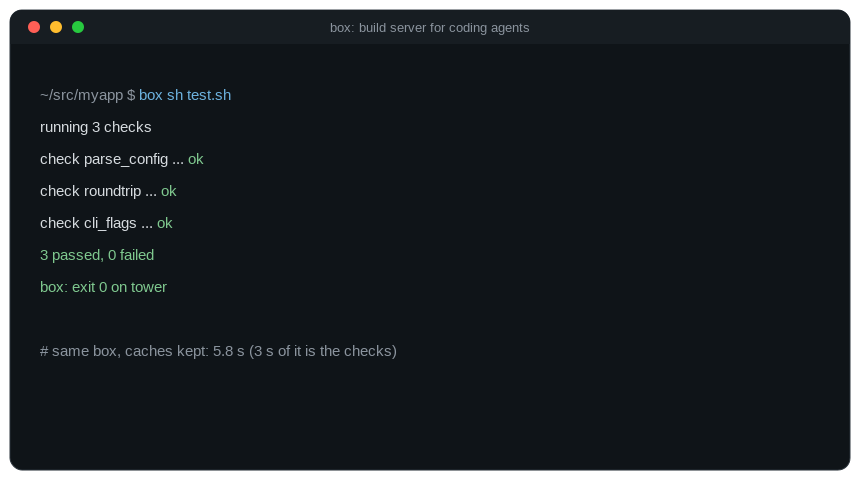
Install. Set up a build host first (steps 1 and 2 of the install section), then on your own machine:
sudo xbps-install -S boxd-client        # Void; Debian: sudo apt install ./boxd-client_*.deb
box setup <host> --hostname <address>   # once per build server
box hosts                               # the server is listed
box npm test                            # first call, inside any git worktree
Full setup: Install
What a call looks like:
box cargo test -p mycrate          # runs on the build server, in this worktree's own box
box --pull target/release make     # build there, copy the result back
box --detach make release          # a run that outlives the agent that started it
Ten agents in ten worktrees get ten boxes. They do not see each other's files, they cannot take the host down
together, and nothing they leave behind stays on the host for long.
Why
Coding agents run builds and test suites all day. On your own machine that means fans, a slow desktop and agents
that step on each other. A rented runner costs money per minute and starts cold every time. Most people already
have a second machine that could do the work: an old tower, a spare laptop, a small server.
boxd turns that machine into a build host for agents:
- One box per worktree. The box is made on the first call and reused on the next ones. Dependency caches
persist, so the second build is fast. - Containers or virtual machines. Boxes are rootless podman containers by default. Add
--vmand the box is
a small virtual machine (microsandbox) with its own kernel, for
work that needs docker, podman or root inside. - The host cannot be overloaded. All boxes share one memory cap. A new virtual machine is admitted only when
the sizes of the running ones leave room; otherwise the call is refused with a clear line, or an idle machine
is removed first. - Cleanup is automatic. An idle box is removed after 30 minutes. The box of a deleted worktree is removed with
its files. Old folders go by age, then by disk pressure. Every removal is logged with the disk it freed. - Several hosts. Register more than one build server and
boxpicks one with room, and remembers it for
that worktree. - A host that sleeps. With the optional power module the host suspends after quiet minutes and wakes on the
nextboxcall (wake on network), in about 15 seconds. - Nothing to trust on the host. The build account can do one thing over ssh: talk to
boxd-pod. It holds no
registry logins and no credentials of yours. A secret reaches a command only through--env, never through a
command line, a file or a log.
Compared with the alternatives
| On your own machine | A rented runner or cloud sandbox | boxd on a machine you own | |
|---|---|---|---|
| Cost | none extra | money per minute | none per run; you own and run the machine |
| Start and caches | warm, but shared with everything else | cold on every start | the same box on every call, caches kept |
| Load on your desktop | all of it | none | none |
| Where your code and secrets go | stay on the machine | to the provider | to your own host; secrets only through --env |
| What you maintain | nothing new | an account and its bill | the host (Void Linux or Debian 13 only) and one more package to install |
How it works
flowchart LR
  subgraph you["Your machine"]
    a1["agent in worktree A"] --> box["box"]
    a2["agent in worktree B"] --> box
  end
  box -- "ssh: sync files, run, stream output" --> pod
  subgraph host["Build host"]
    pod["boxd-pod"] --> c1["box A (container)"]
    pod --> c2["box B (virtual machine)"]
    pod --- cache[("caches and box folders")]
  end
box syncs the files git counts as part of the worktree to the host, runs the command in the worktree's box and
streams the output back with the command's exit code; the last line on standard error is box: exit <code> on <host>. On the host a dedicated sshd lets the build account run onlyboxd-pod, which makes, runs, limits and removes boxes. The protocol between the two is written down indocs/pod-contract.md and checked from both sides by the shared cases incontract/cases.json.
| Package | What it is |
|---|---|
boxd-server |
the build host: boxd-pod, the build sshd, boxd-setup, boxctl, the toolbox image |
boxd-power |
optional: the host sleeps when idle and wakes on the next call |
boxd-client |
the agents' machine: box, box-wake, and a skill that teaches Claude Code to use them |
Requirements
- Build host: Linux on x86_64 with podman. Packaged for Void Linux (runit) and for Debian 13 and its
derivatives (systemd). Virtual machine boxes need/dev/kvm.--gpucontainer boxes need the host's NVIDIA driver and nvidia-container-toolkit installed, thenboxd-setup(it writes the specification of the card). A btrfs work area gives instant resets; any other
file system works as a plain folder. - Agents' machine: Linux with Node.js 20 or newer, ssh, rsync and git.
Install
1. The build host
Built packages are attached to every release at https://github.com/gsalucci/boxd/releases.
On Void, use the release as a package repository. The first sync asks you to accept the signing key "boxd"; its
fingerprint is 18:b7:39:2f:ce:fb:df:54:31:9a:e3:ab:e9:fb:d4:7b:
echo 'repository=https://github.com/gsalucci/boxd/releases/latest/download' | sudo tee /etc/xbps.d/boxd.conf
sudo xbps-install -S boxd-server
On Debian, download the .deb files of the release and install them:
sudo apt install ./boxd-server_*.deb ./microsandbox-bin_*.deb
(microsandbox-bin is optional; it adds virtual machine boxes.) Or build the packages from this repository
(Void: tools/build-packages, Debian: tools/build-deb) and installboxd-server. Then, as root:
boxd-setup --key /path/to/agent.pub     # the public key the agents' machine logs in with
boxctl start
boxd-setup makes the build account, the work area, the podman settings and the services, and turns on virtual
machine boxes when the host can run them. It can be run again at any time. boxctl is the one command for the
service: start, stop, status, check, log, reload.
A host whose disk is shared with the system (a laptop with one disk): the cleanup levels are percents of the whole disk, so the
defaults (from 70 percent) would let build data grow to hundreds of gigabytes. When the work area shares its disk with / and/etc/boxd/boxd.conf sets no level, boxd-setup writes BOXD_EVICT_AT, BOXD_EVICT_TO and BOXD_KEEP_DAYS that fit the disk
and prints what they mean; change them there. Put the work area on a btrfs subvolume of its own (boxd-setup does) so the system's snapshots do not copy build data. The host report shows both (work_own, work_shared, evict_at) and tools/host-watch warns.
2. The agents' machine
Install boxd-client the same way (sudo xbps-install -S boxd-client, or sudo apt install ./boxd-client_*.deb), then once per build server:
box setup <host> --hostname <address> [--port 2222] [--identity <key file>]
This writes the ssh entry, remembers the host as the default and installs the Claude Code skill. For a host
that sleeps, add --wake <hardware address> --broadcast <address>.
3. Use it
Inside any git worktree:
box npm test                                         # this worktree's own container box
box --vm --image localhost/toolbox docker run --rm hello-world
box --image-file ci/Containerfile make test          # the box's image built from a file in the worktree
box --vm --size small -- nproc                       # 2 processors and 2 GB; medium, large and xlarge (8 processors, 12 GB) exist
box --vm --env API_TOKEN ./deploy-check              # hand over one secret from your environment
box --gpu nvidia-smi                                 # a container box with the host's NVIDIA graphics card (CUDA, EGL, Vulkan); box hosts shows gpus=<n>
box --detach make release                            # background run; prints how to read its log
box log <run> --state                                # still running (how old, how long its log was silent), or ended: exit code, when, how long
box log <run> --follow                               # wait for the end, exit with the run's code; last line: box: run <run> exit <code> on <host>
box --pull target/out make                           # copy results back
box --git cargo test                                 # /job/src is a git repository at this worktree's own commit
box --commit HEAD cargo test                         # run on what a fresh clone at that commit holds, not on your working folder
box --shards 5 -- npx vitest --shard={shard}/{shards}   # five boxes side by side, one line as each ends, tails of the failures
box forward 5901 5900                                # reach a port inside the box from your machine
box serve 8080 8080 --idle 600 -- --gpu --no-sync llama-server --port 8080   # a server that starts on the first connection and is stopped when unused
box ps                                               # what runs in this box
box hosts                                            # every build server: asleep, awake with its load, unreachable
box hosts --pick                                     # the one server a first call would pick now; exit 75 when none has room
box list                                             # every box this machine recorded and the worktree that owns it; asks no server
box stop                                             # stop this worktree's box to free memory; its files stay
box drop                                             # remove this worktree's box and its files now
box --help
The dashboard
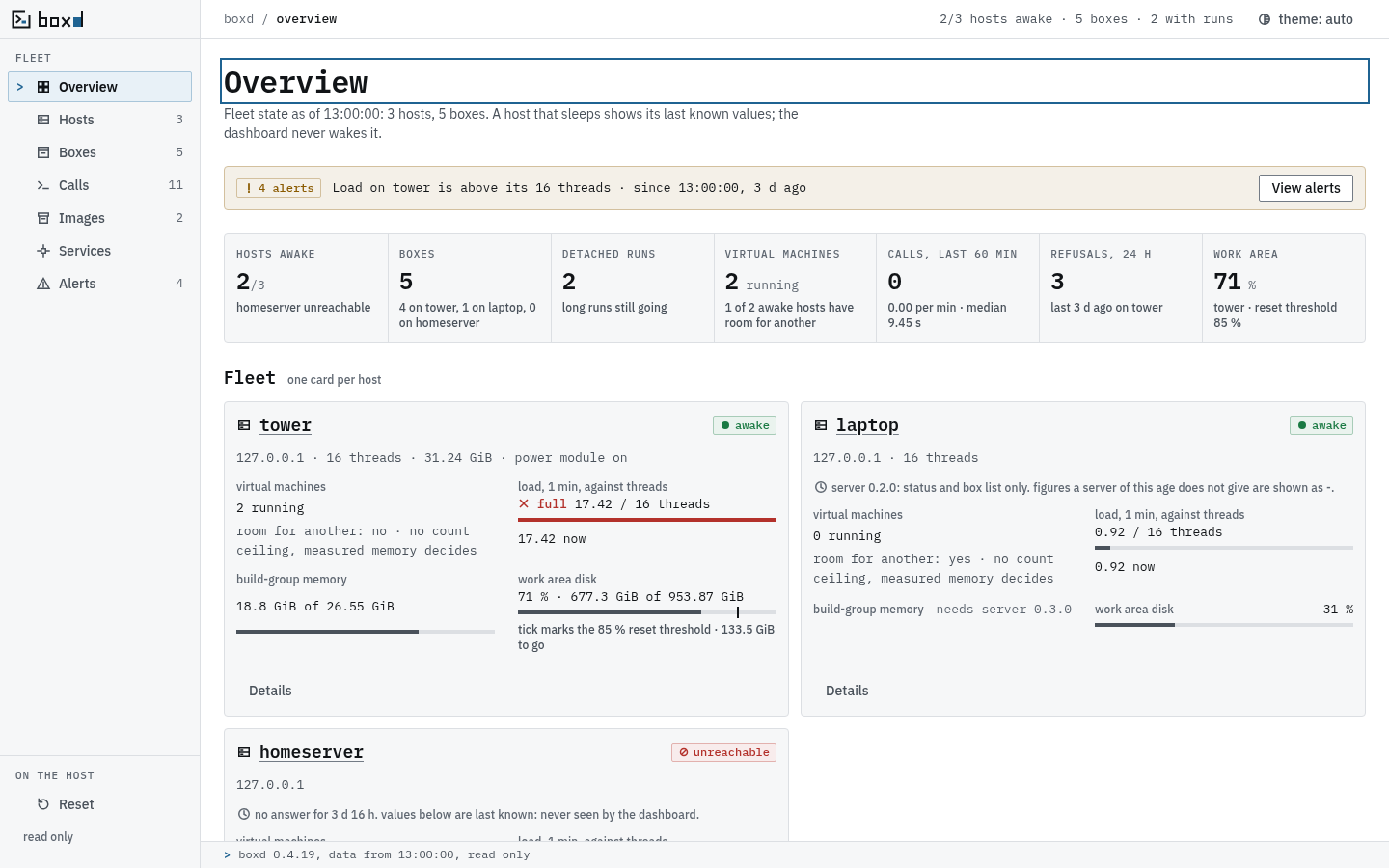
dashboard/ is a small read-only web page for all your build hosts: boxes, runs, memory, disk, refusals and
removals. It asks each host over ssh with a key that may only read, never wakes a sleeping host, and ships as a
container stack (dashboard/stack/INSTALL.md). It is plain files: no build step,
no dependency, no outside request.
Documents
| Document | What it holds |
|---|---|
docs/settings.md |
every setting of /etc/boxd/boxd.conf with its default |
docs/pod-contract.md |
the call protocol between box and boxd-pod, and every rule of admission and cleanup |
docs/packaging.md, docs/packaging-debian.md |
building, signing and publishing the packages |
docs/designs/ |
the designs: installed layout, choice among several hosts, dashboard |
docs/development.md |
compiling and running the tests |
client/skill/SKILL.md |
what the agent is told |
CHANGELOG.md |
every release |
Status
boxd runs day-long agent workloads on two build hosts, and every release is installed on both on the day it is
tagged. It is young software, made for one setup first: expect rough edges on distributions other than Void Linux
and Debian 13, and read the change log before an upgrade.
Acknowledgements
boxd is glue around the work of others.
Shipped with boxd, under their own licenses:
- microsandbox (Apache License 2.0) runs the virtual machine boxes.
Themicrosandbox-binpackage is its unchanged release binary with its license text. - IBM Plex (SIL Open Font License 1.1) is the typeface of the dashboard; the license is
indashboard/web/assets/fonts/OFL.txt.
Used on the host or the client, installed from your distribution:
- Podman runs the container boxes, rootless.
- OpenSSH and rsync carry every call and every file.
- btrfs gives the work area its instant resets.
- Void Linux and Debian are the systems boxd is packaged for.
- Node.js runs the client and the dashboard.
License
Reviews (0)
Sign in to leave a review.
Leave a reviewNo results found