Cortex
Health Warn
- License — License: MIT
- Description — Repository has a description
- Active repo — Last push 0 days ago
- Low visibility — Only 6 GitHub stars
Code Warn
- process.env — Environment variable access in scripts/perf-snapshot.mjs
- network request — Outbound network request in scripts/perf-snapshot.mjs
- process.env — Environment variable access in src/brief.js
- process.env — Environment variable access in src/capturePolicy.js
- process.env — Environment variable access in src/captureService.js
- process.env — Environment variable access in src/claudeAdapter.js
- process.env — Environment variable access in src/cli.js
- network request — Outbound network request in src/cli.js
- process.env — Environment variable access in src/commands.js
Permissions Pass
- Permissions — No dangerous permissions requested
No AI report is available for this listing yet.
A local, SQLite-backed memory and project-ops layer for coding agents (Claude Code, Codex).

Cortex
A local memory and project-ops layer for coding agents.





Coding agents forget everything the moment a session ends. Cortex gives them a
memory that persists — and gives you one place to see, steer, and audit the work
across every project they touch.
It runs entirely on your machine: one Node process, one SQLite file, no external
services, no data leaving your laptop. It works with Claude Code and Codex
out of the box.
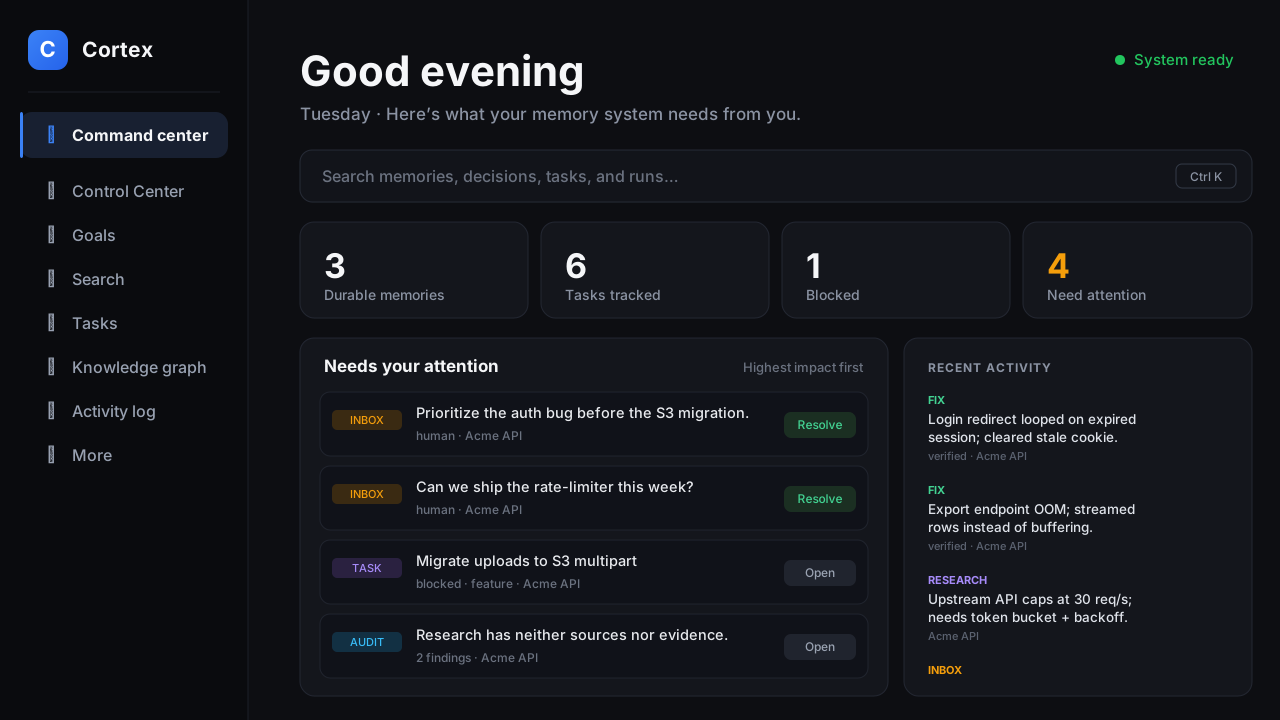
Your agent → the Cortex hub on
localhost:4317→ a memory that gets smarter
every session, a command center, and an evening brief of what actually happened.
Contents: What it does · How it compares ·
How it works ·
The memory lifecycle · Quickstart ·
Connect your agent · Using the system ·
The dashboard · Autonomy tiers · CLI reference ·
Deploy · Security
What it does
🧠 Memory that survives sessions. As your agent finishes work, Cortex quietly
captures the things worth keeping — a fix and how it was verified, a research
finding, a blocker, a task that changed state. Generic "done!" chatter is thrown
away. What's left is deduplicated, linked to related records with typed
provenance, and ranked so the next session recalls the relevant past, not all
of it — packed to fit a token budget you control.
🎛️ A command center. A dark web dashboard that puts blocked work, unresolved
questions, and recent activity first. Search across projects with explained
scores, inspect the token pack, browse tasks and the activity log, run a database
audit, and explore an interactive graph of how your records connect.
🌆 An evening brief. One command (cortex eod) turns the day's raw records
into a report: what got done (with evidence), what needs your eyes, what's queued
for tonight — as text, JSON, or a rendered HTML page, optionally pushed to
Telegram. An optional agent layer rewrites each item into plain English and adds
a short "story of the day"; if that fails for any reason, the deterministic SQL
report stands untouched.
🩺 A portfolio doctor. Cortex watches every project the hub knows about and
tells you which are active, stalled, or quietly abandoned — with a per-project
lifecycle you can set (active, waiting, maintenance, archived) so the
noise stays down.
🎚️ Autonomy tiers. Each project carries a dial — watch, plan, assist,auto — that says how much autonomy an orchestrator may take with it, and a
pin (CORTEX_NEVER_AUTOPILOT) that locks protected repos at watch forever.
Cortex itself never launches agents; it is the policy and memory surface an
external runner reads.
How it compares
There are several polished commercial memory layers for AI agents. They're good
products — the honest difference is where your data lives and what the tool
is for:
| Cortex | Mem0 | Zep | Supermemory | Letta | |
|---|---|---|---|---|---|
| Price | Free, MIT | Free tier, then $19+/mo cloud (OSS core) | Paid cloud (~$125/mo Flex) | Free tier, then $19+/mo cloud (MIT OSS core) | Free tier, then $20+/mo cloud (Apache-2.0 core) |
| Your data lives | Your machine, one SQLite file | Their cloud, or self-host (needs vector + graph DB) | Their cloud; DIY via the OSS Graphiti engine + a graph DB | Their cloud, or a self-hosted local binary | Their cloud, or self-hosted server |
| Needs LLM/embedding calls | No — deterministic local ranking (embeddings optional, via local Ollama) | Yes (LLM + embeddings) | Yes | Yes (self-host can use Ollama) | Yes (BYOK) |
| Built for | Coding agents specifically — hooks into Claude Code / Codex sessions | General AI-app memory | Agent memory / knowledge graph | General memory API + consumer app | Stateful agent framework |
| Beyond memory | Tasks, roadmaps, evening brief, portfolio doctor, autonomy policy | — | — | — | Agent runtime |
| Setup | npm install, npm start — no accounts, no other services |
SDK + account (or multi-service self-host) | SDK + account | SDK + account (or local binary) | SDK + account (or self-host server) |
(Competitor details checked August 2026 — pricing and self-host options move
fast; check their sites for current terms.)
Pick a paid platform when you're building a product that needs memory for
thousands of end users, managed scaling, and SLAs.
Pick Cortex when the memory is for you and your coding agents: your
codebase context never leaves your laptop, there's no per-request bill, it works
offline, and you get the project-ops layer (tasks, briefs, autonomy tiers) that
generic memory APIs don't try to be.
How it works
Cortex is a single local process. Your agents talk to it three ways — session
hooks, an MCP server for mid-session calls, and a plain HTTP/CLI interface — and
everything lands in one SQLite database that the dashboard, the evening brief,
and the portfolio doctor all read.
flowchart LR
    CC["Claude Code"]
    CX["Codex"]

    subgraph HUB["Cortex hub · localhost:4317"]
      direction TB
      CAP["Capture policy<br/>dedup + quarantine + normalize"]
      DB[("SQLite<br/>node:sqlite")]
      LINK["Typed links (provenance)"]
      IDX["Full-text index<br/>(porter-stemmed)"]
      RANK["Ranking engine"]
      CAP --> DB
      DB --> LINK
      DB --> IDX
      RANK --> DB
    end

    WEB["Web command center"]
    EOD["Evening brief"]
    TG["Telegram"]

    CC -->|"hooks: recall / capture"| CAP
    CC -.->|"MCP tools, mid-session"| CAP
    CX -->|"CLI / HTTP API"| CAP
    HUB --> WEB
    HUB --> EOD
    EOD -.->|"daily report / needs you"| TG
No external dependencies for storage or search. The database is Node's
built-in node:sqlite (that's why it needs Node ≥ 25) and search is a
deterministic local ranker — no vector database, no embedding API, no keys.
If you want a semantic arm in the ranking, set CORTEX_EMBEDDINGS=1 and
Cortex blends embedding cosine similarity (via a local Ollama model,nomic-embed-text by default) with the keyword score — still fully local.
The memory lifecycle
Every session is a loop: recall relevant context at the start, capture durable
takeaways at the end. The signal survives; the chatter doesn't.
sequenceDiagram
    participant A as Agent
    participant H as Cortex hook
    participant P as Capture policy
    participant DB as SQLite

    rect rgb(30,40,55)
    Note over A,DB: Session start
    A->>H: SessionStart
    H->>DB: recall ranked context (token-budgeted)
    DB-->>A: compact project brief
    end

    Note over A,DB: ...work happens...

    rect rgb(45,35,50)
    Note over A,DB: Session stop
    A->>H: Stop (full transcript)
    H->>P: any durable takeaways?
    P->>P: discard chatter · dedup · normalize
    P->>DB: store fix / research / blocker / task change
    DB->>DB: link to related records + index
    end
What gets captured
| Record type | Example | Kept because |
|---|---|---|
| Fix | "Login redirect looped; fixed by clearing stale cookie. Verified: npm test." |
Durable, verifiable |
| Research | "Vendor API rate-limits at 30 req/s; backoff needed." | Reusable finding |
| Blocker | "Deploy blocked: missing prod DB migration." | Unblocks future work |
| Decision | "Chose SQLite over Postgres — single-user, local-first." | Explains the "why" |
| Task change | task moved ready → blocked → done |
Progress you can query |
| Lesson | a pattern promoted after recurring across sessions | Hard-won knowledge |
Generic completion chatter ("Done!", "Let me know if you need anything else") is
discarded before it ever reaches the database.
How recall ranks results
Search needs no API key. Its deterministic score blends four signals, so a
verified older fix can still outrank recent noise:
score  =  lexical relevance          (does the text match?)
        + typed graph proximity       (is it linked to what you're touching?)
        + record quality              (verified > unverified, fix > chatter)
        + recency decay               (newer counts more, but doesn't win alone)
        ─────────────────────────────
        then packed to fit your token budget
Two more guards keep the brief honest: an off-topic filter drops records that
name another project and never this one, and a Supersedes: [m:id] marker in
any new decision cleanly retires the one it reverses instead of letting both
rank forever.
Quickstart
Five minutes, four steps. The only requirement is Node.js ≥ 25 (Cortex uses
the built-in node:sqlite module — no database to install, nothing to compile).
1. Get the code and install:
git clone https://github.com/gsl0001/Cortex.git cortex
cd cortex
npm install
2. Set a write token. This is just a password you make up — anything long
and random. Cortex refuses to save anything until it exists:
export CORTEX_TOKEN="$(openssl rand -hex 24)"
On Windows: setx CORTEX_TOKEN "any-long-random-string", then open a new
terminal.
3. Build the dashboard and start the hub:
npm run web:build
npm start
4. Open http://127.0.0.1:4317 — that's your dashboard. It will be empty;
that's normal. It fills up as your agents work.
The server only listens on your own machine. Nothing is sent anywhere.
Next: connect your agent so sessions start feeding it.
Connect your agent
Claude Code
Install the hooks into any project you want remembered:
node src/cli.js claude install --project /path/to/your/project
From then on, Claude recalls compact project context at the start of a session
and Cortex captures durable takeaways when it stops — automatically.
Mid-session recall (MCP)
Hooks cover session boundaries. To let an agent search or save memory during a
session, start the server (npm start) and register the MCP server in the
project's .mcp.json:
{
  "mcpServers": {
    "cortex": {
      "command": "node",
      "args": ["/absolute/path/to/cortex/src/mcp.js"],
      "env": {
        "CORTEX_URL": "http://127.0.0.1:4317",
        "CORTEX_TOKEN": "${CORTEX_TOKEN}",
        "CORTEX_AGENT": "claude-code"
      }
    }
  }
}
Use the absolute path to src/mcp.js in your Cortex checkout — your agent
launches this from your project's directory, not Cortex's.
Six tools are exposed: memory_search, memory_get, memory_remember,memory_recall_task, memory_update_task, memory_lesson. The session brief
cites records by id ([m:42]); memory_get pulls the full record on demand, so
the brief itself can stay a compact stub index.
Codex uses the same CLI and HTTP API.
Using the system
A typical end-to-end flow, from zero to a self-improving memory:
flowchart LR
    S1["1 · Start the hub<br/>npm start"] --> S2["2 · Connect a project<br/>claude install"]
    S2 --> S3["3 · Work normally<br/>fix, verify, ship"]
    S3 --> S4["4 · Session ends<br/>Cortex captures the fix"]
    S4 --> S5["5 · Next session<br/>it recalls what matters"]
    S5 --> S3
    S5 -.-> S6["6 · Evening: cortex eod<br/>the day, in one report"]
- Start the hub once — it stays running and serves the dashboard at
localhost:4317. - Connect a project:
node src/cli.js claude install --project ~/code/myapp.
Now every Claude Code session in that repo recalls context on start and
captures durable takeaways on stop. - Work normally. Fix a bug and verify it. You don't do anything special —
Cortex watches the session boundaries. - The session ends and Cortex stores the fix plus how it was verified,
throwing away the surrounding chatter. - Next session, it remembers. Your agent opens with a brief: recent fixes,
open blockers, and relevant research — ranked and trimmed to a token budget. - Search or track work anytime — from the dashboard or the CLI:
# "How did we solve this before?"
node src/cli.js search --project ~/code/myapp --query "auth redirect loop"

# See the current project brief the agent would receive
node src/cli.js brief --project ~/code/myapp

# Capture a task, then let a human or agent pick it up
node src/cli.js task add --project ~/code/myapp --title "Rate-limit the export endpoint" --type chore --priority high
node src/cli.js next-task --project ~/code/myapp --claim --agent claude-code
- End the day with one report.
node src/cli.js eod --html reports/eod/today.html --notify
builds the evening brief — done work with evidence, a verify queue, what's
blocked, tonight's open items — and can ping it to Telegram. Schedule it
(seescripts/eod-brief.ps1for a Windows Task
Scheduler example) and you get a daily digest for free.
The dashboard
The web command center (dark, keyboard-friendly) is organized around what needs
attention first:
| Area | What it shows |
|---|---|
| Command Center | Blocked work, unresolved inbox questions, recent activity, and recall-economics cards — is the memory actually earning its tokens? |
| Control Center | The per-project autonomy dial (watch → auto), with pinned repos clearly marked |
| Search | Project-scoped search with explained scores and the exact token pack an agent would receive |
| Tasks | Every task with type, priority, status, and its full history |
| Goals / Roadmap | Milestones, weekly plans, and roadmap proposals |
| Knowledge graph | An interactive graph of records and their typed links — manual links are saved with full confidence, inferred ones keep their own provenance |
| Activity log | A chronological feed of everything captured |
| Portfolio | The portfolio doctor: which projects are active, stalled, or abandoned, with lifecycle controls |
| Health & audit | A read-only database health check you can run any time |
Autonomy tiers
Cortex does not launch agents. What it holds is the policy: a per-project dial
that says how much autonomy an external orchestrator (your own runner, a cron
job, a night-shift script) may take, readable over the same HTTP API as
everything else.
| Tier | Meaning |
|---|---|
watch |
Remembered and reported; no agent process is ever launched |
plan |
Agents may propose tasks and flag stalls; never execute |
assist |
Runs only when a human releases a specific task |
auto |
May work the ready queue autonomously; results always park for review |
Every project starts at watch — a newly-seen repo is never autonomous by
default. Set a tier from the dashboard's Control Center orPOST /api/v1/projects/tier.
The pin. Set CORTEX_NEVER_AUTOPILOT to a comma-separated list of absolute
paths (production repos, anything that moves money) and those projects are
pinned at watch — a floor no setting write can raise. Entries are normalized
like project paths themselves, so a subdirectory or mixed-separator spelling of
a protected repo still collapses onto the pin. See
SETUP.md for details.
CLI reference
Run node src/cli.js with no arguments for the full, always-current list.
| Group | Commands |
|---|---|
| Search & recall | search, brief, stats, index rebuild |
| Tasks | task add, task claim, task block, task done, next-task |
| Capture | fix add, research add, session start, session finish |
| Inbox | inbox add, inbox list, inbox resolve |
| Planning | roadmap proposal-add, roadmap show, goals, week show, week auto-plan |
| Portfolio | doctor --portfolio, project lifecycle, profile upsert |
| Reports | eod (evening brief: --html, --notify, --digest) |
| Agent hooks | claude install, claude recall, claude flush |
| Maintenance | audit --all [--fix], maintenance sweep, maintenance dedupe-decisions |
node src/cli.js search --project . --query "close fill" --max-tokens 1500
node src/cli.js task add --project . --title "Fix login redirect" --type bug --priority high
node src/cli.js audit --all --json
Deploy with Docker
docker build -t cortex .
docker run -d \
  -e CORTEX_TOKEN="your-long-random-token" \
  -p 4317:4317 \
  -v cortex-data:/data \
  cortex
The image builds the web UI, binds 0.0.0.0 (so port-mapping works), and stores
the database on the /data volume. Because it binds beyond loopback, the server
requires CORTEX_TOKEN and refuses to start without it. Put it behind a
reverse proxy with TLS if you expose it beyond localhost.
Configuration
Only CORTEX_TOKEN is required. Everything else has a sensible default — see.env.example for the common knobs (CORTEX_DB, CORTEX_HOST,CORTEX_PORT, CORTEX_NEVER_AUTOPILOT) and SETUP.md for the full
setup, agent adapters, notifications, and the autonomy-tier details.
Security model
- Loopback by default. The server only binds a public interface when you opt
in (CORTEX_ALLOW_REMOTE=1), and even then refuses to start without a token. - Writes are default-deny. Every
POST/PATCH/DELETEis rejected untilCORTEX_TOKENis set — even on localhost. - Reads are gated off-loopback. When bound beyond loopback, read endpoints
require the token too — not just writes. - Captured text is quarantined. Session captures that look like prompt
injection ("ignore previous instructions…", and a broad family of phrasings)
are flagged on the way in, so a poisoned transcript can't smuggle instructions
into a future session's brief. - Autonomy is pinned, not promised. Repos listed in
CORTEX_NEVER_AUTOPILOT
are locked at thewatchtier — no API write can raise them. - Treat
CORTEX_TOKENlike an SSH key. The hub schedules local CLI jobs
(transcript distillation, the evening digest), so treat a leaked token as more
than read access. Keep the hub on loopback unless you front it with an
authenticating reverse proxy over TLS.
Development
npm test            # backend suite (node:test) — 348 tests
npm run web:test    # web UI tests (vitest) — 51 tests
npm run web:build   # production build
Back up
Stop the server, copy the SQLite file, restart, and rebuild the index:
cp ~/.cortex/cortex.sqlite ~/.cortex/cortex.backup.sqlite
node src/cli.js index rebuild
License
MIT — see LICENSE.
Reviews (0)
Sign in to leave a review.
Leave a reviewNo results found