agent-sh
Health Warn
- No license — Repository has no license file
- Description — Repository has a description
- Active repo — Last push 0 days ago
- Low visibility — Only 6 GitHub stars
Code Fail
- process.env — Environment variable access in examples/extensions/ash-mcp-bridge/index.ts
- execSync — Synchronous shell command execution in examples/extensions/latex-images.ts
- fs.rmSync — Destructive file system operation in examples/extensions/latex-images.ts
- process.env — Environment variable access in examples/extensions/latex-images.ts
- process.env — Environment variable access in examples/extensions/openrouter.ts
- network request — Outbound network request in examples/extensions/openrouter.ts
Permissions Pass
- Permissions — No dangerous permissions requested
No AI report is available for this listing yet.
A shell-first terminal with an AI agent living in it
agent-sh
An agent that lives in a shell — not a shell that lives in an agent.



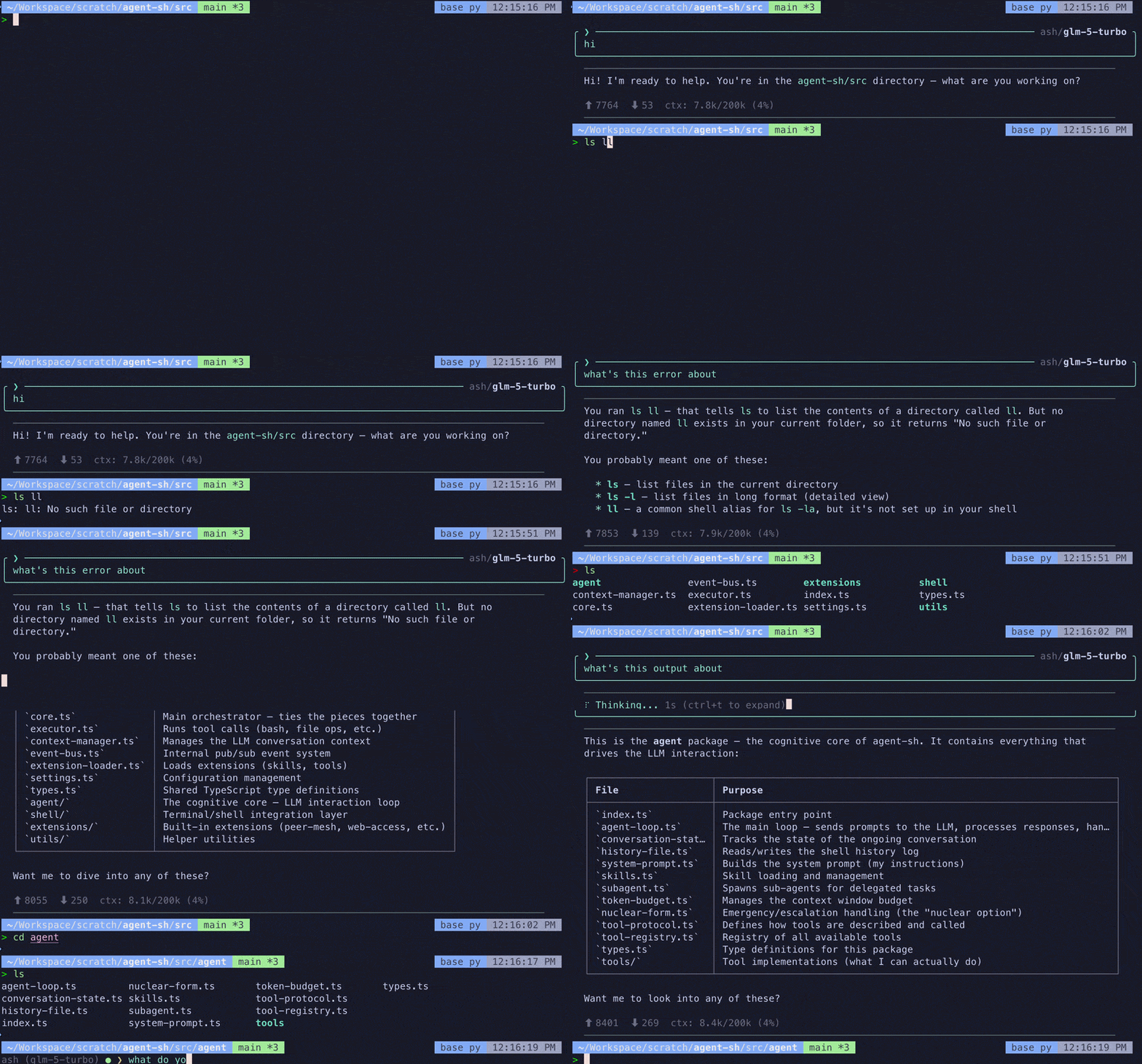
Most AI terminal tools get this backwards: the LLM drives the experience and the shell is bolted on as an afterthought. No real PTY, no job control, no vim, fragile cd tracking. The agent is the main character and your terminal is a prop.
agent-sh flips this. It's your shell first — full PTY, your rc config, your aliases, everything just works. But type > at the start of a line, and you're talking to an agent that has full context of what you've been doing.
~ $ ls -la                       # real shell command
~ $ cd ../tests && npm test      # real cd, env, aliases — all just work
~ $ vim file.ts                  # opens vim in the same PTY
~ $ > explain the last error     # agent investigates using its own tools
~ $ > draft a commit message     # agent reads your diff and shell history
Quick Start
npm install -g agent-sh
agent-sh
Tip: add an alias to your shell config for quick access:
alias ash="agent-sh"
Set OPENAI_API_KEY in your environment (or configure providers in ~/.agent-sh/settings.json). Works with any OpenAI-compatible API — see the Usage Guide for provider examples (OpenAI, Ollama, OpenRouter, Together, Groq, LM Studio, vLLM).
Requires Node.js 18+.
Key Features
Real terminal, zero compromise. Full PTY with your shell config, aliases, and environment. Shell starts instantly — the agent connects asynchronously in the background.
One entry point, smart tool selection. Type > and agent-sh figures out how to help. Scratchpad tools (bash, read_file, grep, glob) for investigation. Extensions add capabilities like running commands in your live shell. No modes to pick — the agent reasons about which tools to use based on your intent.
Context that just works. Every query includes your cwd, recent commands, and their output. Run a failing test, type > fix this, and agent-sh knows exactly what happened. Context management works like shell history — continuous, persistent across restarts, no sessions to manage. See Context Management.
Any LLM, any backend. agent-sh works with any OpenAI-compatible API out of the box. Define multiple providers in settings and switch models at runtime with /model <name>. Or swap in a completely different agent — Claude Code and pi run as drop-in backend extensions.
Extensible by design. The entire system is built on a typed event bus. Extensions can add custom input modes, content transforms (render LaTeX as images, Mermaid as diagrams), themes, slash commands, or replace the agent backend entirely. The built-in TUI renderer is itself just an extension.
Embeddable as a library. The core is a headless kernel — import { createCore } from "agent-sh" to build WebSocket servers, REST APIs, Electron apps, or test harnesses. No terminal required.
Documentation
Start with Usage to get running, then Architecture for the mental model.
- Usage Guide — install, run, configure providers and models
- Architecture — pure kernel + extensions, the shell ↔ agent boundary
- The Built-in Agent: ash — query flow, tools, system prompt, model switching
- Context Management — shell-output spill, three-tier conversation compaction, recall APIs
- Extensions — event bus, content transforms, custom agent backends, theming
- TUI Composition — compositor, render surfaces, stream routing
- Library Usage — embedding agent-sh in your own apps
- Troubleshooting — common errors and debug mode
Development
git clone https://github.com/guanyilun/agent-sh.git
cd agent-sh
npm install
npm run build
npm start
License
MIT
Reviews (0)
Sign in to leave a review.
Leave a reviewNo results found