voice-to-text
Health Warn
- License — License: MIT
- Description — Repository has a description
- Active repo — Last push 0 days ago
- Low visibility — Only 5 GitHub stars
Code Fail
- rm -rf — Recursive force deletion command in Tests/run-hotkey-harnesses.sh
- rm -rf — Recursive force deletion command in scripts/build-tailscale.sh
Permissions Pass
- Permissions — No dangerous permissions requested
No AI report is available for this listing yet.
Free offline dictation app for macOS. Push-to-talk voice input for Claude Code, Codex, and any app. Runs 100% locally on the Apple Neural Engine.
VoiceToText — Free Offline Dictation App for macOS




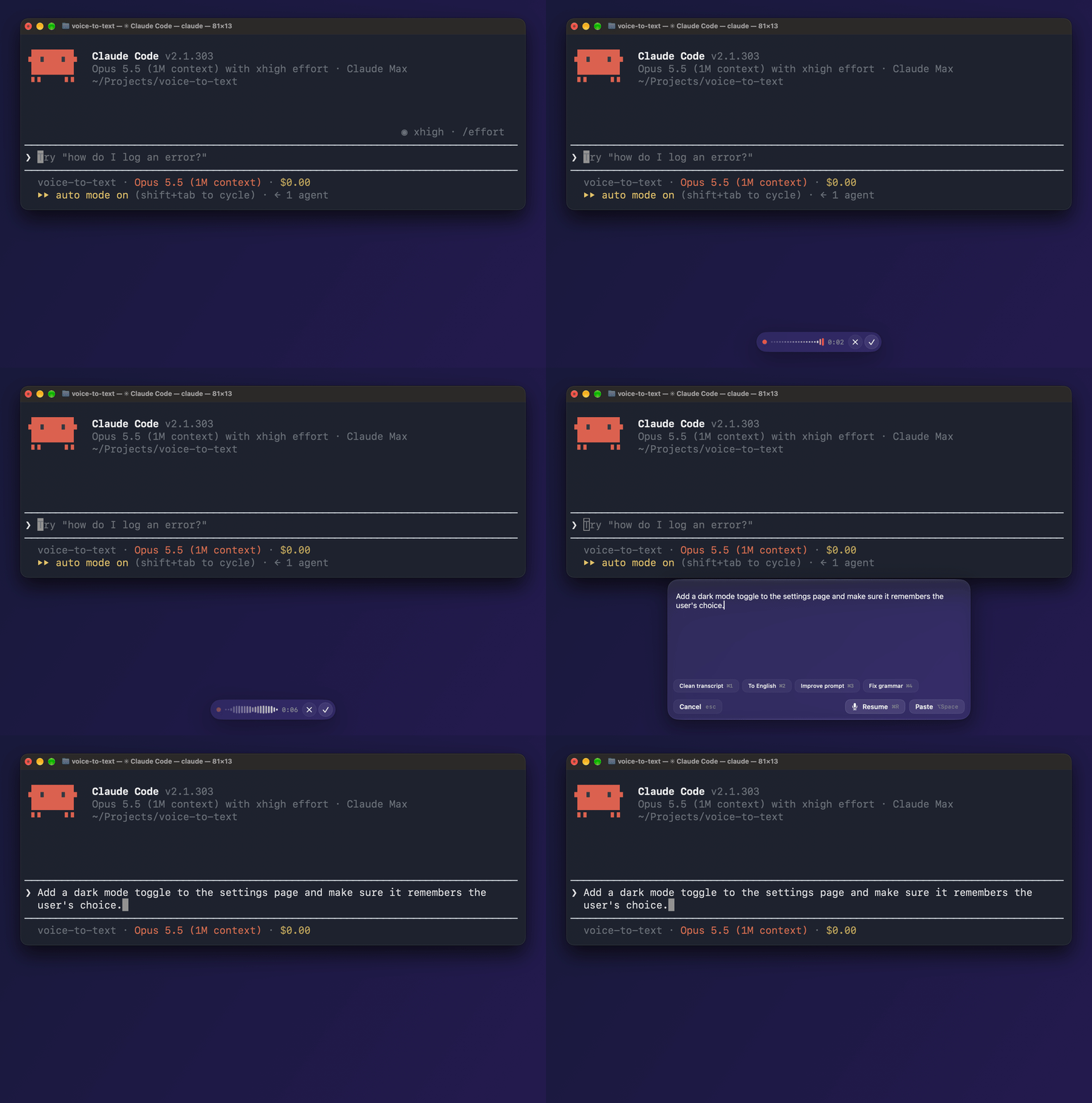
Free, open-source speech-to-text for Mac. Press ⌥ Space, speak, and the transcript is pasted into the app you're in — Claude Code, Codex, Cursor, Slack, Notes, VS Code, Chrome, and more. Local transcription is the default: the Parakeet model runs on your Mac and works offline once it has been downloaded. OpenAI, ElevenLabs, and Groq models are optional: they're used only when you select one and add your own API key.
A free alternative to Wispr Flow, Superwhisper, MacWhisper, and Apple Dictation.
Download for Mac · iPhone app · voicetotext.cc
If VoiceToText is useful to you, a ⭐ on this repo helps other people find it.
Features
- Local by default, offline after setup — Parakeet TDT v3 downloads once on first launch and then runs on your Mac; five local Whisper models are available too
- Built for prompting AI agents — review the transcript, record another take at the cursor, or run an AI action before anything is pasted into Claude Code, Codex, Cursor, or any other app
- Learns your terms — fix a misheard name once, click Remember, and the same fix is made in every later transcript
- Meeting recorder without a bot — Conversations records your microphone and the call's system audio together, or takes an audio or video file
- 17 speech models — 6 local and 11 cloud (OpenAI, ElevenLabs, and Groq) on your own API key, including four live models
- Free, MIT licensed, native — no paid tier, no account, no analytics or telemetry in the app; SwiftUI/AppKit, not Electron
- Global shortcut —
⌥ Spacetoggles dictation by default; switch to hold-to-record, or bind any key with a modifier, a lone F1–F20, or Right Control - Review before pasting — on by default; turn it off for instant paste
- Corrections list — every remembered fix is in Settings → Corrections
- Pastes into any app — the text goes in with ⌘V and your previous clipboard is restored afterwards, so it works anywhere you can paste text
- Speaker labels — optional, through OpenAI's GPT-4o Transcribe Diarize; rename "Speaker 1" to real names
- AI insights — Summary, Action Items, and your own prompts on any recording, with your OpenAI key
- Searchable History — every conversation and your latest 200 dictations stay on your Mac with their audio; search, favorite, replay, copy, and re-transcribe with another model
- iPhone app — free on the App Store: record or import audio and transcribe it on the phone, and start, stop, read, and listen in on your Mac's conversations
- Scriptable — a
voicetotext://URL scheme for Raycast, Shortcuts, Stream Deck, and scripts, and a local app API so other apps can show their own recorder
Download
The app is signed and notarized. Every release is on GitHub Releases.
iPhone: Voice to Text: Offline AI on the App Store — free, iOS 18.0 or later. It records and transcribes on the phone with Parakeet and doesn't dictate into other apps. Build notes are in Mobile/README.md.
Install
- Open the DMG and drag VoiceToText to
/Applications. - Launch it. The default Parakeet model starts downloading in the background.
- Grant Microphone and Accessibility permissions when prompted.
- Put the cursor in any text field and press
⌥ Space, speak, then press⌥ Spaceagain. - The transcript opens in a review panel. Press
Return(or⌥ Spaceonce more) to paste it into the app you were in.
If you'd rather skip the review step, turn off Review before pasting in Settings → General and the text is pasted as soon as you stop.
Requirements
- macOS 15.0 or later
- An Apple Silicon or Intel Mac. Local models run much faster on Apple Silicon. On an Intel Mac, Parakeet and the Whisper models run through transcribe.cpp: on the graphics card when it works, and on the CPU when it doesn't (you can also turn the graphics card off in Settings → Models)
- An internet connection for the first model download, update checks, and any cloud models or AI features you choose to use
How it works
Dictation
- Toggle or hold. Press the shortcut to start and again to stop, or switch to Hold to record in Settings → Shortcut.
- Recording card. A small floating card shows a live level meter, the elapsed time, and Cancel / Finish buttons.
Esccancels (you can turn that off). - Review panel.
Returnpastes,Shift+Returnadds a new line,Escdiscards the take (with a few seconds to undo), and⌘Rrecords another take and inserts it at the cursor, so a long prompt can be spoken in passes. - Paste, not typing. VoiceToText saves your clipboard, puts the text on it, sends
⌘Vto the frontmost app, and restores the previous clipboard about a quarter of a second later. Fields that block pasting won't receive text. - No voice commands. Saying "new line" or "comma" writes those words. There's no built-in filler-word removal; an AI action can clean that up if you want.
- Resilient capture. If the microphone changes mid-take (AirPods switching profiles, for example), recording restarts automatically. If it can't, the audio captured so far is still transcribed. A failed transcription keeps the audio so you can retry, and saves it to History to transcribe again later.
- The app uses the macOS default input device; there's no microphone picker.
AI actions
Six built-in actions in the review panel: Clean transcript, To English, Improve prompt, Fix grammar, Summarize, Essentials only. You can add your own (a name plus an instruction).
- All actions are off by default. Turn them on in Settings → Actions and add an OpenAI API key.
- Run one with a click or
⌘1–⌘9; chain several and step back with Undo. - They never run automatically. Each run sends the transcript text to OpenAI (
gpt-5.5) on your key.
Corrections
Speech models get the same names and terms wrong every time. Fix one in the review panel, say yes once, and VoiceToText makes that fix for you from then on.
- Offered from your edits. When you paste or copy a reviewed transcript, a misheard name or term you typed over is offered back as the fix itself,
cloud code → Claude Code, with a Remember button (likewiseклод→Claude,github→GitHub). One click stores it; nothing is stored without that click. Rewording a sentence, changing a number, or fixing grammar is not offered. - Made in every new transcript. Dictation, conversations, re-transcriptions, and the app API. A correction matches whole words in any case and writes the replacement exactly as you spelled it.
- Easy to take back. After the click, a one-line notice gives you a few seconds to undo. Typing the original words back over a correction gets an offer to forget it.
- Yours to edit. Settings → Corrections lists them all: add, change, or delete any, or turn the offers off. The list stays on your Mac.
Conversations
Conversations is VoiceToText's meeting recorder.
- Mic + system audio. Records your microphone and whatever your Mac plays, so it captures the other people on Zoom, Google Meet, Teams, FaceTime, Webex, Discord, or any other app. No bot joins the call.
- Start it three ways: Start Recording in the Conversations pane, the menu bar item, or an optional Conversation shortcut (no default key; press to start, press again to stop and transcribe).
- Transcribed when you stop, not live. Long recordings are split at quiet points and transcribed in parts. There's no pause.
- Or stop without transcribing. Stop & Save — in the pane, on the floating HUD, and in the menu bar — keeps the audio and skips the transcript. The recording waits in History marked "Not transcribed yet"; transcribe it there whenever you like, with any model. The shortcut always stops and transcribes.
- Its own model. Conversations and uploads have a separate Transcription model setting (default: same as dictation). Live models aren't offered here.
- Upload a file. Choose Upload File… or drag one audio or video file onto the pane — anything macOS can read, such as MP3, M4A, WAV, AIFF, FLAC, MP4, or MOV. With the default local model it's transcribed on your Mac. History keeps the extracted audio, not the original video.
- Speaker labels. Only with the cloud model GPT-4o Transcribe Diarize (OpenAI key, $0.36/hr). Turns are labeled Speaker 1, Speaker 2…; use Name speakers to rename them, and the names carry into copies, AI insights, and search. Local models produce one unlabeled transcript.
- Crash-safe. Audio is written to disk as it records. If the app quits unexpectedly, the recording appears in History on the next launch; use Regenerate to transcribe it.
- Needs Screen Recording permission, because that's how macOS provides system audio. VoiceToText records audio only, never the screen.
History
- Every dictation and every conversation or upload is saved on your Mac with its audio and transcript, in
~/Library/Application Support/VoiceToText/History. - Dictations are saved by default. Turn off Save recordings in History to stop saving them; takes you cancel in review are removed once the few-second Undo passes. Conversations and uploads are always saved.
- Search transcripts finds text across transcripts, earlier versions, summaries, action items, custom results, speaker names, model, and date.
- Favorite, play, copy, or delete with a 5-second Undo (
⌘Z). Clear All is undoable too. - Regenerate any recording with any of the 17 models and keep each version side by side.
- History keeps your newest 200 dictations, removing older ones with their audio. Favorites, conversations, uploads, and recordings with AI insights or speaker names are never removed automatically.
- There's no export, sharing, sync, or transcript editing — copy to the clipboard to take text elsewhere.
AI insights
Open the sparkles menu on any recording (conversation rows also show Summary / Action items / Custom chips):
- Summary — a short summary of the transcript.
- Action Items — a checklist of tasks, with an owner and due date only when someone actually said one. Tick items off, or copy them as a Markdown checklist.
- Custom prompt — "Format with AI" with your own instruction, such as "Rewrite this as meeting minutes". Up to three custom results per recording.
Insights use your OpenAI key and gpt-5.5, and send the transcript text (with speaker names) to OpenAI. Results are saved with the recording and are searchable. If you regenerate the transcript, existing insights are kept and marked as out of date.
Models
17 models: 6 that run on your Mac and 11 in the cloud. Pick one in Settings → Models, which shows a 1–10 quality score (derived from published third-party word error rates; not VoiceToText's own tests) and the provider's price per hour.
On your Mac — free, downloaded once from Hugging Face. Audio never leaves the Mac.
Every local model works with the network off after its one-time download: Parakeet, the default, and the Whisper models load straight from disk.
| Model | Notes |
|---|---|
| Parakeet TDT v3 | Default and recommended. 25 European languages. |
| Whisper Large v3 Turbo | 99 languages. |
| Whisper Large v3 | 99 languages. Highest quality score among local models. |
| Whisper Small | 99 languages. Smaller download, more mistakes. |
| Whisper Base | 99 languages. |
| Whisper Tiny | 99 languages. For testing your setup. |
Models take from under 100 MB to about 1.6 GB on disk, depending on which one you pick.
Cloud — bring your own API key. Audio goes directly from your Mac to the provider, which bills you.
| Model | Provider | Price | Notes |
|---|---|---|---|
| Scribe v2 Realtime | ElevenLabs | $0.39/hr | LIVE — text appears word by word as you speak. 90+ languages. |
| GPT Live Transcribe | OpenAI | $1.02/hr | LIVE — text appears phrase by phrase, after each short pause. |
| GPT Realtime Whisper | OpenAI | $1.02/hr | LIVE — text appears only when you stop. |
| GPT-4o Transcribe Realtime | OpenAI | $0.36/hr | LIVE — text appears phrase by phrase, after each short pause. |
| GPT Transcribe | OpenAI | $0.27/hr | Highest quality score in the catalog. |
| GPT-4o Transcribe | OpenAI | $0.36/hr | |
| GPT-4o Transcribe Diarize | OpenAI | $0.36/hr | Labels speakers (Conversations and uploads). |
| GPT-4o Mini Transcribe | OpenAI | $0.18/hr | Lowest OpenAI price. |
| Whisper-1 | OpenAI | $0.36/hr | |
| Whisper Large v3 Turbo | Groq | $0.04/hr | Lowest price. Very fast. |
| Whisper Large v3 | Groq | $0.111/hr |
LIVE models are for dictation only. Prices are the providers' list prices as of September 2026 (Groq: October 2026). Groq bills each request as at least 10 seconds of audio.
Languages
There's no language picker; each model decides.
- Parakeet TDT v3 (default): 25 European languages, detected automatically.
- Local Whisper models: 99 languages, detected automatically.
- Cloud models: OpenAI models cover 99+ languages, Groq's Whisper models 99, and ElevenLabs Scribe 90+, detected automatically.
For a language outside Parakeet's 25, choose a Whisper model or a cloud model. On an Intel Mac the local models are slower, especially when they run on the CPU; Groq's Whisper models are a fast cloud alternative.
Mac integration
- Window and menu bar. VoiceToText is a regular Mac app with a window and a Dock icon, plus a menu bar item for starting and stopping dictation or a conversation. To run it from the menu bar only, turn off Show in Dock.
- Runs in the background. Closing the window keeps the app running. Launch at login is turned on at first run.
- Appearance: System, Light, or Dark.
- URL scheme.
voicetotext://toggle,start,stop, andcancelcontrol dictation from other apps and scripts, for exampleopen -g voicetotext://toggle. See INTEGRATION.md. - App API. Other apps on your Mac can record and transcribe through VoiceToText while drawing their own recorder — lpm's composer does. A local socket only apps running as you can reach; turn it off with Allow other apps to dictate in Settings → General. See INTEGRATION.md.
- Control from iPhone. Optional and off until you turn it on in Settings → iPhone and sign in to Tailscale, which is built into the app. The iPhone app, signed in to the same Tailscale account, can then start and stop a conversation, read and play this Mac's conversations, and, with Let iPhone listen live on, hear a recording as it happens. Traffic goes between your own devices.
- Updates. The app checks GitHub Releases at launch and once a day. Nothing installs without you: choose Install Update, Later, or Skip This Version. The Updates pane has Check Now and release notes.
Permissions
| Permission | Why |
|---|---|
| Microphone | Recording dictation and your side of a conversation. |
| Accessibility | Pasting into other apps. Recording won't start without it. |
| Input Monitoring | Only if you use Right Control on its own as the shortcut. |
| Screen Recording | Only for Conversations, to capture system audio. The screen is never recorded. |
Privacy and network
- With local models and no API keys, the app connects to the internet only to reach Hugging Face (model downloads) and to check GitHub Releases for updates. Your audio and transcripts stay on the Mac.
- Cloud transcription models send your audio directly to OpenAI, ElevenLabs, or Groq under your API key. Provider charges apply.
- AI actions and AI insights send transcript text to OpenAI under your key when you run them.
- Adding an API key sends one request to that provider to check the key. Keys are stored in the macOS login Keychain on this Mac (older versions kept them in the app's preferences and move them to the Keychain on first launch).
- No VoiceToText servers, no account, and no analytics or telemetry in the app. (The website, voicetotext.cc, uses Google Analytics.)
- History is saved locally, including dictation audio by default — see History.
Build from source
You need Xcode with the macOS and iOS SDKs, and Go (brew install go) for the bundled Tailscale library.
git clone https://github.com/gug007/voice-to-text.git
cd voice-to-text
./scripts/build-tailscale.sh
open VoiceToText/VoiceToText.xcodeproj
In Xcode, choose your own team under Signing & Capabilities, then run the VoiceToText scheme. Swift packages resolve on the first build.
build-tailscale.shhas to run once before Xcode opens the project; it skips itself when its output is current.- A build that includes Intel (
x86_64) also needs./scripts/build-transcribe-cpp.shfirst. A Debug build on an Apple Silicon Mac doesn't. scripts/dev.shandscripts/install.share the maintainer's build-and-install shortcuts and sign with the maintainer's Developer ID.- The logic tests are standalone harnesses:
./Tests/run-hotkey-harnesses.sh. - The iPhone app's build notes are in Mobile/README.md.
Contributing
Bug reports, feature requests, and pull requests are welcome — open an issue or start a discussion.
License
MIT. VoiceToText builds on FluidAudio, WhisperKit, transcribe.cpp, and libtailscale, each under its own license.
Reviews (0)
Sign in to leave a review.
Leave a reviewNo results found