claude-statusline-burnrate
Health Pass
- License — License: MIT
- Description — Repository has a description
- Active repo — Last push 0 days ago
- Community trust — 20 GitHub stars
Code Pass
- Code scan — Scanned 5 files during light audit, no dangerous patterns found
Permissions Pass
- Permissions — No dangerous permissions requested
No AI report is available for this listing yet.
Stop opening /usage — a Claude Code status line that does the weekly-limit math: today's share, sustainable burn rate, sleep-aware pacing. Pure bash + jq.
claude-statusline-burnrate
Stop opening /usage. It's all right there.




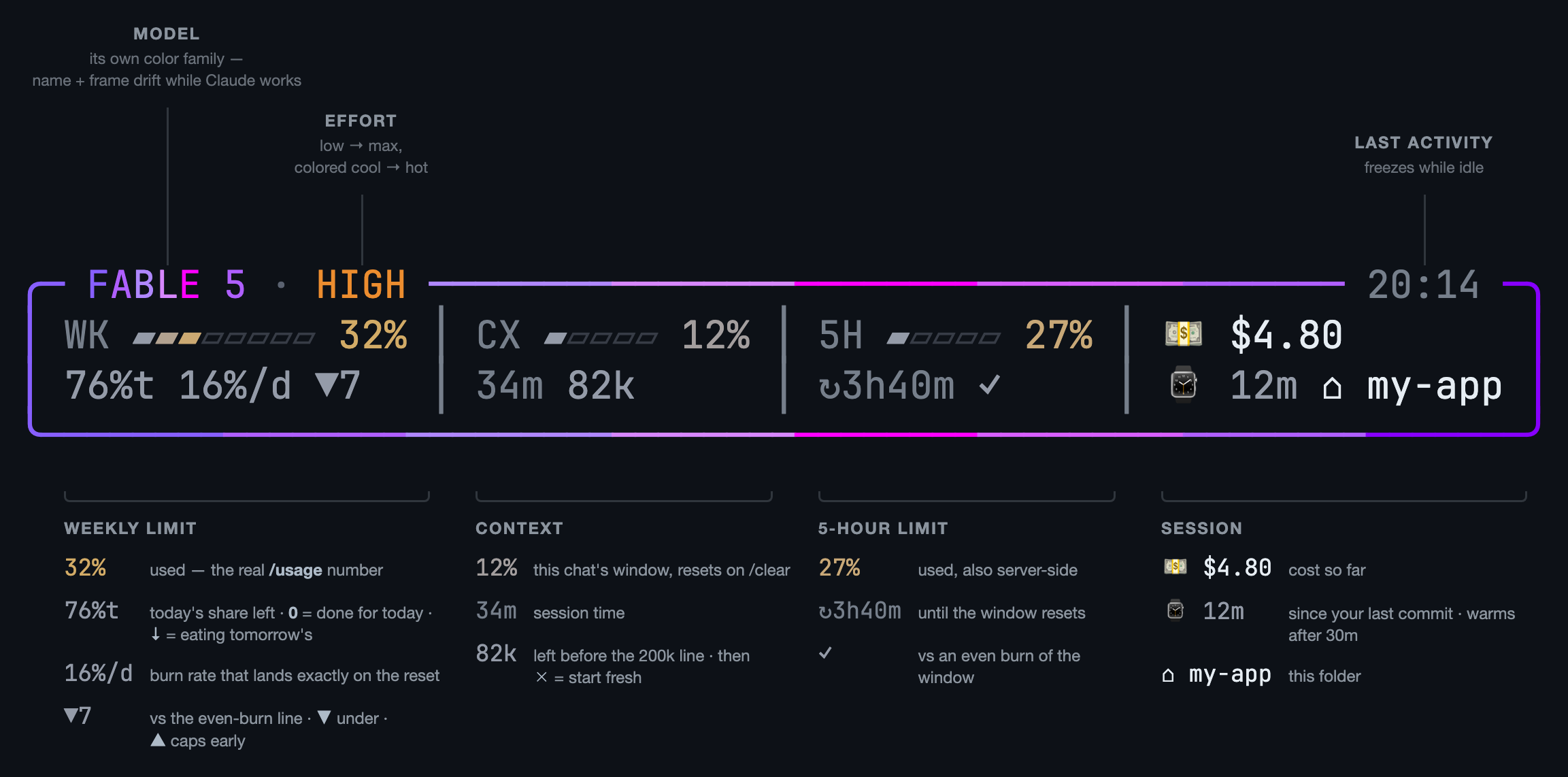
Real server-side rate_limits — the same numbers /usage shows — answers what you actually want: am I ok, and how hard can I push? Pure bash + jq. No node, no daemons, no estimates.
The pacing math counts awake hours, so the trend doesn't fall "behind" every night while you sleep.
Install
Needs jq and Claude Code v2.1+.
Easiest — you already have an AI open. Paste this into Claude Code:
Install the status line from github.com/Gui-Gou/claude-statusline-burnrate: download
https://raw.githubusercontent.com/Gui-Gou/claude-statusline-burnrate/main/statusline.sh
to ~/.claude/statusline.sh, chmod +x it, then set statusLine to
{"type":"command","command":"~/.claude/statusline.sh"} in ~/.claude/settings.json
without touching my other settings.
Using the Antigravity CLI too? Add "and the same statusLine in ~/.gemini/antigravity-cli/settings.json" to the prompt (see below).
By hand — two commands:
curl -fsSL https://raw.githubusercontent.com/Gui-Gou/claude-statusline-burnrate/main/statusline.sh -o ~/.claude/statusline.sh
chmod +x ~/.claude/statusline.sh
Then add to ~/.claude/settings.json:
{
  "statusLine": { "type": "command", "command": "~/.claude/statusline.sh" }
}
Open a new session. That's it.
Antigravity CLI (agy)
The same script works as the status line of Google's Antigravity CLI. Needs jq, python3 and agy.
Already installed for Claude Code? Skip the download and just add the setting below. Otherwise:
mkdir -p ~/.claude
curl -fsSL https://raw.githubusercontent.com/Gui-Gou/claude-statusline-burnrate/main/statusline.sh -o ~/.claude/statusline.sh
chmod +x ~/.claude/statusline.sh
Then add to ~/.gemini/antigravity-cli/settings.json:
{
  "statusLine": { "type": "command", "command": "~/.claude/statusline.sh" }
}
agy's payload carries no rate_limits, so the script falls back to agy -p "/usage": parsed with python3, refreshed in the background every 3 min, and cached in ~/.claude/.cache/agy-quota.cache. Gemini models use the Gemini quota, Claude/GPT models the other one. The effort comes from the model name (Gemini 3.8 Flash (High)), and Gemini Flash ⚡, Gemini Pro ✨ and GPT 🪐 get their own mascot and colors.
| Variable | Default | |
|---|---|---|
SL_AGY_BIN |
agy on PATH, else ~/.local/bin/agy |
Path to the agy binary |
SL_AGY_TTL |
180 |
Seconds between background /usage refreshes |
In Claude Code, rate_limits are present, so the fallback never runs.
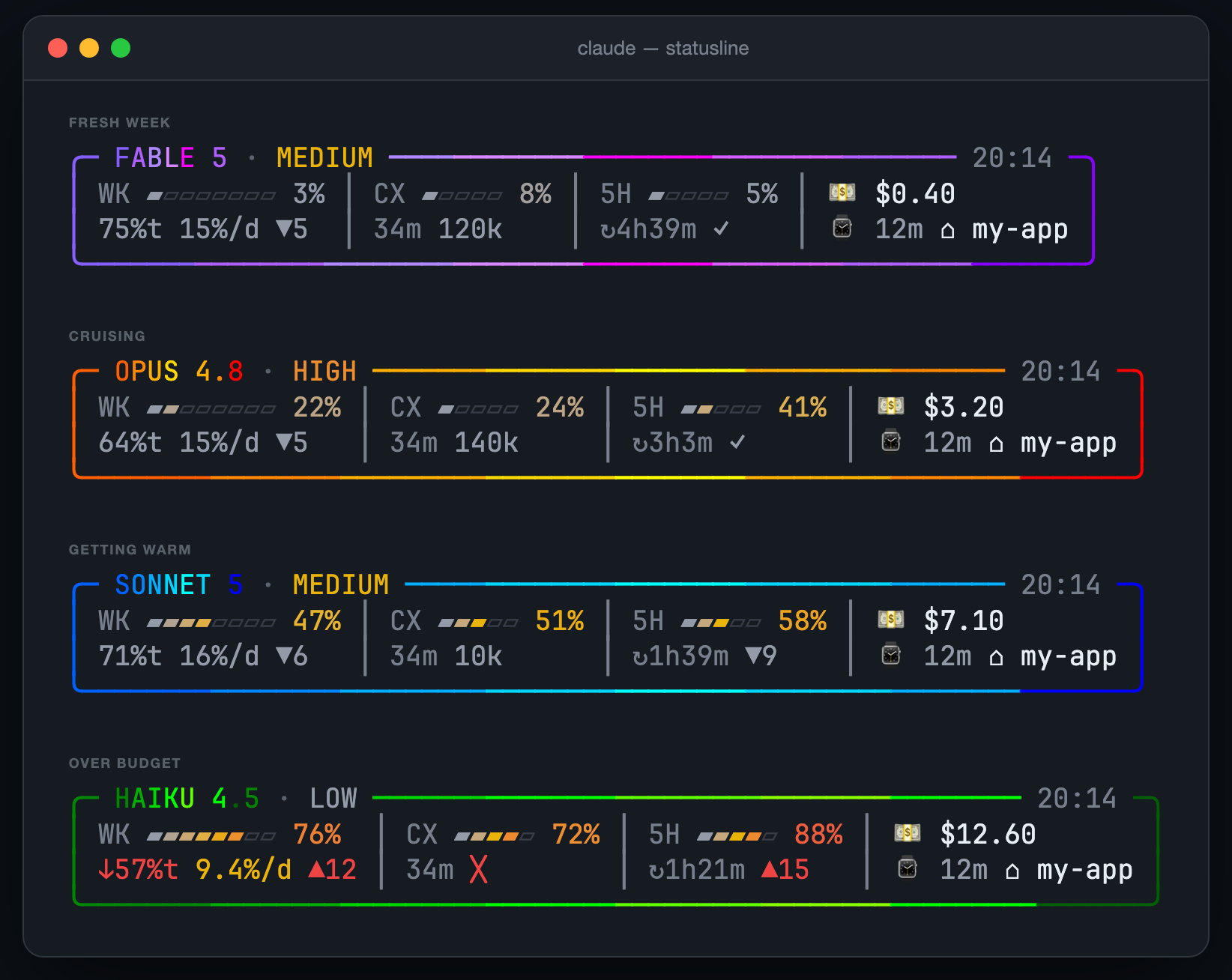
Try it first
git clone https://github.com/Gui-Gou/claude-statusline-burnrate && cd claude-statusline-burnrate
./demo.sh          # the four states below, fake data
./demo.sh --live   # animated
Tweak
| Variable | Default | |
|---|---|---|
SL_DAY_START |
2 |
Hour your day flips (2 = 2am) |
SL_SLEEP_HOURS |
6 |
Hours after that spent asleep — zero-weight in the pacing math |
Colors, thresholds, mascots, cat moods: each is a short case block in ~300 lines of commented bash. Make it yours.
A ⭐ helps the next dev find it before a rate-limit panic.
MIT
Reviews (0)
Sign in to leave a review.
Leave a reviewNo results found