aai-gateway
Health Pass
- License — License: Apache-2.0
- Description — Repository has a description
- Active repo — Last push 0 days ago
- Community trust — 109 GitHub stars
Code Pass
- Code scan — Scanned 12 files during light audit, no dangerous patterns found
Permissions Pass
- Permissions — No dangerous permissions requested
This is a unified gateway server that acts as a central hub for managing and sharing MCP servers and AI skills across multiple agents. It centralizes tool configurations to reduce context token bloat and allows agents to dynamically discover and install new tools.
Security Assessment
Overall Risk: Medium. The primary function of this gateway is to dynamically discover, download, and execute external tools and MCP servers on your machine. While the core code scan of 12 files revealed no dangerous patterns, hardcoded secrets, or dangerous permission requests, the tool's ability to `npx` and run third-party packages introduces significant supply chain and execution risks. Additionally, the `search:discover` feature relies on making network requests to find new tools, and the `aai:exec` command ultimately runs external code.
Quality Assessment
The project is actively maintained (last push was today) and uses the permissive Apache-2.0 license. It has a solid foundation of community trust with over 100 GitHub stars. The documentation is thorough, well-structured, and provides clear, quick-start setup instructions for various AI CLIs.
Verdict
Use with caution—while the gateway itself is safe, it acts as a pipeline for installing and executing third-party tools, so you should strictly vet any external servers or skills before allowing the agent to install them.
AAI Gateway — Install MCP servers and skills once, share across all your AI agents. One-time setup, 90% less context overhead. The unified gateway for AI agent tooling.
AAI Gateway: Unified MCP & Skill Management, Shared Across AI Agents, 99% Context Token Savings


What Is It
AAI = Agent App Interface
AAI Gateway is the interaction gateway for Agent Apps.
What is an Agent App? An Agent App is a collection of capabilities that an Agent can use. For example:
- An MCP Server is an Agent App — it provides a set of tools
- A Skill package is an Agent App — it provides one or more skills
In AAI Gateway, they are abstracted as Agent Apps under unified management. Import once, and all AI Agents can use them immediately.
What Problems Does It Solve
Context Bloat
Traditional: 10 MCPs × 5 tools = 50 full schemas ≈ 7,500 tokens injected into every conversation.
AAI Gateway: each Agent App needs only fewer than 50 tokens for a summary, with details loaded on demand. 99% token savings.
Finding Tools Is Hard
Traditional: search GitHub → read READMEs → copy JSON configs → debug connections → restart Agent.
AAI Gateway: tell your Agent "use AAI to search for xxx" — auto-searches, installs, ready to use.
"Use AAI to search for a browser automation tool"
→ Search → finds Playwright MCP → Agent summarizes a one-line Agent App summary → install → ready to use, no restart needed
"Use AAI to search for a PPT creation skill"
→ Search → finds PPT Skill → uses skill description as Agent App summary → install → ready to use, no restart needed
Duplicate Config
Configure the same thing in Claude Code, Codex, and OpenCode separately? Import once through AAI Gateway, all Agents share instantly.
Quick Start (30 Seconds)
Claude Code:
claude mcp add --scope user --transport stdio aai-gateway -- npx -y aai-gateway
Codex:
codex mcp add aai-gateway -- npx -y aai-gateway
OpenCode — add to ~/.config/opencode/opencode.json:
{
  "mcp": {
    "aai-gateway": {
      "type": "local",
      "command": ["npx", "-y", "aai-gateway"],
      "enabled": true
    }
  }
}
Once installed, just tell your Agent what you want to do.
Built-in Tools
| Tool | Description |
|---|---|
search:discover |
Search and install new tools with natural language |
mcp:import |
Import an MCP Server as an Agent App |
skill:import |
Import a Skill package as an Agent App |
listAllAaiApps |
List all registered Agent Apps |
enableApp / disableApp |
Enable or disable an Agent App per Agent |
removeApp |
Remove an Agent App |
aai:exec |
Execute a specific tool within an Agent App |
Each imported Agent App generates an app_<app-id> tool that returns the full operation guide and tool list when called.
Preset Agent Apps (auto-discovered when locally installed)
| App ID | Name | Description |
|---|---|---|
claude |
Claude Code | AI coding assistant for code editing, analysis, and development |
codex |
Codex | OpenAI-powered AI coding assistant |
opencode |
OpenCode | AI development assistant for editing files and running commands |
Architecture
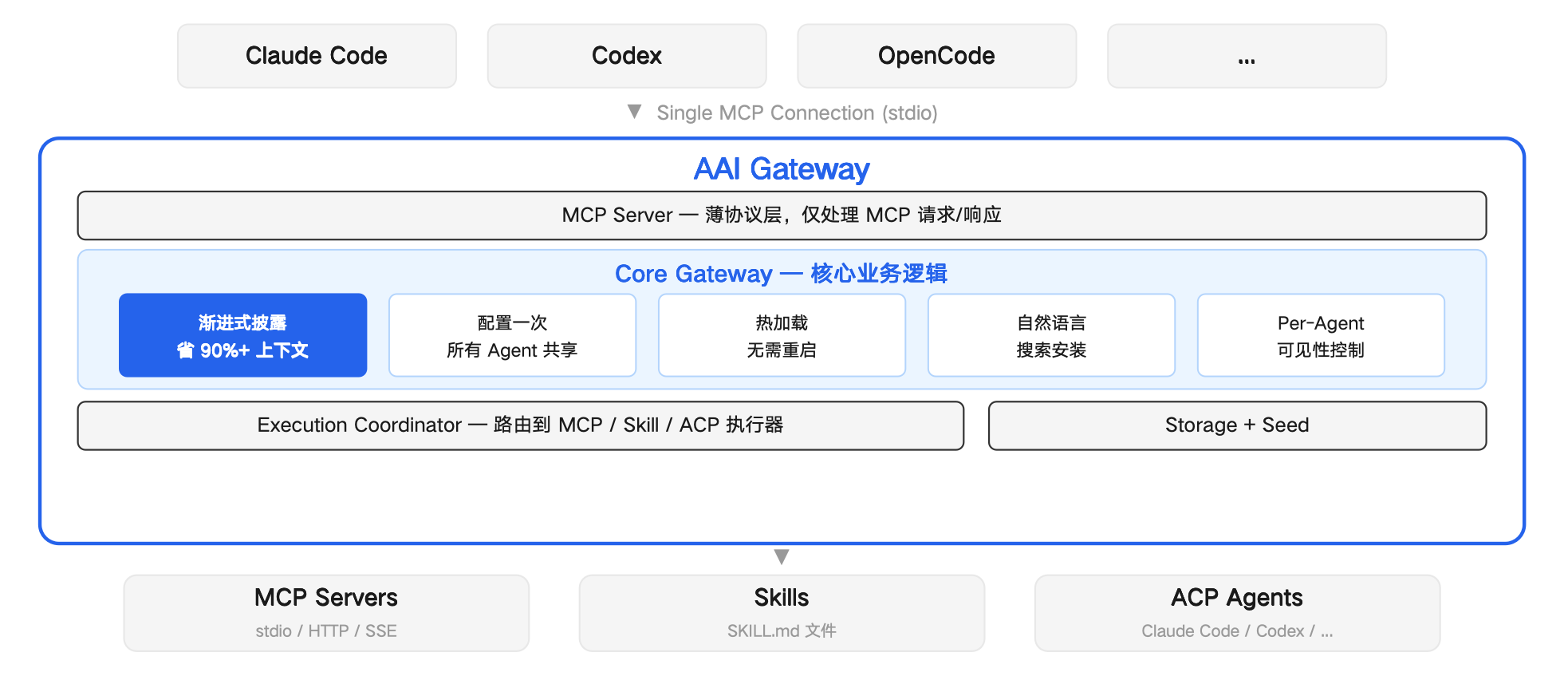
Developers: Get Your Agent App Auto-Discovered
Create an aai.json descriptor and submit it to src/discovery/descriptors/. When a user's local environment meets the discovery.checks conditions, the Agent will auto-discover your Agent App.
{
  "schemaVersion": "2.0",
  "version": "1.0.0",
  "app": {
    "name": { "default": "My App" }
  },
  "discovery": {
    "checks": [
      { "kind": "command", "command": "my-app" }
    ]
  },
  "access": {
    "protocol": "mcp",
    "config": {
      "command": "my-app-mcp",
      "args": ["--stdio"]
    }
  },
  "exposure": {
    "summary": "Use when the user wants to do X."
  }
}
discovery.checks supports three check types: command (command exists), file (file exists), path (directory exists).
Supported protocols: mcp, skill, acp-agent
Welcome to submit a PR to contribute new Agent App descriptors, or open an issue for feedback.
Reviews (0)
Sign in to leave a review.
Leave a reviewNo results found