agent-cow
Health Warn
- License — License: MIT
- Description — Repository has a description
- Active repo — Last push 0 days ago
- Low visibility — Only 7 GitHub stars
Code Fail
- rm -rf — Recursive force deletion command in install.sh
Permissions Pass
- Permissions — No dangerous permissions requested
This tool is a terminal UI and headless monitor that watches your AI coding agents (like Codex and Claude) across multiple machines. It tracks live session status, token usage, costs, and context pressure without relying on cloud dashboards.
Security Assessment
Overall risk: Medium. The application reads local machine state to monitor agent sessions and uses HTTP with websocket subscriptions for multi-machine setups, meaning it does make network requests. It does not request overtly dangerous permissions and no hardcoded secrets were found. However, the automated install script contains a recursive force deletion command (`rm -rf`), which is a notable safety hazard. A typo or unexpected condition during installation could result in unintended data loss on your system.
Quality Assessment
The project is actively maintained, with its latest push occurring today. It uses an established, permissive open-source license (MIT), which is great for adoption and trust. However, community visibility is currently very low. With only 7 GitHub stars, the tool has not yet been widely vetted by the broader developer community.
Verdict
Use with caution: the active maintenance and open-source license are promising, but the low community adoption and potentially destructive installation script warrant a careful code review before deploying.
Agent Cow: the philosophical watcher of your agents across multiple machines.
Agent Cow


 ______________________
< Agent 3 is stuck... >
 ----------------------
        \   ^__^
         \  (oo)\_______
            (__)\       )\/\
                ||----w |
                ||     ||
Agent Cow is the philosophical watcher of your coding agents across multiple machines.
It watches your agent sessions, shows what they are doing, what they cost, how much context they have burned, and whether they are waiting for you. It runs as a fast terminal UI, or as a headless machine agent that another TUI can subscribe to.
Today it ships with Codex and Claude adapters. The architecture is intentionally provider-oriented, so more agent runtimes can be added later without reinventing the UI or core data model.
No dashboard religion. No cloud dependency. Just a sharp TUI and a cow with opinions.
The cow is a deliberate nod to the long and noble cowsay tradition. If you enjoy ranking terminal cattle, see rank-amateur-cowsay.
See The Herd
The list view is the control tower: what is running, what is waiting, what is quietly burning tokens, and which machine it lives on.

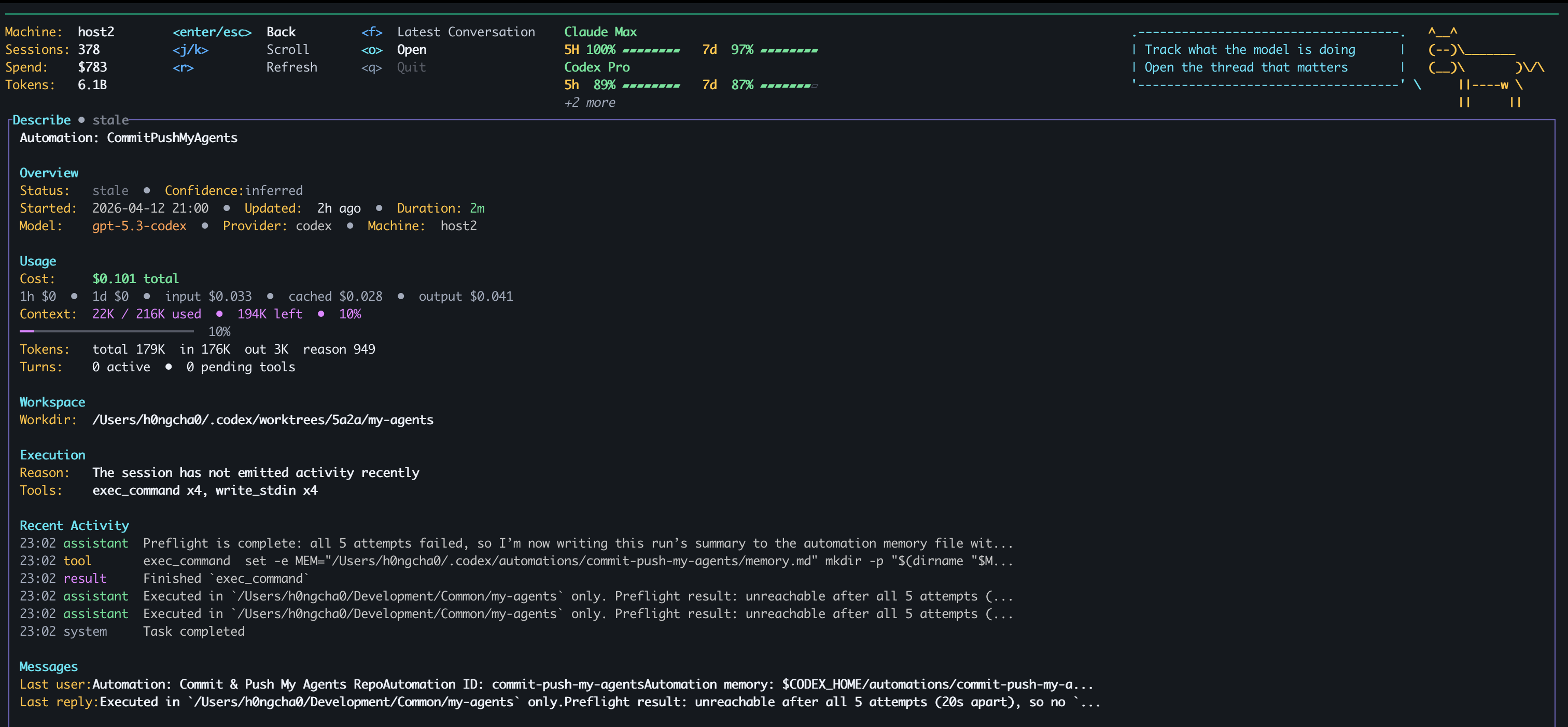
Crack Open A Session
The details pane shows the shape of a single run without forcing you to dig through raw logs: status, spend, context pressure, tokens, workspace, and execution state.
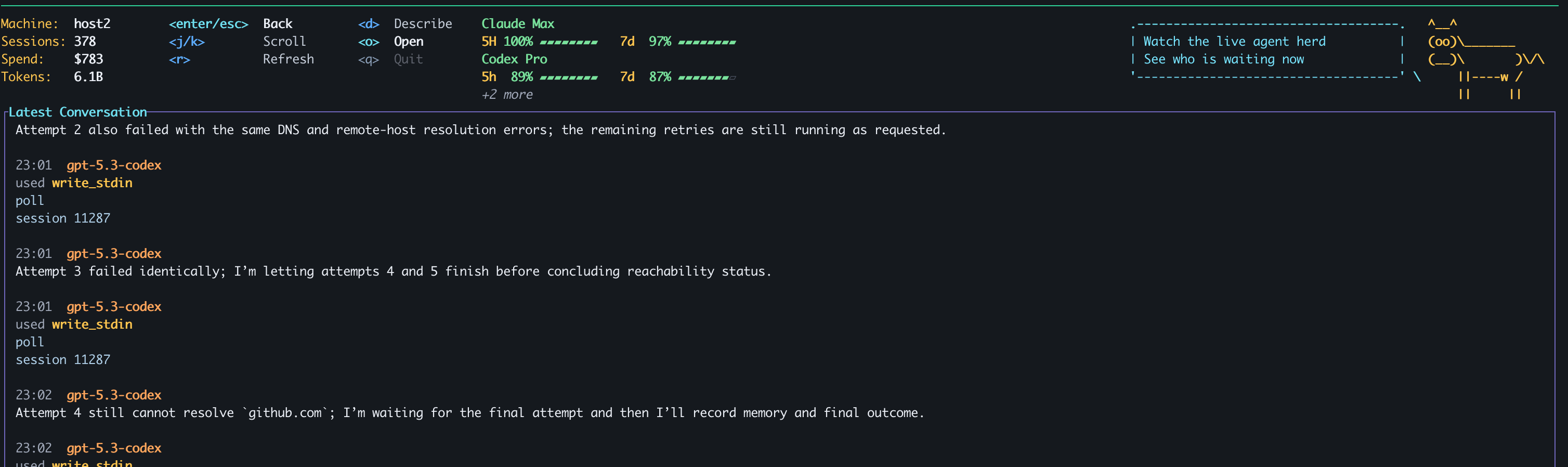
Follow The Thread
Sometimes you do not need every event. You just need the latest conversation and the last few tool moves so you can tell whether the agent is making progress or waiting on you.
What It Does
- Watches agent sessions from local machine state
- Shows live session status:
Thinking,Exploring,Compacting,Waiting,Idle - Tracks tokens, cost, context usage, and quota/subscription summaries
- Lets you open the underlying session in the provider app
- Shows Latest Conversation so you can quickly see what an agent is doing
- Supports multi-machine setups with a headless
agentmode - Uses HTTP + websocket subscriptions for low-friction remote monitoring
- Is built to support more providers and runtimes in the future
Install
Download a binary
If you just want to use Agent Cow, grab a prebuilt binary from GitHub Releases.
Release assets are published for:
- macOS Apple Silicon
- macOS Intel
- Linux x86_64
- Windows x86_64
Install with one command
macOS / Linux:
curl -fsSL https://raw.githubusercontent.com/h0ngcha0/agent-cow/main/install.sh | sh
or:
wget -qO- https://raw.githubusercontent.com/h0ngcha0/agent-cow/main/install.sh | sh
Windows PowerShell:
irm https://raw.githubusercontent.com/h0ngcha0/agent-cow/main/install.ps1 | iex
You can override the version or install directory:
curl -fsSL https://raw.githubusercontent.com/h0ngcha0/agent-cow/main/install.sh | \
  AGENT_COW_VERSION=v0.1.4 AGENT_COW_INSTALL_DIR="$HOME/bin" sh
If you prefer to do it manually, unpack the archive for your platform and run:
agent-cow tui
Common first steps:
- local TUI:
agent-cow tui - headless node:
agent-cow agent --bind 0.0.0.0:8787 - inspect via CLI:
agent-cow sessions list --limit 20
Build from source
If you want to build it yourself:
cargo build --release --manifest-path apps/agent-cow/Cargo.toml
Then run the built binary at:
target/release/agent-cow
Quick Start
Using the built or downloaded binary:
agent-cow tui
Multi-Machine Setup
Run a headless agent on each machine you want to observe:
HOSTNAME=remote-desktop agent-cow agent --bind 0.0.0.0:8787
Then connect from your main TUI machine:
agent-cow tui \
  --machine http://100.x.y.z:8787 \
  --machine http://100.x.y.w:8787
If you want remote-only:
agent-cow tui --no-local --machine http://100.x.y.z:8787
Agent Cow works well over:
- Localhost
- Tailscale
- internal LAN IPs
Keyboard Shortcuts
| Key | Action |
|---|---|
j / k |
Move through sessions |
Enter |
Open details |
Esc |
Go back |
f |
Open latest conversation |
o |
Open the session in the provider app |
m |
Cycle machine scope |
v |
Cycle view: Focus → Recent → All |
/ |
Filter sessions |
r |
Refresh |
q |
Quit |
Why Agent Cow Exists
Because “I think the agent is doing something” is not observability.
You should be able to glance at a machine and know:
- which agent is alive
- which one is stuck
- which one is waiting for approval
- which one is compacting itself into oblivion
- which one is quietly burning money
That is the whole point.
Environment
Optional overrides:
AGENT_COW_CODEX_HOME=...
AGENT_COW_CLAUDE_HOME=...
Agent Cow also falls back to normal local runtime locations when possible.
Performance Notes
Agent Cow is designed to stay cheap:
- staged startup loading
- persistent caches
- websocket subscriptions for remote updates
- fast failure for slow remote machines
If performance is bad, that is a bug.
License
MIT
Reviews (0)
Sign in to leave a review.
Leave a reviewNo results found