whenship
Health Warn
- License — License: MIT
- Description — Repository has a description
- Active repo — Last push 0 days ago
- Low visibility — Only 5 GitHub stars
Code Warn
- process.env — Environment variable access in scripts/build-mcpb.mjs
- process.env — Environment variable access in src/cli/index.ts
Permissions Pass
- Permissions — No dangerous permissions requested
No AI report is available for this listing yet.
When will it ship, honestly? A tiny planner for small teams: live what-if Gantt, deadline risk and realistic dates. Works in the browser and inside Claude.
whenship
When will it ship, honestly? A tiny planner for small teams. List the work, who does it and roughly how long it takes; whenship draws the timeline, tells you which deadlines will slip and why, and lets you drag things around until the plan works. It runs in the browser, offline, and inside Claude.
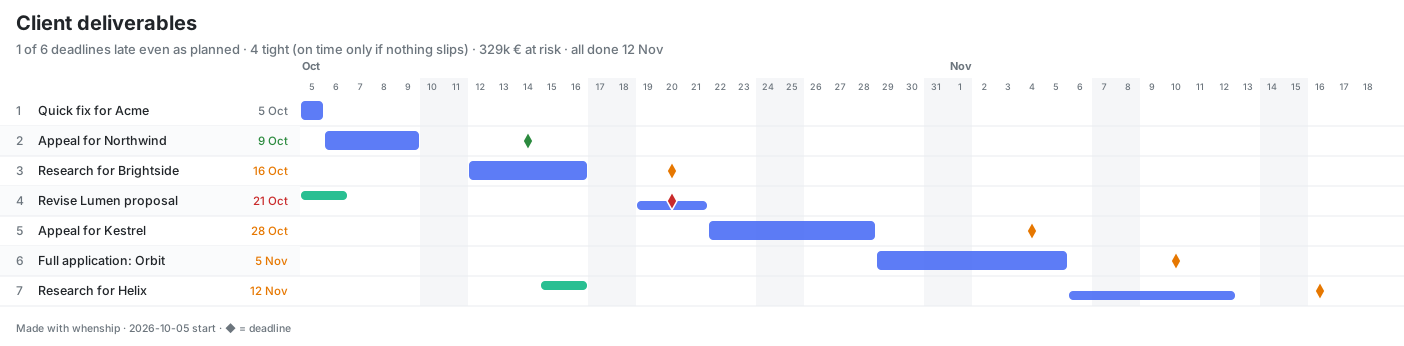
- Real dates, not guesses. A day-by-day scheduler handles priorities, part-time people, teams, hand-offs, dependencies, waiting on clients, weekends and holidays.
- Live what-if. Drag an item (by its handle or its bar) to reprioritise and watch every date move before you drop. Change effort, people or working days and the whole plan updates instantly.
- Honest risk. Every deadline gets a badge (safe, likely, tight, late) and a rough chance, from a forecast scale that never touches your own numbers.
- Options, not just warnings. whenship searches reorders, deferrals, more time and extra people, and shows exactly which deadlines each one saves.
- No sign-up, nothing stored. Your plan lives in your browser, your files, or a link that carries the whole plan.
Use it
| Where | How |
|---|---|
| Your computer | npx whenship opens it in your browser. Nothing leaves your machine. |
| Offline file | Download whenship.html (from any running whenship, at /whenship.html) and double-click it. |
| Claude | Add the connector (below) and ask: "Sara has these five client deliverables… will she make the deadlines?" |
| Your own server | One small Node service, no database, no Docker. See Self-host. |
Bring your plan in any shape: paste a list (Grant draft for Acme, 5d, due 7 Oct), spreadsheet rows, CSV, a Markdown table, or a saved plan file. Export it as a plan file (JSON), Excel with a Gantt sheet, PNG or SVG, a calendar (.ics), CSV, Markdown or JSON, or copy a link with the whole plan inside it.
Use it in Claude
whenship is an MCP App: Claude calls its engine for the dates and shows the interactive chart right in the conversation. Edit the chart and Claude sees your changes automatically, with no "send" button.
Connector (claude.ai, Claude Desktop, mobile). Settings → Connectors → Add custom connector, and enter your whenship address followed by /mcp, for example https://your-whenship.example/mcp. A public hosted address is coming; until then, use your own (see Self-host) or the local options below.
Claude Code
claude mcp add whenship -- npx -y whenship --stdio
Claude Desktop extension. Download whenship.mcpb from the latest release, then in Claude Desktop open Settings → Extensions → Install extension and pick the file (or double-click it). It runs on your computer with Desktop's built-in Node and shows the same interactive chart. To update, install the newer file over the old one. To build it yourself: npm run build && npm run build:mcpb (set WHENSHIP_PUBLIC_URL to choose where "Open in browser" and share links go).
Claude Desktop, Cursor, VS Code and other MCP clients (local)
{ "mcpServers": { "whenship": { "command": "npx", "args": ["-y", "whenship", "--stdio"] } } }
Skills plugin (recommended with the connector). It teaches Claude to always use the engine instead of estimating dates itself, and how to turn the results into advice:
claude plugin marketplace add HamedShams/whenship
claude plugin install whenship@whenship
The skills are plain Markdown: plugin/skills/whenship (workflow and plan format) and plugin/skills/whenship-insights (recommendations, with worked examples for consultancies, product squads, solo founders, agencies, teams with a Saturday–Wednesday week, and teams working with AI agents).
Tools: show_plan (schedule and chart), what_if (compare a list of changes, or a whole alternative version of the plan), find_options (changes that meet more deadlines), export_plan (JSON, CSV, iCalendar, Markdown, link). All are read-only.
In the chart, Ask Claude for better options posts a request to the chat. Claude then tries what the built-in suggestions can't (moving work between people, splitting or cutting items, combinations), checks each idea with what_if, and answers with the best two or three and their exact effects.
How the forecast works
By default you see your own estimates (As planned). whenship never stretches them. The lens switch shows the same plan if work runs long the way it usually does:
| Lens | Multiplier | Meaning |
|---|---|---|
| As planned | 1× | Exactly what you entered: if everything goes to plan. |
| Likely | 1.6× | How it usually goes: about half of projects are done by here. |
| Safe bet | 3.1× | A date you can promise: about 9 in 10 projects are done by here. |
The badges use the same scale: safe means on time even at 3.1×, likely means on time at 1.6×, tight means on time only if nothing slips, and late means late even as planned. With another lens on, every deadline that lens's dates miss shows as late.
The multipliers (P50 1.6×, P90 3.1×) come from a blended outside-view heuristic: Todd Little's 2006 lognormal model of software estimation error, combined with Flyvbjerg et al.'s 2022 power-law findings on IT project overruns, sanity-checked by simple/geometric averaging and a 50/50 Monte Carlo mixture. The "~x% chance" on each deadline is a smooth (lognormal) curve through those two points. They are practical, generic rules of thumb, not a formal industry standard. Your own track record beats them.
Reading the chart
| Mark | Meaning |
|---|---|
| Bar | When someone works on the item, one colour per person or team. An item with several people has one thin bar each. |
| ◆ Diamond | The item's deadline (the usual Gantt milestone mark). Green: on time. Amber: tight. Red: late. |
| Hatched stripes | The part of the work that runs past the deadline. |
| Vertical line | Today. |
| Dashed outline | Only with Likely or Safe bet on: your own estimate, while the bar shows the stretched dates. |
A key above the chart repeats this, and hovering any mark gives its dates.
How the dates and suggestions work
The scheduler. whenship walks the calendar one working day at a time. Each day, items get people in priority order, up to what each item can use: a person's share of time (availability), a team's size, how many people may work on one item (maxPeople) and the work left. It respects hand-offs, dependencies, can't-start-before dates, working days and holidays. An item's prerequisites are worked on at its priority, so a top item never waits behind unrelated work for something it needs. The same plan always gives the same dates. Tests check it against an independent reference scheduler on 400 random plans.
The suggestions are not AI. They come from a fixed try-and-measure loop:
- Build a short menu of single changes (below).
- Re-plan the whole schedule for each one with the same engine.
- Keep only the changes that meet more deadlines or make the plan sturdier (more deadlines survive the next lens, fewer days late, or a clearly earlier finish).
- Rank them: most deadlines met, then the cheapest kind of move, then most deadlines that survive the next lens, then fewest days late, then earliest finish. Show the top 3, at most 2 of a kind.
| Kind | What it tries | Cost rank |
|---|---|---|
| Reorder | The smallest move up that saves a late item (found by binary search) | Free |
| Defer | Undated work that sits in front of late deadlines moves behind the dated work | Free |
| More time | A part-timer goes to 100% | Low |
| More people | One more person in that lane | High |
| Negotiate | The exact extra working days a late item needs | Last resort |
It doesn't try every possibility (10 items already have 3.6 million possible orders). It takes a few milliseconds on normal plans and is switched off above 200 items.
How far to trust it.
- The numbers are exact. Every effect shown comes from a real re-plan, so it can't invent one.
- The coverage is narrow:
- one change at a time, so it never finds combinations ("reorder and one extra day");
- a fixed menu: it never moves work from one person to another, splits or cuts scope, puts a second person on an item, drops a dependency or adds overtime;
- "one more person" is productive from day one and costs nothing, which is optimistic;
- it counts deadlines but doesn't know which ones are hard, or which client matters most;
- its ordering is good, not provably the best.
The Claude layer covers the gaps. In Claude, find_options returns the same menu. For anything else, Claude writes the changed plan and checks it with what_if before it recommends anything, so every number it quotes still comes from the engine. Ask Claude for better options in the chart starts exactly that.
The plan file
Plans are small JSON files (*.whenship.json) you can keep in a repo, edit by hand, or drop into Claude:
{
  "title": "Client deliverables",
  "start": "2026-10-05",
  "lanes": [
    { "name": "Sara" },
    { "name": "Omar", "availability": 50 }
  ],
  "items": [
    { "name": "Appeal for Northwind", "who": "Sara", "days": 4, "deadline": "2026-10-14" },
    { "name": "Revise Lumen proposal", "work": [{ "lane": "Omar", "days": 1 }, { "lane": "Sara", "days": 3, "after": "Omar" }], "deadline": "2026-10-20" }
  ]
}
Items are in priority order (an item's prerequisites in dependsOn are worked on at its priority). availability is the share of someone's time for this plan, and after is a hand-off (Sara starts when Omar is done). Teams ("size": 3), people per item ("maxPeople": 2), dependsOn, notBefore, calendar.workdays and calendar.holidays are also supported; the full format is in the whenship skill.
Self-host
whenship is one stateless Node service: the web app at /, the MCP connector at /mcp, a health check at /healthz and a privacy page at /privacy. No database, no accounts, no Docker.
On Railway: create a service from this repository. railway.json sets the build, start command and health check. Optionally set PUBLIC_URL to your address (e.g. https://whenship.example.com/) for share links; otherwise the address requests come in on is used.
On Render, Fly or any other Node host: build with npm ci && npm run build, start with npm start, health check /healthz.
The service listens on $PORT. Anywhere else: npx whenship --host 0.0.0.0 --port 8080 --public-url https://… --no-open.
Privacy
whenship stores nothing about you or your plans on any server. The website keeps your plan in your browser. Share links carry the plan after the #, which browsers never send to a server. The connector schedules a plan in memory and returns it; it is not logged or kept. See docs/PRIVACY.md.
Develop
npm install
npm run dev
npm run build builds the single-file app (dist/app.html) and the CLI (dist/cli.js). npm run check runs the type check, all unit, regression and connector tests, and the scheduler tests in three time zones.
The code is small on purpose: src/engine (scheduler, forecast lens, insights; no dependencies), src/io (plan files, tables, links, Excel, calendar, SVG), src/ui (Preact app shared by the website and the Claude widget), src/mcp (connector and web server) and src/cli.
Background
whenship grew out of gantt_resource_planner, a capacity planner I built for two product squads, rewritten from scratch for small teams of every kind.
License
Reviews (0)
Sign in to leave a review.
Leave a reviewNo results found