handmux
Health Warn
- License — License: AGPL-3.0
- Description — Repository has a description
- Active repo — Last push 0 days ago
- Low visibility — Only 5 GitHub stars
Code Fail
- spawnSync — Synchronous process spawning in server/bin/handmux.js
- process.env — Environment variable access in server/bin/handmux.js
- process.env — Environment variable access in server/hooks/handmux-statusline.cjs
- fs module — File system access in server/hooks/handmux-statusline.cjs
- fs.rmSync — Destructive file system operation in server/hooks/handmux-write.cjs
- fs module — File system access in server/hooks/handmux-write.cjs
- execSync — Synchronous shell command execution in server/scripts/bundle-web.mjs
Permissions Pass
- Permissions — No dangerous permissions requested
No AI report is available for this listing yet.
A mobile vibe-coding cockpit — built on tmux: drive your live session, Claude Code / Codex — anything a terminal can run — from your phone. 移动 Vibe Coding 驾驶舱 —— 基于 tmux 实现,可在手机上驱动你的会话、Claude Code / Codex、任何终端能实现的东西。
handmux
handmux.com · 中文文档 → README.zh-CN.md




One phone, a whole mobile vibe-coding cockpit. Built on tmux — one command on your computer, scan a QR, and your live session, Claude Code, Codex, git, previews and docs are all in your hand, creativity ready wherever you are.
handmux is more than a terminal on your phone. It puts the same live tmux session running on your computer into your phone's browser (real panes, not a read-only mirror), then builds a whole mobile vibe-coding cockpit around it: Claude Code / Codex push you the moment a pane needs a decision — approve with your thumb, or fire off a new instruction by voice; browse a full-screen colored git diff; preview a running site in one tap; hear a doc read aloud line by line; move files both ways. Nothing to install on the phone — open a link and you're in; "Add to Home Screen" and it runs full-screen as a PWA, basically a native app. Curl up on the couch or squeeze onto the train — the vibe coding never stops, your creativity stays in hand.
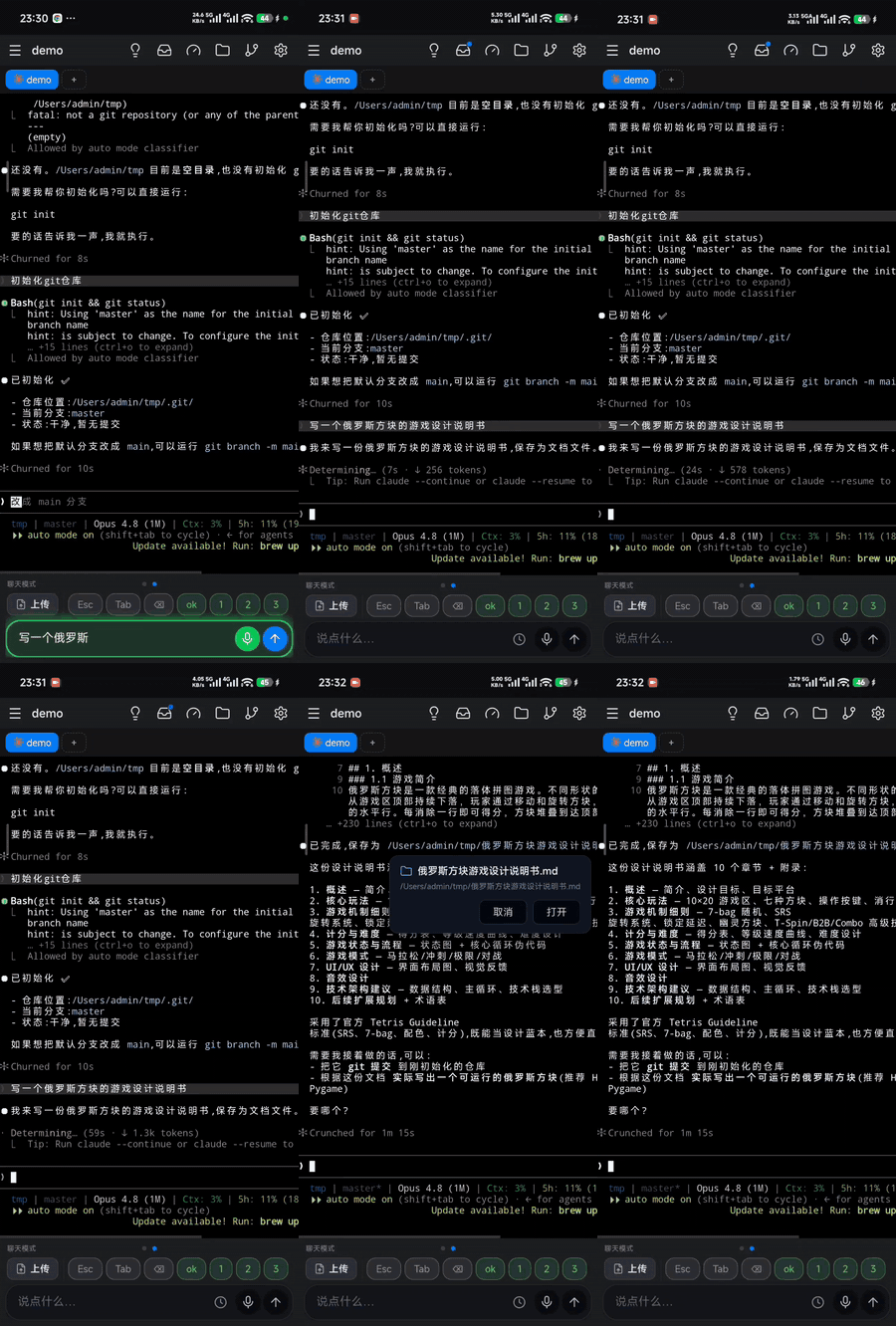
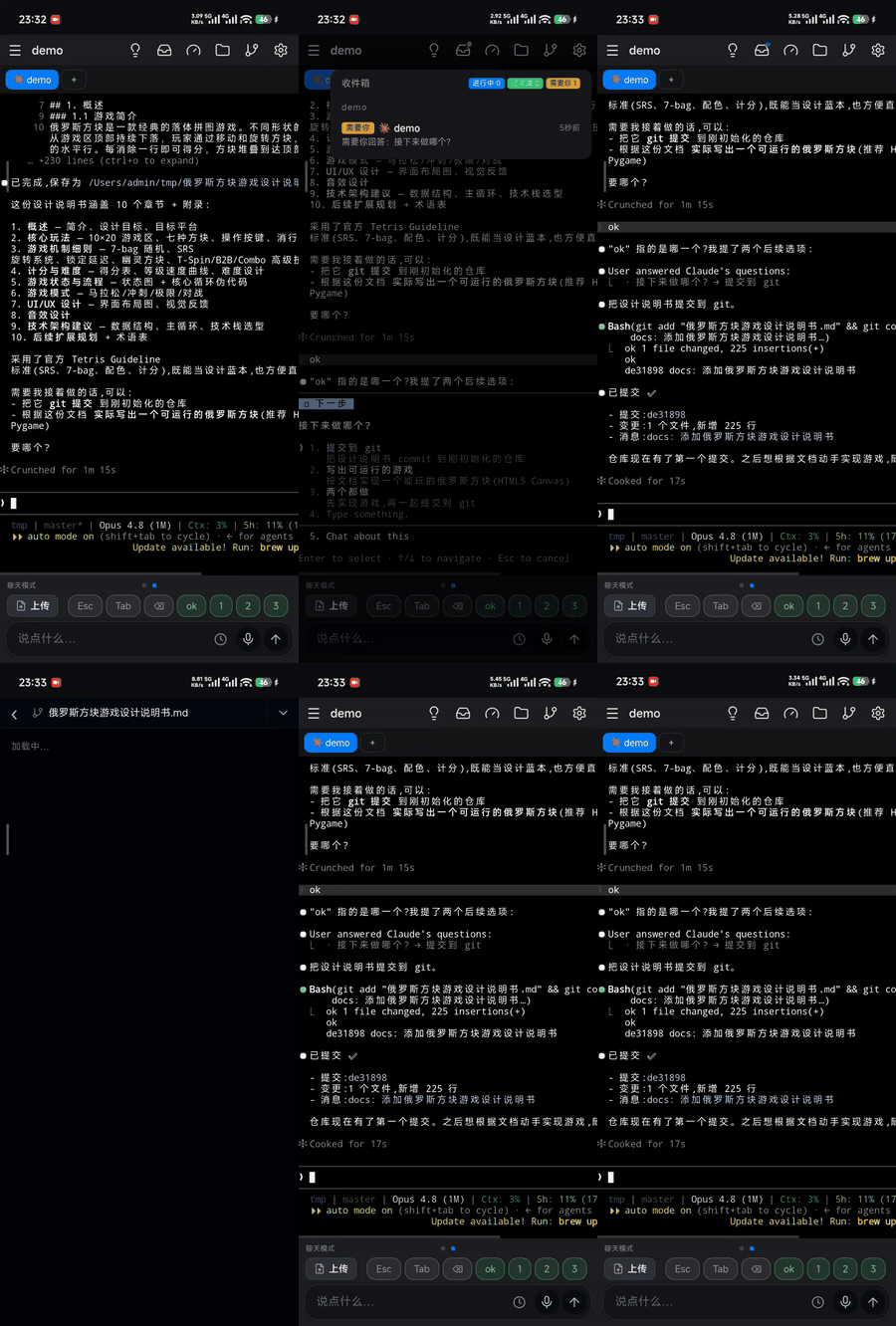
Real phone browser, real panes — say what you need and Claude Code writes it, then tap a filename to preview (left); a push pings you when needed, and you review the git repo & each agent's usage (right).
📖 Docs · 📝 Changelog · 📦 npm
Quick start · about a minute
On your computer you need Node ≥ 18 and tmux ≥ 3.0 (the phone just needs a browser). Then:
npm i -g handmux     # install once
handmux start        # run it — local / same-wifi, nothing exposed
start prints a QR code (plus a URL and token). Scan it with your phone — the token rides in the code, so you're signed in on first open. You'll see your real tmux session; tap one and start driving.
Want to reach it from anywhere? Add one flag for a free public HTTPS link:
handmux start --tunnel cloudflare # instant public URL (cloudflared auto-installed)
Tunnel types, self-hosting, Windows/WSL2, and the full command & flag reference → see the docs.
Why handmux
- 🧰 More than a terminal — a whole mobile vibe-coding cockpit in your pocket. Full-screen colored git diffs, one-tap preview of a running site, docs read aloud line by line, files moved both ways — a whole dev kit in hand, no hopping between apps.
- 🚀 One minute from zero to coding on your phone. One
handmux start, one scan, done — no sign-up, no App Store, no app to sideload; just a link. "Add to Home Screen" and it's a full-screen PWA, as smooth as a native app. - 🧶 Walk away, keep working. Your phone drives the one live tmux pane on your desk (not a new shell, not a screenshot). Close the laptop and keep watching from your thumb — exact same state.
- 🔔 When it needs you, your phone rings. Claude Code / Codex push the moment they need a decision; add it to your home screen and they come through as system notifications. An inbox tags each pane working / needs-you / done — many projects at a glance — and you approve permissions and plans with a tap, so you stop babysitting the screen.
- 🔒 Your code goes through no middleman. Free and fully open-source; we run no server in the middle — your data travels straight between your computer and your phone, so it stays secure.
Features
- Claude Code / Codex, deeply — an inbox status ledger, thumb-approve permissions & plans, per-agent usage bars.
- Command & chat modes — one bottom bar, two modes: type straight into the terminal, or talk to the agent in natural language. Preset ESC/Tab/Ctrl+C, custom ⌃⇧⌥ key-combos, and saved/recent commands split global or per-window (slash-commands included).
- Git viewer — changes / commit history / any branch / full-screen colored diff, multi-repo tabs, read-only, never touches your tree.
- Site preview — a static folder, or a running service by port (routing / APIs / live-reload intact), in a phone or desktop viewport.
- Docs — tap a path in the terminal to open it; Markdown rendered, font zoom, sentence-by-sentence read-aloud.
- Files both ways — multi-select upload from the chat box, download, share in, copy any absolute path.
- Ideas — catch every one — a thought the moment it strikes: a per-window idea/to-do list, jot one by voice and drop it straight into the prompt.
- Built for flaky networks — backoff reconnect, connection-lost banner, offline page, polling that pauses in the background; a reflow-safe cursor and drag-to-select copy.
- Zero-install PWA — runs in the browser; add to home screen for full-screen. Multilingual — English, 简体 / 繁體中文, 日本語, 한국어.
Networking: one decision
LAN-only by default, nothing exposed. To reach it from outside, just ask: does your machine already have a public address?
- Yes (cloud box / public IP / forwarded port) — no tunnel needed, connect directly; fastest and most private.
- No — open a tunnel:
cloudflare(zero-config, up in seconds, but its public nodes can be slow or unreliable in some regions) ·cloudflare-named(your own domain, steadier) ·sshself-hosted (through your own server — the pick where Cloudflare is unreliable, e.g. mainland China).
Tunnel config, server-side reverse proxy, autostart, voice/push credentials, and port previews → see the docs.
Requirements
Your computer needs Node ≥ 18 and tmux ≥ 3.0; the phone just needs a browser. On Windows, run it inside WSL2 (a real Linux kernel + real tmux) — see the docs.
More
📖 Docs · 📝 Changelog · 🔒 Security · License AGPL-3.0
Found a security issue? Please report it privately (see SECURITY.md), not via a public issue.
Reviews (0)
Sign in to leave a review.
Leave a reviewNo results found