model-compose
Health Pass
- License — License: MIT
- Description — Repository has a description
- Active repo — Last push 0 days ago
- Community trust — 72 GitHub stars
Code Pass
- Code scan — Scanned 12 files during light audit, no dangerous patterns found
Permissions Pass
- Permissions — No dangerous permissions requested
No AI report is available for this listing yet.
Docker Compose for AI workflows. Define AI agents, RAG pipelines, MCP servers, and multi-LLM apps in a single YAML file — a lightweight alternative to LangChain.



model-compose
Compose AI Systems, Deploy Anywhere.
Define AI workflows, agents, models, and tools in a single YAML file — then run them locally, in containers, or in production without rewriting your stack.
Inspired by docker-compose — one YAML file defines your entire AI system.
Philosophy
AI systems should not be locked into a single provider, runtime, or cloud. They should remain portable, inspectable, and able to run anywhere.
Today, many AI applications are tightly coupled to provider-specific APIs, managed runtimes, and closed ecosystems. While convenient at first, this coupling introduces vendor lock-in — components can't be swapped without rewriting, systems can't move between environments, and teams are forced to choose between cloud convenience and local control.
model-compose takes a fundamentally different approach based on three core principles:
Composable — Models, agents, workflows, tools, memory, and protocols are treated as modular, interchangeable building blocks.
Portable — Define your AI system once, then deploy it locally, in containers, or across distributed production environments without re-engineering the core architecture.
Hybrid-First — Bridge cloud APIs and local models on your own terms. Swap infrastructure layers seamlessly to optimize for privacy, latency, or cost without changing how your system behaves.
The goal of model-compose is not to build another closed platform, but to restore architectural autonomy to developers.
Why model-compose?
| Feature | Managed APIs (OpenAI, etc.) | Code Frameworks (LangChain, etc.) | model-compose |
|---|---|---|---|
| Provider Coupling | Single provider per SDK | Multi-provider via abstractions | Multi-provider via config |
| Code Coupling | Application code required | Framework-specific code required | Declarative YAML — no application code |
| Infrastructure Control | Provider-controlled | Heavy Abstraction | Full Sovereignty |
| Runtime Flexibility | Cloud Only | Complex to customize | Hybrid-First (Local + Cloud) |
| Protocol Support | Provider-specific | Limited | HTTP / WebSocket / MCP |
| Deployment | Provider-managed | Manual integration | Docker / Native / Process |
Highlights
- Any model, anywhere — run models locally via HuggingFace, vLLM, or llama.cpp for privacy, offline use, or zero API cost — or connect to OpenAI, Anthropic, Google, and more
- AI agents in YAML — build autonomous agents with tool use, planning, and multi-step reasoning — all declarative
- Human-in-the-loop — workflows can pause for approval gates, user input, or manual review before continuing
- Real-time streaming — built-in SSE streaming for live AI responses from any provider or local model
- 20+ components ready — models, agents, HTTP/WebSocket clients, vector/graph stores, shell commands, and more
- Deploy as container — same YAML runs as a Docker container, native process, or standalone service — switch runtime with one line
- Serve any protocol — HTTP REST, WebSocket, or MCP with one line change
- Distributed execution — dispatch workflows to remote workers via Redis queues — scale horizontally by adding servers
- Instant Web UI — add a Gradio-powered interface with 2 lines of YAML
Installation
pip install model-compose
Or install from source:
git clone https://github.com/hanyeol/model-compose.git
cd model-compose
pip install -e .
Requires: Python 3.10 or higher
Quick Start
Define your AI runtime in a model-compose.yml:
controller:
  adapter:
    type: http-server
    port: 8080
  webui:
    port: 8081

workflows:
  - id: chat
    default: true
    jobs:
      - component: chatgpt

components:
  - id: chatgpt
    type: http-client
    base_url: https://api.openai.com/v1
    path: /chat/completions
    method: POST
    headers:
      Authorization: Bearer ${env.OPENAI_API_KEY}
    body:
      model: gpt-4o
      messages:
        - role: user
          content: ${input.prompt}
Create a .env file:
OPENAI_API_KEY=your-key
Run it:
model-compose up
Your AI runtime is now serving at http://localhost:8080 with Web UI at http://localhost:8081.
Explore examples for more workflows or read the Documentation.
Core Capabilities
Declarative YAML Configuration
Define your entire AI system in a single YAML file. Workflows, agents, models, APIs, vector/graph stores, and runtimes — all composed and deployed together without custom code.
controller:
  adapter:
    type: http-server
    port: 8080

workflows:
  - id: chat
    default: true
    jobs:
      - component: chatgpt

components:
  - id: chatgpt
    type: http-client
    base_url: https://api.openai.com/v1
    action:
      path: /chat/completions
      method: POST
Flexible Component System
20+ reusable component types. Mix HTTP clients, local models, vector stores, shell commands, and workflows in any combination. Define once, use everywhere.
components:
  - id: chatgpt
    type: http-client

  - id: local-llm
    type: model

  - id: assistant
    type: agent

  - id: knowledge
    type: vector-store

  - id: cache
    type: key-value-store

  - id: runner
    type: shell
Advanced Workflow Composition
Chain jobs with conditional logic, parallel execution, and data transformation. Pass data between jobs with variable binding — ${input}, ${response}, ${env} — with type conversion and defaults.
workflows:
  - id: rag-pipeline
    jobs:
      - id: embed
        component: embedder
        input:
          text: ${input.query}

      - id: search
        component: vector-store
        action: search
        input:
          vector: ${jobs.embed.output}
        depends_on: [embed]

      - id: answer
        component: chatgpt
        input:
          context: ${jobs.search.output}
          question: ${input.query}
        depends_on: [search]
AI Agent Components
Build autonomous AI agents that use workflows as tools. Agents reason, plan, and execute multi-step tasks by dynamically invoking other workflows — all defined declaratively in YAML.
components:
  - id: research-agent
    type: agent
    tools:
      - search-web
      - fetch-page
    max_iteration_count: 10
    action:
      model:
        component: chatgpt
        input:
          messages: ${messages}
          tools: ${tools}
      system_prompt: You are a web research assistant.
      user_prompt: ${input.question}
Human-in-the-Loop
Add approval gates and user input steps to any workflow. Workflows pause, prompt for human input via CLI, Web UI, or API, and resume seamlessly.
workflows:
  - id: write-with-approval
    jobs:
      - id: write-file
        component: file-writer
        input:
          path: ${input.path}
          content: ${input.content}
        interrupt:
          before:
            message: "Approve file write to ${job.input.path}?"
Local Model Execution
Run models from HuggingFace and other sources locally with native support for transformers, vLLM, and PyTorch. Fine-tune models with LoRA/PEFT through YAML configuration.
components:
  - id: local-llm
    type: model
    task: chat-completion
    model: HuggingFaceTB/SmolLM3-3B
    action:
      messages:
        - role: user
          content: ${input.prompt}
Universal AI Service Integration
Connect to OpenAI, Anthropic, Google, xAI, ElevenLabs, and any custom HTTP API. Mix and match providers in a single workflow.
components:
  - id: claude
    type: http-client
    base_url: https://api.anthropic.com/v1
    action:
      path: /messages
      method: POST
      headers:
        x-api-key: ${env.ANTHROPIC_API_KEY}
        anthropic-version: "2023-06-01"
      body:
        model: claude-opus-4-20250514
        max_tokens: 1024
        messages:
          - role: user
            content: ${input.prompt}
Real-Time Streaming
Built-in SSE (Server-Sent Events) streaming for real-time AI responses. Stream from any provider or local model with automatic chunking and connection management.
workflows:
  - id: chat
    jobs:
      - component: chatgpt
        output: ${output as sse-text}

components:
  - id: chatgpt
    type: http-client
    base_url: https://api.openai.com/v1
    action:
      path: /chat/completions
      method: POST
      body:
        model: gpt-4o
        messages: ${input.messages}
        stream: true
      stream_format: json
      output: ${response[].choices[0].delta.content}
Built-in Data Store Integration
Native integration with Chroma, FAISS, Milvus, Qdrant for vector search. Neo4j and ArangoDB for graph stores. Redis for key-value storage. Build RAG systems with embedding search and semantic retrieval.
components:
  - id: knowledge
    type: vector-store
    driver: chroma
    actions:
      - id: insert
        collection: docs
        method: insert
        vector: ${input.vector}
        metadata:
          text: ${input.text}

      - id: search
        collection: docs
        method: search
        query: ${input.vector}
Deploy in Any Runtime
Run in native, process, Docker, or native container mode. The same configuration works across all runtimes — switch with one line.
controller:
  runtime:
    type: docker
    image: my-ai-service:latest
    ports:
      - "8080:8080"
  adapter:
    type: http-server
    port: 8080
Protocol Adapters
Serve over HTTP REST, WebSocket, or MCP (Model Context Protocol) by changing a single line. Includes concurrency control, health checks, and automatic API documentation.
# HTTP REST
controller:
  adapter:
    type: http-server
    port: 8080

# MCP (Model Context Protocol)
controller:
  adapter:
    type: mcp-server
    port: 8080
Distributed Workflow Execution
Scale AI workloads across multiple machines using Redis-backed queue dispatch. Add workers to scale horizontally without shared filesystem or code changes.
controller:
  adapter:
    type: http-server
    port: 8080
  queue:
    driver: redis
    host: localhost
    port: 6379
    name: my-queue
Webhook and Callback Listeners
HTTP callback listeners for async workflows and HTTP trigger listeners for webhooks. Build reactive AI systems that respond to real-world events.
listener:
  type: http-trigger
  port: 8091
  triggers:
    - path: /webhook
      method: POST
      workflow: handle-message
      input:
        text: ${body.message.text}
Gateway and Tunnel Support
Expose local services to the internet with ngrok, Cloudflare, or SSH tunnels. Integrate webhooks and deploy public APIs without complex networking.
gateway:
  type: http-tunnel
  driver: ngrok
  port:
    - 8090
Instant Web UI
Add a visual interface with 2 lines of YAML. Get a Gradio-powered chat UI or serve custom static frontends for testing and debugging.
controller:
  webui:
    driver: gradio
    port: 8081
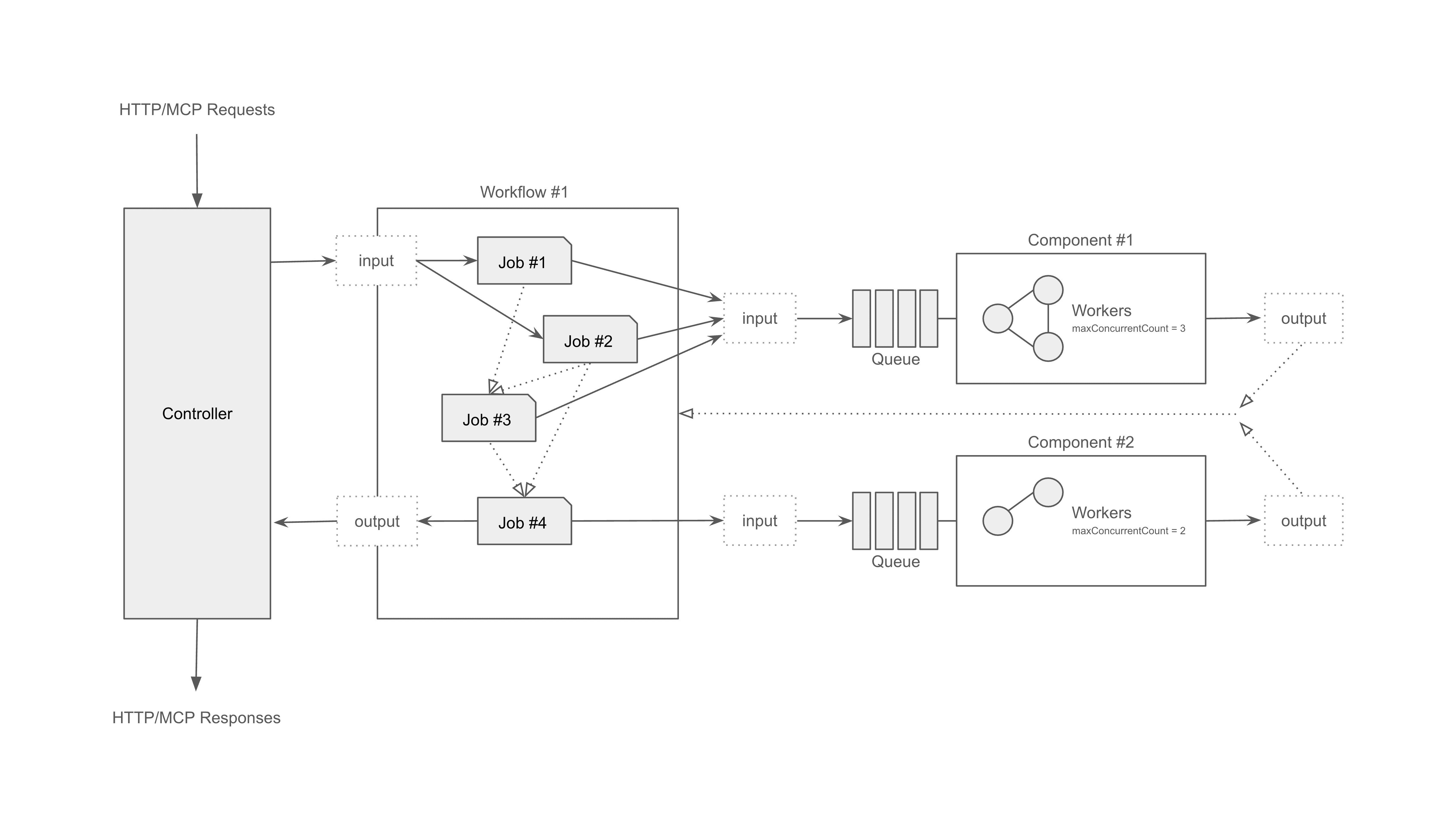
Architecture
Protocol adapters → Composition engine → Runtime executors
Contributing
We welcome all contributions!
Whether it's fixing bugs, improving docs, or adding examples — every bit helps.
# Setup for development
git clone https://github.com/hanyeol/model-compose.git
cd model-compose
pip install -e .
License
MIT License © 2025-2026 Hanyeol Cho.
Contact
Have questions, ideas, or feedback? Open an issue or start a discussion on GitHub Discussions.
Reviews (0)
Sign in to leave a review.
Leave a reviewNo results found