burnkit
Health Warn
- License — License: MIT
- Description — Repository has a description
- Active repo — Last push 0 days ago
- Low visibility — Only 5 GitHub stars
Code Fail
- rm -rf — Recursive force deletion command in scripts/e2e-install-verify.sh
- rm -rf — Recursive force deletion command in tools/burn-ai/package.json
- process.env — Environment variable access in tools/burn-ai/src/cli.ts
Permissions Pass
- Permissions — No dangerous permissions requested
No AI report is available for this listing yet.
AI coding workflow pressure toolkit — Claude Provider Router, iTerm2 Tab Color, Burn AI
BurnKit — Claude Provider Router + iTerm2 Tab Color + Burn AI
Overclock the human. Then build the harness.





BurnKit routes AI work to the right provider, colors idle tabs when AI waits, and tracks plan burn before expensive windows evaporate. Three tools for developers running Claude Code and Codex in parallel.
Chinese spirit name: 卷王三件套.
This is not about going productivity-crazy, and it is not about making you go crazy either.
BurnKit exposes the awkward truth inside AI coding: models keep getting faster, but the workflow still jams around the human operator. You think you need a stronger model. Then you notice the real drag: provider choice, idle sessions, context switching, wasted plan windows, and the person who keeps answering "should I continue?"
BurnKit turns those hidden costs into signals. When the signals become too many to handle manually, the next question becomes obvious: how do you make AI ask less, queue work, split tasks, verify results, and ship without constant babysitting?
That is the harness entrance.
What You Get
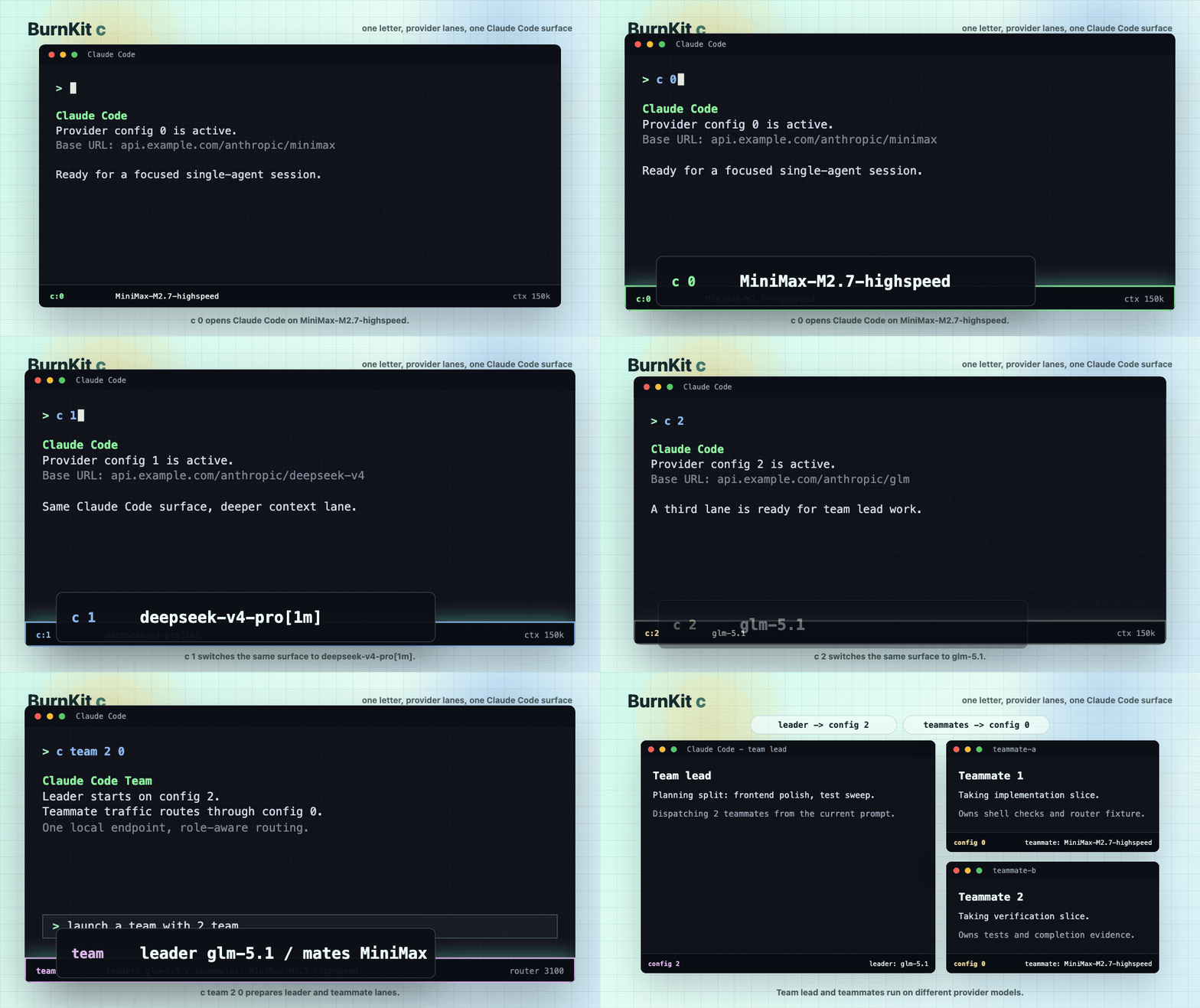
Claude Provider Router — c command
Switch between Claude / Codex providers without editing config. Split Agent Team traffic across providers.
c 0              # Use provider 0 (e.g., Claude)
c team 2 0       # Team mode: leader on provider 2, teammate on 0
iTerm2 Tab Color — Idle tab signaling
Green/Yellow/Red tabs when AI waits. Only inactive tabs get colored—notifications point at what you're missing.
burnkit install tabs
| Color | Meaning |
|---|---|
| Green | AI just finished, collect now |
| Yellow | Waited a while, parallelism leaking |
| Red | Waited too long, human late |
| White | Active, processing, or clean |

Burn AI — Plan burn tracking
Menu bar shows 5h/7d usage across all providers with colored progress bars. No login, reads local Claude Code / Codex data.
burnkit status --refresh
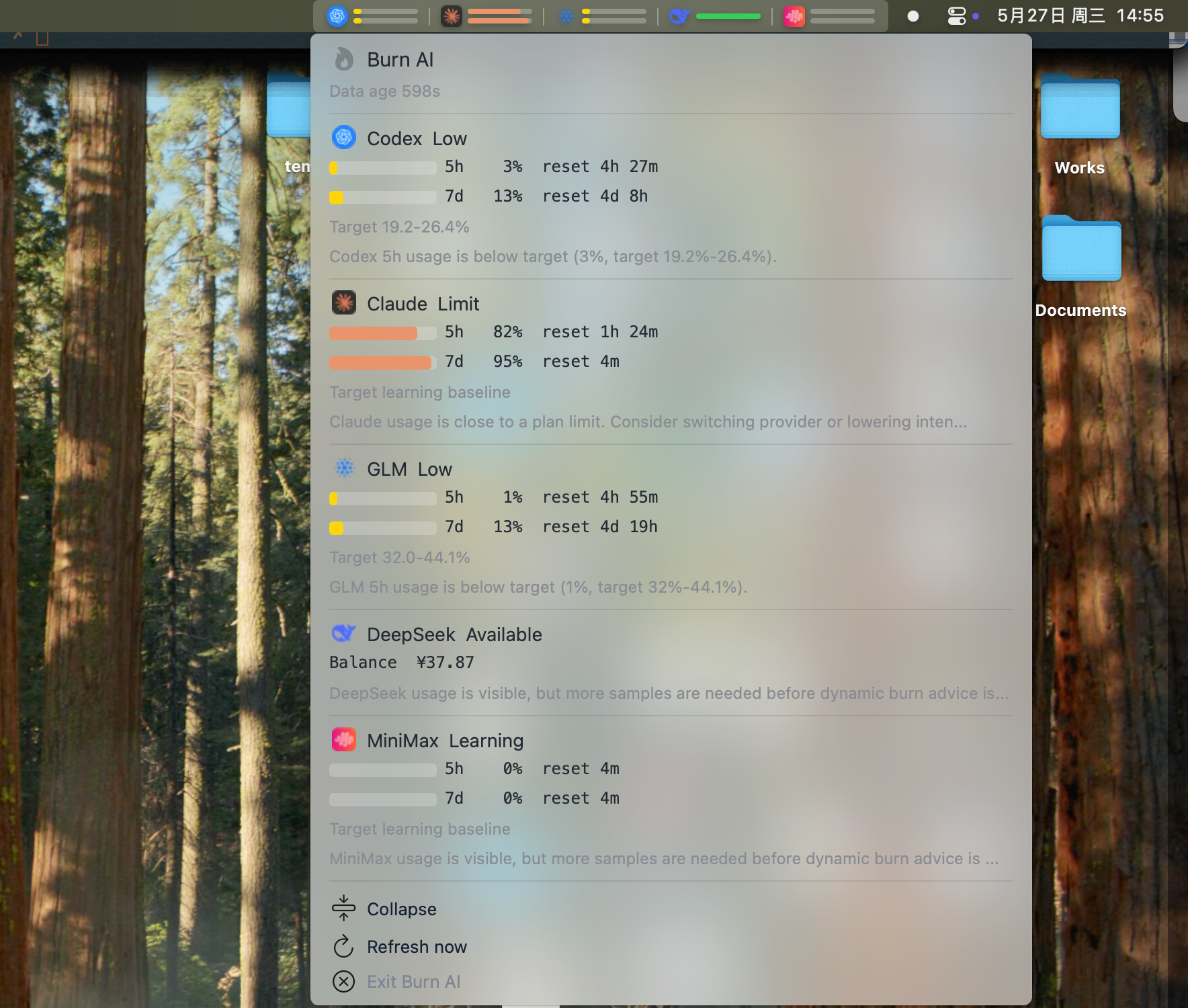
Tip: Menu bar crowded? Use Dozer to hide icons and keep Burn AI front.
Tip: If your menu bar gets crowded, consider a free tool like Dozer to hide less-used icons and keep the Burn AI menubar signal front and center.
Install
npm install -g burnkit
burnkit install all
Or run without installing:
npx burnkit install all

Edit provider config (add tokens):
# Claude / Codex routing
$EDITOR ~/.burnkit-router/config.env

# DeepSeek / GLM / MiniMax usage tracking
$EDITOR ~/.burn-ai/config.json
Example ~/.burn-ai/config.json:
{
  "providers": ["codex", "claude", "deepseek", "glm", "minimax"],
  "deepseek": {
    "apiKey": "your-deepseek-api-key"
  },
  "glm": {
    "baseUrl": "https://open.bigmodel.cn",
    "apiKey": "your-zhipu-api-key"
  },
  "minimax": {
    "region": "cn",
    "apiKey": "your-minimax-api-key"
  }
}
Run Claude Code through provider:
c 0
c team 2 0
Check plan burn:
burnkit status --refresh
Uninstall:
burnkit uninstall all
Let Your Agent Install It
Install BurnKit for me. Use `burnkit install all --dry-run` first, show me what changes, wait for confirmation, then run real install. Preserve ~/.burnkit-router/config.env if it exists.
The Loop It Creates
Start more AI sessions → Watch tabs turn green/yellow/red → See Burn AI wasting 5h/7d windows → Hit human scheduling limit → Build a real agent harness.
BurnKit is a pressure rig. It exposes hidden costs so the questions become architectural instead of motivational.
Commands
| Command | Purpose |
|---|---|
burnkit doctor |
Check prerequisites and tool readiness |
burnkit install all |
Install router, tabs, burn-ai |
burnkit uninstall all |
Remove all tools |
c 0 / c 1 / c 2 |
Start Claude Code on provider N |
c team 2 0 |
Team mode: leader on 2, teammate on 0 |
burnkit status --refresh |
Check plan burn |
Repository Layout
bin/burnkit                          # CLI entry point
tools/claude-provider-router/        # c command, config.env
tools/iterm2-tab-color/              # Python daemon + shell hooks
tools/burn-ai/                       # Node.js CLI + SwiftBar plugin
Tool Docs
Safety Notes
tools/claude-provider-router/config.envcontains tokens and must not be committed.- Burn AI does not manage login state, credentials, or private usage APIs. It reads local usage data already produced by Claude Code and Codex.
- Burn AI does not overwrite existing Claude Code status line scripts. If one exists, it asks before installing a wrapper; skipping prints manual integration steps and explains which Claude features stay unavailable.
- Tab color behavior, state cleanup, process detection, hook events, and daemon scheduling are behavior changes. Do not bundle them with docs or release polish.
Development Checks
For the release entry point:
bash -n bin/burnkit
bin/burnkit --help
bin/burnkit doctor
scripts/e2e-install-verify.sh --dry-run
For real install verification on a local machine:
scripts/e2e-install-verify.sh --real
The e2e verifier checks both router install paths: missing config.env is created from the template with mode 600, and an existing tools/claude-provider-router/config.env is preserved byte-for-byte with its original permissions.
For iTerm2 Tab Color changes:
bash -n tools/iterm2-tab-color/install-core.sh tools/iterm2-tab-color/uninstall-core.sh tools/iterm2-tab-color/install.sh tools/iterm2-tab-color/uninstall.sh tools/iterm2-tab-color/tab_color_hook.sh
python3 -m py_compile tools/iterm2-tab-color/tab_color_daemon.py tools/iterm2-tab-color/reset_tab.py tools/iterm2-tab-color/test_daemon.py
python3 -m unittest tools/iterm2-tab-color/test_daemon.py
For Burn AI changes:
cd tools/burn-ai
npm ci
npm test
npm run build
npx --no-install burn-ai install
burn-ai install
npx --no-install burn-ai doctor --dry-run
npx --no-install burn-ai status --fixtures
npx --no-install burn-ai menubar render
git diff --check
When installing Burn AI from this repository, prefer bin/burnkit install burn or bin/burnkit install all; those paths rebuild tools/burn-ai before copying the runtime into ~/.burn-ai/app.
Contributors

huajuan404 💻 📖 🎨 |
License
Reviews (0)
Sign in to leave a review.
Leave a reviewNo results found