Leeway
Health Pass
- License — License: MIT
- Description — Repository has a description
- Active repo — Last push 0 days ago
- Community trust — 21 GitHub stars
Code Warn
- process.env — Environment variable access in frontend/terminal/src/App.tsx
Permissions Pass
- Permissions — No dangerous permissions requested
This is a workflow-driven AI agent framework that executes decision trees defined in YAML. It bridges rigid automation and flexible AI by enforcing a user-defined graph structure while allowing the model to reason and iterate within each step.
Security Assessment
Overall risk is rated as Medium. The framework's core functionality involves executing shell commands and interacting with local development files through 21 built-in tools. This execution capability represents significant inherent system access that users should be aware of. The automated scan found no hardcoded secrets and noted that the tool does not explicitly request dangerous overarching permissions. However, there is a minor warning regarding environment variable access detected in the frontend terminal component. While standard for a local CLI application, accessing environment variables can potentially expose sensitive configuration data or API keys if not handled carefully.
Quality Assessment
The project demonstrates strong health and active maintenance, with repository updates pushed as recently as today. It operates under the permissive and widely accepted MIT license, making it highly accessible for integration. The framework appears to be well-engineered, boasting 190 passing tests. Community trust is currently in its early stages, reflected by a modest 21 GitHub stars.
Verdict
Use with caution. The framework is well-structured and actively maintained, but its ability to execute shell commands requires users to carefully vet the YAML workflows they run.
A workflow-driven AI agent framework that executes YAML-defined decision trees. Bridging rigid automation and unpredictable agents
Leeway
Human-defined workflows. AI-powered execution.
YAML decision trees with scheduling, hooks, MCP, and 21 built-in tools.








Why Leeway?
You want to automate the same multi-step task. A skill or system prompt can guide the agent, but it can't pin the order: every run reads different files, uses different tools, reaches different conclusions. Nothing you can repeat, nothing you can audit.
Leeway enforces the graph. You write a YAML decision tree; the same nodes run in the same order every time. Each node picks its own tools and runs a full agent loop: the LLM iterates and emits a workflow_signal when done. The graph transitions on those signals.
Tools comparison
| Who drives the flow? | What's in a node? | Best for | |
|---|---|---|---|
| AutoGPT, OpenClaw | LLM | Whatever the LLM decides | Exploratory tasks |
| n8n | Graph | Any kind of node (API call, transform, AI Agent subflow) | SaaS integration (Slack, Stripe, Airtable) |
| Leeway | Graph (decisions) | A full agent loop with local-dev tools | Local dev work (files, shell, codebase) |
Pick Leeway when the task runs on your own files or shell, needs to be repeatable, and needs a model that can reason inside each step.
Key Features
Five things that are hard to get from a node-graph workflow tool:
| # | Feature | What it does |
|---|---|---|
| 1 | Agent loop per node | Each node is a full agent loop. The model can call read_file, grep, bash, iterate up to max_turns, and emit a workflow_signal when done. You decide the graph; the model decides the steps within each node. |
| 2 | Per-node scoping | Every node gets its own ToolRegistry, SkillRegistry, HookRegistry, and MCP set, merged from globals and the node's allowlist. Node A can have bash + glob; node B can have web_fetch + mcp_github_search; same workflow. |
| 3 | Progressive skill loading, per node | skill(name="code-review") returns SKILL.md plus a file index. Reference files load only when the LLM explicitly asks. Combined with per-node scoping, each node only sees its allowlisted skills, and only their top-level content until the model drills in. |
| 4 | Turn budget with urgency injection | For signal-based nodes, the engine tells the LLM how many turns it has and injects an urgent reminder at 2 turns remaining, listing the exact signals to call. No silent cost runaway. |
| 5 | Auto-compaction (microcompact + LLM summary) | When context fills, Leeway first clears stale tool-result bodies in place. If that's not enough, it summarizes older messages via LLM while preserving the last 6. Fully transparent: no manual /compact, no lost context mid-workflow. |
Quick Start
Prerequisites
- Python 3.10+ and uv
- Node.js 18+ (optional, for the React terminal UI)
- An LLM API key
Install & Run
# Clone and install
git clone https://github.com/your-org/Leeway.git
cd Leeway
uv sync --extra dev

# Set your API key
export ANTHROPIC_API_KEY=sk-...

# Launch interactive mode
uv run leeway

# Or run a single prompt
uv run leeway -p "explain this codebase"

# Use different models
uv run leeway --model claude-opus-4-6

# Use OpenAI-compatible provider
uv run leeway --api-format openai --base-url https://api.openai.com/v1
Try the Example Workflow
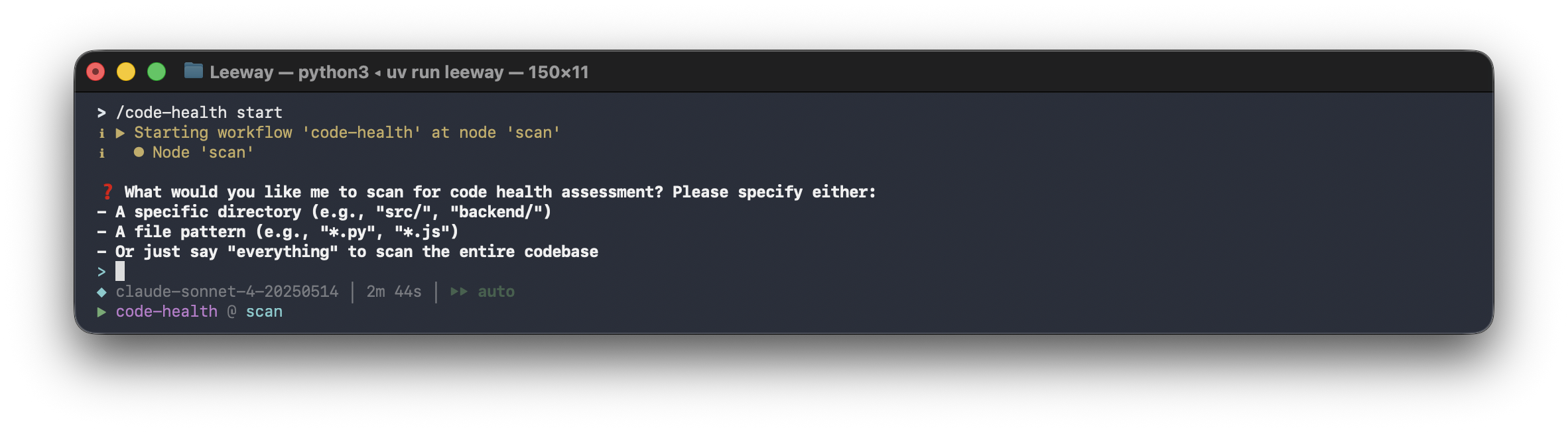
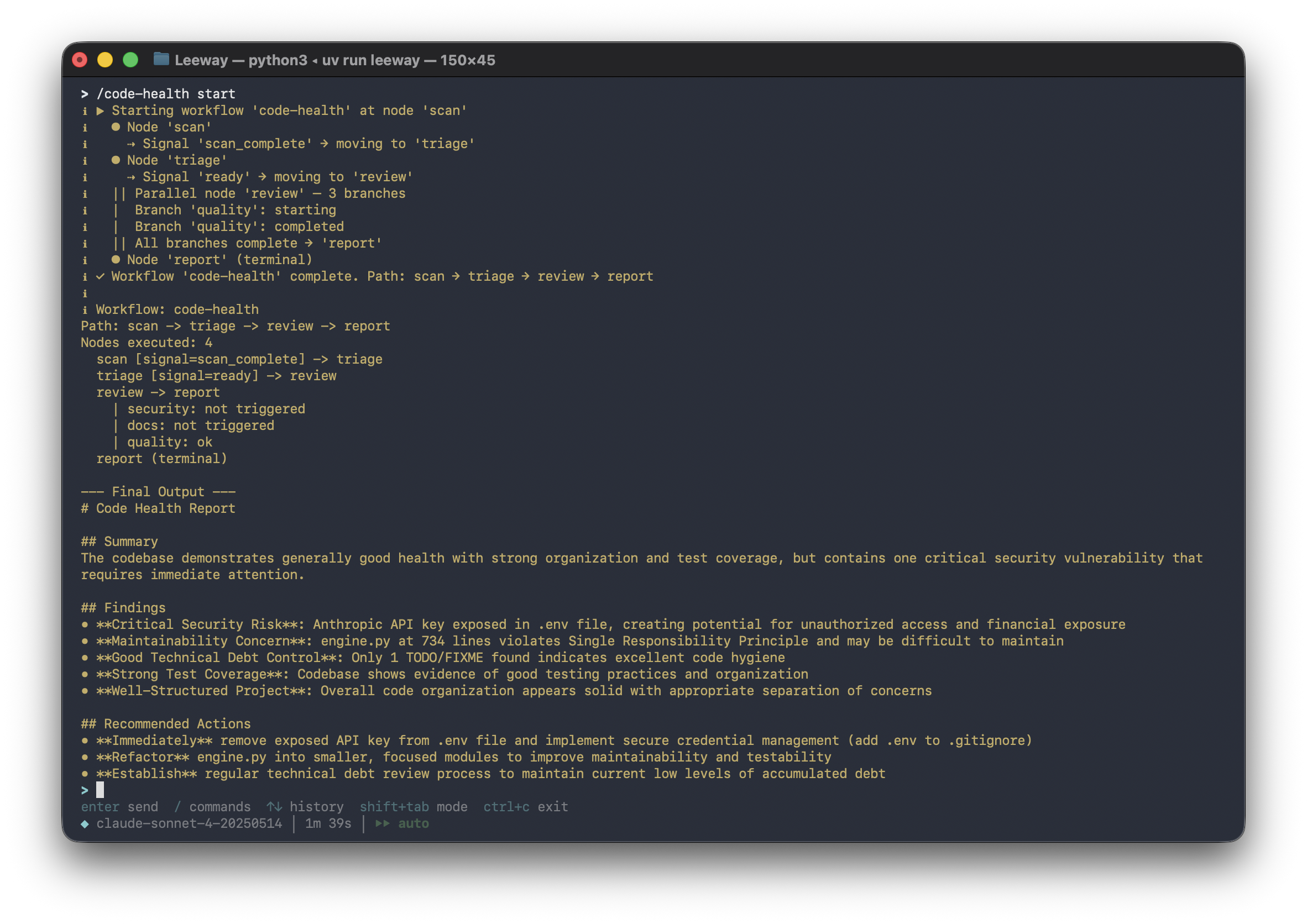
# Health check on any codebase. No input needed, low token usage
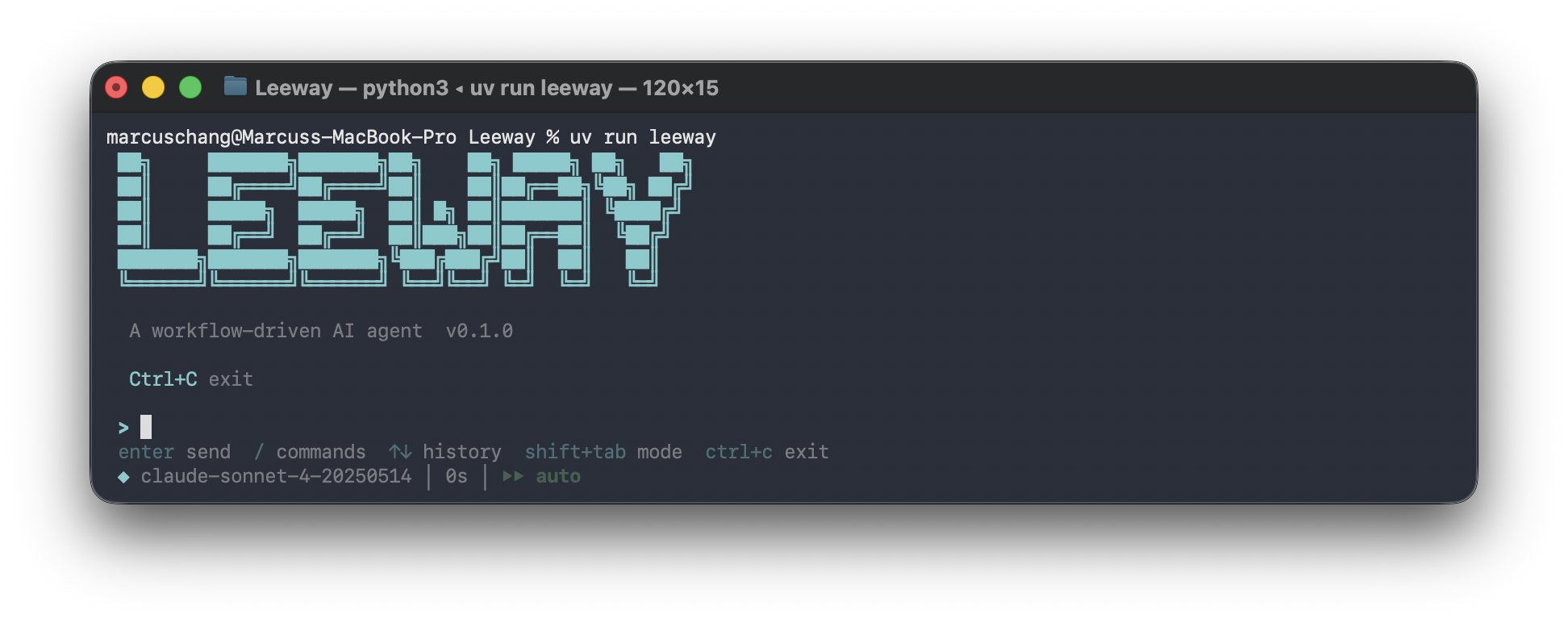
uv run leeway
> /code-health start
Architecture
Leeway's core agent loop, tool registry, permission system, and hook lifecycle are inspired by Claude Code's architecture: a minimal, streaming-first loop where the model drives tool use and the host enforces safety around it. Leeway reimplements that design in Python and extends it with a YAML workflow layer, parallel branches, cron scheduling, and per-node scoping.
flowchart LR
    U[User Prompt] --> C[CLI / React TUI]
    C --> R[RuntimeBundle]
    R --> Q[QueryEngine]
    Q --> A[Anthropic / OpenAI API]
    A -->|tool_use| T[Tool Registry, 21+ tools]
    T --> P[Permissions + Hooks]
    P --> X["Files | Shell | Web | MCP | Tasks | Cron"]
    X --> Q
The Agent Loop
while True:
    response = await api.stream(messages, tools)

    if response.stop_reason != "tool_use":
        break  # Model is done

    for tool_call in response.tool_uses:
        # Hook(before) → Permission check → Execute → Hook(after)
        result = await execute_tool(tool_call)

    messages.append(tool_results)
    # Loop continues. Model sees results, decides next action
Workflow Execution
User YAML ──► WorkflowEngine ──► Node 1 (scoped tools/skills/hooks)
                                    │
                                    ▼ signal / pattern / tool match
                                 Node 2 (parallel?)
                                    │
                           ┌────────┼────────┐
                           ▼        ▼        ▼    concurrent branches
                        Branch A  Branch B  Branch C
                           └────────┼────────┘
                                    ▼ all branches complete
                                 Node 3 ──► Terminal Node
                                    │
                                    ▼ audit trail + progress events
                                 Result
The human defines the graph. The AI operates within each node. Deterministic transitions connect them. Parallel branches run concurrently with per-branch scoping and human-in-the-loop approval gates.
Writing Workflows
Place YAML files in ~/.leeway/workflows/ or <project>/.leeway/workflows/. They are automatically discovered.
Five Patterns
Linear (unconditional transition):
scan:
  prompt: "Scan the project structure."
  tools: [glob, bash]
  edges:
    - target: assess
      when: { always: true }
Branch (signal-based split):
assess:
  prompt: "Signal 'well_documented', 'needs_investigation', or 'trivial'."
  edges:
    - target: deep_dive
      when: { signal: needs_investigation }
    - target: summarize
      when: { signal: well_documented }
Loop (back-edge to self or earlier node):
deep_dive:
  prompt: "Read key files. Signal 'dig_deeper' to loop, 'enough' to move on."
  tools: [read_file, grep, glob]
  edges:
    - target: deep_dive
      when: { signal: dig_deeper }
    - target: summarize
      when: { signal: enough }
Terminal (no edges, workflow ends):
summarize:
  prompt: "Write a summary with ## Overview, ## Key Files, ## Architecture."
Parallel (condition-based concurrent branches):
review:
  parallel:
    branches:
      quality:
        when: { always: true }
        prompt: "Review code quality"
        tools: [grep, glob]
        skills: [code_review]
      security:
        when: { signal: security_risk }
        prompt: "Security audit"
        tools: [grep, web_fetch]
        requires_approval: true
      tests:
        when: { signal: has_tests }
        prompt: "Run tests"
        tools: [bash]
    timeout: 300
  edges:
    - target: report
      when: { always: true }
All matching branches run concurrently. All triggered branches must complete before transitioning. Branches with requires_approval: true ask the user first.
Full Example
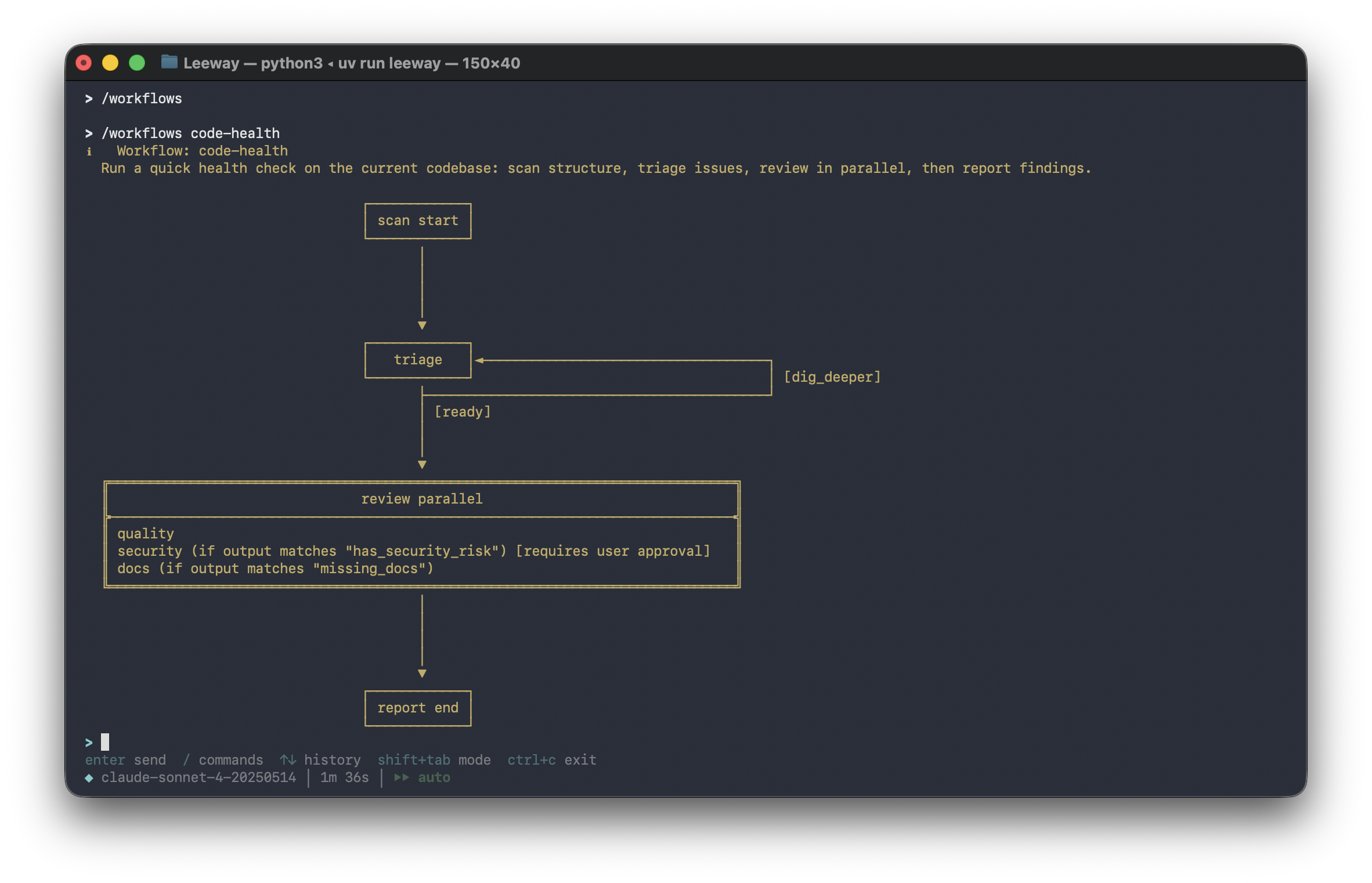
See .leeway/workflows/code-health.yaml. It covers all five patterns in one workflow with skills, hooks, and approval gates:
# Show avaliable workflows and select one
> /workflows
Workflow Properties
Top-level fields in the YAML file:
| Property | Default | Description |
|---|---|---|
name |
required | Workflow identifier (used in commands and logs) |
description |
"" |
Human-readable description of the workflow |
start_node |
required | Name of the first node to execute |
nodes |
required | Dictionary mapping node names to node definitions |
global_tools |
[] |
Tools available in every node (merged with per-node tools) |
global_skills |
[] |
Skills available in every node (merged with per-node skills) |
global_hooks |
[] |
Hooks active in every node (merged with per-node hooks) |
global_mcp_servers |
[] |
MCP servers available in every node (merged with per-node MCP servers) |
Node Properties
| Property | Default | Description |
|---|---|---|
prompt |
required | Task instructions for the LLM at this step |
tools |
[] |
Tool whitelist (only these tools are available) |
max_turns |
50 |
Max LLM turns within this node |
carry_context |
true |
Pass prior node's summary as context |
interactive |
true |
When true, the agent can use ask_user_question and permission prompts are shown. When false, the node runs fully automatically. User prompts are suppressed and parallel approval gates are auto-approved |
edges |
[] |
Outgoing transitions (empty = terminal node) |
skills |
[] |
Skill names scoped to this node |
hooks |
[] |
Node-specific hook definitions |
mcp_servers |
[] |
MCP server names scoped to this node |
parallel |
null |
Parallel execution spec (branches, timeout) |
Transition Conditions
| Condition | Description |
|---|---|
signal: <value> |
LLM called workflow_signal with this decision |
output_matches: <regex> |
LLM's final text matches the pattern |
tool_was_called: <name> |
A specific tool was used during the node |
always: true |
Unconditional transition |
All conditions support negate: true to invert the match.
Turn-budget awareness: For nodes with signal-based edges, the engine automatically tells the LLM how many turns it has and injects an urgent reminder when 2 turns remain. This prevents the LLM from exhausting its turn budget on investigation without signalling a decision.
Edge Properties
| Property | Default | Description |
|---|---|---|
target |
required | Name of the destination node |
when |
always |
Transition condition (see table above) |
priority |
0 |
Evaluation order: higher-priority edges are checked first |
Branch Properties
Each branch inside a parallel block supports:
| Property | Default | Description |
|---|---|---|
when |
always |
Condition that triggers this branch |
prompt |
required | Branch-specific task instructions |
tools |
[] |
Tool whitelist for this branch |
max_turns |
50 |
Max LLM turns within this branch |
skills |
[] |
Skill names scoped to this branch |
hooks |
[] |
Branch-scoped hook definitions |
mcp_servers |
[] |
MCP server names scoped to this branch |
requires_approval |
false |
Human-in-the-loop gate: ask user before executing |
The parallel block itself also accepts a timeout (default 600 seconds) for how long to wait for all triggered branches to complete.
Workflow Progress
Tools (21+)
| Category | Tools | Description |
|---|---|---|
| File I/O | bash, read_file, write_file, edit_file, glob, grep |
Core file operations with permission checks |
| Web | web_fetch, web_search |
HTTP content retrieval and Brave search |
| Interaction | ask_user_question, skill |
User input and on-demand knowledge loading |
| Tasks | task_create, task_list, task_get, task_stop |
Background task lifecycle management |
| Scheduling | cron_create, cron_list, cron_delete, cron_toggle |
Cron job management |
| Agents | agent, remote_trigger |
Subagent spawning and webhook triggers |
| Memory | memory_read, memory_write |
Persistent cross-session knowledge |
| MCP | mcp_<server>_<tool> (dynamic) |
Auto-registered from MCP servers |
Every tool has Pydantic input validation, self-describing JSON Schema, permission integration, and hook support.
Scheduling & Cron
Leeway includes a standalone cron scheduler daemon for running workflows and commands on a schedule.
# Start the scheduler daemon
uv run leeway scheduler start

# Check status
uv run leeway scheduler status

# Stop
uv run leeway scheduler stop
Schedule types:
| Type | Example | Description |
|---|---|---|
| Cron expression | */5 * * * * |
Every 5 minutes |
| Interval | 300 seconds |
Every 5 minutes |
| One-shot | 2026-04-15T09:00:00 |
Run once at a specific time |
Action types: shell commands, workflow executions, or webhook calls.
Skills
Skills are folder-per-skill packages with a SKILL.md entry point and optional supporting files for progressive disclosure. The agent loads the main instructions first, then reads detailed references on demand.
Structure
.leeway/skills/
  code-review/
    SKILL.md              # main instructions (loaded first)
    references/
      checklist.md        # detailed checklist (loaded on demand)
  security-audit/
    SKILL.md              # main instructions
    references/
      owasp.md            # OWASP checklist (loaded on demand)
  coding-standards/
    SKILL.md              # main instructions
    references/
      python.md           # Python-specific conventions
      typescript.md       # TypeScript-specific conventions
This project includes 3 skills in .leeway/skills/:
| Skill | Description | References | Used by |
|---|---|---|---|
coding-standards |
Coding standards checklist | references/python.md, references/typescript.md |
Global (all nodes) |
code-review |
Quality review patterns | references/checklist.md |
quality branch |
security-audit |
Security vulnerability audit | references/owasp.md |
security branch |
How Progressive Disclosure Works
- Agent calls
skill(name="code-review")→ gets SKILL.md content + list of reference files - SKILL.md says "For the full checklist, read references/checklist.md"
- Agent calls
skill(name="code-review", file="references/checklist.md")→ gets detailed checklist - Only the content needed right now is loaded into context
SKILL.md Format
---
name: code-review
description: Code quality review: identify patterns, anti-patterns, and improvements. Use when performing code reviews, auditing code quality, or evaluating pull requests.
---

# Code Review

## Workflow

1. Scan structure: use `glob` and `grep` to understand the scope of changes
...

For the full quality checklist, read [references/checklist.md](references/checklist.md).
The description field is the primary trigger: include both what the skill does and when to use it. Supporting files go in references/, scripts/, or assets/ subdirectories.
Scoping
Skills can be scoped per-node or per-branch in workflows:
global_skills: [coding-standards]     # available in every node

nodes:
  review:
    parallel:
      branches:
        quality:
          skills: [code-review]       # only this branch gets code-review
Place in ~/.leeway/skills/ or <project>/.leeway/skills/. Legacy flat .md files are also supported. List with /skills, load via the skill tool.
Hooks
Lifecycle callbacks that fire before or after tool execution. Hooks can be defined globally (in settings.json), at the workflow level (global_hooks), or per-node/branch:
# Workflow-level hooks (fire for all nodes)
global_hooks:
  - type: command
    match: { event: workflow_start }
    command: "echo 'workflow started' >> /tmp/hooks.log"

nodes:
  tests:
    hooks:   # Node-level hook (only fires within this node)
      - type: command
        match: { event: after_tool_use, tool_name: bash }
        command: "echo 'bash executed in tests' >> /tmp/hooks.log"
Settings-level hooks in settings.json:
{
  "hooks": [
    {
      "type": "http",
      "match": { "event": "before_tool_use" },
      "url": "https://example.com/webhook",
      "method": "POST"
    }
  ]
}
| Hook Type | Execution | Use Case |
|---|---|---|
command |
Shell command with payload on stdin | Logging, notifications, auditing |
http |
HTTP POST with JSON payload | External integrations, webhooks |
Hooks are merged from all levels: settings → workflow globals → node/branch. Errors are logged but never block execution.
MCP Support
Connect to Model Context Protocol servers for external tool integration:
{
  "mcp_servers": [
    {
      "name": "my-server",
      "transport": "stdio",
      "command": "npx",
      "args": ["-y", "@my/mcp-server"]
    }
  ]
}
MCP tools auto-register as mcp_<server>_<tool> and are available in workflow node tools: lists.
uv pip install leeway[mcp] # Install MCP support
Plugins
Bundle skills, hooks, and MCP servers into distributable packages:
my-plugin/
  plugin.json
  skills/
    review.md
{
  "name": "my-plugin",
  "version": "1.0.0",
  "skills": ["skills/review.md"],
  "hooks": [],
  "mcp_servers": []
}
Place in ~/.leeway/plugins/<name>/ or <project>/.leeway/plugins/<name>/.
Remote Triggers
Create webhook endpoints that trigger workflows from external systems:
# The agent creates triggers via the remote_trigger tool
# Each trigger gets a unique ID and secret

POST /trigger/<id>
Header: X-Trigger-Secret: <secret>
Use remote_trigger tool with action: "create" to set up a new endpoint.
Permissions
Multi-level safety with fine-grained control:
| Mode | Behavior | Use Case |
|---|---|---|
| Default | Ask before write/execute | Daily development |
| Full Auto | Allow everything | Sandboxed environments |
| Plan Mode | Block all writes | Review before acting |
Path-level rules in settings.json:
{
  "permission": {
    "mode": "default",
    "path_rules": [{ "pattern": "/etc/*", "allow": false }],
    "denied_commands": ["rm -rf /"]
  }
}
Commands
| Command | Description |
|---|---|
/help |
Show all available commands |
/workflows |
Browse workflows (interactive picker) |
/workflows <name> |
Show workflow graph |
/<name> <context> |
Run a workflow directly |
/skills |
List available skills |
/tasks |
List background tasks |
/cron |
List scheduled cron jobs |
/model / /model <name> |
Show or switch model |
/status |
Show session info |
/compact |
Compact conversation (reduce tokens) |
/permissions set <mode> |
Set permission mode |
/clear |
Clear conversation history |
/exit |
Exit the session |
Extending Leeway
Custom Tool
from pydantic import BaseModel, Field
from leeway.tools.base import BaseTool, ToolExecutionContext, ToolResult

class MyToolInput(BaseModel):
    query: str = Field(description="Search query")

class MyTool(BaseTool):
    name = "my_tool"
    description = "Does something useful"
    input_model = MyToolInput

    async def execute(self, arguments: MyToolInput, context: ToolExecutionContext) -> ToolResult:
        return ToolResult(output=f"Result for: {arguments.query}")
Custom Skill
Create ~/.leeway/skills/my-skill.md with YAML frontmatter.
Custom Plugin
Create <project>/.leeway/plugins/my-plugin/plugin.json with skills, hooks, and MCP servers.
Test Results
| Suite | Tests | Status |
|---|---|---|
| Skills (registry + tool + progressive disclosure) | 20 | All passing |
| Tasks (manager + store) | 9 | All passing |
| Hooks (registry + executor) | 7 | All passing |
| Cron (scheduler + store) | 8 | All passing |
| MCP (adapter) | 5 | All passing |
| Triggers (registry) | 3 | All passing |
| Agents (spawner) | 2 | All passing |
| Plugins (loader) | 4 | All passing |
| Memory (store) | 5 | All passing |
| Workflow (evaluator + graph + types) | 44 | All passing |
| Workflow (node scoping) | 8 | All passing |
| Workflow (parallel models) | 14 | All passing |
| Workflow (engine parallel) | 10 | All passing |
| Workflow (HITL broker) | 6 | All passing |
| Workflow (resource validation) | 12 | All passing |
| Workflow (graph: parallel + scoping) | 11 | All passing |
| Core (engine + permissions + tools) | 22 | All passing |
| Total | 190 | All passing |
uv run pytest -q # Run all tests
Project Structure
.leeway/               # Project-level configuration (auto-discovered)
  workflows/              # YAML workflow definitions
    code-health.yaml      # Example: zero-input codebase health check
  skills/                 # Folder-per-skill with progressive disclosure
    coding-standards/     # SKILL.md + references/python.md, typescript.md
    code-review/          # SKILL.md + references/checklist.md
    security-audit/       # SKILL.md + references/owasp.md

src/leeway/
  agents/       # Subagent spawning with worktree isolation
  api/          # LLM provider clients (Anthropic, OpenAI)
  config/       # Settings and path management
  cron/         # Cron scheduler daemon and job management
  engine/       # Core agent loop (query, messages, streaming)
  hooks/        # Lifecycle event hooks (command, HTTP)
  mcp/          # Model Context Protocol client integration
  memory/       # Persistent cross-session knowledge
  permissions/  # Permission checking system
  plugins/      # Plugin loader and manifest system
  prompts/      # System prompt builder
  services/     # Auto-compaction service
  skills/       # Skill registry and markdown parser
  state/        # Application state
  tasks/        # Background task manager
  tools/        # 21 built-in tools + base abstraction
  triggers/     # Webhook trigger server and registry
  ui/           # React TUI + backend host + print mode
  workflow/     # Decision tree engine, parallel branches, HITL, YAML parser
License
MIT
Reviews (0)
Sign in to leave a review.
Leave a reviewNo results found