terminal-history-mcp
Health Warn
- License — License: MIT
- Description — Repository has a description
- Active repo — Last push 0 days ago
- Low visibility — Only 5 GitHub stars
Code Fail
- rm -rf — Recursive force deletion command in eval/fixtures/history.json
- exec() — Shell command execution in eval/run.mjs
- exec() — Shell command execution in src/db.ts
Permissions Pass
- Permissions — No dangerous permissions requested
No AI report is available for this listing yet.
Search your shell history (zsh/bash/fish) from Claude/MCP. Local SQLite FTS5. Secret-redacted.

terminal-history-mcp



Search your shell history (zsh / bash / fish) from Claude Code, Cline, Cursor, Zed, or any MCP client. Local-only. SQLite FTS5. Secret-redacted before storage.
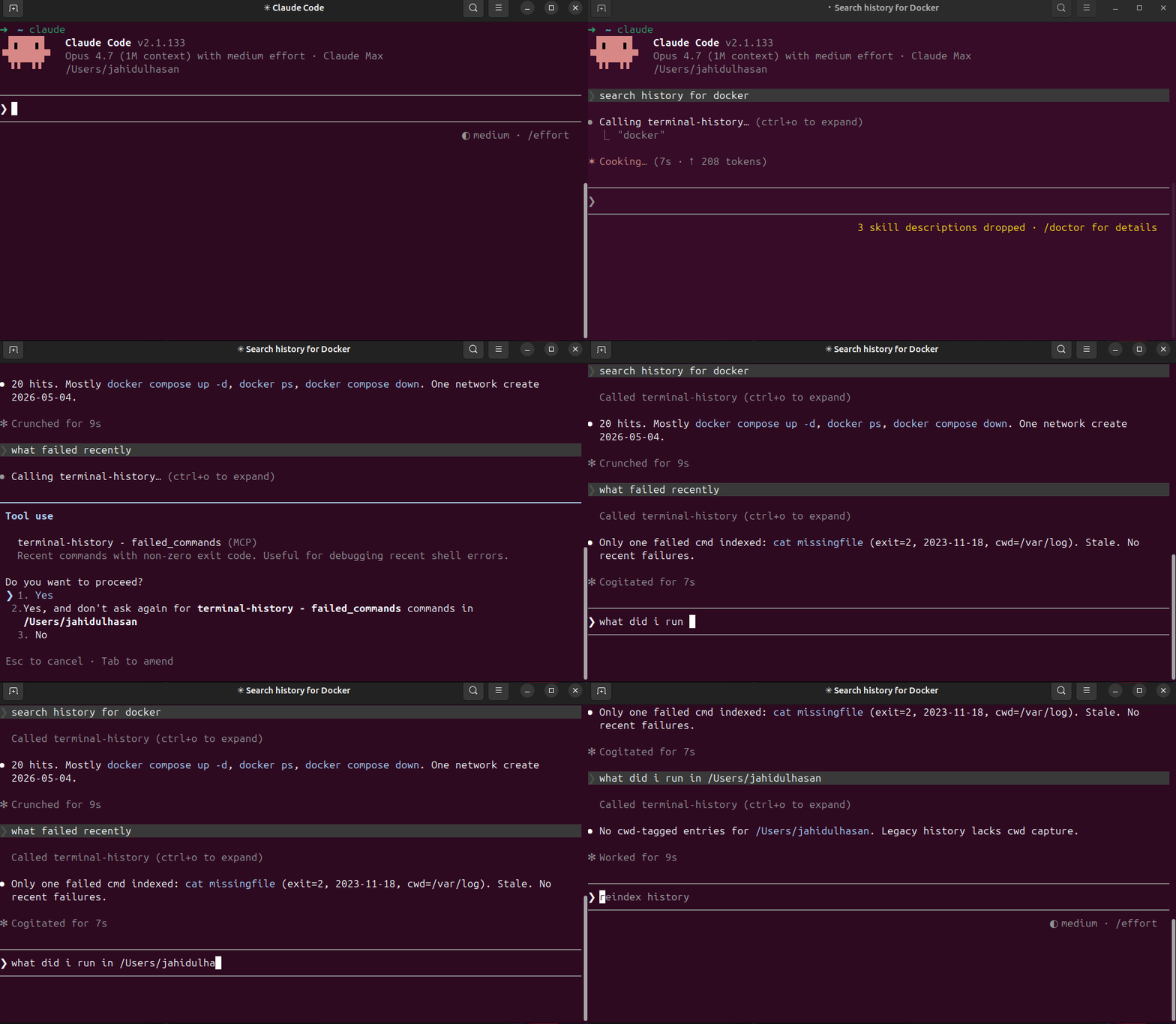
What you can ask
- "When did I last ssh into the staging server?"
- "Show recent failed commands."
- "What did I run yesterday in
/etc/nginx?" - "What's that long docker compose flag I used 3 weeks ago?"
- "Show command chains around
kubectl apply."
Install
npm install -g terminal-history-mcp
terminal-history-mcp index           # one-time backfill from existing history
(Or run from a clone: git clone … && npm install && npm run build && npm link.)
Wire to Claude Code
claude mcp add --scope user terminal-history -- terminal-history-mcp
claude mcp list
Wire to other MCP clients
Anywhere that takes a stdio MCP server config:
{
  "mcpServers": {
    "terminal-history": {
      "command": "terminal-history-mcp"
    }
  }
}
Connect via MCPize
Use this MCP server instantly with no local installation:
npx -y mcpize connect @HasanJahidul/terminal-history --client claude
Or connect at: https://mcpize.com/mcp/terminal-history
Capture cwd + exit code (recommended)
By default zsh/bash history files store only the command. To unlock recent_in_dir and failed_commands, install the shell hook:
terminal-history-mcp install-hook zsh    # or bash, or fish
exec $SHELL                              # reload
The hook appends pipe-delimited lines to ~/.terminal-history-mcp/extended.log. Reindex picks them up.
To inspect the snippet first:
terminal-history-mcp print-hook zsh
To remove:
terminal-history-mcp uninstall-hook zsh
Tools
| Tool | What it does |
|---|---|
search_history(query, limit, mode) |
FTS5 keyword + prefix match across all history. Optional mode: keyword (default), semantic, hybrid — see Semantic search |
recent_in_dir(cwd, limit) |
Last N commands in a working dir (needs hook) |
failed_commands(since_ts_ms, limit) |
Commands with non-zero exit (needs hook) |
command_chains(query, window_ms, limit) |
For each match, list commands within ±5 min |
reindex |
Re-parse history files + extended log |
reindex_embeddings(limit) |
Build the vector index for semantic/hybrid search (needs an embedding endpoint) |
ask_history(question, k) |
Answer a question from your history, citing entries as [id:N] (needs a chat model) |
Semantic search (optional, local)
Keyword search finds commands by the words in them. Semantic search finds them by meaning: "how did I free up docker disk space" finds docker system prune -af even though the query never says "prune". It uses embeddings from a model running on your machine. It is opt-in: search_history stays keyword-only unless you pass mode.
Set up Ollama
brew install ollama            # or https://ollama.com/download
ollama serve                   # skip if the Ollama app is already running
ollama pull nomic-embed-text   # embedding model (~274 MB)
ollama pull qwen2.5:7b         # optional: chat model for ask_history answers (~4.7 GB)
Then, after terminal-history-mcp index, call the reindex_embeddings tool from your MCP client. Each call embeds up to 2000 distinct commands (identical commands share one vector), newest first; call it again until remaining is 0, and again after new history is indexed.
Configuration
| Env var | Default | Purpose |
|---|---|---|
TERMINAL_HISTORY_LLM_BASE_URL |
http://localhost:11434/v1 |
Any OpenAI-compatible endpoint (Ollama, LM Studio, llama.cpp server, vLLM, OpenAI) |
TERMINAL_HISTORY_EMBED_MODEL |
nomic-embed-text |
Embedding model. Changing it re-embeds everything on the next reindex_embeddings |
TERMINAL_HISTORY_CHAT_MODEL |
unset | Chat model for ask_history. Unset: ask_history returns the retrieved entries only |
TERMINAL_HISTORY_LLM_API_KEY |
unset | Sent as a Bearer token, for hosted endpoints |
TERMINAL_HISTORY_ALLOW_REMOTE_LLM |
unset | Must be exactly 1 to allow a non-localhost base URL |
Pass them through your MCP client, e.g.
claude mcp add --scope user terminal-history -e TERMINAL_HISTORY_CHAT_MODEL=qwen2.5:7b -- terminal-history-mcp
{ "mcpServers": { "terminal-history": { "command": "terminal-history-mcp",
  "env": { "TERMINAL_HISTORY_CHAT_MODEL": "qwen2.5:7b" } } } }
Privacy
- The endpoint defaults to localhost. Any other host is refused unless
TERMINAL_HISTORY_ALLOW_REMOTE_LLM=1. - Only command text read from the local DB is embedded, i.e. after the secret scrubber ran at index time. Your search query or question is passed through the same scrubber before it is sent.
ask_historyalso sends the retrieved entries' timestamps, working directories and exit codes to the chat model.- If you opt in to a remote endpoint, that redacted history leaves your machine. Redaction is pattern-based and can miss things.
- Vectors live in the same local DB (
~/.terminal-history-mcp/history.db, tablecommand_embeddings).
Modes
mode |
How it ranks | If embeddings are unavailable |
|---|---|---|
keyword (default) |
FTS5 bm25, exactly the previous behaviour | n/a, never calls the endpoint |
semantic |
Cosine similarity between the query embedding and each command's embedding | Returns an error saying why |
hybrid |
Top 50 keyword + top 50 semantic, fused with Reciprocal Rank Fusion (k=60); one row per distinct command | Falls back to keyword results and says so (fallback_reason) |
"Unavailable" means the endpoint is unreachable, reindex_embeddings has not run for the current model, or the guardrail refused the endpoint.
ask_history
ask_history(question, k=8) retrieves the top k entries with hybrid search and gives them to the chat model as delimited, untrusted data (never as instructions). The model is told to answer only from them and cite entries as [id:N], or reply exactly No relevant history found.. Cited ids are checked against what was retrieved; anything else is reported in invalid_citation_ids. Without TERMINAL_HISTORY_CHAT_MODEL it returns the retrieved entries only.
How well it works
Measured with npm run eval on a synthetic, author-written fixture (200 commands, 25 queries), nomic-embed-text via Ollama, Apple M4:
| mode | recall@5 | MRR@10 |
|---|---|---|
| keyword | 0.680 | 0.516 |
| semantic | 0.680 | 0.587 |
| hybrid | 0.720 | 0.583 |
Vector search is an exact brute-force scan: 23 ms median at 10k distinct commands, 237 ms at 100k. Numbers, caveats and design reasoning are in docs/adr/0001-semantic-search.md.
Privacy
Everything is local. The DB lives at ~/.terminal-history-mcp/history.db. Nothing is uploaded unless you point the optional semantic search at a non-localhost endpoint and opt in (see Semantic search → Privacy).
Secrets are scrubbed before insert. Detected patterns:
- GitHub PATs (
ghp_*,gho_*, …) - OpenAI keys (
sk-*) - Slack tokens (
xox[baprs]-*) - AWS access keys (
AKIA…) Authorization: Bearer/Basic <value>X-*-Token: …,X-*-Key: …,X-*-Secret: …headers- Env vars containing
TOKEN/KEY/SECRET/PASSWORD/API_KEY - CLI flags
--token=…,--api-key …,-k … - URL basic-auth
https://user:pass@host - JWTs (
eyJ.*.*)
If you find a leak, please open an issue. To wipe and re-index after upgrading patterns:
rm ~/.terminal-history-mcp/history.db*
terminal-history-mcp index
Development
git clone https://github.com/hasanjahidul/terminal-history-mcp
cd terminal-history-mcp
npm install
npm run build
npm test        # offline: unit + JSON-RPC e2e (fake embedding/chat endpoint on 127.0.0.1)
npm run eval    # retrieval quality + vector-search latency; needs Ollama for the quality part
License
MIT — see LICENSE.
Reviews (0)
Sign in to leave a review.
Leave a reviewNo results found