codex-context-studio
Health Pass
- License — License: GPL-3.0
- Description — Repository has a description
- Active repo — Last push 0 days ago
- Community trust — 21 GitHub stars
Code Pass
- Code scan — Scanned 12 files during light audit, no dangerous patterns found
Permissions Pass
- Permissions — No dangerous permissions requested
No AI report is available for this listing yet.
A visual, editable context management panel for Codex. AI edit AI's context with surgical precision, giving you more control and freedom over what Codex sees.
Codex Context Proxy
A visual, editable context layer for Codex. Let AI edit AI's context with surgical precision, giving you more control and freedom over what Codex sees.
What We Built
Codex Context Proxy gives the official Codex CLI a visual and editable context layer.
Codex is powerful in long coding sessions, but its context can become hard to inspect and harder to maintain. Tool logs, failed attempts, outdated assumptions, and repeated transcript fragments can keep accumulating. When that happens, you usually cannot see exactly what Codex is about to read or selectively remove noisy context before the next response.
This project adds a local context editor in front of Codex. You keep using the normal Codex workflow, while the proxy captures Codex's live context and opens a workbench where you can visualize, edit, compress, and delete context before future responses.
In short:
Codex writes code.
Codex Context Proxy helps maintain Codex's context.
What Codex Gets
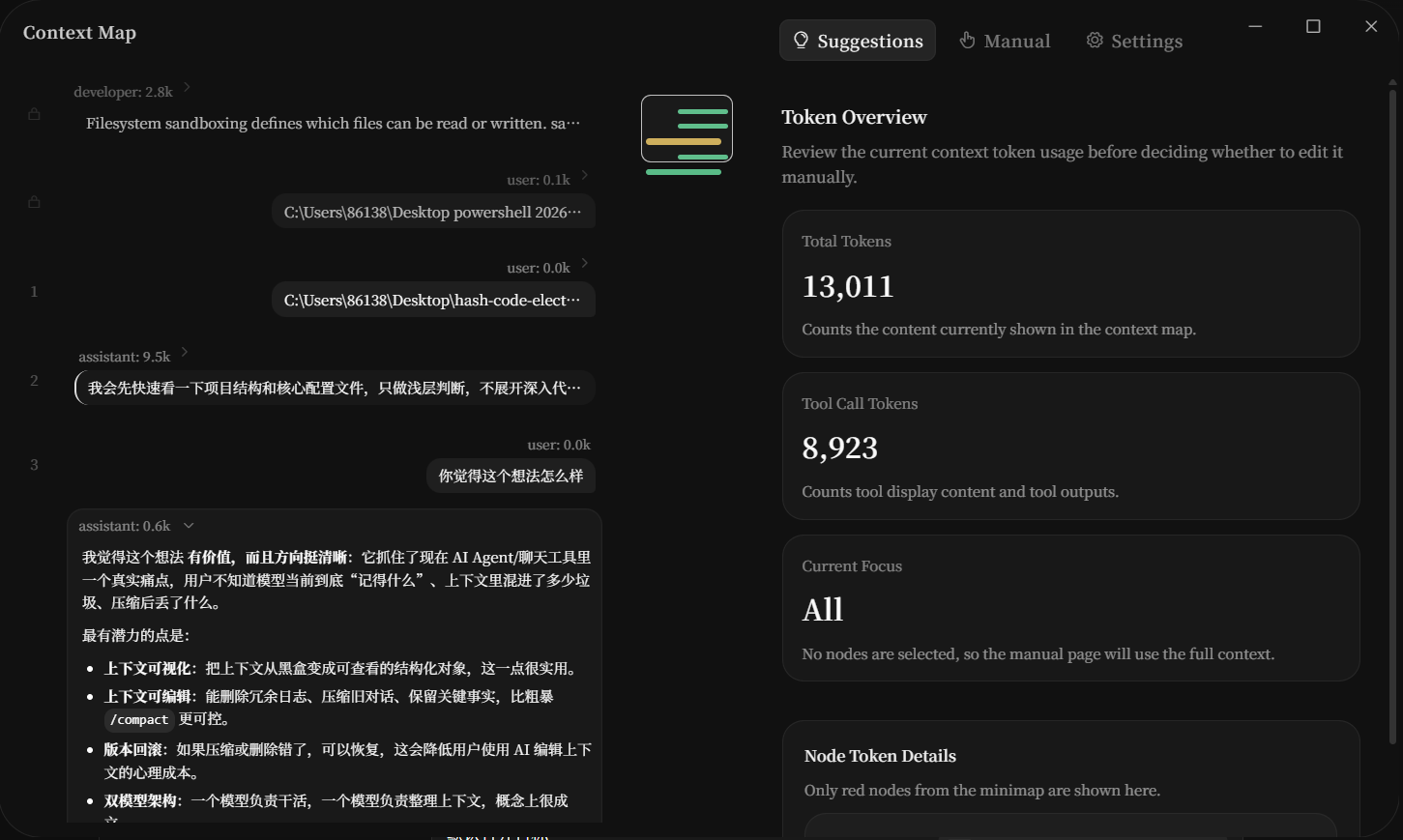
- Context visualization: see the conversation, tool history, and context nodes Codex is about to use.
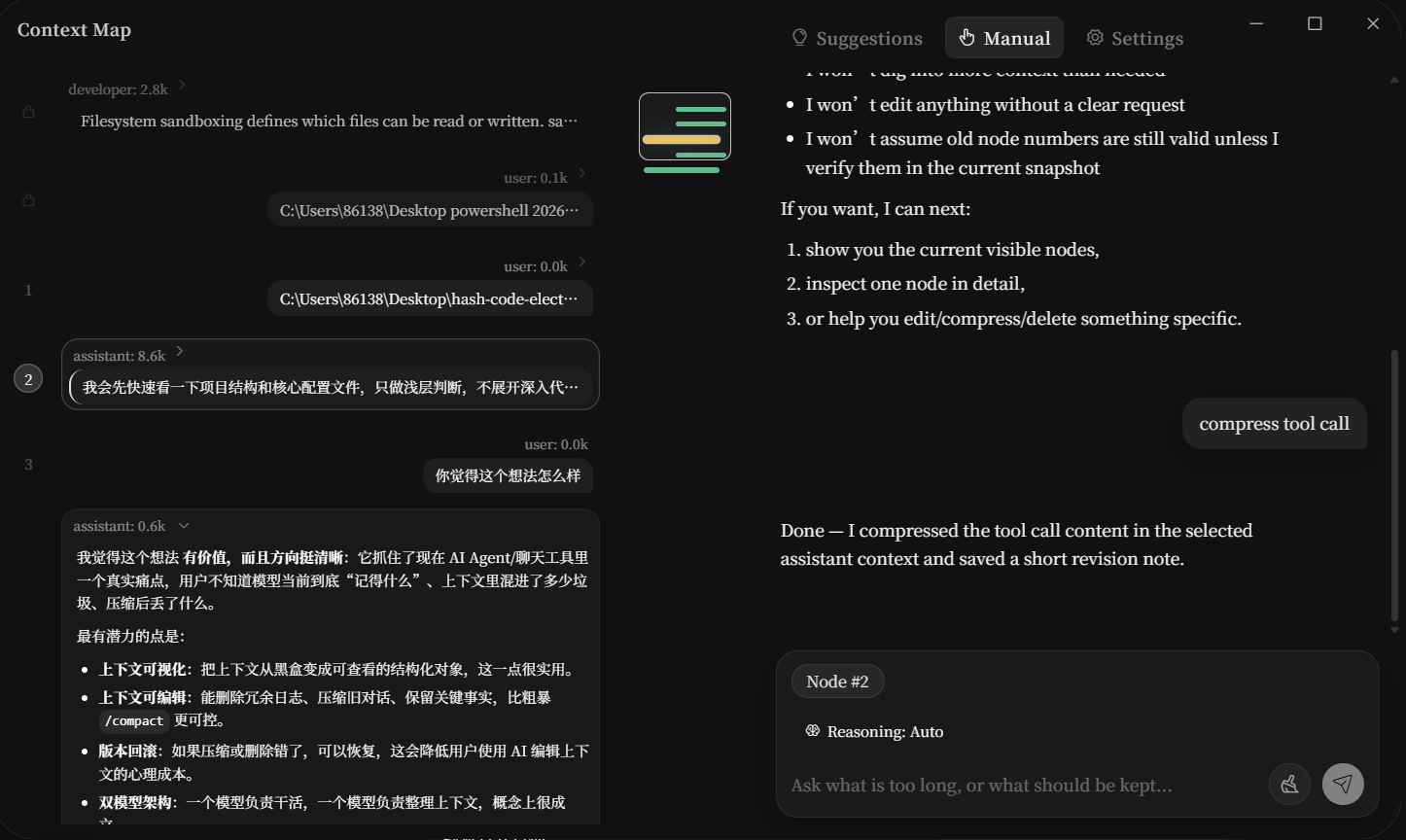
- Editable context: compress, delete, or rewrite selected context items.
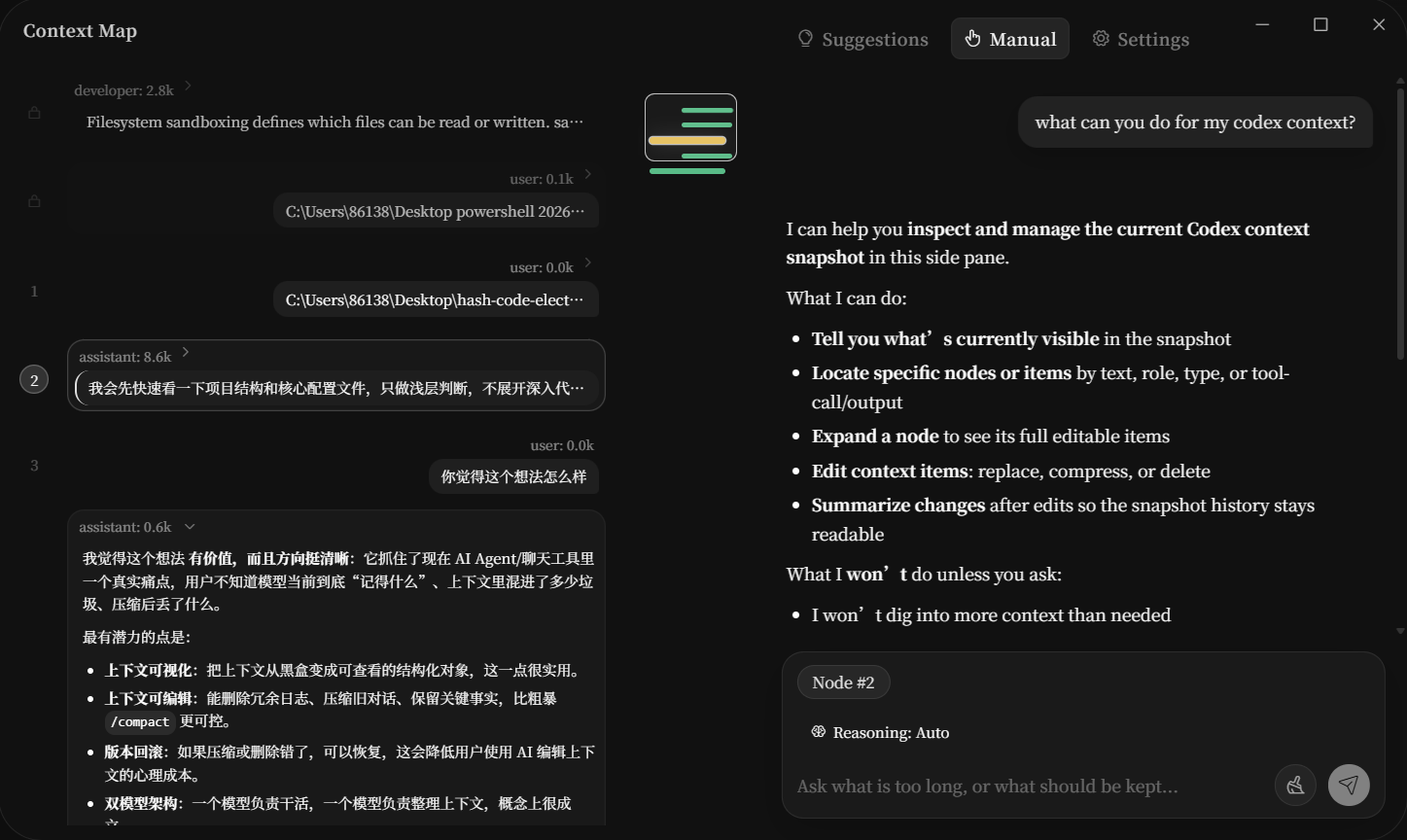
- AI context editing: use a second AI pass to maintain the main AI's context.
- Precise compaction: replace blunt auto-compact with targeted context surgery.
- CLI and Desktop support: use it with Codex CLI, with experimental support for Codex Desktop.
- Normal workflow: continue using Codex from the terminal or desktop app.
The context editing workbench is adapted from HashCode. The original project explains the broader "AI edits AI's context" idea in more detail:
https://github.com/HaShiShark/context-editor-agent
Screenshots
Visualize Codex Context and Token Usage
Ask AI to Inspect the Current Context
Compress Noisy Tool Context
Features
Live Context Map
Codex Context Proxy converts a Codex session into a structured context map. Instead of treating the transcript as one long wall of text, it shows user turns, assistant turns, tool calls, tool results, and edited context nodes as separate items.
AI-Assisted Context Editing
You can select noisy or outdated context and ask an editor model to compress, rewrite, or clean it up. This makes it possible to preserve useful intent while removing bulk from logs, failed attempts, or repeated information.
Manual Context Control
Not every context edit needs AI. You can also remove selected nodes or inspect raw content manually.
Codex CLI and Desktop
Codex CLI support is the main path. Once enabled, the normal codex command starts the local proxy and context window before launching the real Codex CLI.
Codex Desktop support is also included. It can point Codex Desktop's model provider configuration at the local proxy so desktop conversations can use the same editable context layer. Desktop support touches local Codex configuration, so it is controlled separately from the CLI switch.
Transparent Workflow
When the proxy is off, codex passes through to the official Codex CLI. When the proxy is on, the same codex command starts the local proxy, opens the context window, and then launches the real Codex CLI.
How It Works
Codex Context Proxy runs a local Responses API compatible proxy.
When Codex sends a request, the proxy captures the request body and response stream, then builds a canonical transcript for the context workbench. If you do not edit anything, requests are forwarded transparently and Codex behaves like normal.
When you edit the context, the proxy marks that session as overridden. On the next Codex turn, it rebuilds the Responses input from the edited transcript and removes server-side chained context references that would bypass the local edit.
High-level flow:
codex
  -> local shim
  -> Codex Context Proxy
  -> official Codex request
  -> OpenAI / ChatGPT Codex backend

context window
  -> visualize transcript
  -> edit selected nodes
  -> save edited context
  -> next Codex turn uses edited context
Quick Start
Download and run the Windows installer:
Codex Context Proxy Setup 0.3.0.exe
After installation, open a new terminal and enable the proxy:
codex ctx proxy on
Use Codex normally:
codex
Disable the proxy anytime:
codex ctx proxy off
Check status:
codex ctx proxy status
Remove the shim:
codex ctx proxy uninstall
Codex Desktop
Desktop support is controlled separately:
codex ctx desktop on
Check Desktop proxy status:
codex ctx desktop status
Disable Desktop proxying:
codex ctx desktop off
Desktop support is more experimental than CLI support because it modifies local Codex configuration instead of only adding a command shim.
Development
Install dependencies:
npm install
npm run setup:python
Run the local Codex flow:
npm run codex
Run only the context window:
npm run window
Run type checks:
npm run typecheck
Build the Windows installer:
npm run dist:win
The installer is generated at:
release/Codex Context Proxy Setup 0.3.0.exe
Notes
- This project does not replace Codex.
- It does not require modifying the official Codex CLI source code.
- It works by adding a local editable context layer in front of Codex.
- Codex Desktop support is more experimental than Codex CLI support.
Reviews (0)
Sign in to leave a review.
Leave a reviewNo results found