convergekit
Health Warn
- License — License: MIT
- Description — Repository has a description
- Active repo — Last push 0 days ago
- Low visibility — Only 5 GitHub stars
Code Warn
- process.env — Environment variable access in apps/api/scripts/mcp-oauth-smoke/oauth-client.ts
- network request — Outbound network request in apps/api/scripts/mcp-oauth-smoke/oauth-client.ts
- process.env — Environment variable access in apps/api/scripts/mcp-oauth-smoke/run.ts
- network request — Outbound network request in apps/api/scripts/mcp-oauth-smoke/run.ts
Permissions Pass
- Permissions — No dangerous permissions requested
No AI report is available for this listing yet.
Align product intent, code reality, and agent context for engineering teams.
ConvergeKit
ConvergeKit brings product intent, code reality, and agent context together.
It turns repositories into a shared evidence layer so product teams, engineers,
and AI agents can work from the same understanding. ConvergeKit indexes code,
classifies and ranks the files that matter, generates structured wiki content,
supports chat over repository context, and exposes repository knowledge through
a web UI, REST API, background workers, and MCP.
The Skim
ConvergeKit helps an engineering organization converge around what the product
is meant to do, what the code actually does, and what AI agents need to know
before they act.
- Index a repository into searchable files, chunks, branches, and generated
pages. - Classify code, tests, docs, config, and product evidence into ranked
tiers so the strongest source files rise first. - Rerank evidence for each wiki page, guide question, chat answer, and MCP
response instead of treating every match as equal. - Publish the result as a wiki, repository guide, code chat, and scoped MCP
server for tools such as Claude Desktop and Cursor.
What It Does
- Ingests Git repositories and tracks branches, documents, chunks, classified
evidence, and generated wiki pages. - Uses background workers to clone repositories, chunk code, build embeddings,
classify files, rerank evidence, and keep documentation up to date. - Powers a Next.js web app for repository browsing, file inspection, chat, and
wiki-style documentation. - Exposes repository knowledge through an API and scoped Model Context Protocol
server. - Uses PostgreSQL, pgvector, and Redis to support search, queues, and real-time workflows.
Screenshots
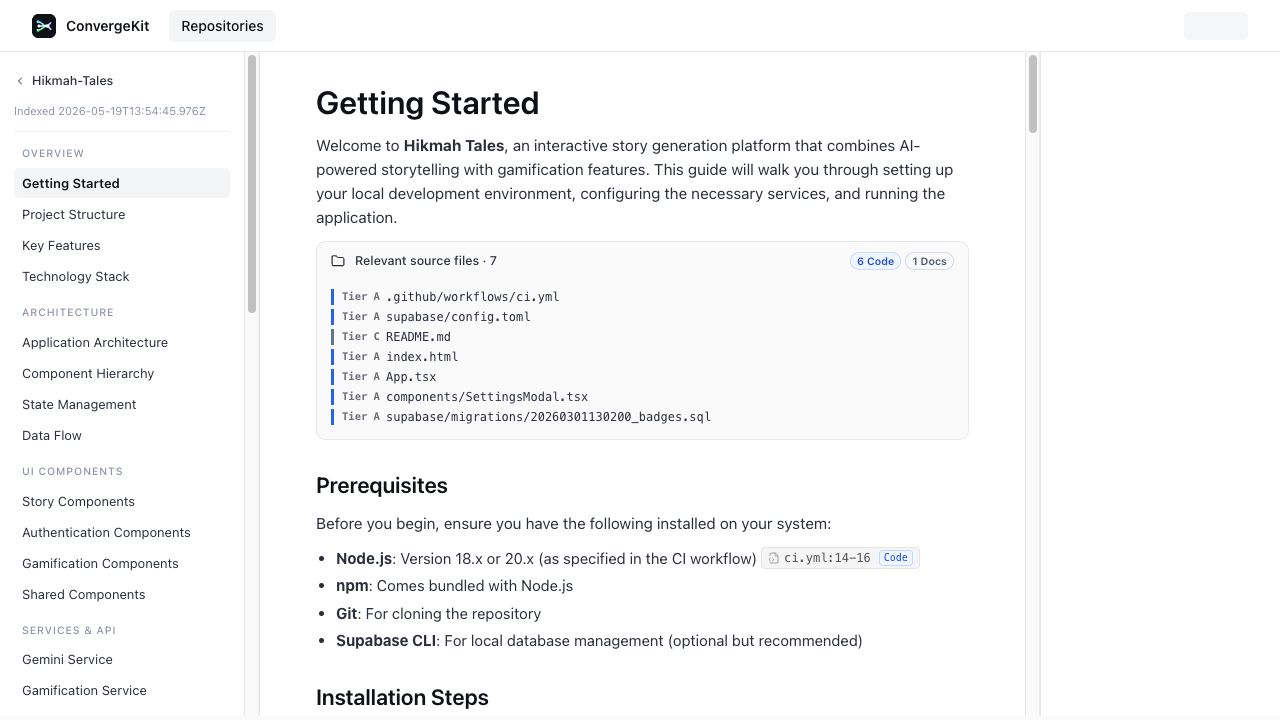
Evidence-ranked Wiki
The wiki is generated from repository context and keeps the source evidence near
the page. Ranked files make it clear which code, tests, docs, and config back a
piece of documentation.
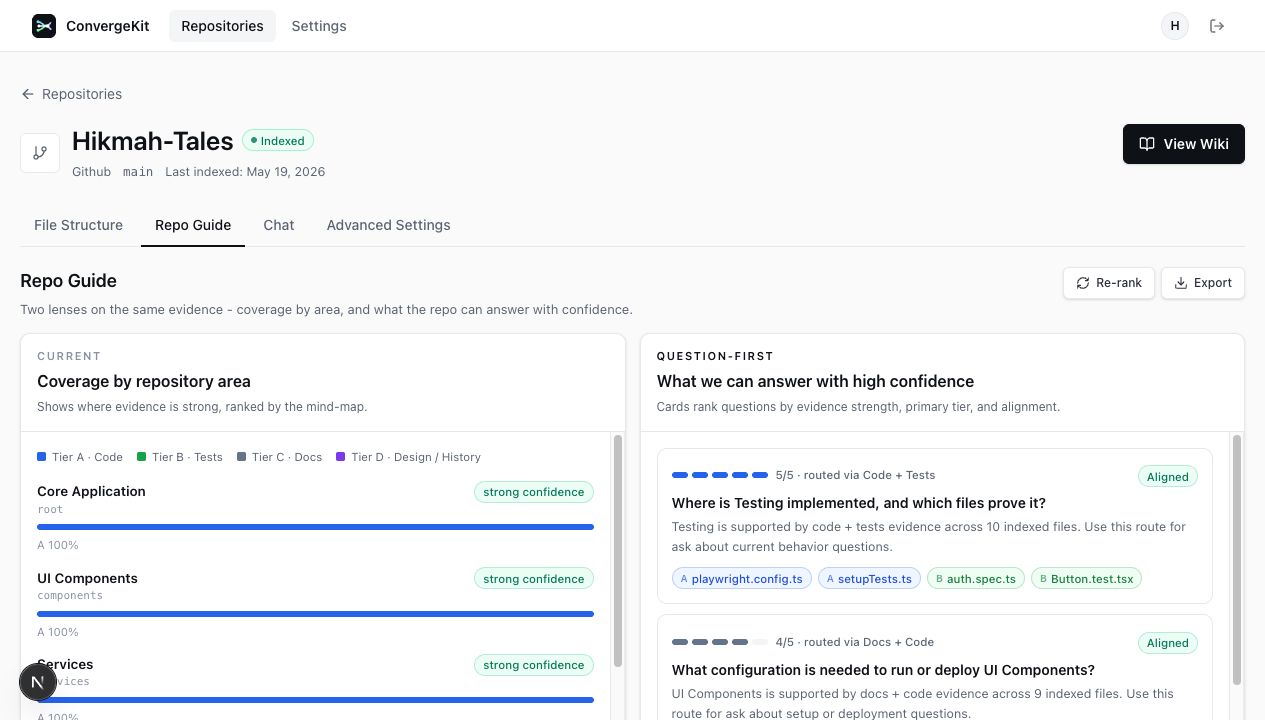
Repository Guide Classification
The guide view groups the repository by functional areas, ranks source coverage,
and turns that evidence map into high-confidence questions for product and
engineering review.
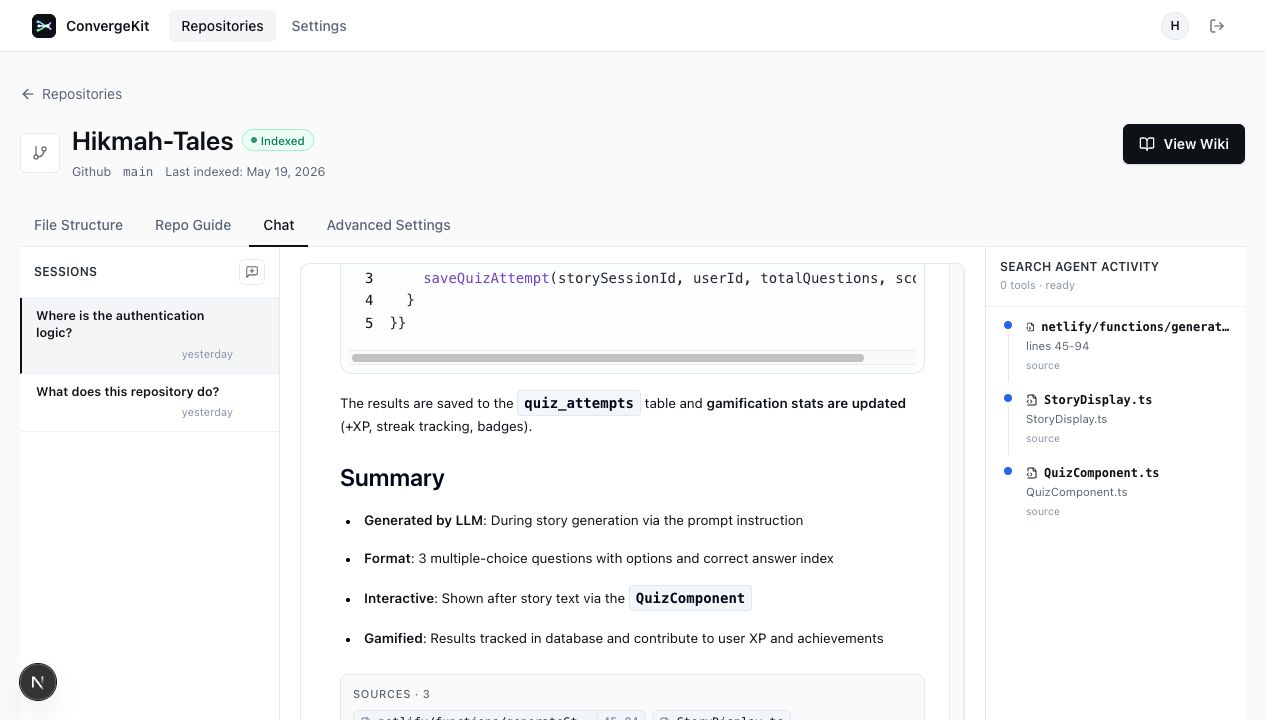
Chat With Agent Activity
Chat answers stay grounded in repository evidence. The side rail shows the
files the search agent used so humans and AI agents can audit the answer path.
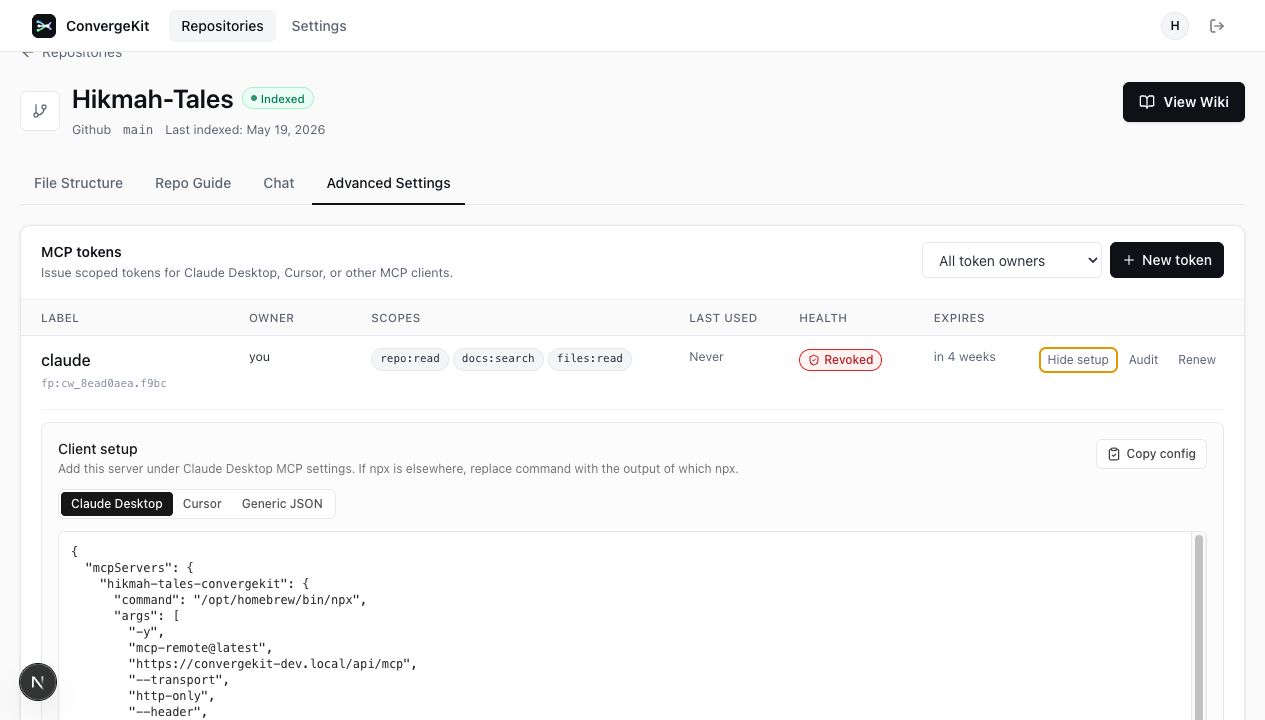
MCP Client Configuration
Repository knowledge can be exposed to external AI clients through scoped MCP
tokens. ConvergeKit generates client-specific setup snippets for Claude
Desktop, Cursor, and generic JSON clients.
Quick Start
Prerequisites
- Node.js 20+
- pnpm 9.15.0+
- Docker + Docker Compose
Install
make install
Start Local Services
make compose:setup-host
./dev.sh start
This starts PostgreSQL, Redis, API, worker, web, and a local HTTPS reverse
proxy. Open the app at https://convergekit-dev.local.
Production-Like Local Runtime
make compose:prod
This builds and runs the production Dockerfiles behind the local HTTPS reverse
proxy. Use this before production-sensitive smoke tests.
Advanced Host Runtime
make docker:up
pnpm turbo dev
This runs only PostgreSQL and Redis in Docker while starting the API, worker,
and web processes on the host. The default ConvergeKit dev flow is the
containerized stack above.
Minimal Local Flow
- Copy
.env.exampleto.env. - Fill in required provider keys. The default local provider is OpenRouter, so
OPENROUTER_API_KEYis the normal key to set. - Configure local HTTPS once with
make compose:setup-host. - Start the hot-reload Compose stack with
./dev.sh startormake dev. - Open the web app at
https://convergekit-dev.local.
Local development mirrors production ingress shape: browser requests use the
single web origin (https://convergekit-dev.local/api/...), and the reverse
proxy routes /api/* to the API container.
For Workforce SSO local SAML testing, configure the dev SAML app with:
ACS URL:   https://convergekit-dev.local/api/auth/workforce-saml/acs
Entity ID: urn:convergekit:dev
Start URL: https://convergekit-dev.local/en/auth/sign-in
To run the local smoke checks after starting the stack:
[email protected] CONVERGEKIT_SMOKE_PASSWORD='password' make smoke:local
Core Features
- Repository analysis and incremental updates.
- AI chat over repository context using RAG.
- Auto-generated wiki pages and mind maps.
- MCP access for external AI clients.
- Shared TypeScript types across the monorepo.
Project Structure
apps/web- Next.js 15 frontend and documentation UI.apps/api- Hono API server.apps/worker- BullMQ worker process.packages/db- Drizzle schema, migrations, and queries.packages/ai- AI utilities, embeddings, and chunking helpers.packages/queues- Queue definitions and job contracts.packages/auth- better-auth configuration.packages/config- Runtime configuration and access policy parsing.packages/mcp- MCP server implementation.packages/types- Shared Zod schemas and TypeScript types.
Commands
make dev                 # Start the full hot-reload Docker Compose dev stack
./dev.sh start           # Start the full Docker Compose dev stack
./dev.sh status          # Show Docker Compose service status
./dev.sh logs            # Tail Docker Compose logs
./dev.sh stop            # Stop the full Docker Compose dev stack
make compose:setup-host  # Add convergekit-dev.local and generate local TLS certs
make compose:dev         # Start hot-reload Docker Compose stack behind HTTPS proxy
make compose:prod        # Start production-like Docker Compose stack behind HTTPS proxy
make compose:down        # Stop the full local Docker Compose stack
make build               # Build all apps and packages
make lint                # Run ESLint across the monorepo
make test                # Run tests across the monorepo
make typecheck           # Run TypeScript checks across the monorepo
make verify              # Run public guard scripts, tests, typecheck, lint, and build
make clean               # Remove build outputs and node_modules

make docker:up           # Start PostgreSQL + Redis
make docker:down         # Stop Docker Compose services
make docker:logs         # Tail Docker Compose logs

make db:generate         # Generate Drizzle migrations
make db:migrate          # Apply pending database migrations
make db:studio           # Open Drizzle Studio

make worker:start        # Start the worker process only
Architecture
The repo is organized as a Turborepo monorepo with three main apps and shared
packages.
apps/webhandles the user-facing interface.apps/apiprovides the HTTP API, auth, and MCP endpoints.apps/workerhandles long-running repository processing jobs.- PostgreSQL stores repository and documentation data.
- Redis backs queues, caching, and event delivery.
For more detail, see:
Environment Variables
The sample environment lives in .env.example. At minimum, a
local or deployed environment needs:
DATABASE_URLREDIS_URLBETTER_AUTH_SECRETBETTER_AUTH_URLWEB_APP_URLNEXT_PUBLIC_API_URL
Depending on the features you enable, you may also need provider keys. The
default provider is OpenRouter, so OPENROUTER_API_KEY is the normal key for
local chat, indexing, embeddings, and wiki generation.
Access Policy
ConvergeKit can restrict who can sign in and which repositories can be indexed
through deployment configuration:
| Env var | Default | Purpose |
|---|---|---|
ACCESS_ALLOWED_EMAIL_DOMAIN |
unset | When set, allows only user/admin email addresses ending in this domain. |
ACCESS_ALLOWED_GITHUB_ORG |
unset | When set, restricts admin GitHub organization access and repository ownership to this org. |
ACCESS_ALLOWED_REPOSITORY_HOST |
github.com |
Allows only repositories from this Git host. |
If the email domain or GitHub organization is unset, that restriction is not
applied. Existing users and repositories are not migrated or deleted when these
values change. Policy values are read at process startup, so deployment changes
require restarting or redeploying the API/auth runtime.
Deployment
ConvergeKit ships as standard Docker images for the web, API, worker, and database
migration workloads. This repository does not prescribe a cloud provider.
At minimum a deployment needs:
- PostgreSQL 16 with pgvector.
- Redis 7 or compatible.
- A public web origin.
- API, web, worker, and migration containers built from this repository.
- Runtime secrets for auth, GitHub OAuth, encryption, and selected AI providers.
Use the local Compose files as the reference for required services and
environment variables.
Contributing
Contributions are welcome. See CONTRIBUTING.md for local
development and pull request expectations.
License
ConvergeKit is released under the MIT License. See LICENSE.
Reviews (0)
Sign in to leave a review.
Leave a reviewNo results found