hermcp
Health Warn
- License — License: MIT
- Description — Repository has a description
- Active repo — Last push 0 days ago
- Low visibility — Only 5 GitHub stars
Code Pass
- Code scan — Scanned 12 files during light audit, no dangerous patterns found
Permissions Pass
- Permissions — No dangerous permissions requested
No AI report is available for this listing yet.
Remote MCP server plugin for Hermes Agent: exposes the Hermes control surface to MCP clients with per-key scopes.
hermcp — H.E.R.MCP


Unofficial community project. hermcp is not affiliated with, endorsed by, or maintained by
Nous Research. "Hermes Agent" is a product of Nous Research; this plugin only talks to an
installed Hermes via its public CLI, Python modules and API server.
Hermes Environment Remote MCP. A Hermes Agent plugin that exposes the whole Hermes
control surface (models, config, sessions, cron, kanban, plugins, skills, profiles,
providers, approvals, secrets) as a remote MCP server with per-key scopes.
Point Claude.ai, Claude Desktop, Codex, Cursor or any MCP client at one URL and drive a
Hermes install from there — including from a phone, including OAuth logins for providers.
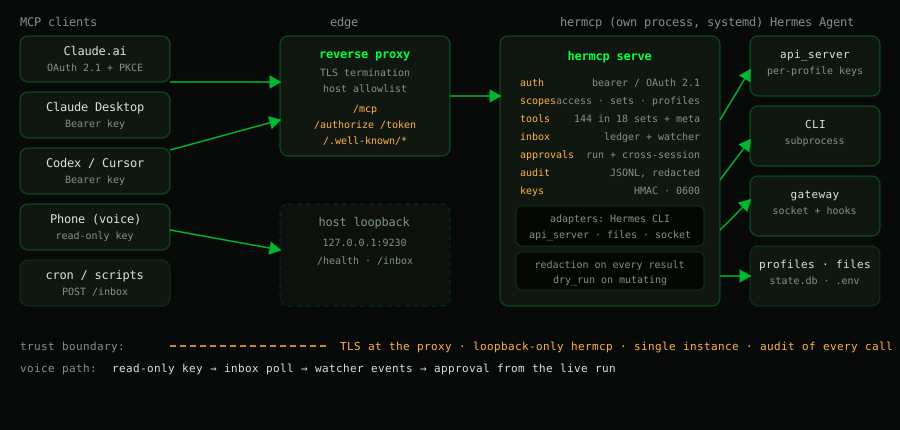
Status: 0.1.0. All four build phases are implemented and covered by tests.
Today's catalog is 148 tools — 144 in 18 toolsets plus 4 meta tools — of which
46 are advertised intools/list(a key sees only what its scopes and opt-in flags allow);
the rest is reachable throughhermes_search_tools→hermes_describe_tool→hermes_call.Known gaps are listed in Roadmap.
Why
Hermes already has a CLI (~380 leaf commands) and a dashboard API. Neither is an MCP
surface, and neither is built for scoped third-party access: a dashboard session cookie is
all-or-nothing, and shelling into the CLI means SSH and full trust.
hermcp wraps the same capabilities as tools with explicit scopes, so you can hand
someone a key that only speaks to one profile, only reads sessions, or only manages kanban —
and see everything they did in an audit log.
What is confirmed working
Everything in this list is exercised by tests and/or by hermes hermcp doctor and hermes hermcp selftest against a live install. Each row links to the section that documents it.
| Feature | What you get | Where |
|---|---|---|
| 148 tools, 18 toolsets | Full Hermes control surface behind one /mcp endpoint; 46 advertised, the rest through hermes_search_tools |
Tool surface |
| Trusted proxies | HERMCP_TRUSTED_PROXIES: forwarding headers (X-Forwarded-For/Forwarded/X-Real-IP/-Proto/-Host) are believed only from a configured proxy, read right to left; otherwise ignored entirely |
Reverse proxy |
| Per-key scopes | access + toolsets + profiles + explicit flags (approvals, secrets_write, dangerous, inbox_push, approvals_always); hidden tools never appear in tools/list |
Keys and scopes |
| Profile-bound keys | A key limited to one profile; global/admin tools and every indirect path (kanban, sessions, cron, skills, logs, approvals, inbox) closed | Profile-bound keys |
| Key lifecycle | keys create / list / policy / show / revoke / rotate / rename / scopes; rename and scope changes keep the token valid |
CLI |
| OAuth 2.1 for Claude.ai | PKCE S256, exact redirect allowlist, hashed opaque tokens, paste-an-hmcp_-key consent page |
Claude.ai connector |
| Run-scoped approvals | Answer the approval of a run hermcp started (chat_run_approval) |
Approvals |
| Cross-session approvals | An in-gateway agent half publishes Telegram/CLI approvals on a loopback socket | Approvals |
| Approval hooks | pre_approval_request / post_approval_response land in the inbox as approval_pending / approval_resolved |
Approval hooks |
| Starting and steering runs | chat_send (idempotent via request_key), chat_run_steer, chat_run_cancel, chat_session_queue |
Starting runs |
| Client sessions | Session cards, client_session handles, run attribution, foreign-run guard, recover_from, claim of unclaimed runs, situation report |
Client sessions |
| Cron ledger | cron_runs (lean metadata from executions.db) and cron_run_output (full saved output by run id, paged, redacted); session attribution, scope filtering, untrusted marking |
Cron ledger |
| Event inbox + run watcher | Status-only mailbox with per-consumer read state; the watcher turns run status into needs_approval / run_finished / run_failed / run_cancelled / run_lost / run_interrupted |
Event inbox |
| One attention classification | inbox_attention and hermes_status.inbox share one decision: waiting approvals, open failures, interruptions, settled failures (with settled_reason / superseded_by), decided approvals with their decision protocol |
Ledger |
| Per-profile api_server keys | profile-keys status / setup / rotate, never printing a key |
Per-profile api_server keys |
| Output redaction | Every result and audit line redacted centrally; write tools return changes, never values | Output redaction |
| Single instance + lifecycle | flock-guarded single server, status, stop, install-service, self-restart, auto-restart after a Hermes update |
Single instance |
| Dashboard control | dashboard_status / dashboard_restart find and restart exactly the running dashboard |
Dashboard control |
| Ledger page (opt-in) | Read-only situation page on hermcp's own port, terminal-styled and with a real navigation: ~/attention (KPI strip, open approvals, open failures, gateway), ~/sessions, ~/runs (incl. settled failures and the approval history with its decision protocol), ~/cron, ~/gateway, and /ledger/session/<id> for one session wide; the attention panel collapses to a single ✓ zero active interruptions line when nothing is open, and every entry offers "✦ Ask Claude" — a plain link that opens Claude with a prepared question (ids only, details read via the tools). The view lives in the URL (?peek=kind:id, filters, page, expanded lists), so every state is a shareable link and back/forward works. Every row opens a small detail pop-up; no write path anywhere, deep links into the Desktop/Web app, own stylesheet and fonts (no external request). Growing lists on the start page show a server-side window (default 10, HERMCP_LEDGER_*_LIMIT) with “Mehr anzeigen” |
Ledger |
| Audit | Append-only JSONL with key id, tool, profile, duration, outcome | Keys and scopes |
Requirements
- Hermes Agent installed with its virtualenv (examples below use
/usr/local/lib/hermes-agent/venv; adjust to your install) - Python ≥ 3.11 (the Hermes venv is used; nothing is installed into it)
- A reverse proxy with TLS for anything beyond loopback (the reference setup uses Pangolin/Traefik; any TLS proxy works)
- No third-party Python dependencies: the code uses stdlib + what Hermes already ships
(starlette,uvicorn,mcp)
Install
Five steps. On a local install the .env is optional — the defaults are 127.0.0.1:9230
and an api_server on 127.0.0.1:8642.
# 1. clone it (the folder name must be `hermcp`)
git clone https://github.com/HearthCore/hermcp.git ~/.hermes/plugins/hermcp
cd ~/.hermes/plugins/hermcp

# 2. enable the plugin — this registers the `hermes hermcp` command
hermes plugins enable hermcp

# 3. create the runtime env if you need one (mode 0600); see docs/install.md for the values
cp .env.example .env 2>/dev/null || true

# 4. run it as a service (must live outside the gateway's process tree)
hermes hermcp install-service
systemctl enable --now hermcp

# 5. first key + smoke test
hermes hermcp keys create --name admin-key --access admin   # prints hmcp_<id>_<secret> ONCE
hermes hermcp doctor
curl -fsS http://127.0.0.1:9230/health
Point a client at http://127.0.0.1:9230/mcp (locally) or https://<host>/mcp (behind a TLS
proxy) with Authorization: Bearer hmcp_<...>. Read-only first is the sane default:
hermes hermcp keys create --name readme-readonly --access read \
  --toolsets status,sessions --profiles default
Full detail — .env values, the two systemd managers, the polkit rule, auto-restart after a
Hermes update and the single-instance lock — is in docs/install.md.
Setup with an agent
Start your coding agent (Claude Code, Codex, Cursor, ...) inside this folder and say
"set up hermcp": it loads AGENTS.md and walks you through preflight, install,
keys, client setup and verification. Claude Code reads it via CLAUDE.md, which only points there.
Secrets stay with you — the agent is instructed to hand you every command that prints a key.
The AGENTS.md flow has been run step by step with GitHub Copilot CLI (per the author's report, including
with unclear user input); any agent that loads AGENTS.md should work.
The hermes hermcp CLI
hermes plugins enable hermcp registers one sub-command. Day to day that is four calls:
hermes hermcp keys list                       # who has which scopes
hermes hermcp keys show alice-researcher      # what one key may do
hermes hermcp keys scopes alice-r2 --toolsets status,sessions --no-approvals
hermes hermcp doctor                          # after any config change
Everything else — serve, status, stop, install-service, selftest, docs, oauth,profile-keys, the full keys family and the exit-code contract — is in
docs/cli.md.
Tool surface
148 tools — 144 in 18 toolsets plus 4 meta tools — of which 46 are advertised directly.
Models (and especially voice modes) degradewith huge tool lists, so the long tail is reachable through three meta tools:
hermes_search_tools(query) -> hermes_describe_tool(name) -> hermes_call(name, args)
hermes_call re-runs the full scope check, so it cannot reach a tool the key may not use.hermes_status is the level-0 entry point; every mutating tool accepts dry_run: true.
Browse the whole surface — every schema and the exact initialize instructions — in
docs/tools.html, generated from the live registry on every server start.
The prose version (toolsets, notable tools, list defaults, cron routing, output redaction) is
docs/tool-surface.md.
Security model
What this protects against: a leaked or scoped key doing more than its scope; a tool call
reaching an unintended profile; silent credential exposure (write-only secrets, redacted
audit, hashed key storage); DNS-rebinding and Host-header confusion; brute force on tokens
(per-IP failed-auth limiter).
What it does not do: protect against an admin-scoped key. access: admin withtoolsets: * is effectively shell on the Hermes install — treat such keys like SSH root
keys, and rotate them.
Documentation
| Document | What it holds |
|---|---|
| docs/install.md | .env, the systemd managers, service units, auto-restart, single instance |
| docs/cli.md | every command and the exit-code contract |
| docs/keys-and-scopes.md | scopes, admin keys, worked examples |
| docs/tool-surface.md | catalog, meta tools, server instructions, redaction |
| docs/tools.html | generated catalog with every schema |
| docs/inbox-and-runs.md | inbox, run watcher, approval hooks, chat_send/steer/cancel |
| docs/client-sessions.md | client_session ledger, recovery, claims |
| docs/approvals.md | how approvals work inside Hermes, run-scoped and cross-session |
| docs/provenance.md | _meta, freshness and the selftest |
| docs/profile-bound-keys.md | what a profile-bound key may call |
| docs/profile-keys.md | per-profile API_SERVER_KEY resolution |
| docs/oauth.md | OAuth 2.1 for Claude.ai connectors |
| docs/deployment.md | reverse-proxy route (Pangolin/Traefik), env values |
| docs/dashboard-control.md | dashboard_status / dashboard_restart |
| docs/troubleshooting.md | known symptoms |
| docs/development.md | tests, repo layout, environment traps |
| docs/DESIGN.md | design contract (architecture, hard constraints) |
| docs/cli-parity.md · docs/CLI_INVENTORY.md | CLI to tool parity table, command inventory |
| AGENTS.md | agent-guided setup: start your coding agent here |
Roadmap
- Key store, scopes, audit, meta tools, 144 tools across 18 toolsets
- Single-instance lock, systemd migration path, status/stop/install-service
- Remote provider OAuth (device code / paste-back), write-only secrets
- OAuth 2.1 authorization server for Claude.ai custom connectors (persistent hashed tokens)
- In-gateway agent half: cross-session approval bridge over a loopback socket
- Run-scoped approvals (
/v1/runscontract),dangerousscope, memory, audit tools - Not yet exposed (deliberately):
debug share,backup,import,uninstall,gateway migrate/uninstall,profile purge-identity— they would need thedangerousscope - Clarify prompts (
PendingControls) are not bridged, only command approvals - Two or three levels instead of many commands: the default becomes a short list of the last five
to ten entries (configurable through a plugin option), and whoever wants more goes into the
detail view. Briefly recent "relevant noise" should stay visible for a while — deliberately not
built yet, the slim attention-only default is the first step. - Live verification of the agent half inside a real gateway (needs the gateway restart)
-
hermes plugins installfrom this repo
Contributing and security
See CONTRIBUTING.md and CODE_OF_CONDUCT.md. Report
vulnerabilities privately via GitHub's Report a vulnerability button, see SECURITY.md.
License
MIT — see LICENSE.
Reviews (0)
Sign in to leave a review.
Leave a reviewNo results found